
Best Practices for Meta Pixel Data Sync
Set up one pixel per domain, add Conversions API with event deduplication, and boost Event Match Quality for accurate Meta tracking.
Meta Pixel data sync is crucial for improving ad performance and ensuring accurate tracking. Without proper setup, you risk incomplete data, inflated metrics, and wasted ad spend. Here's how to get it right:
Combine Meta Pixel with Conversions API (CAPI): Pixel-only tracking captures 40–60% of events, while adding CAPI boosts accuracy to 80–95%. This helps overcome browser restrictions and privacy updates like iOS 14.5+.
Use One Pixel Per Domain: Avoid duplicate tracking and ensure clean data for better optimization.
Enable Event Deduplication: Use the
event_idparameter to prevent double-counting when both Pixel and CAPI report the same event.Focus on Event Match Quality (EMQ): Keep your score above 8.0 by sending multiple identifiers (email, phone, etc.) in the correct format.
Install Pixel Base Code on All Pages: Ensure accurate PageView tracking for retargeting and audience creation.
Leverage Automation Tools: Platforms like AdAmigo.ai can optimize campaigns by analyzing clean data and making real-time adjustments.
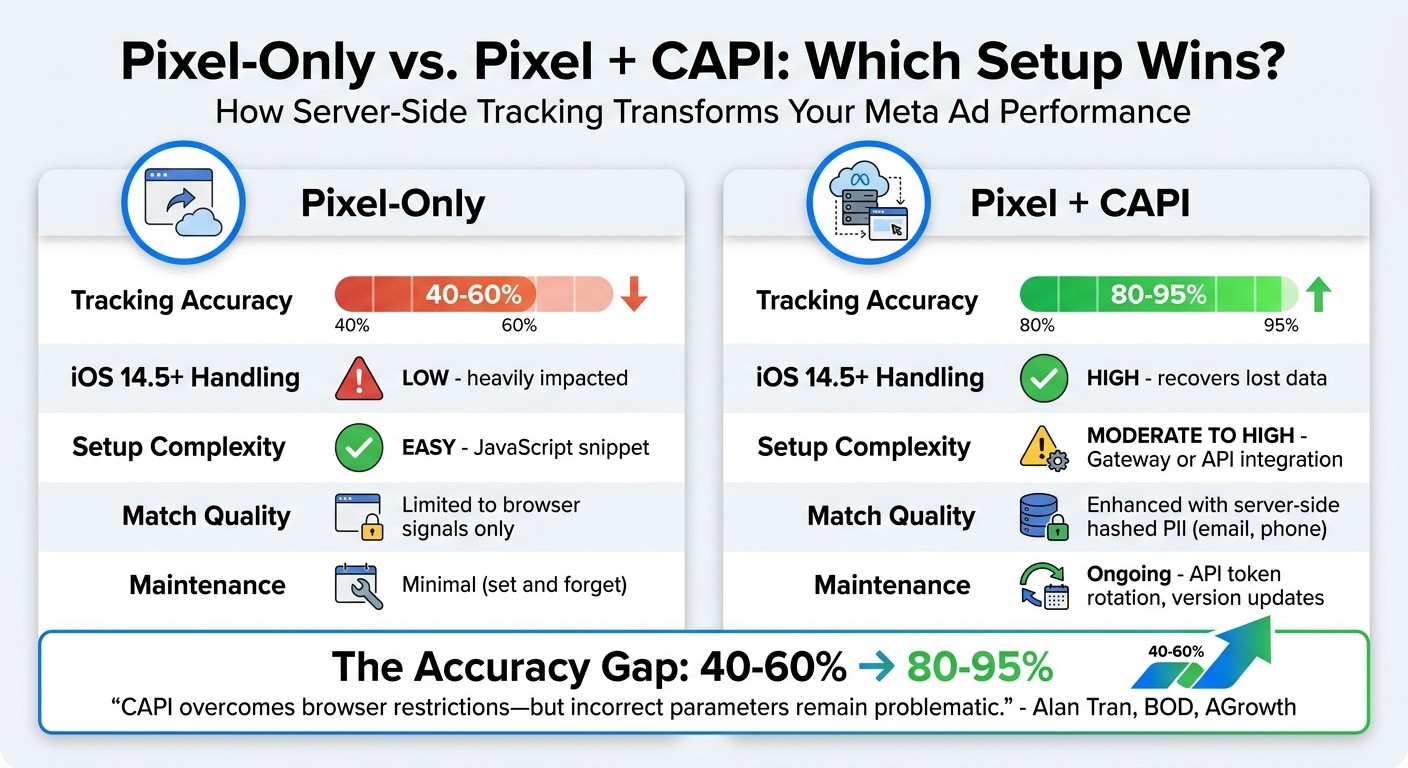
Meta Pixel vs Pixel + CAPI: Tracking Accuracy Comparison
How to Set Up Meta CAPI with PixelYourSite + Tips to Boost EMQ Score
1. Use One Pixel Per Domain
To ensure accurate tracking and reliable data, it's important to consolidate your pixel setup. Using multiple Meta Pixels on a single domain can lead to tracking issues, especially when considering the differences between the Meta Pixel and Conversions API. When multiple pixels fire at the same time, they can double-count events like purchases or add-to-cart actions. This inflates your performance metrics, misrepresents your ROAS (Return on Ad Spend), and can lead to poor budgeting decisions.
Data Accuracy
When you have multiple pixels collecting data, it creates overlaps that distort Meta's reporting. Meta emphasizes that "Optimization depends on accurate event firing". Duplicate pixels result in double-counted events, which can confuse the system during its learning phase. This inaccurate data might cause the algorithm to target the wrong audience segments, wasting your ad spend on users who are less likely to convert.
Event Deduplication
Using a single pixel simplifies event deduplication through unique event_id parameters. This becomes especially important when you integrate server-side tracking via the Conversions API. Managing deduplication is much harder if multiple pixels are firing conflicting events. A helpful tool like the Meta Pixel Helper Chrome extension can assist in verifying that only one pixel is active on your site and can alert you to duplicate events.
Automation and Optimization
Accurate data is the backbone of Meta's real-time optimization capabilities. When conflicting information comes from multiple pixels, it disrupts automated bid rules, audience targeting, and budget allocations. Tools such as AdAmigo.ai (https://adamigo.ai) depend on clean pixel data to perform autonomous optimization, making it even more critical to stick to a single pixel setup.
Ease of Integration with Third-Party Tools
Third-party tools rely on consistent pixel data for smooth automation. When multiple pixels fire, it creates inconsistencies that can undermine these integrations. Consolidating to a single pixel ensures a stable foundation for tools like Google Tag Manager, CRM systems, and AI-driven optimization platforms. This helps maintain seamless data synchronization across platforms and improves overall performance.
2. Use Pixel with Conversions API for Server-Side Tracking
Once your Meta Pixel is properly set up, you can take things a step further by incorporating server-side tracking with the Conversions API (CAPI). Relying only on the Meta Pixel can leave gaps in your tracking due to challenges like iOS 14.5+ privacy updates, ad blockers, and cookie restrictions. By combining the Pixel with CAPI, you can send data directly from your server, significantly improving tracking reliability.
Data Accuracy
Adding the Conversions API to your setup enhances tracking precision compared to using the Pixel alone. Unlike the Pixel, which depends on browser data, CAPI bypasses browser restrictions and sends information straight from your server. This means that even when cookies are blocked or users opt out of tracking on iOS, your server can still capture and transmit conversion data.
Setup Type | Estimated Tracking Accuracy |
|---|---|
No Pixel | 0% |
Pixel Only | 40-60% |
Pixel + Conversions API | 80-95% |
This more complete data flow plays a direct role in improving campaign automation and optimization.
Automation and Optimization
Meta's ad optimization tools work best when they have access to complete data. Missing 40-60% of conversions due to incomplete tracking can make it harder to target the right audiences and fine-tune bids. With enhanced data accuracy from CAPI, tools like AdAmigo.ai (https://adamigo.ai) can make smarter, automated adjustments to your campaigns. These tools can allocate budgets, test new strategies, and scale successful ads based on actual performance rather than incomplete data signals.
Ease of Integration with Third-Party Tools
In addition to improving accuracy and optimization, CAPI integrates smoothly with popular platforms, making setup easier. Platforms like Shopify, WooCommerce, Squarespace, Wix, and Webflow offer native support or plugins, such as PixelYourSite and GTM, to streamline the process. These integrations simplify the technical work, so you can focus on running effective campaigns.
3. Turn On Event Deduplication with Event ID Parameter
When using both the Meta Pixel and Conversions API (CAPI) together, you're essentially sending the same event data from two sources - client-side and server-side. Without proper deduplication, Meta might count each event twice, inflating your conversion numbers and disrupting your campaign optimization.
Event Deduplication
Event deduplication ensures Meta removes duplicate data when both the Pixel and CAPI report the same event. The event_id parameter is the cornerstone of this process. When Meta detects matching event_id and event_name values from both sources, it discards the duplicate - typically favoring the server-side event due to its higher reliability.
To make this work, the event_id must be generated at the moment the action occurs (e.g., when a user clicks "Buy Now") and remain identical across both the Pixel and CAPI.
Parameter | Requirement for Deduplication | Recommended Format |
|---|---|---|
| Must match for both Pixel and CAPI | Unique string (e.g., Order ID or UUID) |
| Must match exactly (e.g., "Purchase") | Meta Standard Event Names |
| Should be consistent | Unix timestamp (seconds) |
| Identifies the origin | "website", "app", or "physical_store" |
Data Accuracy
Accurate deduplication is crucial for reliable tracking. If you're using Google Tag Manager, use a shared data layer variable to ensure the event_id remains consistent across both tracking methods. Regularly check the "Diagnostics" tab in Meta Events Manager to identify timing mismatches or implementation errors. Tools like Meta's Payload Helper and Test Events can help you verify that your deduplication setup is functioning correctly before launching your campaigns.
If you're combining a partner integration, such as Shopify, with manual configurations, double-counting is a common risk. To avoid this, either disable one tracking method or ensure strict alignment of event_id values across both systems by standardizing your conversion data. Proper deduplication is the backbone of accurate campaign tracking and optimization.
Automation and Optimization
When deduplication is done right, the data signals sent to Meta's optimization algorithms become far more reliable. This precision allows tools like AdAmigo.ai (https://adamigo.ai) or AI-driven campaign automation to make smarter decisions, such as optimizing budgets, fine-tuning audience targeting, and adjusting bids based on real performance data. Proper deduplication is essential for maximizing the effectiveness of automated tools and achieving better campaign results.
4. Track and Improve Event Match Quality Scores
Once you've set up reliable event deduplication, the next step is keeping tabs on your Event Match Quality (EMQ). This score plays a big role in ensuring your data is powering accurate targeting.
Event Match Quality (EMQ) is a rating from 1 to 10 that shows how well the customer data you send via Meta Pixel or Conversions API matches actual Meta user accounts. A higher score means better attribution, stronger lookalike audiences, and improved campaign optimization. If your score falls below 6.0, you're likely missing out on potential results - your targeting becomes less precise, and Meta's algorithms won't have the quality data they need to perform effectively. Keeping your EMQ high is essential for syncing data across platforms and getting the most out of your campaigns.
Data Accuracy
You can improve your EMQ scores by providing multiple hashed identifiers for each event. Instead of relying on just one parameter (like email), include several identifiers such as email (em), phone number (ph), first and last name (fn/ln), and unique IDs from your CRM. Meta uses these multiple data points to cross-check and improve matching accuracy.
Proper formatting is also critical. Make sure emails are lowercase and trimmed of spaces. Phone numbers should follow the E.164 format, which includes the country code and digits only (e.g., +12025551234). Once formatted, hash personal details using SHA-256 to protect privacy. However, certain technical fields like client_ip_address, fbc (Facebook Click ID), and fbp (Facebook Browser ID) should remain unhashed and sent in their raw form.
Parameter | Description | Hashing |
|---|---|---|
| Email address (lowercase, trimmed) | Yes (SHA-256) |
| Phone number (with country code) | Yes (SHA-256) |
| First and Last Name | Yes (SHA-256) |
| Unique ID from CRM or loyalty program | No |
| Facebook Click ID / Browser ID | No |
| User's IP address | No |
| Zip code, City, and State | Yes (SHA-256) |
Automation and Optimization
Use the Diagnostics tab in Meta Events Manager at least once a month to review your EMQ scores. Meta provides a breakdown by event type, making it easy to identify areas that need improvement. If you notice scores below 6.0, start by adding missing parameters like hashed email and phone numbers. Then, include geographic details like zip code and city to further boost your score.
To simplify this process, platforms like AdAmigo.ai (https://adamigo.ai) can automate EMQ monitoring and provide actionable recommendations when your scores dip. These tools continuously analyze your data quality, helping you maintain scores above 8.0. When your EMQ is consistently high, automated systems can make smarter decisions on budget allocation, audience targeting, and bid strategies based on reliable conversion data.
EMQ Score | Status | Action Required |
|---|---|---|
8.0–10 | Excellent | No changes needed; matching is strong. |
6.0–7.9 | Good | Add more parameters (e.g., zip code, city). |
4.0–5.9 | Needs Work | Include primary identifiers like email and phone. |
0–3.9 | Poor | Major fixes needed; data is likely incomplete. |
By monitoring EMQ scores regularly, you can ensure your campaigns are running at full potential and integrate seamlessly with third-party tools.
Ease of Integration with Third-Party Tools
Integrating with third-party platforms like CRMs (e.g., Klaviyo) or Reverse-ETL tools (e.g., Hightouch) ensures your first-party data is sent to Meta in the correct format and with proper hashing. Tools like Google Tag Manager can centralize your Pixel and Conversions API setups, keeping your data consistent across tracking methods. To validate your data, use Meta's Payload Helper to check JSON structures and the Test Events tool in Events Manager to confirm parameters are being transmitted correctly.
5. Confirm Pixel Base Code Loads on All Pages
The Meta Pixel base code is a small JavaScript snippet that needs to be placed within the <head> and </head> tags on every page of your website. If this code is missing, it can create gaps in conversion tracking and negatively impact your campaign performance.
Data Accuracy
The base code is crucial for ensuring accurate data collection. It triggers a PageView event whenever someone visits a page, providing the signals needed for retargeting and lookalike audience creation. If the code is missing on important pages, Meta's algorithm won’t have the data it needs to identify high-value customers or optimize campaigns effectively.
To confirm that your base code is properly installed, use the Meta Pixel Helper Chrome extension. This tool helps you troubleshoot missing or misconfigured code by showing real-time event status with green checks for success and red alerts for issues. Focus on key pages like the homepage, product pages, cart, checkout, and confirmation pages. Additionally, check the "Overview" tab in Events Manager to verify that PageView events are consistently firing across your site’s URLs.
Automation and Optimization
Once you’ve ensured your data is accurate, consider automating the deployment process. Use Google Tag Manager (GTM) to deploy the Meta Pixel across your entire site. By creating a Meta Pixel tag in GTM and setting the trigger to "All Pages", you can ensure the base code loads universally without needing to manually update each page. Perform monthly audits to confirm that PageView and conversion events are firing correctly.
For ongoing monitoring, platforms like AdAmigo.ai can automatically track your pixel’s health and alert you to any issues. A properly functioning base code across all pages allows AI tools to make better decisions based on complete data, improving both budget allocation and audience targeting.
Issue | Common Cause | Recommended Fix |
|---|---|---|
Pixel Not Firing | Code missing or blocked by ad blockers | Reinstall the code and use Pixel Helper to troubleshoot |
Wrong Conversion Values | 'Value' parameter not passing correct amount | Map dynamic variables correctly in the code |
Low Match Quality | Missing customer data (email, phone, etc.) | Add hashed customer identifiers to the base code or use CAPI |
6. Configure Auto-Tracking for Standard Events
Auto-tracking simplifies capturing standard events like ViewContent, AddToCart, and Purchase by automatically pulling data from user interactions. This feature saves time and reduces the need for complex technical setups.
Data Accuracy
While auto-tracking is convenient, it’s not foolproof. It might miss events in custom checkout processes or single-page applications where the URL doesn’t change. Additionally, it can skip essential parameters needed for dynamic catalogs.
To ensure accuracy, use Meta’s Test Events tool to verify that all captured events include the necessary parameters and validate custom conversion rules and align with actual transaction data. If you notice missing or incorrectly fired events, consider switching to manual coding or server-side mapping for those specific cases.
Automation and Optimization
Regularly checking your Event Match Quality (EMQ) scores in Events Manager is crucial. Scores below 6.0 indicate a lack of sufficient user identifiers, which can hurt your ability to attribute conversions effectively. To avoid issues, plan quarterly audits of your tracking setup. This helps catch pixel errors or misconfigurations before they affect your campaigns.
For added efficiency, tools like AdAmigo.ai can monitor pixel performance and adjust campaigns automatically. Pairing this with auto-tracking ensures standard events are captured efficiently and data quality remains high across your platforms.
7. Apply Correct Event Parameters and Data Formats
Once you've set up Meta Pixel event deduplication and quality matching, the next step is to ensure your event parameters are formatted correctly. This precision is key for smooth data synchronization, helping you avoid wasted ad spend and ensuring your data aligns seamlessly across Meta platforms and any third-party tools you use.
Data Accuracy
Every event you send needs to include four essential parameters:
event_name: This identifies the type of event, like a Purchase or Lead.event_time: A Unix timestamp in seconds that records when the event occurred.action_source: Specifies where the event originated, such as "website" or "app."event_id: Used for deduplication to avoid counting the same event multiple times.
Additionally, user identifiers and commerce data must follow Meta's formatting guidelines. For instance, emails and phone numbers must be hashed using SHA-256 before sending. However, technical data such as client_ip_address, client_user_agent, fbc (Click ID), and fbp (Browser ID) should always be sent in raw form - do not hash these fields.
For purchase events, make sure to include the following:
A numeric
valueindicating the transaction amount.currencyin ISO 4217 format, such as USD, EUR, or GBP.Exact
content_idsthat match the entries in your Meta Product Catalog. Sending mismatched IDs (e.g., "123" instead of "SKU_123") can disrupt dynamic ads and cause errors.
Automation and Optimization
Properly formatted event parameters can significantly improve your Event Match Quality (EMQ) score. If your score falls below 6.0, it indicates missing or insufficient user identifiers, which limits Meta's ability to match events to user accounts effectively. To avoid this, aim for a high EMQ score - ideally between 8 and 10.
Tools like AdAmigo.ai (https://adamigo.ai) rely heavily on high-quality data to optimize campaigns. With accurate parameters, these tools can adjust budgets, refine audience segments, and refresh creatives more effectively. To ensure everything is set up correctly, use Meta's Pixel Helper Chrome extension and the Test Events tool in Events Manager to troubleshoot Meta Pixel issues. These tools can help you verify that parameters like value and currency are being transmitted accurately before launching your campaigns.
Once you've nailed this step, take a closer look at how to integrate third-party automation tools to maintain consistent data accuracy.
8. Connect Third-Party Tools Like AdAmigo.ai for Automated Sync
Automation and Optimization
Once you've configured your event parameters, you can take things to the next level by incorporating automation tools for smoother campaign management. AdAmigo.ai (https://adamigo.ai) is one such tool. It’s an AI-powered media buyer that integrates directly with Meta’s official API to optimize and manage campaigns with AI. By adding tools like this, you enhance the precision and efficiency established earlier, ensuring your campaigns stay on track with minimal manual intervention.
AdAmigo.ai’s AI Autopilot offers daily suggestions for creatives, audience targeting, budgets, and bids. You can either approve these recommendations with a single click or switch to full autopilot mode for completely hands-free campaign management. This allows agencies to handle many more accounts, as the AI takes care of tasks like testing, adjusting budgets, optimizing audiences, scaling, and pausing campaigns. Meanwhile, your team can focus on broader growth strategies.
Ease of Integration with Third-Party Tools
Setting up AdAmigo.ai is quick and straightforward. The platform connects to your Meta ad account in just minutes using the official API, seamlessly pulling in conversion data based on your existing schema. This ensures the AI receives clean, accurate data to make informed decisions about bid adjustments and budget allocation.
The platform also includes an AI Chat Agent that simplifies ad creation. For instance, you can upload creatives to Google Drive, provide instructions like “Increase spend by 30% while maintaining a minimum 3x ROAS,” and the system will handle everything - writing copy, structuring campaigns, and publishing ads directly to your account. Start with Review Mode to manually vet the AI’s suggestions, then switch to full autopilot once you're comfortable. Just make sure to re-authenticate any CRM or CDP connections periodically to keep the sync seamless.
Feature | Manual Integration | AdAmigo.ai |
|---|---|---|
Setup | Weeks of custom development | Minutes (connection) |
Audience Updates | Manual or scheduled batches | Real-time API synchronization |
Optimization | Manual adjustments | AI-driven daily recommendations |
Scalability | Limited by team size | 4–8× account capacity per buyer |
Error Handling | Reactive troubleshooting | Proactive identification/resolution |
9. Test Events Regularly with Meta's Test Events Tool
Data Accuracy
Meta's Test Events Tool in Events Manager is a handy way to ensure your Pixel is sending data correctly in real-time. By testing your events monthly, you can confirm that actions like PageView and Purchase tracking are firing as they should. The tool shows live event data as users navigate your site, helping you check if parameters such as value, currency, and content_ids align with your actual transaction data.
Start by using a browser extension to verify that events are firing properly - you’ll see green checkmarks during navigation. Once that’s confirmed, move on to the Test Events Tool for a deeper dive. Use real hashed customer identifiers to confirm that the events match a Meta account. After ensuring your event data is accurate, take the extra step to verify deduplication with GA4, ensuring no double-counting occurs.
Event Deduplication
After verifying data accuracy, it’s equally important to test for deduplication. This ensures that browser and server events with the same event_id are merged correctly, preventing inflated reporting. The Test Events Tool lets you confirm this alignment. Additionally, the Diagnostics tab in Events Manager can help you spot setup issues, formatting errors, or low Event Match Quality (EMQ) scores, or compare manual vs. autopilot recommendations for further optimization.
Test Category | Expected Result in Test Events Tool |
|---|---|
PageView | Event appears immediately when the page loads. |
Purchase | Value and currency parameters match the test transaction. |
Deduplication | Browser and Server events share the same |
Match Quality | EMQ score reflects high-quality identifiers (email, phone, etc.). |
10. Review Offline Data Quality for Cross-Channel Sync
When it comes to offline conversions, managing data differently than web events is essential, requiring a specific Offline Conversions API setup. Offline data requires a more extended deduplication process to ensure smooth cross-channel synchronization.
Data Accuracy
Getting offline data right is critical for both attribution and audience targeting. Meta uses an Offline Data Quality (ODQ) score to assess how fresh your data is, how frequently you upload it, and how well your customer identifiers align with Meta accounts.
To ensure proper mapping, align your CRM fields with Meta's standard fields. For instance:
Match
contact_emailtoemMap
order_totaltovalueUse
transaction_currencyforcurrency, formatted according to the ISO 4217 standard (e.g., USD)
Additionally, format phone numbers in the E.164 standard before hashing them. This level of precision helps maintain data integrity and improves matching rates.
Event Deduplication
Deduplication is as essential for offline events as it is for web events, though the timeframes differ. Meta applies a 7-day deduplication window for offline conversions, compared to 48 hours for web events. If the same purchase event is sent via both the Pixel and an offline upload, Meta relies on a matching event_id or order_id to merge them correctly.
To avoid issues, always include the order_id as a backup deduplication key in case event_id is missing or inconsistent. Also, convert all event_time values to UTC Unix timestamps. This prevents time zone mismatches, which can disrupt the deduplication process. This offline strategy complements the online deduplication practices previously discussed.
Automation and Optimization
You can streamline offline data handling by automating key processes. Tools like AdAmigo.ai can simplify offline data syncing by automating uploads and monitoring data quality in real time. For example, AdAmigo.ai can:
Extract data from your CRM
Format and hash it correctly
Push it to Meta's Offline Conversions API on a set schedule
Automating tasks like CSV formatting and weekly uploads ensures your offline events remain up-to-date and accurate. This helps improve attribution and enables better lookalike audience creation, making your campaigns more effective.
Comparison Table: Pixel-Only vs. Pixel + CAPI
Looking at event accuracy and deduplication, the table below breaks down the differences between relying solely on a Pixel setup versus combining it with CAPI.
When deciding between these two approaches, consider factors like tracking accuracy, iOS privacy changes, and the complexity of implementation. A Pixel-only setup struggles to capture conversions effectively compared to the combined method, which can impact attribution and optimization efforts.
That said, integrating CAPI does add some technical challenges. Adding a Pixel is simple - platforms like Shopify or WooCommerce offer quick integrations. On the other hand, CAPI requires more effort, whether you're using Meta's Conversions API Gateway (moderate difficulty) or building a direct API connection (more technical). You'll also need to manage event deduplication using the event_id parameter to avoid double-counting when both systems report the same event.
"CAPI overcomes browser restrictions - but incorrect parameters remain problematic."
Alan Tran, BOD, AGrowth
Proper event deduplication is critical when combining these tools. Here's a side-by-side breakdown of the key differences:
Feature | Pixel-Only Setup | Pixel + Conversions API (CAPI) |
|---|---|---|
Tracking Accuracy | 40-60% | 80-95% |
iOS 14.5+ Handling | Low; heavily impacted by tracking loss | High; recovers lost data via server-side signals |
Setup Complexity | Easy (JavaScript snippet or partner integration) | Moderate to High (requires Gateway or Direct API integration) |
Match Quality Impact | Limited to browser signals | Enhanced by server-side hashed PII (email, phone) |
Maintenance Requirements | Minimal (set and forget) | Ongoing (API token rotation, version updates) |
These distinctions significantly influence how well your campaigns perform and how accurate your data is. For marketers focused on eCommerce or lead generation, where precise attribution is crucial, the additional effort to implement CAPI often results in better optimization and more reliable performance metrics. You can also track Meta Ads with Google Analytics to cross-reference your server-side data.
Conclusion
Getting Meta Pixel data right is the backbone of running successful campaigns. As Meta's official documentation puts it, "Optimization depends on accurate event firing". If your Pixel data isn't reliable, Meta's algorithm struggles to target the right audiences or allocate budgets effectively.
The strategies outlined here work best when used together. For example, pairing one Pixel per domain with Conversions API (CAPI) can increase tracking accuracy from 40–60% to an impressive 80–95%. This combination ensures event deduplication and keeps your Event Match Quality high.
For teams juggling multiple campaigns or client accounts, automation tools like AdAmigo.ai can be game-changers. These platforms connect directly to Meta's API, managing tasks like audience creation, debugging conversion tracking, and budget optimization. With tools like these, agencies can scale their operations by 4 to 8 times without adding extra staff. They’re a perfect complement to the technical setup discussed earlier.
As browser restrictions tighten, server-side tracking through CAPI is becoming non-negotiable. Brands that adopt these practices now set themselves up for long-term success, ensuring their tracking systems stay reliable even as privacy rules and ad blockers evolve.
Make sure your Pixel fires on every page, activate CAPI configuration best practices, and configure event deduplication. These steps can transform your tracking accuracy and supercharge Meta's optimization capabilities. This is the foundation for improving Meta Ads ROI over the long term. For a step-by-step guide to auditing your setup, follow this Meta ads conversion optimization checklist.
FAQs
When should I add Conversions API (CAPI) to my Pixel?
Integrating the Conversions API (CAPI) with your Pixel can significantly improve data accuracy and reduce tracking gaps. This is particularly crucial in the post-iOS 14.5+ era, where browser-based tracking has become more limited due to privacy updates.
By using CAPI, you can achieve more consistent conversion tracking, which leads to better attribution and improved campaign performance. It ensures that even when browser tracking falls short, key conversion data is still captured effectively.
How do I generate the same event_id for Pixel and CAPI?
To ensure both Meta Pixel and Conversions API events share the same event_id, you need to make sure it's unique and consistent across both methods.
For Meta Pixel: Add the
eventIDas the fourth argument in thefbq('track')call. For example:For Conversions API (CAPI): Include the same
event_idin the payload alongside theevent_name. This ensures proper deduplication between the two systems.
By keeping the event_id consistent, Meta can accurately identify and eliminate duplicate events.
Which user data should I hash vs send raw for EMQ?
When handling user identifiers like emails and phone numbers, hash them to protect privacy and align with compliance standards. For other data, such as event parameters, sending the raw information can help improve the Event Match Quality (EMQ) by ensuring more accurate matches.