
Real-Time Conversion Tracking with Meta Ads
Monitor purchases and leads instantly by combining Meta Pixel and Conversions API for accurate attribution, faster optimization, and better ad performance.
Real-time conversion tracking with Meta Ads allows you to monitor user actions, such as clicks or purchases, as they happen. This instant data helps Meta optimize your campaigns by focusing on audiences and creatives that deliver the best results. The two main tools are:
Meta Pixel: Tracks user actions via their browser.
Conversions API (CAPI): Sends data directly from your server, bypassing browser restrictions like ad blockers.
Key Benefits:
Improved Campaign Performance: Meta adjusts budgets and bids in real-time based on live data, reducing costs and increasing ROAS.
Accurate Attribution: Combines browser and server data for better conversion tracking , often outperforming third-party attribution tools, even after privacy updates like iOS 14.5.
Faster Decision-Making: Real-time insights allow you to adjust campaigns quickly.
Setup Steps:
Install and verify the Meta Pixel on your website.
Enable Conversions API for server-side tracking.
Define and configure high-value conversion events in Meta Ads Manager.
By combining these tools, you can create a reliable tracking system that ensures better ad performance and data accuracy. Tools like AdAmigo.ai can further simplify optimization by automating adjustments based on real-time insights.
How to Track Custom Conversions in Meta Ads
Before you begin, ensure your account is ready by following a Meta ads conversion optimization checklist to guarantee accurate data flow. For a complete view of your performance, you can also track Meta ads in Google Analytics to compare cross-channel results. Following best practices for custom conversion reporting ensures these insights lead to actionable optimizations.
Why Real-Time Conversion Tracking Matters
Real-time conversion tracking changes the game for how Meta's algorithm learns and refines your campaigns. By providing instant conversion data, the platform can pinpoint high-value users based on their current behavior instead of relying on outdated patterns. This means your budget can be quickly shifted toward the audiences that are converting the most.
When you pair the Meta Pixel with the Conversions API, you get a tracking system that's reliable even after iOS 14.5, where browser-only tracking often misses conversions. This setup helps improve campaign performance, ensures more precise attribution, and supports quicker decision-making.
Better Campaign Performance
With real-time data, Meta can continuously tweak your campaigns to improve results, boosting your return on ad spend (ROAS) and cutting down your cost per lead (CPL) benchmarks. You can also assign different weights to conversions based on their value (e.g., $500 vs. $20), allowing the algorithm to focus on actions that matter most. These AI-driven updates - happening every few minutes - enable swift budget shifts to maximize performance.
More Accurate Attribution
Real-time tracking bridges the attribution gaps caused by iOS privacy updates and the decline of third-party cookies. Using both the Meta Pixel and Conversions API together ensures full attribution coverage. By sharing Event IDs between these methods, you avoid double-counting and improve your Event Match Quality (EMQ) score. A strong EMQ score (6.0 or higher, as recommended) in Events Manager helps Meta better match conversions to users, ultimately lowering your cost per action.
Faster Decision-Making
Having near real-time data means you can act on opportunities as they arise. Meta's delivery system optimizes campaigns faster when fed with fresh data. By keeping an eye on the "Event Freshness" tab in Events Manager, you can spot reporting delays and tracking issues, identify underperforming campaigns, and redirect your ad spend to the ones that are driving results.
How to Set Up Real-Time Conversion Tracking in Meta Ads
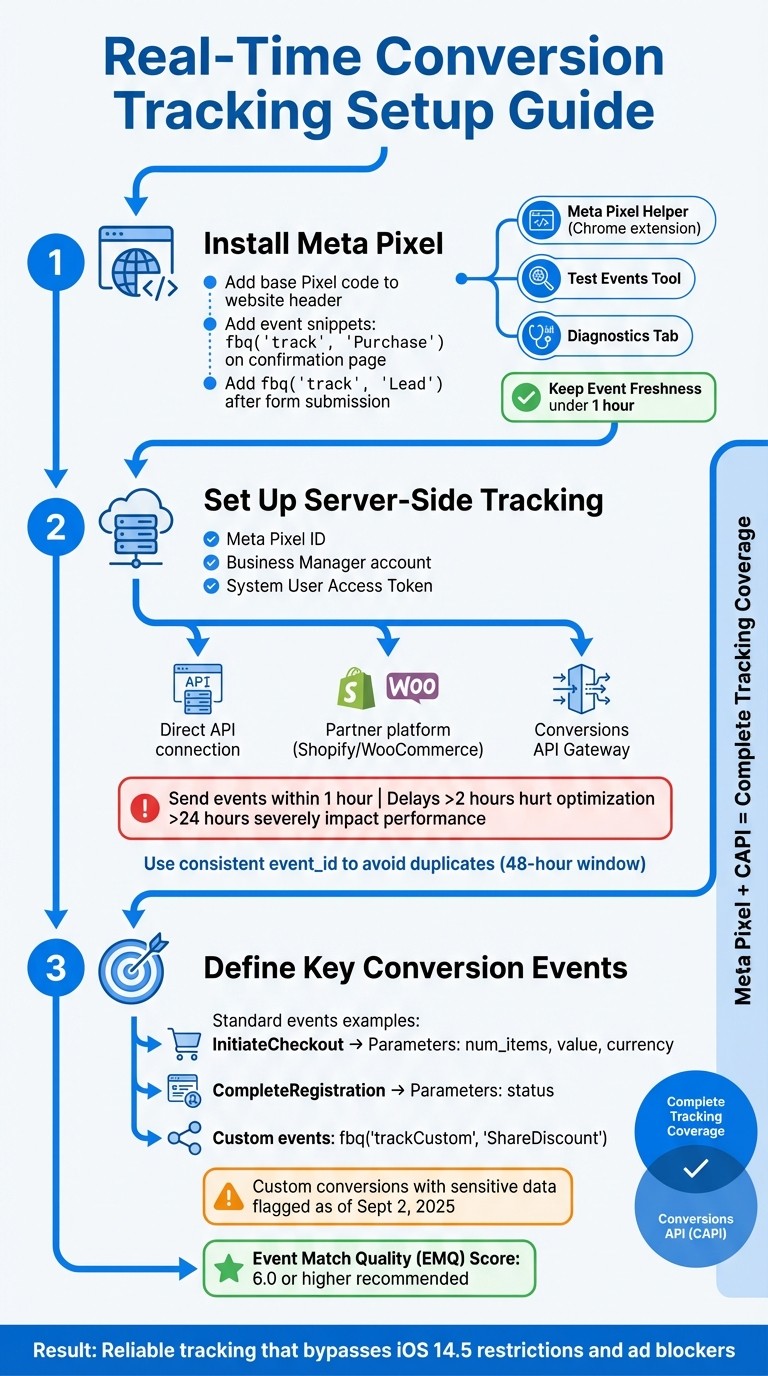
Meta Ads Real-Time Conversion Tracking Setup Process
To track conversions in real-time with Meta Ads, you’ll need to integrate the Meta Pixel, Conversions API, and conversion events. Each of these tools works together to capture and send conversion data to Meta’s algorithm as quickly as possible. Start by setting up the Meta Pixel for browser-side tracking.
Install and Verify the Meta Pixel
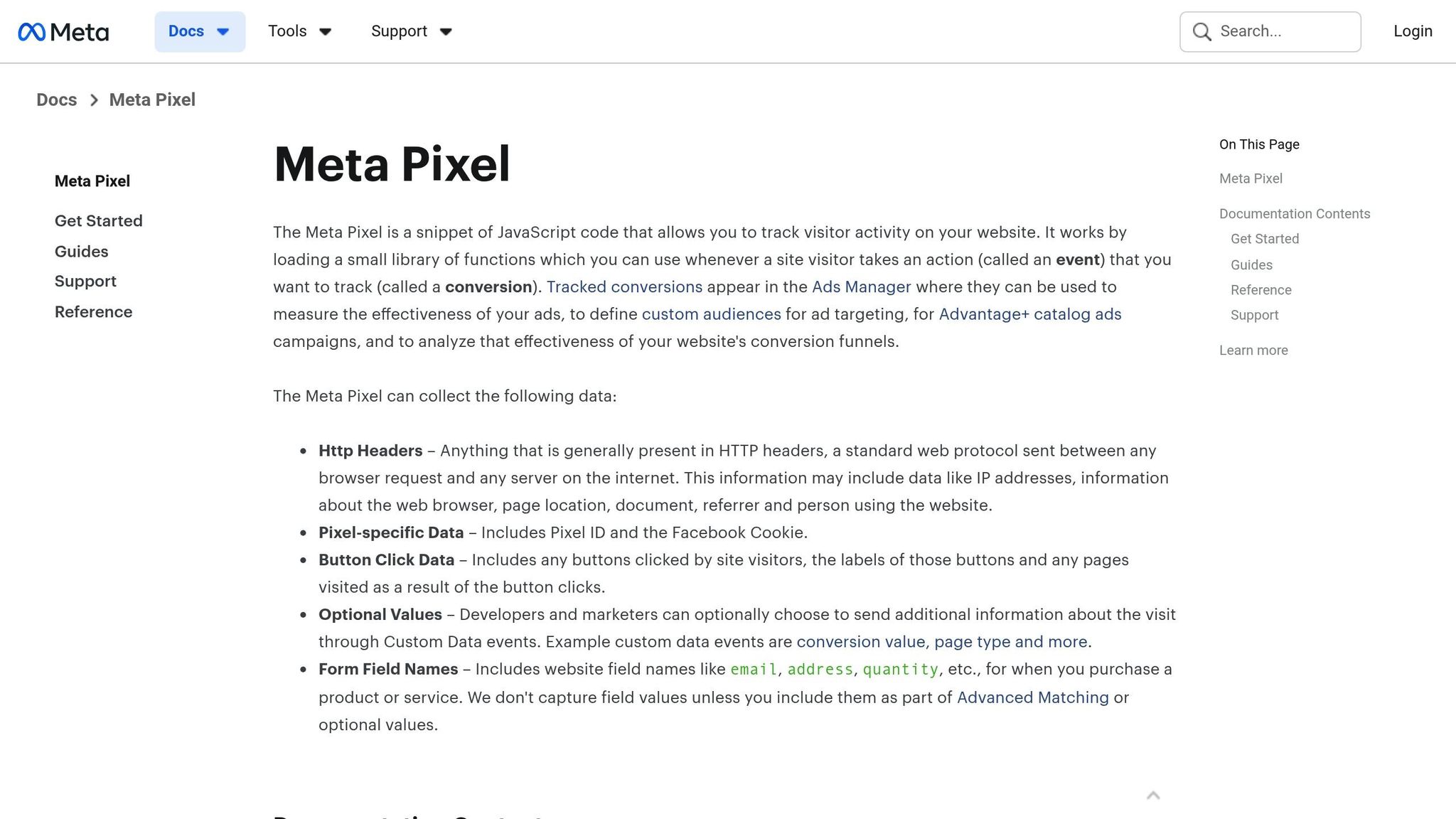
The Meta Pixel is a small piece of JavaScript code that tracks user actions on your site through their browser. Add the base Pixel code to every page of your website (usually in the header) and include event-specific snippets like fbq('track', 'Purchase') on key pages. For example, place fbq('track', 'Purchase') on your order confirmation page or fbq('track', 'Lead') after a form submission.
Once installed, verify the Pixel using tools like the Meta Pixel Helper, Test Events Tool, and Diagnostics Tab. The Meta Pixel Helper, a Chrome extension, can spot missing IDs or firing errors in real-time. The Test Events Tool in Events Manager lets you see live data, like the value and currency of transactions, as it reaches Meta’s servers. The Diagnostics Tab highlights any setup issues or warnings that could impact tracking accuracy, which is essential for troubleshooting Meta Ads Pixel issues.
After verification, keep an eye on the Event Freshness tab in Events Manager. This tab shows how quickly Meta receives data after an action occurs on your site. Aim to keep this delay under one hour for the best results - real-time data helps Meta’s algorithm optimize your campaigns faster.
Enable Conversions API for Server-Side Tracking
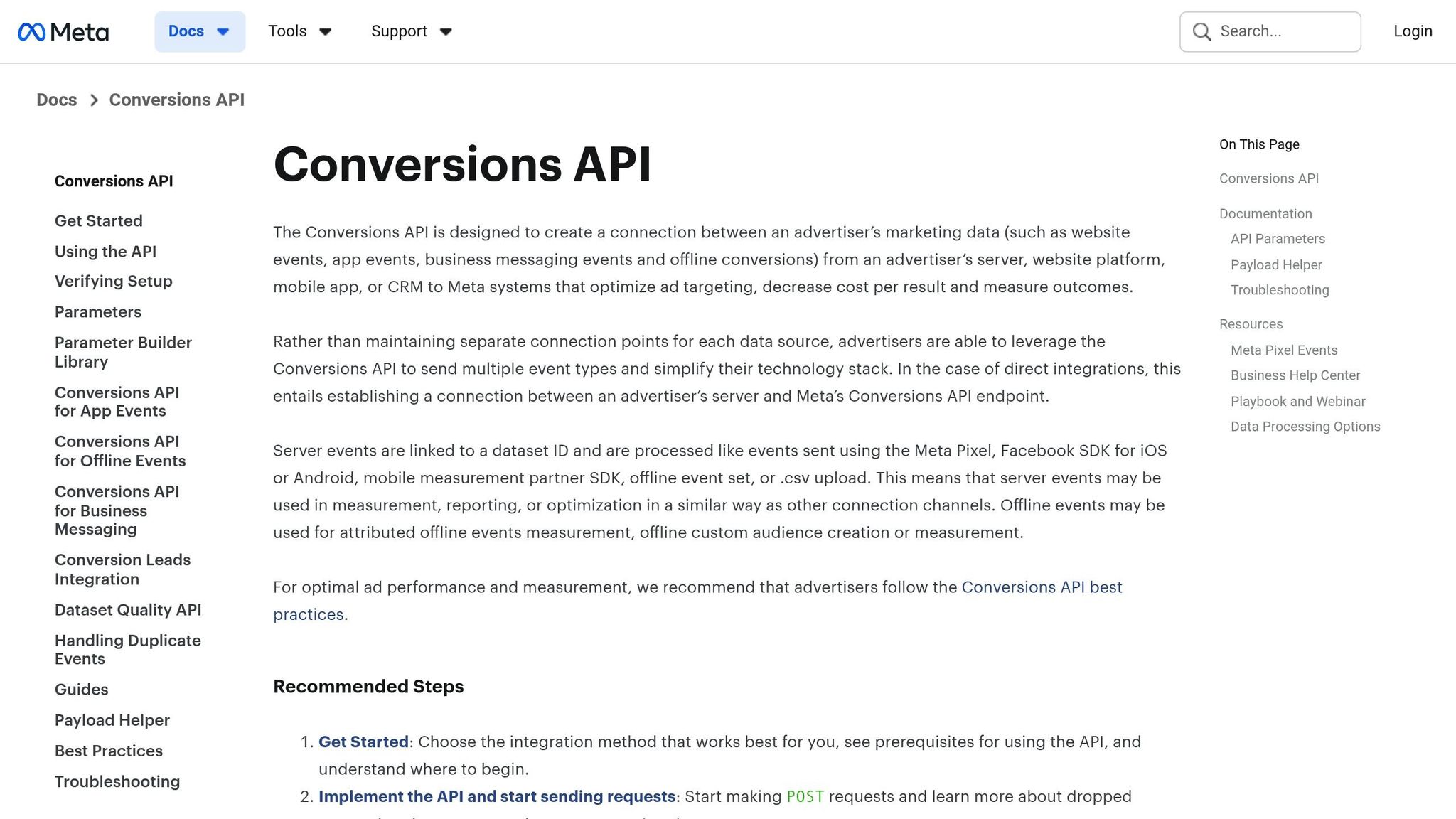
To improve tracking reliability, pair browser tracking with server-side data using the Conversions API (CAPI). While the Pixel tracks user activity through browsers, CAPI sends data directly from your server to Meta. This method bypasses browser restrictions and ad blockers, ensuring more consistent data collection. To get started, you’ll need your Meta Pixel ID, a Meta Business Manager account, and a System User Access Token.
You can integrate the Conversions API in several ways: through a direct API connection, a partner platform like Shopify or WooCommerce, or the Conversions API Gateway. For direct integration, go to Events Manager, select your Pixel, and generate an access token under Settings. Use Meta’s Payload Helper tool to format your data correctly, including details like the event name, timestamp, user data, and any custom parameters.
Timeliness is critical - send events to Meta within one hour of their occurrence. Delays over two hours can hurt ad optimization, and anything beyond 24 hours can severely impact performance. To avoid duplicate data, ensure consistent use of event_id and event_name in your tracking setup. Meta automatically deduplicates matching events received within a 48-hour window.
Define and Configure Key Conversion Events
Identify and mark high-value actions as conversion events in Events Manager to help Meta’s algorithm focus on what matters most. For example, standard events like InitiateCheckout should include parameters such as num_items, value, and currency to track the start of a payment process. Similarly, CompleteRegistration should include a status parameter to confirm successful account creation.
For tracking actions that fall outside standard definitions, you can create custom events using the fbq('trackCustom') function. For instance, you might track referral activity with a custom event like ShareDiscount. However, be aware that as of September 2, 2025, Meta has started flagging and restricting custom conversions that suggest sensitive information, such as health conditions or financial details.
Finally, configure your Conversions API to prioritize sending data as quickly as possible - ideally in real time or within an hour. This ensures Meta’s algorithm has the freshest data to optimize your campaigns effectively.
How to Optimize Campaigns Using Real-Time Conversion Data
Using live conversion data effectively can make all the difference in campaign performance. It allows you to identify trends, adjust budgets, and experiment with strategies in real time. The key is understanding when and how to act.
Adjust Bids and Budgets Dynamically
One of the first steps is to keep an eye on conversion velocity - how quickly conversions come in after your ads go live. For example, if a campaign racks up three conversions in the first two hours, it’s a strong indicator to effectively scale your Meta ad budget before the day is over. On the flip side, if 50% of the daily budget is spent by noon and no conversions have come through, it’s better to pause or reduce spending immediately rather than waiting for end-of-day reports.
Pay close attention to cost per conversion and return on ad spend (ROAS) when making decisions. If a campaign consistently delivers conversions at $15 when your target is $20, consider reallocating budget from underperforming campaigns to scale this winner. To stay ahead of changes, review these metrics twice daily - once in the morning and again in the evening. You can also set up automated rules in Meta Ads Manager to pause campaigns that exceed your cost-per-conversion target by 30% or more within a six-hour window.
Pair these manual adjustments with AI-driven tools to ensure optimization happens even when you’re not actively monitoring.
Use AI Tools for Smarter Optimization
While manual adjustments can address immediate needs, AI tools take optimization to another level by working continuously and with greater precision. Managing multiple campaigns across various audiences and creative assets can quickly overwhelm even the most experienced marketers. That’s where AI steps in. AI tools analyze real-time conversion data faster than any human team, uncovering patterns and making adjustments around the clock.
For instance, platforms like AdAmigo.ai streamline the process by providing a daily, prioritized to-do list of impactful changes across creatives, audiences, budgets, and bids. Its AI Actions feature evaluates live data and suggests specific moves, such as reallocating $200 from one campaign to another or launching a new AI audience segment modeled after top converters. You can choose to approve these recommendations manually or let the system handle them automatically. For agencies juggling multiple clients, this approach allows a single media buyer to oversee significantly more accounts by delegating execution to AI, freeing up time to focus on strategy.
Troubleshooting Common Real-Time Tracking Issues
Once you've set up your Meta Pixel and Conversions API, keeping real-time tracking accurate is essential. Tracking issues can disrupt your data flow and negatively impact your campaign's performance. Most problems fall into familiar categories and can be resolved with straightforward solutions.
Duplicate or Missing Conversion Data
Duplicate conversions often occur when both the Meta Pixel and Conversions API track the same event without proper deduplication. To avoid this, ensure both methods share an event_id. This identifier helps Meta recognize when two signals represent the same conversion, ensuring it’s only counted once. You can test deduplication and check the Event Deduplication tab in Events Manager to monitor your overlap rate. If the rate is low or zero, your events may not be sharing IDs correctly.
On the other hand, missing conversions are often caused by tracking blocks or configuration errors. Browser-based ad blockers can prevent the Meta Pixel from firing. This is where the Conversions API becomes crucial, as server-side tracking ensures high-value conversions are captured. To identify issues, check the is_unavailable field in the API to see if your tracking has been flagged.
Once you've addressed these issues, it’s time to handle server-side integration errors.
Server-Side Integration Errors
Server-side errors are another common obstacle. These errors typically appear in the Diagnostics tab when required parameters are missing or when there are setup warnings. Use the Conversions API Tester to simulate events and verify that your payload includes all necessary fields. Every request must have event_name, event_time, and user_data (hashed using SHA-256). Missing any of these will result in event rejection.
Authentication issues can also disrupt tracking. Since user access tokens expire every 60 days, it's best to use System User tokens for stable, uninterrupted communication with Meta's servers. If you hit rate limits (standard accounts allow 200 calls per hour per user), consider implementing exponential backoff or batching, which supports up to 1,000 events per call.
Another key metric to monitor is your Event Match Quality (EMQ) score in Events Manager. This score reflects how well customer information, such as hashed email addresses or phone numbers, matches events to Facebook accounts. Meta recommends aiming for a score of 6.0 or higher to reduce your cost per action. A low score often indicates missing user data fields or improperly hashed information. Additionally, if your server restricts outbound requests, make sure to whitelist Meta's Crawler IPs to maintain communication between the API and Meta's servers.
Conclusion
Real-time conversion tracking is the key to improving your Meta ad performance. By integrating the Meta Pixel with the Conversions API, you can sidestep challenges posed by browser blockers and privacy updates on iOS, ensuring you don’t lose valuable insights.
With the setup outlined earlier, you’ll create a reliable tracking system that delivers accurate attribution and helps manage costs effectively. Once this foundation is in place, you’ll have the confidence to adjust budgets and bids based on dependable data.
Managing tracking across multiple campaigns manually can quickly become overwhelming. That’s where tools like AdAmigo.ai come in. This platform not only verifies your setup but also identifies potential issues with its daily AI Actions. On top of that, it takes care of optimizing bids, budgets, and audience targeting in real time.
You can decide whether to manually approve each AI suggestion or let the system operate on Autopilot - either way, you retain full control. For agencies juggling multiple clients or in-house teams with limited resources, this level of automation allows one person to handle tasks that would typically require an entire team. In short, accurate real-time tracking is the backbone of any successful Meta ad campaign.
FAQs
How does tracking conversions in real time enhance ad performance?
Real-time conversion tracking offers instant insights into user actions, giving Meta’s algorithm the ability to pinpoint and engage with high-value audiences more effectively. This means advertisers can make smarter decisions about bids and budgets, cutting down on unnecessary spending and improving overall campaign performance.
With this data at their fingertips, advertisers can optimize their return on ad spend (ROAS) and drive stronger results, all while concentrating resources on the opportunities that matter most.
What’s the difference between Meta Pixel and the Conversions API?
Meta Pixel and the Conversions API both serve the purpose of sending conversion data to Meta, but they operate in distinct ways. The Pixel is a browser-based tool that uses JavaScript to track actions like page views or purchases on your website. However, because it depends on the visitor’s browser, it can be impacted by ad blockers, cookie restrictions, or privacy settings, which might result in incomplete data.
The Conversions API works differently. It’s a server-to-server integration that sends data directly from your backend to Meta. This approach sidesteps browser-related limitations, making it more reliable. It also allows for transmitting richer details, like purchase values or user IDs. That said, setting it up requires technical expertise and careful monitoring to prevent duplicate data.
Many advertisers opt to use both tools together. The Pixel provides quick and easy tracking, while the Conversions API ensures more accurate and comprehensive reporting. Combining the two creates a more reliable and resilient system for tracking conversions in your campaigns.
How can I make sure my conversion data is accurate and avoid duplicates or missing events?
To get precise conversion tracking, combine the browser-based Meta Pixel with the server-side Conversions API, ensuring both use matching event IDs. Activate Meta’s deduplication feature to avoid duplicate data being recorded. It's also important to routinely check your setup using tools like the Meta Pixel Helper, Conversions API Tester, and Events Manager. These tools help you spot and resolve issues like missing or duplicate events, ensuring your Meta ads deliver consistent and accurate performance insights.