
Standardized Data Formats for Meta Integration
Use JSON, SHA256-hash PII, normalize timestamps, and keep event_id consistent to ensure accurate, validated Meta ad integrations.
When connecting your CRM, e-commerce platform, or app to Meta's advertising ecosystem, standardized data formats ensure smooth integration. Proper formatting aligns with Meta's API specifications, improves data accuracy, and enhances campaign performance. Key practices include:
Using JSON as the primary format for event data (faster and lighter than XML).
Hashing personal information (e.g., emails) with SHA256 for privacy.
Including required parameters like
event_name,event_time, andevent_idfor accurate tracking and event mapping.Validating data early using tools like Meta's Payload Helper to avoid errors.
Automation plays a big role here. For example, Meta's API can launch up to 494,000 ads in 30 days, saving 37,087 hours of manual work. However, this efficiency depends on clean, well-structured data.
Quick Overview:
JSON: Lightweight, fast, and ideal for Meta APIs.
XML: Suitable for older systems but slower and bulkier.
Meta's DataSchema: Internal format ensuring scalability and consistency.
Validation: Early checks prevent issues like formatting errors or duplicate events.
By following these standards - hashing PII, normalizing timestamps, and maintaining consistent event_id values - you can ensure reliable integrations and better campaign outcomes. Tools like AdAmigo.ai can help automate and monitor these processes effectively.
Install Facebook (Meta Ads) Conversion API with server-side GTM

Core Data Format Standards for Meta Platforms
When working with Meta's advertising ecosystem, you'll encounter three key data formats: JSON, XML, and Meta's proprietary DataSchema. Each serves a distinct purpose and shapes how you approach integration.
JSON and XML: The Basics
JSON (JavaScript Object Notation) is the backbone of Meta's API integrations. It's lightweight, easy to read, and seamlessly works with Meta's APIs. JSON is primarily used to encapsulate event data for these integrations, following Meta API integration best practices.
XML (Extensible Markup Language), although less common for newer projects, remains a standard for structured data exchange. It's often used for catalog feeds and legacy systems where hierarchical data structures are needed.
JSON stands out for its faster parsing and lower bandwidth usage, making it ideal for real-time event tracking and handling large volumes of data. In contrast, XML's more verbose nature can slow down processing, which is why JSON is the go-to choice for most new integrations with Meta's platform.
While JSON and XML cover the basics, Meta also relies on a more advanced internal standard.
Meta's DataSchema: The Backbone of Advanced Integration
Behind Meta’s operations lies DataSchema, an internal Thrift-based standard designed to define the structure and relationships of data assets independently of system implementation. While this isn't something advertisers interact with directly, it plays a critical role in maintaining Meta's scalability and consistency.
DataSchema encompasses over 100 million schemas across more than 100 data systems within Meta. According to Vasileios Lakafosis and the Engineering at Meta team:
DataSchema is a standard format that is used to capture the structure and relationships of all data assets, independent of system implementation. Creating a canonical representation for compliance tools.
This separation of logical schema from physical implementation allows Meta's systems to evolve without disrupting existing integrations. For advertisers using tools like AdAmigo.ai, this architecture ensures that automated campaign management via Meta's API remains dependable, even as Meta updates its backend systems. Meta's "shift-left" approach, which incorporates schematization and privacy annotations early in development, further guarantees data consistency and compliance from the outset.
Data Validation and Error Handling Protocols
Making sure your data is accurate and properly formatted is the backbone of successful integrations. Meta's platform enforces strict rules, and even minor missteps - like formatting errors - can lead to rejected events or incorrect attribution.
ISO Interoperability and Content Rules
Every event sent to Meta must include these four key parameters:
event_name: Examples include Purchase or Lead.event_time: Recorded as a Unix timestamp.event_id: Used for deduplication purposes.action_source: Specifies where the event originated, such as a website, app, or physical store. For those transitioning from legacy systems, following an offline conversions API setup guide is essential before the older API retires.
Meta also has precise formatting requirements for different data types. For Personally Identifiable Information (PII) like emails, phone numbers, first names, and last names, SHA256 hashing is mandatory before transmission. To ensure consistency, normalize the data first - this means emails should be lowercase and trimmed of extra spaces, and phone numbers should include country codes using only digits (e.g., 15551234567). However, technical details like IP addresses, user agent strings, and Meta cookie values (fbc, fbp) should remain unhashed to enable proper attribution.
Currency values must follow the ISO 4217 standard, using three-letter codes like USD, EUR, or GBP. Timing is another critical factor - events delayed by more than two hours can hurt performance, and delays over 24 hours may cause major attribution problems. If you're using both Pixel and Conversions API (CAPI), test deduplication to ensure event_name and event_id are identical and avoid double-counting.
Meta provides tools like the Payload Helper and Test Events in Events Manager to verify your JSON structures and confirm that data is being received in real time. The Diagnostics tab is particularly useful for spotting formatting issues, EMQ drops, or deduplication errors. When sending bulk data, group your events in batches of up to 1,000 to stay within Meta API rate limits while keeping things efficient.
Following these steps ensures your data integrates smoothly with Meta's systems, supporting advanced tracking and attribution.
Error Handling in Meta Integrations
Even with validated data, robust error handling is crucial for seamless integration. For large data transfers or reporting tasks, asynchronous jobs (using async=true) can help prevent timeouts and improve reliability.
Certain error codes require specific fixes. For example:
Error #100: Indicates missing permissions. Check that your access token has the required OAuth scopes.
Error #200: Suggests permission denial. This often happens if the user isn’t an admin of the ad account.
For server-to-server integrations, using System User tokens can improve token longevity compared to short-term tokens, as they can be programmatically renewed.
To handle rate limits, implement exponential backoff strategies, which slow down requests incrementally when limits are hit. Additionally, Meta paginates large result sets, so ensure your reporting scripts include pagination logic. Testing new API integrations in a sandbox environment or with minimal budgets is a smart way to avoid costly mistakes.
Platforms like AdAmigo.ai rely on these validation and error-handling protocols to ensure campaigns run smoothly, providing the stability required for effective autonomous campaign management.
Comparison of Data Standards
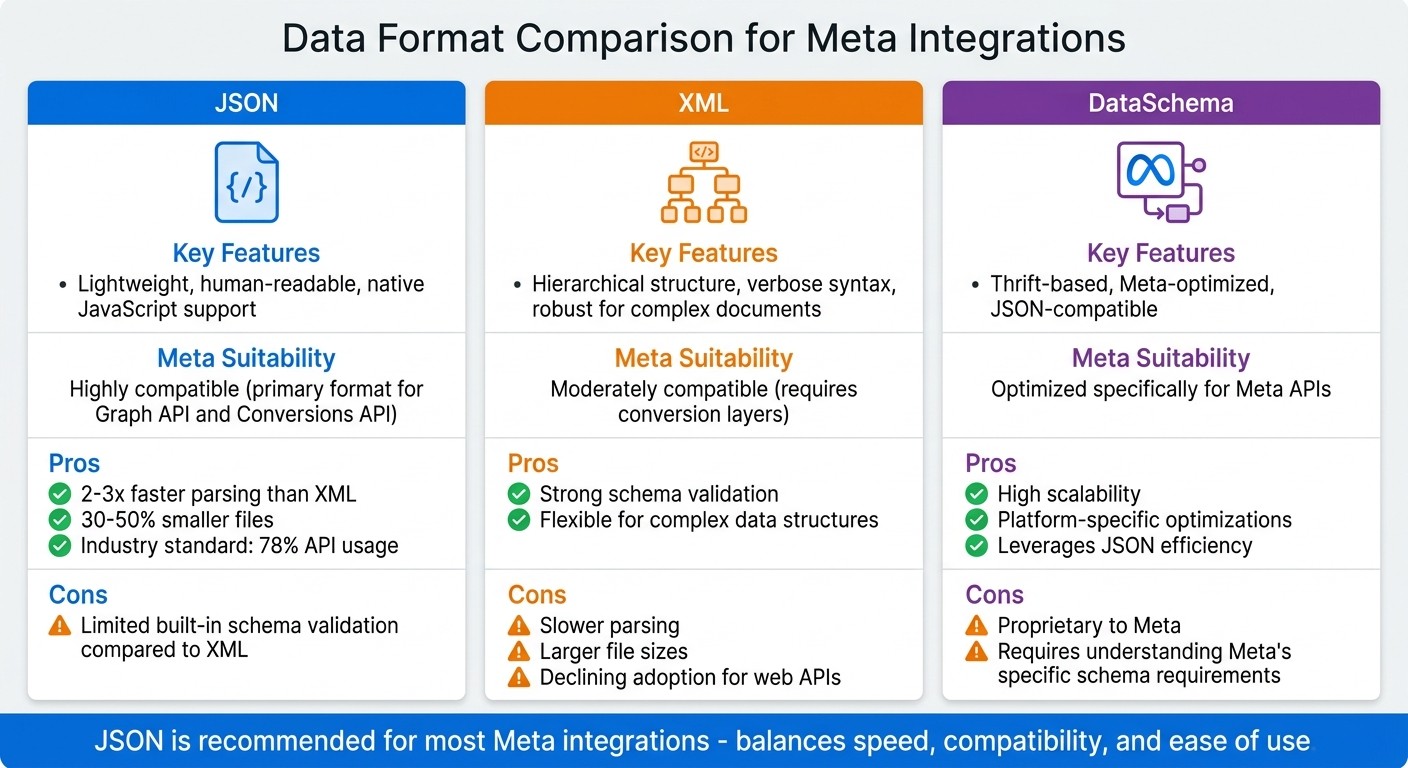
JSON vs XML vs DataSchema: Meta Integration Data Format Comparison
When it comes to data validation and error handling, the choice of data format plays a key role in ensuring campaign efficiency and reliable integrations and real-time tracking. In this section, we'll break down the core data formats used in Meta integrations - JSON, XML, and Meta's proprietary DataSchema - and how they stack up against each other. Understanding these differences can help guide your integration architecture choices.
JSON has become the go-to format for modern API integrations, and for good reason. By 2024, an impressive 78% of APIs were using JSON for data exchange. Meta's Graph API and Conversions API also rely heavily on JSON as their primary data format. Why? JSON is lightweight and efficient: its files are 30–50% smaller than XML files, and JSON parsing is 2 to 3 times faster than XML parsing. This makes it an ideal choice for speed and simplicity.
On the other hand, XML still holds its ground in legacy systems, particularly where complex document structures are involved. Its hierarchical design and strong schema validation make it suitable for certain use cases. However, XML's verbosity often results in larger file sizes and slower parsing speeds. Additionally, modern integrations require conversion layers to handle XML, which can add unnecessary complexity.
Meta's proprietary DataSchema offers a specialized alternative to these formats, requiring specific Meta API configuration. Built on a Thrift-based architecture, DataSchema extends JSON with Meta-specific optimizations for scalability and performance. While this tailored approach enhances efficiency in Meta's ecosystem, it does require developers to familiarize themselves with Meta's unique schema requirements.
Comparison Table
Standard Name | Key Features | Meta Suitability | Pros/Cons |
|---|---|---|---|
JSON | Lightweight, human-readable, native JavaScript support | Highly compatible - primary format for Graph API and Conversions API | Pros: 2–3x faster parsing than XML, 30–50% smaller files, industry standard; 78% API usage |
XML | Hierarchical structure, verbose syntax, robust for complex documents | Moderately compatible - requires conversion layers | Pros: Strong schema validation, flexible for complex data structures |
DataSchema | Thrift-based, Meta-optimized, JSON-compatible | Optimized specifically for Meta APIs | Pros: High scalability, platform-specific optimizations, leverages JSON efficiency |
For most Meta integrations, JSON strikes the best balance between speed, compatibility, and ease of use. Its dominance in the API world ensures robust tooling, extensive documentation, and fewer integration challenges compared to XML or proprietary formats. This foundation sets the stage for diving into implementation strategies in the next sections.
Implementation Best Practices for Standardized Data Formats
After choosing the right data format for your Meta integration, the next step is ensuring it's implemented correctly. Missteps here can lead to data misinterpretation and inefficiencies that hurt campaign performance. To avoid these pitfalls, two key strategies are crucial: shift-left schematization and automated validation tools. These methods ensure your integration stays reliable from data creation all the way through execution.
Shift-Left Schematization
Shift-left schematization focuses on validating and structuring data at its source - whether that’s your CRM, e-commerce platform, or analytics system - before it even reaches Meta's API. By addressing errors early in the pipeline, you prevent them from affecting your campaigns downstream.
One critical step here is PII hashing. Personally identifiable information, like emails and phone numbers, must be hashed using SHA256 prior to transmission to comply with privacy standards. Meta's Business SDKs can automate this process, while technical data, such as IP addresses, should remain unhashed. Additionally, converting event times into Unix timestamps in seconds and normalizing them to UTC ensures consistency across systems.
Another important aspect is maintaining deduplication integrity. Assigning a unique event_id that matches across both Meta Pixel and Conversions API ensures Meta can identify and discard duplicate events within its 48-hour deduplication window. This standardization also boosts your Event Match Quality (EMQ) score by ensuring all required combinations of user data are present from the outset.
Before moving to production, leverage Meta's Payload Helper and Test Events tool to verify JSON structures and hashing protocols. For live environments, use System User tokens instead of short-term user tokens to prevent unexpected expirations and maintain seamless integrations.
Automated Validation Tools
While early schematization catches errors at the source, automated validation tools ensure data quality remains intact throughout processing. Manual management often introduces issues like typos in field mappings, inconsistent UTM parameters, or formatting errors, all of which can disrupt campaign performance. Automated tools eliminate these risks by enforcing consistent naming conventions and data standards across your systems.
Meta's API also streamlines ad launches, saving significant time and effort. For instance, automated systems can launch about 494,000 ads within 30 days, reducing manual workload by an estimated 37,087 hours. These tools not only save time but also reinforce the data standards set earlier, providing real-time monitoring and ensuring campaigns run smoothly.
Platforms like AdAmigo.ai take this a step further by offering continuous monitoring of your ad account's data quality. Instead of waiting for monthly or quarterly reviews, these AI-driven systems provide ongoing oversight of metrics like Event Match Quality (EMQ) and Outcome-Driven Quality (ODQ) scores. Automated alerts notify you immediately if quality drops below acceptable levels - a game-changer for agencies managing multiple clients, as one media buyer can handle 4–8x more accounts compared to manual processes.
Finally, use Meta's Integration Quality API to track EMQ and ODQ scores programmatically. Set up automated alerts to catch data issues early, preventing them from affecting campaign performance or leading to wasted ad spend. This proactive approach ensures your campaigns stay on track and your data remains reliable.
Conclusion
Standardized data formats are the backbone of effective Meta integrations. By using proper JSON structures, hashing PII with SHA256, and keeping event_id values consistent across both Pixel and the Conversions API, you allow Meta's algorithms to efficiently process your data. This alignment helps boost Event Match Quality scores and enhances campaign performance.
Taking a shift-left approach - fixing data issues at the source - avoids downstream headaches. Converting event times to Unix timestamps, normalizing them to UTC, and using Meta's Payload Helper for validation before production can save hours of troubleshooting later. These proactive steps ensure smoother integrations and lay the groundwork for reliable, automated systems.
Automation thrives on a well-structured data foundation. Tools like AdAmigo.ai can monitor Event Match Quality scores in real time, catching problems early to prevent wasted ad spend. However, this is only possible when your data is correctly formatted and optimized for automation using Meta Ads schema best practices.
As Meta plans to retire legacy Advantage Shopping and App Campaign APIs by Q1 2026 (Marketing API v25), transitioning to newer, standardized structures is no longer optional. Start implementing these practices now to avoid last-minute disruptions. Use persistent tokens for uninterrupted automation, set up automated validation systems, and maintain clear documentation mapping every source field to its corresponding Meta parameter.
FAQs
What’s the easiest way to map my CRM or e-commerce fields to Meta’s required event parameters?
To align your CRM or e-commerce fields with Meta's event parameters, start by standardizing your conversion data using a unified schema. This schema should include key fields like event_name, event_time, and action_source, along with hashed identifiers such as email addresses or phone numbers.
Make sure that each event has a unique event_id across both Pixel and Conversions API to prevent duplicate entries. To ensure everything is set up correctly, leverage tools like Meta's Payload Helper and Test Events. These tools can help you validate your configuration, which can enhance your Event Match Quality (EMQ) and improve tracking accuracy.
How can I avoid duplicate events when using both Meta Pixel and Conversions API?
To prevent duplicate events, make sure the event_id values are consistent between Meta Pixel and the Conversions API. This allows Meta to recognize the same event from both sources, avoiding double-counting. Stick to Meta's deduplication guidelines, use standardized event IDs, and hash user identifiers properly. You can also use tools like Meta's Payload Helper and Test Events to validate your configuration, ensuring better attribution accuracy and improving Event Match Quality (EMQ).
Which Meta tools should I use to validate and troubleshoot event data before going live?
Before going live, it's important to confirm that your event data is properly formatted and working as intended. Meta provides two handy tools for this: Payload Helper and Test Events.
These tools allow you to validate and troubleshoot your event data, helping you catch and fix any issues ahead of time. By using them, you can reduce the risk of errors during integration and ensure a smoother process overall.