
How Cross-Device Tracking Improves Meta Ad Results
Use Meta Pixel and Conversions API to link actions across devices, close attribution gaps, lower CPA, and boost ROAS.
Cross-device tracking bridges the gap in Meta ad performance by connecting user actions across devices. For example, someone might see your ad on their phone but complete the purchase on a desktop. Without tracking tools like Meta Pixel and Conversions API, this journey often goes unlinked, leading to common attribution issues and inaccurate conversion data. Here's why it matters:
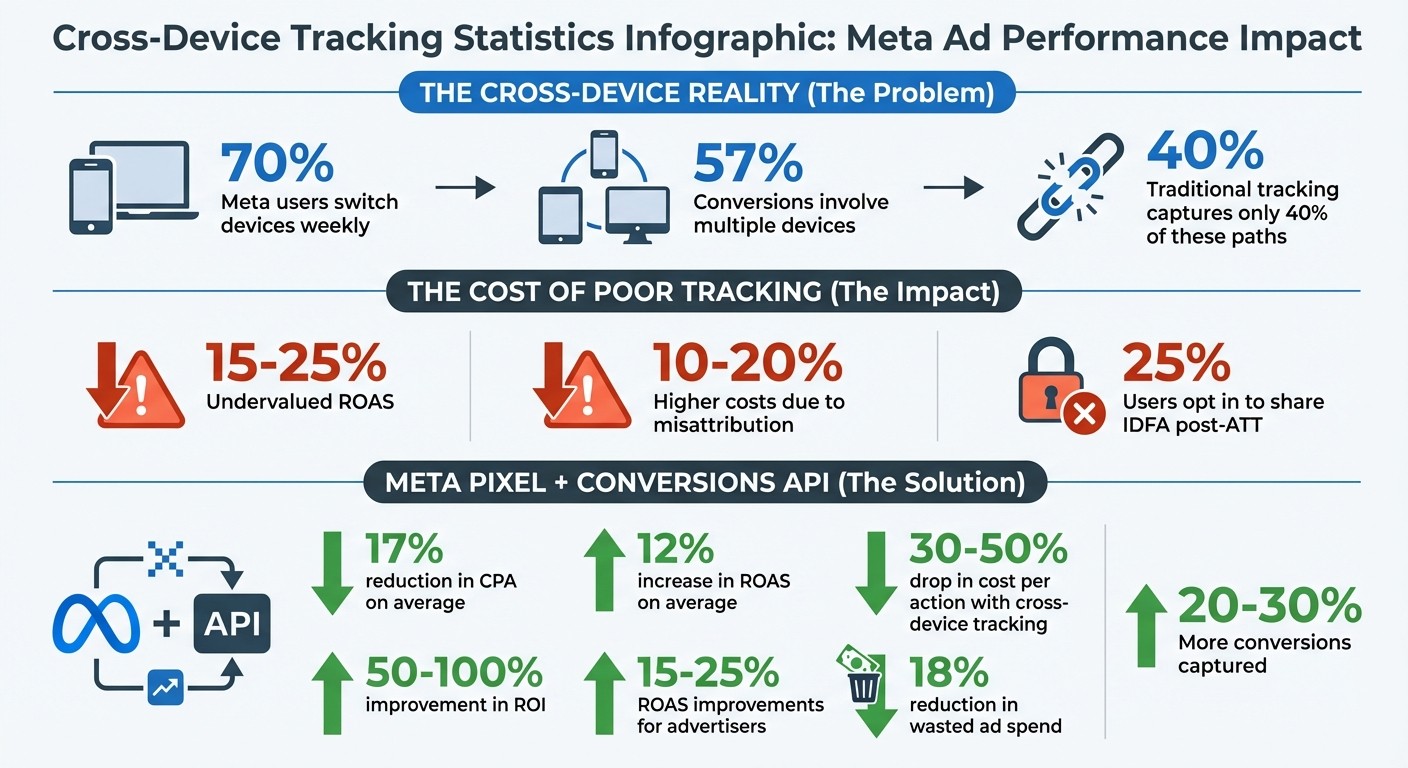
70% of Meta users switch devices weekly, and 57% of conversions involve multiple devices , including offline conversion paths, yet traditional tracking only captures about 40% of these paths.
This results in 15–25% undervalued ROAS and 10–20% higher costs due to misattribution.
Combining Meta Pixel (browser-side) and Conversions API (server-side) ensures more accurate data, reducing CPA by 17% and increasing ROAS by 12% on average.
Cross-Device Tracking Impact on Meta Ad Performance: Key Statistics
The Problem with Cross-Device Tracking
Why Fragmented Data Hurts Performance
Imagine this: a user browses a product on their phone but completes the purchase later on a desktop. If Meta's tracking system can't connect these actions, it sees two separate users instead of one. This disconnect leads to blind spots in conversion data. Without accurate signals, Meta may end up directing ad budgets toward less effective audience segments, all because it misinterprets user behavior.
And it’s not just about devices - browser-based tracking methods make this problem even worse.
Why Browser-Based Tracking Falls Short
Browser cookies, for instance, treat every device as a unique user. This approach creates even more gaps in tracking. To make matters worse, browsers like Safari and Firefox block third-party cookies by default. Even Chrome allows users to opt out, which weakens cookie-based tracking further. Then there’s Apple’s App Tracking Transparency (ATT) framework, which has significantly impacted tracking efforts. Post-ATT, only about 25% of users opt in to share their Identifier for Advertisers (IDFA).
Without reliable identifiers, like user logins, browser-based tracking systems face an uphill battle trying to link activity across apps, browsers, and platforms by setting up cross-device attribution. This leaves large portions of the customer journey out of sight - making it nearly impossible to piece together a complete picture of user behavior.
These challenges highlight the importance of real-time data synchronization to close the gaps in cross-device tracking.
How Real-Time Data Sync Fixes Cross-Device Tracking
How Meta Pixel and Conversions API Work Together
Fragmented tracking is a common challenge, but dual-layer data collection offers a solution. The Meta Pixel handles real-time browser-based tracking, capturing actions like page views, add-to-carts, and purchases. At the same time, the Conversions API (CAPI) sends similar event data directly from your server to Meta. This server-side stream acts as a safety net, bypassing browser limitations like ad blockers or Intelligent Tracking Prevention (ITP).
By combining these two layers, you get a complete picture of the customer journey. If the Pixel is blocked or disrupted, the Conversions API steps in, using first-party identifiers to ensure no conversions are missed, or debug tracking issues if they arise.
Feature | Meta Pixel (Browser-Side) | Conversions API (Server-Side) |
|---|---|---|
Data Source | User's Web Browser | Merchant's Server |
Vulnerability | Blocked by Ad Blockers/ITP | Bypasses Browser Restrictions |
Reliability | Affected by connectivity/crashes | Stable |
Primary Use | Real-time behavioral tracking | Reliable conversion & offline data |
This dual approach doesn't just improve tracking - it also enhances privacy control. With server-side tracking, you decide which data points to share with Meta, rather than relying on the browser to send all metadata automatically. This level of control helps reduce privacy risks while still giving Meta the data it needs to optimize ad performance effectively.
How Better Data Improves Meta's Algorithm
When Meta's algorithm has access to unified data from both the Meta Pixel and CAPI, it operates with greater accuracy. Instead of piecing together incomplete information, it gets a full view of the customer journey - even when users switch devices. This comprehensive understanding allows Meta to refine bids and targeting decisions much faster, helping you exit the learning phase, often within hours.
The results are hard to ignore. With cross-device tracking in place, businesses can see their cost per action drop by 30–50%, while ROI improves by 50–100%. This happens because Meta avoids wasting ad spend on audiences it mistakenly identifies as unengaged. Instead, it recognizes those users as converters - just on a different device.
Meta Ad Tracking: The Pixel Sucks & What You Need To Do Instead
How to Set Up Cross-Device Tracking
Getting cross-device tracking right is critical for syncing real-time data and improving Meta ad performance.
Installing Meta Pixel and CAPI
To start, you’ll need to set up both Meta Pixel and Conversions API (CAPI). Here’s how:
Meta Pixel: Install the Pixel on every page of your site. Platforms like Shopify, WooCommerce, and BigCommerce make this easy with one-click integrations.
CAPI: Use your server's native integration or a third-party app to set it up. Make sure to use a System User Token to avoid unexpected disconnections.
When sending identity signals, include multiple data points like hashed emails, phone numbers, MADID, IP addresses, and first-party customer IDs. Standardize this data by normalizing formats (e.g., lowercase emails, country-code phone numbers) and applying SHA-256 hashing - except for EXTERN_ID and MADID.
Set up a deduplication window to merge duplicate events. Use a 48-hour window for web events and 7 days for offline events. Finally, accept Meta's Custom Audience Terms in Ads Manager to avoid errors like Error Code 400.
Once the setup is complete, it’s time to address common tracking issues to ensure everything runs smoothly.
How to Fix Common Tracking Mistakes
Correcting frequent tracking mistakes can help you capture the entire customer journey across devices, giving Meta better data to optimize your ads.
Low Event Match Quality (EMQ): A low EMQ score means you’re missing key identifiers. Check the Event Quality tab in Events Manager. If your score is below 8.5, add more identifiers to improve it.
CRM Data Issues: Clean up your customer data. Remove empty fields, standardize phone numbers (include country codes), and validate email addresses. If you’re seeing Error Code 401, switch to a System User Token to fix it.
Audience Size Exactly 1,000: This happens because Meta applies a privacy threshold for small audiences. Grow your audience naturally or combine lists to exceed the threshold.
Automated Alerts: Set up alerts to monitor API failures and token expirations, so you can resolve issues quickly.
Here’s a handy table summarizing common sync errors and how to resolve them:
Common Sync Error | Cause | Resolution |
|---|---|---|
Error Code 400 | Custom Audience Terms not accepted | Visit Meta's Custom Audience Terms page and click "Accept". |
Error Code 401 | Expired OAuth connection | Re-authorize OAuth or switch to a System User Token. |
Audience Size "1,000" | Privacy threshold | Wait for natural audience growth or combine smaller lists. |
Missing Metadata | Permission error | Ensure your app has the required |
How to Use Cross-Device Data to Improve Campaigns
Once you have a solid cross-device tracking system in place, you can take your campaign performance to the next level. By analyzing cross-device insights, you can design sequential messaging strategies - for example, running awareness ads on mobile devices and then targeting desktop users with conversion-focused ads. This approach aligns with how customers move through the buying journey, helping to boost ROI while keeping CPA in check.
How to Structure Campaigns for Better Data Signals
To improve your campaigns, start by segmenting audiences based on their device behavior. If your data shows that mobile users are more likely to browse and desktop users are more likely to convert, structure your campaigns accordingly. Run top-of-funnel campaigns on mobile to capture interest, then retarget those users on desktop with ads designed to drive conversions.
Once your campaigns are properly segmented, focus on scaling the successful ones without disrupting the algorithm’s learning process.
How to Scale Winning Campaigns with Cross-Device Data
Use cross-device data to pinpoint which creatives and audiences are genuinely driving conversions. By moving beyond last-click attribution, you’ll get a clearer picture of your best-performing strategies.
When scaling, prioritize campaigns that show strong cross-device results. Gradually increase budgets to avoid destabilizing the algorithm. Tools like Meta's Conversions API play a crucial role here, as they maintain consistent data flow by bypassing browser restrictions like Safari’s third-party cookie blocking. Without CAPI, these restrictions can create data gaps that hurt campaign performance as spending increases. With it, you ensure steady data flow, allowing Meta’s algorithm to keep its performance intact rather than resetting when tracking disruptions occur.
Platforms like AdAmigo.ai make scaling easier by using cross-device insights to fine-tune campaigns while automation manages ongoing adjustments.
How to Measure Cross-Device Tracking Results
Tracking the right metrics is crucial to ensure your cross-device setup with Meta Pixel and Conversions API is working effectively.
Which Metrics to Track
Focus on assisted conversions, which reflect every device involved in the customer journey - not just the last one. This metric provides a clearer picture of how each device contributes to conversions, beyond what single-touch attribution models can show.
Pay attention to cross-device conversion paths and ROAS trends. For example, if conversions often start on mobile but finish on desktop, you can adjust your ad scheduling and creative strategies accordingly. Also, track device-specific ROAS to pinpoint where your ad spend delivers the best results. Lastly, keep an eye on ad frequency to avoid oversaturating your audience and diminishing returns.
How to Use Meta's Attribution Reports
After identifying key metrics, dive into Meta's Attribution Reports to analyze them.
You can find this tool in Ads Manager under "Analyze and Report." It allows you to see how conversion credit is distributed across different touchpoints and devices. Start by selecting the best attribution windows for your goals—like a 7-day click or 1-day view window—and compare results. If you notice significant differences between these windows, it might signal that customers interact with multiple touchpoints before converting, emphasizing the importance of cross-device tracking.
Use conversion path reports filtered by device type to uncover trends in user behavior. For instance, if most conversions move from mobile engagement to desktop completion, you could prioritize mobile campaigns for awareness and desktop retargeting for closing sales. Make it a habit to review these reports weekly and adjust your campaigns based on the insights.
Conclusion
Cross-device tracking addresses one of the biggest challenges in Meta advertising: fragmented user journeys. When someone views your ad on their mobile device but completes the purchase on a desktop, traditional tracking often fails to connect the dots. This leads to underreported ROAS and higher costs. By combining the Meta Pixel with Conversions API, you can bridge those attribution gaps and provide Meta's algorithm with the full picture it needs to optimize bids and targeting effectively.
Advertisers who implement cross-device tracking often experience 15-25% ROAS improvements and can cut wasted ad spend by up to 18% by correctly attributing multi-device customer paths. Real-time data synchronization captures 20-30% more conversions that would otherwise go untracked, especially as cookie restrictions and iOS privacy updates limit browser-based tracking. This creates a solid foundation for scaling campaigns with confidence.
Before scaling budgets, aim for an EMQ score of 8-10, ensure proper deduplication in Events Manager, and strive for match rates exceeding 90%. Without clean, unified real-time data, campaign decisions risk being based on incomplete insights.
Cross-device tracking transforms fragmented signals into a clear view of the entire customer journey - not just the final touchpoint. Take the time to review your Pixel and CAPI settings, ensure real-time data syncing, and track how attribution gaps close as your campaign performance improves.
For advertisers juggling multiple campaigns or clients, tools like AdAmigo.ai can simplify optimization. These tools automate adjustments to creatives, targeting, budgets, and bids - working around the clock to leverage your cross-device data while you focus on broader strategy.
Real-time data synchronization turns incomplete signals into actionable insights, unlocking the potential for smarter advertising.
FAQs
Do I need both Meta Pixel and Conversions API?
Yes, combining Meta Pixel with the Conversions API improves data accuracy and match rates for tracking user behavior across devices. This alignment enhances attribution, ensuring user actions are synchronized more effectively, which ultimately helps optimize ad performance.
How can I tell if cross-device tracking is working?
To see if your cross-device tracking is hitting the mark, check for unified customer journeys. This means interactions like browsing on a smartphone, researching on a desktop, and completing a purchase on a tablet should all connect seamlessly.
Look for consistent user profiles and accurate attribution data that recognize activity across multiple devices. These are strong signs that your tracking setup is functioning properly.
Tools such as Meta’s Conversions API and Pixel can be incredibly useful. They help ensure real-time synchronization, so your ad targeting stays aligned with users’ cross-device behaviors.
What identifiers should I send to improve match quality?
To boost match quality, make sure to send identifiers like Meta Pixel data and Conversions API information. These identifiers help link user actions - like sign-ups, purchases, or adding items to a cart - with your audience data. By doing this, you enable real-time audience syncing, which can significantly improve your match rates.