
Scaling Ads With Multiple Lookalike Audiences
Scale Meta ads by building multiple lookalike tiers from high-value customers, testing 1–5% ranges, and reallocating budgets to improve ROAS.
Scaling Meta ads effectively requires targeting multiple lookalike audiences instead of relying on a single broad one. This approach spreads your budget across high-performing segments, like recent buyers or high-value customers, reducing costs and improving ROAS (Return on Ad Spend). By testing and optimizing tiers (e.g., 1%, 2–3%, 4–5%), you can control budgets, avoid audience fatigue, and scale steadily.
Key Takeaways:
Segment Your Audiences: Create lookalikes from specific groups like top spenders or recent purchasers.
Use Multiple Tiers: Start with narrow tiers (1%) for precision, then expand to broader ones (2–5%) as you scale.
Monitor Metrics: Track ROAS, CPA, and ad frequency. Shift budgets to top-performing tiers and pause underperformers.
Update Source Data: Refresh your customer lists every 30–60 days to maintain accuracy.
Leverage Tools: Platforms like Meta Pixel and Conversions API improve audience quality, while AI tools for Meta ads automate scaling and optimizations.
This method ensures controlled growth, enabling you to scale ad spend while maintaining efficiency through audience expansion.
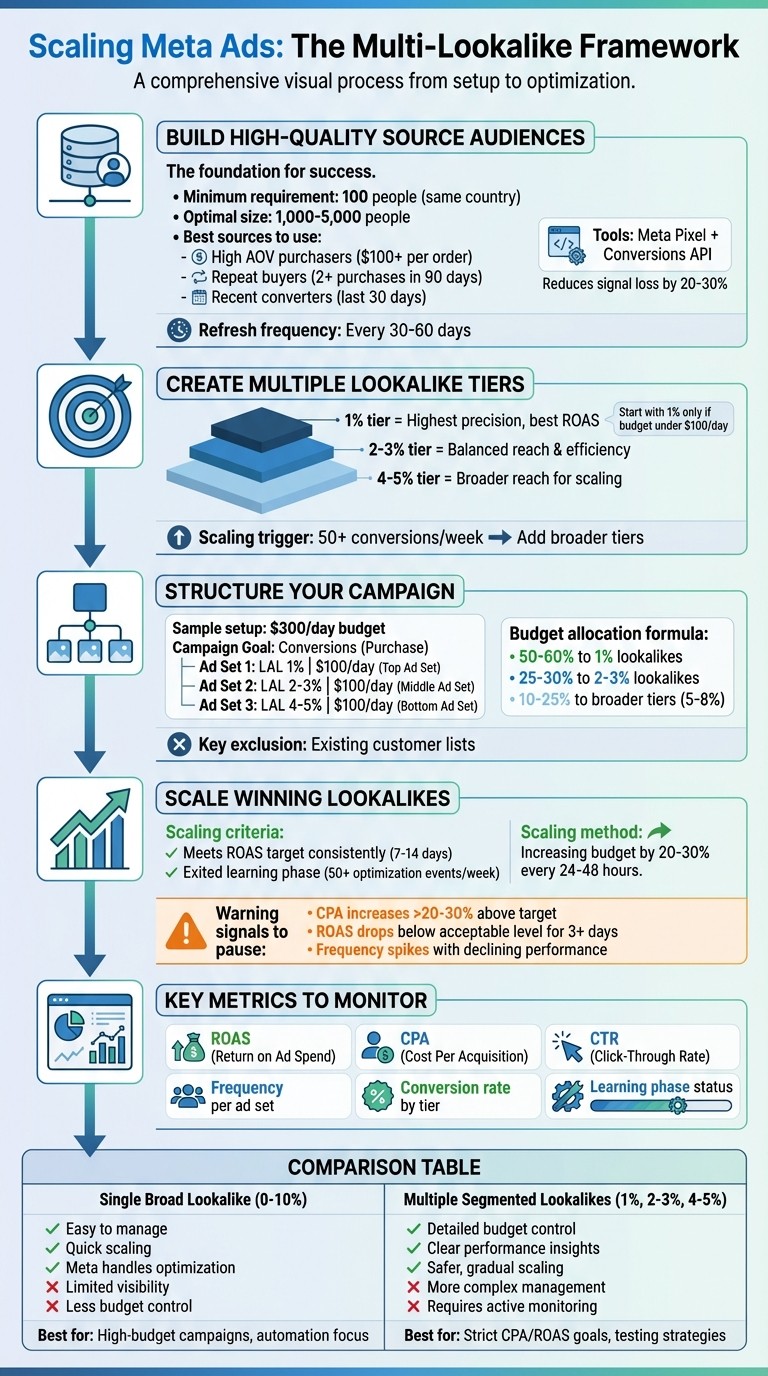
Complete Framework for Scaling Meta Ads with Multiple Lookalike Audiences
META ADS: How to scale to $100,000 in 30 days
How Lookalike Audiences Work for Scaling
To effectively scale your campaigns, understanding how lookalike audiences operate is key.
What Are Lookalike Audiences?
A Meta lookalike audience helps you reach new users who closely resemble your best customers. By analyzing a source audience - like recent purchasers or high-value buyers - Meta’s algorithm identifies patterns in demographics, interests, behaviors, and conversion habits. It then finds similar users within a specific country, giving you a pool of prospects more likely to convert than if you targeted randomly.
When setting up a lookalike audience, you can choose a size ranging from 1% to 10% of the eligible population in your target country. For example, in the U.S., a 1% lookalike audience represents the top 1% of users most similar to your source. This smaller group offers high precision but limited reach. As you increase the percentage, the audience grows, trading precision for scale. Smaller percentages typically result in better conversion rates and lower acquisition costs, while larger ones provide a broader reach for scaling.
Now let’s explore how using multiple lookalike tiers can give you more control and flexibility.
Why Use Multiple Lookalike Audiences?
Running multiple lookalike tiers from the same high-quality source allows for more precise budget allocation compared to using a single, blended audience. By separating narrow tiers (like 0–1% or 1–2%) from broader ones (such as 2–5% or 5–10%), you can adjust spending based on performance. For instance, if a narrow tier consistently delivers lower costs per action, you can focus more budget there to maximize efficiency and ROI.
This tiered strategy also supports gradual scaling. Start with a narrow lookalike audience to test performance. Once you see consistent results, you can introduce broader tiers to increase reach. If one tier shows signs of fatigue - like higher frequency or declining performance - you can implement AI frequency control to stabilize results and you can shift the budget to other tiers without disrupting the entire campaign. Meta allows up to 500 lookalike audiences per source, so the main limitation is often how much complexity your team can manage.
Single Broad vs. Multiple Segmented Lookalikes
Deciding between AI audience segmentation vs manual targeting through broad or segmented lookalike tiers depends on your budget, goals, and how much control you want. A single broad lookalike (or Meta’s Advantage lookalike feature, which can expand beyond your set percentage) is easier to manage. It lets Meta’s algorithm find performance pockets across a wide audience, making it a good choice for accounts with large budgets, strong conversion data, and a preference for automation.
On the other hand, multiple segmented lookalikes provide detailed insights into which similarity ranges perform best. For example, you might find that a narrow tier delivers better results than a broader one, allowing you to fine-tune bids and budgets. While this approach requires managing more ad sets and active monitoring, it’s ideal for advertisers with strict CPA or ROAS targets, agencies handling multiple clients, or brands testing different similarity ranges before scaling up.
Approach | Pros | Cons | Best Use Cases |
|---|---|---|---|
Single broad lookalike (e.g., 0–10% or Advantage lookalike) | Easy to set up; large reach for quick scaling; Meta handles optimization; fewer ad sets to manage | Limited visibility into performance by similarity range; less control over budgets and bids; risk of overspending on weaker segments | High-budget campaigns aimed at aggressive scaling; Advantage+ setups; teams prioritizing automation over segmentation |
Multiple segmented lookalikes (e.g., 0–1%, 1–2%, 2–5%) | Detailed budget control; clear performance insights by tier; safer, gradual scaling | More complex to manage; requires multiple ad sets; demands active oversight | Strict CPA/ROAS goals; agencies managing diverse clients; brands testing similarity ranges for scaling strategies |
This comparison highlights why segmentation often aligns better with advertisers aiming to meet specific CPA or ROAS targets.
Note: In conversion-optimized campaigns (especially Advantage+ setups), Meta may expand beyond your selected percentage, treating the lookalike audience as a strong signal rather than a strict boundary.
Building High-Quality Source Audiences
The effectiveness of your lookalike audiences hinges on the quality of the source audiences you create. Meta's algorithm relies on patterns in your source data - like demographics, interests, behaviors, and conversion habits - to identify similar users. By focusing on quality signals, you can maintain strong ROAS while laying the groundwork for precise segmentation and automation in your scaling efforts.
Creating Source Audiences
Start by identifying your most valuable customers. For example:
High AOV purchasers: Customers spending $100+ per order indicate strong buying power.
Repeat buyers: Those with two or more purchases in the last 90 days show loyalty and consistent engagement.
Audience size also plays a crucial role. While Meta requires at least 100 people from the same country to create lookalike audiences, aiming for 1,000 to 5,000 people yields better results. Smaller audiences often lead to less accurate lookalikes, which can hurt performance during scaling. If you're uploading customer lists, include a value column that reflects total spend or AOV. This helps Meta's algorithm prioritize users similar to your highest-value customers, which is particularly effective for high-ticket items or subscription-based products.
Segmenting by Behavior
Behavioral segmentation allows you to create more tailored lookalike audiences. For instance, you might:
Separate buyers of electronics from those purchasing apparel.
Distinguish frequent shoppers (e.g., three or more purchases in six months) from one-time buyers.
You can also segment by funnel position or engagement levels. For example, create one group for users who abandoned their carts and another for past converters. Similarly, you could differentiate between users who watched 75% of your videos and those who engaged less. These specific segments allow you to align your campaigns with user intent, helping you allocate budgets more effectively as you scale.
Tools for Improving Source Audience Quality
High-quality segments perform even better when paired with tools like Meta Pixel and Conversions API.
Meta Pixel: Tracks website activity such as purchases and add-to-cart events, providing the behavioral data necessary for building precise custom audiences.
Conversions API: Sends server-side data directly to Meta, reducing signal loss by 20–30% in light of iOS privacy updates. Together, these tools ensure your lookalike audiences are built on accurate, reliable data.
For teams juggling multiple campaigns or accounts, platforms like AdAmigo.ai can simplify audience management. AdAmigo.ai leverages AI to analyze your brand data, competitor insights, and past performance. It automatically segments audiences by behavior, value, or category, then creates optimized source audiences for lookalike campaigns. With one click, these audiences can be launched directly into your Meta account. Plus, its AI Actions feature provides daily recommendations to fine-tune segments, keeping your source audiences relevant and effective as you scale - all while reducing manual effort.
Setting Up Campaigns With Multiple Lookalike Audiences
Creating Multiple Lookalike Tiers
To get started, open the Audiences section in Ads Manager and click on "Lookalike Audience." select your source audience (or use a target audience finder to identify new segments), such as repeat buyers or high-value customers you've identified earlier, and set your target location (e.g., United States). Keep in mind that using a larger source audience often delivers better results.
Now, to create multiple tiers, use the percentage slider or range selector. This allows you to build several lookalikes simultaneously. Common tiers include 1%, 2–3%, and 4–5%. A 1% lookalike in the U.S. focuses on your closest audience matches, while 2–3% and 4–5% broaden your reach with slightly less precise targeting. Make sure to label each lookalike clearly, such as "US – Purchasers LAL 1%" or "US – Purchasers LAL 2–3%", so you can easily manage and adjust budgets later.
If your budget is under $100 per day, start with the 1% tier. This tier offers the most precise match and tends to deliver the best return on ad spend (ROAS). Once you achieve stable performance - around 50 or more conversions per week per ad set - you can introduce broader tiers to expand your reach without compromising efficiency.
The next step is deciding how to structure these tiers within your ad sets for optimal budget management.
How to Structure Ad Sets
You have two main approaches: combine multiple tiers into one ad set or separate each tier into its own ad set.
Combining tiers in one ad set simplifies the campaign structure and allows Meta's optimization algorithm to do the heavy lifting. However, this approach limits your ability to see which tier performs best and makes it difficult to adjust budgets for specific tiers.
Separating tiers into individual ad sets - for example, placing 1%, 2–3%, and 4–5% tiers in separate ad sets - gives you much more control. You can allocate more budget to the tiers with the best ROAS, pause underperforming tiers, test unique creatives for each group, and apply exclusions to avoid audience overlap. This ensures Meta doesn’t show the same ads to the same users across multiple ad sets. The downside? Managing separate ad sets adds complexity, and each one needs enough budget and conversions to exit the learning phase, which can be challenging with smaller budgets.
For advertisers spending over $300 per day, the separate ad set structure is often preferred. The insights and flexibility it provides are worth the extra effort. Tools like AdAmigo.ai can make this process easier by automating tasks. For example, AdAmigo's AI Ads Agent can analyze your source audiences, create lookalike-based ad sets (1%, 2–3%, 4–5%), and even launch them into your Meta account with tailored creatives and targeting. Plus, its AI Actions feature offers daily recommendations, such as "Increase budget 20% on US LAL 1% Purchasers" or "Pause underperforming LAL 4–5% ad set", so you can maintain strong performance without constant manual adjustments.
Sample Multi-Lookalike Campaign Setup
Once your tiers are ready and structured, it's time to implement a campaign framework that allows you to test and scale effectively.
Here’s an example setup for a U.S.-based e-commerce brand with a $300 daily prospecting budget. The campaign's goal is Conversions (Sales), optimized for the Purchase event, with optimized placements and a 7-day click conversion window.
Ad Set Name | Audience | Lookalike Range | Country | Daily Budget | Optimization Event |
|---|---|---|---|---|---|
US | LAL Purchasers 1% | Purchase | Lookalike of Purchasers | 1% | US | $100 | Purchase |
US | LAL Purchasers 2–3% | Purchase | Lookalike of Purchasers | 2–3% | US | $100 | Purchase |
US | LAL Purchasers 4–5% | Purchase | Lookalike of Purchasers | 4–5% | US | $100 | Purchase |
Within each ad set, include 2–4 creative variations to test performance by tier. This approach helps you lower creative testing costs by focusing on a few high-impact concepts per audience segment. After the first week, evaluate key metrics like CPA, ROAS, conversion rate, and frequency across the ad sets. For tiers with lower CPA and higher ROAS, consider increasing budgets. For tiers with rising costs or weaker ROAS, reduce budgets or pause them entirely.
Also, exclude your existing customer list from all ad sets to use audience data for growth to ensure you're spending on acquiring new prospects. Use Meta's Audience Overlap tool to confirm that exclusions are working properly. This setup keeps your data organized, ensures actionable insights, and simplifies scaling decisions.
Scaling Budgets and Optimizing Performance
Once you've set up your multi-lookalike structure, the next step is to focus on scaling your budgets and fine-tuning performance. These are the key ingredients to achieving sustained growth.
Initial Budget Allocation and Tracking
After launching your multi-lookalike campaign, it's important to allocate your budget thoughtfully across different tiers. A common strategy is to dedicate 50–60% of your budget to 1% lookalikes, 25–30% to 2–3% lookalikes, and 10–25% to broader tiers like 5–8%. This setup prioritizes your most similar audiences, which are often your best converters, while still allowing room to test less similar segments.
Keep a close eye on top metrics for ad set prioritization like CPA, ROAS, CTR, and frequency. To stay profitable, only scale ad sets that consistently meet or exceed your ROAS target over a 7–14 day period. For instance, if you need a 3× ROAS to break even, focus on scaling the ad sets that hit that mark. Also, check the learning phase status in Ads Manager - ad sets need about 50 optimization events per week to stabilize. To meet this threshold, ensure your daily budgets are at least within Meta's recommended range (typically $20–$50 for conversion campaigns).
Once you've identified the top-performing lookalikes, you can confidently scale them using proven ROAS benchmarks.
How to Scale Winning Lookalikes
When an ad set hits your ROAS target and exits the learning phase, start increasing its budget gradually - raise it by 20–30% every 24–48 hours. This slow and steady approach helps maintain performance without resetting the learning phase. For example, if your 1% purchaser ad set is spending $100 daily with a 3.5× ROAS, increase it to $120–$130, wait a couple of days, and repeat if results remain stable.
For faster scaling, you can duplicate high-performing ad sets and assign them a higher starting budget, typically 2–3× the original. Monitor these duplicates closely for potential issues like audience overlap or rising CPA. If a tier's CPA increases by more than 20–30% above your target or its ROAS dips below your acceptable level for three consecutive days, consider pausing or reducing its budget. When your top-performing tier (e.g., 1%) starts hitting high frequency but maintains strong ROAS, you can expand by merging adjacent segments, such as 2–3% lookalikes, or testing broader tiers like 5–8%. Value-based lookalikes built from high-LTV (Lifetime Value) customers are also worth exploring. You can also implement AI-powered retargeting to re-engage those high-value users who don't convert immediately.
These manual scaling techniques are effective but can be time-consuming. That's where AI tools can make a big difference.
Using AI Tools for Scaling
Managing multiple lookalike tiers manually requires constant attention - checking Ads Manager multiple times a day, exporting reports, calculating trends, and adjusting budgets by hand. AI tools like AdAmigo.ai simplify this process by acting as an automated media buyer. You set your goals (e.g., "Scale spend 30% at ≥3× ROAS"), and the AI takes care of the rest. It analyzes performance in real time, reallocates budgets to winning lookalikes, pauses underperforming ones, and even launches new creatives for fatigued segments.
One standout feature of AdAmigo is its AI Actions, which provides a daily to-do list of actionable recommendations, such as "Increase budget 25% on 1–2% LAL purchasers" or "Pause 5% LAL high-engagement due to ROAS drop." You can approve these suggestions with a single click or let the system operate on full autopilot. As Rochelle D. shared in a G2 review:
Our budgets are controlled, our spend is being smartly allocated and our ROAS is up massively.
Here’s a quick comparison of manual scaling versus AI-driven scaling with AdAmigo:
Aspect | Manual Scaling | AI-Driven Scaling (AdAmigo.ai) |
|---|---|---|
Decision Speed | Hours to days; depends on when you check Ads Manager | Real-time monitoring and adjustments |
Budget Changes | Hand-adjusted 20–30% increases every 24–48 hours based on spreadsheet analysis | Automated micro-adjustments based on live performance |
Audience Management | Manually create, duplicate, or pause lookalike tiers; slower to expand to broader ranges | AI suggests or auto-launches new tiers and consolidates underperforming ones |
Creative Rotation | New ads created and launched manually; often delayed | AI generates and rotates creatives quickly to prevent fatigue |
Workload | Requires significant daily monitoring and adjustments | Minimal effort; autopilot available |
Consistency | Varies based on individual discipline; prone to human error | Consistent, data-driven decisions applied 24/7 |
Maintaining Performance Over Time
Scaling campaigns with multiple lookalike audiences is a solid strategy, but it requires consistent upkeep. Even the most successful campaigns can hit roadblocks like creative fatigue, audience saturation, increasing CPAs, or declining ROAS if they aren’t actively managed. To keep things running smoothly, you’ll need to optimize your Meta ads by regularly refreshing your source data, test new audience segments, and use tools that adapt to performance shifts.
Refreshing Source Audiences
The quality of your lookalike audiences depends entirely on the data you provide. While Meta does periodically update lookalikes, if your source audience hasn’t been refreshed in 30–90 days, you’re essentially working with outdated information. This can lead to weaker results as your lookalikes drift away from representing your best customers.
To keep your source audiences fresh, update them every 30–60 days with recent data - like new purchasers, high-value customers, or updated customer details. For instance, if your original audience was based on buyers from the past 180 days, consider narrowing it to just the last 30 days. You can upload updated customer lists through Meta’s Audiences section using email or phone data, or let the Meta Pixel track recent conversions. Including a value column for higher-ticket items is a smart move - it helps Meta prioritize customers with higher lifetime value (LTV) when creating lookalikes. Remember, Meta requires at least 100 people from the same country to build a source audience, but larger groups of 1,000–5,000 provide better results.
Be especially diligent about refreshing your audiences after major events - like product launches, seasonal sales, or significant changes to your offerings. If you notice a drop in ROAS for your 1% lookalike audience, it’s a clear sign to update your source data.
Once your core lookalike audiences are optimized, it’s time to explore additional strategies.
Testing Beyond Lookalikes
When your primary lookalike audiences start showing signs of saturation - like high frequency or declining engagement - it’s time to branch out. One way to do this is by testing 1–3% lookalikes combined with demographic or interest layers. For example, you could pair your lookalikes with interests tied to your product category or behaviors like online shopping.
Another approach is to experiment with Advantage+ audiences. These allow Meta’s algorithm to go beyond your lookalike parameters and find high-intent users you might not have reached otherwise. Testing larger lookalike tiers, such as 5–8%, can also be effective when paired with fresh creatives. Broader audiences often respond well to new concepts, so scaling your ad creatives weekly can help you identify what resonates best.
Keep in mind, testing isn’t just about audiences - it’s also about solving creative fatigue. Even if your audience segmentation is perfect, showing the same ads repeatedly will eventually lead to disengagement. Regularly update your visuals, messaging, and offers to keep your campaigns fresh and engaging.
Using AI for Ongoing Optimization
Managing all these moving parts manually can quickly become overwhelming. That’s where automation tools come in. Platforms like AdAmigo.ai streamline the entire process, acting as your virtual media buyer. Its AI Actions feature provides a daily to-do list of optimizations, such as “Refresh 1% purchaser source with last 30 days” or “Launch new creative for 2–3% LAL due to frequency spike.” You can approve these updates with a single click or let the system handle everything in autopilot mode.
AdAmigo.ai also uses its AI Ads Agent to generate new creatives based on your competitors’ ads and your top-performing campaigns, launching them directly into your account. When performance issues arise, the AI Chat Agent can diagnose problems - like rising CPAs in your 1% lookalike - and suggest solutions, such as testing broader tiers or new audience combinations. These tools not only save time but also help maintain the strong results you’ve worked hard to achieve. As Jakob K. noted in a G2 review:
The fact that you can launch campaigns through text or voice commands feels like magic! It handles everything from creating lookalike audiences to adjusting budgets with just a few prompts. It saves so much time!
Conclusion
Scaling Meta Ads effectively requires a structured approach built on solid foundations: high-quality source data, thoughtful audience segmentation, rigorous testing, and consistent optimization. Start with your best-performing customers - whether they’re recent purchasers, high-value users, or qualified leads - since Meta’s algorithms thrive on precise, reliable data. For example, a lookalike audience based on your top 1,000 buyers from the past 30 days will consistently outperform one built from general website traffic.
Once your data is clean, segment your lookalike audiences into tiers (e.g., 1%, 1–3%, 3–5%) to balance reach with efficiency. Assign each tier to its own ad set, allowing you to identify which audience size delivers the best results, such as the lowest cost per acquisition (CPA) or the highest return on ad spend (ROAS). Initially, use the same creatives across tiers to isolate audience performance, then gradually scale Meta ad budgets toward the top-performing segments. This method ensures predictable scaling, enabling you to expand into broader tiers only when your target ROAS (e.g., 3× or higher) remains consistent.
Optimization doesn’t stop there - continuous testing is essential. Keep an eye on metrics like frequency and audience overlap to avoid common testing mistakes and wasted ad spend. When your core lookalikes reach saturation, experiment with layering interests, using Advantage+ audiences, or pairing larger tiers with new ad concepts. Automation tools, such as AdAmigo.ai, can simplify this process dramatically. These tools can handle tasks like generating fresh creatives tailored to specific lookalike audiences, suggesting daily optimization actions (e.g., "Refresh 1% purchaser source" or "Increase budget for 2–3% tier by 20%"), and even allowing you to adjust campaigns via text or voice commands. As Jakob K. shared in a G2 review:
The fact that you can launch campaigns through text or voice commands feels like magic! It handles everything from creating lookalike audiences to adjusting budgets with just a few prompts. It saves so much time!
To maintain consistent performance, integrate these practices into your routine. Begin with one or two high-value source audiences, set up 2–3 lookalike tiers with a manageable budget (around $20–$50 per day for each ad set), and review results weekly. Define clear goals - such as “Increase spend by 30% while maintaining at least a 3× ROAS” - so every decision is rooted in data, not guesswork. By following this framework, you can turn multiple lookalike audiences into a dependable strategy for scaling Meta Ads efficiently and effectively.
FAQs
How do I choose the best lookalike audience tier for my campaign?
To choose the best lookalike audience tier, start by matching it to your campaign objectives. If your goal is to expand reach and scale your audience, smaller tiers like 1% lookalikes are a great option. On the other hand, if you're focused on fine-tuning performance and improving ROAS, consider testing slightly larger tiers, such as 2-5%.
You can also use tools like AdAmigo.ai to review performance data and gain AI-driven insights on which tiers are yielding the best outcomes. Use these insights to tweak your approach and boost both efficiency and growth.
How can I keep my source audience data up to date for better ad performance?
To keep your source audience data up-to-date, make it a habit to refresh your lookalike audiences regularly. Using the latest customer or user data ensures your targeting stays sharp and can lead to better return on ad spend (ROAS).
Consider using AI-powered tools like AdAmigo.ai to analyze audience performance and fine-tune segments in real time. Sticking to outdated data can weaken your campaign's effectiveness and hurt your overall results. Stay current to keep your efforts impactful.
How can AI tools help scale campaigns with multiple lookalike audiences?
AI tools make it easier to scale campaigns using multiple lookalike audiences by automating essential tasks such as audience segmentation, real-time budget adjustments, and refining targeting. These tools continuously analyze performance data, ensuring your campaigns adapt swiftly to boost ROAS while cutting down on manual work.
With AI managing the heavy lifting, you can dedicate more time to strategy and creative direction, allowing you to scale campaigns faster and more effectively without compromising results.