
5 Automated Bid Rules for Meta Ads
Five automated bid rules for Meta Ads to improve reach, control CPA, pause losing ad sets, and safely scale winners; includes AI automation tips.
Automated bid rules simplify managing Meta Ads by using Meta ads automation to adjust performance. These rules help you control costs, scale successful campaigns, and pause underperforming ads without constant manual intervention. Leveraging real-time data ensures these adjustments happen exactly when needed. Here’s a quick rundown of the five key rules:
Increase bids for low-impression ads: Boost visibility by adjusting bids when ads underperform in Meta’s auction.
Increase bids for top-performing ads: prioritize resources for ads with strong metrics like low CPA and high ROAS. Use an ad performance analyzer to track these metrics accurately.
Pause ad sets with rising CPA: Protect your budget by pausing campaigns if costs spike or ROI drops.
Set bid caps to manage CPA: Use caps to maintain predictable costs and prevent overspending.
Scale bids with budget safeguards: Scale Meta ad budgets for winning campaigns while setting rules to avoid losses.
For advanced optimization, AI tools like AdAmigo.ai analyze data trends and automate decisions, saving time and improving efficiency. Start with these rules and consider optimizing Meta ads with AI for even better results.
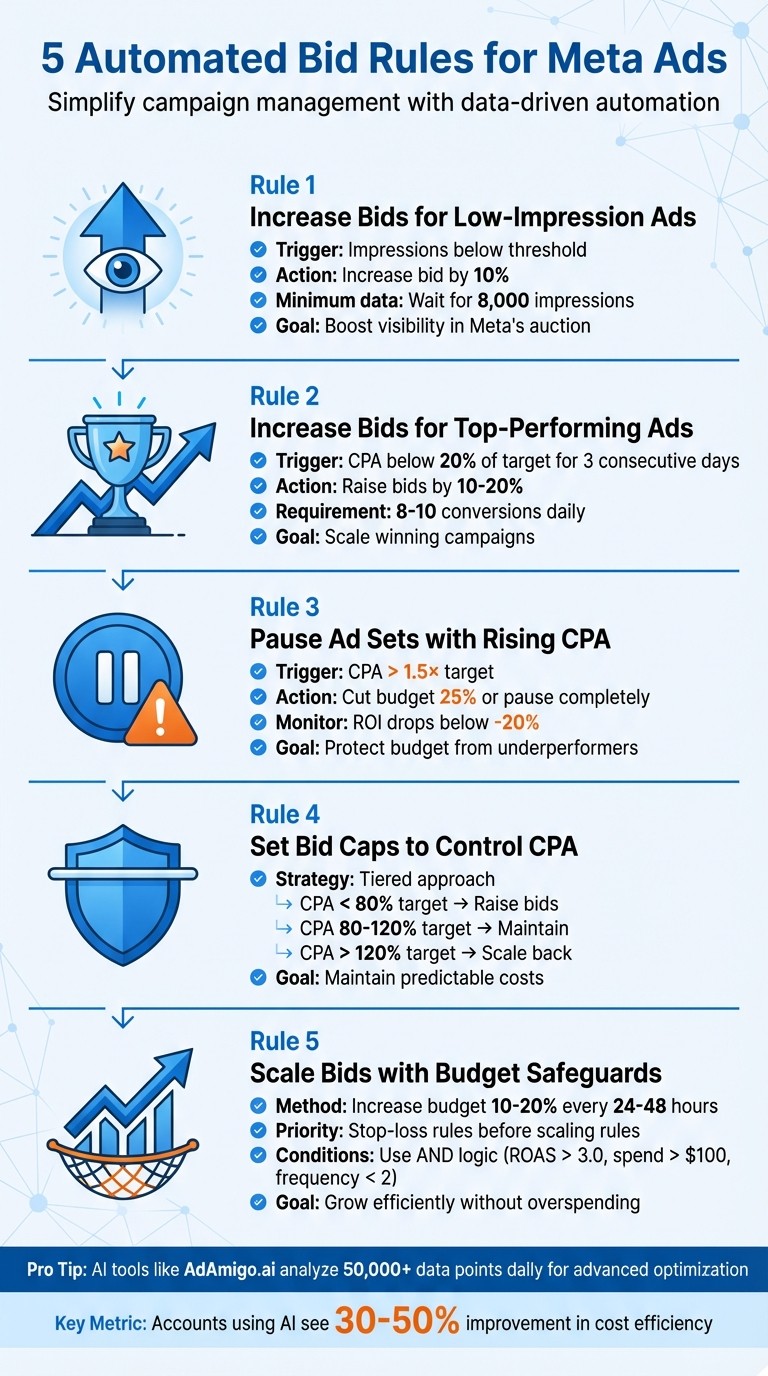
5 Automated Bid Rules for Meta Ads: Quick Reference Guide
Scaling to Six Figures a Day: The Ultimate Meta Ads Playbook
1. Raise Bids for Ads Getting Too Few Impressions
This rule automates bid adjustments, turning what’s often a manual process into one driven by data. It’s one of several automation rules for scaling Meta ads aimed at improving performance.
Why Low Impressions Happen
If an ad isn’t receiving enough impressions, it’s likely losing in Meta’s auction. The platform compares your bid against those of other advertisers, and if your bid is too low, your ad may not appear. To make informed decisions, wait until your ad reaches at least 8,000 impressions before applying changes. This ensures you’re working with a meaningful amount of data and helps you analyze Meta ad metrics more accurately.
Raising bids can make your ad more competitive in the auction, increasing its reach. For example, you can set an automated rule to increase bids by 10% when impressions drop below a set threshold. You can also use AI-driven recommendations to identify these thresholds automatically. However, it’s crucial to ensure these higher bids still align with your budget and goals. It is also vital to follow Meta ad policies to avoid account restrictions while scaling.
Balancing Bids and Costs
While raising bids can boost visibility, it’s essential to maintain control over costs. A good approach is to tie bid increases to performance metrics. For instance, if your cost per result (CPR) exceeds $2.00, you could automate a 10% bid increase. Adynext explains:
"If the cost per result (CPR) for a specific campaign exceeds $2.00, then automatically increase the bid by 10%... This will help you capture more conversions at a lower cost, while still maintaining a competitive position in the auction."
Keep in mind that significant or frequent bid changes can reset your campaign’s learning phase, leading to fluctuations in CPA (cost per acquisition). Balance is key to ensuring your strategy remains effective without overspending.
2. Raise Bids to Push High-Performing Ads
Increasing bids on ads that are already performing well can help you win more auctions and expand your reach. By allocating more of your budget to ads with proven success, you can amplify their impact. The key is to monitor performance metrics closely to decide when it’s time to raise those bids.
Key Metrics to Watch (e.g., CPA, ROAS)
Consider raising bids by 10–20% if your Cost Per Acquisition (CPA) stays below 20% of your target for three consecutive days, with at least 8–10 conversions daily. For instance, if your target CPA is $10, and your actual CPA drops to $8 or lower for three days in a row, that’s a clear signal to scale up. These metrics ensure your scaling decisions are data-driven and precise.
Scaling While Staying in Control
Automated rules can simplify scaling for stable ad sets. However, you must be prepared to address common scaling problems like audience saturation. For example, if your CPA is less than half your target and you’ve achieved 20+ conversions over three days, you can safely increase your budget by 30%. That said, always set a maximum daily budget cap to avoid overspending.
It’s important to avoid making large or frequent changes, as this can disrupt the learning phase of your campaigns. To keep things running smoothly, schedule budget adjustments during off-peak hours, like midnight in your ad account’s time zone. This approach aligns with Meta’s daily pacing system, helping maintain consistent performance.
3. Pause Ad Sets When CPA Climbs After Purchases
If a reliable ad set suddenly starts showing a higher Cost-per-Action (CPA), it’s time to step in before profits take a hit. The challenge lies in figuring out whether it’s just a temporary blip or a sign of deeper issues.
Cost-per-Action (CPA) Management
Meta ad sets usually need at least 50 conversions within 7 days to stabilize performance. So, if your CPA spikes after a budget adjustment, give it 1–2 days to recalibrate. But if the trend continues, it’s time to dig deeper.
A good way to assess the situation is by comparing data. Look at results from days 6–4 and compare them to the last 3 days. If you see a consistent drop in ROI or ROAS benchmarks, it’s a clear signal that the ad set may need to be paused. As ROASPIG explains:
"Rules that fire on 1-2 conversions produce noise, not signal" – ROASPIG
Once you’ve identified the trend, make calculated adjustments to protect your budget and maintain efficiency. You can also use a Meta ads budget planner to forecast spend more accurately.
Bid Cap and Cost Control Strategies
If your CPA hits 1.5× your target, start by cutting the budget by 25% to give the ad set some breathing room. If the CPA keeps climbing, it’s best to pause the ad set altogether.
For campaigns that have been running well, consider a hard pause if ROI drops below -20% in a single day after a period of stability. Another red flag to watch for is audience fatigue. If your ad frequency goes above 3.0–4.0 and your click-through rate (CTR) drops by more than 30%, it’s often linked to CPA increases. Keeping an eye on these metrics can help you avoid wasting your budget on audiences that are no longer engaged.
4. Set Bid Caps to Control CPA
Bid caps are a smart way to keep your costs in check while running performance-driven campaigns. They act as a safeguard, ensuring you don’t pay more than a set amount for each action - whether it’s a lead, purchase, or sign-up. By defining the maximum amount you're willing to pay, bid caps help maintain a predictable CPA and protect your profit margins.
Bid Cap and Cost Control Strategies
A tiered approach to managing your CPA can make a big difference. For instance, if your target CPA is $50, you could:
Raise bids when your CPA drops below $40 (80% of your target).
Keep spending steady when the CPA ranges between $40–$60 (80–120%).
Scale back when your CPA climbs above $60–$100 (120–200%).
This strategy helps you react appropriately to performance trends without overcorrecting for small fluctuations. This is especially important when managing ad frequency to prevent audience fatigue during scaling. Here's a table outlining some automated rules you could use:
Rule Type | Condition (Trigger) | Action | Purpose |
|---|---|---|---|
CPA Ceiling Guard | CPA > 3× target AND conversions > 3 | Reduce budget by 50% | Protects budget while allowing recovery |
Scaling Winner | CPA < 80% of target AND conversions > 10 | Increase budget 20% | Takes advantage of high efficiency |
Efficiency Drop | CPA > target for 2 consecutive days | Decrease budget 20% | Encourages Meta to find cheaper auctions |
These rules work hand-in-hand with CBO and automated bidding strategies, ensuring you can scale campaigns while keeping costs under control, often by scaling Meta ads with bulk launching.
When scaling successful campaigns, avoid making drastic changes. Losid Berberi, CMO of TheOptimizer, advises:
"The safest approach would be to stay within the 20%-30% range for medium to high CPA campaigns [when scaling]."
Scaling Stable Ad Sets with Guardrails
The order of your rules plays a crucial role in managing multiple automated strategies. Always prioritize rules that protect your budget over those aimed at scaling. For example, use time-based rules with shorter windows (24 hours) for immediate safeguards, medium windows (3 days) for testing, and longer windows (7 days) for scaling adjustments. This structured approach ensures your campaigns remain stable as they grow and your rules don’t conflict with each other.
5. Scale Bids with Budget Protection Rules
When scaling winning ad sets, keeping your budget protected is essential. Think of budget protection as your safety net - it ensures a campaign that's performing well doesn't suddenly become a costly mistake if performance dips. To achieve this, set up a clear hierarchy for your rules. For example, stop-loss rules (Priority 1) should always take precedence over scaling rules (Priority 4). This way, you avoid unintentionally overspending on an ad set that suddenly becomes less efficient. These rules complement earlier bid adjustment strategies by adding an extra layer of budget control as you scale.
To scale effectively without disrupting performance, increase budgets gradually—using manual or AI budget testing— - by 10–20% every 24–48 hours. This approach prevents triggering "significant edits", which could reset the learning phase. As AdBid explains:
"The difference between profitable and unprofitable accounts often comes down to one thing: how fast you kill losers and scale winners."
Before automated rules kick in, ensure ad sets meet minimum performance thresholds. For example, aim for at least 8,000 impressions or 5–10 conversions. Keep a close eye on your click-through rate (CTR). If CTR drops by more than 30% during scaling, it may signal creative fatigue - pause budget increases in such cases to align with full-funnel AI optimization strategies.
Use "AND" logic when setting conditions for scaling. For instance, only scale when metrics like ROAS, spend, and frequency (e.g., ROAS > 3.0, spend > metrics like ROAS > 3.0, spend > $100, and frequency < 200, and frequency < 2) are consistently met. Additionally, establish separate thresholds for scaling and pausing to avoid conflicting actions within your campaigns.
Using AI-Powered Tools to Improve Automation
Automated bid rules are great for handling straightforward tasks, but AI-powered tools take ad optimization to the next level by analyzing and acting on complex data insights. While Meta's native rules rely on simple "if-then" logic, platforms like AdAmigo.ai dive deeper, processing over 50,000 data points daily. These include factors like engagement velocity, conversion delays, and auction dynamics. Instead of just reacting to changes, these tools predict trends and adjust accordingly.
One of the standout features of AI-driven platforms is their ability to prevent conflicts between rules - like increasing budgets while simultaneously pausing ads during temporary dips. AdAmigo.ai, for example, streamlines your entire account, resolving these contradictions. Its AI Actions feature generates a daily list of prioritized optimizations across areas like creatives, audiences, budgets, and bids. You can either approve these changes with a single click or let the system handle them automatically.
Creative fatigue can be a challenge, but AI tools tackle this by continuously producing fresh creatives and measuring their performance against top-performing ads. This constant refresh helps maintain engagement. Accounts using AI-powered tools often see a 30–50% improvement in cost efficiency compared to manual management.
For teams managing multiple accounts, efficiency is key. AdAmigo.ai's Bulk Ad Launch lets you create hundreds of Meta ads at once, complete with coordinated copy, visuals, and targeting. This feature goes well beyond what Meta's native tools can offer. Additionally, the platform's AI Chat Agent simplifies account management through a conversational interface, making it easier to launch campaigns and analyze performance data.
AI tools don't just automate tasks - they enhance your ability to oversee strategy. As AdBid puts it:
"Human strategy remains essential for creative development and major decisions. Automation executes - humans strategize".
Rather than replacing human input, AI works alongside you, balancing automation with human strategy to handle day-to-day execution so you can focus on the bigger picture.
Conclusion
Automated bid rules are a practical way to manage Meta ads efficiently, especially when dealing with repetitive tasks. They can adjust bids for underperforming ads, pause campaigns when costs spike, and safeguard budgets during scaling Meta ads - all without constant hands-on management. Keep in mind, Meta Ads Manager limits accounts to 250 rules, so it’s essential to focus on the most impactful optimizations.
Taking it a step further, integrating AI can enhance these foundational rules. While Meta’s built-in automation operates on simple if-then logic, platforms like AdAmigo.ai go deeper. They analyze intricate patterns across creatives, audiences, budgets, and bids simultaneously, reducing the likelihood of rule conflicts and uncovering opportunities that manual processes might overlook.
Managing numerous campaigns or client accounts manually simply doesn’t scale. AI tools can sift through millions of data points - like real-time conversion trends, audience demographics, and engagement metrics - at speeds no human team could match. For agencies, this means a single media buyer can handle 4–8× more clients, allowing senior strategists to concentrate on broader, high-level planning.
As Meta leans into value-based bidding and broader audience targeting, the demand for smarter, ongoing bid adjustments increases. AI-powered tools bridge the gap between human strategy and machine precision by continuously testing creatives, pinpointing high-value audience segments, and adjusting bids in real time. This combination of strategic insight and automated execution keeps campaigns performing at their best.
Start with these five automated bid rules, and then integrate AI solutions to push your Meta ads even further. Define the strategy, and let automation take care of the execution.
FAQs
What’s a safe minimum of data before a rule runs?
To ensure reliable decisions, it's generally a good idea to have at least 3 conversions or enough activity over the past 3 days. This is especially important for automated rules monitoring metrics like CPA or conversions. Without adequate data, these rules might not function as intended, leading to inaccurate results.
How do I scale winners without resetting learning?
To grow successful ad sets without disrupting their performance, increase budgets slowly - by about 10–20% every 24–48 hours. Keep an eye on key metrics like ROAS (Return on Ad Spend) and CPA (Cost Per Acquisition) to ensure they stay steady. Be cautious of overlapping rules that could unintentionally pause or lower budgets on top-performing ads, as this could hurt their momentum.
When should I use bid caps vs. automated rules?
When you need tight control over the maximum cost per action (whether that's clicks, conversions, or other actions), using bid caps is the way to go. This approach is especially useful for short-term or high-priority campaigns where staying within a strict budget is non-negotiable. Bid caps ensure costs don't exceed the limits you set.
On the other hand, automated rules are ideal for more dynamic adjustments. They can handle tasks like tweaking budgets, pausing campaigns that aren't performing well, or scaling efforts based on key metrics like ROAS (Return on Ad Spend) or CPA (Cost Per Acquisition). Automated rules provide a flexible way to manage campaigns over the long term, saving time while keeping performance on track.