
Meta Conversions API for Offline Data Sync
Sync in-store and CRM sales server-side with Meta's Conversions API for accurate attribution, reduced CPL, and improved ROAS.
The Meta Conversions API (CAPI) is a server-side tool that lets you send offline conversion data - like in-store purchases or CRM updates - directly to Meta. This bypasses browser tracking issues caused by ad blockers, [privacy restrictions like iOS App Tracking Transparency (ATT), and Safari’s Intelligent Tracking Prevention (ITP)](https://www.adamigo.ai/blog/meta-consent-mode-advertisers-need-know). As of May 14, 2025, Meta has retired the standalone Offline Conversions API, requiring all offline data to integrate with the unified CAPI.
Key Benefits:
Capture 85-95% of actual conversions (vs. 40-70% with browser tracking alone).
Improve ad performance with better signals, reducing Cost Per Lead (CPL) by 15-35% and increasing Return on Ad Spend (ROAS) by 20-40%.
Track omnichannel events like in-store sales, CRM updates, and phone conversions.
How It Works:
Collect identifiers like
fbclid(Facebook Click ID) from ad interactions.Sync offline events (e.g., purchases, leads) with Meta using server-side API calls.
Use hashed customer data (email, phone) for better match rates.
Setup Essentials:
Admin access to Meta Business Manager.
A server capable of sending API requests.
Event configuration with required fields like
[event_name,event_time, andaction_source](https://www.adamigo.ai/blog/meta-pixel-setup-cross-domain-tracking).
Setting Up the Meta Conversions API for Offline Data Sync
Prerequisites for Implementation
Before you dive in, make sure you have admin access to Meta Business Manager, an active ad account, and a server-side setup capable of making POST requests to Meta's API endpoint. You'll also need a way to securely store credentials as environment variables - never embed them in client-facing code.
Pro Tip: Use JavaScript to capture the fbclid (Facebook Click ID) as soon as the page loads. Store it in a cookie for up to 90 days. This simple step can significantly improve the accuracy of matching offline conversion events.
Keep in mind: Meta applies a 48-hour deduplication window. To avoid duplicate counts between the browser Pixel and the Conversions API (CAPI), include a unique event_id with each event.
Once you've met these prerequisites, you're ready to configure your offline event tracking in Meta Business Manager.
Configuring Event Sets in Meta Business Manager
To streamline your offline data, set up a unified Dataset in Events Manager. As of May 14, 2025, Meta no longer supports standalone Offline Event Sets. Instead, offline data is integrated into a unified Dataset that combines web, app, and offline signals.
Here’s how to create one:
Navigate to Events Manager > Connect Data Sources > Offline.
Click Create and assign a clear, descriptive name (e.g., "CRM Leads – Q3 2026").
Link the Dataset to your ad accounts in Business Settings. This step ensures offline data is properly attributed to your campaigns.
Assign a System User with Admin role and
ads_managementpermissions to automate the data flow. This eliminates the need for personal user tokens.
A couple of key details to watch for:
Every offline event sent via CAPI must include an
action_source. Usephysical_storefor in-store events orsystem_generatedfor CRM data without a browser session.Offline conversion data must be uploaded within 62 days of the event to count toward attribution. After that, it won't be eligible.
Generating Access Tokens and Managing Permissions
Once your Dataset is configured and linked to your ad accounts, secure your API interactions by generating an access token. In Events Manager, select your Dataset, go to Settings, find the Conversions API section, and click "Generate access token." Save the token as an environment variable on your server to keep it secure - never hardcode it or store it in repositories.
"The Conversions API is designed to be less susceptible to issues like a browser crash or connectivity problems." - Meta Developer Documentation
If you need Full Access to the Marketing API (formerly Advanced Access), you'll need to meet a threshold of 500 API calls within a 15-day period. For businesses syncing large amounts of CRM or POS data, this requirement is usually met quickly.
To confirm your Dataset is ready to receive offline events, make a GET call to the Graph API and check the is_consolidated_container field. If it returns true, you're good to go.
Mapping Offline Data to Meta Conversions API Parameters
Understanding Required Parameters
When sending events to Meta's Conversions API, there are three must-have fields: event_name, event_time, and action_source. These fields ensure the event is valid:
event_name: Describes what happened, likePurchaseorLead.event_time: A UNIX timestamp accurate to the second.action_source: Indicates where the event occurred. Usephysical_storefor in-store events orsystem_generatedfor CRM data.
If you're sending Purchase events, you’ll also need to include the following:
value: A decimal number representing the transaction amount.currency: A three-letter ISO code, such asUSD.At least one match key (e.g., a hashed email or phone number) to help Meta link the event to a user profile.
These fields are essential for proper data normalization and event mapping.
"By using the Conversions API, you agree that the
action_sourceparameter is accurate to the best of your knowledge." - Meta Developer Documentation
Hashing and Formatting Match Keys
Customer data must be hashed using SHA-256 before leaving your server. However, hashing alone won’t cut it - you need to normalize the data first to ensure better match rates.
Here’s how to prepare each field before hashing:
Parameter | API Field | Hashing | Format Rule |
|---|---|---|---|
| Required | Lowercase, trim whitespace | |
Phone |
| Required | Digits only, include country code |
First Name |
| Required | Lowercase, no spaces |
Last Name |
| Required | Lowercase, no spaces |
ZIP Code |
| Required | No spaces |
State |
| Required | Lowercase, 2-letter code (e.g., |
Click ID |
| Not Required |
|
Lead ID |
| Not Required | 15–17 digit number |
External ID |
| Recommended | Unique internal CRM ID |
Some fields, like fbc, lead_id, and client_ip_address, should never be hashed. Sending them in a hashed format will disrupt matching. To ensure your data is structured correctly, use Meta’s Payload Helper tool before launching.
"The quality of your CAPI integration is directly proportional to how much user data you send." - Metaphase Marketing
Aim for an EMQ score of 7.0 or higher by including multiple identifiers. A combination like email, phone, and ZIP code often achieves this benchmark.
Offline Event Types and Data Mapping Examples
Now that you know the required parameters and formatting rules, let’s look at how to map offline events for accurate campaign tracking and optimization.
Meta provides standard event names for various offline scenarios. For example:
Purchase: In-store sales.Lead: Captures form submissions or CRM phone inquiries.Schedule: For booked appointments.Contact: Covers phone calls or live chat interactions.
Here’s how you’d map a Purchase event from a retail POS system:
Include
event_name: "Purchase".Set
event_timeto the transaction timestamp.Use
action_source: "physical_store".Add
valueandcurrency, along with hashedemandphfrom the receipt record.Use the POS order ID as
event_idto prevent duplication when a browser Pixel or Conversions API also fires.
For a Lead event from a CRM (e.g., a phone inquiry that closed two weeks after the ad click):
Set
action_sourcetosystem_generated.Pass the
fbcvalue stored during the original landing page visit. This click ID links the offline event to the ad that drove it, providing Meta with the data it needs to optimize future campaigns.
Integration Methods for Offline Data Sync
Direct API Integration
With direct API integration, your engineering team takes charge of creating a server-side connection to Meta's Conversions API. This involves sending JSON payloads while manually managing tasks like Meta API configuration best practices for access tokens, SHA-256 hashing, and error handling. One major advantage of this method is the ability to include custom data points - like product margins or customer lifetime value scores - that pre-built tools typically don't support. However, this approach does come with its complexities. Teams need to handle error management, retry logic, token rotation, and API updates. It's a better fit for businesses with intricate data models or those focused on deep-funnel metrics. For teams looking for an easier setup, third-party platforms can simplify these processes.
Third-Party Platforms and Tools
If full customization isn’t a priority, third-party platforms can provide a faster and more accessible alternative. Many partner-led solutions can be up and running in as little as 3–5 business days. Here are some popular options:
Make.com: Features a native Meta module with built-in support for phone number formatting and advanced fields like
fbclid,client_ip_address, anduser_agent.Zapier: Works well for simpler workflows, such as syncing Lead Ads with CRMs. However, some tools might not support native click ID fields, which could impact match quality.
Hightouch: Ideal for teams using data warehouses like Snowflake or BigQuery. It allows direct syncing with Meta without needing custom ETL scripts.
AdAmigo.ai: Offers an automated and easy-to-implement solution, reducing technical overhead while integrating seamlessly with Meta's API. It's a great choice for advertisers aiming to simplify data syncing and campaign optimization.
Real-Time vs. Batch Data Uploads
Deciding between real-time uploads and batch processing depends on your operational needs and technical capabilities.
Real-time uploads happen immediately after a conversion, sending optimization signals to Meta right away. This approach generally improves match quality since the data is fresh, but it requires a more advanced setup, like webhooks or server-side triggers.
Batch uploads collect events over a set timeframe and send them in one scheduled job, often through CSV files or SQL queries. While less technically demanding, this method delays algorithmic learning until the next upload cycle.
Feature | Real-Time Uploads | Batch Uploads |
|---|---|---|
Optimization Speed | Immediate; Meta adjusts bidding in real time | Delayed; algorithm learns after the next upload |
Match Quality | Higher due to fresh session data | Lower if data is stale or missing session IDs |
Technical Effort | High; requires webhooks or server-side triggers | Moderate; managed via CSV or scheduled scripts |
Best For | Lead gen, SaaS, high-value service bookings | High-volume retail, in-store sales, legacy CRMs |
Error Handling | Requires real-time logging and retry logic | Easier to troubleshoot using bulk upload logs |
Deduplication | Critical within the 48-hour | Necessary; requires strict timestamp and ID management |
For businesses like high-intent lead generators, the extra effort of real-time uploads pays off by accelerating algorithmic learning. On the other hand, retailers managing thousands of daily transactions may find nightly batch uploads more practical while still achieving solid results. Meta also supports offline conversion insights through historical uploads for up to 90 days after the event, provided this feature is enabled in Events Manager. Keep in mind, standard attribution windows will still apply.
Report offline sales to Meta Ads: a step-by-step configuration workshop | Webinar Recording
This workshop complements our guide on real-time conversion tracking to ensure your attribution is as accurate as possible.
Optimizing Campaigns with Offline Conversion Data
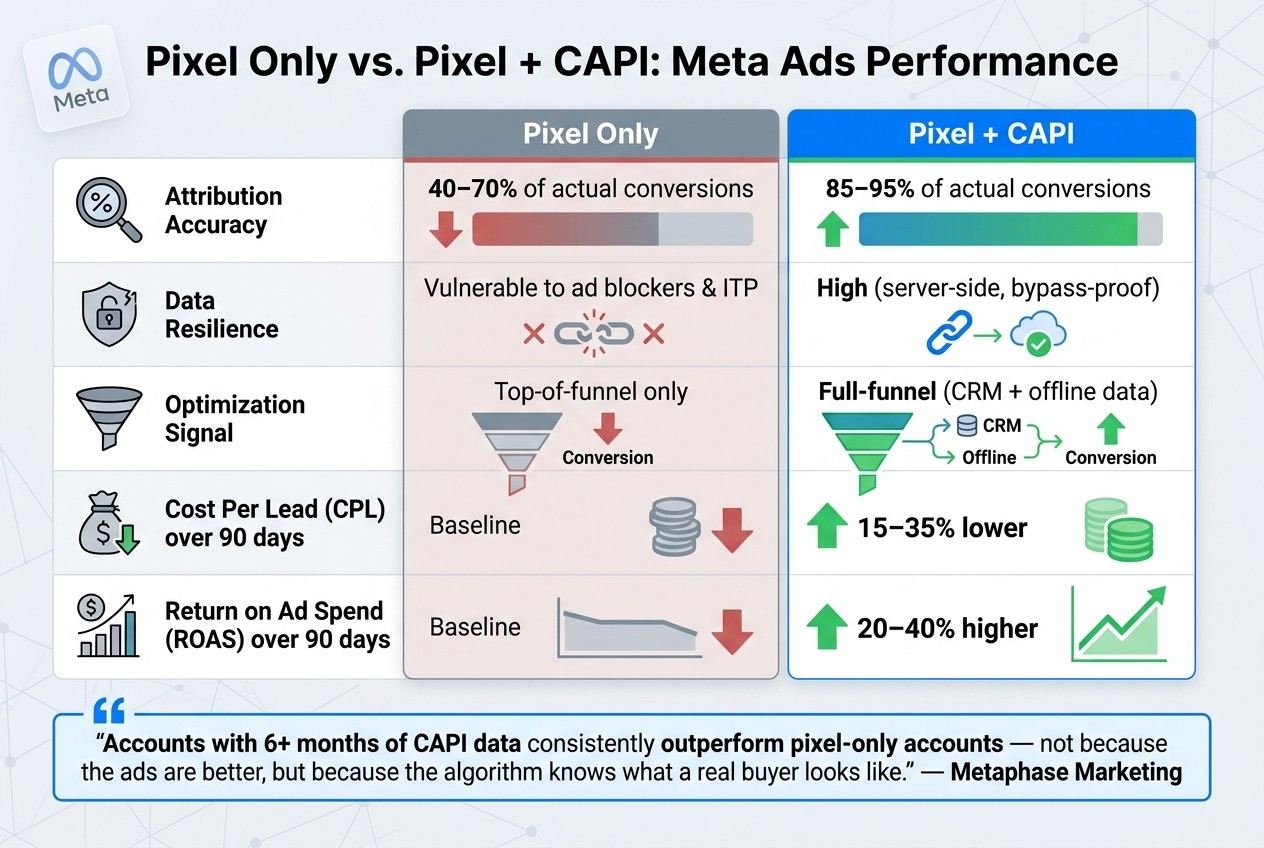
Pixel Only vs. Pixel + CAPI: Meta Ads Performance Comparison
Once you've got your offline data flowing into Meta through CAPI, the real magic begins. This data can transform your campaigns by improving targeting, refining audience quality, and making your budget work harder. The next step? Use this data to build sharper, more effective audiences.
Building Audiences from Offline Data
With your API setup in place, you can take audience targeting to the next level. While pixel-based audiences capture site visits, they don’t always reflect actual buyers. By syncing CRM data - like closed deals, in-store purchases, or completed appointments - you can create Custom Audiences of verified buyers. Even better, Meta’s Lookalike Audiences built on these offline converters often outperform those based on website visitors. Why? Because Meta’s algorithm learns from real customers who completed the sales process, not just those who browsed.
You can also get super specific by using custom parameters like store_code or lead_type to segment audiences. For example, you could create groups like "High-Value In-Store Customers" or "Enterprise Contract Signers" and either target or exclude them as needed.
To maximize audience matching, aim for a Match Quality Score of 7/10 or higher. This means including hashed data like email, phone number, name, ZIP code, and city.
Improving Bidding and Budget Decisions
Offline data doesn’t just improve targeting - it also changes what you’re optimizing for. Instead of asking Meta’s algorithm to find more form submissions, you can focus on the actions that matter most: booked appointments, signed contracts, or in-store purchases. This shift, often called "optimizing for high-value conversion actions", can make a big difference.
One actionable tip: align your key offline actions with the standard Purchase event, even if the action is something like an appointment or contract signing. Doing this unlocks the "Maximize value of conversions" performance goal. For businesses with varying deal sizes, this approach often beats the "Maximize number of conversions" goal.
For more precise budgeting, use Custom Conversions to break down data by product line or store location. This way, you’ll see the true cost per acquisition for each category rather than relying on an account-wide average.
The results speak for themselves. Campaigns running both pixel and CAPI together often see 15–35% lower Cost Per Lead (CPL) and 20–40% higher ROAS over 90 days compared to campaigns using only the pixel. These optimized bidding strategies also pave the way for better performance measurement.
Measuring Attribution and Campaign Performance
Better attribution is one of the biggest benefits of integrating offline data. Because CAPI operates server-side, it bypasses issues like ad blockers, iOS privacy updates (ATT), and Safari's Intelligent Tracking Prevention (ITP). It also captures events that happen days - or even weeks - after someone clicks an ad, without needing an active browser session. This is a game-changer for businesses with longer sales cycles.
The best practice? Use both the pixel and CAPI simultaneously. When you properly deduplicate events using a shared event_id, this setup can capture 85–95% of actual conversions, compared to just 40–70% with the pixel alone.
Metric | Pixel Only | Pixel + CAPI |
|---|---|---|
Attribution Accuracy | 40–70% of actual | 85–95% of actual |
Data Resilience | Vulnerable to ad blockers/ITP | High (server-side) |
Optimization Signal | Top-of-funnel only | Full-funnel (CRM/offline) |
CPL (90-day) | Baseline | 15–35% lower |
ROAS (90-day) | Baseline | 20–40% higher |
For businesses with extended sales cycles, make sure to enable "Extend attribution uploads" in Events Manager. This allows Meta to credit ad impressions up to 90 days old. Another must? Save the fbclid from your landing page URL in a cookie and pass it to CAPI through your CRM. This small step dramatically improves attribution accuracy for offline events.
"Accounts with 6+ months of CAPI data consistently outperform pixel-only accounts - not because the ads are better, but because the algorithm knows what a real buyer looks like." - Metaphase Marketing
Conclusion and Key Takeaways
Server-side data sharing has become essential for staying competitive in Meta advertising. As highlighted earlier, relying solely on browser pixels means missing a large portion of conversions, leaving Meta's algorithm with an incomplete understanding of what drives real results. To address these limitations, adopting server-side solutions is now a must for ensuring your advertising strategies remain effective.
Future-Proofing Your Advertising Strategy
The main reason to adopt CAPI offline sync is straightforward: Meta's algorithm can only optimize based on the data it receives. By providing it with real downstream signals - like closed deals, signed contracts, or in-store purchases - you enable it to identify what a true customer looks like, rather than just focusing on clicks or form submissions.
With Meta discontinuing the standalone Offline Conversions API on May 14, 2025, the unified CAPI has become the only supported solution. Using both the pixel and CAPI together, with a shared event_id, ensures your campaigns perform at their best. Strategies like capturing fbclid in your CRM and extending the attribution window to 90 days for longer sales cycles help close the data gap.
"Accounts with 6+ months of CAPI data consistently outperform pixel-only accounts." - Metaphase Marketing
Cleaner, more accurate signals lead to better optimization, reducing cost per lead (CPL) and increasing return on ad spend (ROAS). These improvements don’t just show immediate benefits - they compound over time.
To take full advantage of these enhanced signals, proper implementation and ongoing adjustments are key.
How AdAmigo.ai Can Help

Setting up CAPI is only the beginning. The real value comes from using that data to refine your campaigns - shifting budgets to high-value conversion events, creating lookalike audiences from verified buyers, and testing creatives against your best-performing segments. This is where AdAmigo.ai steps in.
AdAmigo's AI Autopilot takes the guesswork out of campaign management. It continuously analyzes your performance data, identifies opportunities, and makes adjustments - scaling up successful campaigns, pausing underperformers, and reallocating budgets to focus on the signals that matter most. Instead of manually interpreting your CAPI data in Ads Manager, let AdAmigo's AI handle the heavy lifting, providing clear explanations for every change it makes.
FAQs
What offline events should I send to Meta CAPI first?
To get started, send offline events such as in-store purchases, phone orders, and CRM updates to Meta's Conversions API (CAPI). These are the key types of offline data that Meta supports for tracking and attribution. By focusing on these events, you can ensure precise measurement and better alignment with Meta's tracking capabilities.
How do I prevent duplicate conversions between Pixel and CAPI?
To prevent duplicate conversions between Pixel and CAPI, use the event_id parameter. This parameter helps ensure that the same event isn't recorded twice, maintaining the accuracy of your data tracking and reporting. Implementing it correctly is key to avoiding discrepancies.
What’s the best way to capture and store fbclid for CRM syncing?
When a user clicks on your Meta ad, the most effective way to capture and retain the fbclid parameter is by saving it in a cookie. This allows you to store the parameter for later use. When sending offline events through the Conversions API, include this stored fbclid along with other user details - such as email, phone number, name, IP address, and user agent. Doing so helps boost attribution accuracy and ensures better match quality.