
How to Standardize Conversion Data for Meta Integration
Unify conversion data for Meta with consistent event IDs, SHA256-hashed identifiers, Pixel+CAPI deduplication, and EMQ validation for better attribution.
Accurate conversion data is the backbone of Meta Ads success. Without standardized data, you risk inflated metrics, double-counting, and poor ad targeting. This guide explains how to fix those issues by creating a unified schema for your conversion data, ensuring seamless integration with Meta's systems.
Key Takeaways:
Standardization solves three issues: accurate attribution, eliminating double-counting, and improving Event Match Quality (EMQ).
Meta's requirements include specific event parameters (
event_name,event_time,action_source) and hashed user data (e.g., email, phone).Deduplication is critical: Use consistent
event_idvalues across Meta Pixel and Conversions API to avoid duplicate conversions.Data enrichment improves quality: Proper formatting, hashing, and mapping improve EMQ scores, leading to better ad performance.
Tools to validate data: Use Meta's Payload Helper and Test Events to check your setup before going live.
By following these steps, you can improve your real-time conversion tracking, reduce wasted ad spend, and optimize Meta Ads for maximum ROI using AI tools.
What Meta Requires for Conversion Data
Core Data Points for Conversion Tracking
Meta's Conversions API and Pixel rely on specific data points to ensure accurate tracking. For each event, key parameters include:
event_name: The action taken, like "Purchase" or "Lead."event_time: A Unix timestamp (in seconds) indicating when the event occurred.action_source: Identifies where the event took place, such as "website", "app", "physical_store", or "system_generated" for CRM events.
For website-based events, adding event_source_url and client_user_agent helps improve attribution by connecting ad interactions to conversions. These form the foundation of a cohesive conversion tracking framework.
The user data object is another critical piece, linking events to Meta user accounts. At least one customer identifier is required, such as a hashed email (em), hashed phone number (ph), or the Click ID (fbc) from Meta's cookie. It's essential to hash all personally identifiable information (e.g., emails or phone numbers) using SHA256 before sending it. However, do not hash IP addresses, user agents, or cookie values like fbc and fbp.
For purchase events or campaigns using value optimization, the custom_data object must include parameters like:
value: The monetary amount of the purchase.currency: The currency type, such as "USD".
Meta also supports additional parameters like content_ids, num_items, and predicted_ltv to provide more context for optimization.
A common mistake is providing insufficient user data combinations. For example, sending only "First Name + Gender" or "Date of Birth + User Agent" isn't enough for precise matching. These combinations don't uniquely identify users. Since Meta uses an Event Match Quality score (rated 1 to 10) to measure how well your data matches its user accounts, weak data combinations can lower your score and hurt ad performance.
Why a Standardized Schema Matters
A standardized schema for conversion data isn't just a technical convenience - it plays a vital role in optimizing campaigns and delivering actionable insights. When every event, whether it’s a purchase, lead, or sign-up, follows the same structure, Meta's algorithms can quickly identify trends and allocate budgets to the most effective audiences by setting guardrails.
Standardization also avoids duplicate conversions caused by mismatched identifiers. For instance, if your Shopify store sends an order_id while your CRM sends a transaction_id for the same purchase, Meta can't deduplicate without a consistent event_id field, which may lead to inflated conversion counts.
For teams leveraging AI tools like AdAmigo.ai, which depend on real-time, standardized data, having a unified schema is essential. These systems need clean, consistent signals to adjust bids, refresh creatives, and reallocate budgets efficiently. Whether you're tracking in-app purchases, CRM leads, or physical store visits, a unified schema ensures your data remains clear, reliable, and actionable.
Install Facebook (Meta Ads) Conversion API with server-side GTM

Building a Unified Conversion Data Schema
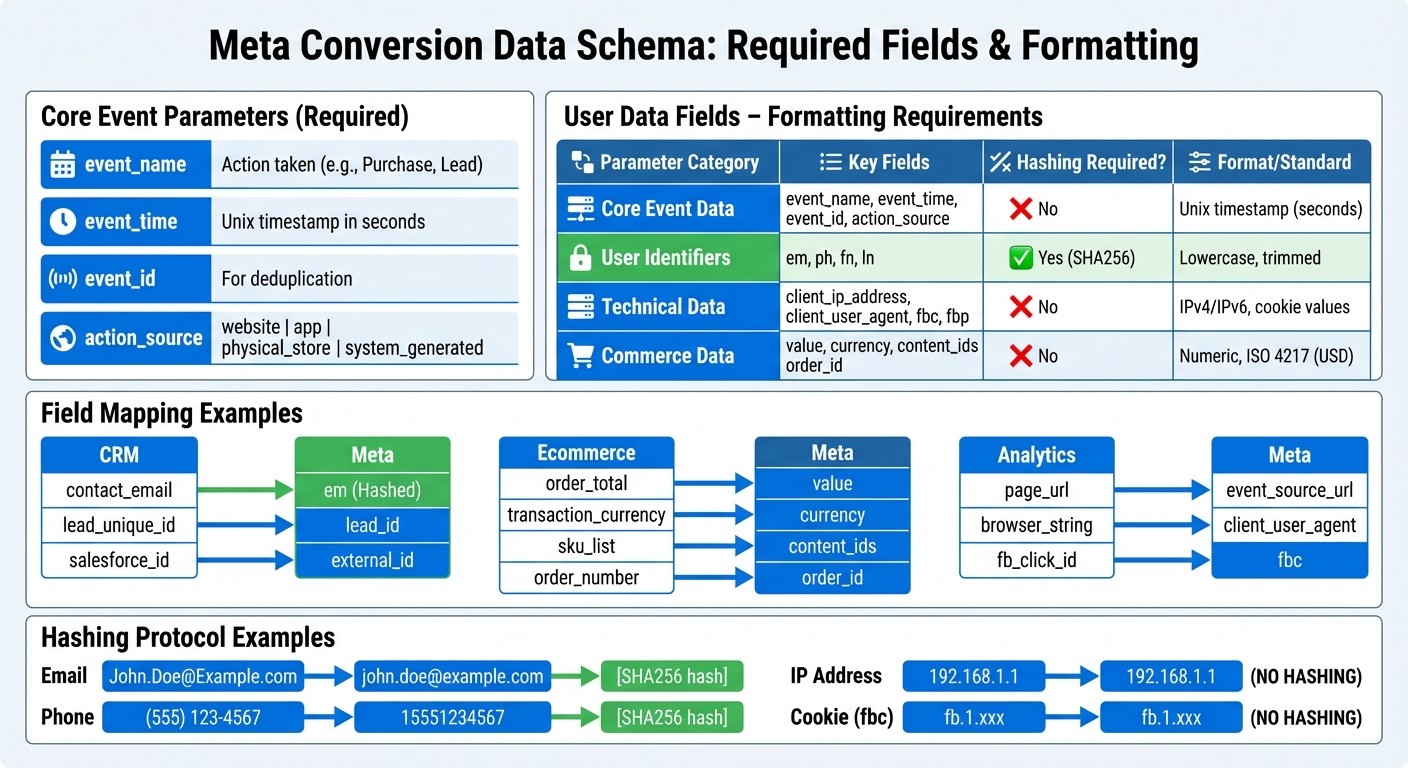
Meta Conversion Data Schema Requirements and Field Mapping Guide
Creating a unified schema for conversion data is crucial to ensure consistency across platforms like CRMs, Shopify stores, and mobile apps. This schema provides a standardized format for sending events to Meta, capturing all required fields while accommodating data from various sources.
Start by identifying the core event parameters every conversion must include:
event_name: The name of the event.event_time: A Unix timestamp in seconds.event_id: Used for deduplication.action_source: Indicates the origin of the event, such aswebsite,app,physical_store, orsystem_generated(for CRM leads).
Next, map out user data fields and custom attributes. User identifiers like email (em), phone (ph), first name (fn), and last name (ln) need to be hashed using SHA256 before being sent. However, technical fields such as client_ip_address, client_user_agent, fbc (click ID), and fbp (browser ID) should remain in their raw form. For purchase events, include fields like value (numeric) and currency (ISO 4217 format, e.g., USD). Additional parameters such as content_ids, order_id, and external_id help improve Meta's ability to match events accurately.
Below is a summary of the key schema components:
Parameter Category | Key Fields | Hashing Required? | Format/Standard |
|---|---|---|---|
Core Event Data |
| No | Unix timestamp (seconds) |
User Identifiers |
| Yes (SHA256) | Lowercase, trimmed |
Technical Data |
| No | IPv4/IPv6, cookie values |
Commerce Data |
| No | Numeric, ISO 4217 (e.g., USD) |
Formatting User Data Fields
When preparing user data, follow Meta's hashing protocol for identifiers like email and phone numbers. For emails, convert them to lowercase and trim any extra spaces. Phone numbers should include only the country code and digits - so a U.S. number like (555) 123-4567 becomes 15551234567 before hashing.
Geographic fields such as city (ct), state (st), zip code (zp), and country also require hashing and should be normalized to lowercase. However, do not hash IP addresses, user agent strings, or Meta's cookie values (fbc and fbp), as these are needed in their raw form for attribution. Regularly refresh fbc and fbp values from your website cookies to maintain high Event Match Quality scores.
Meta evaluates Event Match Quality on a scale from 1 to 10, and events with insufficient user data combinations are often rejected. For instance, pairing only "Gender + City" or "First Name + Gender" won't suffice. Instead, aim to include multiple identifiers like email, phone, and external ID for better matching accuracy. Once user data is standardized, ensure consistent naming conventions and attribute formats following API best practices.
Event Naming and Attribute Formatting
Event names should be consistent across all sources. Use Meta's standard event names - such as Purchase, AddToCart, Lead, or CompleteRegistration - whenever possible. If you're sending the same event via both the Pixel and Conversions API, ensure the event_name matches exactly to enable proper deduplication.
Convert all timestamps to Unix time (seconds). Meta allows backdating events by up to 7 days, but for Conversion Leads, the timestamp must reflect the actual lead generation time or the event will be discarded. For currency values, use the ISO 4217 three-letter code (e.g., USD, EUR, GBP), and ensure the value field is numeric (e.g., 142.52).
Before going live, use Meta's Payload Helper tool to validate your JSON structure. This tool ensures all required parameters for specific event types are present and correctly formatted. For teams managing multiple platforms, the Meta Business SDK (available in Python, PHP, Node, and other languages) can streamline hashing and automate batch requests.
Documenting Custom Events
While standard events are preferred, many businesses will need custom events to track specific actions that don't fit Meta's predefined categories. For example, a SaaS company might track TrialStarted or DemoBooked. These custom events are valid but won't benefit from Meta's built-in optimization unless mapped to a standard event using Meta custom conversion rules in campaign settings.
To maintain consistency, document every custom event in a centralized schema guide. Include details like the event name, the action it represents, the action_source, and any custom attributes being passed. For CRM integrations, send all stages of your sales funnel - such as "Marketing Qualified Lead", "Sales Opportunity", and "Converted" - as they occur. Providing these signals helps Meta's algorithm optimize more effectively.
For industries like automotive or real estate, Meta offers specialized parameters such as listing_type, property_type, make, and model, which can be incorporated into your schema for better results.
Mapping Source Data to Meta Conversion Fields
Mapping your source data to Meta's conversion fields is a crucial step in turning your standardized schema into actionable insights. By aligning each source field with Meta's required format, you ensure accurate conversion tracking. Since different systems often use varying field names, this mapping process helps maintain consistency across platforms.
Field Mapping Examples
For example, your CRM might label an email field as contact_email, while your ecommerce platform might call it customer_email_address. Both should be mapped to Meta's em parameter after applying SHA256 hashing. Similarly, fields like order_total or transaction_amount should align with Meta's value field, paired with a currency code formatted in ISO 4217 (e.g., USD).
Here’s a quick look at how common source fields map to Meta’s conversion schema:
Source System | Source Field Example | Meta Standard Field | Object Category |
|---|---|---|---|
CRM |
|
| Customer Information |
CRM |
|
| Customer Information |
CRM |
|
| Customer Information |
Ecommerce |
|
| Custom Data |
Ecommerce |
|
| Custom Data |
Ecommerce |
|
| Custom Data |
Ecommerce |
|
| Custom Data |
Analytics |
|
| Server Event |
Analytics |
|
| Customer Information |
Analytics |
|
| Customer Information |
For website events, you’ll also need to include action_source (set to website), along with client_user_agent and event_source_url. Additionally, timestamps must be converted to Unix epoch time (in seconds) for the event_time field.
Handling Incomplete Data
It’s not uncommon for some data sources to lack complete customer details. However, Meta won’t accept events that only include broad location data - such as City + State + Zip + Gender. To meet validation requirements, you’ll need strong identifiers like email addresses, phone numbers, or external IDs.
When working with CRM data, ensure you include these robust identifiers to improve Event Match Quality scores. For example, if a phone number in your source system doesn’t include a country code, you’ll need to add it during the mapping process. A U.S. phone number like (555) 123-4567 should be formatted as 15551234567 before hashing. On ecommerce platforms that don’t capture user agent strings, you can still send purchase events, but keep in mind that match rates may be lower without technical parameters like client_ip_address and client_user_agent.
To ensure your fields are correctly mapped, use Meta’s Payload Helper tool. This tool validates your JSON structure, checks for required parameters based on event types, and flags any formatting errors before you push to production.
Maintaining Mapping Documentation
As your data sources grow and evolve - whether through new CRM fields, updated ecommerce platforms, or additional analytics tools - your mappings will need periodic updates. Maintaining a central mapping document is key. This document should list every source field, its corresponding Meta parameter, whether hashing is required, and which team owns the data source.
A shared reference document avoids inconsistencies when multiple teams or agencies handle Meta integrations. For instance, if your marketing team maps crm_transaction_id to order_id, but your engineering team uses purchase_reference_number, this mismatch could lead to data conflicts. A central reference ensures everyone stays aligned and simplifies onboarding for new team members.
Lastly, remember to batch events in groups of up to 1,000 and note that Meta allows data backfills for events up to 7 days old. By maintaining consistent field mapping, you’ll create a solid foundation for seamless data syncing and validation in your Meta integrations.
Syncing Pixel and Conversions API Data
To maintain accurate data tracking, it's essential to sync both browser and server events by connecting Meta Ads to third-party tools. By using both Meta Pixel and the Conversions API to send identical events, you can ensure that conversions are captured even if issues arise - like a browser crash, blocked cookies, or lost connectivity. This dual approach follows best practices for Meta Pixel data sync to keep your tracking reliable. However, without proper deduplication, you risk counting the same conversion twice.
Using Event IDs for Deduplication
To avoid double-counting, your Pixel and Conversions API (CAPI) events must share the same event_name and event_id. The event_id should be generated at the exact moment the event occurs, such as when a page loads or a button is clicked. Use this same unique ID across both the browser Pixel and server-side CAPI. For example, if a customer completes a purchase, your checkout page could create an ID like purchase_abc123xyz and include it in both the browser and server events.
Meta automatically discards duplicates within a 48-hour window if the server and browser events have matching keys. For purchase events, you can add another layer of deduplication by including the order_id parameter in the custom_data field. If needed, Meta can also use a combination of external_id and fbp (browser ID) for deduplication, as long as both are provided in each channel.
Once deduplication is in place, the next step is to format and hash user data correctly, similar to the process in an offline conversions API setup, before sending it to Meta.
Preprocessing and Hashing User Data
Before sending customer information to Meta, ensure the data is properly formatted and hashed. Most parameters should be hashed using SHA256. For example, emails should be trimmed of extra spaces and converted to lowercase - John.Doe@Example.com becomes john.doe@example.com before hashing. Similarly, phone numbers should have formatting removed and include the country code, so (555) 123-4567 becomes 15551234567.
Certain parameters, like client_ip_address, client_user_agent, fbc (Click ID), or fbp (Browser ID), should not be hashed. To simplify the process, you can use Meta Business SDKs, which can automatically hash user parameters. Properly formatted and hashed data improves your Event Match Quality (EMQ) score, leading to better ad attribution and delivery optimization.
Normalizing Time Zones and Attribution Windows
All event_time values should be converted to Unix timestamps and standardized to UTC. If your internal systems use different time zones - like Pacific Time for your CRM and Eastern Time for your ecommerce platform - make sure everything is converted to UTC before sending it. This prevents discrepancies where the same event might appear to occur at different times.
Timely event reporting is critical for ad performance. Events sent more than 2 hours after they occur can negatively impact ad performance, and delays of 24 hours or more can cause serious attribution problems. Aim to send events in real time or as close to real time as possible to maintain accuracy and optimize results.
Validating and Monitoring Conversion Data
Keeping your conversion data accurate is crucial to prevent errors and missing parameters that can hurt your performance. Meta provides tools to help debug conversion tracking issues early, while automated checks ensure your data stays reliable over time. These steps complete the integration process that begins with standardizing and mapping your data.
Testing in Meta Events Manager
The Test Events tool in Meta Events Manager is your starting point for ensuring sample events are being received correctly. Use real customer information, like your own email or phone number, during testing. This way, the test events can match an actual Meta account instead of being discarded. This step is essential to confirm that deduplication is functioning properly and that your event_id implementation is working as intended.
The Diagnostics tab offers a centralized view of any setup issues or formatting errors. It breaks down key metrics like Event Match Quality (EMQ), Data Freshness, and Deduplication. EMQ scores, which range from 1 to 10, measure how well your customer data (e.g., email, phone, IP address) matches Meta accounts. Scores of 8.0 or higher indicate strong matching, while lower scores point to issues like missing or poorly formatted data. As Meta explains:
"Low Event Quality impacts match rate, availability, and can result in longer learning phases and suboptimal campaign optimisation".
For offline conversion events, keep an eye on your Offline Data Quality (ODQ) score. This score evaluates factors like data freshness, upload frequency, match key coverage, and purchase value accuracy. A score of 8.5 or higher is recommended for optimizing omnichannel ad campaigns. Use Meta's Payload Helper tool to validate your payloads during this process.
Setting Up Automated Data Checks
Automated validations can help you monitor key fields like action_source, event_time, and event_name. These checks also ensure that personally identifiable information (PII) is securely hashed using SHA256, while technical parameters remain unhashed. Additionally, automated tools can track critical metrics like catalog match rates (aiming for above 90%) and data freshness. The Integration Quality API can monitor your EMQ and ODQ scores, sending alerts if quality drops below acceptable levels.
Implementing Data Governance Rules
To maintain high data quality, stick to Meta’s standard event names and parameters - such as Purchase, AddToCart, value, and currency. This ensures your data aligns with Meta’s optimization algorithms. Document the required PII for each event type and set minimum matching thresholds to avoid sending incomplete or weak data combinations that Meta might reject.
Establish clear governance rules and a change management process to handle schema updates. Before rolling out changes to production, validate new payloads using the Test Events tool and Payload Helper. For offline events, upload data at least 12 times within a 14-day period to maintain ad eligibility. Regularly audit your deduplication and matching configurations. Keep in mind that web events have a 48-hour deduplication window, while offline events have a 7-day window. These steps are key to ensuring your campaigns perform at their best. Leveraging real-time data for Meta Ads further enhances these optimizations by providing immediate feedback for AI-driven bidding.
Conclusion
Standardizing your conversion data isn’t just a technical upgrade - it’s a direct way to enhance campaign results and boost your revenue. By integrating both Meta Pixel and Conversions API with correctly formatted data, advertisers can achieve up to 19% more attributed events and see up to 13% better cost per result. These gains are largely thanks to higher Event Match Quality (EMQ), which allows Meta’s algorithms to deliver ads with greater precision. This solid data foundation also supports AI-driven tools designed for smarter ad management.
Key elements like a unified schema, accurate field mapping, and effective deduplication ensure that Meta receives clean, consistent data to optimize your ads. Regular automated checks and strong data governance are essential to keeping this system running smoothly and maintaining these advantages over time.
Platforms like AdAmigo.ai take things a step further. With standardized conversion data, AI tools can make more informed decisions about creative choices, audience segmentation, and budget distribution. These systems work tirelessly, analyzing performance data and fine-tuning campaigns in real time - delivering results that go beyond what manual adjustments can achieve.
By prioritizing data standardization, you reduce troubleshooting headaches and position your campaigns for faster, more strategic growth. You’ll benefit from more accurate attribution, quicker optimization cycles, and stronger performance from the start.
Stick to the essentials outlined in this guide: follow a Meta conversion data sync checklist to monitor your EMQ scores, enforce strict data governance, and keep refining your system. The payoff? A conversion tracking setup that not only satisfies Meta’s standards but also gives you a competitive edge in today’s automated advertising environment.
FAQs
Why is standardizing conversion data important for better ad performance on Meta?
Standardizing your conversion data is key to maintaining clean and consistent event parameters. This minimizes tracking errors and sharpens audience segmentation, which in turn boosts the quality of signals Meta relies on to optimize your ads.
When you supply accurate and well-structured data, Meta’s algorithms gain a clearer picture of user behavior. This translates into better-performing campaigns and a stronger return on ad spend (ROAS).
What are the key elements of a standardized conversion data format for Meta Ads?
A unified conversion data format ensures your event data remains clean, consistent, and ready to work with Meta’s Conversions API. This makes tracking and improving performance much smoother by avoiding mismatched fields, cutting down on duplicate uploads, and simplifying data mapping across multiple sources like websites, apps, and offline systems.
Here’s what it typically includes:
Core event details: These fields define the event type and source. Examples include
event_name,event_time(in Unix timestamp format),event_id(used for deduplication), andaction_source(like a website or app).User data: Hashed identifiers such as
email,phone,address, andclient_ip_addresshelp Meta link conversions back to specific users.Custom data: Business-specific metrics like
value,currency,content_ids, andcontentsoffer additional insights into purchases or other actions.Deduplication safeguards: By using
event_idand performing consistency checks, you can avoid double-counting and maintain accurate data.
When your data schema is structured consistently, mapping it from platforms like CRMs or e-commerce systems to Meta becomes effortless. Tools like AdAmigo.ai can take this a step further by automating data mapping and real-time uploads. This way, you can focus on your strategy while ensuring your data is reliable and your ads perform effectively.
How can I avoid duplicate conversion tracking across Meta platforms?
To avoid duplicate conversions when using both the Meta Pixel and Conversions API, you can rely on Meta's deduplication process. Here's how it works:
Assign a unique event ID: Use something like a UUID or an order number as the
event_id. Include this ID in both the Pixel and Conversions API requests for the same event. This helps Meta identify and discard duplicates effectively.Provide a consistent timestamp: Use Unix epoch time to record when the conversion occurred. This ensures both requests align correctly in Meta's system.
Enable the deduplication flag: In the API call, make sure parameters such as
event_source_urlandaction_sourceare consistent. Meta will prioritize the more reliable server-side events and drop any duplicates from the Pixel.
For an automated solution, AdAmigo.ai can simplify this process. It generates unique event IDs and ensures consistent formatting across both Pixel and server-side events, letting you focus on strategy while keeping your conversion data clean and accurate.