
Offline Conversion Insights for Meta Ads
Connect in-store, phone, and CRM sales to Meta ads by setting up offline event sets, uploading hashed identifiers or using the Conversions API to measure true ROAS.
Many businesses rely on Meta ads to drive sales, but standard online tracking often misses offline actions like in-store purchases, phone orders, or CRM-recorded deals. Offline conversion tracking solves this by linking these real-world activities back to your Meta campaigns, giving you a full picture of ad performance. Use a conversion optimization checklist to ensure your tracking is accurate.
Key Benefits of Offline Conversion Tracking:
Connects offline sales (e.g., in-store, phone) to your Meta ads.
Improves targeting by identifying profiles and behaviors that lead to offline revenue.
Optimizes ad spend by focusing on campaigns driving both online and offline results.
How It Works:
Set Up Offline Tracking: Create an offline event set in Meta Business Manager and link it to your ad accounts or integrate with other analytics tools.
Collect Data: Track events like purchases, leads, or deals using standardized customer data (e.g., email, phone, ZIP).
Upload Data: Send offline events manually via CSV or automatically through Meta’s Conversions API.
Why It Matters: Without offline tracking, Meta might overlook conversions, underestimating your campaigns' true impact. This can lead to misallocated budgets and missed opportunities to optimize for high-value customers.
How to Set Up Facebook Offline Conversion Tracking (Step-by-Step Tutorial 2025)
Once you've set up real-time conversion tracking, you'll need to analyze Meta ad metrics to see how offline conversions impact your overall ROAS.
Setting Up Offline Conversion Tracking
How to Set Up Offline Conversion Tracking for Meta Ads in 3 Steps
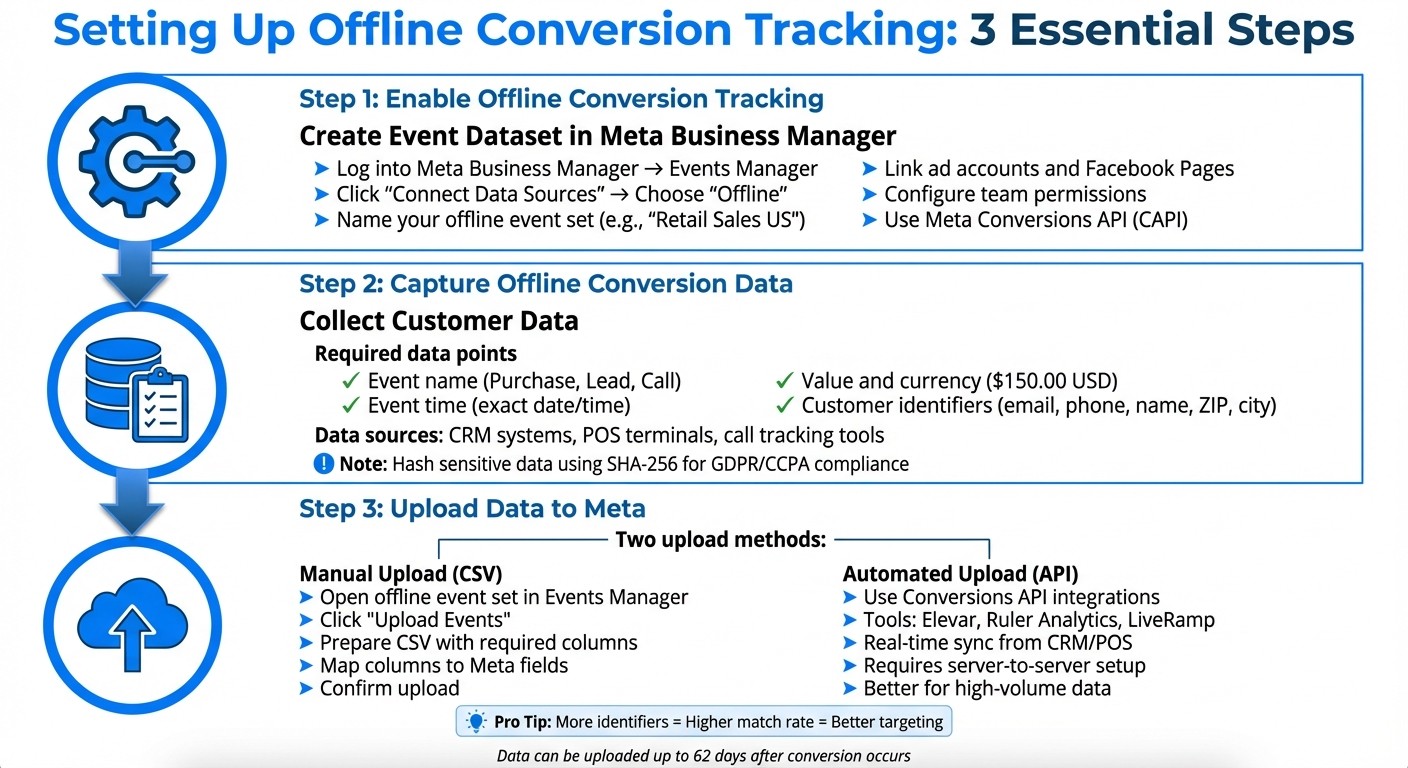
To set up offline conversion tracking, follow three main steps: create an event dataset, collect customer data, and upload it to Meta. These steps work hand-in-hand with your Meta ad optimization strategy.
Enabling Offline Conversion Tracking in Meta Business Manager
Begin by logging into Meta Business Manager and heading to the Events Manager section. Click "Connect Data Sources" and choose "Offline" from the options provided. When prompted, name your offline event set - pick something descriptive like "Retail Sales US" or "Phone Orders Q4 2025." Link relevant ad accounts and Facebook Pages to connect offline events to your campaigns. Then, configure permissions to ensure only authorized team members can access or upload customer data. Once your offline event set is ready and connected, it can start receiving data. Use the Meta Conversions API (CAPI) for this process, as older APIs are no longer supported.
Capturing Offline Conversion Data
Accurate tracking hinges on collecting detailed and reliable customer data. At a minimum, you’ll need to record:
Event name (e.g., Purchase, Lead, or Call)
Event time (exact date and time of the conversion)
Value and currency (e.g., $150.00 USD)
Customer identifiers (such as email addresses, phone numbers, names, ZIP codes, and cities)
The more identifiers you include for each transaction, the better Meta can match offline events to users who interacted with your ads.
Most businesses gather this information through CRM systems, point-of-sale (POS) terminals, call tracking tools, or subscription platforms. For example, if you run a retail chain, your POS system can log a customer’s email or phone number during checkout, along with the purchase amount and timestamp. If you manage a B2B operation, your CRM system should capture when a lead transitions into a customer, including deal value and contact details. To comply with GDPR and CCPA regulations, sensitive data (like emails and phone numbers) should be hashed using SHA-256 before uploading.
Uploading Offline Data to Meta
You can upload offline data in one of two ways: manually using CSV files or automatically through integrations with the Conversions API.
For manual uploads, open your offline event set in Events Manager and click "Upload Events." Prepare a CSV file with columns for key fields such as event_name, event_time, value, currency, event_source (e.g., "physical_store" or "phone_call"), and customer identifiers (email, phone). Ensure your file uses a consistent date format (MM/DD/YYYY or ISO), lists currency in USD, and follows standard U.S. number formatting (periods for decimals and commas for thousands). After uploading the file, map each column to the appropriate field in Meta's setup wizard and confirm the upload.
For businesses handling higher data volumes or needing quicker updates, automated uploads via the Conversions API are a better option. Tools like Elevar, Ruler Analytics, and LiveRamp can sync offline events from your CRM or POS system to Meta in near real time. While these integrations require some technical setup - such as server-to-server connections, API authentication, and proper data formatting - they significantly reduce manual effort and improve attribution accuracy compared to third-party tools by ensuring Meta receives conversion data with minimal delay.
Optimizing Campaigns with Offline Conversion Data
Once your campaign is live, offline data plays a key role in fine-tuning ad delivery, creative strategies, and overall campaign performance.
Using Offline Data to Improve Targeting
When Meta matches your offline conversions - like in-store purchases or phone sales - with users who engaged with your ads, its algorithm identifies patterns to find audiences more likely to convert. This means the platform prioritizes showing your ads to users who share traits with your most valuable offline customers. For example, if your data highlights a specific group driving significant in-store revenue, Meta can focus on reaching more people with similar characteristics.
This method not only improves relevance but also boosts ROI by targeting users who mirror your best offline customers. The more identifiers you provide - such as email, phone number, name, and ZIP code - the higher your match rate, leading to more precise targeting.
With these insights in hand, you can adjust your creative assets and budget allocation.
Optimizing Creative and Budget Allocation
Offline conversion data provides clarity on which ads are driving tangible results. Using AI tools for Meta ad account analysis can help identify these patterns more quickly. By analyzing which creatives generate the highest offline conversion rates, you can shift your budget toward the campaigns that deliver real-world outcomes by scaling Meta ad budgets effectively. For instance, if a video ad showcasing your retail store outperforms a static product image in driving in-store sales, you can reduce spending on underperforming creatives and allocate more to the winning video ad.
This strategy ensures you're maximizing your return on ad spend (ROAS) while minimizing wasted resources. Campaigns with better offline purchase attribution should receive increased budgets, and your creatives should be updated to align with these high-performing ads.
Next, consider extending your attribution window to capture delayed conversions.
Extending Attribution Windows for Better Insights
Offline conversions often take time, especially for higher-value purchases or products with longer sales cycles. Adjusting Meta's attribution window in Ads Manager allows you to capture these delayed conversions. Depending on your business model, you might set attribution windows to 7, 28, or even 90 days.
For example, if you sell furniture and customers typically visit your store within two weeks of seeing an ad, a 28-day attribution window can help ensure those conversions are accurately reflected in your performance metrics.
For advertisers juggling multiple campaigns or seeking automation, tools like AdAmigo.ai can streamline this process. These platforms analyze both online and offline conversion data, adjust targeting and budgets in real time, and even create new ad creatives based on what’s driving actual sales. This eliminates manual guesswork and helps scale performance effectively.
Measuring Offline Conversion Performance
Once your offline data is uploaded to Meta, the next step is to evaluate profitability. This helps you identify which campaigns are genuinely driving revenue and which ones only appear successful on the surface.
Viewing Offline Conversion Data in Meta Ads Manager
Offline conversion metrics can be accessed in Ads Manager, but they aren’t included by default. You’ll need to use the Customize Columns feature to add metrics like Offline Conversions, Offline Purchase Conversion Value, and Offline ROAS. These can be displayed alongside your standard online metrics, such as Website Purchases, Website Purchase Conversion Value, and ROAS. For a complete performance overview, include cost and engagement metrics like Spend, CPC, CPM, CTR, and Landing Page Views. Once you’ve set this up, save it as a preset for easy access in the future, or use Meta ads reporting dashboards to automate the process.
Before trusting the data, it’s essential to validate it in Events Manager. Check event counts, upload statuses, and the match rate (the percentage of uploaded events successfully matched to Meta users). If your match rate falls below 30%, it could signal issues such as missing or poorly formatted identifiers (e.g., email, phone number, name, or ZIP code). Cleaner data and more identifiers typically lead to higher match rates.
Keep in mind that offline conversions don’t always appear immediately. Meta allows up to 90 days for offline events to be uploaded after an ad interaction. This means performance data for a specific date range can continue to update as new conversions are logged. For campaigns with longer sales cycles - like B2B deals or high-value retail purchases - using attribution reporting windows of 28 to 60 days can better capture delayed conversions. Comparing initial performance data with finalized figures often reveals the true impact of these delays.
These steps lay the groundwork for calculating accurate ROAS benchmarks.
Calculating True Return on Ad Spend (ROAS)
Once your data is properly organized, you can calculate a more accurate ROAS by incorporating both online and offline revenues. Standard Meta ROAS only accounts for online revenue, which leaves out crucial contributions like in-store sales, phone orders, or CRM-closed deals. To get a clearer picture, use this formula:
True ROAS = (Online Revenue + Offline Revenue) ÷ Meta Ad Spend
Start by combining Website Purchase Conversion Value and Offline Purchase Conversion Value. Then, divide the total by your ad spend (in USD). For more detailed insights, export your data to a spreadsheet or BI tool to calculate separate metrics like Online-only ROAS, Offline-only ROAS, and Blended ROAS. This breakdown helps pinpoint which campaigns excel at driving online sales, which are better for offline conversions, and which deliver strong combined results.
To ensure your ROAS calculations are accurate, assign actual transaction values and map events to conversion goals, including taxes and shipping if applicable. For leads where the final deal size isn’t confirmed, use expected deal values or lifetime value (LTV). It’s also helpful to categorize events by type - such as Qualified Lead, Closed Won, or Repeat Purchase - to reflect their true economic impact. Periodic reconciliation of your CRM or POS data with Meta’s reporting can help catch discrepancies, such as missing large deals or misformatted values.
These insights allow you to reallocate budgets more effectively. For example, you can shift resources from campaigns that perform well online but underdeliver offline to those driving stronger overall revenue. Tools like AdAmigo.ai can simplify this process by continuously analyzing both online and offline conversion data. They can automatically adjust bids, budgets, and targeting in real time to focus on segments that yield the highest blended ROAS.
"We are getting INSANE RESULTS! Our budgets are controlled, our spend is being smartly allocated and our ROAS is up massively. Agencies charging 7 times the cost of AdAmigo have been put to shame quite frankly!" – Rochelle D., G2 Review
Overcoming Common Challenges with Offline Conversion Tracking
Even with a well-structured setup, offline conversion tracking can face hurdles that impact accurate revenue attribution. Challenges like low match rates, privacy regulations, and delayed conversions can skew your data, making it harder to connect ad spend with real-world results. Here’s how you can tackle these issues to improve data accuracy and attribution using AI-driven insights.
Improving Data Matching Accuracy
Getting accurate matches is essential for attributing offline sales to your Meta ads. Meta uses hashed identifiers - such as email, phone number, name, and ZIP code - to match offline events to users. But when these identifiers are incomplete, missing, or incorrectly formatted, match rates can drop significantly, often hovering around 30–40%. This leaves many conversions uncredited.
To boost your match rate, always include at least an email and phone number for every conversion. When possible, add extra details like first name, last name, ZIP code, city, state, and country. Proper formatting is key:
Phone numbers: Use the E.164 format with country codes (e.g., U.S. numbers as
+1XXXXXXXXXXwith no spaces or dashes).Emails: Ensure they are in lowercase.
Timestamps: Use the ISO 8601 format.
Currency values: Use periods as decimal separators, with no thousands separators (e.g.,
1234.56USD).
Before sending data through the Conversions API, hash all personally identifiable information (PII) using SHA-256. If you’re manually uploading CSV files via Events Manager, Meta will hash the data for you, but it’s still crucial to clean and format the data before uploading. Afterward, check your match rate in Events Manager. If it’s lower than expected, review your data formatting and identifiers, then re-upload recent events as needed.
Handling Privacy Compliance
Uploading customer data to Meta requires strict adherence to privacy laws like GDPR and the CCPA and Meta's Business Tools Terms. Wherever you collect customer data - whether in-store, online, or over the phone - your privacy policy should clearly state that this information may be shared with partners like Meta for advertising and measurement purposes.
To comply with privacy regulations:
Respect opt-out requests by maintaining suppression lists and excluding opted-out users from uploads and audience building.
Only upload the necessary data for matching and measurement, avoiding sensitive information like Social Security numbers, health records, or data about children.
Always hash PII before it leaves your environment when using the API, and ensure data is securely transmitted.
Document your data handling processes for audit purposes and set data retention limits for offline logs.
Once data privacy is ensured, you can shift your focus to managing delays in conversion reporting.
Managing Delayed Conversions
Offline conversions often don’t happen immediately. High-value purchases, B2B deals, or in-store sales can take days - or even weeks - to complete after a user interacts with your ad. Meta allows you to upload offline events up to 62 days after they occur. However, if uploads are delayed or infrequent, you risk missing attribution opportunities.
To address this, automate your uploads to send offline events in near real time from your CRM. For longer sales cycles, configure your CRM to trigger Conversions API events at key milestones, such as when a lead is qualified, an opportunity is created, or a contract is signed. Use the actual conversion timestamp to ensure accurate attribution across different devices.
For extended sales cycles, consider optimizing for earlier offline events (e.g., Appointment Booked or Demo Completed) while still tracking final revenue for more precise ROAS calculations. You can also expand attribution windows in Ads Manager reporting or build custom BI reports to connect campaign spend to eventual revenue. Tools like AdAmigo.ai can help by analyzing both short- and long-term outcomes, identifying which early-stage events predict long-term revenue, and automatically adjusting optimization goals and bidding strategies accordingly.
Conclusion
Tracking offline conversions has become a crucial part of Meta's measurement strategy, especially for businesses where a significant portion of revenue comes from phone calls, in-store purchases, or deals logged in a CRM system. Without incorporating these offline signals, Meta's algorithm misses critical customer journey actions, which can lead to inaccurate ROAS calculations and inefficient ad spend.
By uploading offline events to Meta, you give the platform a more complete picture of your customer interactions. This comprehensive view allows you to amplify successful strategies and eliminate underperforming ones. Using first-party offline data ensures greater accuracy, even as privacy updates continue to limit the effectiveness of browser-based tracking. Even a straightforward offline setup - built on clean customer data, consistent uploads, and defined ownership - can significantly enhance targeting precision and performance compared to relying solely on pixel-based tracking vs. Conversions API.
This approach connects online metrics with offline revenue seamlessly. Make sure your data is clean and ready to flow into Meta, and use the insights to refine your campaigns. Tools like AdAmigo.ai can help streamline this process by automatically integrating online and offline performance data, testing creatives and audiences, and optimizing bids and budgets in real time. This enables you to focus on strategy while your campaigns benefit from a unified view of conversion data, driving improved performance over time.
FAQs
How can offline conversion tracking enhance Meta ad performance?
Offline conversion tracking connects your online advertising efforts to real-world customer actions, like in-store purchases or phone inquiries. By uploading offline data to Meta Ads Manager, you can pinpoint which ads are driving real outcomes - not just clicks or website visits.
This information helps Meta's algorithms fine-tune ad delivery, focusing on users more likely to take meaningful actions. Over time, this can improve campaign performance, boost your return on ad spend (ROAS), and make budgeting decisions more effective. Tools such as AdAmigo.ai can simplify this process by automating optimizations and scaling successful strategies with ease.
What information is required to accurately track offline conversions for Meta ads?
To measure offline conversions accurately, you’ll need specific customer details like transaction records, contact information (such as phone numbers or email addresses), and timestamps for offline interactions. This information helps Meta connect offline events to ad engagements, giving you a clearer picture of how your campaigns influence real-world outcomes.
Make sure your data is properly formatted and securely uploaded to Meta's Offline Events Manager. Clean, consistent data enhances match rates, allowing you to fine-tune your campaigns based on actual business performance.
How can businesses stay compliant with privacy laws when using offline conversion tracking?
To stay on the right side of privacy laws while leveraging offline conversion tracking, businesses need to stick to a few crucial practices. First and foremost, get clear consent from users before collecting or processing their data. Be upfront about how their information will be used, and make sure opt-in options are easy to understand and accessible.
It's also important to align your data management practices with relevant laws like GDPR, CCPA, or any other local regulations. Use secure methods when uploading or sharing offline data, and take steps to protect sensitive information - this could mean encrypting or anonymizing it. Finally, make it a habit to regularly review your processes. Privacy laws and expectations change, and staying current helps you maintain compliance and build trust with your audience.