
Best Practices for Mapping App Events in Meta Ads
Map app events for Meta Ads: use standard names, prioritize revenue events, include value and currency, enable AEM, avoid duplicates, and test regularly.
Accurate event mapping is essential for improving Meta Ads performance. Here’s why: it speeds up learning, optimizes ad spend, and helps Meta’s algorithm target high-value users effectively by leveraging machine learning for Meta Ads metrics. Poor mapping can waste your app's 1,000-event limit, fragment data, and hurt results. Follow these steps to map events to ensure better campaigns:
Use Standard Event Names: Align app actions (e.g.,
Purchase,Lead) with Meta’s predefined events for better optimization.Prioritize High-Value Events: Focus on revenue-driving actions like
PurchaseandInitiateCheckout.Include Revenue Data: Add parameters like
valueandcurrencyto enhance ROAS (return on ad spend).Set Up Aggregated Event Measurement (AEM): Ensure compliance with iOS tracking rules and prioritize key events.
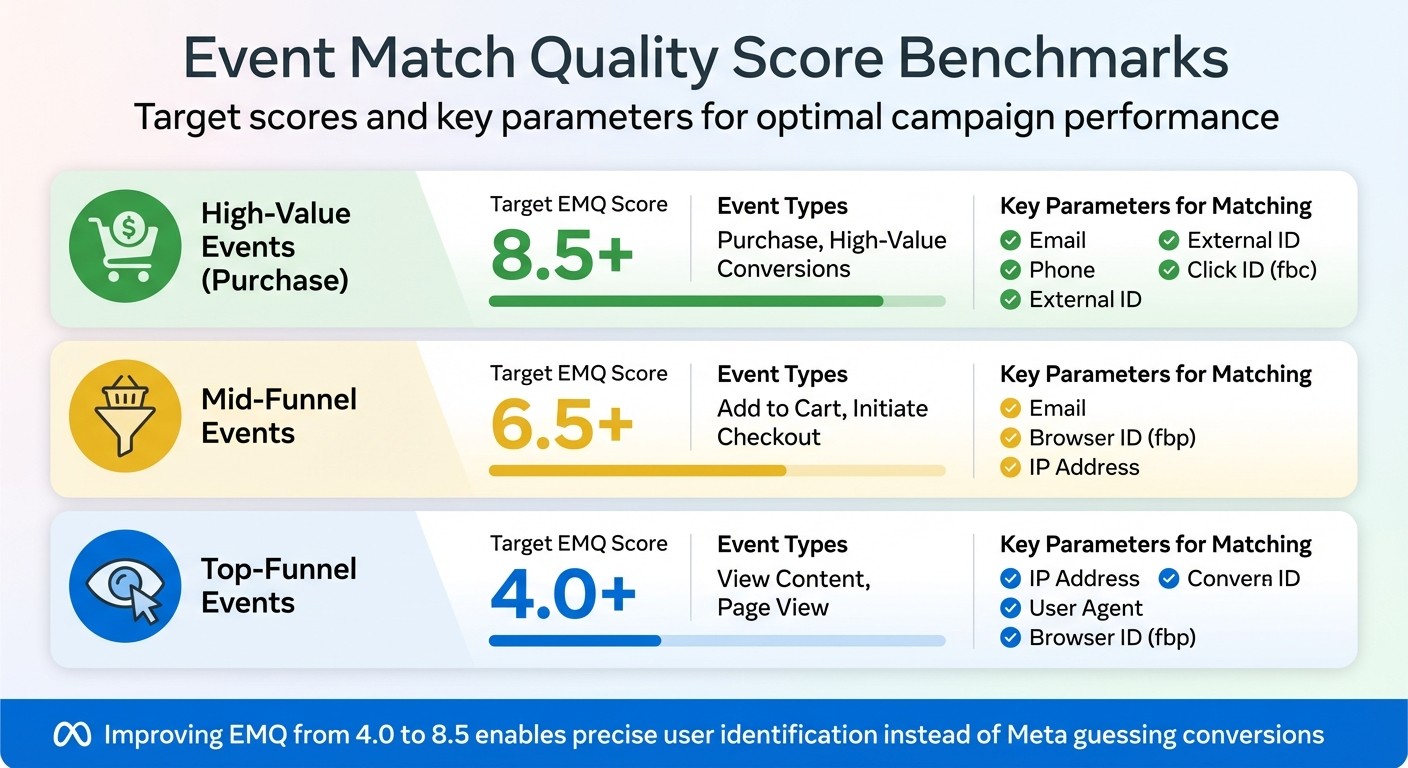
Monitor Event Match Quality (EMQ): Aim for scores above 8.5 for
Purchaseevents to improve targeting and attribution.Implement real-time conversion tracking and test events regularly: Use Meta’s tools to validate mappings and fix errors before campaigns go live.
Avoid Duplicate Events: Use unique event IDs across SDKs and APIs to prevent inflated metrics.
Use Custom Aliases: Map internal event names to Meta’s standards without disrupting your systems.
Leverage the Signals Gateway: Centralize multi-platform event tracking for consistent data.
Automation tools like AdAmigo.ai can simplify mapping, validate data, and improve campaign efficiency. Proper mapping ensures Meta’s algorithm works smarter, delivering better results and higher ROAS.
Event Match Quality Score Benchmarks for Meta Ads Optimization
1. Map Events to Meta's Standard Event Names
Event Alignment with Meta's Standard Naming Conventions
Using Meta’s standard event names - like Purchase, AddToCart, and CompleteRegistration - is essential for optimizing campaigns effectively.
Event Type | Meta Standard Name | Purpose |
|---|---|---|
Purchase |
| Tracks completed transactions to optimize ROAS |
Add to Cart |
| Tracks mid-funnel intent for retargeting within a full-funnel setup |
Lead |
| Tracks sign-ups or contact requests |
Registration |
| Tracks new user account creation |
App Install |
| Tracks initial app downloads (deduplicated over 90 days) |
These mappings are the backbone of effective campaign optimization.
Impact on Campaign Optimization and ROAS
Getting event names right isn’t just a technical detail - it’s a game-changer for campaign performance. When events like Purchase include parameters like value and currency, Meta can optimize beyond basic conversions and focus on return on ad spend (ROAS). This level of precision ensures your ad budget goes toward actions that generate real revenue. Plus, it unlocks advanced features, such as value-based lookalike audiences, which can further refine targeting and improve results. This process is often the first step before you create custom audiences to re-engage high-value users through AI-powered retargeting.
Data Integrity and Accuracy in Event Mapping
Before rolling out updates, double-check your event names using the Test Events tool. Even small mistakes - like a typo in Purchase or incorrectly tracking custom conversions - can throw off your optimization efforts and disrupt campaign performance (see our conversion optimization checklist for more tips).
2. Focus on High-Value Events First
Impact on Campaign Optimization and ROAS
After establishing proper event naming, the next step is to focus on events that directly contribute to revenue. These are the ones that will make the biggest difference in your campaign's performance.
Events like Purchase, Lead, InitiateCheckout, and AddToCart should take priority over awareness-focused events like ViewContent. Why? Because Meta’s optimization engine works best when it’s geared toward actions that impact your bottom line. Start by mapping out events tied to revenue - completed purchases, or high-intent actions like adding items to a cart or beginning the checkout process. For businesses with physical locations, you can also sync offline sales data to capture the full customer journey.
Meta’s Aggregated Event Measurement (AEM) allows for only eight prioritized events per domain. To get the best results, rank your events in order of importance: Purchase, InitiateCheckout, AddToCart, and finally ViewContent. This ensures Meta’s algorithm focuses on driving meaningful outcomes, rather than chasing metrics that don’t directly boost revenue.
"Standard and custom events are natively understood by Meta's optimization engine and should be used whenever possible." - AGrowth
Data Integrity and Accuracy in Event Mapping
When it comes to high-value events, accuracy is essential. For events like Purchase, include detailed parameters such as value, currency, order_id, and num_items. For app-specific events, make sure to include required fields like action_source (‘app’), advertiser_tracking_enabled, application_tracking_enabled, and extinfo. This is especially important for devices running iOS 14.5 or higher, where the advertiser_tracking_enabled parameter ensures compliance with App Tracking Transparency (ATT) guidelines.
It’s also worth noting that Meta limits apps to 1,000 unique event names. Once you hit that cap, no new event types will be recorded. Focusing on high-value events first helps you avoid wasting these slots on low-impact actions that clutter your data without adding value.
3. Include Revenue and Currency Parameters
Impact on Campaign Optimization and ROAS
Focusing on high-value events is just the start - standardizing revenue data takes campaign optimization to the next level.
Revenue and currency parameters are critical for value-based optimization in Meta Ads. Without them, Meta's algorithm treats all conversions equally - a $5.00 purchase is no different from a $500.00 one. Including value and currency parameters in your app events allows Meta to identify and prioritize users who are likely to spend more, rather than just convert. This fine-tuning has a direct impact on your return on ad spend (ROAS). You can evaluate your current results using an ad performance benchmark tool to see how your metrics compare to industry standards. When Meta’s algorithm has access to transaction amounts, it can focus on higher-value customers, making your campaigns more profitable. On the other hand, if you're optimizing for Purchase events but skipping revenue data, your campaigns lose the ability to focus on profitability.
Data Integrity and Accuracy in Event Mapping
Mapping revenue data accurately is essential. For example, your system might label transaction amounts as order_total or transaction_amount, but Meta requires this data in the value field as a numeric value (e.g., 99.99). Similarly, currency must adhere to the ISO 4217 standard - always use three-letter codes like USD, EUR, or GBP instead of symbols like $ or €.
When dealing with app events, set the action_source to "app" to differentiate them from website or offline events. Scaling Meta Ads with real-time API updates can further enhance how these events are processed and utilized. To avoid duplicate event counts, include the order_id parameter with your internal transaction ID. If a single purchase involves multiple items, pass product SKUs through the content_ids parameter as an array.
Consistency in mapping internal fields to Meta's parameters is key. For instance, if your backend uses transaction_currency, it should always map to Meta's currency field. Similarly, if your system uses order_number for order IDs, ensure it maps to order_id. This level of precision not only ensures accurate optimization and reporting but also enhances overall ad performance.
4. Set Up Aggregated Event Measurement After Mapping
Data Integrity and Accuracy in Event Mapping
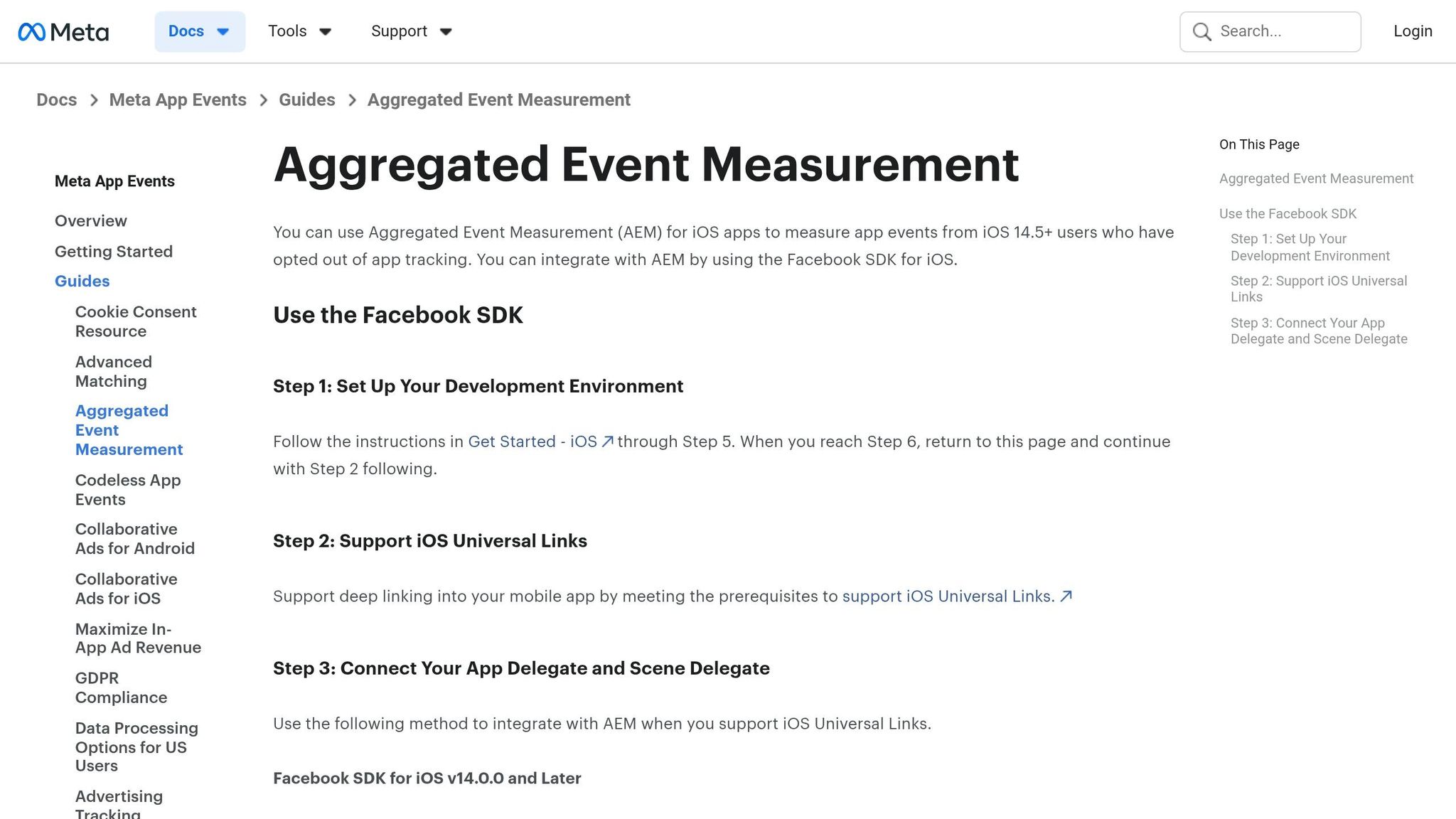
Once you've mapped your app events correctly, the next step is to ensure accurate measurement by configuring Aggregated Event Measurement (AEM).
For app events sent through the Conversions API, Meta requires several technical parameters to be included. These parameters are critical for ensuring proper AEM functionality:
Parameter | Requirement for App Events | Description |
|---|---|---|
action_source | Required | Must be set to "app" to indicate the source of the event. |
advertiser_tracking_enabled | Required | Specifies if the user has granted tracking permission on iOS 14.5+ (0 or 1). |
application_tracking_enabled | Required | Indicates whether app-level tracking is enabled (0 or 1). |
extinfo | Required | An array providing device-specific details like OS version and model. |
event_id | Required | A unique identifier used to prevent duplicate events. |
Automation and Scalability of Event Mapping Processes
AEM integrates with the Conversions API, allowing event submissions to flow through a single endpoint. This simplifies configurations across multiple apps. However, as your workload grows - whether you're managing numerous apps or handling events for various clients - manual configuration can quickly become unmanageable.
To tackle this, leverage Meta ads automation tools. These tools can:
Automatically populate required fields.
Detect and flag errors in real-time.
Adapt to Meta's evolving requirements with minimal manual intervention.
5. Monitor Event Match Quality Scores
Event Alignment with Meta's Standard Naming Conventions
Once you've set up accurate event mapping and Aggregated Event Measurement (AEM), the next step is keeping an eye on Event Match Quality (EMQ). This score, ranging from 1 to 10, measures how well your customer information parameters align with server events in your Meta account. Why does this matter? Only matched events contribute to advanced ad attribution and delivery optimization. Unmatched events, on the other hand, are limited to basic reporting and won't unlock the full potential of your campaigns.
Impact on Campaign Optimization and ROAS
Low EMQ scores can drag down your campaign's effectiveness. For example, if your purchase events - arguably the most critical - score below 8.5, your Return on Ad Spend (ROAS) calculations can become unreliable, making it harder to optimize for ROI. Mid-funnel events like AddToCart need at least a 6.5 EMQ to build strong retargeting audiences, while top-funnel events such as ViewContent should hit a minimum score of 4.0 to enable basic optimization.
Event Type | Target EMQ Score | Key Parameters for Matching |
|---|---|---|
Purchase / High-Value | 8.5+ | Email, Phone, External ID, Click ID (fbc) |
Mid-Funnel (Add to Cart) | 6.5+ | Email, Browser ID (fbp), IP Address |
Top-Funnel (View Content) | 4.0+ | IP Address, User Agent, Browser ID (fbp) |
Boosting an EMQ score from 4.0 to 8.5 can make a big difference. Instead of Meta guessing conversions, it enables precise user identification. To improve match rates, include as many identifiers as possible - like email, phone numbers, and external IDs.
Data Integrity and Accuracy in Event Mapping
Regularly check the Events Manager for any drops in EMQ to address issues before they hurt your campaign performance. Meta provides resources to help improve match quality for web events, app events, and offline conversions. For mobile apps, it's critical to validate events and parameters before pushing updates, as fixing issues after the app is live depends on users downloading the latest version.
A good benchmark to aim for is a 75% event coverage ratio for Conversions API events compared to Meta Pixel events. Falling short of this ratio could mean you're losing valuable match signals. To improve match quality, hash user identifiers like emails and phone numbers using SHA256 (ensuring they are lowercase and trimmed), and transmit technical data - like IP addresses and user agents - in their raw format. These practices ensure cleaner, more accurate data for better optimization.
6. Test Mappings with Live App Events
Data Integrity and Accuracy in Event Mapping
Before rolling out any updates to your event mapping, it's crucial to validate all parameters in a controlled test environment. For app events sent through the Conversions API, make sure the action_source is set to "app" and required fields like advertiser_tracking_enabled and extinfo (which includes device details) are properly included. These are especially important for iOS 14.5+ users, as they ensure compliance with App Tracking Transparency (ATT) permissions. Missing or incorrect parameters can disrupt attribution, leading to incomplete or inaccurate data, often caused by common tracking mistakes.
To verify these parameters, use Meta's Test Events tool within Events Manager. This allows you to send sample app events and confirm they display correctly. Double-check that revenue values are properly formatted as numeric, standardized for Meta integration with currency codes adhering to the uppercase three-letter ISO standard (e.g., "USD"), and event IDs match between your SDK and Conversions API. Misaligned event IDs can lead to duplicate event counts. Also, ensure that all event names stay within Meta's naming limits.
Impact on Campaign Optimization and ROAS
Timely event sharing is a game-changer. Events should be transmitted in real-time or within one hour to allow Meta's ad delivery system to accurately predict user actions. Delayed event data can weaken conversion optimization and negatively impact your return on ad spend (ROAS). A strong integration should achieve a 75% event coverage ratio, meaning at least 75% of your Conversions API events should align with Meta SDK events. Falling below this threshold risks losing key match signals that enhance campaign performance.
Once you've ensured timely transmission, it's time to test under real-world conditions. Send live events from actual app sessions and monitor the results and track API usage in Events Manager. Pay close attention to issues like missing purchase values (often caused by variable misconfigurations), invalid currency codes, or errors where raw personally identifiable information (PII) is sent instead of properly hashed data (using SHA-256). Identifying and fixing these problems early helps you avoid wasting ad spend on campaigns that rely on incomplete or flawed data. Accurate and real-time live event testing sets the stage for better ROAS and more efficient campaigns.
7. Remove Duplicate Events from Multiple Sources
Data Integrity and Accuracy in Event Mapping
To maintain accurate data, it's crucial to ensure that events are uniquely identifiable. Sending the same app event through multiple channels - like the Meta SDK and Conversions API - can result in duplicate reporting. Meta's deduplication system uses event IDs to filter out redundant data. However, if these IDs are missing or incorrect, the system can't perform this task effectively. As Meta Developers cautions: "Inaccurate event IDs may cause your conversion to be wrongly deduplicated, further impacting conversion reporting and campaign performance". Without proper deduplication, your dashboards might show inflated conversion numbers, leading to misleading metrics and inaccurate optimization by Meta. This can distort key performance indicators like ROAS and waste your ad spend or hinder your ability to scale Meta ad budgets.
Meta automatically deduplicates app install events within a 90-day window. However, for post-install events - like purchases, registrations, or level completions - you'll need to handle deduplication manually. Assign a unique event_id to each instance and ensure it matches across all sources. For example, if your SDK sends a purchase event with a specific event_id, the same identifier should be used by your Conversions API. This consistency ensures precise measurement and seamless integration with your campaign tracking.
Impact on Campaign Optimization and ROAS
Duplicate conversions can confuse Meta's algorithm, leading to incorrect performance calculations. This can result in poor budget allocation and reduced ad effectiveness.
To prevent this, configure both the Pixel and Conversions API to use matching event IDs. This setup ensures that data is captured even if network issues or ad blockers interfere, provided the event IDs are consistent across sources. Regularly auditing the Events Manager can help you identify and resolve any issues with multiple event firings caused by deduplication errors.
8. Create Custom Event Aliases for Internal Tracking
Event Alignment with Meta's Standard Naming Conventions
Custom event aliases bridge the gap between your internal event names (like TrialStarted) and Meta's standard events (such as CompleteRegistration). This approach meets your internal tracking needs while keeping Meta campaigns optimized. Essentially, your engineering team can stick to the terminology that aligns with your business processes, while Meta's algorithm leverages its global data network for better delivery. Meta supports up to 1,000 different event names per app, giving you plenty of flexibility to create detailed aliases for internal reporting without cluttering standard events used for optimization.
Data Integrity and Accuracy in Event Mapping
Using aliases also ensures your data remains consistent across platforms. Think of it this way: your Shopify store might label a field as customer_email_address, your CRM calls it contact_email, and your mobile app logs it as user_email. Without alignment, these discrepancies can lead to data silos and attribution errors. By mapping all these fields to Meta’s em parameter, you create a unified structure that avoids mismatched fields.
A mapping table like the one below can help maintain consistency across platforms:
Source System Field | Internal Alias | Meta Standard Field | Hashing Required? |
|---|---|---|---|
|
|
| Yes (SHA256) |
|
|
| No |
|
|
| No |
|
|
| No |
|
|
| No |
Centralizing mapping documentation is crucial for both engineering and marketing teams. This ensures that developers don’t accidentally update field names without informing media buyers, which could break event tracking. It’s also important to standardize formats - monetary values, for example, should always use numeric formats like 142.52 along with ISO 4217 currency codes (e.g., USD) to keep ROAS calculations accurate.
Automation and Scalability of Event Mapping Processes
As your app grows, managing aliases manually becomes impractical. With dozens of custom events across multiple platforms, even one misconfigured alias can disrupt your entire attribution model. This is why many advertisers are turning to AI to improve attribution accuracy and maintain data integrity. To avoid this, validate every mapping using Meta's Payload Helper and Test Events tool before implementing changes. This ensures critical parameters like action_source and event_time are properly configured.
Platforms like AdAmigo.ai can simplify this process by automating event mapping as part of broader campaign management. You define the business outcomes that matter most, and the AI takes care of the technical details - keeping aliases consistent, formatting parameters correctly, and ensuring events trigger without a hitch. Automating these processes ensures a steady flow of reliable data across your entire marketing stack.
9. Use Signals Gateway for Multi-Platform Event Routing
Event Alignment with Meta's standard naming conventions
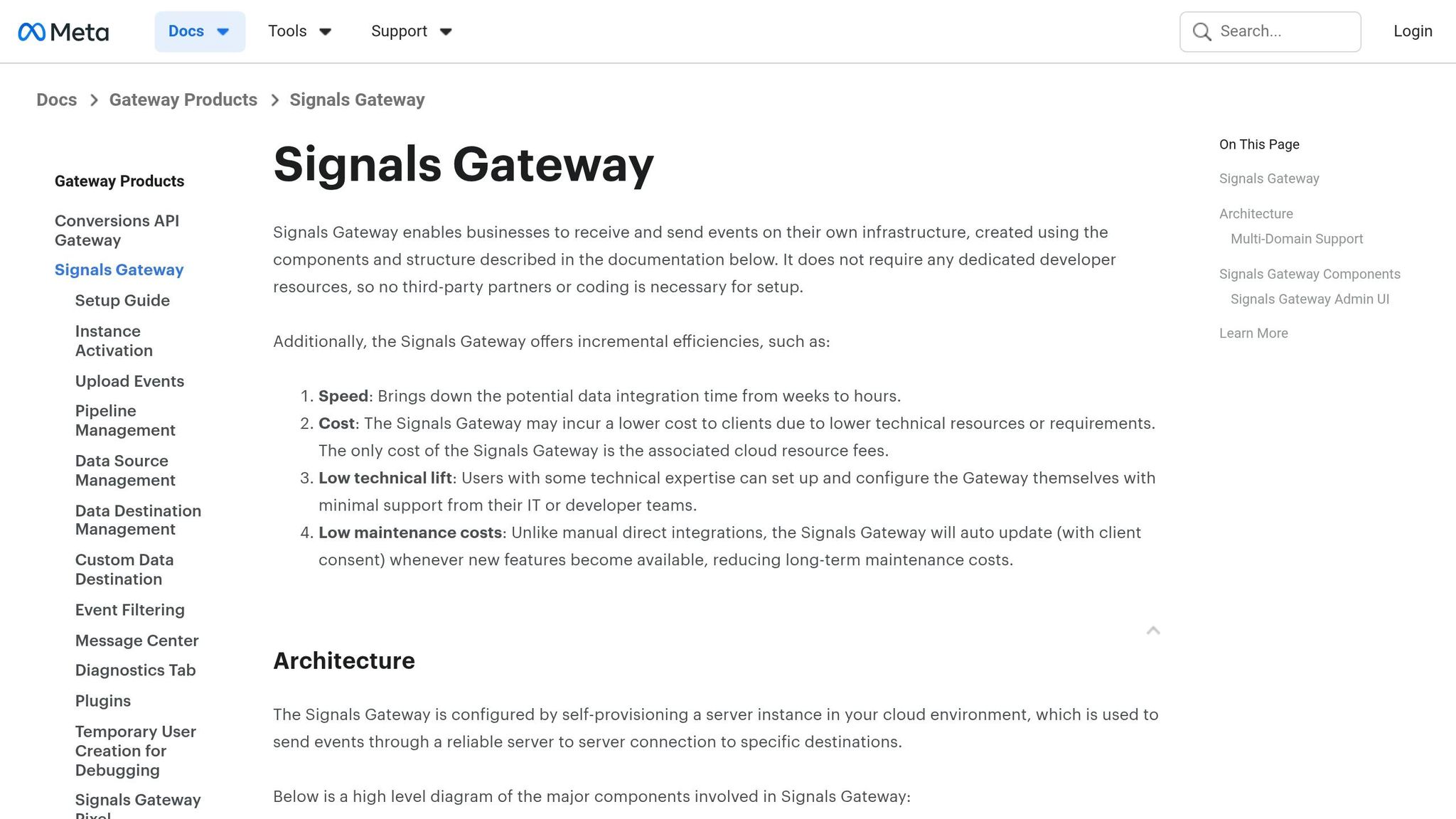
The Signals Gateway (also called the Conversions API Gateway) simplifies event tracking by centralizing data from web, app, store, and messaging platforms into one endpoint. This eliminates the need for separate API integrations for each platform. Instead of juggling different event naming conventions across Android, iOS, and web, you can maintain consistency across all sources.
The gateway leverages Datasets to provide a unified view of all customer activities. By setting the action_source to "app", you ensure that events are correctly attributed to your mobile app. This streamlined approach aligns with the focus on accuracy and efficiency mentioned earlier.
Impact on Campaign Optimization and ROAS
Beyond improving performance, the Signals Gateway enhances data accuracy by offering Meta's ad delivery system a full picture of the customer journey across multiple touchpoints. For example, if a user encounters your ad on Instagram, visits your website, and completes a purchase in your app, this unified data allows Meta to better understand and optimize user actions.
To get the most out of this system, aim for a 75% event coverage ratio between server-side and browser-side events. The gateway simplifies this process by mirroring the events sent by the Meta Pixel, reducing the risk of data loss due to browser restrictions, which is a key part of debugging Meta conversion data sync. To avoid double-counting, make sure each event includes a unique event_id and a matching event_name.
Data Integrity and Accuracy in Event Mapping
Routing events through servers, CRMs, or other backends - less vulnerable to ad blockers - improves data reliability. By linking your app, website, and offline sources to a single dataset, you create a comprehensive view of customer behavior. This integration not only minimizes the maintenance required for multiple API setups but also ensures that data formatting remains consistent across platforms.
Meta Ads Aggregated Event Measurement (And Why It's Critical)
10. Automate Event Mapping with AdAmigo.ai
Streamlining event mapping not only saves time but also ensures your data remains accurate and campaigns scalable.
Simplifying Event Mapping with Automation
AdAmigo.ai takes the hassle out of manual event tracking by automating the entire process. When juggling multiple campaigns, platforms, and conversion sources, manual mapping can quickly become overwhelming. AdAmigo.ai steps in to monitor real-time data synchronization between your server and Meta, catching issues like deduplication errors before they impact performance. It also identifies missing parameters such as action_source, value, and currency, while flagging expired credentials and event misfires - all automatically.
Ensuring Data Accuracy and Security
AdAmigo.ai's AI Chat Agent pinpoints conversion tracking gaps and offers immediate fixes for any discrepancies. The platform handles data cleaning and PII hashing to align with Meta's security requirements. It also standardizes conversion data from sources like CRMs and e-commerce platforms (e.g., Shopify) into a unified schema compatible with Meta’s Conversions API (CAPI). This ensures consistent formatting, unique event_id generation, and seamless integration of both Pixel and server-side events. Plus, real-time alerts keep you informed the moment something goes wrong, eliminating the need for constant manual checks.
Smarter Campaigns and Better ROAS
Automation doesn’t just improve data integrity - it leads to better campaign performance. While Meta Ads Manager offers basic conditional logic, AdAmigo.ai employs an AI-powered agent to manage hundreds of campaigns with real-time adjustments. Instead of manually tweaking setups, you’ll benefit from guided onboarding and "autopilot" features that let the AI handle optimizations. This system fine-tunes creatives, targeting, bids, and budgets in sync, ensuring your event data directly supports smarter decisions and improved ROAS over time.
Conclusion
Getting event mapping right is the backbone of running effective Meta ad campaigns. By aligning user actions - like purchases or sign-ups - with Meta’s standard event names (including revenue parameters) and keeping your data clean by combining Pixel and Conversions API rules, you give Meta’s algorithm the tools it needs to optimize delivery and target high-value customers. Without this accuracy, it’s nearly impossible to measure performance or take advantage of value-based optimization. Solid mapping ensures you’re ready to handle technical challenges and scale your campaigns efficiently.
Precision matters. Aim for at least a 75% event coverage ratio to capture a broad view of user behavior. Regularly monitor event match quality scores, eliminate duplicate events, and validate your mappings with live data. These steps help prevent hidden data issues that could drain your budget or skew your campaign results.
As your campaigns grow, manually mapping events becomes a major hurdle. Managing hundreds of events across platforms and catching deduplication errors eats up time better spent on strategy. That’s where AdAmigo.ai steps in. By automating the mapping process, monitoring data syncs, and flagging missing parameters, it frees you up to focus on the big picture.
Automation doesn’t just save time - it boosts your return on ad spend (ROAS). With AdAmigo.ai’s AI-powered agent, your campaigns are continuously optimized, adjusting creatives, targeting, bids, and budgets as a unified system. Instead of letting event data sit in reports, it powers smarter, faster decisions that drive growth beyond what manual efforts can achieve.
When event mapping is automated, you can shift your attention to what really matters: refining creative strategies, understanding your audience, and scaling for long-term success.
FAQs
Which 8 events should I prioritize in AEM?
When working with Adobe Experience Manager (AEM), there are eight key events you should focus on to enhance your Meta ad performance. These include:
Purchase: Tracks when a transaction is completed.
AddToCart: Monitors when a user adds an item to their cart.
InitiateCheckout: Captures when a checkout process begins.
ViewContent: Logs when users view specific content or product pages.
Lead: Records when a potential customer expresses interest, such as filling out a form.
CompleteRegistration: Tracks successful sign-ups or registrations.
Search: Monitors search activity on your platform.
ViewContent (yes, again): Ensures you're capturing content engagement data accurately.
These events are essential for understanding user behavior and optimizing your ad campaigns for better results.
How do I prevent duplicate events between SDK and CAPI?
To prevent duplicate events when using both SDK (Pixel) and CAPI, assign a unique event_id to each event. Ensure that both the SDK and server-side implementations send the same event_id for the same user action. This allows Meta to identify and deduplicate events effectively.
Additionally, keep an eye on the Event Match Quality (EMQ) scores in Meta Events Manager. Regular monitoring ensures deduplication is functioning properly and helps maintain accurate data.
What data improves my Purchase Event Match Quality fastest?
To boost your Purchase Event Match Quality (EMQ), include user data such as hashed email addresses, phone numbers, or other identifiers in your setup. A high EMQ score depends on properly standardizing and mapping your conversion data accurately. This approach can lead to improved performance and more reliable results.