
7 Ways to Use Audience Data for Meta Ad Growth
Turn first-party audience data into scalable Meta ad growth using Pixel/CAPI, lookalikes, segmentation, retargeting, exclusions, Advantage+, and automation.
Meta ads thrive on data. With privacy regulations tightening, first-party data has become essential for improving campaign performance. Here are seven ways to leverage audience data to maximize your Meta ad growth:
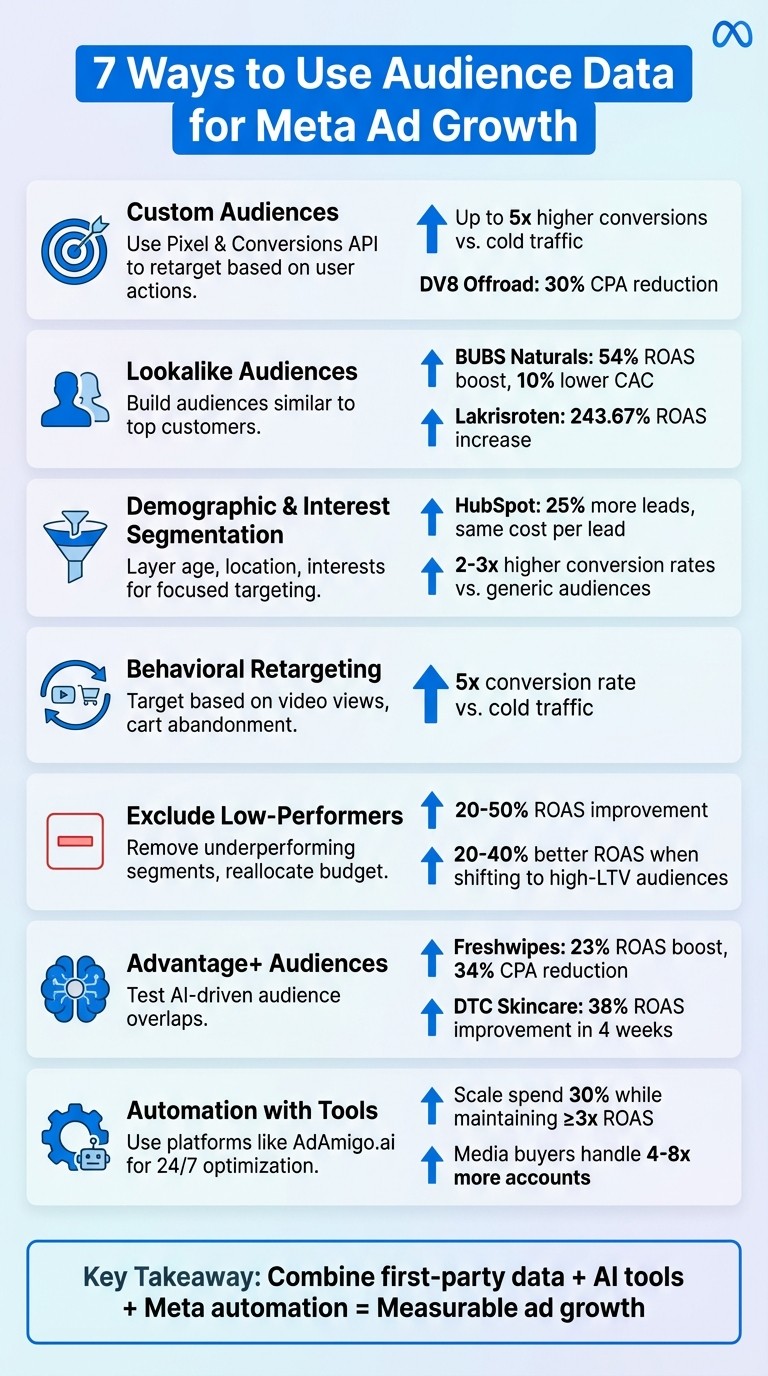
Custom Audiences: Use Pixel and Conversions API (or integrate other analytics tools) to create targeted groups based on user actions like purchases or cart abandonment. AI-powered retargeting can boost conversions by up to 5x.
Lookalike Audiences: Build audiences similar to your top customers. Value-based lookalikes often lead to higher ROAS and stronger conversions.
Demographic and Interest Segmentation: Layer filters like age, location, and interests to create focused groups that align with your goals.
Behavioral Retargeting: Target users based on actions like video views or cart abandonment to drive higher engagement and sales.
Exclude Low-Performers: Analyze data to identify and exclude underperforming segments, reallocating budget to high-value audiences.
Advantage+ Audiences: Test dynamic AI-driven audience overlaps to find high-converting combinations and scale campaigns.
Automation with Tools: Compare AI vs manual audience creation and use platforms like AdAmigo.ai to automate insights and optimize targeting.
These strategies help you reduce wasted spend, improve targeting precision, and scale campaigns effectively. By combining first-party data, AI tools, and Meta's automation features, you can achieve measurable growth in ad performance.
7 Data-Driven Strategies to Maximize Meta Ad Performance
NEW Meta Ads Targeting Tutorial [Beginner to Pro in 16 Minutes]
1. Build Custom Audiences from Pixel and Event Data
Meta's Pixel and Conversions API (CAPI) are powerful tools for turning website traffic into highly-targeted audiences. The Pixel tracks browser-side actions like page views, add-to-cart events, and purchases, while CAPI works server-side to bypass tracking limitations. Together, they collect essential behavioral data that Meta's algorithm uses to identify and convert your ideal prospects.
How to Use Audience Data Effectively
To get started, install both the Pixel and CAPI through Meta Events Manager. Then, navigate to Audiences > Create Audience > Custom Audience > Website. From there, you can select specific events like "Purchase" (last 180 days) or "Add to Cart" (last 30 days). If you're working with a smaller audience, consider using 90–180-day windows for broader reach, but always focus on high-value actions over basic interactions like page views.
For example, DV8 Offroad successfully added 23,000 visitors to their Meta audiences using first-party pixel data, cutting their cost per acquisition (CPA) by 30%. You can also create more refined segments, such as "visitors who spent more than 3 minutes on the pricing page" or "cart abandoners who didn’t purchase within 7 days." These segments are perfect for retargeting campaigns, offering precise targeting that drives better results.
Boosting Campaign Performance
Custom audiences based on pixel events consistently outperform cold traffic. Retargeting users who’ve already interacted with your site can lead to conversion rates up to 5x higher than broad targeting. Additionally, creating high-value customer audiences from pixel data improves your lifetime value tracking, which is crucial for optimizing return on ad spend (ROAS). By focusing your ad spend on users who have already shown intent - like cart abandoners or frequent visitors - you avoid wasting budget on less-engaged audiences.
Simplifying the Process with Automation
To streamline this process, enable Advanced Matching in Meta Events Manager. This feature securely shares hashed visitor details (like emails and phone numbers) to help Meta identify users across devices and build more robust audience pools. You can also set up aggregated events to prioritize the most important conversion actions and use Meta’s Audience Overlap Tool to ensure your custom audiences don’t compete with each other in ad auctions.
For even greater efficiency, tools like AdAmigo.ai's AI Ads Agent can analyze your pixel and event data to automatically generate custom audience campaigns. With features like AI Actions, it can refine your audiences daily, allowing you to maintain precise targeting with minimal effort. This automation ensures your campaigns are consistently optimized, building on the strategies discussed throughout this guide.
2. Create Lookalike Audiences from Top Converters
Actionability of Audience Data
Lookalike Audiences allow you to reach people who resemble your best customers, using data from Pixel, CAPI, or customer lists. Your "best customers" might be defined by purchase behavior, lead generation, or high lifetime value (CLV). To create one, go to Meta Ads Manager, then navigate to Audiences > Create Audience > Lookalike Audience. From there, select your source (like "Purchasers – Last 180 Days") and specify your target country.
The quality of your seed audience plays a big role in performance, which is why AI audience profiling is often used to refine these groups. A smaller, high-value group tends to outperform larger, less engaged audiences. If you have CLV data, you can even create value-based lookalikes. These audiences guide Meta to prioritize users likely to drive higher-value actions, giving you a more targeted approach.
Impact on Campaign Performance
Lookalike Audiences often outperform cold targeting when it comes to return on ad spend (ROAS). For example, in 2024, BUBS Naturals used AI-driven lookalike audiences and saw a 54% boost in ROAS while cutting customer acquisition costs by 10%. Similarly, Lakrisroten's use of AI-enhanced targeting led to a massive 243.67% increase in ROAS, a 470.10% jump in conversion rates, and a 77.21% drop in cost per conversion.
There’s a clear distinction between standard and value-based lookalikes. Standard lookalikes cast a broader net based on general engagement, while value-based lookalikes tap into data like purchase history and CLV to zero in on high-value prospects. This focus on quality often translates to better ROAS and stronger conversions, aligning with broader Meta ad optimization tips for scaling performance.
Scalability for Meta Ad Growth
Meta recommends targeting audiences of 2–10 million people for optimal results. A good starting point is a 1% lookalike audience, which you can expand as you gather more data. If your business is just starting out and lacks sufficient conversion data, Dennis Yu, CTO of BlitzMetrics, suggests using lookalikes as "training wheels." They help the algorithm learn who converts, setting the stage for broader Advantage+ campaigns once the system has enough insights.
When your lookalike audience starts performing well, combining it with Meta Advantage+ automation can amplify your reach even further. This pairing allows the algorithm to identify high-intent users outside your initial targeting, blending precise audience insights with automated optimization. This strategy not only enhances current performance but also lays the groundwork for more advanced targeting techniques in the future.
3. Segment Audiences by Demographics and Interests
Using Audience Data Effectively
Demographic and interest filters are like a magnifying glass for your audience. With Meta Ads Manager, you can zero in on specific groups by layering filters like age (e.g., 25–34), gender, location (down to U.S. states or cities), and language, or use a target audience finder to streamline the process. Add interest categories such as "Fitness enthusiasts" or "Small business owners" to create what Meta calls core audiences, or use behavioral clustering to target users based on actions. These are finely tuned groups designed to align your message with the right people.
The real magic happens when you combine these layers. For example, targeting "Women aged 25–44 interested in yoga" often performs better than broad, generic audiences. Why? Because high-signal groups help Meta's algorithm optimize faster. Just like custom or lookalike audiences, these detailed segments give Meta's AI the data it needs to drive more cost-effective results, boosting conversion rates while keeping ad spend under control.
How It Impacts Campaign Performance
Refined audience segments consistently outperform broad targeting when it comes to metrics like return on ad spend (ROAS) and conversions. For instance, HubSpot ran a lead-generation campaign targeting specific job titles and marketing software interests with Advantage+ expansion, resulting in 25% more leads without increasing the cost per lead.
Targeting niche groups - like "Men aged 35–54 interested in golf" for sports gear or "Women aged 25–34 who follow beauty influencers" for cosmetics - can lead to conversion rates that are 2–3 times higher than those from generic audiences. Even more impressive, remarketing to interest-based segments, such as users who have already browsed product pages, can convert at five times the rate of cold traffic. By excluding low-quality demographics, you can also lower your cost per acquisition. These strategies not only improve short-term results but also set the stage for scalable growth.
Scaling Meta Ad Campaigns
Once you identify a top-performing audience segment, scaling becomes much easier. For instance, if a "Tech interests + ages 25–34" segment generates a 4x ROAS, you can create lookalike audiences based on that group and expand your reach efficiently. At the same time, excluding underperforming segments ensures your budget focuses only on high-value groups.
To track success, monitor key metrics like cost per acquisition (CPA), average order value (AOV), and lifetime value (LTV) for each segment. Using Meta's Conversions API (CAPI) alongside your segmentation strategy can further enhance your data. By collecting server-side events, CAPI improves signal quality, especially in the post-iOS 14 landscape, making Meta's algorithm even more effective.
Simplifying the Process with Automation
Manually creating audience segments works, but automation can save you a lot of time and effort. AI-powered tools analyze your pixel data to identify high-performing segments, suggest audience tweaks, and even launch optimized campaigns automatically. For example, AdAmigo.ai's AI Ads Agent studies your brand, competitors, and past performance to configure demographic and interest segments, then deploys them directly into your ad account. This allows you to test multiple combinations each week without the hassle of manual setup. It’s a streamlined way to keep your Meta campaigns running smoothly while continuously optimizing for better results.
4. Use Behavioral Retargeting Sequences
Actionability of Audience Data
When someone watches 75% of a product video, abandons their cart, or spends time browsing specific pages, Meta's Pixel steps in to capture these behaviors. This data allows you to create highly targeted audience segments. By combining behaviors - like grouping cart abandoners with engaged video viewers - you can craft ads that speak directly to these users and re-engage them almost instantly. Pairing the Pixel with CAPI (Conversions API) sharpens this strategy even more, helping Meta zero in on users with strong purchase intent.
Impact on Campaign Performance
Retargeting people who’ve already shown interest - like those who visited a product page - can convert at five times the rate of cold traffic. This can significantly improve your return on ad spend. Sending conversion values and lifetime value (LTV) data directly to Meta via CAPI ensures the platform prioritizes campaigns that generate higher revenue. For example, you could:
Show social proof ads to video viewers on day one.
Follow up with a discount offer for cart abandoners on day three.
Re-engage page browsers with testimonials by day seven.
This step-by-step approach guides users through a full-funnel Meta ads setup, lowering acquisition costs and increasing the likelihood of a sale. It’s a win-win: more conversions and a strong foundation for scaling your campaigns.
Scalability for Meta Ad Growth
Once your retargeting sequences are performing well, scaling becomes much easier. You can create lookalike audiences based on top-performing segments - like repeat buyers or high-value cart abandoners - to reach similar people with high purchase intent. To avoid wasting ad spend, exclude recent converters from your campaigns. Then, gradually increase your budget by 20–30% to keep performance steady. As you feed more first-party data into Meta, its algorithm gets smarter, identifying and scaling behaviors that drive results. Tools like Advantage+ can take this further, helping Meta’s AI find new opportunities beyond your initial audience segments.
Automation and Ease of Implementation
While you can manually set up retargeting sequences, automation streamlines the process and saves time. Platforms like AdAmigo.ai's AI Ads Agent can take over by analyzing your Pixel and CAPI data to pinpoint high-value behaviors. It can even auto-generate retargeting creatives and launch optimized campaigns straight into your ad account. Plus, with AI Actions, it adjusts targeting and budgets on the fly. For agencies juggling multiple clients, this means a single media buyer can handle 4–8x more accounts, freeing up strategists to focus on scaling and growth.
5. Exclude Low-Performers to Reduce Wasted Spend
Using Audience Data Effectively
Meta's audience data offers a clear view of which segments are driving results and which are falling short. By diving into pixel events, CAPI data, and metrics like cost per acquisition (CPA) and lifetime value (LTV), you can spot the audience groups that consistently underperform and drain your budget. Start by analyzing your Ads Manager data - break it down by top metrics for ad set prioritization like demographics, interests, and behaviors. Look for patterns like higher bounce rates, lower conversion rates, or CPAs that are way above your campaign's average. For instance, if you find that users who recently made purchases through Google Search are clicking on your Meta ads but not converting, excluding them can help avoid overlap and keep your retargeting efforts more focused.
How This Impacts Campaign Results
Once you've identified the low-performing segments, reallocating that budget can significantly improve your Meta ads ROI optimization. Cutting these underperformers often leads to a 20–50% boost in ROAS, as funds are redirected to high-value audiences. For example, pausing interest-based segments with bounce rates five times higher than your campaign average can free up resources. Shifting 15–30% of your budget from these underperformers to high-LTV lookalike audiences has helped many advertisers achieve a 20–40% improvement in overall ROAS - without needing to increase their total spend.
Scaling Your Meta Campaigns
Reducing wasted spend isn't just about saving money; it's about reinvesting those funds into areas that drive growth. By cutting 20–30% of wasted spend, you can redirect that same percentage into high-performing segments, all while maintaining Meta's learning phase. This approach keeps your ROAS steady (ideally above 3×) as you scale your campaigns. Plus, by feeding Meta cleaner, more refined audience data, the platform can better identify and prioritize high-intent users, creating a snowball effect that drives long-term growth. Excluding underperformers sharpens your audience targeting, helping Meta's AI focus on users who are more likely to convert.
Simplifying the Process with Automation
Meta's automation tools make it easy to exclude low-performing audiences. For example, you can set rules to pause segments when CPA rises above $50 or when ROAS drops below 2× after 50 conversions. Tools like AdAmigo.ai take this a step further by generating a daily to-do list of high-impact adjustments, including automated exclusions. By analyzing your pixel events and CRM data, it identifies underperforming groups and suggests exclusions while ensuring your budget, pacing, and geo rules stay intact. For agencies, this automation can be a game-changer, allowing a single media buyer to manage 4–8× more clients while focusing on strategy and growth.
6. Test Audience Overlaps with Advantage+ Audiences
Actionability of Audience Data
Once you've fine-tuned your custom audiences and excluded those that underperform, the next step is testing audience overlaps with Advantage+. This feature replaces rigid demographic targeting with a dynamic, AI-driven system. Instead of manually creating multiple custom or lookalike audiences, Meta’s algorithm leverages its vast user data to automatically identify potential high-converting customers. To make the most of this, provide the algorithm with quality conversion signals - such as purchase values, customer lifetime value (LTV), offline conversion insights, or custom events like subscription renewals.
For even richer data, integrate CAPI (Conversions API) alongside your pixel. This syncs information like email addresses, phone numbers, UTM parameters, and click IDs directly from your server. By doing so, you equip Meta’s algorithm with deeper insights, making it easier to uncover audience overlaps that manual targeting might miss. This sets a strong foundation for optimizing performance through audience testing.
Impact on Campaign Performance
Testing overlaps between custom audiences and Advantage+ Audiences can help identify the combinations that yield the best results. To do this, run parallel campaigns with three setups: custom/lookalike audiences, Advantage+ Audiences, and a mix of both. Track key metrics like cost per acquisition (CPA), return on ad spend (ROAS), and conversion rates for each test.
For example, in Q4 2024, Freshwipes saw a 23% boost in ROAS and reduced CPA by 34% through AI-driven segmentation and Advantage+. Similarly, a direct-to-consumer (DTC) skincare brand revamped its Meta campaigns using Advantage+ Shopping in Q2 2024. Within just four weeks, they improved ROAS by 38% and reduced cost per lead by 22%. These results highlight how Advantage+ can elevate campaign performance when paired with strategic testing.
Scalability for Meta Ad Growth
Advantage+ Audiences offer an efficient way to scale campaigns because the algorithm continuously learns from your conversion data. Over time, it becomes better at identifying users similar to your top-performing customers, reducing the need for manual targeting adjustments.
To scale effectively, make incremental budget adjustments (about 20–30%) and monitor results over several days. This measured approach helps you expand your reach without compromising performance, creating a compounding effect that supports long-term growth without requiring constant audience rebuilding.
Automation and Ease of Implementation
Automation streamlines the process of testing audience overlaps, making it faster and more efficient. With automation tools, you can test multiple audience variations simultaneously and reallocate budgets to the best performers in real time.
Platforms like AdAmigo.ai take this a step further by offering daily, prioritized recommendations for optimizing audiences, budgets, and bids. Its AI Ads Agent even handles ad creative and targeting adjustments automatically while adhering to your budget, pacing, and placement rules. This level of automation allows media buyers to focus on strategy rather than execution, turning what used to be a labor-intensive process into a seamless, data-driven workflow. By simplifying and automating audience testing, you can continuously refine and improve the performance of your Meta campaigns.
7. Automate Audience Insights with AdAmigo.ai
Actionability of Audience Data
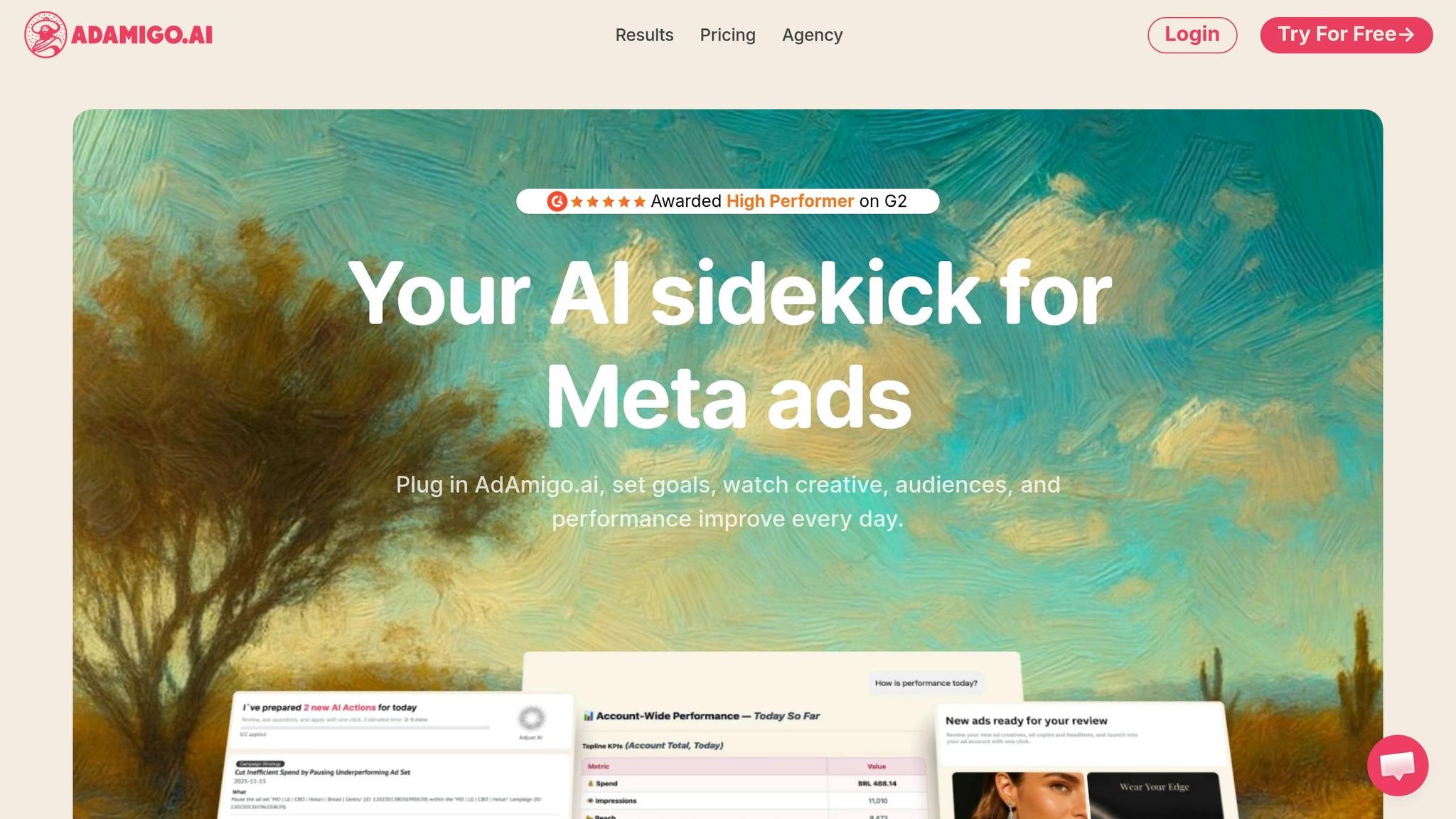
Gone are the days of spending hours manually fine-tuning audience data. AdAmigo.ai takes care of it all by automating audience insights, ensuring your campaigns are always optimized. It analyzes pixel events and CRM data to create targeted configurations in just one click. The platform's AI Ads Agent studies your brand identity, competitors, and top-performing ads to generate tailored creatives and optimized audiences, which are launched directly into your ad account. Plus, the AI Chat Agent provides real-time insights, answering questions like, "Why is my retargeting audience underperforming?" and offering instant recommendations for improvement. You can even deploy hundreds of ads at once using Bulk Ad Launch via Google Drive - no more manual list uploads.
Impact on Campaign Performance
By automating audience insights, AdAmigo.ai ensures your campaigns stay optimized with up-to-the-minute data. The platform helps boost return on ad spend (ROAS) by creating value-based lookalikes and comparing AI audience segmentation vs. predictive targeting or testing AI audience segmentation vs manual targeting for overlaps. Users have reported scaling their ad spend by 30% while maintaining at least a 3× ROAS. Its AI Actions feature provides a daily to-do list of impactful audience adjustments, like excluding underperforming groups or fine-tuning behavioral segments. These updates can be approved, edited, or published automatically. This approach mirrors strategies where high-value lookalike audiences outperform broad targeting, achieving up to 5× higher conversion rates.
Scalability for Meta Ad Growth
AdAmigo.ai allows agencies to focus on strategy rather than repetitive tasks. It uses first-party data to create dynamic lookalikes and integrates targeting adjustments with budgets and bids. The platform respects your geo, pacing, and placement settings while quickly identifying and scaling winning campaigns - something manual teams struggle to match. This efficiency creates a compounding effect, expanding your reach without the need to constantly rebuild audiences. It works much like Advantage+ Audiences, scaling effectively through incremental budget increases while keeping everything streamlined.
Automation and Ease of Implementation
Getting started with AdAmigo.ai is quick and straightforward. In just 5 minutes, you can connect your Meta ad account, set your KPIs (e.g., "Scale spend 30% at ≥3× ROAS"), and share your campaign goals. From there, the platform provides daily AI-recommended audiences and adjustments that you can approve, tweak, or let auto-publish. You can choose to operate fully autonomously or semi-autonomously, depending on your preferences. By integrating server-side signals, AdAmigo syncs emails, phone numbers, and click IDs to maintain data accuracy in the post-ATT era. It dynamically builds privacy-compliant intent segments, ensuring your campaigns stay on target around the clock. This automation keeps your Meta ads performing at their peak, effortlessly.
Conclusion
Audience data plays a central role in making Meta ads work - it’s the backbone of profitable and scalable campaigns. The seven strategies outlined here show how to turn raw data into precise targeting: pixel and event tracking to gather first-party signals, lookalike audiences to scale your top-performing customers, demographic and interest segmentation to find high-ROAS groups, behavioral retargeting to re-engage warm leads, exclusions to reduce wasted spend, Advantage+ testing to expand reach strategically, and automation to keep campaigns running efficiently 24/7.
Automation and continuous optimization are game-changers for campaign success. Managing everything manually can limit scalability, but automation takes over tasks like testing, adjusting budgets, and monitoring real-time metrics, ensuring consistent growth over time. Tools such as AdAmigo.ai put these strategies into action, simplifying targeting, optimizing creative, and managing budgets around the clock. For example, in Q4 2024, Freshwipes used AI-driven segmentation through AdAmigo.ai, achieving a 23% increase in ROAS and a 34% drop in CPA.
To get started, link your Meta ad account, set clear goals (like "Increase spend by 30% while maintaining ≥3× ROAS"), and review daily AI recommendations. Whether you approve changes manually or let the system handle them automatically, you’ll save time for higher-level strategy while performance improves. The key to exceptional Meta ad results lies in how quickly you can spot winners, cut underperformers, and scale effective strategies - and automation makes this process faster and more efficient than any manual approach.
FAQs
Should I use Pixel, Conversions API, or both?
Using both Pixel and the Conversions API together is a smart move to enhance tracking accuracy, refine ad targeting, and improve your campaign performance on Meta platforms. By combining these tools, you ensure more reliable data collection, which leads to better insights and results for your ads.
How many conversions are needed for a lookalike audience?
To build a lookalike audience on Meta, your source audience needs to include at least 100 people. This minimum ensures Meta has sufficient data to identify and target users with similar characteristics effectively.
When should I switch to Advantage+ audiences?
Switch to Advantage+ audiences when you're looking to streamline audience segmentation, tap into AI-powered adjustments, and cut down on the need for manual tweaks. This approach works particularly well if you're starting with broad targeting and want to enhance performance efficiently.