
Meta Ads Event Triggers: Setup and Examples
Compare Meta Ads Standard Events, Custom Events, and Custom Conversions to choose the right setup for optimization, tracking complexity, and retargeting.
Meta Ads event triggers help you target the right audience by tracking user actions like purchases, searches, or sign-ups with real-time conversion tracking. These triggers guide Meta’s algorithm to optimize your campaigns for better performance. Here’s a quick breakdown of the three main types:
Standard Events: Predefined actions like
PurchaseorAddToCart. Easy to set up and ideal for broad optimization.Custom Events: Tailored actions unique to your business, like "Watched Demo Video." Requires coding but offers more control.
Custom Conversions: Rule-based filters for existing events (e.g., purchases over $100). No coding needed and great for precision targeting.
Each option has its strengths and is suited for different goals. Standard Events are best for general campaigns, Custom Events for tracking specific actions, and Custom Conversions for targeting high-value actions without extra coding.
Quick Comparison:
Feature | Standard Events | Custom Events | Custom Conversions |
|---|---|---|---|
Setup Difficulty | Low | High | Low |
Flexibility | Low | High | Moderate |
Algorithmic Power | High | Medium | High |
Best For | General optimization | Tracking unique actions | Precision targeting |
Choose the one that aligns with your goals and resources by mapping events to conversion goals. Whether you’re optimizing for broad reach or fine-tuning for specific actions, the right setup can improve your return on ad spend (ROAS) and campaign performance.
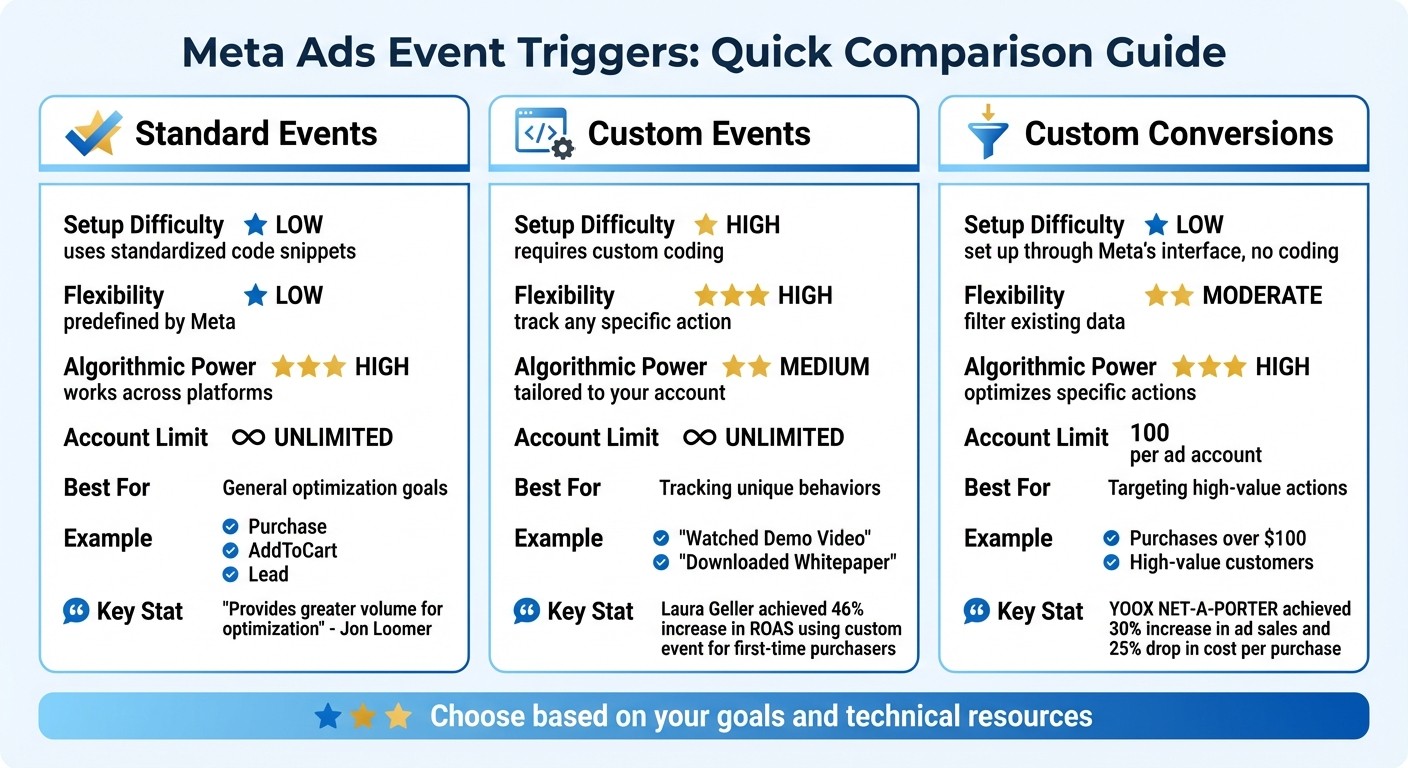
Meta Ads Event Triggers Comparison: Standard Events vs Custom Events vs Custom Conversions
Facebook Custom Events & Conversions: Easy Setup Guide with GTM
If your events aren't firing correctly after following this guide, you may need to debug Meta Ads conversion tracking to identify the issue.
1. Standard Events
Standard Events are predefined actions that Meta uses across its advertising platforms. These include events like Purchase, AddToCart, Lead, ViewContent, and Search. They serve as the backbone of Meta's tracking system because their meaning is consistent across millions of advertisers. For example, firing a Purchase event tells Meta's system to find users with similar high-intent behaviors, no matter your industry or business type. Let’s dive into how these events are set up, optimized, and used for retargeting.
Setup Complexity
Setting up Standard Events can range from simple to moderately technical, depending on your resources. If you’re looking for a no-code option, Meta’s Event Setup Tool allows you to track button clicks and URL visits with ease - just point and assign a predefined event like Purchase or CompleteRegistration. For more advanced tracking, you can integrate the Meta Pixel using code like fbq('track', 'EventName'); or set up the Conversions API. For mobile apps, the Facebook SDK is your go-to for event tracking.
Optimization Potential
Standard Events are incredibly effective for optimization because Meta has extensive global data on user behavior across its platforms. As Jon Loomer, Founder of Jon Loomer Digital, puts it:
"You should prioritize standard events... it's typically recommended to optimize for standard events rather than custom conversions when you can since the standard event will provide greater volume".
This broad dataset allows Meta’s algorithms to quickly and accurately identify users with high purchasing intent. Make sure to include parameters like value and currency with your events. These not only help with Return on Ad Spend (ROAS) tracking but also enable value-based optimization, so Meta can focus on users more likely to make higher-value purchases. This level of precision directly enhances retargeting strategies.
Retargeting Use Cases
Standard Events are a powerful tool for funnel-based retargeting, as they capture user actions at various points in the customer journey. For example, you can retarget users who triggered a ViewContent event but didn’t proceed to AddToCart, or exclude recent Purchase converters from your acquisition campaigns. Adding parameters like content_ids, content_type, and value provides even more targeting flexibility. A Search event, for instance, could help you retarget users based on specific product attributes they looked for.
2. Custom Events
Custom Events are user-defined actions that go beyond Meta's Standard Events. They allow you to track behaviors specific to your business, such as "Downloaded Whitepaper", "Watched Demo Video", or "Clicked Pricing Calculator." While this gives you more control over tracking, it does require a more hands-on setup and might take longer to optimize.
Setup Complexity
Setting up Custom Events involves manual coding. To reduce tracking gaps, many developers align Meta Pixel with GA4 using a shared data layer. For example, you’d use fbq('trackCustom', 'RequestQuote'); to track actions like someone clicking a "Request Quote" button. If you’re already familiar with the Meta Pixel, adding Custom Events won’t feel too daunting, but it’s definitely more involved than using Meta’s built-in tools. Once the setup is complete, the focus shifts to using these events strategically to improve performance.
Optimization Potential
Custom Events provide unique data that can fine-tune Meta's optimization process. They capture high-value actions that Standard Events might overlook. For instance, in June 2025, Laura Geller achieved a 46% increase in ROAS by using a Custom Event for "first-time purchasers". This let Meta's system prioritize attracting new, high-value customers instead of simply boosting overall purchase numbers. The trick is to define events that point to meaningful user behavior. Keep in mind, though, that Custom Events don’t tap into Meta’s global dataset like Standard Events do, so they may take longer to optimize - especially if you’re working with lower event volumes.
Retargeting Use Cases
Custom Events shine when it comes to targeting specific behaviors that Standard Events might miss. For example, a SaaS business could track "Viewed Pricing Page 3+ Times" to identify highly interested prospects or "Started Free Trial" to differentiate trial users from general leads. You can then create audiences based on these behaviors and serve tailored ads, like offering a discount to users who repeatedly viewed the pricing page but didn’t convert. Just make sure the event volume is large enough to build meaningful audience segments.
3. Custom Conversions
Custom Conversions act as a bridge between Standard and Custom Events, offering a way to track specific actions without needing to write code. Instead of adding pixel snippets manually, you can set up Meta custom conversion rules based on URL patterns or event parameters. For instance, you might track purchases over $100 by creating a rule like: "Purchase event where value > 100." This makes them a great tool for detailed tracking, especially when developer resources aren't available.
Setup Complexity
Setting up Custom Conversions is rule-based and simple. To get started, you'll need an active Meta Pixel, admin or editor access in Business Manager, advertiser identity verification, and, in many cases, domain verification. Rules can be defined using URL patterns or parameter filters, and you can combine conditions (AND, OR, NOT) for more advanced tracking. Keep in mind that each account can have up to 100 custom conversions, so it's important to use clear naming conventions, such as "High_Value_Purchases_Over_100", to keep reporting organized and easy to understand. This setup process is much easier than the coding required for Custom Events, making it a great choice for advertisers who prefer a rule-based approach.
Optimization Potential
Custom Conversions not only simplify setup but also enhance optimization. They allow you to target specific subsets of users, like high-value buyers or first-time customers, instead of casting a wide net like Standard Events. This level of precision helps Meta's algorithm focus on users most likely to achieve your specific goals. To maintain accuracy, regularly check your Event Match Quality (EMQ) score - low scores can hurt tracking effectiveness. If you're comparing the Pixel vs. Conversions API for your setup, ensure you enable event ID deduplication to avoid double-counting conversions.
Retargeting Use Cases
Custom Conversions are also a powerful tool for retargeting. They help you create highly specific audience segments. For example, you can target users who viewed a product and added it to their cart but didn’t complete the purchase, or focus on customers who made purchases over $200. Since these conversions rely on existing pixel data, you can segment users based on their exact actions and deliver personalized messages. However, ensure your conversion volume is high enough to build meaningful audience segments - low-volume conversions can limit your retargeting potential. Together with Standard and Custom Events, Custom Conversions complete the toolkit for precise campaign targeting in Meta ads.
Advantages and Disadvantages
Each type of trigger comes with its own set of pros and cons. Standard Events are the simplest to use for algorithmic learning since Meta recognizes them across all ad products, ensuring consistent optimization. The downside? They're inflexible - you can't tweak them to track specific business actions or narrow down to particular customer segments.
While Standard Events provide broad optimization, Custom Events give you the power to track unique user behaviors. For instance, you can monitor actions like "Video Watched 75%" or "Premium Feature Clicked." However, setting up Custom Events requires developer support, and they perform best when you have enough conversion data for Meta's algorithm to identify patterns and prioritize events for ROAS impact. A great example of this is Laura Geller Beauty, which, in June 2025, implemented a custom event to track "first-time purchasers." This helped Meta's algorithm focus on acquiring new customers and resulted in a 46% boost in ROAS.
Then there are Custom Conversions, which strike a balance between flexibility and ease of use. These are configured directly within Meta's interface using URL patterns or parameter filters, so no coding is necessary. Once configured, it is essential to test your Meta Pixel events to ensure data accuracy. They allow you to target high-value actions - like purchases exceeding $100 - without making changes to your website. For instance, YOOX NET-A-PORTER paired the Meta Pixel with the Meta Conversions API, achieving a 30% increase in Facebook ad sales and a 25% drop in cost per purchase during testing.
Here’s a quick comparison of the three options:
Feature | Standard Events | Custom Events | Custom Conversions |
|---|---|---|---|
Setup Difficulty | Low (uses standardized code snippets) | High (requires custom coding) | Low (set up through Meta’s interface, no coding) |
Flexibility | Low (predefined by Meta) | High (track any specific action) | Moderate (filter existing data) |
Algorithmic Power | High (works across platforms) | Medium (tailored to your account) | High (optimizes specific actions) |
Account Limit | Unlimited | Unlimited | 100 per ad account |
Best For | General optimization goals | Tracking unique behaviors | Targeting high-value actions |
So, how do you decide? If you're running straightforward e-commerce campaigns, Standard Events are your go-to for broad optimization. Need to track specific behaviors and have developer resources? Custom Events can give you deeper insights. And if you’re looking for precision without the hassle of coding, Custom Conversions are your best bet for targeting high-value actions.
Conclusion
Deciding on the best event trigger for your campaigns depends on your goals and the technical resources at your disposal. Standard Events are a great starting point for most campaigns. They’re designed for common actions like purchases or sign-ups and are optimized globally for performance.
If you need to track specific behaviors that go beyond Meta’s pre-defined actions, Custom Events are your go-to. However, setting them up often requires the help of a developer.
For a middle ground between flexibility and ease of use, Custom Conversions are a smart choice. They let you filter Pixel data to target high-value actions, offering precision without the need for heavy technical work.
That said, managing multiple event triggers across campaigns can quickly become overwhelming. This is where Meta Ads automation becomes a game-changer. Tools like AdAmigo.ai simplify the process by automating event-based campaign adjustments. Instead of manually tracking event performance or tweaking bids, budgets, and targeting, AdAmigo’s AI Actions agent continuously analyzes your conversion data and applies optimizations. It identifies which event triggers deliver the best results and adjusts your campaigns accordingly - whether you’re using Standard Events, Custom Events, or Custom Conversions.
For agencies managing multiple clients or in-house teams stretched thin, AdAmigo handles the execution so you can focus on strategy. Simply connect your Meta account, set your goals (e.g., "Increase spend by 30% while maintaining at least a 3× ROAS"), and let the AI work around the clock. With pricing starting at $99/month for accounts spending under $5,000 monthly, AdAmigo.ai provides a cost-effective way to take your campaign management to the next level.
FAQs
Should I use Standard Events or Custom Events for my Meta Ads campaign?
Standard Events are actions that Meta has already defined, like ViewContent, AddToCart, or Purchase. These are straightforward to implement using the Event Setup Tool - no coding required. They work well when the action you want to track matches Meta’s predefined categories. Using Standard Events allows for quicker setup, dependable attribution, and access to Meta’s advanced optimization tools.
Custom Events, however, are more flexible. They let you define specific actions tailored to your needs, such as “NewsletterSignup” or “FreeTrialStarted.” Setting up Custom Events requires either coding or a tag manager, making them ideal for tracking unique interactions or generating detailed reports with custom parameters. For instance, you could create a Custom Event to track purchases over $50 or other high-value actions.
A smart strategy is to start by using the Standard Event that most closely matches your goal. If it doesn’t provide enough detail, you can enhance it with a Custom Event or a Custom Conversion rule. Tools like AdAmigo.ai can guide you in finding the right combination of events, ensuring you strike a balance between simplicity and precision for better campaign performance.
What are the benefits of using Custom Conversions in Meta Ads?
Custom Conversions let you track specific actions - like purchases over $50 or form submissions on a particular page - by setting rules based on URLs, parameters, or value thresholds. This level of customization provides insights into user behavior that go beyond what standard events can offer.
By linking conversions to these targeted actions, Meta can fine-tune ad delivery to reach users more likely to take those actions. This not only improves ad relevance but also boosts your Return on Ad Spend (ROAS). Plus, Custom Conversions show up as distinct metrics in Ads Manager, making it simple to monitor performance and align campaign goals.
In essence, they help you refine targeting, manage budgets more efficiently, and focus on the metrics that truly drive your business forward.
How can tools like AdAmigo.ai improve the performance of my Meta Ads campaigns?
Automation tools like AdAmigo.ai take the hassle out of managing Meta Ads campaigns by optimizing performance in real time. By keeping a close eye on key metrics like CTR, CPA, and ROAS, this AI tool fine-tunes bids, adjusts budgets, and tweaks placements on the fly. High-performing ads get more resources, while weaker ones are paused - cutting out guesswork and reducing the need for constant manual intervention. The result? You save time and see better outcomes.
Advertisers using AdAmigo.ai often report 20–30% higher ROAS and lower CPA. Why? The AI reallocates ad spend faster than any human team could, ensuring campaigns stay efficient and effective around the clock. Plus, with features like AI-generated ad creatives, bulk ad launching, and an on-demand AI assistant for actionable insights, both agencies and in-house teams can scale campaigns quickly without losing control over budgets or targeting. It’s a smarter way to handle Meta Ads, freeing you up to focus on strategy while the AI takes care of the heavy lifting.