
How Meta Pixel Event Prioritization Impacts ROAS
Rank top conversion events and combine Pixel + CAPI to improve match quality, exit learning faster, and lift ROAS in weeks.
Meta Pixel event prioritization is key to improving your ad performance on Meta platforms. By ranking up to eight conversion events in order of importance, you help Meta focus on the actions that matter most - like purchases or leads - especially for users who opt out of tracking after Apple's iOS 14.5 update. This ensures your campaigns send stronger signals to Meta's algorithm, leading to better targeting and higher return on ad spend (ROAS).
Key Takeaways:
Prioritize High-Value Events: Always rank "Purchase" or "Lead" at the top to drive revenue-focused optimizations.
Combine Pixel & CAPI Tracking: Using both improves data accuracy, recovering up to 40% of lost conversions.
Monitor Event Match Quality (EMQ): Aim for a score above 8.0 by passing hashed first-party data like emails and phone numbers.
Optimize Campaigns Faster: High-priority events help Meta exit the learning phase quicker, requiring 50+ conversions per week per ad set.
Tools like AdAmigo.ai can automate event validation, monitor EMQ scores, and adjust campaigns for better ROAS. Start by verifying your domain, mapping events to conversion goals in Events Manager, and enabling Pixel + CAPI tracking to see measurable improvements in just weeks.
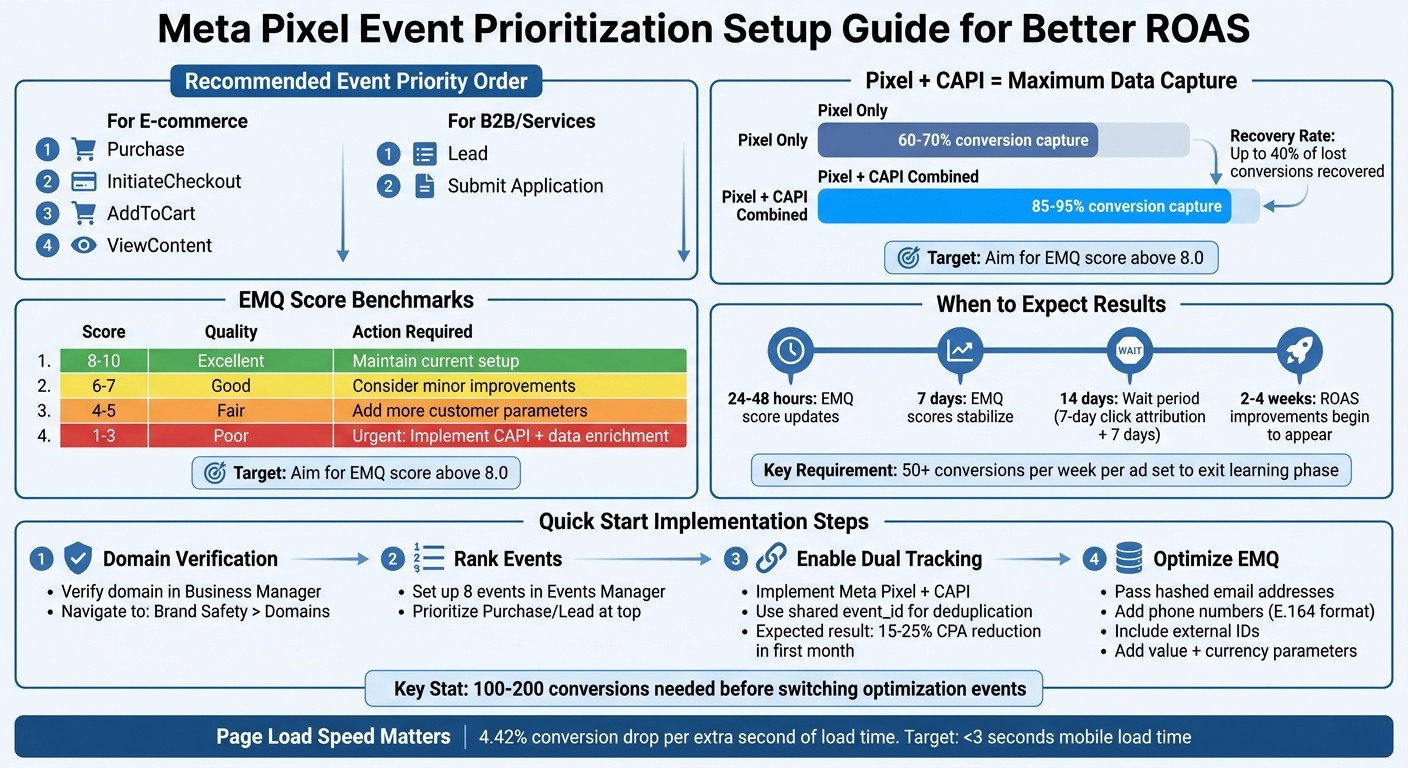
Meta Pixel Event Prioritization Setup Guide for Better ROAS
Which Events to Prioritize for Better ROAS
Bottom-Funnel Events: Purchase, Lead, and AddToCart
When it comes to driving better ROAS, Purchase and Lead events should always be at the top of your priority list. These actions directly represent revenue or high-intent behaviors, giving Meta's algorithm the clearest signal about your ideal customers. Meta has trained extensively on these standard events, so it associates "Purchase" with high-intent user behavior right away.
The impact on ROAS is clear: optimizing for purchases ensures Meta targets actual buyers instead of casual browsers. For e-commerce businesses, Purchase should always be set as the Priority 1 event in your Aggregated Event Measurement settings. For service providers or B2B companies, Lead or Submit Application should take precedence.
AddToCart serves as a valuable intermediate signal. If your ad sets aren't generating the 50 purchases per week needed for Meta to exit the learning phase, you can temporarily optimize for AddToCart. This provides Meta with enough data points to refine its targeting. Once you've reached 100–200 conversions, switch back to optimizing for Purchase.
When bottom-funnel events are limited, incorporating mid-funnel signals can help build a full-funnel Meta ads setup with a stronger data foundation.
Mid-Funnel Events: InitiateCheckout and ViewContent
InitiateCheckout and ViewContent capture user intent but don't carry the same optimization strength as bottom-funnel events. They’re particularly useful when your conversion volume is too low for effective bottom-funnel optimization, acting as stepping stones to higher-value actions.
The order of event prioritization is critical, especially under Meta's Aggregated Event Measurement. Here’s why: if a user performs multiple actions - viewing a product, adding it to their cart, and completing a purchase - Meta will only report the highest-priority event. If you rank ViewContent above Purchase, you could lose key revenue data from opted-out iOS users. For most advertisers, the recommended priority order is: Purchase (1), InitiateCheckout (2), AddToCart (3), ViewContent (4).
Meta Ads Aggregated Event Measurement (And Why It's Critical)
Technical Setup for Accurate Data Collection
Getting the right events in place won’t help much if your tracking setup sends incomplete or duplicate signals to Meta. Starting in 2026, using both Meta Pixel and Conversions API (CAPI) is non-negotiable. Why? Pixel-only tracking captures just 60-70% of conversions, while combining it with CAPI increases match rates to 85-95%. CAPI works around browser-side challenges like ad blockers and iOS privacy restrictions, recovering 20-40% of lost conversion data.
Preventing Event Duplication
Running both Pixel and CAPI means Meta receives two signals for the same event - one from the browser and one from your server. Without proper deduplication, you risk inflating your conversion numbers and skewing your ROAS. To avoid this, send a unique event_id with every event from both sources. For purchase events, your transaction or order ID works well. Meta uses matching event_id values to count the conversion only once.
"When running both Pixel and CAPI, use event_id to deduplicate. Same event_id = Meta counts it once." - Adbid.me
For deduplication to work, the event_id, event_name, and event_time must match exactly between both tracking methods. Meta allows up to a 60-minute difference in event timing. Use the "Test Events" tool in Events Manager every week to confirm deduplication is functioning correctly.
Improving Data Accuracy with Parameter Matching
An Event Match Quality (EMQ) score below 6.0 can hurt your campaign’s optimization. To improve this score, pass standardized first-party data - such as lowercase email addresses, phone numbers in E.164 format (e.g., +15551234567), and external IDs - with every conversion event. Email is the most critical parameter for matching, followed by phone numbers and external IDs. Additionally, for accurate ROAS tracking, make sure every purchase event includes value and currency parameters. Without these, Meta won’t be able to calculate your return on ad spend.
EMQ Score | Quality | Action Required |
|---|---|---|
8-10 | Excellent | Maintain current setup |
6-7 | Good | Consider minor improvements |
4-5 | Fair | Add more customer parameters |
1-3 | Poor | Urgent: Implement CAPI + data enrichment |
Check your EMQ scores in Events Manager diagnostics weekly. If your score is below 4.0, adding hashed phone numbers and zip codes should be your top priority. These steps to enhance data accuracy are critical for the long-term ROAS improvements discussed in the next section. For those looking to scale further, AI-powered retargeting can leverage this clean data to personalize creatives and lower acquisition costs.
When to Expect ROAS Improvements
Initial Changes and EMQ Score Updates
Once you start sending enriched event data to Meta, your Event Match Quality (EMQ) score usually updates within 24 to 48 hours. To ensure everything is on track, check the Events Manager daily to confirm that the enriched data is being received. Most advertisers notice their EMQ scores stabilize within about a week.
That said, a higher EMQ score doesn’t mean your ROAS will instantly improve. Meta’s algorithm still needs time to process the enhanced data and adjust its targeting strategies. As Gaultier D'Acunto, Co-founder of Benly.ai, points out:
"Wait at least 7 days and one full conversion window before judging performance. If you're using 7-day click attribution, wait 14 days total".
Once you’ve confirmed your EMQ improvements, expect Meta’s algorithm to optimize for better performance in the weeks that follow.
Long-Term Performance Gains
With updated EMQ scores and accurate event data in place, Meta’s algorithm gradually refines its targeting. ROAS improvements generally start to appear after 2 to 4 weeks of consistently high-quality data. During this time, the algorithm exits its learning phase and begins optimizing more effectively. To speed up this process, aim for at least 50 conversions per week per ad set. If you’re falling short of this number, consolidating your account structure can help focus conversions into fewer ad sets.
When transitioning from upper- to lower-funnel events, allow for 100–200 conversions before making further changes. This helps avoid resetting the learning phase and ensures smoother optimization.
Using AdAmigo.ai to Automate Event Optimization
How AdAmigo.ai Optimizes Meta Pixel Data
Managing campaigns manually can be time-consuming and often requires constant monitoring and adjustments. This is where tools like AdAmigo.ai step in to simplify the process. By continuously monitoring your Meta Pixel data, AdAmigo.ai ensures your campaigns run smoothly and deliver better results. The platform starts by validating your Meta Pixel setup through its setup wizard, flagging any misconfigurations that could hurt your Return on Ad Spend (ROAS).
Once your Pixel is properly configured, AdAmigo.ai uses real-time anomaly detection to keep an eye on your account. If your Event Match Quality (EMQ) score drops unexpectedly or if tracking data shows irregular patterns, the system sends you alerts so you can fix the issue before it affects performance. Additionally, it identifies audience overlaps - anything over 25% - and suggests automated solutions like merging similar audiences or adding exclusion lists. These adjustments help prevent internal competition and ensure your conversion data stays accurate.
By automating these critical tasks, AdAmigo.ai lays the groundwork for even greater results, which are explored further in its broader campaign management capabilities.
Benefits of AI-Powered Campaign Management
AdAmigo.ai takes campaign optimization to the next level by automating tasks that traditionally require manual intervention. Instead of spending days analyzing performance data and making adjustments, the AI reviews your account history and suggests the best audiences and budget changes based on top-performing events. You can choose between Manual vs. Autopilot Mode, where changes are reviewed twice daily or implemented automatically, which implements adjustments automatically within your set parameters.
For agencies and eCommerce businesses, this automation means you can handle 3–5× more accounts without increasing your workload. The AI doesn’t just highlight problems - it fixes them. Over time, as the system learns from your account's performance data, its recommendations become even sharper. The result? A snowball effect where ROAS keeps improving as the AI fine-tunes your campaigns.
Conclusion
Meta Pixel event prioritization sends clear signals to Meta's algorithm, helping improve ROAS. By ranking events effectively within Aggregated Event Measurement, you direct the algorithm to focus on what truly matters - turning potential users into paying customers. Instead of optimizing for actions like page views, Meta can zero in on conversions that drive revenue.
The numbers speak for themselves: combining Pixel and CAPI tracking can boost match rates from 60–70% to 85–95%, recovering up to 40% of lost conversions. This additional data allows Meta's algorithm to exit the learning phase faster and optimize campaigns more effectively.
"The quality of this optimization depends entirely on two factors: the conversion event you choose and the data you provide. If you optimize for page views, Meta finds people who view pages. If you optimize for purchases, Meta finds buyers." – Benly.ai
AI-powered platforms like AdAmigo.ai take this a step further by refining and validating your Pixel setup. These tools monitor your Event Match Quality (EMQ) score, aiming to keep it above 8.0. With accurate data signals, the AI can make better decisions about budget allocation and audience targeting, which leads to consistent ROAS improvements as the system learns from reliable conversion data.
Action Steps for Advertisers
Ready to implement these strategies? Here’s how to get started:
Domain Verification and Event Ranking: Verify your domain in Business Manager under Brand Safety > Domains. Then, set up and rank your eight events in Events Manager, prioritizing key actions like "Purchase" or "Lead".
Enable Meta Pixel and CAPI: Use both tracking methods with a shared event_id (e.g., an Order ID) to avoid double-counting while maximizing data capture. This setup often results in a 15–25% reduction in CPA within the first month.
Improve Event Match Quality: Pass additional customer parameters, such as hashed email addresses, phone numbers, and external IDs, to help Meta better match conversions to users. Strive for an EMQ score of 8.0 or higher. If your score is below 6.0, implementing CAPI becomes critical.
Optimize Landing Page Speed: Slow-loading pages hurt conversions. Research shows conversion rates drop by about 4.42% for every extra second of load time. Aim for mobile page load times under 3 seconds to ensure the Pixel fires before users leave the page.
For agencies and eCommerce teams managing multiple accounts, tools like AdAmigo.ai simplify the process. This platform automates event validation, EMQ monitoring, and campaign adjustments, allowing one media buyer to handle 3–5× more accounts. Whether you use Manual Mode for regular reviews or Autopilot Mode for hands-free optimization, the AI ensures your event prioritization translates into measurable ROAS gains.
FAQs
What happens if I prioritize the wrong event?
Prioritizing the wrong event can negatively impact your return on ad spend (ROAS). This happens because it leads to inaccurate targeting and flawed attribution. Meta's Event Match Quality score depends on correctly aligning tracked events with users. When events are misprioritized, this alignment breaks down, causing campaign performance to suffer.
Do I really need both Meta Pixel and CAPI?
Using both Meta Pixel and the Conversions API (CAPI) is a smart move to boost ad performance. Meta Pixel captures real-time website actions, such as purchases, while CAPI ensures data sharing remains accurate even with evolving privacy regulations. Together, they bridge tracking gaps, enhance audience targeting, improve ad optimization, and ultimately increase ROAS (Return on Ad Spend). Tools like AdAmigo.ai can streamline managing and optimizing campaigns with these data sources, making this approach a go-to strategy for many businesses.
How can I raise my Event Match Quality fast?
To improve Event Match Quality on Meta, fine-tune your conversion tracking efforts. Here’s how you can get started:
Choose conversion events that generate at least 50 conversions per week. This volume helps Meta optimize your campaigns more efficiently.
Implement the Conversions API (CAPI) alongside the Meta Pixel. This combination helps recover lost data and enhances the accuracy of event matching.
Verify your pixel setup using tools like Meta Pixel Helper. This ensures that it’s functioning correctly for critical actions on your site.
By focusing on these steps, you can significantly boost the quality of your event matching.