
Common Mistakes in Bulk Meta Ad Testing
Avoid audience overlap, broken Pixel/CAPI tracking, poor testing frameworks, misaligned objectives, and manual errors when scaling Meta ads.
Scaling Meta ads through bulk testing can boost results but comes with risks. Without a structured approach, mistakes like audience overlap, poor testing frameworks, broken tracking, misaligned objectives, and common Meta ads mistakes can waste up to 50% of your budget. Here’s what you need to know:
Audience Overlap: Competing ad sets targeting the same users drive up costs and confuse Meta's algorithm.
No Testing Framework: Testing too many variables at once wastes money and provides unclear results.
Broken Pixel Tracking: Errors in tracking cause inaccurate attribution and wasted spend.
Wrong Objectives or Budgets: Misaligned goals lead to poor optimization and inefficient campaigns.
Manual Management: Managing hundreds of ads manually increases errors and delays optimizations.
Solutions include using Meta’s tools like the Audience Overlap Tool, setting clear testing frameworks, auditing tracking setups and attribution, aligning objectives with goals, and automating repetitive tasks. Platforms like AdAmigo.ai can help simplify and optimize bulk testing, saving time and improving ROAS.
EASY Meta Ads AI Campaign Build & Launch (Step by Step Guide)
Mistake 1: Audience Overlap in Bulk Launches
Launching multiple Meta ads without careful planning can lead to audience overlap, which drains your budget and hurts performance. This happens when different ad sets target the same users, forcing your campaigns to compete against each other in Meta's auction system. The result? Higher costs and poor optimization.
Imagine running 50 ad variations without coordinating your targeting. Your "Cold Prospecting" campaign could end up competing with your "Lookalike Audience" campaign for the same users. Meta's algorithm will favor the ad set with the strongest performance history, leaving the others to underperform - while your budget gets wasted.
Why Audience Overlap Is a Problem
When audiences overlap, you're essentially paying to show ads repeatedly to the same users across different ad sets. If overlap exceeds 30%, you could face higher CPMs, slower optimization, and faster creative fatigue. These issues can quickly lead to a poor return on investment (ROI).
Jon Loomer, Founder of Jon Loomer Digital, offers a helpful analogy:
"I envision Auction Overlap like the bouncer at a club. The bouncer won't let you and your friend in at the same time... If it happens repeatedly, you may struggle to get the number of events you need for your ad to be profitable".
Overlapping data also confuses Meta's algorithm, making it harder to match the right ad with the right audience. This slows down the learning phase and wastes your budget.
How to Solve Audience Overlap
The good news? You can fix this with a more structured approach to targeting. Start by using Meta's Audience Overlap Tool in the "Audiences" section. Select your audiences, click "Actions", and choose "Show audience overlap". If the overlap is above 20–30%, it's time to take action. Combine overlapping audiences into a single ad set to give Meta's algorithm a clearer picture and reduce internal competition.
Another solution is to use exclusions to keep your audiences separate. For example, exclude your "Warm" retargeting audience from your "Cold" prospecting campaigns. This ensures each ad set targets a unique group of users. You can also create a tiered structure - cold, warm, and hot audiences - by assigning specific time windows and exclusions to each layer. For Lookalike Audiences, use distinct seed sources, like high-value customers versus recent purchasers, to avoid overlap.
Once you've refined your targeting, run your campaign for 7–14 days to let Meta's algorithm stabilize. You can also set up an automated rule in Ads Manager to "Reduce auction overlap" or use automation rules for scaling to manage performance. This rule can notify you or even disable overlapping ad sets automatically.
For an extra layer of efficiency, tools like AdAmigo.ai can help align targeting and flag overlaps during setup. This proactive step prevents internal competition and helps you scale your campaigns with confidence.
Mistake 2: No Testing Framework
Launching Meta ads without a clear testing plan is like trying to hit a target blindfolded - you end up wasting money and learning very little. Testing multiple variables at once only adds confusion, making it hard to pinpoint what actually worked. This issue becomes even bigger when you're running ads at scale. For instance, testing 50 ad variations without a proper framework could drain your budget before you gather enough data to draw meaningful conclusions. Typically, you need 50 to 100 conversions per ad variation to make decisions with confidence. To avoid this, document your testing hypotheses and set clear success criteria to guide your decisions.
As one advertiser aptly put it:
"Running Meta ads without testing is like throwing darts blindfolded. Sure, you might hit the board now and then, but you're not really in control." – Extuitive
Building a Testing Framework
A good testing framework starts with isolating variables. Focus on changing one element at a time - whether it's the ad copy, visuals, or audience - so you can clearly identify what caused a shift in performance [13, 15]. Group similar ad formats, like Reels, for consistent comparisons and better budget allocation.
Before you launch, decide on how to analyze your success metrics. Choose a primary KPI, such as CTR for engagement campaigns or CPA/ROAS for sales, and stick to it throughout the test. Run your campaigns for 7–14 days to account for daily fluctuations and give Meta's algorithm time to stabilize [13, 16]. Using Meta's A/B Testing Tool can also help by randomizing audience distribution, ensuring that the same user doesn't see multiple variations, which could skew your results [13, 16].
When it comes to budget, set your daily spend at 1x to 2x your average CPA per ad set. Let the campaign run without changes for the first 48–72 hours to allow Meta's algorithm to gather reliable data. As one Reddit user, digitaladguide, explained:
"I think of Meta's algorithm like a snow globe. Anytime you make a change... that's you shaking the snow globe. The snow goes everywhere... Meta ads perform best in this calm settled state." – digitaladguide, Reddit
Lastly, keep a detailed testing log. Document your hypothesis, the variable you changed, the results, and your final decision. Over time, this becomes a valuable resource for refining your strategy.
This structured framework not only helps you test effectively but also lays the groundwork for automation tools.
AI Tools for Testing
When managing hundreds of ad variations, AI tools can be a game-changer. Platforms like AdAmigo.ai simplify the process. The AI Ads Agent creates creative variations while following a structured testing framework. It isolates variables, monitors performance in real time, and provides data-driven recommendations.
AdAmigo also offers an AI Actions feature that generates a daily to-do list of high-impact adjustments across creatives, audiences, budgets, and bids. You can choose to approve changes manually or let the system handle them automatically. For agencies juggling multiple clients or brands aiming to scale quickly, this approach identifies and scales winning ads faster than any human team - all while staying within your budget and adhering to placement rules.
Mistake 3: Broken Pixel and Event Tracking
The Meta Pixel serves as the data foundation for your campaigns. Without it, there’s no way to monitor conversions, build audiences, or measure campaign performance effectively. When managing dozens - or even hundreds - of ads, small tracking errors can snowball into attribution pitfalls, inconsistent ROAS, and wasted ad spend. Misconfigured tracking often leads Meta’s algorithm to optimize for the wrong metrics, like clicks, instead of focusing on actual business outcomes such as sales or leads.
As Sam Tomlinson, Founder of SamTomlinson.me, explains:
"Direct, person-to-sale attribution was always a fugazi. It was an illusion... Stop chasing granular precision. Start tracking progress." – Sam Tomlinson
Common Pixel Tracking Errors
Some of the most frequent tracking issues include duplicate events (where the same event is tracked multiple times), misaligned event mapping (e.g., logging "ViewContent" instead of "Purchase" (or other custom conversions)), and broken Conversions API (CAPI) configurations. Relying solely on browser-based tracking is risky, especially with privacy updates from iOS and browsers that weaken its reliability. To ensure accurate data capture, you need both the Meta Pixel and CAPI working together.
Another common problem lies in post-click connectivity: even if your website fires the pixel, the data might not pass back to your CRM or Customer Data Platform (CDP). This means Meta doesn’t register the conversion. Additionally, slow-loading landing pages - those taking over 2.5 seconds to load - can cause tracking scripts to fail before they execute. These disruptions make it critical to address and fix tracking errors promptly.
How to Fix Tracking Issues
Here’s how you can tackle tracking problems effectively:
Audit Your Pixel Setup: Use Meta’s Pixel Helper tool to identify firing errors and warnings in real time.
Sync Your Conversions API: Ensure server-side conversion data is being sent directly to Meta, which helps mitigate browser-related tracking issues.
Verify Data Flow: Double-check that form submissions and checkout processes correctly pass conversion data back to your CRM or CDP, ensuring Meta can register the events.
Add UTM Tags: Apply UTM tags to all campaign links to track attribution across platforms and integrate seamlessly with third-party tools.
For those managing a large volume of ads, manually auditing every aspect of your setup can be overwhelming. Tools like AdAmigo.ai offer a solution. Their AI Chat Agent can instantly review your tracking configuration, identify issues, and explain attribution gaps - all through an easy-to-use chat interface. This can save time and prevent unnecessary budget losses.
Mistake 4: Wrong Objectives or Budget Strategies
Choosing the wrong campaign objective when launching multiple ad variations can throw Meta's algorithm off track. For example, if you're running an eCommerce campaign focused on Return on Ad Spend (ROAS) but select Traffic as your objective, Meta will prioritize clicks over actual purchases. This means you'll get plenty of impressions and link clicks, but not the sales you’re aiming for. Similarly, using Engagement for a lead-generation funnel will optimize for likes and comments rather than form submissions. The algorithm sticks to the objective you select, so misalignment can drain your budget on actions that don’t support your goals.
Another common issue is applying the same budget to all ad sets. Different audiences perform at different speeds - some convert quickly, while others take longer. A uniform budget ignores these differences, dragging out the learning phase and lowering overall efficiency. This approach might lead you to spend just as much on a cold audience test with minimal results as you do on a high-performing lookalike audience. To avoid these pitfalls, it’s crucial to align your objectives with your goals and scale your budget strategically.
Matching Objectives to Campaign Goals
Your campaign objective should directly match the outcome you’re aiming for. For instance, if your bottom-of-funnel campaign is focused on driving revenue, choose the Sales or Conversions objective. This signals to Meta that purchases are your priority, helping the algorithm optimize for higher returns. On the other hand, mid-funnel campaigns meant to build awareness or engagement should use objectives like Traffic or Video Views. By aligning your objective with your goal, you ensure Meta’s algorithm works in your favor rather than against it.
Better Budget Allocation
To tackle budget inefficiencies, Campaign Budget Optimization (CBO) can be a game-changer. CBO automatically distributes your budget to the best-performing ad sets based on real-time data. For example, if you set a $1,000 daily budget across 10 ad sets, CBO will shift funds toward the top performers after gathering enough data - typically around 50 conversions per ad set. This dynamic allocation improves efficiency and maximizes ROAS without requiring constant manual adjustments.
Here’s an important tip: exclude warm audiences - such as retargeting groups, past purchasers, or engaged users - from cold audience tests. Combining these audiences can distort performance data and inflate costs by 20–30%, as warm audiences often compete with cold ones. Keeping them separate ensures your budget is focused on acquiring new prospects, avoiding unnecessary overlap.
Managing large-scale bulk tests can become overwhelming without the right tools. Platforms like AdAmigo.ai's AI Actions simplify this process by offering a daily, prioritized to-do list of budget and bid optimizations. This tool fine-tunes budgets, bids, creatives, and targeting as a unified system, all while adhering to your rules. Agencies using AdAmigo have reported managing 4–8× more clients because the AI handles the execution, freeing strategists to focus on big-picture growth opportunities.
Mistake 5: Manual Bulk Management
Handling a large number of Meta ad variations manually can create unnecessary delays and open the door to costly mistakes. Think about it - copying ad text, uploading creatives, and setting up targeting for each variation by hand can turn what should be a straightforward 50-ad test into a multi-day grind. The repetitive nature of these tasks often leads to errors like mismatched creatives, broken URLs, or even editing the wrong campaigns. For example, you might intend to adjust 15 campaigns but accidentally change 47 because you didn’t double-check the selection counter. A simple 10-second review could prevent 99% of these errors.
On top of that, manual processes can’t keep up with how quickly ad performance shifts. Imagine spending hours setting up a bulk launch, only to realize that some of your best-performing ad sets are already showing signs of creative fatigue - like a frequency above 3.5. By the time you address the problem, you’ve already wasted budget, leaving high-performing ads underutilized and low-performing ones draining your funds unnecessarily.
Problems with Manual Bulk Management
The biggest challenge here is scale. Editing creatives, audiences, or budgets for hundreds of ads one by one is a time sink. It often forces marketers to rush launches or delay optimizations, both of which can hurt campaign results. Common issues include:
Mistakenly editing the wrong campaigns due to filter errors.
Bulk URL edits without previews, leading to broken tracking links.
Misaligned creatives and copy that confuse your audience.
Overlapping audiences, which causes your ads to compete against each other, driving up costs.
When you’re pressed for time, you’re stuck choosing between two bad options: either spend hours perfecting every detail (and launch late) or push campaigns live quickly and risk errors. Neither approach works when you’re managing campaigns at scale, especially if you’re an agency juggling multiple clients or a brand running constant experiments.
This is where automation can make a huge difference.
Benefits of Automation
Automation takes the heavy lifting out of ad management, reducing errors and saving time. Tools like AdAmigo.ai's Bulk Ad Launch allow you to set up Meta ads with optimized copy, creatives, and targeting directly from Google Drive - all in just a few minutes. Instead of spending days on tedious tasks, you can focus on strategy while the system handles the details. It ensures every budget, geo, and placement rule is followed, so you maintain control without all the manual effort.
What makes AI-driven automation even more powerful is its ability to optimize campaigns around the clock. AdAmigo.ai's AI Actions provides a daily to-do list of high-impact changes, from pausing underperforming ads to reallocating budgets to the best performers. It constantly monitors performance, making adjustments in real-time to get better results than manual management. For agencies, this means one media buyer can manage 4–8× more clients because the AI handles execution, leaving strategists free to focus on big-picture goals.
The system also keeps you ahead of the competition by analyzing top-performing ads and generating fresh creatives for your campaigns. You can start by reviewing and approving changes or let the AI take over entirely once you’re confident in its performance. With just a quick 5-minute setup - connecting your Meta ad account and setting KPIs like "Increase spend by 30% with at least 3× ROAS" - the AI continuously optimizes your campaigns while you focus on growth.
Comparison of Bulk Testing Methods
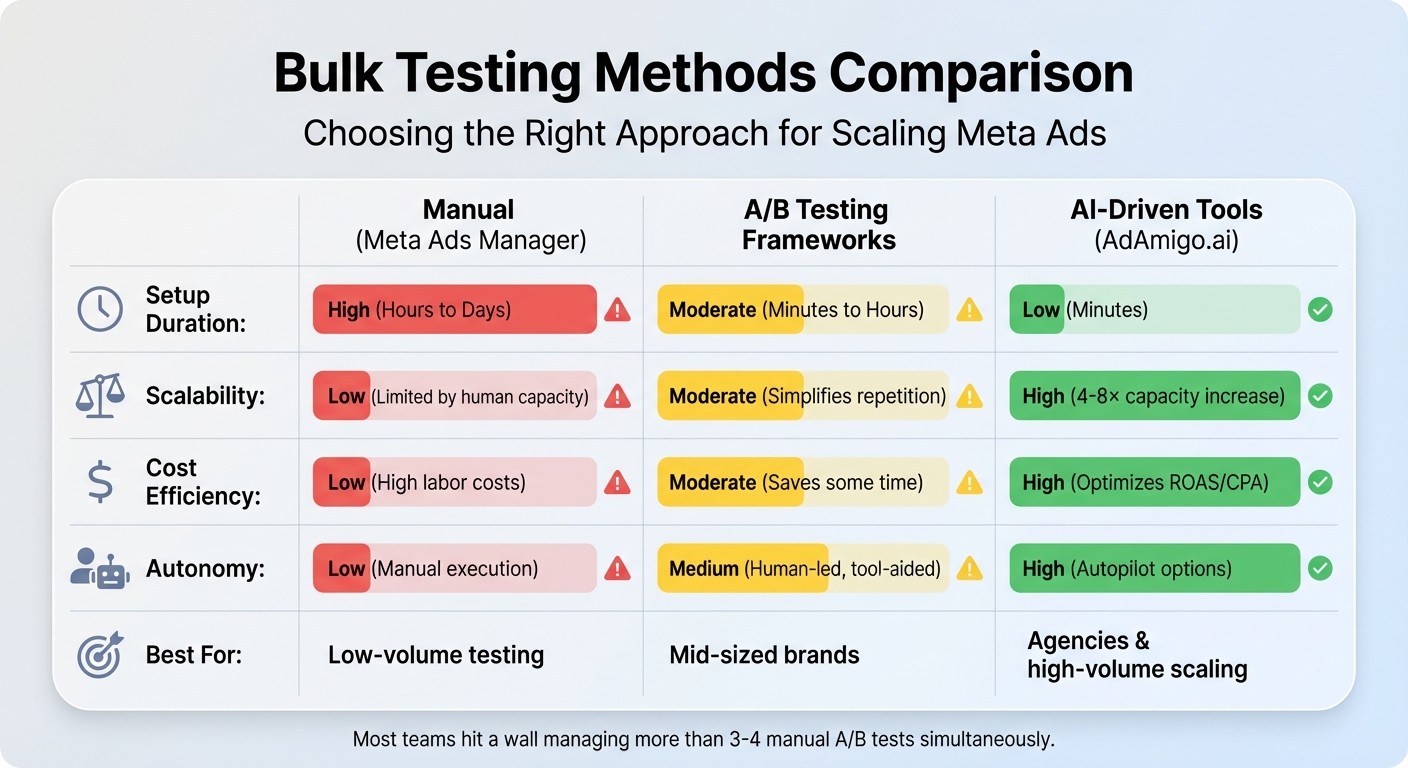
Comparison of Meta Ads Bulk Testing Methods: Manual vs A/B Framework vs AI-Driven
When tackling Meta ads at scale, choosing the right testing method can make or break your campaign efficiency. There are three main approaches: manual management through Meta Ads Manager, structured A/B testing frameworks, and AI-driven automation tools. Each method comes with its own strengths and weaknesses in terms of time investment, scalability, cost, and control.
Here’s a closer look at how these methods stack up:
Manual management is the most straightforward option in terms of cost - there are no additional fees. However, it’s incredibly time-intensive, requiring detailed, hands-on setup for each campaign. Most teams hit a wall when trying to manage more than 3–4 manual A/B tests at once, which makes this method impractical for large-scale operations. It’s best suited for small-scale testing but quickly becomes unmanageable as the volume grows.
A/B testing frameworks, such as the "One Ad per Ad Set" (ABO) method or Meta’s built-in A/B testing tools, offer a more structured approach. These frameworks excel at isolating variables, providing cleaner data and more precise insights. However, they’re not ideal for high-volume testing. As Cedric Yarish, Co-founder of AdManage.ai, explains:
"The top advertisers are launching hundreds of ads, so it's worth giving up on significance and valuing the learnings overall, rather than trying to create a perfectly fair test setup".
In essence, when operating at scale, speed and volume tend to outweigh the pursuit of perfect test conditions.
AI-driven tools like AdAmigo.ai take automation to the next level. These tools drastically cut setup time, handling hundreds of ads simultaneously - something that would otherwise require an entire team of media buyers. For agencies, this means one person can manage 4–8× more clients, freeing up strategists to focus on overarching goals. AI tools continuously optimize aspects like creatives, targeting, budgets, and bids, accelerating the process of identifying and scaling winning ads.
Feature | Manual (Meta Ads Manager) | A/B Testing Frameworks | AI-Driven Tools (AdAmigo.ai) |
|---|---|---|---|
Setup Duration | High (Hours to Days) | Moderate (Minutes to Hours) | Low (Minutes) |
Scalability | Low (Limited by human capacity) | Moderate (Simplifies repetition) | High (4–8× capacity increase) |
Cost Efficiency | Low (High labor costs) | Moderate (Saves some time) | High (optimizes CPA and ROAS) |
Autonomy | Low (Manual execution) | Medium (Human-led, tool-aided) | High (Autopilot options) |
Best For | Low-volume testing | Mid-sized brands | Agencies & high-volume scaling |
Ultimately, the right method depends on your specific needs and resources. If you’re running a few tests a month, manual management or A/B frameworks might suffice. But for those managing hundreds of ads or juggling multiple clients, automation is the key to staying competitive and avoiding common pitfalls of scaling campaigns.
Conclusion
In this article, we’ve covered some of the most common mistakes that can derail bulk Meta ad testing, along with practical ways to fix them. Bulk testing offers the potential for rapid growth, but it can also drain your budget fast or increase your creative testing costs if you’re not careful. The five pitfalls we discussed - audience overlap, poor testing structures, broken tracking, mismatched objectives, and manual management errors - are responsible for much of the wasted spend in ad campaigns. The upside? Each of these issues has a clear solution: clean up overlapping audiences, build a full-funnel setup to isolate variables, debug your conversion tracking, match your campaign objectives to your funnel stage, and automate repetitive tasks to minimize human error.
Managing dozens or even hundreds of ads manually can quickly spiral out of control. Small mistakes in one campaign can snowball into bigger problems across multiple campaigns. That’s where AI-powered tools like AdAmigo.ai come into play. These platforms can handle time-consuming tasks like audience overlap checks, creative generation, tracking validation, and campaign alignment, allowing you to scale your efforts without the stress.
AdAmigo.ai offers features like its AI Ads Agent, which creates on-brand ad creatives, and AI Actions, which provide daily recommendations for optimizing audiences and budgets. Its Bulk Ad Launch feature can generate hundreds of ready-to-go ads in minutes, all while learning from real-world performance to improve results over time. Simply set your performance goals - like increasing ad spend by 30% while maintaining a 3× ROAS - and let the AI handle the execution, freeing you up to focus on the bigger picture.
FAQs
How do I know if my ad sets are overlapping too much?
Excessive audience overlap can show up in a few ways: audience saturation, high frequency, and diminishing returns. These issues often result in ad fatigue and wasted budget. To tackle this, use Meta's Ads Manager to check for audience overlap and make sure each ad set focuses on distinct, clearly defined audience segments. Keep an eye on metrics like frequency and cost per result to spot potential problems. Additionally, tools like AdAmigo.ai can automate the process of refining your audience segments, helping you cut down on overlap and boost efficiency.
How much budget and time do I need for a valid bulk test?
To run a proper bulk test on Meta, you’ll need a budget that ensures at least 50 conversions per week per ad set. The exact budget depends on your campaign goals and the size of your target audience. Aim for a testing period of 3–5 days to gather sufficient data for effective optimization.
How can I confirm my Pixel and Conversions API are tracking correctly?
To make sure your Pixel and Conversions API are working as they should, use tools like Facebook's Pixel Helper to confirm that events - like purchases or sign-ups - are firing correctly. Then, head over to Meta Ads Manager and use the Event Manager to verify that these events are being received without issues. It's also a good idea to regularly review your tracking data and explore using AI tools to automate error detection. This can help ensure your tracking stays accurate and dependable over time.