
Meta Ad Naming Conventions Guide: Campaign, Ad Set & Ad Names (2026)
Standardize your Meta ad naming with templates for every level. Covers Advantage+ conventions, UTM mapping, a vocabulary table, and rollout strategies.
Open Meta Ads Manager right now. Can you tell what every campaign, ad set, and ad does just by reading its name? If you're squinting at a wall of auto-generated labels like "Campaign #47" or ad names that three different team members built three different ways, you already know the cost: hours lost in reporting cleanup, creative tests you can't properly compare, and onboarding that takes twice as long as it should.
Here's the fix — and it's simpler than you think:
Campaign names capture the objective, theme, funnel stage, and date:
BrandX_Conv_SpringSale_BOFU_Mar2026Ad set names encode audience, location, placement, and bid strategy:
LAL1%_US_Feed_CostCapAd names describe the creative: format, hook, offer, and version:
UGC_Video_20%Off_V1
A consistent naming convention turns every campaign name into a filterable data column — no manual tagging, no guesswork, no "wait, which winter sale was this?" during a quarterly review. This guide gives you the templates, the abbreviation table, and the rollout playbook to make it stick, whether you manage one ad account or twenty.
The Three-Level Naming Structure: Campaign, Ad Set, and Ad
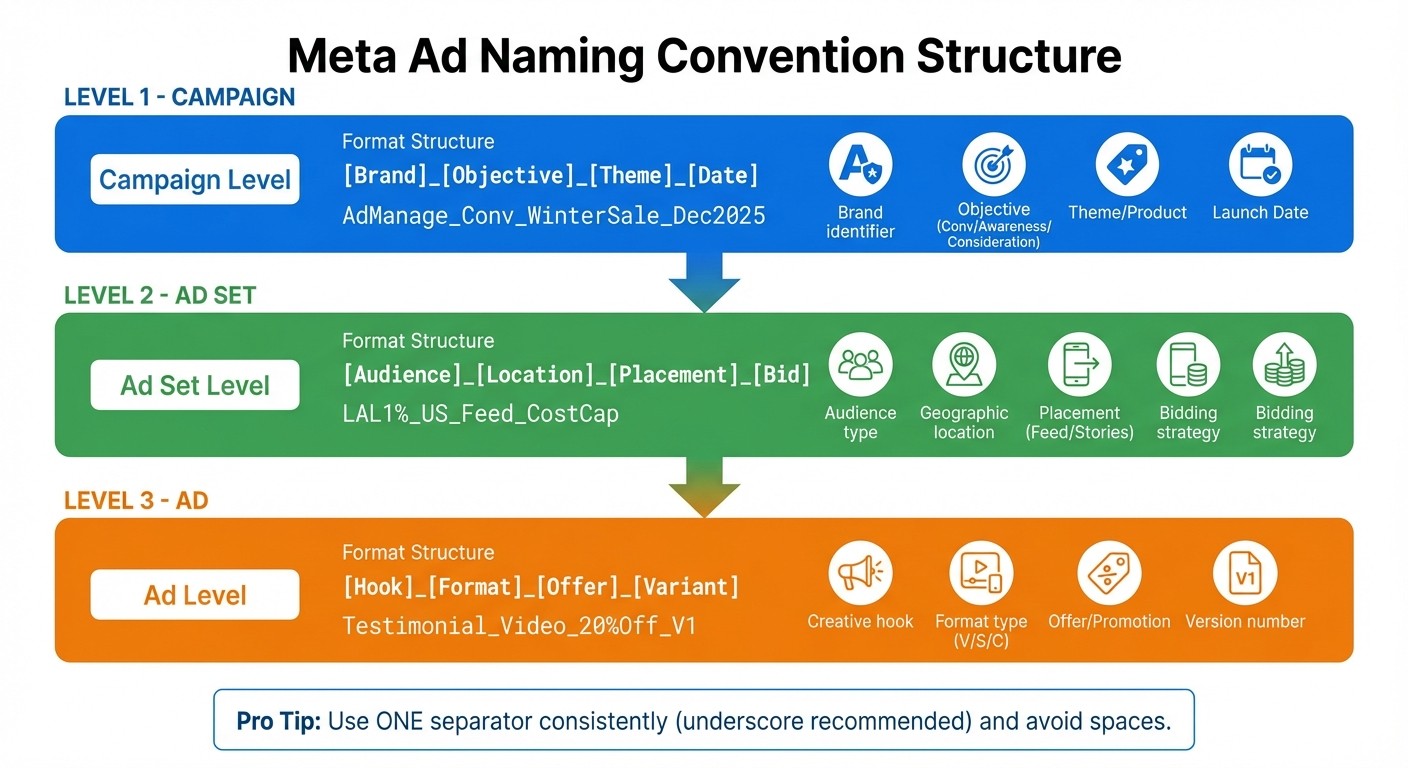
Meta Ad Naming Convention Structure: Campaign, Ad Set, and Ad Level Examples
Every Meta ad account has three levels — campaign, ad set, and ad — and each one answers a different question. Your naming convention should reflect that hierarchy so you can filter, report, and optimize at exactly the right granularity.
Campaign Level: Objective, Theme, and Funnel Stage
Campaign names answer the question: what are we trying to do? They should capture the brand, campaign objective, theme, funnel stage, and launch date.
Standard format: [Brand]_[Objective]_[Theme]_[Stage]_[Date]
Example | What it tells you |
|---|---|
| Conversion campaign for BrandX, spring sale, bottom-of-funnel, launched March 2026 |
| Awareness campaign for a new product launch, top-of-funnel |
| Lead gen campaign promoting a webinar, middle-of-funnel |
Many teams use funnel-stage prefixes — TOFU (top of funnel / prospecting), MOFU (middle of funnel / consideration), BOFU (bottom of funnel / conversion) — to group campaigns by where they sit in the customer journey. This makes it easy to pull a quick report on all your prospecting spend versus your retargeting spend without touching a single filter.
For agencies managing multiple clients, lead with a client code: ClientA_Conv_SpringSale_BOFU_Mar2026. This keeps every account visually distinct when you're bouncing between Ads Managers all day.
Ad Set Level: Audience, Location, Placement, and Bid
Ad set names answer: who's seeing this, where, and under what budget rules?
Standard format: [Audience]_[Location]_[Placement]_[Bid]
Example | What it tells you |
|---|---|
| 1% Lookalike audience, United States, Feed placement, Cost Cap bidding |
| Retargeting purchasers, UK, Instagram Stories, Campaign Budget Optimization |
| Broad targeting (no audience restrictions), Germany, Reels, Highest Volume bid |
Order matters — and it should match how you think about your account. If audience type is the primary axis you optimize on, start every ad set name with the audience. If geography drives your strategy, lead with the location code instead. The rule isn't the format; the rule is that the format stays the same.
"A well-structured naming convention is the foundation of efficient campaign management." — Colbie Bronx, GoodYou Marketing
For more granular tracking, expand the audience field with seed and percentage: LAL_Purchasers_1%_US_Feed_CostCap. If you're testing budget tiers, append _BudT5 or tag CBO vs ABO explicitly. Including the bid strategy in the name — Cost Cap, Bid Cap, Min ROAS, Highest Volume — lets you filter ad sets by bidding approach and spot patterns across campaigns.
Ad Level: Creative Format, Hook, Offer, and Variant
Ad names answer: what does the creative look like?
Standard format: [Hook]_[Format]_[Offer]_[Variant]
Example | What it tells you |
|---|---|
| User-generated content video, 20% off offer, version 1 |
| Testimonial static image, free trial offer, version 3 |
| Problem/solution carousel, 30% off offer, version 2 |
Short codes keep names scannable: Vid or V for video, Sta or S for static image, Car or C for carousel, Coll for collection. Advanced teams often add aspect ratio (9x16, 1x1, 4x5), video duration (15s, 30s), and production flags (Subs for subtitles, VO for voiceover, UGC for user-generated content).
When A/B testing creatives, append temporary tags like _TestA or _GreenBG during the experiment — then clean them up once a winner is declared. An Asset ID at the end (_ASSET123) makes it trivial to trace a live ad back to the exact file in your creative library.
Quick Reference:
Level | Format | Example |
|---|---|---|
Campaign |
|
|
Ad Set |
|
|
Ad |
|
|
Choosing Your Delimiter and Naming Schema
Delimiter Comparison
Your delimiter — the character that separates fields in a name — is the single most consequential choice in your naming convention. Change it later and every automated filter, every dashboard, and every parsed report breaks.
Separator | Pros | Cons |
|---|---|---|
Underscore (_) | Works with UTM parameters and nearly all tracking tools; universally parseable | Can blend with text in some interfaces |
Hyphen (-) | Easy to read; common in URLs | Can be confused with hyphenated words ("mid-funnel") |
Pipe (|) | Strong visual separation between fields | Requires escaping in some systems; less common in UTMs |
Space ( ) | Most human-readable | Avoid — breaks UTM parameters and automated filters |
Recommendation: use underscores. They're the default in Meta's own Name Templates, they play well with URL parameters, and every reporting tool supports them. Pick one and enforce it — mixing delimiters is one of the fastest ways to make your naming convention unparseable.
Positional vs Key-Value Schemas
There are two philosophical approaches to naming structure, and the right one depends on your team:
Positional schema (what this guide uses): each position in the name has a fixed meaning. BrandX_Conv_US_Feed_V1 — position 1 is always brand, position 2 is always objective, and so on. Positional schemas are compact, fast to read, and enforce discipline — but they're rigid. If you add a field mid-convention, you break every existing name.
Key-value schema: each element is labeled. brand=BrandX_obj=Conv_geo=US_pl=Feed_v=V1. Key-value is self-documenting (a new team member can read any name without a decoder ring), handles optional fields gracefully, and survives convention changes. The tradeoff: names get longer fast, and they're harder to scan at a glance.
For most teams, a positional schema with a well-documented abbreviation table (see below) is the sweet spot — short enough to scan, structured enough to parse.
Controlled Vocabulary: The Abbreviation Table Your Team Needs
Inconsistent abbreviations are the silent killer of naming conventions. One person writes LAL, another writes LLA, a third writes LookALike — and suddenly your "filter by audience type" report misses half the data. Publish a canonical abbreviation list and require everyone to use it.
Campaign-Level Abbreviations
Field | Allowed Values | Meaning |
|---|---|---|
Objective |
| Campaign objective |
Funnel Stage |
| Funnel stage |
Campaign Type |
| Advantage+ Shopping, Campaign Budget Opt., Ad Set Budget Opt., Dynamic Creative Opt. |
Ad Set-Level Abbreviations
Field | Allowed Values | Meaning |
|---|---|---|
Audience Type |
| Lookalike, Custom Audience, Broad, Dynamic Ad Broad Audience, Retargeting |
Audience Seed |
| Purchasers, Add to Cart, View Content, Engaged, Leads, Subscribers |
Location |
| ISO country codes (or |
Placement |
| Facebook Feed, Instagram Feed, Stories, Reels, Audience Network, Messenger |
Bid Strategy |
| Cost Cap, Bid Cap, Min ROAS, Highest Volume, CPM |
Ad-Level Abbreviations
Field | Allowed Values | Meaning |
|---|---|---|
Format |
| Video, Static, Carousel, Collection, Dynamic Product Ad |
Aspect Ratio |
| Vertical, Square, Vertical (4:5), Landscape |
Duration |
| Video length (L = looping, for Reels/Stories) |
Features |
| Subtitles, Voiceover, User-Generated Content, Headline Question, Animated |
Store this table in a shared doc or Notion page — and version it (see Version Control). When the team debates whether to use Conv or Conversions, the table is the tiebreaker.
Meta's Built-in Name Templates
Before you build a spreadsheet or a custom enforcement script, know that Meta Ads Manager has a native naming feature you might be overlooking.
Meta's Name Templates let you define a naming format once and have Ads Manager autofill it every time you create a campaign, ad set, or ad. You can set one template per level per ad account. The template builder supports:
Predefined fields — drag in campaign objective, ad set name, placement, and other Meta-native fields as tokens
Custom text — type fixed separators or labels that appear in every name
Custom dropdowns — define a list of allowed values (e.g., your funnel stages or creative formats) so team members pick from a menu instead of typing freehand
How to set it up:
Open Ads Manager → click Settings (the gear icon)
Under Ad Account Settings, find Name Templates
Choose the level (Campaign, Ad Set, or Ad) and build the template
Save — the template applies to every new campaign, ad set, or ad created in that account from that point forward
Name Templates are free, native, and eliminate typos at creation time. Their limitation: they only fire when you create something new in Ads Manager. They don't validate names from the API, bulk uploads, or third-party tools, and they don't touch existing ads.
That's where automation tools pick up the slack — more on that in the Automation & AI section below.
Naming Advantage+ Shopping Campaigns (ASC) and Flexible Ads
Advantage+ Shopping Campaigns (ASC) and flexible ad formats collapse traditional campaign structure — there's no ad set layer, targeting is automated, and Meta dynamically assembles creatives from your uploaded assets. That makes the old Campaign_AdSet_Ad naming model incomplete.
Why ASC Naming Needs Its Own Convention
In a standard campaign, the ad set name carries your audience and placement logic. ASC eliminates the ad set — Meta handles audience and placement automatically. If your naming convention relies on ad set names to encode targeting, you lose that signal entirely in an ASC campaign.
ASC Naming Templates
The campaign name does the heavy lifting in ASC, so include what you'd normally put at the ad set level:
ASC Campaign: [Brand]_ASC_[Goal]_[Product/Category]_[Date]
Example | What it tells you |
|---|---|
| Advantage+ Shopping, sales objective, shoe category, March 2026 |
| ASC optimized for new customer acquisition, skincare |
For the ad level inside ASC, focus on the creative components since targeting isn't yours to name:
ASC Ad: [Format]_[Hook]_[Angle]_[Variant]
Example | What it tells you |
|---|---|
| Video, testimonial hook, before/after angle, version 1 |
| Carousel, lifestyle imagery, seasonal angle, version 2 |
Dynamic Creative Optimization (DCO) Bundles
When you use DCO — feeding Meta multiple headlines, images, and primary texts and letting it assemble the best combination — the "ad" is really a bundle. Name the bundle, not the individual combinations:
DCO Ad: DCO_[Hook]_[Offer]_[Date]
Prefix with DCO_ or Flex_ so you can instantly filter for dynamically assembled ads versus fixed creatives in your reports. Meta reports which combinations win — you don't need to name each one.
If your team is transitioning a portion of spend to ASC while keeping some manual campaigns running, add an ASC_ prefix at the campaign level across the board. That way, a single filter splits your ASC and non-ASC spend for apples-to-apples performance comparison.
Mapping Ad Names to UTM Parameters
A naming convention that stays trapped inside Meta Ads Manager is only half the picture. Your campaign, ad set, and ad names should flow into your analytics — and UTM parameters are how they get there.
The Basic Mapping
Naming Field | UTM Parameter | Example Value |
|---|---|---|
Campaign name → |
|
|
Ad set name → |
|
|
Ad name → |
|
|
— |
|
|
— |
|
|
Meta's Dynamic URL Placeholders
Meta Ads Manager supports dynamic URL parameters that auto-populate from your naming fields:
{{campaign.name}}→ inserts the full campaign name{{adset.name}}→ inserts the full ad set name{{ad.name}}→ inserts the full ad name{{placement}}→ inserts the placement (Feed, Stories, etc.){{site_source_name}}→ insertsfborig
A full URL parameter string might look like:
Set this once at the ad level and Meta fills it in automatically every time an ad serves.
Critical Rules
Lowercase everything. Google Analytics treats
utm_campaign=Spring_Saleandutm_campaign=spring_saleas two different campaigns. If your ad names use mixed case (which they should, for readability), add a lowercase rule in your UTM builder or use URL parameter settings that force lowercase.fbclid is not a UTM. Meta appends
?fbclid=...to every click for its own attribution. That's separate from your UTM parameters — both coexist. Don't try to suppress fbclid; just make sure your UTMs are there alongside it.Apple's Link Tracking Protection strips UTMs from direct clicks in Apple Mail and Messages for users who've opted in. This doesn't affect in-app ad clicks, but it's worth knowing if you're cross-referencing email campaign UTMs with paid social.
With the mapping in place, you can open GA4 (or any analytics tool that reads UTMs), filter by utm_campaign, and see every conversion broken out by your naming convention — no manual reconciliation required.
Version Control: Creatives and Conventions
Creative Versioning
Version numbers (V1, V2, V3) are the simplest, most reliable way to track creative iteration. Every time you test a new headline, hook, or visual, increment the version:
UGC_Video_20%Off_V1— originalUGC_Video_20%Off_V2— new hook, same offerUGC_Video_20%Off_V3— updated thumbnail
When version 2 outperforms version 1 by 30%, you can see it in one glance — no cross-referencing creative IDs or timestamps. During A/B tests, append temporary tags (_TestA, _GreenBG) and strip them once the winner is declared. A cluttered ad name with stale test tags makes future reporting harder than it needs to be.
Versioning the Convention Itself
Your naming convention is a living document. Six months from now, you might add a new field, change an abbreviation, or restructure the ad-set format. When you do, tag every name created under the new rules with a convention version suffix: _nc2, _nc3, etc. (AdsUploader popularized this pattern — it's simple and effective.)
So BrandX_Conv_SpringSale_BOFU_Mar2026 under convention version 2 becomes BrandX_Conv_SpringSale_BOFU_Mar2026_nc2. When you pull a report, you can filter out pre-convention-change names or handle them with different parsing rules — no silent data corruption, no "wait, why do some of these have an extra field?" confusion.
Rollout Playbook: Fixing a Messy Ad Account
Inheriting an account with hundreds of inconsistently named ads is daunting. The wrong move — renaming everything at once — breaks historical continuity and makes year-over-year comparisons impossible. Here's the playbook.
Step 1: Lock the Present with a Forward-Only Rule
Don't touch existing names. Announce a hard cutover: every campaign, ad set, and ad created from today forward follows the new convention. Document the new standard in a shared guide (include the abbreviation table), set up Meta's Name Templates if you haven't already, and audit new names weekly for the first month.
Step 2: Tag the Legacy Era
For the top 20% of spenders in the old account — the campaigns and ads that drive the majority of conversions — add a LEGACY_ prefix or suffix to their names. This is a one-time manual pass:
Old Campaign Name→LEGACY_Old Campaign Name
Why only the top spenders? Because those are the campaigns you'll benchmark against when evaluating whether the new naming convention (paired with better structure) actually improved performance. The long tail of paused, low-spend ads doesn't need the tag — you won't analyze them historically.
Step 3: Surgical Renames for Active High-Value Campaigns
If a handful of legacy campaigns are still performing well and will run for months, rename them to the new convention — but only if you can map every field cleanly. A partial rename that guesses at the audience or objective is worse than leaving the old name in place. When in doubt, leave it and wait for the campaign to end naturally.
Step 4: Audit Quarterly, Not Mid-Campaign
Schedule a naming audit on your calendar every quarter. Review a random sample of 50 names across campaigns, ad sets, and ads. Flag inconsistencies; update the abbreviation table if the team has organically adopted a better shorthand. But never change the convention mid-campaign — historical data integrity trumps a slightly better name.
For agencies managing multiple client accounts, repeat this playbook per client. A unified naming standard across clients is ideal; a per-client standard that's actually followed beats a unified one that isn't.
Keeping Naming Consistent Across Teams
A naming convention is only as good as the least-consistent person applying it. When multiple media buyers, designers, freelancers, and agency partners touch the same ad account, consistency requires more than a shared document.
Publish a naming spec, not just a guide. A naming spec is prescriptive: it lists every allowed abbreviation (see the controlled vocabulary table above), the exact field order, the delimiter, and examples of what's wrong versus what's right. A guide explains principles; a spec enforces rules. Store it somewhere everyone can access — a Notion page, a pinned Slack message, a Google Doc with comment permissions.
Onboard with a name-along. When a new team member or freelancer joins, have them name five sample campaigns, ad sets, and ads using the spec before they touch the live account. You'll catch misunderstandings in five minutes that would otherwise become fifty misnamed ads.
Use automation as your safety net. Even the most disciplined teams make mistakes at 11 PM before a launch deadline. Automation tools that validate names against your convention before ads go live — rejecting or flagging anything that breaks the format — are the difference between a convention that works on paper and one that survives real-world pressure. More on that below.
Automation & AI: Enforcing Naming at Scale
Manual naming works when you launch five ads a week. When you're launching fifty — or five hundred — it doesn't. A single typo in an ad set name can silently split your reporting and cost hours of cleanup. Automation closes the gap between the naming convention you designed and the one that actually ships.
Dynamic Tokens
Dynamic tokens auto-populate name fields from data sources, eliminating manual entry errors:
{{date}}or{{dateFormat}}— inserts the current date in your chosen format{{filename}}— pulls the creative filename{{creator}}— tags the team member who built the ad{{placement}}— auto-fills the placement
When every name is generated rather than typed, consistency becomes the default.
Bulk Launch with Enforced Naming
Bulk launching dozens or hundreds of ads amplifies both the value and the risk of naming conventions. A bulk launch tool that enforces your naming template at upload time — validating every field against your controlled vocabulary before anything hits Meta's API — turns a high-risk manual process into a reliable one.
Platforms like AdAmigo.ai combine bulk launch with naming enforcement: upload your creatives and targeting from a spreadsheet, and the platform generates every campaign, ad set, and ad name according to your rules. For agencies, this means one media buyer can manage 4–8× more accounts without sacrificing naming consistency — not because they're typing faster, but because they're not typing names at all.
AI-Powered Naming Suggestions
Beyond enforcement, AI can actively improve your naming. An AI agent that analyzes your top-performing ads can identify naming patterns linked to strong performance — specific hooks, formats, or offers that keep showing up in winners — and suggest refinements to your naming taxonomy. It's not replacing your convention; it's making it smarter over time.
The goal isn't to automate away the thinking behind naming. It's to automate away the busywork — so the thinking actually gets applied, every time, without fail.
Common Naming Convention Mistakes
Even experienced media buyers fall into these traps. Here are the ones that cause the most damage — and how to sidestep them.
1. Mixing Delimiters
Using underscores in campaigns, hyphens in ad sets, and pipes in ads makes automated parsing impossible. If your naming convention is Brand_Conv_US_Feed_V1, every name must use underscores — no exceptions. This is the single most common mistake and the hardest to undo, because fixing it requires renaming every affected asset.
2. Putting Budget Figures in Names
BrandX_Conv_US_$500_CBO seems helpful — until you adjust the budget. Now the name is wrong, and you have to choose between an inaccurate name (which misleads everyone) or a mid-campaign rename (which breaks historical continuity). Leave budget out of names. Use budget tiers (BudT1, BudT5) if you need to group by spend level, but never encode a dollar amount.
3. Inconsistent Abbreviations
LAL in one ad set, LookALike in another, LLA in a third. This is a filtering disaster — one audience type, three different text strings, zero chance of a clean report. The controlled vocabulary table exists to prevent exactly this. Make it the single source of truth.
4. Over-Encoding
Names like BrandX_Conv_US_Feed_M_25-44_iphone_CostCap_9x16_15s_Subs_VO_V2 defeat the purpose. Beyond 5–7 fields, readability collapses and the name stops being useful at a glance. If a detail doesn't change how you filter or report, leave it out. Meta's 400-character API limit on ad set names is generous — human attention is not.
5. Spaces in Names
Spaces break URL parameters, confuse CSV exports, and make programmatic parsing unreliable. Use underscores instead. If you need visual separation, that's what consistent capitalization and delimiters are for.
6. Changing the Convention Mid-Campaign
A naming convention change resets every automated dashboard and breaks historical comparisons. Forward-only changes (see the rollout playbook) keep old and new eras cleanly separated. If you must change mid-flight, use a convention-version suffix — never silently rename.
FAQs
Creating a solid naming convention is one thing, but sticking to it across a growing number of ads is a whole different challenge. The key to keeping your ad account organized lies in maintaining strict consistency. Without it, even the most carefully planned naming system can unravel, leaving your reporting in chaos.
Here’s how you can ensure your naming conventions remain effective and scalable over time.
Choosing and Using Separators Consistently
When it comes to separators - whether you use underscores, hyphens, or pipes - the most important thing is consistency. Mixing different delimiters can make it impossible to parse names automatically, which becomes a major issue when managing large accounts or integrating data into external dashboards.
Separator | Pros | Cons |
|---|---|---|
Underscore (_) | Works well with UTM parameters and most tracking tools. | Can blend in with text in some interfaces, making it harder to read. |
Hyphen (-) | Easy to read and commonly used in URLs. | Can cause confusion if used within words (e.g., "mid-year"). |
Pipe (|) | Visually separates components clearly. | Less common and might need special handling in some systems. |
Space ( ) | Very human-readable. | Avoid - breaks UTM parameters and automated filters. |
Choose one separator and stick to it. Use Meta Ads automation tools or API scripts to enforce this rule, ensuring every ad name follows the chosen format. This small step prevents errors and keeps things running smoothly as your campaigns grow.
Version Control for scaling Meta campaigns
Version numbers (e.g., V1, V2, V3) are your best friend when tracking creative changes and understanding what drives results. Each time you test a new version - whether it’s a different video, headline, or offer - add the next version number to the ad name. This makes it easy to see which iteration worked best.
For example, if Testimonial_Video_20%Off_V1 outperforms Testimonial_Video_20%Off_V2, you’ll know the original version resonated more with your audience. When A/B testing Meta Ads, consider adding temporary tags like _TestA or _GreenBG to track specific variables. Once the test ends and a winner is chosen, clean up the naming by removing test-specific tags. This keeps your account organized and prevents unnecessary clutter in future reports.
Keeping Naming Consistent Across Teams
A great naming convention is useless if it’s not followed by everyone involved. Create a detailed naming guide that defines abbreviations, element order, and any other rules. Share this guide with anyone who works on the ad account - media buyers, designers, freelancers, or agency partners.
To avoid human error, leverage automation tools that validate ad names before they go live. These tools can ensure that no one accidentally deviates from the established format. Consistency not only improves team collaboration but also ensures clean data integration when using automated tools.
For agencies working with multiple clients, include a Brand or Client code at the start of each ad name to prevent confusion across accounts. Schedule quarterly audits to confirm the naming convention still aligns with your current strategy, but avoid making changes mid-campaign to protect historical data integrity.
AI Tools and Automation for Ad Naming
Managing ad naming manually can quickly become unmanageable, especially at scale. A single typo can throw off your reporting, making it harder to track performance accurately. Automation tools solve this by standardizing naming conventions at the system level. This ensures consistency, even when multiple team members are involved. Essentially, these tools turn your ad structure into a functional tagging system, allowing you to filter instantly by audience, creative type, or campaign objective. Let’s dive into how the best AI tools for Meta ads can help enforce and improve these naming standards.
Using AI Agents for Naming and Optimization
AdAmigo.ai offers a smart solution for ad naming. It analyzes your brand, competitor data, and campaign structures to create consistent ad configurations. Its AI Ads Agent goes a step further by continuously reviewing your top-performing ads and launching pre-configured creatives with accurate naming conventions - all with just one click. Unlike rigid rules-based systems, AdAmigo’s learning agent adjusts its approach based on live performance data. It respects your budget, pacing, geo, and placement rules while maintaining uniform naming standards. You can choose between full autopilot or manual approvals, giving you control while automating repetitive tasks.
AI Actions for Naming Improvements
AdAmigo’s AI Actions feature simplifies campaign management by delivering a daily, prioritized list of actionable tweaks. These suggestions cover creatives, audiences, budgets, and bids. The system identifies naming patterns linked to strong performance and refines them accordingly. Plus, the AI Chat Agent allows you to update naming sequences using natural language commands, making it easy to adapt as your campaigns evolve.
Bulk Ad Naming and Launches
Automation doesn’t just improve individual ad naming - it also makes large-scale ad deployment more efficient. With bulk launch capabilities, you can deploy dozens of ads using dynamic tokens like {{filename}}, {{dateFormat}}, and {{creator}}. AdAmigo’s Bulk Ad Launch feature enables you to publish multiple Meta ads in one action, complete with the right copy, creative, and targeting, directly from your Google Drive. For agencies juggling multiple clients, this tool allows a single media buyer to manage 4–8× more accounts, freeing up senior strategists to focus on broader campaign strategies.
Common Naming Convention Mistakes to Avoid
Marketers often fall into naming traps that create long-term headaches. Let’s explore some of the most common mistakes and how to steer clear of them.
Overly Complex or Inconsistent Naming
Packing ad names with unnecessary details makes them harder to understand. Experts suggest sticking to 5–7 key elements for clarity. Going beyond that just adds noise. A frequent misstep is inconsistent abbreviations - like alternating between "LAL" and "LLA" for Lookalike audiences. This inconsistency can instantly disrupt your reporting and filtering capabilities.
Another tip: avoid spaces in your names. Instead, use underscores or hyphens to prevent tracking errors. And keep UTM parameters out of ad names - they belong in the URL tracking field. Changing your naming structure mid-campaign is a big no-no; it breaks historical continuity, making long-term analysis a nightmare.
A well-thought-out system should also account for growth to ensure clarity as campaigns scale.
Failing to Plan for Scalability
A lack of scalability can turn managing thousands of ad variations into chaos. For example, AdManage.ai reported launching 494,000 ads in just 30 days - a feat only achievable with automated naming and organization. Relying on manual naming becomes impossible as campaigns grow. Without a documented schema or set of rules, teams face confusion, especially when onboarding new members or collaborating with external agencies.
To tackle this, AI automation platforms are a must.
Skipping Automation Tools
At scale, manual naming is both error-prone and inefficient. Automation ensures consistency and saves time. Tools that use dynamic tokens such as {{dateFormat}}, {{filename}}, and {{placement}} auto-fill names accurately, eliminating typos and discrepancies. Platforms like AdAmigo.ai enforce naming standards, ensuring every ad name aligns with your rules - even when managing multiple clients or launching hundreds of ads at once without errors. For agencies, this can allow a single media buyer to handle 4–8× more accounts without sacrificing precision.
In short, automation isn’t just a nice-to-have; it’s critical for maintaining the consistency that makes naming conventions effective in the first place.
Key Takeaways for 2025 Naming Conventions
When it comes to naming conventions in 2025, sticking to a consistent approach is critical. Why? Because proper naming doesn't just keep things tidy - it turns chaos into clarity. Well-structured names act like filterable data columns, allowing you to instantly analyze performance based on hooks, formats, or audiences by analyzing Meta ad metrics - no need for tedious manual cleanup. This makes reporting far more accurate by tracking Meta ads with Google Analytics, enabling "apples-to-apples" comparisons that bring true winners to light, instead of letting them get lost in the noise.
How Consistent Naming Boosts Performance
Consistent naming is more than just a good habit - it’s the backbone of scalable systems. A clear and well-thought-out naming structure cuts down on onboarding time for new team members and avoids confusion across clients. By embedding tags directly into campaign names, analytics tools can quickly group and filter data by creative hooks, audience profiles, or offers. This transforms campaign names into actionable insights, connecting creative elements to conversion metrics with ease.
And when paired with automation, the benefits multiply.
The Role of Automation in 2025
At scale, manually naming campaigns becomes a bottleneck. Automation tools simplify this process by enforcing naming standards at the system level. Using dynamic tokens like {{dateFormat}}, {{filename}}, and {{creator}}, these tools auto-generate names and eliminate human errors like typos. Platforms such as AdAmigo.ai make it possible to maintain consistent naming across hundreds of ads launched in a single session. This level of automation allows agencies to scale effortlessly - one media buyer can handle 4–8× more accounts without losing precision. To put it in perspective, automated systems can launch up to 494,000 ads in just 30 days.
In short, structured naming combined with tools like AdAmigo.ai transforms ad management into a streamlined, efficient process - perfectly designed for scaling to thousands of variations.
FAQs
How long should Meta ad names be?
Keep ad names under 5–7 fields. Meta's API enforces a 400-character hard limit on ad set names, but the practical limit is much lower — aim for scannable names that don't require horizontal scrolling in Ads Manager. If a team member can't read the full name at a glance, it's too long.
What's the best delimiter for ad names?
Underscores (_). They're compatible with UTM parameters, they're the default in Meta's Name Templates, and every reporting tool parses them reliably. Hyphens are a reasonable second choice, but avoid spaces and pipes unless your entire analytics stack is confirmed to handle them.
Should I include dates in ad names?
Yes — at the campaign level. A date (month and year is sufficient in most cases) tells you at a glance when a campaign launched and helps with seasonal year-over-year comparisons. Avoid putting dates in individual ad names unless the ad is tied to a time-sensitive offer. Format consistently: Mar2026, not March2026, 0326, or Spr26.
How do I name Advantage+ Shopping Campaigns when there's no ad set?
Lead with ASC_ in the campaign name so you can filter Advantage+ and manual campaigns separately. Encode the goal and product/category at the campaign level — that's the information you'd normally put in the ad set. At the ad level, focus on creative format, hook, and variant, since targeting is handled by Meta.
Can I use the same naming convention across multiple ad accounts?
Yes — and you should. A unified convention across accounts (or across clients, for agencies) makes it possible to run cross-account reports and onboard team members faster. Use a client-code prefix (ClientA_, ClientB_) to distinguish accounts within the same convention.
How often should I audit my naming conventions?
Quarterly. Review a random sample of names, check for drift, and decide whether the convention itself needs updating. When you update it, version the convention (_nc2) rather than silently changing the rules — so old names remain parseable under old rules.