
How To Monitor API Key Usage On Meta Ads
Monitor Meta Ads API keys: track call volume, errors, token expiry, and rate limits using dashboards, token debugger, and automation.
Monitoring API key usage on Meta Ads is essential to safeguard your campaigns and ensure smooth operations. Mismanaged API keys can lead to budget drains, security risks, and broken workflows. Here's the gist:
Why Monitor?
Prevent budget loss from excessive API calls.
Avoid disruptions caused by expired tokens or rate limit breaches.
Stay compliant with Meta's quarterly API updates.
Key Metrics to Track:
API Call Volume: Avoid rate limits and throttling.
Error Rates: Spot issues with permissions or configurations.
Token Expiration: Ensure continuous operations.
CPU/Total Time: Monitor resource usage.
Tools to Use:
Meta Developer Dashboard: Access real-time usage data and alerts.
Access Token Debugger: Check access token vs API key usage, expiration, permissions, and security.
Graph API Explorer: Test and validate API responses manually.
Best Practices:
Conduct weekly audits of API permissions and token scopes.
Rotate tokens regularly and store them securely in encrypted environments.
Use automation tools like AdAmigo.ai for continuous monitoring and alerts.
Automation combined with regular audits ensures secure, efficient, and uninterrupted campaign management. Focus on tracking the right metrics and leveraging tools effectively to avoid issues before they escalate.
How to Set Up Meta Ads API in n8n (Complete Step-by-Step Tutorial 2025)

How to Access the Meta Developer Dashboard for Usage Data
Key Metrics to Monitor for Meta Ads API Usage
The Meta Developer Dashboard is your go-to tool for tracking API calls, errors, and resource usage. To get started, log in at developers.facebook.com, select your app from the dropdown menu, and you'll land on the main dashboard. Here, you can monitor usage metrics and receive alerts to identify potential issues before they escalate.
Finding the API Usage Section
Once you're in your app's dashboard, head over to the "App Dashboard" tab. This area provides real-time insights into API call volumes, error codes, and resource consumption. Look out for the "App Alerts" section - it highlights unusual activity, policy violations, or rate limit warnings. If you're managing multiple apps or accounts, ensure you're working with the correct App ID.
Meta also includes a "Usage Header" in its API responses. This feature monitors rate limit consumption in real time, allowing you to integrate logic into your scripts to reduce usage when limits are approached. This can help you avoid throttling and maintain smooth operations.
Which Metrics to Monitor
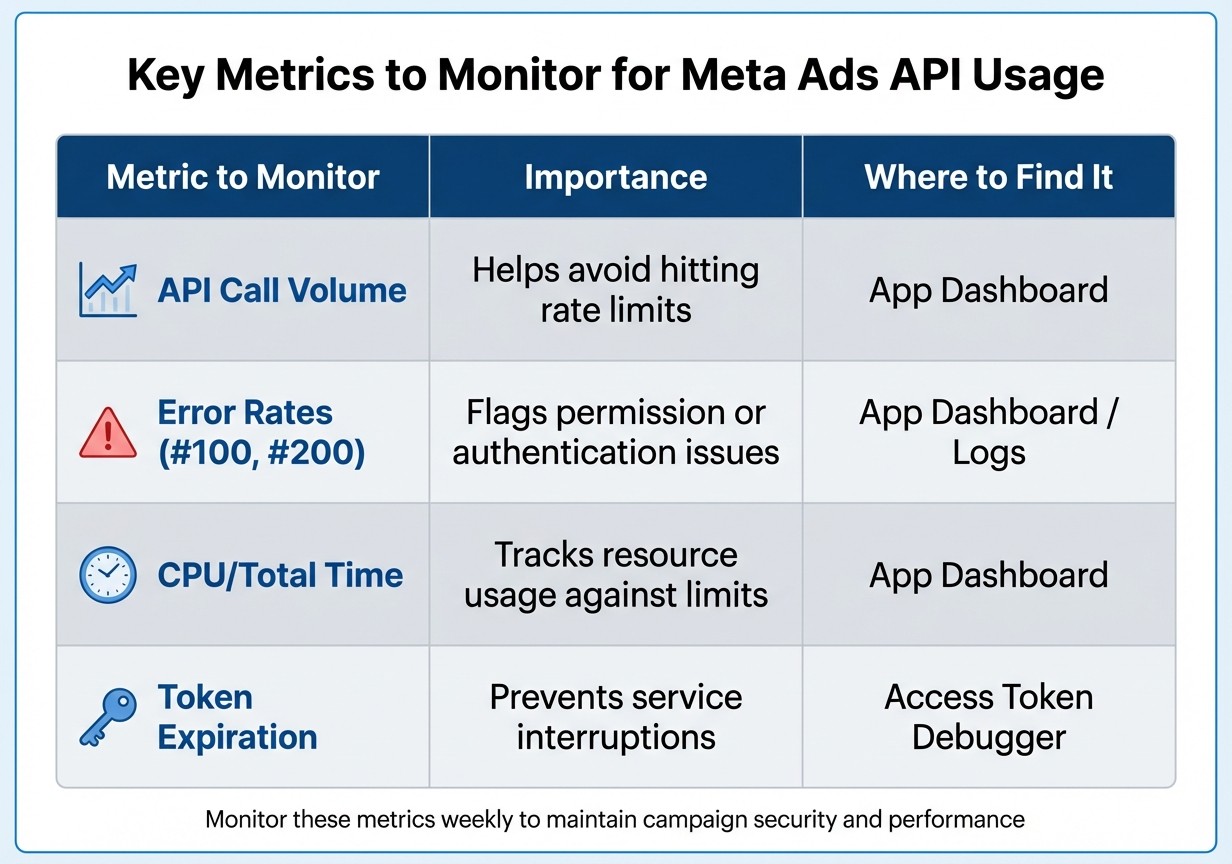
Not all metrics are equally important, so focusing on the right ones is key. Here's what to keep an eye on:
API Call Volume: This is critical because rate limits are tied to both the number of calls and the CPU and Total Time consumed by your app.
Error Rates: These can signal integration or security issues. For example, error codes like #100 (missing permission) or #200 (permission denied) often point to expired tokens or incorrect access configurations.
CPU/Total Time: Monitoring these ensures your app stays within resource limits.
Token Expiration: Since short-term user tokens expire within one to two hours, tracking token status is essential to avoid disruptions.
Metric to Monitor | Importance | Where to Find It |
|---|---|---|
API Call Volume | Helps avoid hitting rate limits | App Dashboard |
Error Rates (#100, #200) | Flags permission or authentication issues | App Dashboard / Logs |
CPU/Total Time | Tracks resource usage against limits | App Dashboard |
Token Expiration | Prevents service interruptions | Access Token Debugger |
Keep in mind that conversion data may take up to 72 hours to fully process due to delayed attribution logic. Additionally, historical breakdowns for metrics like reach by age or gender are only available for the past 13 months. When planning reports, make sure your time frames align with these limitations for accurate insights.
These metrics are fundamental for effective monitoring and pave the way for the manual tracking methods discussed in the next section.
Manual Tracking of API Calls and Activity
Manual tracking can work well if you're managing a smaller operation - say, fewer than 20–30 ads per week. The process is simple: log each API call in a spreadsheet or internal database. Be sure to include details like the specific object modified (e.g., a Campaign ID), the type of change made (such as adjusting a budget or swapping creatives), and an accurate timestamp. Keeping this kind of audit trail can help you spot irregularities, like unexpected spikes in API activity or recurring errors.
In addition to logging, it's important to validate API responses as they happen. For this, the Graph API Explorer is a great tool. It allows you to manually send requests, review the returned JSON, and ensure your integration is behaving correctly. Pair this with the Payload Helper to check your JSON formatting and avoid errors before updates go live. The Test Events tool in Meta Events Manager is another useful resource, letting you confirm in real time that events are processed and deduplicated properly.
That said, manual tracking has clear limitations. If you fail to update your scripts before breaking changes occur, your tracking system will stop working. Plus, since Meta doesn't deliver large datasets in a single response, you'll need to handle pagination by writing logic to follow "next page" links. It’s tedious and time-consuming.
Another hurdle is the Data Transformation Gap. API outputs come in nested JSON structures that don’t align neatly with tools like your CRM or finance systems. Flattening, mapping, and standardizing this data requires extra effort. This is especially true when you connect Meta Ads to third-party tools for reporting or automation. As Cedric Yarish aptly puts it, "The Meta Ads API is the difference between launching 50 ads manually over a week and launching 1,000 ads in an afternoon". Once your operation grows beyond basic testing, manual tracking just can’t keep up.
For larger-scale operations, System User tokens become a necessity. Unlike personal tokens, which expire every 60 days, these tokens allow continuous monitoring without interruption. If you hit rate limits, applying exponential backoff - increasing wait times between retries - can help minimize penalties. While these methods can temporarily reduce the strain, manual tracking is ultimately a short-term fix, not a scalable solution.
Using Meta's Access Token Debugger for Security
Meta's Access Token Debugger is a handy tool for verifying key details about your tokens, such as expiration dates, app connections, permissions (like ads_read or ads_management), and the linked User or System ID. This is especially useful when managing multiple campaigns or working with AI copilot for Meta ads or other third-party tools that need access to your ad accounts.
To use it, log into Meta for Developers, navigate to the Access Token Debugger, paste your token, and hit "Debug". You'll see details like the App ID, token expiration, granted scopes, and the associated User ID or System User. If anything looks off - like an unfamiliar app connection or permissions you didn’t authorize - it could signal a security issue. This tool is a vital first step in conducting a thorough security check for your tokens.
How to Run a Security Audit
Start by confirming that the App ID matches your approved Developer App. Next, check the token's expiration date - long-lived tokens last 60 days, so plan to refresh them before they expire. Review the scopes to ensure only necessary permissions are granted, and immediately revoke any unneeded "Advanced Access" permissions. Finally, verify that the User ID or System User corresponds to the correct account, not a former employee or an unexpected third party.
For most accounts, a monthly audit should suffice, but high-volume or agency-managed accounts might need weekly checks. The debugger can also help you spot misuse. For example, if a token meant for read-only access suddenly has write permissions, that’s a clear warning sign.
Token Management Best Practices
Regularly rotating tokens - even before they expire - reduces the risk of unauthorized access. For production environments, use System User tokens, which are more stable for long-term use compared to personal tokens. Always grant the least amount of access necessary; for example, if a tool only needs to view campaign data, don't provide it with editing privileges. Make sure to revoke unused tokens immediately, as they can become a security risk, especially after staff changes or tool updates.
Keep a detailed log tracking active tokens, who requested them, and their purpose. This helps streamline audits and makes it easier to spot irregularities. Remember, a single compromised token can cause significant disruptions, so maintaining strong token management practices is crucial.
Automating API Key Monitoring with AdAmigo.ai

Keeping track of API keys manually can quickly become unmanageable, especially as campaigns scale. That’s where automation steps in to make life easier. AdAmigo.ai simplifies this process by automating backend monitoring, ensuring your campaigns stay secure and efficient without the need for weekly manual checks. The platform continuously oversees API connections as part of its comprehensive campaign management system.
How AdAmigo.ai Handles API Monitoring
AdAmigo.ai connects directly with Meta's official API to manage ad campaigns with real-time API updates. This means it’s always keeping tabs on your API keys and tokens. With its AdAmigo Protect feature, the platform constantly scans account activity and performance for any irregularities. For example, it monitors Event Match Quality (EMQ) scores - a critical metric for data signal strength - and notifies you if there’s a drop that could hurt campaign results.
The system also alerts you before token expirations to avoid downtime. On top of that, daily audits provide insights and detect errors, ensuring your API connections remain stable and secure. All keys are encrypted using industry-standard protocols, and these checks seamlessly tie into broader campaign optimizations.
Why This Matters for Meta Ad Campaigns
AdAmigo.ai doesn’t just secure your API keys - it actively improves campaign performance. Its AI Actions feature fine-tunes creatives, audiences, budgets, and bids automatically, addressing any issues flagged by unusual API activity or campaign data. Instead of waiting for the next manual review, the system detects and addresses problems like broken CAPI tracking in real time.
For agencies juggling multiple client accounts, this automation is a game-changer. Media buyers can manage far more accounts because AdAmigo takes care of repetitive tasks like API health checks, freeing up time for strategic decision-making. The platform works entirely within Meta's official permissions and rate limits, offering the flexibility to run changes autonomously or with manual approvals. This ensures campaigns are always monitored and optimized while staying compliant with best practices for routine API key management.
Best Practices for Regular API Key Auditing
Regular audits work hand-in-hand with automated monitoring tools to strengthen security and maintain clarity in operations. For most advertisers, weekly reviews strike the right balance - they're frequent enough to catch potential issues early without becoming overwhelming. During these reviews, focus on two key areas: Event Match Quality (EMQ) scores and permission scopes. Make sure permissions align with your current campaign requirements. Additionally, setting up real-time alerts for anomalies and conducting routine permission reviews or use AI prompts for Meta ads audits can help keep your API secure.
Plan for token rotation and store keys securely in encrypted environments like AWS Secrets Manager or HashiCorp Vault. Since long-lived tokens generally expire after 60 days, schedule refreshes well before that deadline. Avoid embedding keys directly into client-side code, as this increases exposure risk. To manage retries effectively, implement exponential backoff, which gradually increases wait times between retry attempts.
Setting Up Alerts for Unusual Activity
Alerts are a critical tool to identify and address issues before they spiral out of control. Configure notifications for unexpected spikes in API call volume, which could signal unauthorized access or script errors. You can also use AI tools for Meta ad account analysis to identify these patterns more efficiently. Keep an eye on repeated error codes, particularly authentication failures or permission denials, as these could indicate token expiration or a potential breach.
Meta's unified attribution updates (introduced in June 2025) altered how conversion data is processed through the API. Because of this, you may need to recalibrate alert thresholds to avoid false positives. Drops in EMQ scores can also serve as a red flag, pointing to data quality issues or API connection problems.
In addition to setting up alerts, make it a habit to audit permissions regularly to ensure that API access is limited to what is strictly necessary.
Reviewing API Key Permissions Regularly
Permissions can drift over time due to shifting campaigns or changes in team roles. Conducting weekly audits of API key scopes can help you catch and remove unnecessary access that might pose a security risk. Tools like Meta Business Manager are useful for centralizing control and applying the principle of least privilege - only grant the minimum permissions required for each integration. For instance, use ads_read for reporting purposes and ads_management for campaign edits.
To enhance control, complete Meta's Business Verification and Identity Confirmation processes. These steps unlock Advanced Access, which is essential for managing client accounts and production-level use cases. Regularly reviewing user roles - such as Admin, Advertiser, and Analyst - ensures that access remains tightly aligned with current responsibilities as team dynamics evolve.
Conclusion
Keeping a close eye on API key usage is critical for safeguarding both the security and performance of your Meta ad campaigns, especially when operating at scale. Issues like unauthorized access, expired tokens, or incorrect permissions can quietly wreak havoc - draining budgets or exposing sensitive data. The good news? You don’t have to choose between manual monitoring and automation. A combined approach offers the best of both worlds: detailed oversight and efficient scaling.
Manual tracking through tools like the Meta Developer Dashboard provides insight into call volumes and error trends, often following a Meta Ads API key setup guide to ensure initial accuracy. However, it can be time-consuming and prone to human error. That’s where automation steps in. Tools like AdAmigo.ai take care of the heavy lifting by continuously monitoring API activity, refreshing tokens automatically, and detecting anomalies before they impact your campaigns. Automation doesn’t just make life easier - it shifts your focus from reacting to problems to preventing them altogether. This proactive stance is the foundation of effective threat detection for Meta ads.
To tie it all together, regular audits play a key role. Weekly reviews, token rotations, and real-time alerts help protect your ad accounts without disrupting campaign execution. By combining proactive monitoring with the right tools, you’re not just securing API keys - you’re setting the stage for scalable and reliable ad operations that grow without adding unnecessary workload.
The strategies outlined here - from manual checks to automation - work best as a unified system. Start with the basics, integrate automation thoughtfully, and conduct regular audits. This approach ensures your Meta ad campaigns remain secure, compliant, and optimized for peak performance.
FAQs
What’s the easiest way to check if I’m nearing Meta Ads API rate limits?
You can easily monitor your Meta Ads API rate limits by checking the real-time usage stats included in the API response headers. Another helpful tool is the Meta App Dashboard, which shows your application's rate limit status. This makes it simple to keep an eye on call volume and prevent hitting the limits before encountering errors.
How can I tell if an API error is from permissions, an expired token, or my request payload?
To figure out if an API error is due to permissions, an expired token, or issues with your request payload, pay close attention to the error code and message:
Permissions errors suggest that the access rights are either missing or inadequate.
Expired tokens typically generate messages about the token being invalid or expired.
Request payload errors point to problems with the structure of your data or incorrect parameters.
It's a good idea to monitor and log your API calls, including the error details, to make troubleshooting easier.
What’s a safe token rotation schedule for Meta Ads without causing downtime?
While there's no strict timeline for rotating your Meta Ads API keys, maintaining a consistent rotation schedule is essential for smooth operations. To prevent interruptions, consider these steps:
Set up expiration alerts: Configure notifications to warn you before tokens expire. This gives you ample time to act.
Proactively rotate keys: Aim for a rotation cycle of every 30 to 60 days, depending on your organization's security guidelines.
Monitor regularly: Keep an eye on your API keys to ensure everything is functioning as expected.
By staying on top of these tasks, you can keep your API access running seamlessly.