
10 Privacy Policy Best Practices for Meta Ads
Ensure Meta ad approvals by maintaining a mobile-friendly privacy policy that discloses tracking, third parties, consent tools, and retention.
Running Meta ads without a privacy policy can get your campaigns rejected. Starting in 2026, Meta requires every ad landing page to include a privacy policy link. Missing this can lead to ad disapprovals, account restrictions, or even permanent bans. Here's what you need to know to stay compliant and maintain user trust:
Monthly Privacy Policy Reviews: Regularly update your policy to reflect tools like Meta Pixel and Conversions API.
Pre-Launch Checks: Ensure privacy links work on both mobile and desktop as part of your landing page optimization.
Clear Data Collection Details: Specify what data you collect (e.g., emails, IP addresses) and why.
Third-Party Disclosures: Name all companies receiving user data, including Meta.
User Rights: Explain how users can access or delete their data.
Mobile Optimization: Make sure your privacy policy is easy to read on any device.
Compliance Records: Keep documentation of certifications and approvals.
Consent Tools: Use platforms like Cookiebot to manage user permissions.
Data Storage Limits: Define how long data is kept and when it’s deleted.
Contact Information: Provide clear ways for users to reach you about privacy concerns.
Bottom line: A well-maintained privacy policy isn’t just a Meta requirement - it’s a way to build trust and avoid legal risks. Follow these steps to keep your ads running smoothly and your audience informed.
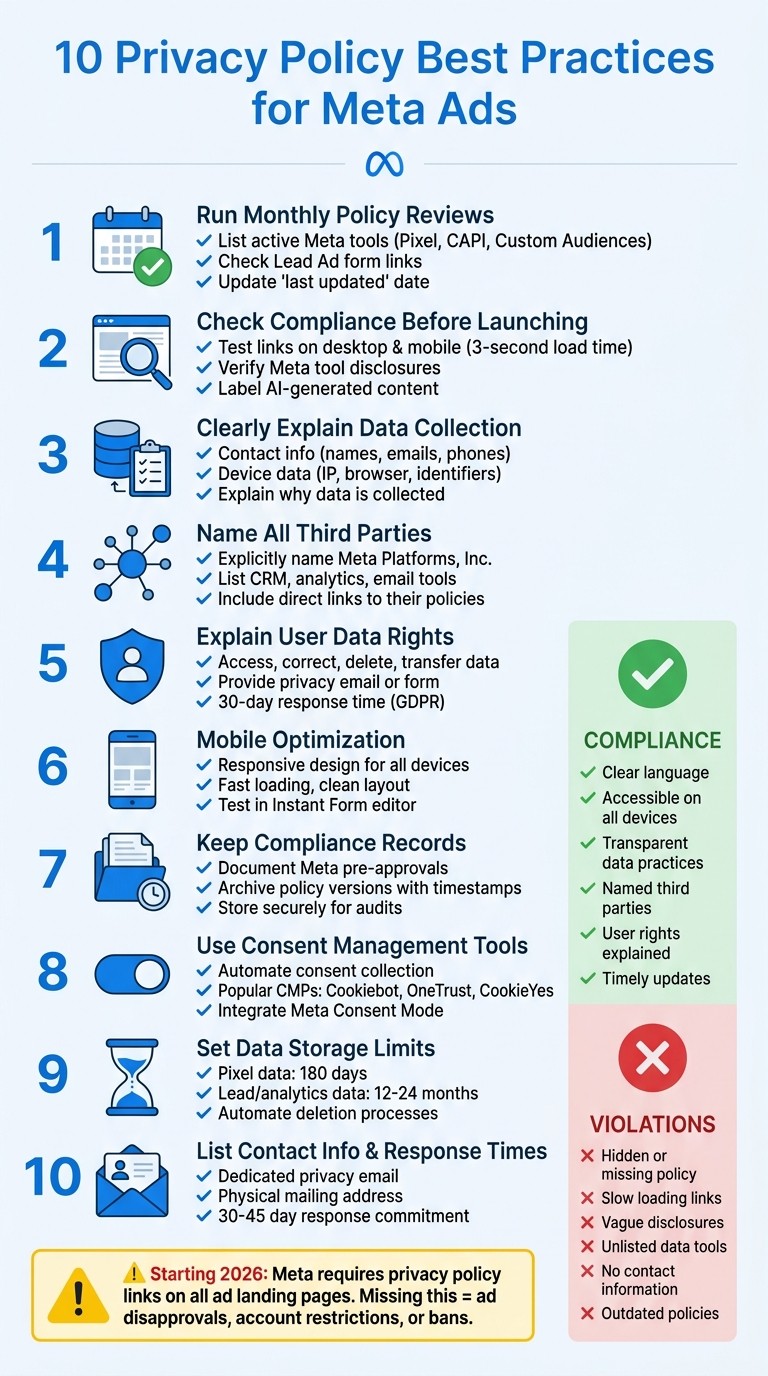
10 Privacy Policy Best Practices for Meta Ads Compliance
1. Run Monthly Policy Reviews
Your privacy policy isn’t something you can set and forget. Meta’s automated systems continuously check landing pages to ensure privacy policy links are functional and that your disclosures align with Meta consent requirements and tracking tools. Regular monthly reviews help you stay compliant and protect your ad account from unexpected restrictions.
To begin, list all active Meta tools in your account. This includes tools like the Facebook Pixel, Conversions API (CAPI), Custom Audiences, and any Lead Ads forms you’re using. Your privacy policy needs to specifically mention these tools and clearly explain what data they collect - such as page views, purchase events, or IP addresses. If you’ve recently added features like Advantage+ Shopping, make sure your policy reflects those updates.
Next, check that every active Lead Ad form includes a working privacy policy link. Meta won’t approve Lead Ads without this link, and the policy must clearly explain how you collect and use lead data. Don’t forget to test the link on mobile devices as well. Broken links are one of the quickest ways to trigger account restrictions.
Finally, after each review, update the "last updated" date on your privacy policy. This simple action signals to users and regulators that you’re actively maintaining compliance. Be sure the contact information listed in your privacy policy matches what’s in Meta Business Manager. These steps help ensure your policy stays aligned with Meta’s ever-changing requirements.
Review Step | Focus Area | Meta Requirement |
|---|---|---|
Pixel Audit | Transparency | Disclose IP collection and event tracking (e.g., add-to-cart) |
Lead Form Check | Collection | Mandatory privacy link in every Instant Form |
Opt-Out Links | User Control | Provide working links to Meta Ad Preferences and DAA opt-out tools |
2. Check Compliance Before Launching Campaigns
Before launching any Meta ad campaign, double-check that your privacy policy aligns with Meta's requirements using a Meta ad policy checker. Even a small oversight can lead to account restrictions - or worse, a permanent ban. This final review complements your regular monthly audits, helping to catch any last-minute issues before your ads go live.
Start by testing your privacy policy link on both desktop and mobile devices. Make sure it loads within 3 seconds and displays correctly. This simple step ensures that your link is functional and user-friendly. As Anupam Kumar, Compliance Reviewer, warns, "Meta can restrict your entire ad account - not just individual ads - if your landing page lacks a proper privacy policy."
After confirming the link works, focus on the content of your privacy policy. Be specific about the Meta tools you’re using, such as Facebook Pixel or Conversions API, and list the types of data you collect, including hashed customer data for Custom Audiences. Don’t forget to include clear opt-out links. If you’re using templates, make sure they include Meta-specific disclosures.
Also, stay on top of Meta’s policy changes. These include labeling any AI-generated content and adhering to data age restrictions. For ads featuring AI-created or modified content, use the mandatory "AI-generated" label in Ads Manager. Meta’s multimodal AI now actively scans ad creatives for Housing, Employment, and Credit indicators. If your ad falls into one of these categories, you must declare the appropriate Special Ad Category to avoid being flagged. Additionally, any custom audiences built from data older than 180 days will automatically be rejected.
Common Audit Failure | Recommended Fix |
|---|---|
Broken Privacy Link | Ensure the URL is live and optimized for mobile devices. |
Generic Templates | Add Meta-specific disclosures for tools like Pixel and Custom Audiences. |
Missing Opt-Out | Include clear links to Meta Ad Preferences or DAA opt-out tools. |
Unlabeled AI Content | Use the mandatory "AI-generated" tag in Ads Manager. |
3. Clearly Explain What Data You Collect
Your privacy policy needs to spell out exactly what user data you gather through Meta ads. Avoid generic phrases like "we collect personal information." Instead, be specific about the types of data you collect and where it comes from. Breaking this down in detail helps create a sense of openness.
Start with contact information - this includes things like names, email addresses, and phone numbers collected through tools like Lead Ads and Instant Forms. Then, move on to device data, which might involve IP addresses, device identifiers, browser types, software details, and behavioral metrics.
Make sure to explain why you collect each type of data. For example, you might use email addresses for promotional purposes or technical data to improve ad performance and campaign targeting.
While it’s possible to meet compliance requirements with broad categories like "email" or "IP address", it’s better to go a step further. Detail the exact data points you collect and how you collect them. This kind of transparency not only builds trust but also ensures your privacy practices align with Meta's consent rules and standards.
4. Name All Third Parties Who Receive Data
Once you've outlined the data you collect, the next step is to identify who receives it. Your privacy policy must explicitly name Meta Platforms, Inc. and any other companies involved in your Meta advertising activities. This includes tools like CRM systems, email marketing platforms, analytics software, or sales tools. Avoid vague terms like "marketing partners" or "service providers" - be specific.
Organize third parties by category to make the information more user-friendly. For example, you could create sections such as Advertising Platforms, CRM Systems, Analytics Providers, and Email Marketing Tools. Under each category, list exact names like Meta Platforms, Inc., Salesforce, Mailchimp, or Shopify. This approach makes it easier for users to see where their data is going and lays the groundwork for the next step: detailing your integrations with Meta tools.
"Disclose integrations with providers such as Google Ads, CRM tools, or email marketing platforms like Mailchimp. This is a crucial part for any privacy policy." - CookieYes
Highlight the Meta tools you use. Whether you've installed the Meta Pixel and Conversions API, or run Lead Ads, these tools must be explicitly mentioned in your privacy policy. For Lead Ads, ensure the privacy policy link is embedded in the Instant Form, and clarify which teams or systems will handle the submitted data. If you're using Custom Audiences, explain that hashed customer data is shared with Meta for ad targeting.
Include direct links to the privacy policies of all third parties mentioned. This helps users understand how each company manages their data. Additionally, provide links to opt-out tools, like the Meta Ad Preferences center, so users can make choices about their data. Always update your privacy policy promptly whenever you integrate a new tool or service. Transparent third-party disclosures are a key part of maintaining compliance with Meta advertising requirements.
5. Explain How Users Can Access or Delete Their Data
Your privacy policy should clearly outline how users can access, correct, delete, or transfer personal data collected through Meta tools like Pixel, Conversions API, or Lead Ads. Regulations such as GDPR and CCPA require businesses to provide easy-to-follow methods for users to exercise these rights. Consider including a dedicated privacy email (e.g., privacy@yourcompany.com) or a Data Request Form to handle such requests.
Set clear expectations regarding response times. For example, GDPR typically mandates that data requests be processed within 30 days. Be specific about how to disclose data use and how users can request data deletion or opt out of collection. Additionally, Meta provides built-in tools that can help users manage their data more effectively.
"A Privacy Policy is not just a formality - it's a legal requirement in most regions." - Cookie-Script
Include direct links to helpful resources like Meta Ad Preferences, the Digital Advertising Alliance opt-out tool, and Meta's Off-Meta Activity controls. These tools allow users to manage their data independently. If you use cookie banners, explain how users can withdraw consent by selecting options like "Reject All" or "Manage Preferences." To ensure these mechanisms work correctly, follow user consent auditing best practices regularly. Make sure all links are mobile-friendly to accommodate smartphone users.
To make the process even easier, organize user rights by specific actions. For example, create separate sections for accessing data, requesting deletion, opting out, and data portability. Whether users need to email your privacy team, fill out a form, or visit a settings page, providing clear, step-by-step instructions will simplify the process and help you stay compliant with global privacy rules.
6. Make Your Policy Easy to Read on All Devices
After completing compliance checks, make sure your privacy policy works seamlessly on every device. Since most people interact with Meta ads on their smartphones, your policy should load quickly and display properly on mobile. A slow or broken privacy policy link can lead to ad disapproval or even account suspension by Meta. To avoid this, manually test your policy URL on different devices to confirm it loads fast and looks good everywhere. This mobile-friendly approach adds a practical layer to your compliance efforts.
"Your audience is likely accessing your ads and Instant Forms via smartphones, too. Ensure your privacy policy page is mobile-optimized and easy to read." - CookieYes
To improve readability, use responsive design that automatically adjusts text and layout for any screen size. Host your policy on a simple, fast-loading page. A clean, dedicated landing page with short paragraphs, clear headings, and bullet points makes it easy for users to skim, especially when they’re on the move.
If you’re using Meta Instant Forms or landing pages, test your privacy policy link directly in the Instant Form editor to ensure it works smoothly within the mobile ad flow before going live. Place your privacy policy link in consistent, easy-to-find spots like your website footer, landing pages, and directly within the Instant Form. Include the "last updated" date at the top of the policy to show transparency and confirm users are viewing the latest version.
Consider using a layered disclosure format that highlights key details upfront, with expandable sections for more in-depth information. Features like jump-links to specific sections can also reduce unnecessary scrolling. These design choices not only meet Meta’s guidelines but also improve the overall experience for your audience.
7. Keep Records of Compliance Certifications
As part of your compliance efforts, it's crucial to maintain detailed records of all certifications and Meta pre-approvals. These documents are invaluable during audits or account disputes, serving as proof that your campaigns adhered to launch requirements.
For restricted categories like alcohol, pharmaceuticals, tobacco, or weapons, make sure to document every Meta pre-approval. Save these approval notifications in a dedicated folder within Meta Business Suite or your ad account records. Before launching new campaigns, review these files to avoid any ad rejections or account suspensions (or learn how to recover disabled Meta ad accounts if issues arise).
Additionally, archive every version of your privacy policy for global Meta ads along with its active timestamp. This creates a clear audit trail, showing exactly which disclosures were in place when data was collected. If a user files a complaint or Meta raises questions about your data practices, you can quickly reference the specific version that was active at the time. Store these records securely in platforms like Google Drive or your internal document management system for easy access.
To stay on top of things, set calendar reminders to review your compliance documentation before major campaign launches - especially when policies are updated or when entering restricted categories. Staying proactive ensures your records are up-to-date and helps you avoid compliance gaps. These records are a cornerstone of your overall compliance strategy.
8. Use Consent Management Tools
After focusing on mobile optimization and record-keeping, it's time to look at how Consent Management Platforms (CMPs) can simplify handling user data permissions.
CMPs take the hassle out of managing user consent by automating tasks like collecting, storing, and overseeing permissions for data collection and tracking. These tools work in real time, managing everything from showing consent banners to blocking tracking scripts until users explicitly opt in.
When choosing a CMP, ensure it aligns with Meta's 2026 data requirements. This includes features to declare the source of your audience data (like website pixels or CRM uploads) and document the legal basis for its collection. Keep in mind that Meta now rejects custom audiences built from data older than 180 days, so regularly update your audience data before uploading it. Also, by March 2026, your CMP should support the AI disclosure labels.
Some popular CMP options include Cookiebot and OneTrust, which offer tools like cookie scanning, consent banners, and centralized audit logs for legal compliance. If you're looking to test a solution, CookieYes provides a 14-day trial. For Meta-specific tracking, consider integrating Meta Consent Mode with your CMP. This feature allows privacy-friendly modeling and conditional Pixel firing, letting you still gather conversion data even when users decline consent.
Since most Meta users interact with ads via smartphones, ensure your consent interface is mobile-friendly. Test banners on both iOS and Android devices to confirm they load quickly and don't block essential content. Pairing your CMP with combining Meta Pixel and Conversions API can further enhance performance by reducing reliance on browsers while respecting users' privacy choices.
Another useful tip: set up automated alerts in your CMP to stay informed about regulatory updates or policy changes. This feature helps you maintain up-to-date compliance records without constant manual checks. It also creates a searchable audit trail, which can be invaluable if Meta or regulators request proof of consent during an investigation. By integrating these tools, you not only protect user data but also ensure your practices align with Meta's evolving compliance standards.
9. Set Clear Limits on Data Storage and Use
When it comes to data storage, clarity is key. Every data category you collect through Meta ads should have well-defined retention periods and usage boundaries. Vague statements like "store data as needed" won’t cut it - your privacy policy should specify exact timeframes and clear limits for each type of data.
To strengthen your privacy framework, build on your Meta Ads privacy and consent practices by establishing specific retention periods for different data types. For example:
Automatically delete retargeting pixel data after 180 days.
Retain usage logs, analytics, lead data, billing information, and consent records for 12–24 months, or in line with regulatory requirements, sales cycles, or the duration of an active account.
It’s also important to explain what happens once these timeframes are up. Will the data be permanently deleted, anonymized, or archived? For instance, instead of saying something vague like "data is removed when no longer needed", you could clarify with: "Pixel tracking data is automatically deleted 180 days after your last website visit."
Avoid technical jargon like "data processing for algorithmic optimization." Instead, use straightforward language such as "personalizing your ad experience on Facebook and Instagram." This transparency aligns with earlier sections of your privacy policy, creating a consistent and user-friendly tone. If tools like Meta Pixel or the Conversions API are part of your data practices, mention them directly so users can better understand how their information is handled.
Finally, automate data deletion processes to ensure information is removed when it’s no longer needed for advertising purposes. Refresh user consent periodically - every 12 to 13 months - to stay compliant. Understanding how Meta handles consent within ad accounts can help you automate these signals effectively. Be sure to document any legal exceptions, such as retaining data for dispute resolutions or financial recordkeeping, so users know why certain information might be kept beyond standard retention periods.
10. List Contact Information and Response Times
Your privacy policy should provide several ways for users to contact you regarding privacy concerns or data requests. For instance, include a dedicated email address like privacy@yourcompany.com or consumerrights@yourcompany.com. Add a physical mailing address, such as "ATTN: Privacy Operations", for users who prefer traditional mail. Additionally, offer a direct link to a privacy-specific contact form or Help Center for electronic submissions. These options make it easy for users to reach out and escalate any concerns about their data.
If your business operates in regions governed by GDPR or similar regulations, you’ll need to include the contact details for your Data Protection Officer (DPO). Also, provide links to relevant regulatory authorities, such as the Information Commissioner's Office (ICO) or your local Data Protection Authority. This ensures users have a clear route to escalate unresolved issues.
Beyond offering contact options, it’s equally important to set clear expectations about response times. Laws like GDPR and CCPA mandate responses within 30–45 days (see our GDPR and CCPA checklist for more details). Your policy could include wording like, "We respond to requests within 30 days of confirmation." Be sure to mention that identity verification may be required for processing sensitive requests to prevent misuse.
"Regional privacy laws aren't the only source of data privacy requirements now. Companies like Facebook have strict and evolving policies and efficient ways of detecting compliance. Companies can't risk their advertising revenue by ignoring them." - Sara Marques, PPC Specialist, Usercentrics
Failing to respond promptly can have serious consequences, such as Meta ad policy issues like ad disapprovals or account suspensions. To avoid this, keep your contact details up to date and ensure privacy-related requests don’t get lost in general support queues. A dedicated channel for data rights inquiries is essential. Offering clear and accessible contact options not only builds user trust but also strengthens your overall privacy practices.
Compliance Comparison Table
This table highlights the contrast between the dangers of neglecting privacy policy requirements and the advantages of adhering to established best practices. By reviewing this, you’ll see how following these practices not only safeguards your ad account but also strengthens user trust.
Category | Risks of Ignoring Requirements | Benefits of Following Best Practices |
|---|---|---|
Ad Approvals | Ads are immediately disapproved if privacy policy URLs are missing in Lead Ads. Repeated violations can lead to permanent account bans or restrictions, which are tough to reverse. | Ensures a smooth ad approval process. Meta reviews landing pages for working privacy policy links and clear tracking disclosures before approving ads. |
User Trust | Users are reluctant to share personal data if they’re unsure how it will be handled. This results in lower engagement and fewer completed forms. | Being transparent fosters trust. When users see clear explanations of data use, they’re more likely to share their information and engage with your brand. |
Legal Compliance | Violates major privacy laws like GDPR (EU), CCPA (California), and LGPD (Brazil) by failing to disclose tools like Meta Pixel or Conversions API. This can lead to hefty fines and legal consequences. | Meets global privacy regulations. Clear disclosures about tracking tools shield your business from fines or legal trouble. |
Campaign Performance | Account restrictions can completely halt your ability to run ads, causing revenue loss and disrupting marketing efforts. | Campaigns run without interruption. Mobile-friendly privacy policies make it easy for users to access and review terms on smartphones. |
Conclusion
Having a valid privacy policy is non-negotiable for running Meta ads. Without one, your ads - especially Lead Ads - are at risk of being disapproved, and your entire ad account could face restrictions or even bans. As Anupam Kumar, Compliance Reviewer at Ultrafast Utilities, cautions:
"Meta can restrict your entire ad account - not just individual ads - if your landing page lacks a proper privacy policy."
But compliance isn't just about avoiding penalties. A well-crafted privacy policy strengthens trust with your audience. When users clearly understand how their data will be used - whether through tools like the Meta Pixel or the Conversions API - they’re more likely to share their information and engage with your brand. Beyond trust, transparency also protects you from legal risks under regulations like GDPR and CCPA, which impose steep fines for non-compliance.
To safeguard your ad account and keep campaigns running smoothly, prioritize regular updates to your privacy policy, ensure it’s mobile-friendly, disclose data usage clearly, and incorporate consent management tools. Meeting both Meta’s requirements and user expectations helps you dodge compliance pitfalls that could derail your advertising efforts.
Think of your privacy policy as a living document. By keeping it aligned with evolving regulations and your business needs, you can avoid costly disruptions - whether from legal penalties, lost revenue, or damaged user trust. The effort you put into compliance today pays off in smoother operations and stronger relationships tomorrow.
FAQs
Where should I place the privacy policy link for Meta ads?
To comply with Meta's advertising rules, your website's landing page (or any linked site) must prominently display a privacy policy link. This link should be easy to spot and navigate, ensuring users can quickly access details about data collection and tracking practices. Clear accessibility not only meets Meta's standards but also builds trust with your audience.
What Meta tracking tools must my privacy policy disclose?
Your privacy policy should clearly outline the use of Meta tracking tools such as the Facebook Pixel, Custom Audiences, and similar data collection technologies. Be upfront about how user data is gathered, utilized, and shared. This not only ensures transparency but also aligns with Meta's guidelines and meets user expectations for data privacy.
What should I do if Meta rejects my ad for privacy policy issues?
If Meta turns down your ad because of privacy policy concerns, take a close look at your privacy policy to ensure it aligns with Meta's guidelines. It should be clear, easy to access, and explain how user data is collected, used, and shared.
Make sure your landing page includes a working link to your privacy policy. This policy should cover details like tracking technologies, data sharing practices, and options for users to opt out. If necessary, update your policy to meet these standards, and then resubmit your ad for review.