
Meta Ad Policy Training: Ultimate Guide for Teams
Prevent Meta ad rejections with team workflows: pre-launch checklists, monitoring, appeals, and automation to protect accounts and scale campaigns.
A single rejected ad can disrupt your entire campaign. From higher CPMs to slower delivery, non-compliance with Meta's ad policies can cost you time and money. Worse, repeated violations may lead to account restrictions or permanent bans.
Meta's ad review process combines automated systems and manual checks, flagging issues like misleading claims, banned visuals, or improper targeting. Ads in regulated industries - like finance, health, or gambling - face stricter scrutiny, requiring certifications such as LegitScript. Even approved ads can be re-reviewed anytime, making compliance an ongoing effort.
Key Takeaways:
Common Violations: Personal attribute references, banned visuals (e.g., before-and-after images), unrealistic claims, or clickbait, while ensuring FTC compliance.
Restricted Industries: Gambling, alcohol, CBD, and others require additional certifications and stricter adherence to rules.
Compliance Tips: Use pre-launch checklists, avoid editing ads under review, and monitor feedback scores to prevent rejections.
Tools to Help: Platforms like AdAmigo.ai automate compliance checks, flagging over 90% of potential issues in under 2 minutes.
To protect your campaigns, build a workflow that prioritizes compliance, trains your team to handle rejections and appeals effectively, and stays updated on how to adapt to Meta ad policy changes. For high-volume campaigns, consider automation to save time and avoid costly mistakes.
Table of Contents
Meta Advertising Standards: The Basics
Common Policy Violations and How to Avoid Them
Building a Team Compliance Workflow
Staying Current with Policy Changes
Tools for Managing Compliance at Scale
FAQs
Meta Advertising Standards: The Basics

Meta's approach to ad compliance is built on a mix of Community Standards, strict Advertising Standards, Meta's Terms, and local laws. Community Standards aim to keep the platform safe by prohibiting hate speech, violence, and deceptive practices. Advertising Standards go a step further, as ads are seen by audiences who might not have chosen to engage with your content. According to Meta:
"Our policies require all advertisers to meet global privacy rules, not engage in discriminatory practices, and not sell illegal or unsafe substances." For those in specific sectors, it is also vital to adapt Meta ads for retail policies to meet industry-specific requirements.
When you submit an ad, Meta reviews everything - images, videos, text, targeting settings, landing pages, and even your business assets like your ad account and Page. Some advertisers use third-party tools for Meta ad compliance to automate these checks before submission. If your account has a history of violations, that will also be factored in. Even if your ad gets approved, it doesn’t mean it’s safe forever; Meta can re-review it at any point while it’s running. These rules and processes form the foundation for Meta's ad review and enforcement systems.
How Meta's Automated Review Process Works
Meta uses automated systems to review millions of ads every day before they go live. Within 24 hours, the system scans your ad’s creative elements, copy, targeting criteria, and destination URL. While automation handles the bulk of the work, human reviewers get involved when you appeal a rejected ad. If your ad is flagged incorrectly, you can use the "Request Review" feature in Business Support Home. This not only helps resolve the issue but also improves the system’s accuracy over time. However, if you make changes to an ad that’s marked "In review", such as altering the creative or targeting, the review process will restart.
Policy Enforcement: From Rejections to Account Bans
Meta’s enforcement doesn’t stop at rejecting a single ad. The consequences escalate depending on how often and how severely you violate the rules. A first offense might only block one ad, but repeated violations can result in restrictions on your ad account, Page, or even your personal account - essentially cutting off your ability to advertise on Meta platforms. Importantly, if one Business Manager account is penalized, other accounts remain unaffected, as long as the problematic ad account or Page is isolated. Meta is particularly strict about inauthentic practices, such as creating fake accounts to bypass restrictions. Such actions can lead to permanent bans. To avoid these outcomes, addressing compliance issues quickly and setting guardrails for Meta ads is critical to maintaining your ability to advertise on the platform.
Common Policy Violations and How to Avoid Them
Ad rejections often follow familiar patterns. By understanding the common pitfalls and addressing potential issues with a Meta ad policy checker before publishing, you can save yourself a lot of time and hassle dealing with Meta's review process. Here's a closer look at the most frequent challenges, including industry-specific restrictions and creative missteps.
Restricted Industries and Special Requirements
Meta enforces strict standards across the board, but certain industries face even tighter scrutiny, often due to evolving age-based targeting restrictions. Categories like alcohol, dating services, gambling, cryptocurrency, weight loss, and financial services are considered "restricted." While advertising in these areas is allowed, it comes with additional requirements. For example, as of 2025, online pharmacies and telehealth services must obtain LegitScript certification, placing the responsibility on advertisers to meet these standards. Meta's gambling ad rules, for instance, have tightened significantly — see our breakdown of what changed and how to stay compliant.
If you're promoting hemp-derived products in the U.S., Meta allows ads for topical products with less than 0.3% THC, provided they make no health claims. However, ingestible CBD products remain completely banned.
For lead ads, Meta prohibits asking for sensitive information such as Social Security numbers, criminal history, bank account details, or specific medical conditions. If collecting this data is essential, you'll need to direct users to a separate landing page that includes proper disclosures and consent mechanisms.
Beyond these industry-specific rules, the creative and language of your ad also play a major role in whether it gets approved.
Creative Elements That Get Ads Rejected
One of the quickest ways to get your ad flagged is by violating Meta's personal attribute rules. Ads cannot imply knowledge of a user's race, religion, age, sexual orientation, medical conditions, or financial status. For instance, a phrase like "Are you struggling with debt?" could lead to rejection. A better alternative would be something more neutral, like "We offer services for managing personal debt".
Certain visuals and claims are also off-limits. Before-and-after images are banned, particularly in weight loss and cosmetic ads. Unrealistic promises, such as "Lose 20 lbs in 10 days", are immediate red flags. Additionally, clickbait phrases like "Learn the secret" or landing pages that prompt automatic downloads violate Meta's quality standards.
Even if your ad passes the initial automated review, it’s not guaranteed to stay live. A high volume of negative user feedback, such as "Hide Ad" or "Report Ad" actions, can trigger a manual re-review and result in removal. One last tip: avoid editing an ad while it’s marked "In Review." Doing so resets the review process entirely. If urgent changes are needed, duplicate the ad and make adjustments there instead.
Building a Team Compliance Workflow
Stopping ad rejections in their tracks starts with preparation. While most Meta ad policy guides focus on individual advertisers, this guide is built specifically for teams and agencies managing multiple accounts — where one mistake can cascade across every client. A well-organized workflow ensures every ad gets reviewed by the right people at the right time, reducing policy violations and keeping campaigns running smoothly. This is especially crucial for teams managing multiple clients or accounts, where one mistake can lead to account-wide restrictions that affect all linked assets , which may require a formal process to recover disabled accounts.
Creating a Pre-Launch Compliance Checklist
Before launching, every ad needs to clear a compliance checklist. Start with industry classification - if your campaign falls into a restricted category like finance, health, or gambling, make sure all necessary certifications (e.g., LegitScript for telehealth) are secured. Then, examine creative elements like copy and visuals: check for banned visuals like before-and-after images, and ensure the copy avoids language referencing personal attributes. Also, test landing pages to confirm they load correctly, don’t trigger auto-downloads, and include any required disclosures for lead ads. For a deeper dive into disclosure rules, see our complete guide to FTC ad disclosures.
For campaigns in sensitive industries, consulting a legal or compliance expert can help avoid costly errors. Additionally, maintain a compliance tracker - a simple spreadsheet to log flagged ads, the policies cited, and how the issues were resolved. This will help your team spot patterns in rejections and improve future campaigns.
Checklist Category | Essential Verification Steps |
|---|---|
Industry Classification | Confirm restricted category requirements (certifications, disclaimers, age-gating) |
Creative Review | Remove banned visuals (e.g., before-and-after images, weapons, tobacco); avoid clickbait phrases |
Copy Scan | Ensure no personal attribute references; claims should be realistic and supported |
Landing Page Test | Verify proper loading, no auto-downloads, and inclusion of required disclosures |
Legal Sign-Off | Secure approval for high-risk content like health claims or financial services |
Once your checklist is ready, train your team to act swiftly and effectively when rejection notices occur.
Training Teams to Read and Respond to Rejection Notices
Rejection notices arrive via email and can also be found in the Account Quality dashboard. Teach your team to carefully read these notices and focus on the specific policy cited instead of making assumptions. While Meta’s automated systems handle the initial review, appeals are managed by human teams - so knowing when to edit versus when to escalate is key.
"A rejected ad is a signal to slow down and check your approach." - Aurora Sandino, Birch
Set up an "Edit vs. Appeal" protocol for your team. If the issue is clear - like a broken link, profanity, or a banned image - team members should fix the problem and resubmit the ad. But if the rejection seems to be a mistake by the automated system, escalate it to a human reviewer using the "Request Review" option. For more complex cases, particularly in sensitive industries, reach out to Meta Support Pros through the portal for tailored advice.
Use your compliance tracker to guide team training and refine protocols over time. Also, emphasize the importance of monitoring feedback scores. High rates of negative user actions, like "Hide Ad" or "Report Ad", can lead to manual reviews and increase delivery costs, even if no specific policy is violated.
Staying Current with Policy Changes
Keeping up with Meta's ever-changing policies is just as important as having a solid workflow. For a detailed breakdown of this year's requirements, see our 2026 compliance strategies guide. Policies can shift quickly - ads that were fine last month might get flagged today. Meta’s automated system doesn’t just review ads during the approval process; it can re-check live campaigns at any time. This means even previously approved ads can be rejected without warning. If your team isn’t actively monitoring these updates, you could face sudden account restrictions or permission errors.
Monitoring Policy Updates and Competitor Ads
A smart way to stay informed is by checking the Meta Ad Library every week. This tool lets you see how competitors in your industry are staying compliant. Focus on brands in highly regulated sectors like finance or healthcare and analyze their creative choices, disclaimers, and messaging. By studying these examples, you can pinpoint strategies that align with Meta's policies and identify what might lead to rejections.
The "Info and Ads" section on Facebook Pages is another valuable resource. It reveals disclosure language and targeting methods that have already passed Meta’s approval process, offering practical insights you can apply to your campaigns.
It's also important to keep an eye on your feedback scores in the Account Quality dashboard. High rates of "Hide Ad" or "Report Ad" actions indicate user dissatisfaction, which can hurt ad delivery and increase costs - even if you haven’t technically broken any rules. Think of this feedback as an early warning system; negative sentiment often signals potential issues before formal enforcement kicks in. Use this data to guide your regular audits and address risks before they escalate. Implementing anomaly detection can further help identify these hidden risks automatically.
Auditing Active Campaigns and Handling Rejections
With updated policy knowledge in hand, make it a habit to audit all live campaigns monthly. Use the Account Quality dashboard to review recent ad rejections, spot recurring problems, and ensure landing pages are functioning correctly. Keep a compliance tracker updated with new rejection reasons to improve your pre-launch checklist and avoid repeating mistakes.
If one of your ads gets rejected, resist the urge to make changes while it’s under review. Instead, use the "Request Review" option in Business Support Home if you believe the rejection was an error. For more complicated issues, you can reach out to Meta Support Pros directly through the portal. In most cases, Meta completes these reviews within 24 hours.
Tools for Managing Compliance at Scale
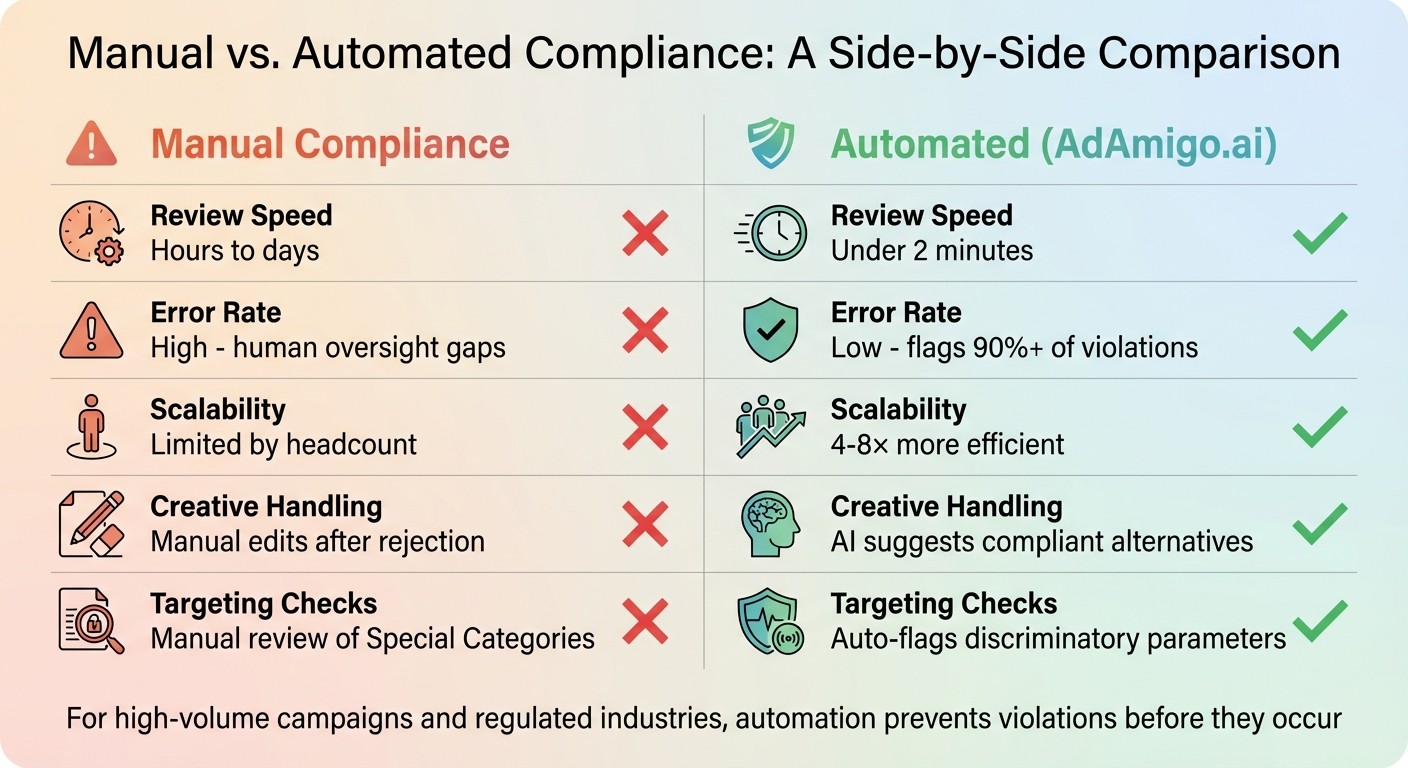
Manual vs Automated Meta Ad Compliance: Speed, Accuracy, and Scalability Comparison
Managing high volumes of Meta ads can be tricky. Manual checks for ad creatives, targeting, and policy updates slow down campaigns, while AI tools for Meta ad account analysis can identify issues instantly, making it harder to keep things running smoothly. But with the right tools, you can catch policy violations before Meta’s 24-hour review process even kicks in. This not only prevents account strikes but also keeps campaigns on track. Automated solutions like AdAmigo.ai are designed to make compliance faster and easier.
How AdAmigo.ai Handles Compliance and Optimization
AdAmigo.ai acts as an autonomous AI media buyer, handling ad compliance right from the start. Its AI Ads Agent scans your brand’s tone and competitor strategies to create compliant image and video ads. It automatically filters out creatives or claims that might violate Meta’s policies. This pre-submission check is a game-changer for avoiding Meta’s three-strike account quality rule, protecting your campaigns from unnecessary disruptions.
The platform’s AI Actions feature provides a daily to-do list of compliance tasks, flagging potential issues like discriminatory targeting in employment or housing ads before they cause violations. The Bulk Ad Launch tool allows you to deploy hundreds of ad variations in one click, ensuring every creative meets policy guidelines. This level of automation means a single media buyer can handle 4–8× more clients without extra stress or risk.
To ease into the system, teams can manually approve AI recommendations at first, building confidence before switching to full automation. The AI Chat Agent makes workflows even simpler, letting you manage campaigns or generate reports using text or voice commands. Pricing starts at $99/month for accounts spending under $5,000 monthly, with unlimited AI Actions available for $299/month (or $179/month annually).
Manual vs. Automated Compliance: A Comparison
The difference between manual and automated compliance is clear. Manual reviews can take hours or even days - Meta’s own review process can last up to 24 hours. Automated tools like AdAmigo.ai cut that time down to under two minutes. Plus, human oversight often leads to inconsistent results, especially in high-volume campaigns, while AI tools flag over 90% of violations consistently.
Feature | Manual Compliance | Automated (AdAmigo.ai) |
|---|---|---|
Review Speed | Hours to days | Under 2 minutes |
Error Rate | High (human oversight gaps) | Low (flags 90%+ of violations) |
Scalability | Limited by headcount | 4–8× more efficient |
Creative Handling | Manual edits after rejection | AI suggests compliant alternatives |
Targeting Checks | Manual review of Special Categories | Auto-flags discriminatory parameters |
For campaigns with high volumes, operating in regulated industries, or when delays impact your return on ad spend (ROAS), automation is worth considering. For sensitive product launches, a hybrid approach works well: let automated tools handle the initial checks, then use manual reviews for final tweaks. While Meta’s native tools like Business Support Home and the Ad Library are helpful for monitoring account health and researching competitors, they’re reactive - they don’t prevent violations. Automated tools fill that gap, keeping your campaigns ahead of potential issues.
Conclusion
Every step, from pre-launch reviews to ongoing monitoring, plays a critical role in ensuring ad performance. Staying aligned with Meta's ad policies isn't just about avoiding rejections and penalties - it directly affects your campaign's reach and costs. Meta rewards high-quality, compliant ads with better delivery and efficiency, while non-compliance leads to reduced reach and increased expenses. Regular reviews and pre-launch checks are essential safeguards for your campaigns.
In 2024, Meta enforced over 33,000 content restrictions in the United Kingdom alone, while global ad revenue climbed by 22%, surpassing $160 billion. With automated systems now re-reviewing live ads, maintaining compliance requires constant attention. For teams managing large ad volumes, manual reviews alone simply can't keep up.
Proactive team training combined with automation significantly improves compliance efforts. Tools like AdAmigo.ai can flag policy violations in under two minutes, allowing one media buyer to handle 4–8 times more accounts efficiently. A hybrid approach of manual vs. autopilot reviews often works best - automated tools can handle pre-screening, while manual reviews are reserved for sensitive launches or new product categories.
Keeping a compliance log turns past mistakes into a valuable resource for future campaigns. When paired with tools that optimize creatives, targeting, and bidding while adhering to budget rules, you can scale successful campaigns faster without risking account penalties. Treat compliance as an ongoing priority - your ad account's health is directly tied to your bottom line.
FAQs
What steps can teams take to stay compliant with Meta's ad policies?
To ensure your ads align with Meta's guidelines, it's important to frequently review your ad creatives, landing pages, and targeting settings. Pay close attention to sensitive areas like housing, employment, and political ads, as these categories have stricter rules. Additionally, make sure your content meets Meta's standards for accuracy, privacy, and overall quality.
Tools like AdAmigo.ai can make this process much easier by automatically auditing your creatives and targeting settings to flag potential compliance issues before they become a problem. Staying informed about Meta’s policies and how their review process works is equally important. Meta provides resources to help advertisers understand acceptable practices and avoid common pitfalls like misleading claims or restricted content.
Regular training sessions and keeping up with policy updates are key strategies for staying ahead. By doing so, your team can maintain compliance and avoid unnecessary disruptions to your ad campaigns.
Why do Meta ads get rejected most often?
Meta ads often get rejected due to violations of advertising policies related to content, behavior, or compliance. Some common reasons include promoting banned products or services, making misleading claims, or featuring inappropriate content like sexually suggestive imagery or discriminatory language. Ads in sensitive areas - like housing, employment, or credit - are subject to even stricter rules for targeting and compliance.
Rejections can also stem from creative issues, such as having too much text overlay, using clickbait tactics, or breaching privacy guidelines. To minimize the chances of rejection, make sure your ads align with Meta’s policies, thoroughly review your creative and targeting details, and consider tools like AdAmigo.ai to simplify compliance and optimize ad performance.
How long does Meta ad review take for teams managing multiple accounts?
Meta's automated review system typically processes ads within 24 hours, but teams managing high volumes across multiple ad accounts may experience staggered review times. Ads in restricted categories (finance, health, gambling) or from accounts with prior violations often face longer, more thorough reviews. For agencies, the key is to submit ads in batches and avoid editing ads marked "In Review" — any change resets the clock. Using a pre-launch compliance checklist and automated pre-screening tools like AdAmigo.ai helps ensure more ads pass review on the first submission, reducing bottlenecks across client accounts.
What's the difference between a rejected ad and an account restriction?
A rejected ad is a single-instance decision — Meta's review system flags one specific ad for a policy violation, and you can either fix and resubmit or request a review. An account restriction is more serious: it limits your ability to advertise across your entire ad account, often after repeated violations or a pattern of non-compliance. Restrictions can include reduced delivery, spending limits, or a full advertising ban. The best defense is catching violations early, maintaining a clean compliance tracker, and addressing rejection patterns before they escalate to account-level enforcement.
How can automation simplify Meta ad compliance management?
Automation takes the hassle out of managing Meta ad compliance by streamlining the process of adhering to platform policies. With AI tools, ad creatives are automatically reviewed for issues like misleading claims or prohibited content. These tools flag potential violations before ads go live, helping advertisers avoid rejections or even account suspensions - all while saving valuable time.
Automation also ensures that targeting settings align with strict policies for sensitive categories like housing or employment, where verification and limited options are mandatory. Beyond that, AI-driven tools monitor ad performance in real time, quickly spotting and correcting compliance issues as they arise.
By reducing manual tasks and minimizing human error, automation allows advertisers to focus on strategy while staying on top of Meta's constantly changing policies.