
User Consent Auditing: Best Practices for Meta Ads
Guide to auditing user consent for Meta Ads: GDPR/CCPA compliance, CMPs, Consent Mode, consent records, and audit routines to protect campaigns.
Managing user consent for Meta Ads is non-negotiable in today's privacy-driven landscape. Here's why it matters and how to do it right:
Why It’s Important:
How to Stay Compliant:
Use tools like Meta Consent Mode to adjust tracking based on user permissions.
Implement Consent Management Platforms (CMPs) to automate compliance across regions.
Keep detailed records of consent, including timestamps, categories, and user actions.
Key Challenges:
Navigating complex and evolving privacy regulations.
Ensuring all data collection points (Meta Pixel, Conversions API, Lead Ads) are properly documented.
Balancing privacy compliance with ad performance.
Best Practices:
Audit consent processes regularly using Meta’s Test Events Tool.
Align privacy policies with Meta’s requirements, including opt-in for sensitive data.
Leverage statistical modeling to maintain campaign performance when users decline tracking.
User Consent Requirements for Meta Ads

Privacy Laws: GDPR, CCPA/CPRA, and Others
Meta ads are influenced by two key privacy frameworks: the General Data Protection Regulation (GDPR) and the California Consumer Privacy Act/California Privacy Rights Act (CCPA/CPRA). Under GDPR, users must explicitly opt in before any tracking begins, meaning the Meta Pixel stays inactive until they click "Accept." On the other hand, CCPA/CPRA takes an opt-out approach, allowing basic data collection by default but requiring explicit opt-in for sensitive data, like precise geolocation, health details, or financial information.
GDPR requires clear consent for three main categories:
Advertising and Marketing: Activities like behavioral tracking, conversion measurement, and audience creation.
Analytics and Performance: Campaign optimization without personalization.
Cross-Border Data Transfers: Moving data from the EU to servers in the U.S..
To comply with GDPR, you can initialize the Meta Pixel with fbq('consent', 'revoke');, ensuring no tracking occurs until the user grants permission. For CCPA/CPRA, Meta’s Limited Data Use (LDU) feature helps restrict data processing for California users who choose to opt out. Importantly, website owners - not Meta - are responsible for ensuring compliance when using tracking technologies.
These legal frameworks form the foundation for Meta's own privacy policies.
Meta's Data and Privacy Policies
Meta enforces additional requirements for advertisers. Starting in 2025, Meta will require explicit opt-in consent for any contact information - such as email addresses or phone numbers - uploaded to Custom Audiences, regardless of GDPR rules. Advertisers must ensure their privacy policies clearly state that data is shared with Meta for targeted advertising, clearly disclose data use and retention timelines, and provide straightforward opt-out instructions.
Meta has implemented strict automated enforcement measures. For example, campaigns may be paused, and accounts restricted if advertisers cannot promptly supply consent documentation when requested. To avoid such issues, your privacy policy should include these four essential elements:
The purpose of data collection (e.g., running ads on Facebook and Instagram).
Data retention timelines.
A statement about third-party data sharing with Meta for Custom Audiences.
Clear instructions for withdrawing consent.
Additionally, Lead Ads face specific restrictions. Advertisers are barred from requesting sensitive data - like government IDs, financial account numbers, criminal records, or detailed health information - without prior written approval from Meta.
"Each company is responsible for ensuring their own compliance with the GDPR, just as they are responsible for compliance with the laws that apply to them today." – Meta Platforms, Inc.
How to Set Up CookieYes Consent for Facebook & Google Ads in GTM (Step-by-Step)
How to Build a Consent Auditing Workflow
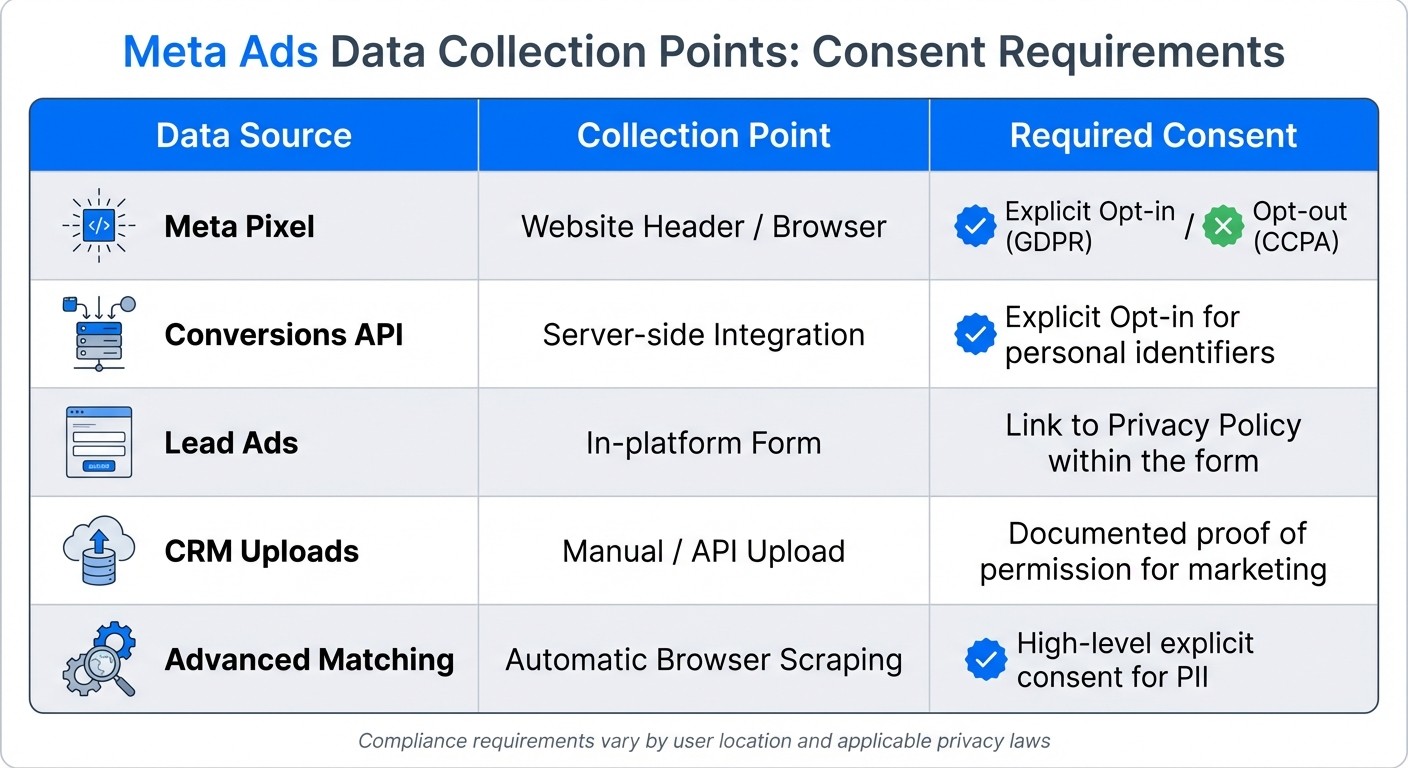
Meta Ads Data Collection Points and Required Consent Types
Identify All Data Collection and Consent Points
Start by mapping every point where user data flows into Meta's ecosystem. This includes the Meta Pixel, which tracks browser activity; the Conversions API, sending server-side events; Lead Ads, which gather form submissions; and CRM uploads, used to create Custom Audiences. Each of these requires proper documentation of user consent.
Meta's Events Manager is a great tool for checking which events are firing and ensuring they align with your consent records. Pay close attention to Advanced Matching, which automatically gathers personal identifiers from forms. This feature requires explicit user consent for processing personally identifiable information (PII).
Data Source | Collection Point | Required Consent |
|---|---|---|
Meta Pixel | Website Header / Browser | Explicit Opt-in (GDPR) / Opt-out (CCPA) |
Conversions API | Server-side Integration | Explicit Opt-in for personal identifiers |
Lead Ads | In-platform Form | Link to Privacy Policy within the form |
CRM Uploads | Manual / API Upload | Documented proof of permission for marketing |
Advanced Matching | Automatic Browser Scraping | High-level explicit consent for PII |
Once you’ve mapped your data flows, the next step is to focus on tools that help manage and validate user consent.
Set Up Consent Management Platforms and Tools
A Consent Management Platform (CMP) is essential for handling user choices effectively. Popular options like Secure Privacy, OneTrust, and TrustArc integrate seamlessly with Meta's tracking tools. These platforms automatically detect user location and apply the appropriate legal standard - such as opt-in for GDPR in Europe or opt-out for CCPA in California.
Meta also offers Meta Consent Mode, which syncs your Pixel and Conversions API to respect user preferences. It uses statistical modeling to estimate conversions when users decline consent. Unlike Google's approach, Meta’s system actively blocks unauthorized data collection at the source instead of marking it as non-consented. Use the Test Events Tool in Events Manager to confirm that consent signals are functioning properly in real-time.
"Meta Consent Mode represents the future of privacy-compliant advertising, enabling businesses to maintain effective campaign performance while respecting user privacy rights." – Secure Privacy
Once your CMP is in place, it’s critical to establish a routine audit process to maintain compliance.
Create a Regular Audit Schedule
To avoid compliance issues, set up a regular audit schedule. Perform monthly tests with the Test Events Tool to ensure consent signals are firing correctly. Quarterly, review your Event Match Quality scores in Events Manager to confirm deduplication is working as intended - events sent via both Pixel and CAPI should share identical event_id values to prevent double-counting.
Check Meta's Account Quality dashboard weekly for any rejected ads or restricted assets as part of your Meta ads policy compliance checklist. Meta has started pausing campaigns for accounts that cannot provide consent documentation upon request. Additionally, review your privacy policy and consent language every quarter to keep up with the evolving privacy landscape, including the 19 different U.S. state privacy laws anticipated by 2025. Keep detailed audit logs with timestamps, consent categories, and user IP addresses to demonstrate compliance if regulators come knocking.
How to Stay Compliant and Optimize Ad Performance
Building on your consent auditing workflow, let’s explore how to stay compliant while ensuring your ad campaigns perform effectively.
How to Document and Store Consent Records
To maintain compliance, focus on recording five critical data points: the consent timestamp, the categories of consent (e.g., analytics or advertising), user identifiers like IP addresses (where permitted by law), the collection method (such as a banner or preference center), and a modification history that tracks any changes over time. These details are crucial, especially considering the €2.92 billion in GDPR fines issued in 2024 for improper Meta Pixel implementations.
To safeguard your records, use cryptographic verification. This creates tamper-proof audit trails that can protect your business during regulatory investigations by proving the authenticity of your consent logs. Additionally, ensure that every consent record is tied to the specific version of your privacy policy that was active when the user gave their permission. This eliminates potential legal discrepancies as your policy evolves.
"Tamper-proof audit trails provide cryptographic verification of consent authenticity, preventing disputes about consent validity and ensuring documentation meets regulatory evidence standards during enforcement investigations." – Secure Privacy
Under EU law, the responsibility to prove valid consent lies with you. Consent must be demonstrable, meaning you should be able to show the exact moment and method of the user’s affirmative action. For data transfers to the U.S., ensure you document explicit consent separately, as this is now required by GDPR enforcement actions.
Once you’ve established a solid consent framework, you can use these insights to fine-tune your ad campaigns.
Optimize Campaigns Within Consent Limits
Meta Consent Mode helps businesses estimate conversions even when users decline tracking, achieving accuracy rates of over 80% through statistical modeling. To stay compliant, initialize your Meta Pixel with fbq('consent', 'revoke');, which ensures no data is sent until users provide explicit consent.
Leverage first-party data - such as in-app events, email subscribers, or CRM records - from users who have provided documented consent. Use geo-targeting in your consent management platform to automatically adapt to a visitor’s location. For example, display GDPR-compliant opt-in banners for users in the EU and opt-out options for California residents.
AI-powered tools like AdAmigo.ai can simplify compliance and campaign optimization. These tools monitor your consent framework in real-time and detect anomalies, scan creatives for compliance, and alert you to changes in Meta’s data processing policies. For agencies managing multiple clients, this automation allows media buyers to handle significantly more accounts while ensuring campaigns remain compliant.
Staying on top of privacy laws and platform policies is just as important as optimizing campaigns.
Track Updates to Privacy Laws and Meta Policies
Keep an eye on Meta’s Account Quality dashboard for ad rejections or asset restrictions. Meta’s automated systems may pause campaigns if you can’t provide consent documentation when requested. Regularly check the Meta Transparency Center and Business Help Center for updates that could impact the use of tools like the Pixel or Conversions API.
To stay ahead of regulatory changes, set up automated alerts through your consent management platform or AI compliance tools. With 19 U.S. state privacy laws expected by 2025, relying on manual tracking is risky. Conduct quarterly reviews of your privacy policies, data collection methods, and consent forms to ensure they align with the latest legal requirements. Additionally, review your Custom Audience sources frequently - Meta may request proof of documented consent for any data used in Custom Audiences vs. Lookalike Audiences at any time.
Conclusion
Auditing user consent is a critical step for ensuring Meta ads remain compliant while still delivering strong results. Ignoring compliance can lead to serious financial and operational setbacks, but implementing Meta conversion data compliance best practices doesn't mean sacrificing performance. This makes a well-structured consent framework a necessity, not an option.
Using a consent management platform that halts tracking until users explicitly opt in is a smart move. It not only keeps your campaigns compliant but also allows Meta's statistical modeling to work effectively, striking a balance between respecting privacy and maintaining performance.
Automation tools for Meta compliance, such as AdAmigo.ai, can simplify tasks like monitoring and creative reviews. These tools free up time for media buyers to concentrate on scaling campaigns strategically and avoiding common scaling pitfalls, while compliance operates seamlessly in the background.
With GDPR and CCPA compliance requirements are becoming more stringent and Meta increasingly pausing campaigns without proper documentation, integrating consent auditing into your campaign workflows is no longer optional. As Meta emphasizes:
"Consent must be freely given, specific, informed, and unambiguous".
Advertisers who succeed in this evolving environment will be those who embed consent management into their processes from the start, leveraging the right tools to maintain compliance without compromising performance. By doing so, they achieve a smooth alignment between privacy regulations and advertising success.
FAQs
How can businesses ensure their Meta ads comply with GDPR and CCPA/CPRA regulations?
To align Meta ads with GDPR and CCPA/CPRA regulations, businesses need to prioritize a consent-first approach. Start by using a Consent Management Platform (CMP) to gather clear and explicit user consent before activating the Meta Pixel. Meta’s Consent Mode allows you to hold off on firing pixel events until users opt in, ensuring compliance with GDPR’s prior consent rules and CCPA/CPRA’s opt-out requirements.
As the data controller, it’s crucial to document your legal basis for processing data, limit data collection to what’s absolutely necessary, and steer clear of sensitive targeting categories unless you’ve obtained explicit consent. Be transparent - use plain language to explain how you collect, use, and share data. Make it simple for users to exercise their rights, such as accessing their data, requesting deletion, or opting out, and respond to these requests without delay.
Tools like AdAmigo.ai can streamline compliance efforts. This platform can audit consent statuses, flag non-compliant targeting, and create detailed reports. Its AI capabilities can identify missing disclosures, recommend updates to consent modes, and ensure your campaigns respect user preferences. By combining a CMP, Meta’s consent features, clear communication, and AI-driven monitoring, businesses can effectively meet GDPR and CCPA/CPRA standards.
What are the best tools for managing user consent in Meta ads?
Managing user consent for Meta ads requires two essential tools to ensure compliance and efficiency.
The first is a Consent Management Platform (CMP). This tool is designed to handle the collection, storage, and management of opt-in permissions, keeping your practices in line with privacy laws like GDPR and CCPA. A CMP simplifies the process of creating consent logs and maintaining a clear, auditable record of user permissions, which is crucial for legal compliance.
The second tool is Meta Consent Mode. This feature integrates consent signals directly with Meta’s tracking tools, such as the Meta Pixel. By doing so, it automatically adjusts data collection based on each user’s consent choices, minimizing the risk of non-compliance.
When used together, these tools help marketers navigate privacy regulations while maintaining transparency with their audience. For added convenience, platforms like AdAmigo.ai can audit consent statuses, pinpoint any gaps, and apply corrections automatically. This eliminates the need for manual intervention, saving time and ensuring everything stays compliant.
What is Meta Consent Mode, and how does it maintain ad performance when users opt out?
Meta Consent Mode allows advertisers to honor user privacy preferences by modifying how pixel data is gathered when users opt out of tracking. Rather than collecting personal data, it relies on aggregated, privacy-focused signals to measure conversions and fine-tune campaigns. This approach helps maintain campaign effectiveness while adhering to privacy laws.
With this tool, marketers can achieve their performance objectives while respecting user consent, ensuring campaigns remain impactful without using personally identifiable information.