
10 Privacy Compliance Tips for Meta Advertisers
Practical steps to make Meta ad campaigns privacy-compliant: audits, consent, Pixel/CAPI setup, lead form rules, and regional adjustments.
Running Meta ads means handling a lot of user data, and doing it wrong can lead to ad rejections, account bans, or even legal fines. Privacy laws like California's CCPA/CPRA now require businesses to get clear consent, limit data collection, and honor opt-outs. Plus, regulators are cracking down - Meta was fined $420 million in 2023 for privacy violations. But here’s the upside: following privacy rules can improve your ad performance by giving Meta’s algorithms better data to work with.
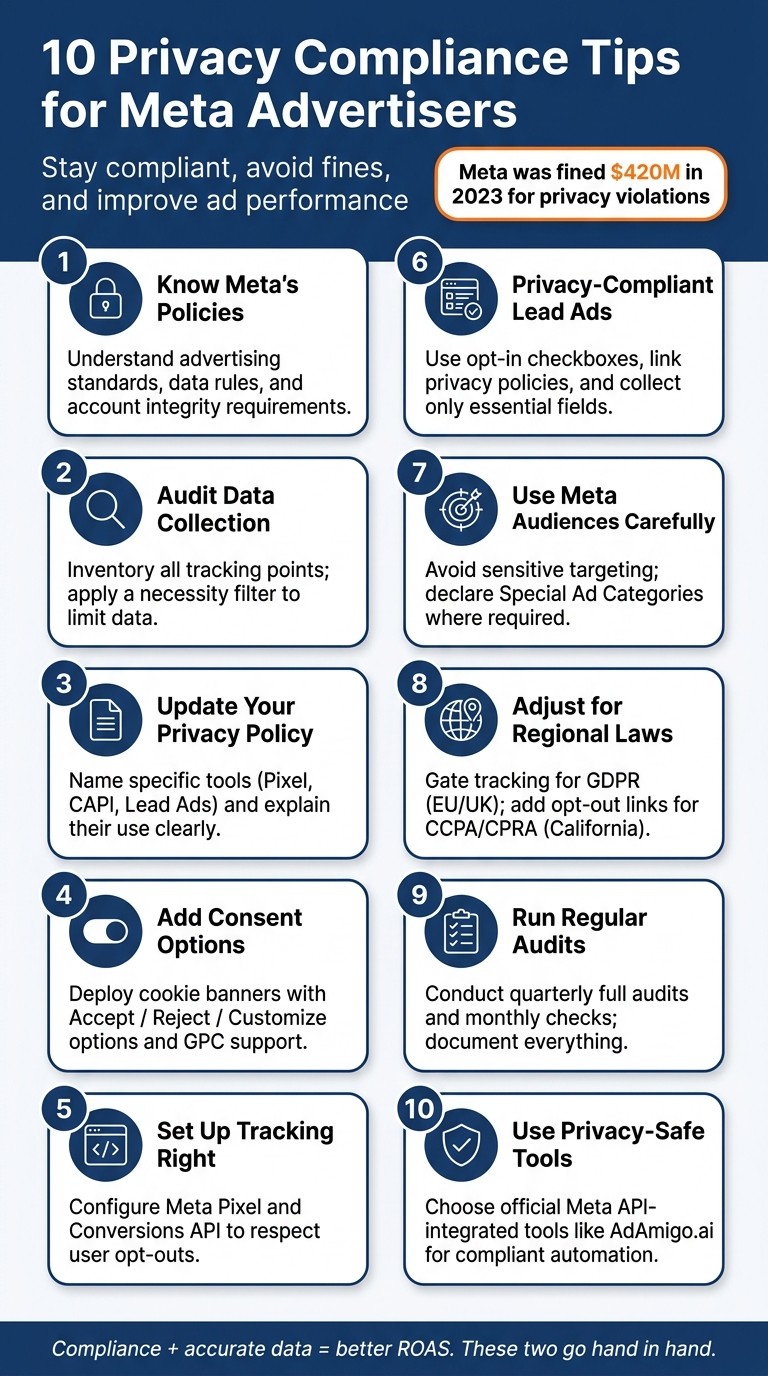
Here’s a quick summary of the 10 tips to keep your Meta ads compliant and effective:
Know Meta's Policies: Understand their rules on ads, data, and account integrity.
Audit Data Collection: Limit data to what’s necessary for your campaigns.
Update Your Privacy Policy: Clearly explain how Meta tools use user data.
Add Consent Options: Use banners for cookies and tracking preferences.
Set Up Tracking Right: Respect user opt-outs with Meta Pixel and Conversions API.
Privacy-Compliant Lead Ads: Be transparent and avoid collecting unnecessary data.
Use Meta Audiences Carefully: Avoid sensitive targeting and follow legal requirements.
Adjust for Regional Laws: Adapt campaigns for GDPR (EU) and CCPA/CPRA (California).
Run Regular Audits: Check and document compliance quarterly or more often.
Use Privacy-Safe Tools: Choose tools like AdAmigo.ai that align with Meta’s API.
10 Privacy Compliance Tips for Meta Advertisers
1. Understand Meta's Advertising Standards and Privacy Rules

Before launching any ad campaign on Meta, it's essential to familiarize yourself with their policy framework. Meta's guidelines fall into three primary categories: Advertising Standards, Data & Privacy rules, and Account integrity requirements. Together, these policies shape what is and isn’t allowed, ensuring your ads meet compliance standards.
Advertising Standards
Meta's Advertising Standards outline what you can and cannot promote. Certain content is outright prohibited, such as illegal products, discriminatory messaging, or false claims. Other categories - like credit, housing, employment, alcohol, gambling, and political ads - are restricted. These require additional steps like pre-approval, special labeling, or limitations on targeting options.
Data & Privacy Rules
Meta's Data & Privacy rules regulate how you collect and use data through tools like the Pixel, Conversions API, Custom Audiences, and Lead Ads. To stay compliant:
Make sure you have a lawful basis for data collection.
Include clear disclosures in your privacy policy.
Account Integrity Requirements
Meta also requires that your Business Manager, ad accounts, and Pages are properly set up and use only legally obtained data. This ensures your account meets their integrity standards.
Beyond Meta's Policies: Legal Compliance
It’s important to note that Meta’s policies are not a substitute for legal compliance. Depending on your industry and target audience, you may need to adhere to additional regulations, such as:
CCPA/CPRA: California consumer privacy laws.
HIPAA: Rules for handling healthcare data.
GLBA: Financial services data protection.
COPPA: Safeguards for children’s data.
FTC rules: Guidelines on deceptive advertising.
Meta explicitly states that advertisers are responsible for ensuring their practices comply with all applicable laws. Following Meta’s rules alone won’t protect you if local regulations demand more stringent measures.
Why Compliance Matters
Non-compliance can lead to serious consequences, including ad rejections, reduced delivery, or even permanent bans from the platform. In more severe cases - especially for housing, employment, or credit-related ads - violations may be deemed discriminatory or deceptive. This could trigger enforcement actions and financial penalties from regulators.
To avoid these risks, start by thoroughly reviewing Meta's core policy documents, such as their Advertising Standards, Business Tools Terms, Custom Audiences Terms, and Lead Ads Terms. Take the time to map these policies against your data practices and industry-specific requirements before launching any campaigns. It’s better to address potential issues upfront than face penalties down the line.
2. Audit and Limit Your Data Collection Points
After getting familiar with Meta's policy framework, the next step is to take a hard look at the data you're collecting and cut out anything unnecessary. This process starts with creating a detailed inventory of all your data collection points.
Start by building a spreadsheet that lists every touchpoint where data is collected in your Meta ads ecosystem. This includes your website pages using the Meta Pixel, server-side events tracked through the Conversions API, Lead Ads or Instant Forms, CRM-based custom audience uploads, and even third-party tools like chatbots, scheduling widgets, or heatmap tools on your landing or checkout pages. These tools often gather data in ways you might not expect. Having a complete inventory is crucial to staying compliant and reducing risks.
For each touchpoint, document the data fields being collected, the tracking scripts in use, and where the data flows. You can use browser developer tools or Meta Events Manager to inspect payloads. This step can reveal unexpected issues. For example, a 2023 investigation by The Markup found that 33 of the top 100 U.S. hospitals had Meta Pixels installed, with some unintentionally sending patient appointment details to Meta - an oversight caused by poorly audited pixel setups.
Once you've mapped everything out, apply a necessity filter to your data. Ask yourself: does this data directly support attribution, optimization, or reporting? For instance, an eCommerce store needs data like purchase value, currency, and product IDs for ROAS optimization. But details like full names, dates of birth, or granular browsing history? Those are rarely essential and should be removed. Configure your Meta Pixel and Conversions API to only send standard events and the minimal data your campaigns need. Also, double-check that URLs aren’t inadvertently passing personal information, like email addresses, through query strings.
With the California Privacy Rights Act (CPRA) now making data minimization a legal requirement, businesses must limit data collection and retention to what’s "reasonably necessary and proportionate" for their stated purpose. Even if you're not in California, this is a smart practice to adopt across all your Meta advertising efforts. Follow best practices for Meta ad data privacy and review your setup quarterly to avoid unintentional data creep from new campaigns or integrations. Not only does this approach help you stay compliant, but it can also improve your campaign performance by focusing on the data that matters most.
3. Write a Privacy Policy That Addresses Your Meta Ads Data Practices
Once you've completed a data audit, it's time to update your privacy policy to reflect your use of specific Meta ad tools. Skip the one-size-fits-all templates and focus on being detailed and transparent. Call out tools like Meta Pixel, Conversions API, Lead Ads, and custom audience uploads by name, and explain their purpose in plain language. Your policy should align with the data collection points you’ve already mapped out.
Make sure your policy covers these key details: what data you collect, why you collect it, who you share it with, and how users can opt out. If you're advertising in the U.S., you’ll need to address state-specific regulations like CCPA/CPRA. For example, under CPRA, sharing customer data with Meta for interest-based ads can count as "sharing", even if no money changes hands. This means you’re required to honor opt-out requests from California residents. Use clear disclosures and ensure you follow through on user preferences.
Here’s an example of how to explain your practices clearly:
"We use a Meta tracking tool that helps us understand which ads lead to purchases on our site. When you visit certain pages or complete a purchase, that information is sent to Meta to help us measure results and show more relevant ads."
This kind of straightforward language not only helps users understand but also meets regulatory expectations. If you use Conversions API, be sure to highlight that it sends data directly from your servers, which is becoming increasingly important for server-side tracking.
To make it easier, here’s a quick breakdown of what your policy should include for each major Meta ad tool:
Meta Feature | What to Disclose in Your Policy |
|---|---|
Meta Pixel | Tracks page views, purchases, and other on-site actions; data is sent to Meta for attribution and ad optimization. |
Conversions API | Shares server-side data (e.g., order details sent directly from your servers to Meta). |
Explains what user information is collected, how it’s used (e.g., for marketing or CRM), and opt-out options. | |
Custom Audiences | States that hashed customer lists may be uploaded to Meta for ad targeting and lookalike audiences. |
Third-party tools (e.g., AdAmigo.ai) | Discloses that external providers access your Meta account via API for campaign management. |
Make sure your privacy policy is easy to find - link it in your website footer, on landing pages, and in Lead Ads or Instant Forms. Don’t forget to review and update it whenever you add a new Meta feature, integrate a tool, or start operating in a state with new privacy laws. Keeping your policy up to date ensures it’s as thorough as your ad setup.
4. Add Clear User Notices and Consent Options
A privacy policy is only effective if users actually notice it. The real challenge lies in communicating directly with visitors on your site. You need to clearly explain what data you're collecting, why you're collecting it, and who you're sharing it with - before any data leaves their browser. This level of transparency is essential for setting up consent-driven tracking.
At a bare minimum, your website should include a cookie or tracking banner that uses plain, straightforward language to explain tools like Meta Pixel. For example, your banner could say: "We use cookies and tools like Meta Pixel to understand site usage and show relevant ads on Facebook and Instagram. Adjust your preferences anytime." This approach not only builds trust but also meets transparency requirements.
Your banner should present users with three clear options: "Accept all", "Reject non-essential," and "Customize." To comply with legal standards, make sure the "Reject non-essential" button is just as prominent and easy to access as "Accept all." For compliance in the U.S., you also need to include a clear "Do Not Sell or Share My Personal Information" link in your footer. If you're leveraging Meta for cross-context behavioral advertising, remember that under CCPA/CPRA, this counts as "sharing" personal information - even if no money is exchanged. Additionally, your site must automatically honor Global Privacy Control (GPC) signals from browsers that support it.
To give users ongoing control, add a permanent "Privacy Settings" or "Cookie Preferences" link in your website footer. From a technical perspective, ensure your consent logic dictates when tracking is activated. For example, non-essential Pixel events like Purchase or AddToCart should only fire after a user opts in. extend this same consent logic to your Conversions API setup with GA4 by following Meta conversion data compliance best practices so that server-side events align with user preferences.
5. Set Up Meta Pixel and Conversions API the Right Way
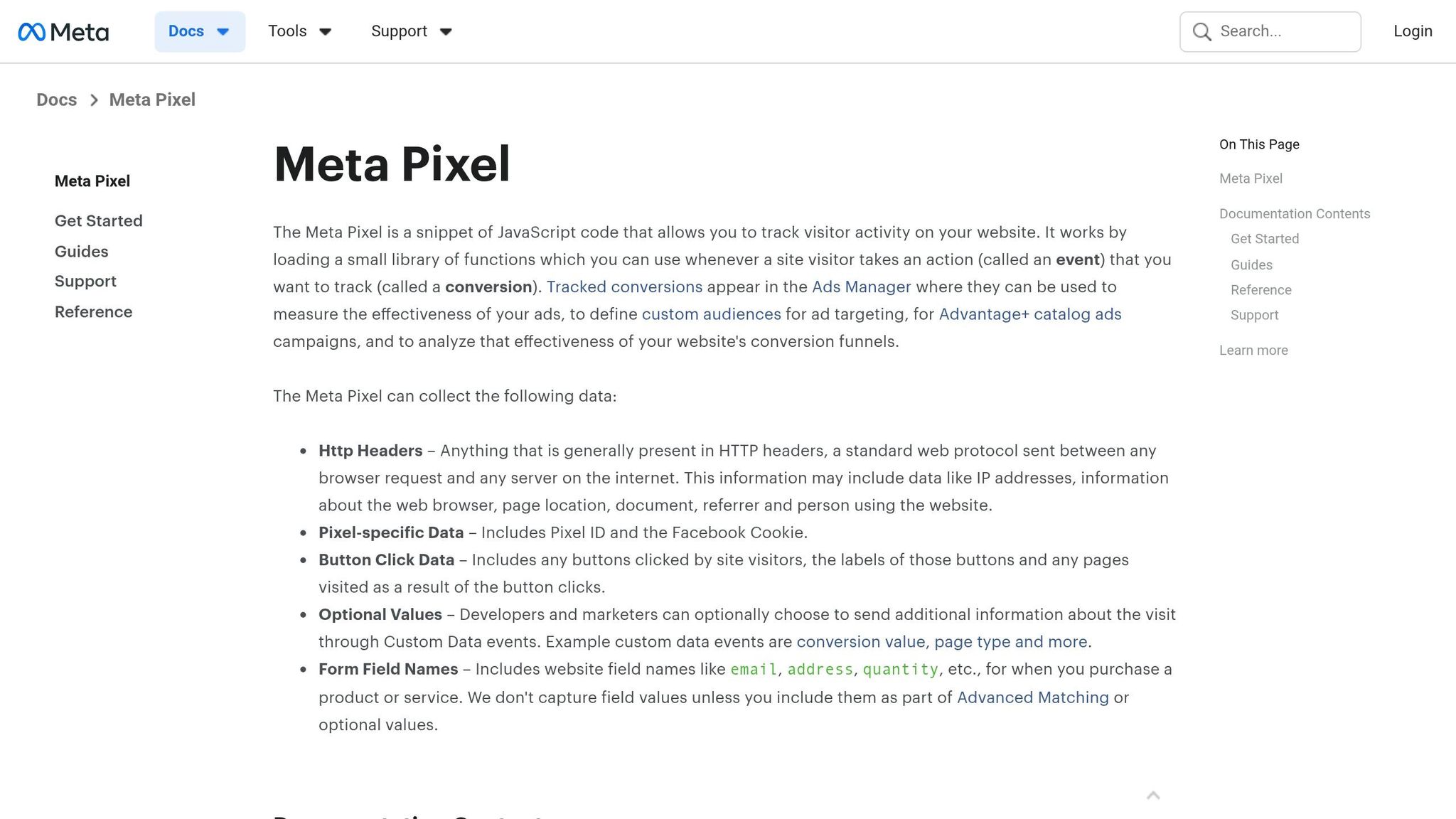
Once your consent strategy is ready, it's time to configure your tracking tools to respect user preferences. Meta Pixel (browser-side) and Conversions API (CAPI) (server-side) are most effective when used together - but only if set up with care.
Start by focusing on data minimization. Stick to standard events like Purchase, AddToCart, and Lead, and include recommended parameters such as value, currency, and content_ids. Avoid sending free-form data that might unintentionally include sensitive information like full names, government IDs, or health-related details. Use a developer checklist to review your implementation and ensure compliance.
For CAPI, the key benefit is control: you decide what data gets sent to Meta's servers. Before transmitting identifiers like email or phone numbers, hash them using SHA-256. Only include essential fields needed for matching, such as hashed email, hashed phone, IP address, user agent, and event timestamp. To prevent double-counting, assign a shared event_id (a UUID generated in the browser) to each action and pass it through both Pixel and CAPI calls. This allows Meta to deduplicate events effectively.
Consent must guide both client-side and server-side tracking. On the client side, Pixel events that are not essential should only fire after users opt in, linking directly to the banner logic discussed earlier. On the server side, store a consent flag in your backend and create CAPI middleware that checks this flag before sending any data to Meta. For users in states like California who opt out using "Do Not Sell or Share", activate Meta's Limited Data Use (LDU) feature to limit how their information is used for behavioral advertising.
Key Differences Between Meta Pixel and Conversions API
Aspect | Meta Pixel (Client-Side) | Conversions API (Server-Side) |
|---|---|---|
Where it runs | User's browser | Your server or tag environment |
Privacy control | Harder to align with consent logic | Easier to integrate with backend consent records |
Ad blocker risk | High | Lower (server-to-server) |
Data minimization | Requires careful scrubbing of URLs/forms | You control exactly what's sent |
Implementation effort | Lower | Higher - requires server-side work or managed integration |
Regular testing and auditing are crucial. Use Meta's Test Events tool to verify payloads and conversion events and schedule quarterly audits with your team. Logging CAPI requests and periodically sampling event payloads can help identify and remove any sensitive data that might accidentally slip through.
6. Keep Lead Ads and Instant Forms Privacy-Compliant
After updating your privacy policy and consent practices, the next step is ensuring your lead data collection complies with privacy regulations.
Meta Lead Ads make it easy for users to share their contact details directly on platforms like Facebook and Instagram. However, this convenience comes with strict privacy responsibilities.
Make sure your Instant Forms include a clear, accessible link to your privacy policy. This policy should explicitly explain how the collected data will be used. Don't rely on vague statements - be specific. For instance, clarify whether the data will be shared with a CRM, an email marketing service, or your sales team. Ambiguity won't stand up under laws like the CCPA or CAN-SPAM.
Include an opt-in checkbox for marketing communications, such as emails or SMS, that is unchecked by default. The checkbox should clearly state what the user is agreeing to, like: "I agree to receive promotional emails from [Your Brand]. You can unsubscribe at any time." This approach not only ensures compliance but also sets clear expectations for users.
When designing forms, limit the data fields to only what’s absolutely necessary. Avoid collecting sensitive information - like income, health details, or birth dates - unless there’s a valid business need. Gathering unnecessary data increases compliance risks, so stick to the essentials needed to qualify and follow up with leads.
Protect the data you collect by taking security seriously. Set up real-time alerts for unusual activity, restrict internal access to the data, avoid storing it in unsecured locations, and delete records that are no longer needed.
7. Use Meta Audiences and Targeting Within Policy Limits
Meta provides three main audience types: Core, Custom, and Lookalike, each with specific privacy considerations. Here's how they work:
Core Audiences rely on Meta's data, such as interests, demographics, and behaviors. Your key responsibility here is to steer clear of sensitive or discriminatory targeting criteria.
Custom Audiences involve uploading your own customer data. This requires a lawful basis for data use and clear disclosure in your privacy policy.
Lookalike Audiences are based on your seed audience, with Meta handling the modeling. However, the compliance of your seed data determines whether the Lookalike audience is appropriate.
Understanding these ways to use audience data helps you craft targeted campaigns while staying within privacy guidelines.
Avoid Sensitive Targeting
Meta has strict rules against targeting based on sensitive attributes, like health conditions, religious beliefs, sexual orientation, or political affiliations. In fact, Meta removed detailed targeting options related to these categories in 2022 due to misuse. These targeting restrictions require advertisers to pivot toward first-party data strategies. For industries like housing, employment, credit, or elections, you must declare a Special Ad Category in Ads Manager. This designation disables options like age, gender, and ZIP code targeting, a requirement stemming from Meta's 2019 settlement with the U.S. Department of Housing and Urban Development (HUD).
Best Practices for Custom Audiences
When using Custom Audiences, only upload data collected with explicit notice about its use for Meta advertising. Avoid including sensitive information, such as health diagnoses or financial difficulties. Meta’s Custom Audiences Terms require you to confirm that you have the rights to use and share the data. Make sure your consent language explicitly covers ad personalization on third-party platforms, not just general marketing activities.
For website-based audiences built using the Meta Pixel or Conversions API, stick to standard behavioral segments like "visited product page" or "abandoned cart in the last 14 days." Avoid overly detailed micro-segments that could inadvertently reveal sensitive browsing behaviors. Also, create a suppression audience to exclude users who opted out of tracking under laws like the CCPA or similar state regulations.
Retargeting Tips
Limit retargeting windows to 7–30 days and keep ad exposures at a reasonable level to avoid overwhelming users. Over-targeting can erode trust and result in a negative user experience. Balancing frequency and timing is key to maintaining user confidence in your advertising practices.
8. Adjust Campaigns for Regional Privacy Laws
Once you’ve set up compliant tracking, the next step is tailoring your campaigns to align with regional privacy laws. These rules can vary significantly depending on the location. For example, what’s acceptable in Texas might not meet the stricter standards of other areas. Two key frameworks to focus on are GDPR (which applies across the EU and UK) and CCPA/CPRA (specific to California). Each operates with its own set of rules.
Under GDPR, explicit consent is generally required before activating the Meta Pixel or building audiences using data from EU users. Without this consent, tracking is prohibited. Non-compliance can lead to hefty penalties - Meta learned this the hard way in 2023 when the Irish Data Protection Commission fined them €1.2 billion for unlawful international data transfers involving Facebook user data.
On the other hand, CCPA/CPRA grants California residents the right to opt out of having their data "sold or shared" for targeted advertising. To comply, you’ll need to include a prominent "Do Not Sell or Share My Personal Information" link and a system to suppress data for users who opt out. The CPRA also established the California Privacy Protection Agency, which signals a stronger focus on enforcement moving forward.
To stay compliant, segment your campaigns by region. For EU and UK audiences, use consent-gated tracking mechanisms. For California, implement opt-out mechanisms and data suppression. For other U.S. states, a standard setup can work, but it’s smart to prepare for emerging state laws. Meta Ads Manager’s location-based exclusions can help prevent audience overlap. Here’s a quick breakdown of the requirements:
Region | Core Requirement | Key Campaign Adjustment |
|---|---|---|
EU / UK (GDPR) | Lawful basis, typically consent | Gate Pixel firing behind consent; document data transfers |
California (CCPA/CPRA) | Notice + opt-out of sale/share | Add "Do Not Sell or Share" mechanism; suppress opted-out users |
Other U.S. states | Varies; some states have similar opt-out laws | Use the California setup as a baseline; extend as new laws take effect |
As more states introduce privacy laws, treating California’s rules as your default standard makes sense. By building opt-out infrastructure now, you’ll be better prepared to adapt when new regulations come into play, saving time and avoiding compliance headaches down the line.
9. Run Regular Compliance Audits and Keep Records
Maintaining privacy compliance isn't a one-time task - it requires ongoing audits and consistent record-keeping. For most Meta advertisers, a good starting point is a quarterly full audit paired with monthly operational checks. However, if you're dealing with higher-risk scenarios - like managing sensitive data or targeting audiences in the EU or California - you'll need to step it up to monthly full audits and weekly spot checks on areas like lead forms and custom audiences. This proactive approach ensures you stay ahead of potential compliance issues.
Begin by auditing the essentials: Business Manager permissions and roles, Pixel or CAPI settings, consent mechanisms, audience data, lead forms, and ad creatives. For example, review who has access to your ad accounts, removing any former employees or unnecessary partners. Then, check your Events Manager to confirm that only the events you need are being triggered - and that no sensitive data (like health information or financial details) is being passed through event parameters. Tools designed for diagnostics can help you verify exactly what data is being sent and ensure it aligns with user consent.
Once your tracking and access controls are in order, documenting every step is key. Under GDPR's accountability principle, it's not enough to simply comply - you need to prove it. This means keeping thorough records, such as dated versions of your privacy policies, consent banner configurations, active tracking tools, audience sources, and vendor agreements for data processing. A 2023 Cisco Data Privacy Benchmark study highlights that 95% of organizations consider privacy a business priority, yet enforcement actions often target missing documentation, even when the technical setup meets standards.
To manage risks effectively, use a risk matrix to evaluate issues based on their likelihood and potential impact. For example, prioritize critical problems like health data leaks or ignored user opt-outs. Less urgent gaps, such as minor documentation oversights, can be addressed during the next audit cycle. Assign clear ownership, deadlines, and remediation steps for each issue.
Here’s a quick breakdown of key audit areas and what to document:
Audit Category | Key Actions | Documentation to Keep |
|---|---|---|
Tracking | Verify Pixel/CAPI events; remove unused parameters | Event list, Events Manager diagnostics report |
Consent & Legal Basis | Ensure consent flags control event firing; validate opt-out mechanisms | Consent logs with timestamps and regions |
Audiences & Data Uploads | Review custom audience sources; confirm hashing and deletion schedules | Audience source records, retention schedule |
Access & Security | Remove ex-employees; enforce 2FA for admins; rotate API tokens | Access log, role assignments |
Lead Ads & Forms | Check privacy disclosures and policy links on all live forms | Form screenshots, lead data retention policy |
For each audit, log the date, the auditor, any issues found, and how they were resolved. Store these records in a secure, centralized location, so you're ready to demonstrate compliance whenever needed. For a detailed roadmap on addressing findings, see our post-audit security guide. This level of preparation not only reduces risk but also builds trust with regulators and users alike.
10. Use Privacy-Aware Ad Tools Like AdAmigo.ai
navigating the complexities of privacy regulations and platform updates can make running performance campaigns feel like an uphill battle. In fact, a 2023 IAB survey revealed that 79% of U.S. marketers believe these changes have significantly complicated campaign management. Choosing the right tools can simplify this process, especially when those tools are built on Meta's official Marketing API. Unlike unofficial scripts or browser-based workarounds - which can bypass Meta's permission model and expose you to policy violations - these tools ensure compliance while streamlining your workflow.
Privacy-aware tools not only align with Meta's guidelines but also help maintain measurable and compliant campaigns. By using Meta's official API, they ensure every optimization - whether it's adjusting budgets, testing creatives, or refining audience targeting - is carried out through approved methods. This eliminates the risks associated with unsupported workarounds, such as enforcement actions or account restrictions.
Take AdAmigo.ai, for example. This autonomous AI media buyer for Meta ads is an official Meta Business Technology Partner. Beyond optimizing performance, it includes features designed to safeguard your account and maintain compliance. AdAmigo Protect offers 24/7 monitoring for irregularities like unusual behavior, delivery issues, or unexpected spending patterns. By catching these problems early, it prevents them from escalating into costly mistakes or policy breaches. Plus, every action taken by the AI is fully documented, providing a clear audit trail that aligns with best practices.
AdAmigo also gives you control over automation. You can set strict guardrails, including budget caps, audience restrictions, geographic exclusions, and CPA/ROAS limits, ensuring the AI operates within the boundaries you define. Prefer a hands-on approach? Use the manual approval mode to review each recommendation before it's implemented.
"Our budgets are controlled, our spend is being smartly allocated, and our ROAS is up massively. Agencies charging 7 times the cost of AdAmigo have been put to shame quite frankly!" - Rochelle Dallas, Founder, The Work Mat Co.
When evaluating ad tools, prioritize those that rely on official Meta integrations, provide detailed audit logs, support role-based access, and clearly explain how they handle data. While these tools won't replace your compliance process, they make it far easier to manage at scale. Incorporating privacy-aware solutions like these can be the final piece in building a strong, effective compliance strategy.
Conclusion
Staying on top of privacy compliance with Meta is a continuous effort. By following these 10 tips - from understanding Meta's policies to conducting regular audits - you can minimize the risk of ad rejections, account restrictions, or even legal penalties. Overlooking any of these steps could leave vulnerabilities that jeopardize your campaigns.
Compliance isn’t just about avoiding fines; it directly impacts efficiency and return on ad spend (ROAS). Take Ireland's Data Protection Commission, for instance - they fined Meta around $420 million in 2023 for GDPR violations related to personalized advertising. When tracking is properly set up and consent processes are airtight, Meta’s algorithm can work with cleaner data. This leads to better bidding, improved learning phase outcomes, and higher ROAS. As highlighted throughout this guide, accurate data fuels Meta’s optimization, creating long-term performance improvements. Compliance and performance go hand in hand - they strengthen each other.
In addition to these strategies, make it a habit to review Meta’s policy updates regularly. A quarterly check-in, ongoing monitoring, and a simple checklist can help ensure your account stays compliant.
While legal advice provides the framework, the right tools make compliance manageable day to day. Legal counsel clarifies regulations, while ad tools like AdAmigo.ai ensure your campaigns align with Meta’s rules. These tools continuously audit your account, enforce compliance measures, and optimize campaigns within Meta's guidelines.
FAQs
Do I need consent before using the Meta Pixel?
Whether or not consent is needed depends on the privacy laws in the region where your audience resides and where your business operates. Meta's advertising ecosystem has become more regulated due to the rise of strict data privacy laws.
To ensure compliance, it's essential to use tools that align with Meta's official guidelines. Additionally, handling customer data responsibly is critical. For example, you can hash data before uploading it to meet the requirements of regulations like the California Consumer Privacy Act (CCPA). This approach helps protect user information while staying within legal boundaries.
How do I honor CCPA/CPRA opt-outs in Meta tracking?
To comply with CCPA and CPRA opt-outs when using Meta tracking, you’ll need to rely on Meta’s internal processing tools. Meta takes care of hashing first-party customer data automatically to ensure compliance when building audiences.
Here’s what you need to do:
Install the Meta Pixel correctly: Make sure it’s set up properly on your site.
Enable advanced matching features: This ensures customer data is captured and processed securely.
Additionally, platforms like AdAmigo.ai can streamline this process. They integrate directly with Meta’s API and follow strict privacy and compliance standards, making it easier to manage audience data while staying within legal guidelines.
What data should I never send via Pixel or CAPI?
When using tools like the Meta Pixel or Conversions API, never send sensitive personal information, including Personally Identifiable Information (PII). To stay aligned with privacy laws like the CCPA, make sure customer data is securely hashed before transmission. Platforms such as AdAmigo.ai work within Meta’s approved API and compliance standards, offering an added layer of protection for your account. Regularly review your Events Manager to ensure that only permitted, non-sensitive data is being tracked.