
7 Ways to Spot Suspicious Meta Ad Activity
Seven ways to spot Meta ad fraud—budget spikes, unauthorized ads, odd logins, fake clicks—and simple steps to secure your account.
Your Meta ad account is vulnerable to fraud, which can lead to lost money, damaged reputation, and even permanent account suspension. Acting fast is critical to minimize risks. Here are 7 ways to detect suspicious activity and protect your account:
Unexpected Budget Changes: Watch for sudden increases in ad spend, especially during odd hours.
Ads You Didn't Create: Check for unfamiliar campaigns or changes in your account's activity log.
Login Activity: Monitor logins from unknown locations or devices.
Traffic Sources: Ensure your ad traffic aligns with your targeting; mismatches may indicate bots or fraud.
Engagement Metrics: High clicks but low conversions could mean fake traffic or click fraud, so it's vital to analyze Meta ad metrics for campaign success.
Audience Demographics: Compare actual audience data to your targeting settings to spot unauthorized edits.
AI Tools: Use AI systems to monitor and flag anomalies in real-time for better account protection.
Quick Tip: Regularly review your account settings, enable two-factor authentication, and set up alerts for unusual activity. For 24/7 monitoring, consider AI tools like AdAmigo.ai to safeguard your budget and campaigns.
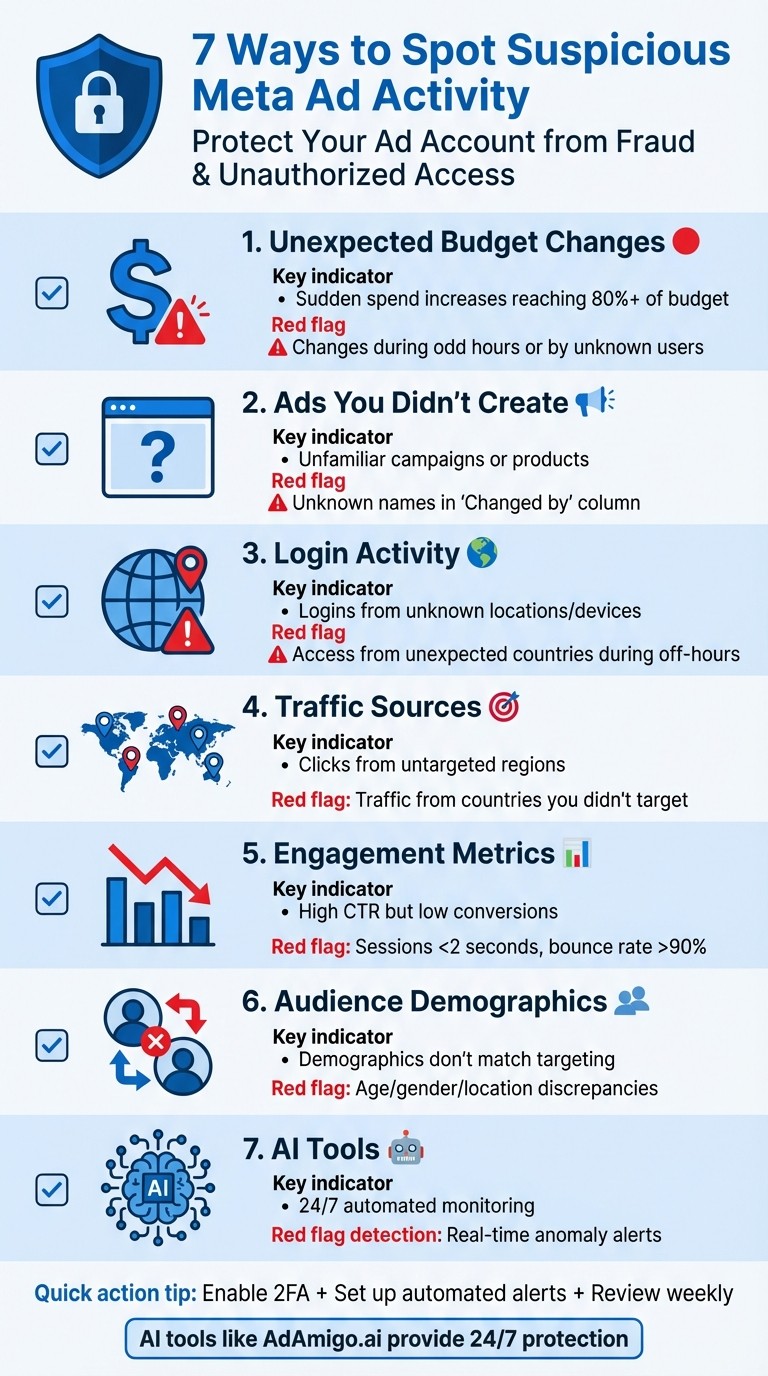
7 Warning Signs of Suspicious Meta Ad Activity
The Truth About Meta Ads Scams (And How to Protect Yourself)
1. Check for Unexpected Budget Changes
Unexpected changes in your ad budget can be a red flag for potential compromise. While small, routine fluctuations are normal, sudden and unauthorized increases - especially when daily spend nears or exceeds 80% of your planned budget - should grab your attention.
To investigate, open the Activity History panel in Ads Manager. Filter for "Budget" updates and pay close attention to the "Changed by" column. Legitimate updates typically show "Meta", an automated rule, or a trusted team member. If you spot unfamiliar names making these changes, it could indicate unauthorized access.
Timing is also a clue. Budget adjustments during peak business hours are common, but changes made late at night or during off-hours should raise suspicion. Hackers often create entirely new campaigns with inflated budgets rather than modifying existing ones, making these unauthorized actions less obvious at first glance.
To stay ahead of this, consider setting up automated rules. These can pause campaigns or send alerts when spending reaches 80% of your budget. Additionally, keep an eye on your manual vs AI budget testing and payment methods - unfamiliar credit cards or payment accounts could signal fraudulent activity.
Feature | Normal Fluctuation | Suspicious Spike/Drop |
|---|---|---|
Initiator | System (Meta) or authorized team members | Unknown users or unauthorized admins |
Campaign Status | Changes within active, approved campaigns | New campaigns or reactivated paused ads |
Settings Changes | Budget updates only | Includes changes to targeting or creative |
Frequency | During high-demand hours (min. 3 hours) | Random, often during off-hours |
Finally, take a close look at your ad creation logs as part of a comprehensive Meta ad audit to identify any ads that you didn’t approve or initiate. This extra step can help you catch unauthorized activity before it spirals out of control.
2. Review Ads You Didn't Create
Once you've reviewed budget changes, it's time to check for ads you didn't authorize. If you find ads promoting unfamiliar products, using odd names, or targeting unexpected audiences, it could signal that your Meta ad account is compromised. These unauthorized campaigns are a red flag, but the good news is that Meta Ads Manager provides a detailed activity log to help you investigate.
To start, open the Activity History panel. Head to the "Ads" tab, select any suspicious campaigns, and click "Activity history" on the right-hand side. This log shows every action taken on the ad, including who made changes and when. Use the search bar to look for the "Ad created" event - this will show you exactly when the ad was launched and by whom. Pay extra attention to the "Changed by" column. Typically, you'll see your name, a trusted team member's name, "Automated rules", or "Meta" (for ad reviews). If you spot ads created using methods like "Using: Power Editor" or "Using: Boosted Page" and your team rarely uses those tools, it could indicate unauthorized activity. Dig into the details of these changes to spot anything unusual.
Any unfamiliar name in the logs should raise a red flag and prompt further investigation.
"Meta Ads Manager tracks all changes made to your ad campaigns, ad sets and ads. When you view your activity history, you can see who made changes, what changes were made and when those changes were made." - Meta
In addition to reviewing ads, double-check your account settings. Go to Business Suite > Settings > People to confirm that all admins are authorized team members. If you see new admins or find trusted users downgraded to lower permissions, it could mean your account has been compromised. Also, review the Billing & Payments section for unfamiliar credit cards funding your ads. Regular monitoring of these areas adds an extra layer of protection to your ad account.
3. Monitor Login Activity from Unknown Locations
After addressing unauthorized ads, keeping an eye on login activity is your next line of defense. Hackers often test the waters with brief logins to examine settings before making significant changes. Fortunately, Meta keeps a detailed log of every login attempt.
To get started, head over to Settings & Privacy > Security on Facebook and select "Where You're Logged In." This section, accessible through Facebook Settings or Meta Business Suite, shows all active sessions, including details like device type, geographic location, and session start times. Look out for anything unusual, such as unknown devices or logins from regions outside your operational area. For instance, if your business operates in California but you notice a login from Romania or Nigeria, that's a major red flag.
Timing is another clue. Logins during non-working hours or sessions that last unusually long could signal unauthorized access. Additionally, a surge in failed login attempts from specific IP addresses suggests someone might be trying to crack your password. These warning signs should prompt immediate action.
If you spot suspicious activity, log out of the questionable session right away. Then, strengthen your security by following a guide to password security and enabling two-factor authentication (2FA) and setting up an IP allowlist to restrict access to trusted locations, like your office or home. It’s also a good idea to configure auto-logout for inactive sessions to minimize risks.
Make it a habit to review your login activity weekly. For even better protection, consider enabling Meta Protect, which provides enhanced monitoring and admin security features. Regular vigilance is key to keeping your account secure.
4. Compare Traffic Sources to Your Targeting
Checking if your traffic matches your targeting is another key step in keeping your account secure. Sometimes, even legitimate-looking ads can produce unusual traffic patterns. A major red flag? Clicks and impressions coming from countries or regions you didn’t target. This often hints at issues like click fraud, bot activity, or even a compromised account.
To investigate, head to your Meta Ads Manager and go to the reporting section. Use the breakdown feature to analyze data by "Region" or "Country." This lets you see exactly where your impressions and clicks are coming from. Compare these locations with the ones you set in your Ad Set targeting. For example, if your campaign is aimed at California customers but you notice a sudden spike in clicks from places like Nigeria or Romania, it’s time to dig deeper. Such mismatches are worth investigating and could point to suspicious activity.
Be on the lookout for unexpected traffic surges from regions with historically low conversion rates. Like budget spikes or unusual logins, these mismatches can signal a potential compromise.
Also, evaluate session quality. Suspicious traffic often comes with ultra-short sessions, high bounce rates, or originates from data centers and proxies. Tools like UTM parameters and tracking Meta ads with Google Analytics can help you confirm whether the traffic is legitimate.
To safeguard your budget, take advantage of Meta’s geotargeting and exclusion tools to block regions or countries known for high bot activity. You can also set up real-time alerts for key metrics to notify you of sudden spikes in impressions or clicks from locations outside your targeting.
5. Look for Unusual Click and Engagement Rates
Once you've checked your budget and login activity, it's time to dive into engagement metrics. These can reveal telltale signs of deceptive bot traffic. Just like sudden budget changes or unauthorized ads raise red flags, strange engagement patterns demand immediate attention.
For instance, if your click-through rate (CTR) suddenly spikes but your conversions stay flat, you might be dealing with bot traffic or click fraud. A high CTR paired with low conversions is one of the most obvious warning signs.
Take a closer look at session duration and bounce rates. Bot traffic often leaves a trail of sessions lasting less than two seconds and bounce rates exceeding 90%. Real visitors take time to explore your site. So, if you're seeing thousands of clicks but your analytics show little to no time spent on-site, something is definitely off. These metrics can help you zero in on suspicious click activity.
"Meta's machine learning thrives on accurate behavioral signals. When fake clicks dominate, the algorithm mistakes them for real engagement, learning from bad data." - TrafficGuard
Also, watch for patterns like repeated clicks from the same IP address or sudden bursts of activity during odd hours. Automated scripts can generate clicks at speeds no human could replicate - milliseconds apart. Compare your click volume with actual conversion data. If clicks are climbing but conversions aren't, dig into those specific traffic sources right away.
Lastly, check your account activity logs to ensure low-quality traffic isn't being driven by unauthorized changes. Use Meta's Activity History to spot any unexpected targeting or budget adjustments.
6. Verify Audience Demographics Match Your Settings
If you notice odd patterns in clicks or engagement, it's time to check if your ad audience demographics align with your targeting. Discrepancies here could point to unauthorized changes or even fake profiles.
Start by reviewing the age, gender, and location data in your Meta Ads Manager. Compare this data with your original campaign settings. For instance, if your campaign is set to target women aged 25–34 in California, but your reports show interactions from men aged 55+ in Southeast Asia, something is clearly off. This might signal unauthorized adjustments or fake profiles infiltrating your audience settings.
Meta's Activity History panel can be a lifesaver here. It lets you track any changes made to your audience settings - showing what was altered, when it happened, and who made the change. Maintaining a clean Meta ad campaign structure makes these audits much easier to perform. Hover over the "Changed By" column to see whether the modification came from an admin or directly through Ads Manager. If you spot changes like your age range being expanded to "18-65+" or specific locations replaced with "All", it’s a red flag for unauthorized edits.
"If your reports are full of fake engagement, your optimization strategy will be built on false assumptions. This makes it impossible to optimize Meta Ads for ROI effectively. You could end up increasing spend on underperforming ads or pausing ads that are actually working." - TrafficGuard
To further validate your findings, compare Meta's demographic data with Google Analytics or another reliable third-party tool. For example, if Meta reports thousands of clicks from India but your website analytics show no sessions from that region, you might be dealing with bot traffic or click fraud. Studies have highlighted the prevalence of PPC click fraud, which can distort your targeting and waste your ad budget over time.
7. Use AI Tools to Catch Anomalies Automatically
While manual checks can uncover various issues, they have limitations - especially during off-hours. AI-powered tools step in to provide constant monitoring, ensuring that your Meta ad account stays under watch 24/7. These platforms learn your account's typical spending patterns, pacing, and performance metrics, making it easier to spot irregularities that might otherwise go unnoticed.
What sets AI tools apart is their ability to go beyond basic alerts. Unlike Meta's built-in notifications, which rely on simple thresholds, tools like AdAmigo.ai create a detailed profile of your account's normal activity. For example, if your daily budget suddenly spikes or an unfamiliar ad set starts running in a different region, the AI can flag these anomalies in real time.
Custom thresholds make these tools even more powerful. You can set specific triggers tailored to your business needs, such as detecting a 50% budget increase within six hours or spotting login attempts from unknown locations. Some platforms, including AdAmigo.ai, even allow you to automatically pause campaigns when critical issues arise. This proactive approach helps prevent financial losses before they escalate. Users have praised these capabilities, citing their effectiveness and reliability.
One user shared their experience:
"What others promised, AdAmigo.ai delivered. True AI, automation, and results." – Nadia Toffar
AdAmigo.ai has also been recognized as a "High Performer" on G2, thanks to its ability to deliver actionable insights and timely alerts. It provides a daily summary of prioritized anomalies along with recommended fixes. Whether you prefer to review and approve changes, make adjustments, or leave everything to the AI, the system ensures you're always in control while minimizing risks.
Conclusion
Your Meta ad account is a direct link to your marketing budget, making it a tempting target for fraud, unauthorized access, and expensive errors. Keeping a close eye on your account is essential - it could mean catching a small budget discrepancy early and avoiding a bigger financial hit later. Spotting issues quickly allows you to pause suspicious campaigns, remove unauthorized users and secure your account access before they can cause more harm, and prevent budget overspend.
The problem is, manual monitoring only works when someone is actively checking. If a rogue login or campaign happens outside of business hours, the damage can pile up fast. Imagine a compromised account early in the morning or an unauthorized campaign running over the weekend - by the time you notice, the financial loss could already be significant.
This is where AI tools like AdAmigo.ai step in, offering round-the-clock monitoring. Unlike Meta's basic alerts that rely on fixed thresholds, AdAmigo.ai continuously analyzes your account, learning your usual spending habits, pacing, and performance metrics. It flags unusual activity in real-time, whether it’s a sudden budget spike, logins from unfamiliar locations, or ads targeting unexpected regions.
Setting up AdAmigo.ai is quick - just five minutes to connect your Meta ad account, and the system starts tracking anomalies and risks right away. You can decide whether to review and approve its recommendations, make manual changes, or let it operate on its own. You can also implement automated bid rules to further protect your spend. This way, you stay in charge while the AI handles the heavy lifting.
The result? A system that grows smarter over time, providing centralized protection across multiple accounts. Your budget and strategy remain in your hands, while the AI ensures your account stays secure and your spending stays on track.
FAQs
How can AI tools help protect my Meta ad account from suspicious activity?
AI tools are a powerful ally in protecting your Meta ad account, keeping a close eye on unusual activity and flagging potential threats. For instance, platforms like AdAmigo.ai can alert you to unexpected budget spikes, unauthorized changes to your ads, or login attempts from unfamiliar locations. These alerts allow you to tackle problems early, before they spiral out of control.
On top of that, AI can take over essential security tasks like managing user permissions, enforcing two-factor authentication (2FA), and scanning your account for suspicious activity. By handling these responsibilities, AI not only strengthens your account’s defenses but also gives you more time to concentrate on strategy and growing your campaigns.
What should I do if I spot suspicious activity on my Meta ad account?
If something seems off with your Meta ad account, start by reviewing your notifications, Account Quality Dashboard, and Support Inbox for any alerts or updates. Once you've done that, take these steps to secure your account right away:
Change your password and turn on two-factor authentication for added security.
Check your recent login activity to spot any unauthorized access.
Review your payment methods to make sure there aren’t any unapproved charges.
Quick action is key to stopping further problems and keeping your account safe from misuse.
How can I tell if my ad traffic is legitimate or fraudulent?
To spot fraudulent activity in your ad traffic, keep an eye out for warning signs like an unusually high click-through rate (CTR) without any conversions, multiple clicks coming from the same IP address or geographic location, extremely short session times, or erratic click patterns that don’t align with normal user behavior.
Taking the time to manually review traffic sources and patterns can reveal suspicious activity, such as bots or click farms targeting your ads. While platforms like Google Ads have built-in systems to filter out invalid clicks, tools like AdAmigo.ai can add an extra layer of protection. These tools monitor traffic and flag anomalies, helping you protect your ad spend and improve overall campaign performance.