
Meta Ads Frequency Benchmarks (When Ads Start Fatiguing)
Guidelines and warning signs for Meta ad frequency, benchmarks by campaign type, and tactics to prevent creative fatigue and rising costs.
Meta ads can lose effectiveness fast if you don’t manage frequency properly. Ads shown too often can hurt performance, increase costs, and even damage your brand. Here’s what you need to know:
Ad Fatigue: Starts after 4 exposures; conversion rates drop by 45%, and click-through rates (CTR) fall by 50% after 5–8 views.
Frequency Sweet Spot:
Cold Audiences: Keep frequency under 3.0 to avoid early fatigue.
Retargeting Audiences: Aim for 4.0–6.0, but avoid exceeding 7.0.
Performance Decline: At 5+ exposures, costs can rise by 50–80%, and CTR drops by 40–55%. This makes it difficult to maintain profitable ROAS benchmarks while scaling.
Solutions:
Rotate ad creatives every 7–14 days to solve creative fatigue.
Use tools like Meta Ads Manager or AI platforms (e.g., AdAmigo.ai) to track and adjust frequency automatically.
Expand audiences and segment them by funnel stage to avoid oversaturation.
Managing ad frequency isn’t just about limiting views - it’s about keeping ads engaging and relevant while controlling costs. Below, we’ll explore how to monitor, optimize, and refresh your campaigns effectively.
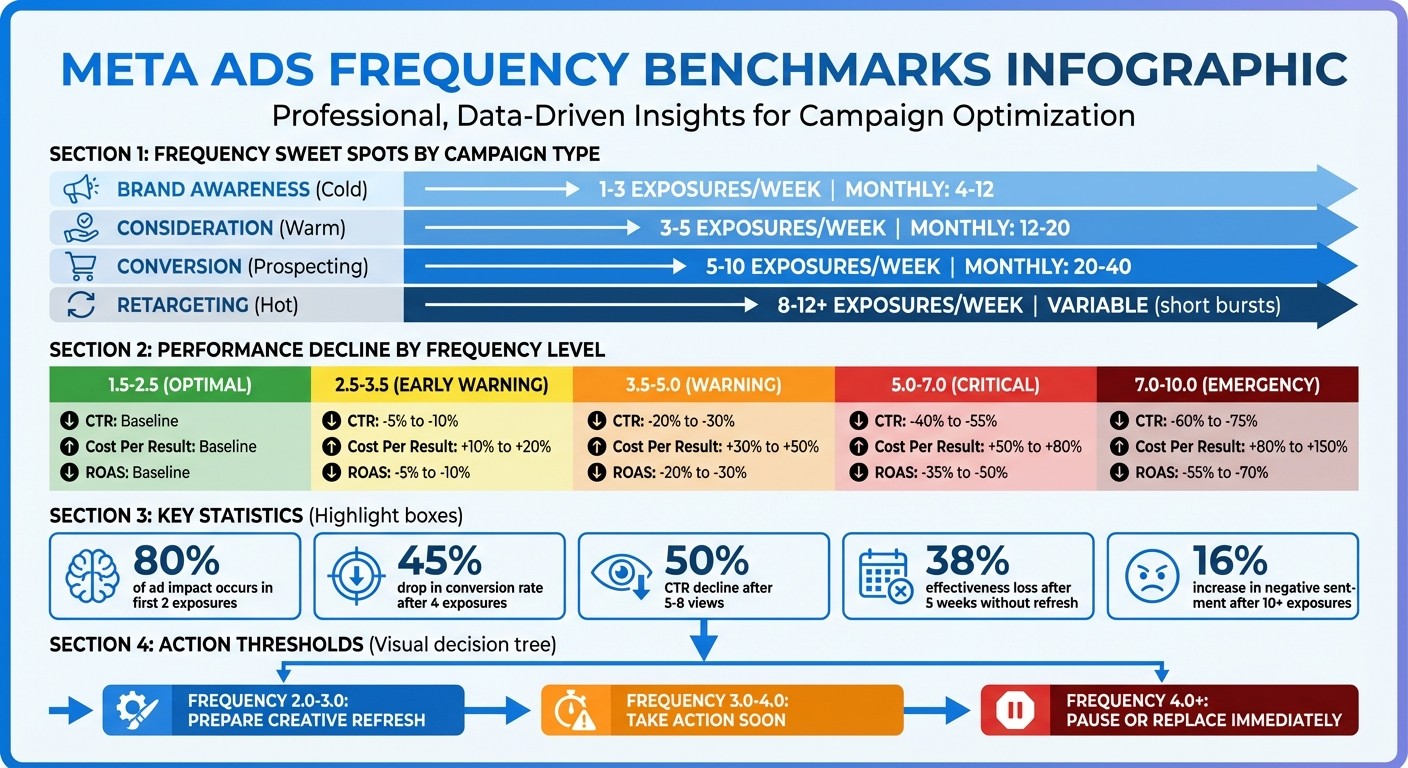
Meta Ads Frequency Benchmarks: Performance Impact by Exposure Level
Meta Ads Frequency Benchmarks by Campaign Objective
Frequency Guidelines by Campaign Type
How often should your ads appear? Managing frequency is key to scaling. It depends on aligning your campaign goals and the audience you're targeting.
For brand awareness, aim for about 1–3 exposures per week. This frequency works well for cold audiences, helping establish recognition. Research indicates that nearly 80% of an ad's impact happens within the first two exposures.
Consideration campaigns need a bit more repetition - 3–5 exposures per week. This keeps your brand in the audience's mind without causing ad fatigue.
When it comes to conversion campaigns, the stakes are higher. You'll generally need 5–10 exposures per week to drive action. However, frequent creative updates are crucial here, as ad performance can drop quickly if the content becomes stale.
Retargeting campaigns can sustain even higher exposure rates. Successful campaigns typically maintain a frequency between 2.5 and 7, depending on the product's price point. For example, higher-priced items (over $500) perform well with 2–4 exposures per month, while lower-priced items ($100–$500) can handle 5–7 exposures monthly.
"If the product is between $100–$500, I'd keep the frequency cap between 5–7x/30 days... if you're selling something that's greater than $500, I'd recommend a maximum frequency of 2x–4x/30 days." – Abhi Bavishi, Growthfox
These guidelines provide a strong starting point, but they also highlight the importance of monitoring for signs of audience saturation, which will be covered in the next section.
Benchmark Comparison Table
Campaign Objective | Weekly Frequency | Monthly Frequency | Primary Focus | Expected Performance Impact |
|---|---|---|---|---|
Brand Awareness (Cold) | 1–3 | 4–12 | Reach, brand recall, recognition | Maximize unique impressions; avoid overexposure |
Consideration (Warm) | 3–5 | 12–20 | Traffic, engagement, evaluation | Reinforce messaging without causing fatigue |
Conversion (Prospecting) | 5–10 | 20–40 | Sales, lead generation, action | Needs creative updates to maintain performance |
Retargeting (Hot) | 8–12+ | Variable (short bursts) | Cart recovery, closing sales, urgency | High intent allows repetition; use timely incentives |
For context, the median Meta ad frequency is 2.51 for B2B companies and 2.43 for B2C companies. Additionally, about 40% of marketers say that a monthly frequency cap of 5–10 impressions is ideal for retargeting campaigns.
One example illustrates the importance of managing frequency: when a creative's frequency rose from 1.4–1.5 (CPA: $25) to 5.2 (CPA: $52), the cost-per-acquisition more than doubled. This highlights the necessity of refreshing your creative to keep costs under control , especially when testing new creative concepts to find high-performing winners..
When Ads Start Fatiguing: Warning Signs and Thresholds
Frequency Thresholds to Monitor
For cold audiences in prospecting campaigns, try to keep the frequency below 3.0. If you notice engagement metrics dropping after hitting this mark, it’s a clear signal to update your creative. Generally, conversions tend to perform best within 3–5 exposures, but beyond that, diminishing returns often set in.
For warm audiences in retargeting campaigns, you can push the frequency a bit higher - typically up to 5.0–7.0 before seeing a decline in effectiveness. However, once you hit 6.0 or higher, you’re likely entering the fatigue zone. Brand awareness campaigns are a bit of an outlier, as they can sustain frequencies of 8–10 or more without causing frustration.
Here’s a quick breakdown of frequency thresholds and their implications:
2.0–3.0: Early warning - start preparing to refresh your creative.
3.0–4.0: Fatigue is setting in - take action soon.
4.0+: Urgent - pause or replace the ad immediately.
If you notice a frequency of 3.5 combined with a 20–30% drop in performance, it’s time to cut your ad spend by 50%. These thresholds act as a guide for spotting and addressing performance issues before they escalate.
"Frequency > 2.5-3.0 = danger zone. High frequency + declining CTR = confirmed fatigue." – AdBid
Performance Warning Signs
One of the first indicators of ad fatigue is a declining click-through rate (CTR). Watch out for:
A 10% drop in CTR over seven days and a 15% increase in cost per acquisition (CPA) - these are early warning signs.
A 20% CTR drop over 14 days - this points to a more serious problem.
Keep an eye on cost metrics as well. At a frequency of 9, cost per click (CPC) can spike by 161% compared to baseline. Similarly, if your CPA jumps by 30% or more over 14 days, it’s time for immediate action. Another red flag is a 15–25% increase in CPM over two weeks without any changes to your targeting.
Engagement metrics like likes, comments, and shares also offer clues. A noticeable dip signals creative fatigue. For video ads, if the hook rate (first 3 seconds) drops by 15% from baseline, it’s worth testing new openings before scrapping the entire video. Data shows that 4 repeated exposures can reduce the likelihood of conversion by about 45%.
Meta Ads Manager might also step in with alerts like "Creative Fatigue" or "Creative Limited". Another sign to watch for is negative brand sentiment, which tends to rise by 16% after users see an ad 10+ times. Additionally, top-performing ads can lose around 38% of their effectiveness after five weeks if they aren’t updated. Staying proactive with these metrics helps you maximize your campaign’s ROI.
Frequency Impact Comparison Table
Here’s a look at how performance changes as frequency increases:
Frequency Level | Performance Status | CTR Impact | Cost Per Result Impact | ROAS Impact |
|---|---|---|---|---|
1.5–2.5 | Optimal | Baseline | Baseline | Baseline |
2.5–3.5 | Good/Early Warning | -5% to -10% | +10% to +20% | -5% to -10% |
3.5–5.0 | Warning/Fatigue | -20% to -30% | +30% to +50% | -20% to -30% |
5.0–7.0 | Problem/Critical | -40% to -55% | +50% to +80% | -35% to -50% |
7.0–10.0 | Emergency | -60% to -75% | +80% to +150% | -55% to -70% |
A real-world example highlights the importance of managing frequency. In late 2025, a D2C subscription box company spending $400/day saw their CPA climb from $45 to $82 over four months as their frequency rose from 2.4 to 5.8. For users who saw the ad 7+ times, the CPA skyrocketed to $147, compared to just $38 for those exposed 1–2 times. Their solution? Excluding anyone who had seen an ad 4+ times and rotating 15 new creative variations every 10 days. This brought their CPA back down to $39.
Tools and Methods for Tracking Ad Frequency
Tracking Frequency in Meta Ads Manager
Meta Ads Manager calculates frequency by dividing total impressions by reach - where reach represents the number of unique users who have seen your ad. This metric is available at the ad set level and typically falls between 1 and 2 on average. However, it can climb higher depending on factors like your budget, audience size, and campaign duration.
To manage how often users see your ads, Meta Ads Manager offers tools like Target Frequency. This feature is available for Sales, Awareness, and Engagement campaigns with lifetime budgets, letting you aim for a specific exposure frequency - such as 2 views per user every 7 days - without imposing a strict cap. For Awareness and Reach campaigns, you can also activate Frequency Capping to set firm limits on the number of times an individual user sees your ad within a set timeframe.
Another useful tool is Ad Relevance Diagnostics, which provides insights into Quality, Engagement, and Conversion Rate rankings. If high frequency starts to negatively impact your ad's performance in the auction, these diagnostics will flag the issue. Additionally, you can create Automated Rules to take action when frequency exceeds a defined threshold. For example, you could set a rule like, "If Frequency > 3.0, pause the ad set", or receive notifications when frequency crosses a specific limit.
While these manual tools are effective, advanced technologies now offer automated solutions for managing frequency more efficiently.
AI Tools for Automated Frequency Monitoring
Manual tracking is a good starting point, but AI-driven platforms like AdAmigo.ai take frequency management to the next level with real-time, automated monitoring. These platforms identify early signs of ad fatigue - such as declining click-through rates (CTR) or increasing cost-per-click (CPC) - and address them instantly, often before you even notice the issue.
AdAmigo.ai employs features like AI Autopilot, which continuously audits your campaign's performance, identifies opportunities for improvement, and implements changes either automatically or with your approval. This includes testing new strategies, adjusting budgets, rotating creatives, and fine-tuning audience segments - all while keeping frequency within optimal ranges. Another standout feature is AdAmigo Protect, which detects unusual activity or delivery problems early, helping to prevent wasted ad spend.
One of the biggest advantages of AI platforms is their ability to perform predictive optimization. They can forecast when your audience might become oversaturated and recommend reallocating budgets to untapped or lookalike audiences. AI tools can also handle automated creative rotation, which sequences different ad creatives to tell a cohesive brand story. This approach allows you to increase frequency (up to 5–8 exposures) without frustrating your audience.
Feature | Manual Management (Ads Manager) | AI Management (e.g., AdAmigo.ai) |
|---|---|---|
Response Time | Hours to days (Reactive) | Real-time (Proactive) |
Optimization Scope | Focused on specific metrics | Comprehensive system optimization |
Scaling Capability | Limited by human capacity | Handles multiple campaigns simultaneously |
Learning Curve | Fixed rules | Adapts with machine learning |
The main difference lies in execution. While Ads Manager provides the data and tools for you to act on, AI platforms vs. manual management differ in how they handle execution, with AI automating solutions. This frees you to concentrate on strategy and creative planning while the AI handles the day-to-day adjustments.
Meta Ads Frequency Controls for Campaigns
How to Optimize Frequency and Prevent Ad Fatigue
Once you’ve pinpointed frequency issues using tracking tools, the next step is to take action. The aim? Keep your ads fresh and engaging while avoiding audience burnout. Here’s how to control frequency and extend the life of your campaigns.
Creative Rotation and Refresh Schedules
On average, Facebook ad creatives perform well for 10 to 36 days before results start to dip. High-performing campaigns refresh their creative assets every 10.4 days on average, and ads left unchanged for five weeks lose 38% of their effectiveness.
To counteract this, tweak your creative elements incrementally - adjust hooks, colors, or headlines. If performance still drops, consider introducing entirely new creative assets, experimenting with different ad formats and testing frameworks, or employing a "Rest and Restart" strategy. For instance, pausing an ad for 30–45 days can help it regain 60–70% of its original performance when reintroduced. Even small changes, like swapping out a video’s opening hook, can extend its effectiveness by 30–40%.
When your audience becomes oversaturated, it’s time for a complete refresh. This could mean reimagining your angles, visuals, or even the creators involved. Mixing up formats - like user-generated content (UGC), static images, founder-led videos, and carousels - can keep things fresh. Data shows that founder-led content extends creative lifespans by 28% compared to standard UGC or brand-shot content.
Another method is the "Pulse" strategy: launch a set of 10 ads, run them for two weeks, then replace them with a new batch. After 30 days, you can rotate back to the original set to maintain novelty. For cold audiences, refresh creative as frequency nears 2.5; for retargeting, act before it hits 4–6 to prevent performance drops. Also, keep an eye on your thumbstop rate (3-second view rate) - if it falls by 15–20%, update the video hook to prevent rising costs.
Refresh Type | Effectiveness | Effort | Best For |
|---|---|---|---|
Partial (Hook/Headline) | 70% | Low | Early fatigue signs |
Format (Static to Video) | 60% | Medium | Extending winning concepts |
Complete Overhaul | 90% | High | Severe performance collapse |
Refreshing creative is only part of the equation - expanding and segmenting your audience is equally important.
Audience Segmentation and Expansion
Audience size plays a big role in how quickly ad fatigue sets in. Smaller audiences saturate faster because your budget is spread across fewer people. When frequency for a cold audience exceeds 3.0, it’s time to broaden your targeting. Try layering interests, exploring adjacent segments, or increasing lookalike percentages by scaling ads with multiple lookalike audiences (e.g., moving from 1% to 3–5%).
Expanding your audience naturally reduces frequency and introduces new users to your ads. Regularly updating lookalike seed lists with recent purchaser data can also help.
Segmentation helps avoid overlap between campaigns. Dividing audiences into stages - like prospecting and retargeting - lets you tailor your creative, preventing the same person from seeing identical ads repeatedly. As Brittany Schulte from Revel Marketing Partners explains:
"Frequency compounds if you are delivering the same ads at various funnel stages... unless you have good creative differentiation at each funnel stage."
Meta’s tools can help monitor audience overlap. When users see multiple ads from different ad sets, fatigue increases, and your budget becomes less efficient. For example, users exposed to an ad 6–10 times are 4.1% less likely to purchase than those who saw it 2–5 times. Additionally, 49% of consumers say they won’t buy from a brand that advertises too frequently.
Audience Type | Warning Frequency Level | Critical Frequency Level | Recommended Action |
|---|---|---|---|
Prospecting (Cold) | 2.5+ | 3.5+ | Expand audience or refresh creative |
Retargeting (Warm) | 4.0+ | 6.0+ | Rotate creative or reduce budget |
Pair audience expansion with smart budget strategies to keep frequency under control.
Budget and Bidding Adjustments
How you allocate your budget has a direct impact on ad frequency. Gradually increase budgets - by 10–20% at a time - to expand reach without overwhelming your audience. High daily budgets can shorten the lifespan of your creative, turning weeks into days.
A useful approach is the "60/30/10" rule: allocate 60% of your budget to proven winners, 30% to testing, and 10% to refreshing past winners.
Ad scheduling (dayparting) is another way to manage frequency. Limit ad delivery to peak engagement hours or specific days (e.g., 5–6 days per week) to avoid oversaturation while staying visible during high-intent periods. For accounts spending over $20,000 per month, the "Pulse" strategy - rotating ads on and off in two-week intervals - can extend creative lifespans by 2–3 times.
Set clear thresholds to guide your actions. For example, if frequency hits 2.5 or performance drops by 10–15%, reduce spend by 25%. If frequency exceeds 3.5 or performance declines by 20–30%, cut spend by 50%. And if costs double or the click-through rate (CTR) drops by 40%, pause the campaign entirely.
When scaling budgets, broaden your targeting with larger lookalike audiences to distribute spend. Pausing fatigued ads for 30–45 days can also allow them to perform well again as audience composition evolves.
For those managing multiple campaigns or large budgets, platforms like AdAmigo.ai can simplify the process. Its AI Autopilot feature continuously monitors performance, reallocates budgets, rotates creatives, and adjusts audience segments in real time - helping you keep ad frequency optimized without constant manual intervention.
Conclusion
Managing ad frequency effectively means staying proactive and addressing issues early. Research shows that nearly 80% of an ad's impact happens within the first two impressions per week. However, when exposure hits 10+ times, negative sentiment can rise by 16%. It's better to tackle a 10% performance drop immediately than risk a decline of over 30%.
Key Takeaways
To keep your campaigns running smoothly:
Keep cold campaign frequency below 2.5 and retargeting campaigns under 4.0.
Use a 10% drop in CTR or a 15% increase in CPA over seven days as red flags for intervention.
Click-through rates can plummet by 50% after 5–8 exposures, so refreshing ads every 7–14 days is key to maintaining engagement.
Refreshing creative assets every 10 days helps prevent ad fatigue. Even small tweaks - like changing the first three seconds of a video or testing new headlines - can extend an ad's lifespan without requiring a complete redesign. Founder-led content is another smart move, as it can increase a creative's lifespan by 28% and improve ROAS by 15%.
For larger campaigns, platforms like AdAmigo.ai can help automate frequency monitoring, creative rotation, budget adjustments, and audience expansion in real time.
Next Steps
To put these insights into action:
Audit your current campaigns to check frequency levels and performance trends.
Set up automated rules in Meta Ads Manager to flag when frequency exceeds 3.5 for cold audiences or 6.0 for retargeting.
Build a creative pipeline to generate 2–3 new ad variations weekly for high-budget campaigns.
You can also stagger ad launches (e.g., Monday, Wednesday, Friday) to give algorithms clearer signals. For retargeting, segment your audience by time windows (e.g., 0–7 days, 8–30 days) and assign different frequency caps and messaging to avoid overwhelming potential customers.
FAQs
How do I set a frequency cap in Meta Ads Manager?
To set a frequency cap in Meta Ads Manager, head to your campaign settings. This feature lets you control how many times a specific ad is displayed to the same user within a defined period - commonly used with objectives like Reach or Brand Awareness.
Here’s how you can do it:
Log in to Meta Ads Manager and create or edit a campaign.
Choose an objective like Reach.
Specify your frequency cap (e.g., 2 impressions per user every 7 days).
This ensures your ads remain effective without overwhelming your audience.
What should I do when frequency is rising but results look stable?
If you notice frequency climbing but results staying flat, it could be a sign of creative fatigue. To keep your audience engaged and avoid a dip in performance, try updating or rotating your ad creatives. This simple step can help ensure your campaign stays effective over time.
How can I tell if high frequency is from a small audience or ad overlap?
High ad frequency often stems from either a small audience or ad overlap. When the issue is a small audience, it means your budget is too large for the limited number of people you're reaching, causing the same individuals to see your ad repeatedly. On the other hand, ad overlap occurs when multiple campaigns are targeting the same group of people, leading to excessive exposure.
To pinpoint the problem, dive into metrics in Ads Manager. Look at reach (how many unique people saw your ad), impressions (total views of your ad, including repeats), and overlap reports (to see if campaigns are clashing). These insights can help you figure out whether audience size or overlapping targeting is driving the high frequency.