
Ultimate Guide to Post-Audit Meta Ad Security
Prioritize and fix audit findings: secure access and billing, validate Pixel/CAPI, remove audience overlap, and set quarterly reviews.
Want to secure your Meta ad account after an audit? Here's the bottom line: Audits reveal issues, but the real impact comes from fixing them. This guide breaks down how to act on audit findings, safeguard your account, and prevent future problems.
Key Takeaways:
Prioritize critical risks first: Fix tracking issues (Pixel/CAPI setup) and resolve audience overlap before tackling less urgent tasks.
Secure access and billing: Use two-factor authentication (2FA), limit admin rights, and monitor billing with spend alerts.
Validate tracking accuracy: Ensure your Meta Pixel and Conversions API (CAPI) are properly configured to avoid feeding incorrect data into the algorithm.
Clean up audiences: Remove outdated or redundant audiences to improve performance and stay compliant with privacy laws.
Use automation tools: Tools like AdAmigo Protect can monitor account health, flag issues, and optimize campaigns automatically.
Next steps: Start with your audit's most critical findings, set up a quarterly review schedule, and implement tools for continuous monitoring. This approach ensures your account stays secure and performs effectively.
How To Prevent Your Meta Account From Getting Hacked
Turning Audit Findings into Action Plans
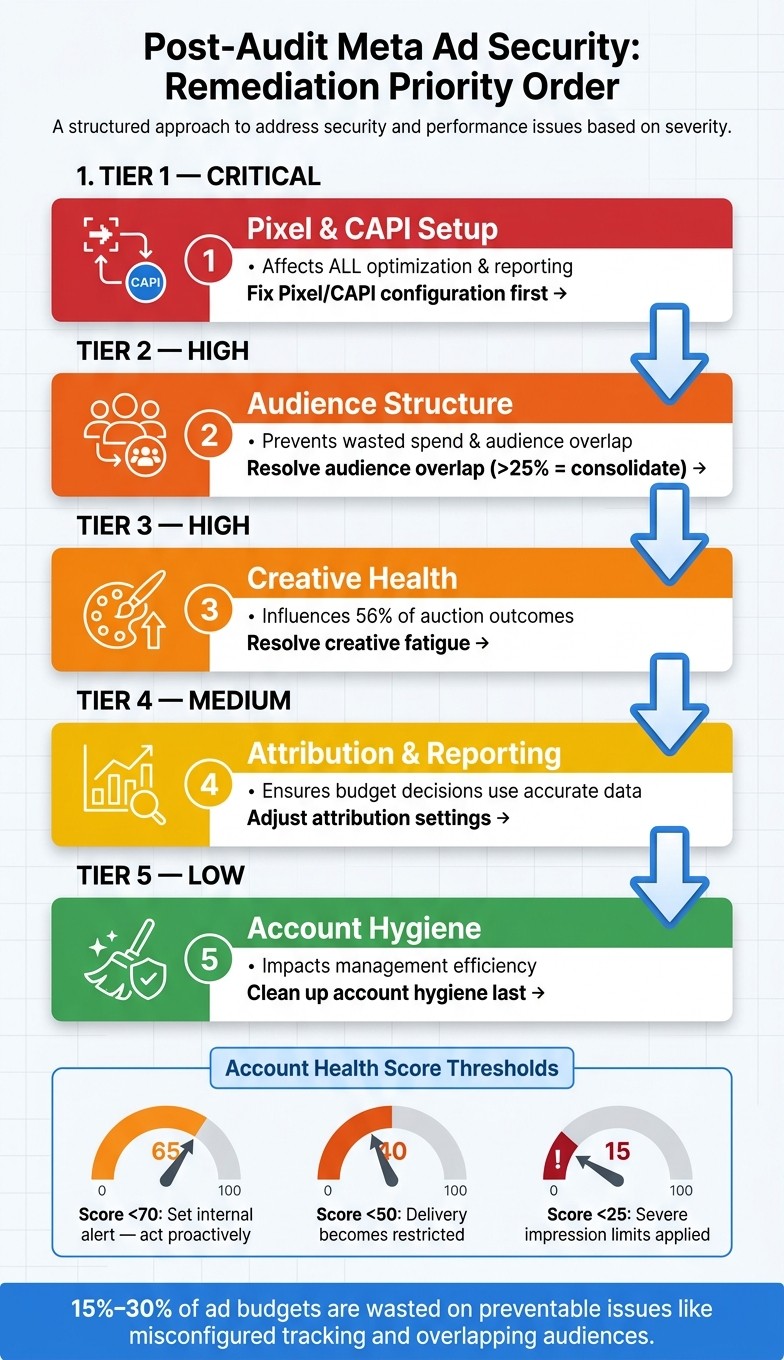
Meta Ad Account Security: Post-Audit Action Plan
An audit gives you a list of problems, but what you do next determines whether those issues get fixed or spiral out of control. The goal isn’t just to create a lengthy to-do list - it’s about turning those findings into a clear, actionable, and prioritized plan.
Ranking Risks by Severity
Start by categorizing issues based on their potential impact on your budget, data accuracy, or account access. Here’s a simple breakdown:
Risk Severity | Audit Category | Impact on Account |
|---|---|---|
Critical | Pixel & CAPI Setup | Affects all optimization and reporting |
High | Audience Structure | Prevents wasted spend and audience overlap |
High | Creative Health | Influences 56% of auction outcomes |
Medium | Attribution & Reporting | Ensures budget decisions rely on accurate data |
Low | Account Hygiene | Impacts management efficiency but not direct performance |
Fixing tracking issues should always be the first priority. As David Pombar, a Digital Analytics Expert, explains:
"If your event data is wrong, Meta optimizes on the wrong signals. That's how decent creative and solid media buying still produce disappointing outcomes."
It’s worth noting that many accounts waste 15%–30% of their budget on preventable problems like misconfigured tracking or overlapping audiences. Addressing these issues upfront safeguards your overall performance. Once the critical risks are resolved, you can move on to the next tier with a structured plan.
Building a Remediation Backlog
Turn each audit finding into a specific task with clear ownership, deadlines, and dependencies. Here’s a suggested order for tackling issues:
Fix Pixel/CAPI setup first.
Address audience overlap.
Resolve creative fatigue.
Adjust attribution settings.
Review budget and learning phase issues.
Optimize Advantage+ configurations.
Finally, clean up account hygiene.
Proper documentation is critical. Muhammad Naseer, a Performance Marketer, emphasizes:
"If you don't document everything early, recovery becomes guesswork."
Make sure to log key details like timestamps, screenshots, and asset IDs immediately. Also, verify that admin profiles match government-issued IDs to avoid unnecessary account disruptions.
Keep an eye on your Account Health Score in Ads Manager. If your score drops below 50, delivery becomes restricted, and scores under 25 can lead to severe impression limits. Set up internal alerts for scores under 70 so you can act before performance is affected.
Aligning Actions with Business and Compliance Goals
Once your remediation backlog is in place, ensure your actions align with both your business objectives and compliance requirements. As Sam Tomlinson puts it:
"Structure is a value statement. It is how you (the media buyer) communicate your goals and priorities to the machine (Meta)."
This means organizing your account around key revenue drivers, like hero products or service tiers, rather than just grouping by creative type. On the compliance side, ensure your plan accounts for privacy regulations like GDPR and CCPA, especially when cleaning up audience data or adjusting pixel events.
Meta’s Multimodal Ad Review System (MARS) now scans every ad before it’s served. With AI-generated content becoming the third-largest reason for ad rejections - 14% of all rejections by 2026 - it’s crucial to flag and correct these issues during your remediation process. Ignoring compliance could cost you dearly, both in rejected ads and in lost opportunities.
Securing Access, Assets, and Billing
After addressing your remediation backlog, the next step is to secure access points, assets, and billing processes. These measures act as long-term safeguards, reducing the chance of vulnerabilities reappearing. Start by focusing on user access, then move on to securing connected assets and billing processes to strengthen your account's overall security.
Tightening User Access Controls
Reducing account access is one of the most effective ways to minimize risk. Begin by enforcing two-factor authentication (2FA) for all team members. Use authenticator apps like Google Authenticator or Duo, as they offer better security than SMS codes, which are susceptible to SIM-swapping attacks. For accounts managing significant budgets, physical security keys provide the highest level of protection.
Additionally, implement the principle of least privilege: assign roles based solely on what each individual needs to perform their tasks. For example:
Campaign managers should have "Advertiser" access.
Reporting stakeholders should have "Analyst" (view-only) access.
"Admin" rights, which include full control over billing and settings, should be limited to a select group of senior, trusted individuals.
If you’re working with an agency, use Meta’s Partner Access feature instead of adding external staff as individual users. This way, your client retains ownership of their assets while your team can still manage campaigns.
To further enhance security, set auto-logout timers - 15 minutes for shared workstations and 30 minutes for personal devices. Regularly check the Security Center for any logins from unusual locations or devices you don’t recognize. Conduct a formal access review every quarter to remove credentials for former employees or contractors whose roles have changed.
Protecting Connected Assets
Every connected pixel, catalog, or third-party integration in your Business Manager can be a potential vulnerability. After performing an audit, review each connected asset to confirm its necessity and recent usage. Revoke access for any tools or integrations that are no longer active.
For API connections, configure IP allowlists in Meta Business Settings to ensure only trusted systems can connect programmatically. If you rely on third-party tools for automation or reporting, carefully review their permission levels and periodically regenerate access tokens - especially after an admin leaves your organization. For accounts with high spending or elevated risk, enrolling in Meta Protect adds an extra layer of mandatory security monitoring.
Billing and Spend Protection
Treat access to billing as a critical financial control. Only admins should have the ability to view or modify payment methods, and this group should be as small as possible. Use account spend limits within Ads Manager to set a maximum amount that can be charged during a specific period.
Here’s an important detail: Meta's pacing algorithm can exceed daily budget caps by up to 75% under certain conditions. This makes automated spend alerts a necessity. Set up alerts to monitor sudden increases in CPC, CPM, or daily spend. If something unusual occurs, you’ll be notified within minutes instead of discovering it at the end of the billing cycle. Combine these alerts with a well-defined internal response process to quickly address potential financial issues before they escalate.
Tracking, Data Integrity, and Privacy Protection
Once you've set up access controls and billing safeguards, the next step is ensuring your tracking setup is accurate. Faulty or incomplete tracking can skew your reports and misguide Meta's algorithm, leading to poor campaign optimization. Here's how to validate your tracking and maintain data accuracy.
Validating Pixel and Conversions API Setups
Start by using the Meta Pixel Helper to confirm that your pixel fires correctly across all conversion steps. Then, go to Events Manager and leverage the "Test Events" tool to identify schema mismatches, such as a purchase event missing its value parameter. Keep an eye on key metrics like Event Match Quality (EMQ) (target ≥7.0) and deduplication rate (aim for 70%–100%) to ensure proper data matching and avoid inflated CPMs.
For Shopify users relying on native integration, proceed cautiously. John Moran from Tier 11 highlights the issue:
"Shopify's own public attribution is only 44% accurate. Importing Shopify purchase data via the direct Shopify-to-Meta integration means feeding the algorithm 56% wrong data."
To illustrate, in early 2026, a beauty brand managed by Tier 11 switched from Shopify's native integration to first-click Conversions API (CAPI) imports through its CRM, adding custom new-customer events. This change improved attribution accuracy from 53% to over 85%. Over six weeks, their Effective New Customer Acquisition Cost (ENCAC) dropped from $26 to $6.73, even as they doubled their ad spend.
For non-Shopify platforms, consider alternatives like the Conversions API Gateway from Stape.io, which automates pixel event duplication for just $10/month.
Cleaning and Securing Audiences
Outdated or inaccurate audiences can hurt performance and create compliance risks. Conduct an audit of all saved and custom audiences. Remove any that haven't been used in the last 90 days or are based on unverifiable data. For CRM-based audiences, confirm the underlying list is up-to-date before syncing it with Meta.
Meta's Audience Overlap tool can help you identify redundancy. If two ad sets in the same campaign have more than 25% overlap, consolidate them. Additionally, ensure the gap between your prospecting and retargeting audiences is under 10%. A higher gap likely indicates broken or missing exclusion lists.
Audience Overlap Type | Healthy Threshold | Action If Exceeded |
|---|---|---|
Two ad sets in same campaign | Under 25% | Consolidate ad sets |
Prospecting vs. Retargeting | Under 10% | Add or fix exclusion lists |
Lookalike 1% vs. Lookalike 2% | Under 50% | Use seed-quality scoring |
Cross-campaign overlap | Under 25% | Drop the lower-CTR campaign |
Maintaining Privacy and Compliance
Accuracy in tracking goes hand-in-hand with privacy compliance. A 2026 audit revealed that 69% of Meta’s tracking code did not honor Global Privacy Control (GPC) opt-outs. This means pixels were firing and setting cookies even when users opted out of tracking. To check compliance, test your server’s response to a sec-gpc header. If it still returns a set-cookie command for advertising cookies when it receives a sec-gpc: 1 signal, your site could be violating state privacy laws.
One effective solution is integrating a Consent Management Platform (CMP), such as OneTrust or Cookiebot. These tools can block pixel firing based on user consent and log that consent for audits. This approach aligns with GDPR and CCPA requirements, especially if you're targeting users in regulated areas like California or the EU. Consent records can be stored and retrieved if needed, ensuring compliance with privacy laws.
Building Long-Term Account Security
Fixing problems after an audit is just one piece of the puzzle. The other - and arguably more critical - piece is making sure those problems don’t creep back in. This means setting up a routine for reviews, having a solid plan for when things go sideways, and using the right tools to keep everything running smoothly in the background.
Setting a Recurring Security Review Schedule
Security isn’t a one-and-done task - it’s an ongoing process. Campaign conditions shift, and so should your reviews. Schedule regular check-ins to assess creative performance and overall account health. Make notes of any changes or issues you spot, as they’ll serve as a roadmap for future audits. This habit ensures you’re always ready to act quickly when something goes wrong, as explained in the next section.
Incident Response and Recovery Planning
Routine reviews lay the groundwork, but a well-thought-out response plan is your safety net for unexpected issues. Whether it’s a hacked login, a sudden policy restriction, or an account flag, having a clear plan can save you a lot of time and headaches. Start by heading to Business Support Home to figure out what caused the restriction. Next, you’ll need to verify your identity using a government-issued ID or business documents. Once the problem is resolved, submit a formal review with documentation of the changes you’ve made.
Here’s what to expect: minor policy violations are usually cleared up within 24 to 72 hours after corrections, while manual reviews for restricted accounts generally take about 48 hours. Keep an eye on your Business Portfolio feedback score - it’s a critical indicator. A score below 3 means you need to act fast, and anything under 1 could stop your ads entirely.
Using Automation and AI Tools for Ongoing Monitoring
Let’s face it - manual monitoring has its limits. You can’t keep an eye on everything 24/7, and by the time you catch an issue, it might’ve already drained your budget. That’s where automation steps in. Tools like AdAmigo Protect are built for this exact purpose. They keep tabs on your account’s health and performance, flagging unusual activity, delivery issues, or unexpected spending before they snowball into bigger problems.
On top of that, AI Autopilot takes care of ongoing campaign adjustments. It fine-tunes budgets, pauses campaigns that aren’t performing, and scales up the ones that are - all without requiring constant input. For agencies juggling multiple accounts, a centralized dashboard simplifies everything. It helps enforce critical standards like two-factor authentication and spending limits across all clients, making sure no account falls through the cracks.
Conclusion: Keeping Your Meta Ad Account Secure
Key Takeaways
Audit findings only make a difference when you act on them. Focus on addressing risks, securing access, validating tracking, and preparing a solid incident response plan as part of a unified approach. This wraps up the journey from audit insights to building stronger account security.
Two-factor authentication (2FA) is non-negotiable. For accounts handling large budgets or higher risks, using a hardware security key provides the best protection. Understanding Meta ad permissions vs. admin roles ensures you follow the principle of least privilege, and conducting a quarterly review ensures team roles match actual needs. Misconfigured Pixel or CAPI setups can hurt performance, so double-check that your tracking systems are accurate to avoid unnecessary losses.
Use these points as your action plan to tighten security today.
Next Steps for Advertisers
Start by tackling the most critical issues identified in your audit. Then, set up a routine: conduct full audits every quarter and review creative assets weekly to monitor ad frequency and fatigue.
For continuous protection, consider tools like AdAmigo Protect for real-time anomaly detection and AI Autopilot to fine-tune performance automatically. These tools help close the gap between when issues arise and when they’re resolved - minimizing wasted budget.
The goal is to develop habits and systems that catch issues early, respond faster, and keep improving over time.
FAQs
What should I fix first after a Meta ads audit?
The foundation of any successful campaign lies in accurate data tracking. Ensuring your pixel health and conversion tracking are in top shape is non-negotiable. If your data is off, even the best optimization strategies won't deliver results. Double-check that your events are firing correctly and that your tracking aligns with your campaign goals. This step ensures you’re working with reliable numbers.
Secure Your Account
Protecting your ad spend is just as important as running the ads themselves. Implement Two-Factor Authentication (2FA) to add an extra layer of security to your account. Also, review user permissions to ensure only the right people have access. These precautions help prevent unauthorized changes or misuse of your account.
Build on a Strong Foundation
Once your tracking and security are solid, you can shift your focus to the creative and strategic elements of your campaigns. Prioritize creative diversity to keep your ads fresh and engaging. Fine-tune your audience targeting to reach the right people, and structure your campaigns effectively to maximize performance over time. These steps, combined with a strong foundation, set you up for consistent growth.
How can I ensure my Pixel and CAPI data is accurate?
To keep your Pixel and CAPI data accurate, it's crucial to run regular diagnostics and audits. These checks help uncover any attribution problems or data distortions that might affect your campaigns. On top of that, keeping a close eye on performance metrics allows you to spot and resolve discrepancies before they escalate. Consistent maintenance ensures your data stays reliable, which directly impacts the effectiveness of your ads.
What’s the fastest way to prevent surprise ad spend?
To avoid unexpected ad spending, set firm budget limits from the start. Use tools like AdAmigo.ai to monitor performance in real-time, allowing you to spot unusual activity or sudden cost spikes quickly. If anything seems off, pause or adjust your campaigns immediately. Staying proactive and responsive is essential to keeping costs under control.