
Set Up Cross-Device Attribution for Meta Ads
Set up cross-device attribution for Meta Ads with Pixel and Conversions API. Track conversions across phones, tablets, and desktops to improve campaign ROI.
Cross-device attribution ensures you understand how users interact with your ads across multiple devices. For example, someone might see your ad on their phone but complete the purchase on their laptop. Without this setup, you risk missing key insights about how your ads drive conversions.
Key Takeaways:
Meta's Device Graph links user activity across devices using logged-in accounts, encrypted identifiers, and tools like the Meta Pixel and Conversions API (CAPI).
This system helps you credit the right ads for conversions, even if they happen on a different device.
To get started, ensure both Meta Pixel and CAPI are synced with the same Pixel ID to avoid Meta Ads misconfigurations, aim for an Event Match Quality score (especially when mapping app events) of 6.0 or higher, and configure attribution windows (e.g., 7-day click, 1-day view) in Ads Manager.
Use tools like Compare Attribution Settings and benchmarks in Ads Manager to analyze performance across devices and adjust your campaigns effectively. This process is easier when you benchmark performance using historical data to identify long-term trends.
How Cross-Device Attribution Works in Meta Ads
What Cross-Device Attribution Means
Cross-device attribution tracks and credits the ads that drive conversions when users engage with your brand across multiple devices, such as smartphones, tablets, and desktops. Rather than treating each device as a separate entity, Meta links activity by tracking logged-in accounts across its platforms.
At the core of this process is Meta's Device Graph - a database that maps user activity across all the devices they use to access Facebook or Instagram. For instance, if someone stays logged in on their phone, tablet, and laptop, Meta connects all their interactions to a single account.
This system uses encrypted identifiers, such as email addresses or phone numbers, which your website sends through the Meta Pixel and Conversions API (CAPI). Meta then matches these anonymized identifiers to its database of logged-in users, enabling it to link a conversion on a desktop back to a mobile ad click. This identity-based tracking is far more dependable than traditional browser cookies, which are often blocked by privacy tools like Apple’s App Tracking Transparency.
This unified approach provides the foundation for smarter, more effective campaign strategies.
How Cross-Device Attribution Improves Campaign Results
By consolidating conversion data across multiple devices, cross-device attribution helps refine budget allocation and optimize Meta Ads ROI.
Without this unified tracking, your conversion data might be incomplete. Cross-device attribution reveals how users navigate between devices - researching a product on a tablet, comparing prices on a laptop, and completing the purchase on a smartphone. This level of insight allows you to allocate your ad budget more effectively. For example, instead of overemphasizing desktop ads that capture the final click, you can give proper credit to mobile ads that initiated the customer journey.
"Accurate attribution is the foundation for effective campaign optimization and a clear understanding of your return on investment." - Adynext
Meta advises aiming for an Event Match Quality score of 6.0 or higher in Events Manager to ensure your server events are correctly linked to Facebook accounts. A higher match quality score means more accurate cross-device tracking, leading to better ROI analysis and smarter spending decisions.
What You Need Before Setting Up Cross-Device Attribution
To track conversions across devices effectively, you’ll need to set up the right technical tools. Start by ensuring that both the Meta Pixel and Conversions API (CAPI) are installed and configured to send events using the same Pixel ID. This combination helps capture conversions that might otherwise be missed, such as those blocked by ad blockers or lost during browser crashes. Additionally, double-check your account settings to ensure smooth data transmission.
A Business Manager account is also essential. This is where you’ll generate the access token that allows CAPI to communicate with Meta's servers. Once both tracking methods are active, head to Events Manager to confirm that events are showing up under both "Browser" and "Server" in the Connection Method column. It's a good idea to verify this within 20 minutes of sending an event.
Another key factor is Event Match Quality. Meta uses a scoring system from 1 to 10, and you should aim for a score of 6.0 or higher. A higher score means Meta can more accurately match user actions to their accounts, which enhances ad optimization and can reduce your cost per action.
"When your events are matched to people with a Facebook account, your events can be better utilized for ad attribution and optimization." - Meta Developers
How to Set Up Cross-Device Attribution
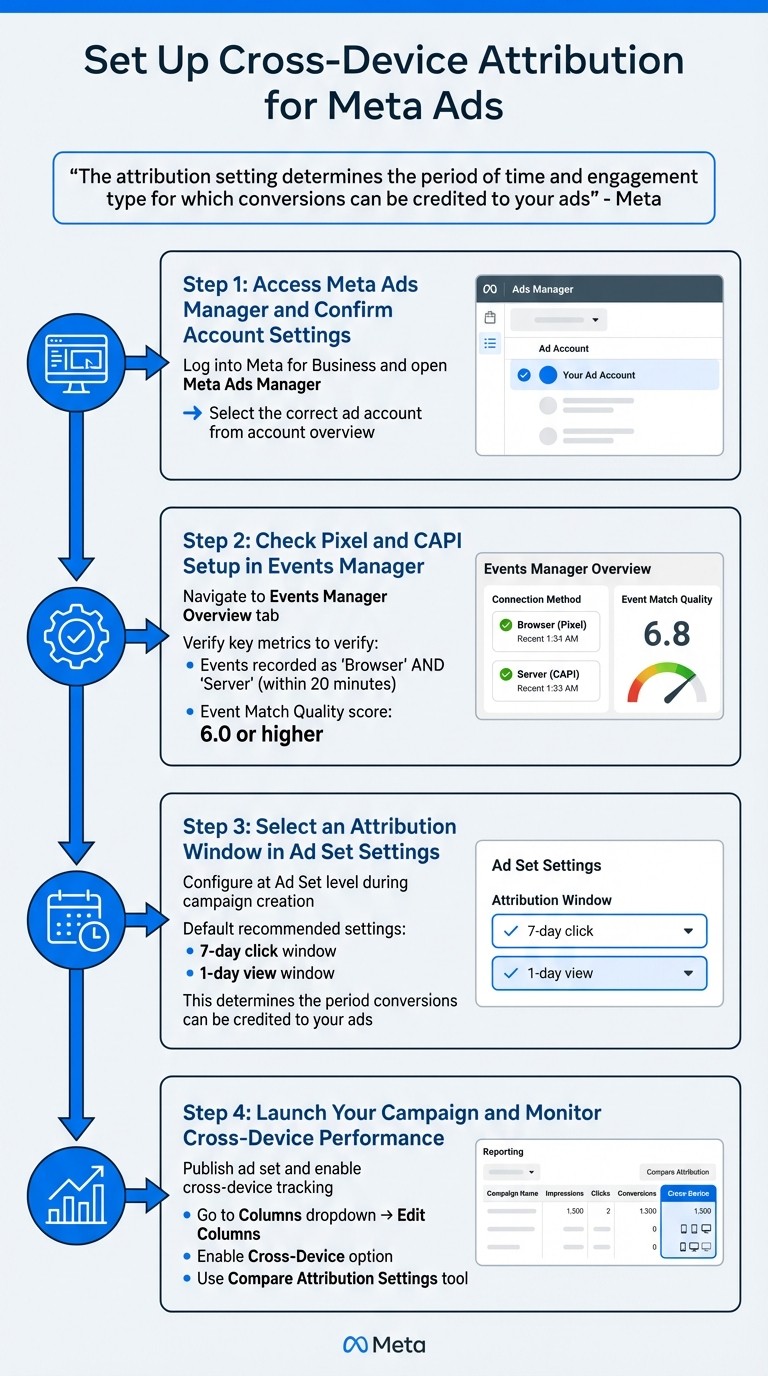
How to Set Up Cross-Device Attribution for Meta Ads in 4 Steps
Once your technical groundwork is in place, setting up cross-device attribution is a straightforward process. Most of the configuration happens at the ad set level, where you'll define how Meta attributes conversions to your ads. These settings also guide Meta's algorithm in targeting users effectively. For example, choosing a 7-day click window helps the system focus on users likely to convert within that timeframe. Follow these steps to get started.
Step 1: Access Meta Ads Manager and Confirm Account Settings
Start by logging into Meta for Business and opening your Meta Ads Manager. From the account overview page, select the ad account you want to configure, or integrate Meta Ads with analytics tools for deeper insights. If you oversee multiple accounts, double-check to ensure you're working with the correct one.
Step 2: Check Pixel and CAPI Setup in Events Manager
Navigate to Events Manager to ensure your Pixel and Conversions API (CAPI) are functioning properly. Under the Overview tab, confirm that events are being recorded as "Browser" and "Server" within about 20 minutes using real-time conversion tracking. This ensures you are leveraging real-time data for Meta Ads AI to optimize performance. Additionally, verify that event data updates within an hour. Pay close attention to your Event Match Quality score - it should be at least 6.0 to enable effective cross-device tracking.
Step 3: Select an Attribution Window in Ad Set Settings
When creating a campaign, such as for Sales or Leads, head to the Ad Set level. In the Attribution Setting section, you'll choose an attribution window. Typical options include 1-day click, 7-day click, 1-day view, and 1-day engaged-view (for video ads). Unless your campaign requires a shorter timeframe, stick with the default 7-day click and 1-day view settings.
"The attribution setting determines the period of time and engagement type for which conversions can be credited to your ads. This is also used to inform ad delivery." - Meta Business Help Center
Step 4: Launch Your Campaign and Monitor Cross-Device Performance
After finalizing your ad creative and audience targeting, publish the ad set. To track cross-device conversions, go to the reporting table in Ads Manager. Open the Columns dropdown, select Edit Columns, and enable the Cross-Device option from the left-hand menu. This will show conversions that occurred on a different device than the one where the initial click happened. You can also use the Compare Attribution Settings tool to review conversions outside your optimization window, giving you a broader view of your customer journey.
Selecting the Right Attribution Window
The attribution window you choose determines how conversions are counted and directly impacts your ad targeting. For example, a 7-day click window attributes conversions that happen within a week, while a 1-day click window focuses on immediate customer actions. The key is to align the window with your customer’s buying process.
Meta's default settings aim to strike a balance between conversion volume and accuracy while navigating the Meta Ads Learning Phase. In this setup, the 7-day click window captures conversions that might follow a period of customer research, while the 1-day view window credits ads that users see but don’t necessarily click on. It’s worth noting that "click" includes any interaction with the ad, not just website link clicks. This approach works well alongside the cross-device tracking setup discussed earlier.
"The algorithm is driven by this attribution setting... If you change how a conversion is defined, the algorithm will change how it finds them."
– Jon Loomer, Founder, Jon Loomer Digital
For video campaigns, the 1-day engaged-view window is particularly useful. Meta counts a conversion if someone watches at least 10 seconds of your video (or 97% of it if the video is shorter) and then takes action within 24 hours.
For lead generation campaigns, a 1-day click window is a good choice. Meanwhile, for remarketing efforts, it’s often better to exclude the 1-day view window to prevent inflating conversion numbers with organic actions.
Attribution Window | Best Use Case | Key Strength |
|---|---|---|
1-day click | Lead magnets, impulse buys | Tracks quick decisions and avoids inflated data |
7-day click + 1-day view | Standard e-commerce campaigns | Balances reach and accuracy across devices |
1-day engaged view | Video-focused campaigns | Captures how video engagement drives conversions |
Once you've chosen the right attribution window, you're ready to dive deeper into analyzing and optimizing your cross-device data.
Checking and Analyzing Cross-Device Attribution Data
Once you've set up your attribution settings, the next step is to regularly monitor and analyze your cross-device data. This ensures your configuration provides insights that you can act on. Meta Ads Manager makes this easier by showing how conversions are tracked across devices and timeframes. This data helps you connect the dots between your setup and the ongoing optimization of your campaigns.
Use the Compare Attribution Settings Tool
Meta Ads Manager includes a handy tool called the Compare Attribution Settings tool, which you can find at the bottom of the Columns dropdown menu. This tool lets you compare conversion data across different attribution windows - like 1-day click, 7-day click, 1-day view, and 28-day click - all at once. By analyzing these windows side by side, you can get a clearer picture of how your ads are performing. For example, a high 1-day view conversion rate might suggest your ad is reaching people who were already planning to buy. As Jon Loomer, Founder of Jon Loomer Digital, puts it:
"If a high percentage of your conversions are 1-day view, for example, you might consider the results inflated... these conversions are less indicative of your ad clearly driving the result."
Additionally, the tool offers a First Conversion reporting option, which excludes repeat purchases, giving you a cleaner view of unique conversions.
Cross-Check with Your Sales Data
To ensure your attribution data is accurate, it's essential to validate it against your internal sales or CRM data. Start by reviewing the Event Match Quality (EMQ) score in Events Manager. Meta suggests aiming for a score of 6.0 or higher to ensure reliable attribution. A strong EMQ score indicates that customer details - like email addresses or phone numbers - are being effectively matched to Meta accounts.
Next, double-check that your event_id is consistently transmitted between your Conversions API and Meta Pixel. This helps prevent duplicate reporting, which can skew your data. You can verify this using the Event Deduplication tab in Events Manager to confirm a strong deduplication rate.
If you notice discrepancies - like your backend showing fewer conversions than Ads Manager - it may be helpful to switch to First Conversion reporting. This adjustment filters out repeat purchases, offering a more accurate reflection of unique conversions.
Tips for Getting the Most from Cross-Device Attribution
Getting cross-device attribution right means making choices that align with your business model and sales cycle. These tips go beyond the technical setup and focus on using your cross-device data effectively.
Match Attribution Windows to Your Sales Cycle
Your attribution window should match how long it typically takes for a customer to move from clicking an ad to making a purchase. For quick decisions, like buying snacks or phone accessories, a shorter window - such as a 1-day or 7-day click - works well. However, for products that involve more research, like enterprise software or expensive items, a longer window (e.g., 7-day click/1-day view or 28-day click) is more suitable.
Keep Attribution Settings Consistent
Consistency in your attribution settings is key. Changing them too often can disrupt Meta's delivery system, which needs time to learn which users are most likely to convert. With 60% to 85% of shoppers using multiple devices during their journey, sticking to a single "source of truth" - whether it's Ads Manager or your CRM - helps maintain accuracy. You can also use AI tools for Meta ad account analysis to identify discrepancies and optimize performance. Also, using consistent UTM parameter formats can make it easier to compare Meta's data with other analytics tools.
Use CAPI to Stay Privacy-Compliant
The Conversions API (CAPI) is a must-have for accurate tracking across devices while respecting user privacy. Unlike browser-based methods, CAPI sends data directly from your server to Meta, bypassing issues like ad blockers or cookie restrictions. It uses hashed identifiers to connect user activity across devices.
For the best results, implement both Meta Pixel and CAPI with the same Pixel ID in a redundant setup. Send conversion events as quickly as possible - ideally within one hour - to ensure accurate tracking. Adding customer details like email addresses or phone numbers can boost your Event Match Quality score to 6.0 or higher. You can also use Meta's "Limited Data Use" feature within CAPI to comply with privacy laws like CCPA.
Conclusion
Implementing cross-device attribution offers a clear and unified view of how customers interact across devices. Without it, you risk missing vital connections - like how a mobile ad click leads to a desktop purchase - resulting in wasted ad spend on campaigns that might only appear effective in single-device reports. As Adynext explains, "Accurate attribution is the foundation for effective campaign optimization and a clear understanding of your return on investment."
To get started, ensure both Meta Pixel and Conversions API are properly set up, select an attribution window that aligns with your sales cycle, keep your settings consistent, and use tools like the Compare Attribution Settings feature to monitor performance.
Once tracking is live, you can immediately analyze ad performance with an Ad Performance Analyzer. Cross-device tracking allows you to pinpoint high-performing ads and reallocate budgets to boost ROAS and efficiency. For teams juggling multiple campaigns or clients, platforms such as AdAmigo.ai can simplify the process by continuously analyzing cross-device data and making real-time adjustments to creatives, audiences, and budgets - freeing you up to focus on strategy.
FAQs
How does cross-device attribution help improve Meta ad performance?
Cross-device attribution offers a detailed look at how customers interact with your brand across various devices - whether it's a phone, tablet, or desktop. By pinpointing and crediting conversions to the correct touchpoints, it allows for more accurate performance tracking. This means you can allocate your budget more effectively and get a better return on investment (ROI), ultimately fine-tuning your campaigns for improved outcomes.
How do I set up Meta Pixel and Conversions API for cross-device tracking?
To effectively track users across various devices - like phones, tablets, and desktops - you’ll need to use both the Meta Pixel (client-side tracking) and the Conversions API (server-side tracking). This combination ensures accurate event tracking, even when cookies or device IDs are altered or unavailable.
Set up the Meta Pixel: Start by creating a new Pixel in Events Manager. Copy the provided code snippet and place it right before the closing
</head>tag on any page you want to monitor. Define your events, whether standard ones likePurchaseorLead, or custom ones tailored to your goals. Use tools like the Pixel Helper or the "Test Events" feature to confirm everything is working as expected.Configure the Conversions API: In Events Manager, generate a System Access Token and select your preferred integration method, such as a server-side tag manager or direct HTTP POST. Map the same events tracked by the Pixel to the API, ensuring you include event IDs to avoid duplicate data. Thoroughly test the setup to confirm all events are being captured correctly.
With both systems in place, Meta can seamlessly attribute conversions across devices. To simplify the process, you might want to explore tools like AdAmigo.ai. These tools can automate server calls and keep your Pixel and API aligned, so you can focus on your strategy while maintaining accurate cross-device tracking.
Why is selecting the right attribution window important for my Meta ad campaigns?
Choosing the right attribution window is key to understanding which interactions contribute to conversions. This helps Meta’s algorithm assign credit to the touchpoints that matter most, improving ad delivery and boosting the effectiveness of your campaigns.
When your attribution window matches your sales cycle and aligns with customer behavior, you’ll get a clearer picture of what’s driving results. This means you can make more informed decisions and allocate your ad budget more effectively.