
UTM Parameters in Cross-Platform Attribution
Standardize UTM tagging to unify cross-platform measurement, prevent data fragmentation, and reconcile ad costs with utm_id.
UTM parameters are the key to solving one of marketing's biggest challenges: figuring out which channels and campaigns are driving results. By adding small tags to your URLs, you can track exactly where your traffic comes from, what campaigns are performing, and even which ads are converting. Unlike platform-specific tracking that struggles with privacy updates, UTMs provide a clear, unified view of performance across platforms like Facebook, Google, and email.
Why UTMs Matter:
They simplify cross-platform attribution by providing consistent data.
Help eliminate "Direct" or "(Other)" traffic misattribution.
Enable detailed insights for better budget allocation.
Key Points:
6 Core UTM Parameters:
utm_source: Platform (e.g., Facebook, Google).utm_medium: Traffic type (e.g., email, paid-social).utm_campaign: Campaign name (e.g., spring-sale-2026).utm_term: Keywords or audience segments.utm_content: Differentiates ads or creatives.utm_id: Unique ID for cost tracking.
Common Mistakes:
Inconsistent naming (e.g., "Facebook" vs. "facebook").
Adding UTMs to internal links.
Forgetting to test URLs in incognito mode.
Best Practices:
Use lowercase for all values.
Replace spaces with hyphens.
Standardize naming with a shared reference.
Advanced Tactics:
Use
utm_idfor precise cost reconciliation.Track offline campaigns with QR codes.
Automate UTM tagging with tools like AdAmigo.ai.
UTM parameters are simple yet powerful tools for tracking and improving your marketing efforts. When used correctly, they let you measure campaign performance with clarity, helping you make smarter decisions and avoid wasting ad spend. This is a critical step to reduce Facebook ad costs and improve overall efficiency.
A Beginners Guide to UTM Parameters (And How to Use Them)
Once you understand the basics of tracking Meta ads with Google Analytics, follow these steps to sync Meta Ads with GA4 to import cost data, ensure your tracking is set up correctly or debug your conversion tracking if you need to resolve reporting differences with a Meta ads conversion optimization checklist.
What Are UTM Parameters?
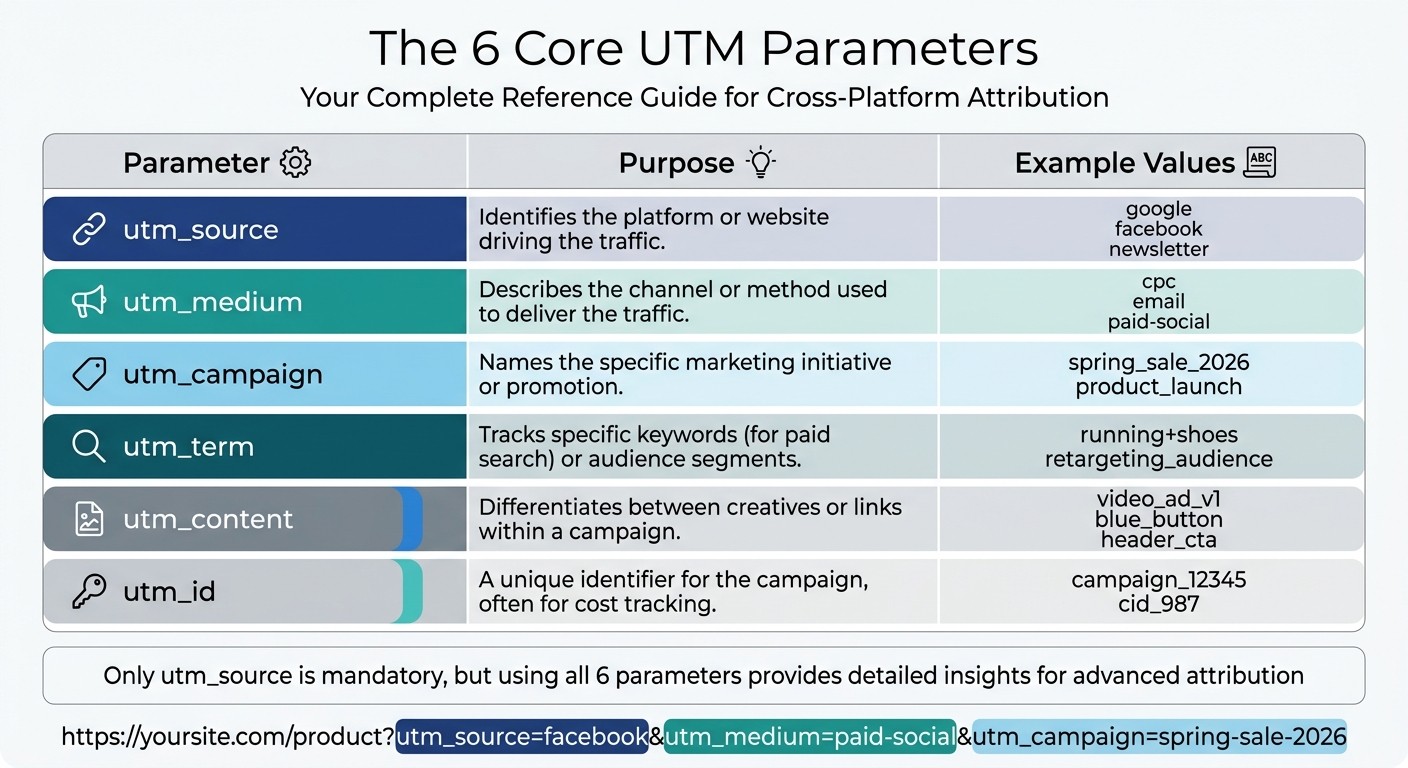
The 6 Core UTM Parameters: Complete Reference Guide
UTM parameters are small snippets of text added to a URL that help your analytics platform identify exactly where your traffic originated. Think of them as digital breadcrumbs that track a user’s journey from the initial click to a conversion. Proper UTM tagging is the backbone of precise cross-platform attribution.
When someone clicks on a URL containing UTM parameters, these details are passed to your analytics tool - like Google Analytics 4 - when the page loads. The tool then uses this data to connect the session to the campaign information embedded in the link.
UTM parameters are added to a URL after a ? and consist of key-value pairs separated by &. For instance:
https://yoursite.com/product?utm_source=facebook&utm_medium=paid-social&utm_campaign=spring-sale-2026.
The 6 Core UTM Parameters
Six key UTM parameters work together to provide a full breakdown of your traffic sources. Here’s what each one tracks:
Parameter | Purpose | Example Values |
|---|---|---|
utm_source | Identifies the platform or website driving the traffic |
|
utm_medium | Describes the channel or method used to deliver the traffic |
|
utm_campaign | Names the specific marketing initiative or promotion |
|
utm_term | Tracks specific keywords (for paid search) or audience segments |
|
utm_content | Differentiates between creatives or links within a campaign |
|
utm_id | A unique identifier for the campaign, often for cost tracking |
|
Here’s how they work together:
utm_source pinpoints the platform, like Google, LinkedIn, or an email newsletter.
utm_medium identifies the channel type, such as paid social, organic search, or email.
utm_campaign names the specific initiative, like a seasonal sale or product launch. This is especially critical when testing Meta Ads for Black Friday to ensure high-volume traffic is attributed correctly.
utm_term is primarily for paid search and captures the keyword triggering the ad or helps track audience segments.
utm_content is handy for landing page A/B testing, allowing you to distinguish between different creatives or placements.
utm_id acts as a campaign identifier, helping reconcile costs and map analytics data to internal ad accounts.
While only utm_source is mandatory, using all six parameters gives you the detailed insights needed for advanced attribution. To streamline the process, platforms like Meta and Google Ads offer dynamic placeholders - like {{campaign.name}} or {keyword} - that automatically populate UTM fields with actual values, reducing manual errors.
How UTM Parameters Work
When a user clicks a tagged link, UTM parameters travel with them and are captured when the page loads. Your analytics platform logs these values, attributing the session - and any resulting conversions - to the specified source, medium, and campaign.
In Google Analytics 4, you can find this data in reports like "Traffic acquisition" (session-level data) and "User acquisition" (first-touch data). These reports allow you to compare performance across Facebook Ads and Google Ads, email campaigns, and affiliate programs, all from one dashboard. This kind of unified view is why UTMs are the go-to standard for tracking marketing performance.
"URL parameters shouldn't replace Ads Manager metrics, but they provide invaluable backup and insights that Ads Manager alone can't give." - Jon Loomer, Facebook Ads Expert
One important rule: never use UTM parameters on internal links within your own website. Doing so can overwrite the original traffic source, leading to inaccurate attribution. For example, it might look like visitors came from your site itself rather than the actual campaign. Always test your tagged URLs in an incognito browser window before launching to ensure they work properly and appear correctly in real-time analytics reports.
Understanding how UTMs capture and relay data is critical for ensuring accurate attribution, as we’ll explore further in the next section.
Why UTM Parameters Matter for Cross-Platform Attribution
Without UTM parameters, your campaign data becomes a scattered puzzle. When running ads across platforms like Meta Ads, Google Ads, email, and more, each platform gives you its own version of success. The problem? None of them tell the full story. UTMs act as a universal tracking system, connecting every touchpoint in your customer’s journey and providing a single, unified view in your analytics dashboard.
UTMs allow you to track every interaction - from a Facebook ad click to an email follow-up and finally a Google search conversion. This level of detail transforms vague reports like "we got traffic from Facebook" into something far more precise: "The Spring Sale 2026 campaign on Facebook, using the video_ad_v1 creative for the retargeting_audience, generated $50,000 in revenue." Without consistent UTM tagging, this kind of insight just isn’t possible.
"The difference between 'we think this channel is working' and 'we know this channel delivered $50,000 in revenue' comes down to proper UTM implementation." – aubado
Even minor tagging mistakes can throw off your data. For example, using "Facebook" in one campaign and "facebook" in another splits your analytics into two separate entries. This makes your Facebook performance look weaker - not because it underperformed, but because the data is fragmented. UTMs also help eliminate "dark traffic", where visits are misattributed as "Direct" or "Referral" instead of their true sources, like email newsletters or social media. Businesses that consistently use automated workflows with UTMs report an average return of $5.44 for every $1 spent.
Supporting Multi-Touch Attribution Models
To build accurate attribution models, precise UTM tagging is non-negotiable. Whether you’re using single-touch vs. multi-touch attribution models, UTMs provide the campaign metadata needed to assign credit correctly.
First-touch attribution highlights the
utm_source(and oftenutm_campaign) responsible for introducing customers to your brand.Last-touch attribution credits the final UTM-tagged interaction before conversion.
Linear and time-decay models distribute credit across all tagged touchpoints, showing the collective impact of your marketing efforts.
Attribution Model | Data Captured | Key Insight |
|---|---|---|
First-Touch |
| Which channel drives initial brand discovery? |
Last-Touch |
| What closes the deal? |
Linear | All UTM-tagged sessions in the user’s history | How do channels contribute on average? |
Time-Decay | UTM timestamps, with recent clicks getting more credit | Which touchpoints matter most near conversion? |
Automated tools make this process even easier. For instance, marketing teams using automated data platforms save an average of 38 hours per analyst per week, while 83% of B2B sales teams leveraging AI-driven analytics report measurable revenue growth compared to 66% of those who don’t. Tools like AdAmigo.ai (https://adamigo.ai), designed for Meta Ads, can automate UTM management, ensuring consistency and reducing manual errors.
Preventing Data Fragmentation
Consistent UTM tagging is essential for clear and reliable reporting. Data fragmentation happens when traffic sources are labeled inconsistently - like using "paid_social" in one campaign and "Paid Social" or "paid-social" in another. Analytics tools like Google Analytics treat these as separate sources, leading to unreliable reports and poor budget decisions.
To avoid this, follow these best practices:
Use lowercase-only UTM values.
Stick to a controlled vocabulary of approved terms.
Replace spaces with hyphens (spaces convert to
%20, which can break tracking).
Centralized UTM builders with dropdown menus can help teams stay consistent and prevent "vocabulary drift".
"If 20% of your campaign links are mistagged, 20% of your attribution data is wrong - and you will never see an error message." – KISSmetrics Editorial
Another common mistake is adding UTMs to internal website links. This overwrites the original traffic source, making it seem like visitors came from your blog instead of the actual ad campaign. To avoid false attribution, only apply UTMs to external links directing users to your site.
Additionally, CRM data tends to degrade by 25% to 30% annually, and only 16% of RevOps professionals fully trust their CRM’s accuracy. Consistent UTM practices ensure you maintain a clear, unified view of your cross-platform performance, reducing data gaps and improving decision-making.
Best Practices for Setting Up UTM Parameters
Getting your UTM parameters right from the start can save you from months of messy data and attribution headaches. Clean, actionable reports rely on a few essential practices to avoid common tracking mistakes.
Naming Conventions and Taxonomy
Consistency matters. UTM parameters are case-sensitive, so variations like "Facebook", "facebook", and "FB" will be tracked as separate sources, leading to fragmented data. Stick to lowercase for all UTM values to maintain uniformity.
Avoid using spaces in your parameters - opt for hyphens or underscores instead to prevent encoding issues. For campaigns, descriptive labels like spring-sale-2026 or 2026-q1-retargeting-trial make it easier to understand and track performance over time. A structured format such as [Date]-[Audience]-[Goal] keeps everything organized and searchable.
Standardize your vocabulary. Create a shared reference guide that documents approved values for utm_source and utm_medium. This avoids inconsistencies like using paid-social in one instance and Paid Social in another. Consistent naming ensures accurate data aggregation and better cross-platform attribution.
"If 20% of your campaign links are mistagged, 20% of your attribution data is wrong - and you will never see an error message." – KISSmetrics Editorial
Google Analytics 4 automatically categorizes traffic based on specific utm_medium values. Using non-standard terms can push your traffic into the "(Other)" bucket, making it harder to analyze. Here's a quick reference for recommended values:
Channel Group | Recommended |
|---|---|
Paid Search |
|
Paid Social |
|
Organic Social |
|
| |
Display |
|
Affiliate |
|
Using Centralized UTM Builders
Manually building UTMs can quickly lead to errors, especially when managing dozens or hundreds of ads. Centralized tools help enforce naming conventions and reduce mistakes.
Google's Campaign URL Builder is a great free option for creating individual links, but it lacks collaboration features and historical tracking. For team use, a shared Google Sheets template with dropdown menus for utm_source and utm_medium can streamline the process. By using data validation and formulas to generate URLs, you can maintain a searchable record of every link.
For larger teams or agencies, dedicated platforms like UTM.io, Terminus, or aubado UTM Tag Organizer offer advanced features like governance, team permissions, and link libraries. These tools are invaluable for high-volume campaigns. For instance, AdManage clients launched about 494,000 ads in a single month using automated UTM systems, saving an estimated 37,087 hours of manual work. Automation is key for maintaining data accuracy across platforms like Meta and Google.
Feature | Manual Building | Spreadsheet Templates | Dedicated UTM Platforms |
|---|---|---|---|
Consistency | Low; prone to typos/errors | Medium; dropdown enforcement | High; strict governance |
Collaboration | None; individual effort | High; shared access | High; team permissions |
History | No record of links | Yes; manual log | Yes; searchable library |
Efficiency | Slow; manual entry | Faster; formula-based | Fastest; often automated |
Cost | Free | Free | Paid subscription |
Many ad platforms also support dynamic parameters that auto-fill UTM fields with real-time data. For instance, Meta allows you to use {{campaign.name}}, and Google Ads supports {keyword}, eliminating manual errors and ensuring your UTMs mirror your campaign structure.
Common Mistakes to Avoid
Applying UTMs to internal links is a common error - it replaces the original traffic source and skews attribution data. Always test UTM-tagged URLs in an incognito window to ensure tracking works correctly. This is especially important when setting up custom conversion tracking across Meta and GA4 to ensure data consistency. Watch out for redirects or link shorteners that might strip out UTM data.
Regular audits are crucial. Check your GA4 source/medium reports monthly to catch and fix non-standard values like "facebook" vs. "Facebook" or "paid_social" vs. "paid-social." Consolidating these discrepancies ensures cleaner long-term reporting.
Outdated campaign tags can also be problematic. For example, if a tag like utm_campaign=summer-2024-sale is left on evergreen content, it can distort your data long after the promotion ends. Update or remove expired tags to maintain accuracy.
Finally, never include personally identifiable information (PII) in your UTM parameters. Adding details like names or email addresses could violate analytics platform terms and lead to compliance issues.
"Not every underperforming campaign is a creative problem. More often than not, it's a tracking problem." – Jack Browning, Northbeam
For teams managing large-scale campaigns, tools like AdAmigo.ai (https://adamigo.ai) can automate UTM management as part of a broader optimization workflow. Its AI Ads Agent ensures consistent tagging across all platforms, minimizing manual errors and freeing up time for strategic work.
Advanced UTM Strategies for Cross-Platform Attribution
Using utm_id for Cost Reconciliation
The utm_id parameter acts as a unique identifier that links cost data from ad platforms to performance data in your analytics tools. Unlike campaign names, which can change over time, utm_id remains constant, ensuring your reports stay consistent even if you rename campaigns in platforms like Meta or Google Ads. This stability prevents fragmented data and helps maintain accuracy.
Ad platforms such as Meta, Google, and LinkedIn use internal unique IDs to track spending. By passing these IDs into your analytics tools via utm_id, you can combine various datasets to calculate metrics like ROI and ROAS with greater precision. A typical process involves exporting cost reports (containing Campaign ID and Spend) from your ad platform and performance reports (with utm_id and Revenue) from your analytics tool, then merging these datasets using the ID field to pinpoint actual cost per acquisition.
To simplify this process, dynamic tokens can automatically populate the utm_id field. Instead of manually entering data, you can configure tokens specific to each platform:
Platform | Dynamic Campaign ID Token | Dynamic Ad ID Token |
|---|---|---|
Meta Ads |
|
|
Google Ads |
|
|
|
|
Using dynamic tokens reduces errors and ensures every click includes the correct identifier. Just make sure that link shorteners or server-side redirects preserve the utm_id parameter. This setup not only improves cost reconciliation but also lays the groundwork for integrating offline efforts and leveraging AI-driven optimization.
Offline Attribution with QR Codes
QR codes are a powerful way to connect offline marketing efforts with digital attribution. Whether you're using billboards, print ads, or event flyers, you can create short, user-friendly URLs (e.g., example.com/save) that redirect to a destination URL containing full UTM parameters. This keeps your offline designs clean while still capturing detailed tracking data.
For better insights, assign unique UTM-tagged URLs to each offline campaign. For instance, a QR code used at a trade show should have different UTM parameters than one included in a direct mail campaign. This level of detail eliminates unattributed traffic and provides clear visibility into which offline channels are driving results. With these foundations in place, AI tools can take UTM management to the next level.
Using AI Tools for UTM Optimization
Managing UTM parameters manually becomes increasingly difficult as campaigns scale. AI-powered platforms can streamline this process by enforcing tracking standards automatically. By setting up account-level UTM templates, these tools ensure every ad follows a consistent schema, eliminating errors and inconsistencies in tagging.
Platforms like AdAmigo.ai (https://adamigo.ai) specialize in automating UTM tagging for Meta campaigns. Their AI Ads Agent ensures all ads are tagged correctly while maintaining uniform naming conventions. It uses tokens (e.g., campaign objective or audience) to align UTM parameters with ad naming, creating harmony between tracking and campaign organization. Automated audits further enhance performance by identifying tagging inconsistencies or gaps before they impact your budget.
For campaigns with high volumes, tools like AdAmigo's Bulk Ad Launch feature allow you to deploy hundreds of ads simultaneously via Google Sheets. This ensures every link adheres to your UTM template, even when scaling successful ads with Post IDs to retain social proof. AI tools also handle the complexity of applying unique UTM tags to scaled versions, removing the need for manual adjustments and saving valuable time.
Conclusion
Consistent UTM implementation turns cross-platform attribution into a precise and reliable process. By enforcing lowercase standards, using dynamic tokens, and maintaining centralized governance, you can avoid the chaos caused by inconsistent source naming. This approach ensures a clear and unified view of performance across all channels.
As KISSmetrics Editorial highlights, "If 20% of your campaign links are mistagged, 20% of your attribution data is wrong - and you will never see an error message". Such errors can distort your campaign insights and lead to poor budget decisions.
Taking things further, advanced techniques like using utm_id for cost reconciliation and analytics integration, integrating QR codes for offline tracking, and leveraging AI-powered tools can simplify and enhance UTM management. For example, marketing teams using AI tools report saving 15–20 hours per week on repetitive tasks. Platforms like AdAmigo.ai automate Meta campaign tracking by enforcing account-level templates, ensuring every ad - whether it’s 10 or 1,000 - adheres to your tracking standards without manual effort.
These strategies create a robust attribution framework that grows stronger over time. Jon Loomer puts it well: "URL parameters shouldn't replace Ads Manager metrics, but they provide invaluable backup and insights that Ads Manager alone can't give". Especially with iOS privacy updates making platform tracking less dependable, UTMs act as a reliable, independent source of truth - helping you confidently connect your marketing spend to revenue.
FAQs
Which UTM fields should I always use?
When setting up tracking for your marketing efforts, always include utm_source, utm_medium, and utm_campaign parameters. These three elements are critical for identifying where your traffic is coming from, the type of campaign driving it, and the specific campaign details. Together, they create the backbone for understanding attribution and measuring performance across different platforms effectively.
How do I stop UTMs from breaking my GA4 reports?
To keep UTMs from messing up your GA4 reports, stick to consistent and standardized UTM tagging for all URLs. Problems often arise from things like inconsistent naming, missing parameters, or UTMs getting removed during redirects. You can tackle these issues by:
Setting up clear naming conventions for your UTMs.
Ensuring UTMs stay intact when URLs go through redirects.
Automating the tagging process to minimize manual mistakes.
When done right, this approach ensures accurate data and dependable campaign tracking.
How can I track ad spend with utm_id?
To monitor your ad spend using utm_id, simply add it as a parameter in your URL. This allows you to uniquely identify campaigns and achieve more precise attribution. Pairing utm_id with other UTM parameters like utm_source, utm_medium, and utm_campaign provides richer insights into how your campaigns perform across different platforms.