
A/B Testing Meta Ads Conversion Rules
Step-by-step guide to A/B testing Meta Ads conversion rules: set up Experiments, choose metrics, ensure statistical power, and scale winning rules to improve ROAS and lower CPA.
A/B testing conversion rules in Meta ads helps you determine which optimization signals drive better results for your campaigns. Instead of testing landing pages, creatives, or audiences, this method focuses on how Meta prioritizes conversions, such as targeting high-value purchases or using different attribution windows. The goal? To refine budget allocation and scaling and improve metrics like ROAS and cost per acquisition. Following a conversion optimization checklist ensures your account is ready for testing.
Key Takeaways:
What are conversion rules? Custom settings that prioritize specific actions, like purchases over $50, to guide Meta’s algorithm.
Why test them? To uncover the most effective strategies for your goals, potentially boosting ROAS by up to 100% or increasing new customers by 25%.
How to test: Use Meta’s Experiments tool, keep variables consistent (only change the conversion rule), and aim for at least 500 conversions for reliable results.
Tools to simplify testing: Platforms like AdAmigo.ai automate A/B tests, manage budgets, and analyze performance.
By systematically testing and applying winning rules, you can optimize your campaigns for better outcomes without wasting ad spend.
What Are Conversion Rules and Why They Matter
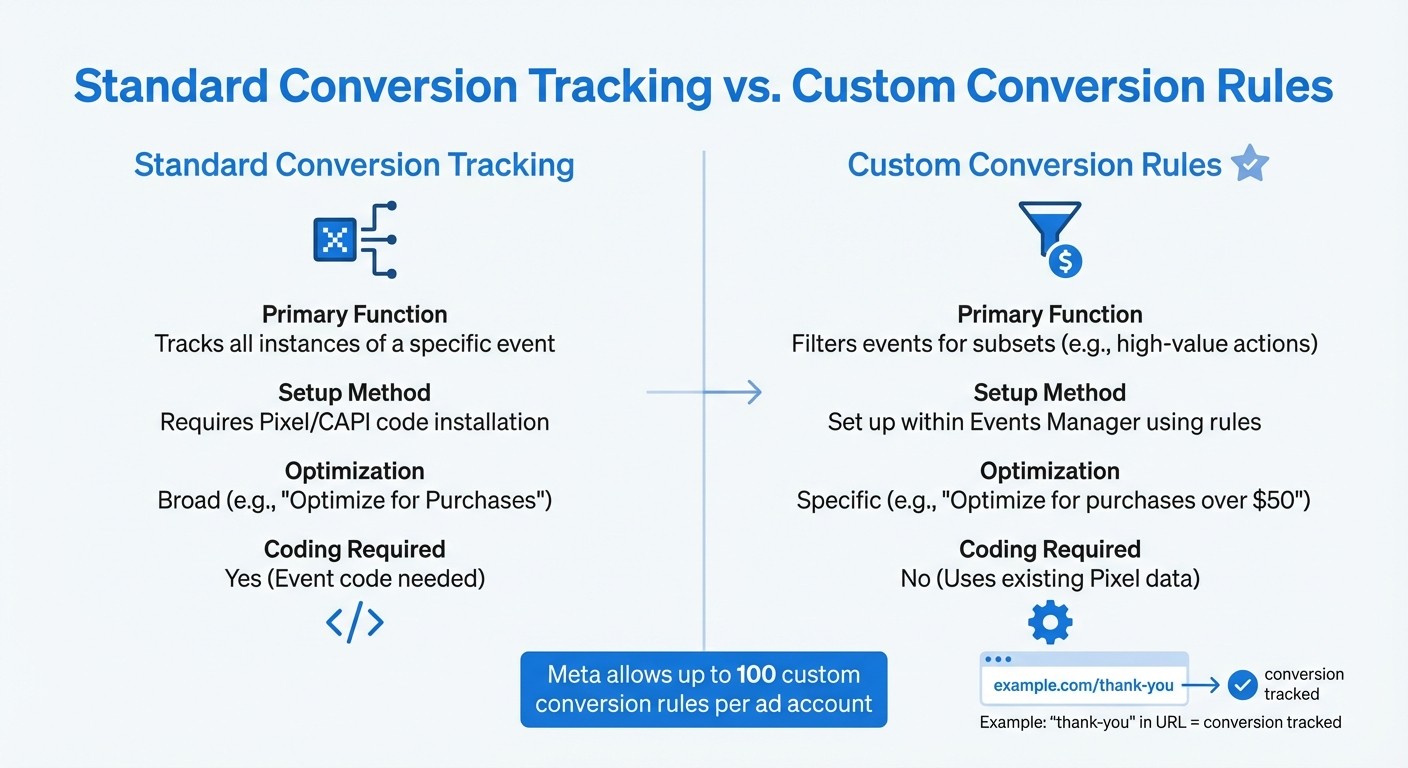
Standard Conversion Tracking vs Custom Conversion Rules in Meta Ads
Conversion rules help fine-tune Meta ads by focusing on specific, valuable actions - like targeting purchases over $50 or tracking conversions within a certain timeframe after a user clicks on an ad. These custom rules guide Meta's algorithm to prioritize users who meet your criteria, ensuring your budget is spent more effectively. It’s a strategic way to create a more focused and efficient campaign.
Conversion Rules vs. Standard Conversion Tracking
Standard conversion tracking captures all instances of a specific event, such as every purchase or lead, using a Pixel or Conversions API (CAPI) code installed on your website. This method primarily optimizes for volume. On the other hand, custom conversion rules allow you to filter these events based on specific parameters - like order value, URL patterns, or customer details or offline conversion data - without needing to modify your website’s code.
Feature | Standard Conversion Tracking | Custom Conversion Rules |
|---|---|---|
Primary Function | Tracks all instances of a specific event | Filters events for subsets (e.g., high-value actions) |
Setup Method | Requires Pixel/CAPI code installation | Set up within Events Manager using rules |
Optimization | Broad (e.g., "Optimize for Purchases") | Specific (e.g., "Optimize for purchases over $50") |
Coding Required | Yes (Event code needed) | No (Uses existing Pixel data) |
For example, you can use URL patterns - like detecting "thank-you" in a URL - to track conversions without having to alter your website’s code. Meta allows up to 100 custom conversion rules per ad account, giving you plenty of room to experiment with different optimization signals. This flexibility is especially useful for A/B testing, as it lets you pinpoint the impact of precise conversion rules on your campaign results. This process is similar to how you would test ad variations to find the best creative combinations.
Understanding the difference between these two methods highlights why testing custom rules is so important.
Why Test Your Conversion Rules
Testing conversion rules helps uncover the most effective optimization signals for your campaigns. The rule you choose can influence metrics like cost per acquisition (CPA) and the quality of customers you attract. For instance, some advertisers focus on high-value purchases to boost return on ad spend (ROAS), using proven optimization tips, while others use specific attribution windows to ensure the algorithm works with real-time data rather than fragmented signals.
Advanced rules also let you handle data maturity by incorporating filters like lookback windows or time-based parameters. This prevents the algorithm from making decisions based on incomplete attribution data. Meta reports that using data-driven attribution rules to connect customer touchpoints has resulted in a 25% increase in both net new customers and overall conversions. By systematically testing these variables instead of relying on guesswork, you can determine which strategies align best with your business goals and customer behavior.
What You Need Before Starting A/B Tests
Before diving into any A/B testing, it’s crucial to ensure everything is properly set up and your campaigns are active enough to deliver meaningful results. Skipping these steps can lead to wasted budgets and unclear outcomes.
Technical Setup Requirements
First, make sure your Meta Pixel or Conversions API is working correctly and reliably tracking conversion events. A higher Event Match Quality score (or EMQ) can significantly improve the accuracy of your Conversion Lift results.
Next, define your statistical parameters. Aim for at least 80% statistical power and a 95% confidence level (equivalent to a 5% significance level) to reduce the chance of false positives. Use a sample size calculator to determine the minimum detectable effect - the smallest change in conversion rate that’s worth measuring - and figure out how many unique users your test needs to reach. Then, allocate a budget that can cover this sample size based on your average cost per unique outbound click.
Once your technical setup is complete, check that your campaigns are stable and ready for testing.
Is Your Campaign Ready to Test?
A strong technical foundation is just the beginning; your campaign also needs to meet certain criteria to ensure reliable test results. Start with a large enough audience. For best results, your campaign should generate at least 500 conversions and have a minimum spend of $10,000. This helps avoid issues like under-delivery or interference from other ads running simultaneously.
Stability is key. If you’ve recently made edits to a campaign and it’s in Meta’s learning phase, hold off on testing until performance stabilizes. This ensures your baseline data is accurate. Understanding how machine learning impacts Meta metrics can help you interpret these baseline fluctuations more effectively.
Additionally, your target audience must be large enough to handle being split into test groups. If your audience is too small, it can lead to under-delivery. If you notice low delivery levels, consider broadening your targeting to ensure each test variant gets enough traffic.
Finally, plan for your test to run between two and 30 days. This timeframe allows you to capture weekly patterns and achieve the confidence level you need.
How to Set Up and Run A/B Tests for Conversion Rules
Once you've nailed down your campaign parameters, it's time to design a clear and focused A/B test for your conversion rules or automate campaign pausing or set time-based rules to automate performance shifts.
How to Structure Your Test
Keep the test simple by isolating the conversion rule as the only variable. Everything else - creative, targeting, and placements - should remain unchanged (unless you are specifically testing dynamic creative optimization best practices as a separate variable while looking for ways to lower creative testing costs). This way, you'll know any performance differences are due to the rule itself, not other factors.
Split your budget evenly between the test variants - 50/50. Make sure your audience size is large enough to support a meaningful test. If you're not getting enough traffic, consider broadening your targeting to boost delivery.
"What makes an A/B test different is that it eliminates overlap to help isolate the value of a particular variable... The targeting pools will be split randomly to make sure that targeted users only see an ad from one of the variations."
Jon Loomer, founder of Jon Loomer Digital
Creating Test Variants in Ads Manager
Meta's Experiments tool, located in the "Analyze and Report" section of Ads Manager, is the best way to set up controlled A/B tests. This tool automatically splits your audience to avoid overlap, ensuring clean and reliable results.
Step | Action in Meta Ads Manager |
|---|---|
1 | Go to Experiments under the "Analyze and Report" menu. |
2 | Click Create Test and choose A/B Test. |
3 | Select the asset level to test: Campaign Groups, Campaigns, or Ad Sets. |
4 | Pick the test variants. |
5 | Set the Schedule (start and end dates) and name your test. |
6 | Choose the Key Metric to measure success (e.g., Cost per Result or ROAS using an ad performance analyzer). |
7 | Review everything and click Create Test to launch. |
You can test anywhere from two to five variations at once. However, sticking to fewer variables makes it easier to pinpoint what’s driving performance changes. Focus on one primary metric, like Cost per Purchase, to define the winner. You can also track up to nine additional metrics to add more depth to your analysis.
Don’t make major edits to your campaigns during the test period. Any changes can restart Meta's learning phase and mess up your results.
Tracking Your Test Performance
Pay close attention to metrics that directly measure conversion rule performance, such as cost per conversion, ROAS, conversion rate, and attribution window data.
Keep in mind that conversions can take time to show up. For ROAS-based rules, exclude data from the most recent 7 days to allow for delayed conversions. Similarly, for attribution windows, wait 7 days before analyzing results to ensure full data capture.
Meta provides a confidence level (sometimes called a "winning score") to evaluate statistical significance. Here's a quick breakdown:
High confidence: 90% or higher
Medium confidence: 80% or higher
Low confidence: Below 50%, meaning the results aren't reliable enough to act on.
Wait until your test reaches at least 80% confidence before declaring a winner. Once you’ve got reliable results, scale your findings for better performance.
How to Read Results and Scale What Works
Reading Results and Statistical Significance
Meta's Experiments tool helps measure confidence levels: 90% or higher is considered high, 80% or higher is medium, and below 50% is unreliable. Aim for at least 80% confidence before making any decisions based on the test results.
To determine the winning variant, focus on primary metrics like cost per conversion or ROAS benchmarks. The variant with lower costs or a higher conversion lift is typically the winner. This process is a key part of reducing Facebook ad costs by identifying high-performing strategies. However, if your audience is small or the variants perform similarly, you might not get a clear result.
When evaluating metrics like ROAS or cost per acquisition, ignore the last 7 days of data. This is because conversions often take time to register due to Meta attribution vs. third-party windows. To simplify reporting, use presets like LAST_ND_14_8, which automatically exclude the last 7 days of incomplete data.
For reliable results, Meta advises spending at least $10,000 and generating over 500 conversions during your tests.
Applying Winning Rules to Your Campaigns
Once your test reaches statistical significance, it’s time to implement the winning custom conversion rule. Apply it to campaigns that have similar objectives and audience sizes as those in your test. Keep in mind that a rule that works well for Traffic campaigns might not yield the same results for Conversion campaigns, so it’s essential to run a separate test for each objective and placement.
After implementation, track key metrics for prioritization like cost per conversion, ROAS, and conversion rate for 7–14 days to ensure the performance holds up. If you notice a drop in performance or no improvement, revert to your original setup and investigate potential issues. This often involves debugging your conversion tracking to ensure data accuracy.
When scaling, take a gradual approach. Apply the winning rule to similar campaigns one at a time to scale your budget without losing ROAS. This lets you spot and address any problems early without risking your entire account budget.
Confidence Level | Percentage Guide | Recommended Action |
|---|---|---|
High Confidence | 90%+ | Apply the rule immediately and scale |
Medium Confidence | 80%+ | Apply the rule but monitor closely |
Low Confidence | 50%+ | Use as a directional indicator only |
No Confidence | Below 50% | Retest to validate results |
Using AdAmigo.ai to Automate A/B Testing
AdAmigo.ai takes the hassle out of A/B testing by automating critical tasks, making conversion rule testing faster and more efficient. Normally, manual testing involves creating multiple ad variants and keeping a close eye on their performance. With AdAmigo.ai, the process becomes much simpler - it handles everything from launching test variants to identifying the most effective strategies and scaling them, minimizing the need for constant manual input.
What sets AdAmigo.ai apart is its ability to focus on meaningful performance trends across campaigns rather than reacting to isolated data points. For example, it can differentiate between ads still in Meta's learning phase and those that genuinely underperform. By using preset parameters - like target CPA thresholds, minimum ROAS, and maximum daily spend - the platform ensures your tests run smoothly without wasting budget or pausing ads too soon.
AI Ads Agent for Automated Testing
AdAmigo.ai’s AI Ads Agent takes automation to the next level. It creates ad creatives that align with your brand, tests them against your conversion rules, and adjusts targeting based on live performance data. Instead of manually building every test variant, you simply give the agent a clear goal, like "Increase spend by 30% with ROAS of 3× or higher." With just one click, the AI generates and launches complete ad campaigns directly into your account.
You also have control over how the AI operates. In Manual Control Mode, you can review and approve every recommendation before it goes live. If you prefer a hands-off approach, Autopilot Mode lets the AI handle optimizations automatically, staying within the limits you’ve set. This approach has been shown to reduce CPAs by 20–35% while delivering stronger ROAS.
Bulk Ad Launch for Faster Test Setup
The Bulk Ad Launch tool is perfect for speeding up test setups. By uploading a spreadsheet from Google Drive that includes details like conversion rules, audience settings, and creatives, you can launch dozens - or even hundreds - of test variants at once. This method drastically cuts down on setup time and helps you quickly pinpoint which combinations hit your conversion goals.
To avoid wasting budget, you can set clear performance thresholds and guardrails, such as pausing an ad if it surpasses 2–3× your target CPA without converting. Meanwhile, the AI continuously monitors each variant’s performance, highlighting the top performers in your daily AI Actions feed. This feed provides actionable insights, showing you which strategies to scale for maximum impact. All these tools integrate seamlessly into your overall testing strategy, making it easier to optimize campaigns effectively.
Summary
This guide has shown how isolating conversion rules can lead to more precise budget allocation and improved campaign results. By A/B testing conversion rules, you can focus on one variable at a time - whether that’s comparing a custom data source with standard Meta tracking or testing different attribution models and windows. To get accurate results, structure your tests with a 50/50 budget split, use the same creatives across all variants, and keep your audience broad since Meta automatically divides it between test cells. Avoid making changes during the test, as this can reset the learning phase.
Once you’ve identified a winning strategy, apply those rules to live campaigns. You can also create lookalike audiences from your best-performing segments and use the insights to guide further creative and placement tests. Previous tests have shown impressive results, such as up to a 100% increase in ROAS and a 25% boost in customer acquisition.
While manual testing requires close monitoring and tight control over budgets, AdAmigo.ai simplifies the process by automating much of the work. It can launch tests for conversion rules, monitor key performance metrics using automation rules for scaling like target CPA or minimum ROAS, and provide actionable recommendations in a daily feed. The AI Ads Agent handles on-brand creative generation and full campaign setup, while the Bulk Ad Launch feature allows you to create hundreds of test variants from a single spreadsheet. You can either review and approve changes in Manual Control Mode or let Autopilot optimize campaigns within your predefined limits.
FAQs
How can custom conversion rules improve ad performance and efficiency?
Custom conversion rules let you zero in on the user actions that matter most for your business - like purchases over $50, sign-ups on a specific landing page, or sales of a particular product. By applying these filters to standard or custom events in Meta’s Events Manager, you can direct ad delivery toward high-value actions. This reduces wasted impressions and improves your return on ad spend (ROAS), ensuring your budget targets audiences likely to take meaningful actions.
These rules also help Meta’s algorithm prioritize bids and placements that drive your key events. This means faster learning and more accurate reporting. By focusing only on actions tied to your goals, you get clearer insights into which creatives, audiences, or placements work best. This approach sharpens your budget allocation, lowers cost-per-action (CPA), and boosts efficiency.
Want even better results? Try running A/B tests comparing campaigns with custom conversion rules to those using standard events. In most cases, campaigns with custom rules outperform, showing how precise tracking can make your ad spend go further. Tools like AdAmigo.ai can simplify the process by automating the setup, testing, and scaling of these conversion rules, allowing you to focus on strategy while the system fine-tunes performance.
How can AdAmigo.ai improve A/B testing for Meta ads?
AdAmigo.ai takes the hassle out of A/B testing for Meta ads by automating the entire process. From creating and launching ad variations to managing them, it streamlines your workflow, cutting down on time and minimizing the risk of manual errors.
Powered by AI, AdAmigo quickly pinpoints the best-performing creatives, audiences, and budget strategies, allowing you to scale successful campaigns more efficiently. It continuously learns from real-time performance data, fine-tuning your creatives, targeting, bids, and budgets automatically - all while adhering to your specified rules for budget, pacing, geo, and placements.
Think of AdAmigo as your 24/7 optimization partner. It handles the execution with precision, freeing you up to focus on the bigger picture: strategy and growth.
Why do A/B tests need at least 500 conversions to be accurate?
To get reliable results from your A/B test, aim for at least 500 conversions. This amount of data allows you to spot meaningful differences between variations while minimizing the risk of being misled by random fluctuations.
Hitting this benchmark also ensures a strong confidence level - usually between 80% and 90%. That means the insights you gather are solid enough to guide smarter decisions for your Meta ad campaigns.