
8 Automation Rules for Scaling Meta Ads
Eight rule-based automation strategies to manage budgets, pause poor ads, and scale high‑performers for better ROAS and lower CPA on Meta.
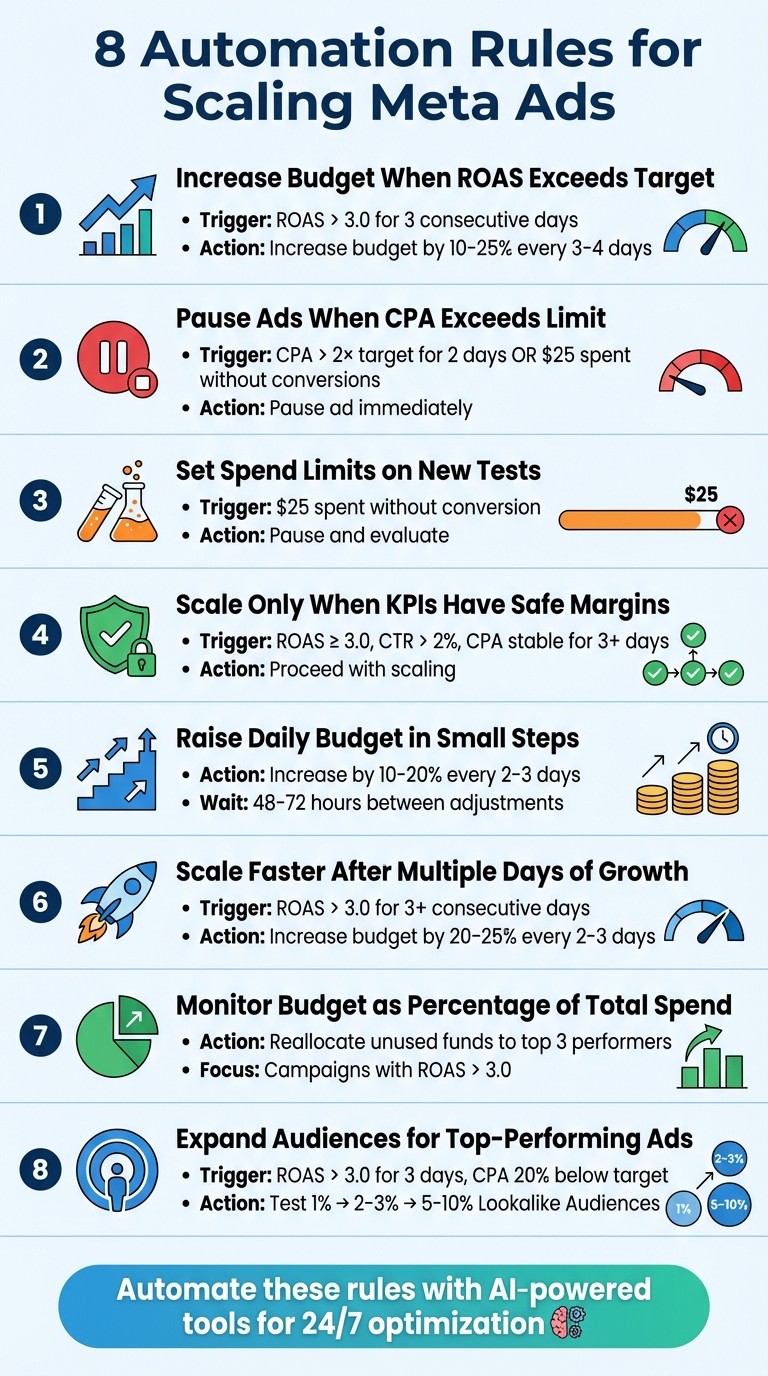
Managing Meta ad campaigns manually can waste money on poor performers while underfunding successful ones. Automation solves this by using custom conversion rules to optimize budgets and performance metrics like ROAS and CPA, even amid algorithm changes and iOS privacy limitations. Below are eight key automation rules to scale Meta Ads effectively:
Increase Budget When ROAS exceeds industry benchmarks: Use multi-day ROAS trends (e.g., 3-day averages) to guide budget increases by 10–25% every 3–4 days.
Pause Ads When CPA Exceeds Limit: Stop ads if CPA is 2× the target for two days or if $25 is spent without conversions.
Set Spend Limits on New Tests: Cap spending for new tests at $25 without conversions and scale only after proven results.
Scale Only When KPIs Have Safe Margins: Ensure ROAS, CTR, and CPA metrics are stable before scaling budgets.
Raise Daily Budget in Small Steps: Gradually increase budgets by 10–20% every 2–3 days to avoid disrupting Meta’s learning phase.
Scale Faster After Multiple Days of Growth: For campaigns with 3+ days of strong ROAS, increase budgets by 20–25% more frequently.
Monitor Budget as Percentage of Total Spend: Reallocate unused funds to top-performing campaigns for better ROI.
Expand Custom Audiences for Top-Performing Ads: Use proven ads to target broader Lookalike Audiences (1–10%) while monitoring performance.
Automation tools like AdAmigo.ai simplify these processes by monitoring campaigns 24/7, adjusting budgets, pausing underperformers, and scaling winners. These strategies ensure you optimize ad spend while maintaining campaign efficiency.
8 Meta Ads Automation Rules for Scaling Campaigns
1. Increase Budget When ROAS Exceeds Target
Performance Triggers
The key to deciding when to allocate more budget to a campaign lies in focusing on multi-day ROAS trends rather than reacting to one-off daily spikes. A widely used benchmark is to increase budgets when your ROAS consistently exceeds 3.0 over a three-day period. Using rolling averages, like 3-day or 7-day ROAS, helps you avoid making hasty decisions based on temporary surges in performance.
For campaigns with a ROAS greater than 4.0 and a CTR above 2%, it’s recommended to apply a five-day freeze. This ensures stability and avoids over-optimization.
Once you’ve identified these triggers, it’s time to scale up your budget in a controlled manner.
Budget Scaling Methodology
When your campaigns hit the trigger conditions, increase budgets in increments of 10–25% every 3–4 days. This gradual approach helps maintain Meta’s learning phase, preventing performance dips. It also helps you avoid common Meta ads mistakes that often occur during rapid scaling. Avoid making large, sudden increases - doubling or tripling your budget overnight can disrupt campaign efficiency, leading to higher CPAs and wasted ad spend.
Condition (Trigger) | Action | Why |
|---|---|---|
ROAS > 3.0 for 3 consecutive days | Increase budget by 20% | Builds on proven performance |
ROAS > 4.0 AND CTR > 2% | Freeze campaign for 5 days | Avoids over-optimization |
Cost per Purchase < $20 (3-day data) | Increase budget by 10% | Keeps efficiency steady |
By increasing budgets thoughtfully, you protect Meta’s learning phase and ensure your campaigns continue to perform well over time.
Automation Tools and Workflows
Manually managing budget increases can be time-consuming and prone to errors. That’s where automation tools like AdAmigo.ai come in. This platform monitors campaigns 24/7, analyzing performance in real time and recommending budget adjustments. You can either review and approve these recommendations yourself or let the AI handle the changes automatically.
As a certified Meta Business Technology Partner, AdAmigo.ai ensures compliance with your budget, pacing, and placement rules. This ensures your strategy follows full-funnel AI optimization principles. It optimizes your campaigns holistically, adjusting creatives, targeting, and bids as a unified system. For smaller ad accounts spending under $5,000 per month, their Entry Plan starts at $99/month.
2. Pause Ads When CPA Exceeds Limit
Performance Triggers
Keeping your ad spend in check starts with setting clear cost-per-acquisition (CPA) limits. If an ad's CPA exceeds 2× your target for two days straight, it's time to hit pause. Similarly, stop any ad that spends over $25 without generating a single conversion. Watch out for return on ad spend (ROAS) dropping below 1.0 or ad frequency climbing above 2.0 with a low click-through rate (CTR) - these are red flags that your ad isn't delivering.
Automation Tools and Workflows
Managing these triggers manually can be a headache, but Meta Ads Manager simplifies the process by letting you create up to 250 automated rules per account. For even more streamlined control, tools like AdAmigo.ai keep an eye on your campaigns 24/7. They can automatically pause ads that exceed your CPA limits or notify you when action is needed, saving you from the hassle of setting up and maintaining multiple rules across various campaigns.
What makes AI-driven automation stand out is its ability to adapt. Instead of sticking to rigid rules that might not fit every situation, these systems adjust thresholds based on your account's performance trends. This means your campaigns stay aligned with your funnel's current performance, whether you're in a slow season or a peak one, based on industry conversion rate benchmarks.
3. Set Spend Limits on New Tests
Performance Triggers
When running new ad tests, it’s smart to have a safety net in place. Utilizing bulk ad testing with AI can help streamline this process while maintaining control over your spend. A good rule of thumb is to pause any ad set that spends over $25 without landing a single conversion. For more established tests, keep an eye on your cost per acquisition (CPA). If it exceeds your target for two days in a row, it’s time to hit pause before the losses stack up.
To deal with performance fluctuations, rely on 3-day or 7-day rolling averages for a clearer picture. And if you’re evaluating click-through rates (CTR), don’t make any decisions until the ad has at least 8,000 impressions under its belt.
Budget Scaling Methodology
If your stop-loss conditions are triggered, use a Meta ads budget planner to adjust your spend strategically. Start small and scale gradually. Dedicate 10–20% of your total budget to test a new ad over a 7-day period. If the results show promise, increase that allocation to 50% over the next two weeks. Only fully commit once you’ve seen consistent performance.
Your daily budget should align with your campaign goals. For lead generation, start with $20–$30 per day. Sales-focused campaigns might need $30–$50 daily, while brand awareness efforts can begin with $15–$25.
To make confident decisions, aim for at least 50 conversions per ad set per week. This volume helps separate meaningful trends from random noise, giving you the data needed to scale effectively.
Automation Tools and Workflows
Managing multiple ad tests manually can quickly become overwhelming, which is where automation tools come in. Platforms like AdAmigo.ai monitor your campaigns around the clock, automatically pausing ad sets that exceed your spend thresholds without converting. You can either review these recommendations manually or let the system handle everything in autopilot mode.
"The fact that you can launch campaigns through text or voice commands feels like magic! It handles everything from creating lookalike audiences to adjusting budgets with just a few prompts." - Jakob K., G2 Reviewer
What sets AI-driven tools apart is their ability to evaluate multiple metrics - like return on ad spend (ROAS), CTR, and cost per conversion - using dynamic creative optimization best practices before making budget adjustments. This ensures changes are only made when all benchmarks align, avoiding common mistakes in bulk testing like premature pauses for ads that might just need a little more time to perform.
4. Scale Only When KPIs Have Safe Margins
Performance Triggers
Scaling works best when you have a cushion of strong performance metrics. For instance, if your goal is a 2.0 ROAS, hold off on scaling until you're consistently achieving at least 3.0 ROAS. This extra margin helps absorb any performance drops that can happen after scaling.
Don't focus on just one metric - track multiple indicators to ensure overall campaign health. Your Click-Through Rate (CTR) should stay above 2%, and your Cost Per Acquisition (CPA) should remain steady for at least three days in a row. Keep an eye on ad frequency too. If it rises above 3–4 impressions per person, your audience may be experiencing ad fatigue, which can hurt results when you scale. These checks ensure you're moving from observation to scaling with control.
Budget Scaling Methodology
Once your KPIs show consistent strength, start increasing your budget vs. audience expansion gradually. A good rule of thumb is to raise your daily budget by 10–25% every 3–4 days. After each adjustment, pause for 48–72 hours to let the algorithm stabilize. Increasing your budget too quickly can disrupt Meta's learning phase, leading to weaker performance.
If you're generating 50 or more conversions per week and your ROAS is consistently above your target, it's a good sign that you're ready to scale. Use rolling averages to smooth out short-term fluctuations, and always allow a stabilization period after each budget increase.
Automation Tools and Workflows
Automation can make scaling easier and more precise. AI tools for Meta ad account analysis like AdAmigo.ai monitor key metrics - ROAS, CTR, CPA, and ad frequency - simultaneously. The platform only suggests budget increases when all indicators are aligned.
"What others promised, AdAmigo.ai delivered. True AI, automation, and results." - Nadia Toffar
AdAmigo.ai builds on earlier automation strategies by offering dynamic, data-driven recommendations. You can manually approve each suggestion or switch to autopilot mode, letting the system handle scaling while you focus on refining your creative assets. The AI tracks performance over 3–7 day windows, eliminating the need for guesswork or reactive changes based on daily shifts.
Mastering Automated Rules for Efficient Facebook Ad Scaling
5. Raise Daily Budget in Small Steps
Building on earlier strategies for budget adjustments, this approach fine-tunes daily changes to encourage steady growth without disrupting performance.
Budget Scaling Methodology
The key here is to make small, consistent increases to your daily budget. Aim to raise budgets by 10–20% every 2–3 days, then allow 48–72 hours for the algorithm to adjust. If your return on ad spend (ROAS) consistently outperforms your target, you can consider increasing by 20–25%.
Avoid large, sudden budget jumps. These can disrupt Meta's learning phase and drive up your cost per result. By sticking to gradual adjustments, you help maintain stable performance while optimizing your campaign ROI.
Performance Triggers
When deciding to scale, rely on rolling averages rather than daily fluctuations. Rolling averages help confirm trends, offering a clearer picture of your campaign's performance. For instance, you might trigger a 20% budget increase only if your ROAS stays above 3.0 for three consecutive days and your cost per acquisition (CPA) remains below your target.
It’s also important to monitor performance benchmarks like click-through rate (CTR) and cost per link click. If CTR drops or your cost per click rises, it’s a sign to pause scaling - even if ROAS appears strong. Multiple positive indicators ensure your campaign is ready to handle a higher budget.
Automation Tools and Workflows
Manually managing multiple campaigns can be overwhelming. Tools like AdAmigo.ai simplify this process by monitoring metrics such as ROAS, CPA, CTR, and spend patterns. The platform provides budget recommendations through its AI Actions feed, offering a daily list of suggested adjustments based on multi-condition logic.
You can either review and approve these recommendations manually or use an autopilot mode to apply incremental changes automatically. This hands-off approach minimizes the risk of resetting the algorithm while keeping your campaigns on track for consistent growth.
Next, we’ll dive into the performance triggers that validate when these small, daily adjustments are most effective.
6. Scale Faster After Multiple Days of Growth
Once your campaigns demonstrate consistent performance, it’s time to pick up the pace. Reward steady success by ramping up your budget more aggressively.
Performance Triggers
Before accelerating, ensure your campaign has maintained a ROAS of 3.0 or higher for at least three consecutive days. Using rolling averages - like 3-day or 7-day averages for ROAS and CPA - can help smooth out daily fluctuations and delays in data, giving you a clearer picture of when to scale. These extended growth patterns indicate your campaigns are ready to handle a quicker scaling pace.
Budget Scaling Methodology
When the data confirms your campaign is stable, increase your budget by 20–25% every 2–3 days. Make sure to pause for 48–72 hours between adjustments. This approach allows you to build on momentum while keeping Meta’s learning phase intact.
Remember to apply the freeze rule for top-performing campaigns to avoid over-optimization and maintain their success.
Automation Tools and Workflows
To manage these faster adjustments, automation tools like AdAmigo.ai can monitor your campaigns around the clock to ensure budgets are allocated to the highest-performing ads. These tools use multi-condition logic to recommend budget increases only when specific thresholds for ROAS, CTR, and CPA are met. AdAmigo’s AI Actions feed provides daily, prioritized recommendations with Opportunity Scores (ranging from 0–100), making it easy to identify which campaigns are ready for faster scaling.
With comprehensive AI-driven optimization, you can scale up to 40% faster. You can either review and approve each recommendation manually or enable autopilot mode by comparing manual vs AI budget testing to let the system handle budget increases within the safe limits you’ve set. As G2 reviewer Rochelle D. shared:
"We are getting INSANE RESULTS! Our budgets are controlled, our spend is being smartly allocated and our ROAS is up massively".
7. Monitor Budget as Percentage of Total Spend
Keeping an eye on how much each campaign contributes to your total spend is crucial. This approach helps you avoid bottlenecks and ensures funds are allocated where they perform best.
Performance Triggers
Once you've made initial budget adjustments, it's important to continue monitoring each campaign's spending as a percentage of the total. This ensures your funds are working as effectively as possible. For example, you can set up time-based automation rules to flag campaigns spending 20% or more below their daily budget. This might signal an opportunity to shift funds toward campaigns already delivering a return on ad spend (ROAS) above 3.0.
Budget Scaling Methodology
When you notice unused funds, consider redistributing them to your top-performing campaigns. Focus on your top three campaigns to ensure your total budget remains fully utilized. For campaigns that are still unproven or in the testing phase, it’s wise to set strict spending limits to protect your overall budget.
Automation Tools and Workflows
Platforms like AdAmigo.ai can simplify this process by constantly monitoring your account-level spend. The tool identifies opportunities for reallocating budgets and flags campaigns that may need adjustments. With compound logic, it determines which campaigns are ready for more funding and which should be scaled back. You’ll receive real-time alerts in your daily AI Actions feed, so you can act quickly.
To stay ahead of seasonal trends and shifts, review and update your automation rules every 2–3 weeks. This ongoing monitoring works hand-in-hand with the automated scaling strategies discussed earlier in our Meta ads automation guide, keeping your campaigns optimized and aligned with your goals.
8. Expand Audiences for Top-Performing Ads
Once you’ve identified ads that are performing well, it’s time to scale them up - reaching similar audiences through behavioral clustering without starting from scratch. However, this process needs careful monitoring to maintain results.
Performance Triggers
Before you even think about scaling, make sure your ads have proven their worth. Here's a solid benchmark: aim for a ROAS (Return on Ad Spend) above 3.0 for three consecutive days and a CPA (Cost Per Acquisition) that's at least 20% below your target threshold. These metrics indicate that your ad is ready for expansion. If your CPA is teetering near your limit or your ROAS is inconsistent, hold off. Expanding at this stage could weaken your results. Waiting for these clear performance indicators ensures your scaling efforts are based on solid data, not guesswork.
Audience Management
When it’s time to expand, start small. Test the waters with 1% Lookalike Audiences to see if the performance remains steady. If results hold, gradually move to 2–3% Lookalikes and increase your budget incrementally. For broader reach, consider expanding to 5–10% Lookalikes to tap into a wider pool of potential customers.
When targeting new demographics or regions, remember that different groups respond to different messages. For example, a 60-year-old and a 35-year-old might have completely different pain points and motivations. Use tailored creatives that resonate with each audience's unique needs. Also, keep an eye on ad frequency - if people see your ad three or four times without taking action, it’s time to refresh your creative.
Automation Tools and Workflows
Automation can take a lot of the guesswork out of scaling. Tools like AdAmigo.ai simplify the process by monitoring your ad performance in real time and generating Lookalike Audiences with just a text or voice command. As one G2 reviewer, Jakob K., put it:
"The fact that you can launch campaigns through text or voice commands feels like magic! It handles everything from creating lookalike audiences to adjusting budgets".
AdAmigo.ai doesn’t just rely on one metric; it uses a combination of signals - like a high ROAS and a CTR (Click-Through Rate) above 2% - to decide when to scale. This disciplined approach ensures you’re expanding based on strong, data-driven performance rather than hunches.
Conclusion
These eight rules create a system that adjusts itself, directing your budget toward successful ads while cutting off underperformers. This approach not only protects your ad spend during uncertain times but also lays the groundwork for growth when the conditions are right. By pairing budget increases for high ROAS with gradual scaling, you’re addressing common scaling problems and introducing safeguards that balance risk and reward. This disciplined approach paves the way for AI-driven automation tools to take performance optimization even further.
It all starts with setting up safety nets. Always use auto-pause rules to stop unnecessary spending. For instance, pause any ad that spends more than $25 without generating a single conversion. Limit spending on untested campaigns, and when it’s time to scale, take small, calculated steps - like increasing budgets by just 10–25% - to avoid disrupting Meta’s learning phase.
For an extra edge, AI-powered tools like AdAmigo.ai go beyond basic "if-then" rules. These tools leverage predictive analytics and complex logic to spot performance issues, prevent overspending, and suggest scaling strategies based on real-time data. As one user, Nadia Toffar, shared:
"What others promised, AdAmigo.ai delivered. True AI, automation, and results."
Looking ahead to 2025, Meta Ads are leaning heavily into AI-driven features. Creative diversity is becoming the norm, with tools designed to generate fresh visuals, refine ad copy, and manage budgets through conversational interfaces. These advancements are quickly becoming essential for staying competitive in the advertising space. And if your monthly ad spend exceeds $10,000, integrating the Conversions API (CAPI) is a must. This ensures your AI tools have access to cleaner, more accurate data, leading to sharper targeting decisions.
FAQs
How does automation make Meta ad campaigns more effective?
Automation takes the hassle out of managing Meta ad campaigns by handling repetitive tasks and making real-time tweaks based on performance. For instance, you can set up automated rules to pause ads when the cost per result goes over $50 or boost budgets for ads delivering a return on ad spend (ROAS) higher than 3×. This means your campaigns benefit from around-the-clock monitoring, quicker decisions, and less wasted spend, all while driving better performance and efficiency.
Platforms powered by advanced AI, like AdAmigo.ai, push automation to the next level. Acting as a learning agent, it continuously updates strategies using real-time data. It can create fresh ad creatives, fine-tune targeting, and adjust budgets, bids, and placements - all within a single, integrated system. This approach allows for rapid scaling, expanding your audience, and simplifying workflows. With the heavy lifting handled, you can focus on strategy while the AI ensures optimal performance and maximizes ROAS. Simply put, automation saves time, cuts costs, and keeps your campaigns running smoothly and effectively.
What metrics should you track before scaling your Meta ads?
Before you ramp up your Meta ad campaigns, it’s crucial to keep an eye on a few key metrics to guide your decisions. Pay attention to total spend, cost per acquisition (CPA) or cost per result, return on ad spend (ROAS), click-through rate (CTR), and ad frequency. These numbers reveal which campaigns are delivering the best results and help you avoid showing the same ads too often, which can turn off your audience.
By tracking these metrics, you’ll be able to adjust budgets wisely and broaden your audience reach without compromising performance or efficiency.
How can AdAmigo.ai simplify and improve Meta ad campaign management?
AdAmigo.ai is an AI-powered platform built to simplify and improve Meta ad campaigns. Think of it as a virtual media buyer that takes care of essential tasks like creating ad creatives, fine-tuning budgets, and broadening audience reach - all while learning from actual performance data in real time.
Every day, AdAmigo.ai delivers a prioritized list of actionable suggestions. These might include launching fresh ad variations, halting ads that aren't performing well, or increasing budgets for successful campaigns. Running around the clock, it automatically tweaks bids, placements, and targeting, all while staying aligned with your rules and objectives. This means marketers can shift their focus to big-picture strategies and growth initiatives, while AdAmigo.ai works to get the most out of every campaign.