
5 Attribution Pitfalls That Hurt Meta Ads Performance
Fix Meta Ads attribution errors—use CAPI with your Pixel, deduplicate events, match attribution windows, and include offline/cross-device data.
Attribution is the backbone of successful Meta ad campaigns, but common errors can waste your budget and mislead optimization efforts. Here's a quick breakdown of the key pitfalls and how to fix them:
Relying Only on Pixel Tracking
Privacy updates like iOS 14.5 and ad blockers mean the
Meta Pixel alone captures just 60-70% of conversions. Pair it with the Conversions API (CAPI) to increase match rates to 85-95%.
Using the Wrong Attribution Windows
Meta’s default 7-day click/1-day view window may not align with longer buying cycles. Adjust to 28-day click for high-value products or stick to 1-day click for impulse buys.
Double-Counting Conversions
Without event deduplication, using both Pixel and CAPI can inflate conversion data. Match parameters like event IDs to ensure accurate tracking.
Missing Offline and Cross-Device Conversions
Purchases made offline or on different devices often go untracked.
Integrate offline data through your CRM and use hashed identifiers for better cross-device tracking.
Misunderstanding View-Through Attribution (VTA)
VTA credits ads for conversions after users see (but don’t click) them. This can over-credit retargeting campaigns while undervaluing prospecting efforts.
Quick Comparison
Pitfall | Impact | Solution |
|---|---|---|
Pixel-Only Tracking | Misses 30-40% of conversions | Add CAPI and enable Advanced Matching |
Wrong Attribution Windows | Misjudges campaign performance | Align windows with sales cycle (e.g., 28-day) |
Double-Counting Conversions | Inflates CPA and ROAS metrics | Enable event deduplication |
Missing Offline/Cross-Device Data | Undervalues ad impact | Connect CRM and use hashed identifiers |
Misunderstanding VTA | Over-credits retargeting, under-credits prospecting | Use single-touch vs. multi-touch attribution models |
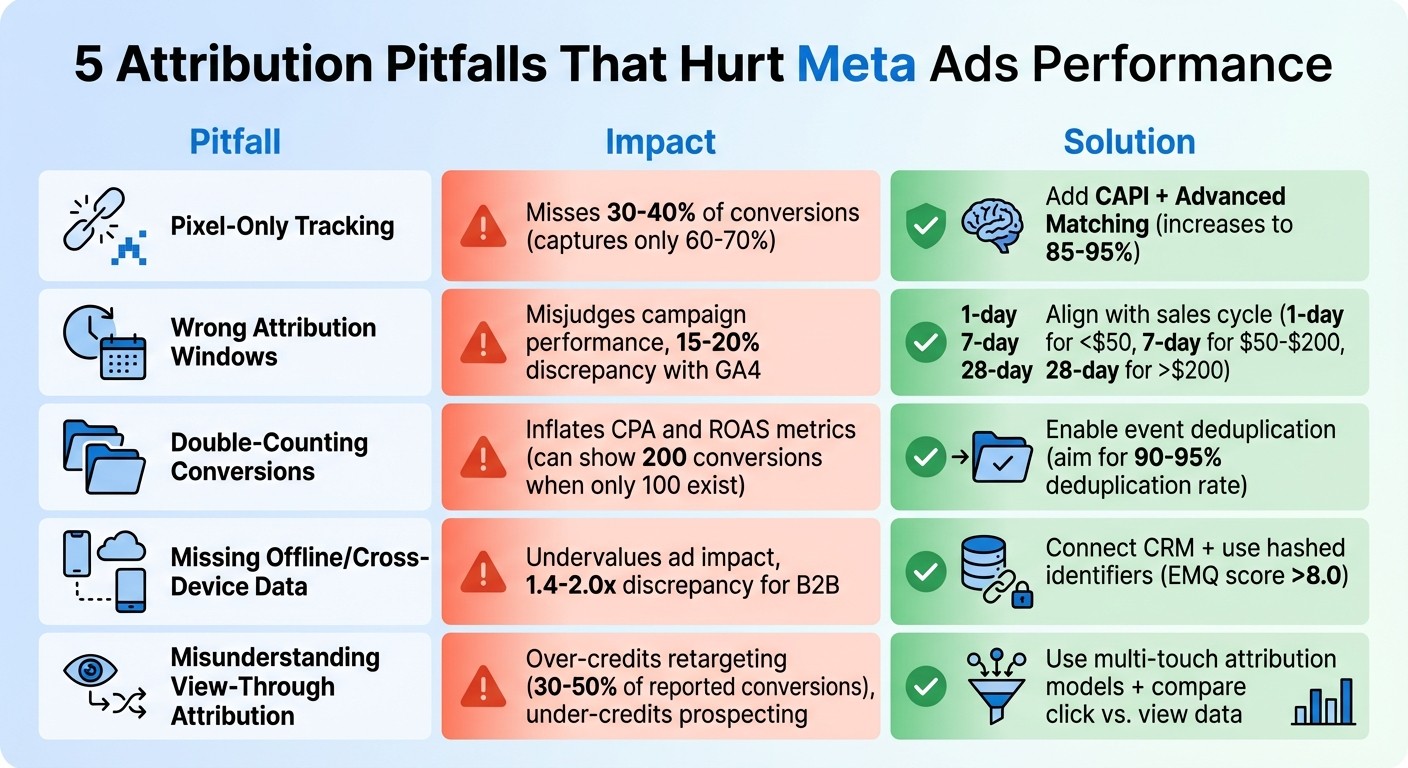
5 Meta Ads Attribution Pitfalls: Impact and Solutions Comparison
Facebook Ad Attribution Models
For a deeper dive into how platform data compares to external tracking, see our guide on Meta Ads attribution vs. third-party tools.
Pitfall 1: Using Only Pixel-Based Tracking
By 2026, relying solely on the Meta Pixel becomes increasingly unreliable due to stricter privacy measures. Features like Safari's Intelligent Tracking Prevention, Firefox's Enhanced Tracking Protection, and widespread use of ad blockers - employed by roughly 40% of users worldwide - block third-party cookies, preventing the pixel code from functioning effectively. Following iOS 14.5, about 75% of iOS users opted out of tracking, further limiting the pixel’s ability to link user actions to your ads.
The result? Pixel-only tracking captures just 60–70% of conversions. This incomplete data makes it harder for Meta's algorithm to find similar audiences, leading to higher acquisition costs and inefficient budget allocation. These challenges significantly diminish campaign performance, underscoring the need for more advanced tracking methods.
"In 2026, running Meta Ads without CAPI is like driving with one eye closed - you're missing critical information that affects every optimization decision you make." - Benly.ai
To overcome this, advertisers must adopt a more comprehensive solution for tracking conversions.
Solution: Set Up Conversions API (CAPI)
Pairing the Meta Pixel with the Conversions API (CAPI) creates a server-to-server connection that bypasses browser restrictions, ensuring more accurate data collection. When used together, match rates can increase from 60–70% to an impressive 85–95%.
Setting up CAPI has become more accessible. Platforms like Shopify and WooCommerce provide native integrations that take only a few minutes to configure. For custom setups, tools like Stape or Elevar can handle the process for a monthly fee of $50–$500. Once CAPI is live, confirm in Events Manager that events are coming from the "Server" source in addition to the "Browser."
Next, activate Advanced Matching in Events Manager. This feature uses hashed customer data - such as email addresses and phone numbers - to improve your Event Match Quality score. Aiming for a score of 8.0 or higher ensures you're capturing most of your data, while scores below 6.0 point to significant gaps. Lastly, enable event deduplication by assigning a unique event_id to each conversion. This prevents duplicate counting when both the Pixel and CAPI record the same event, avoiding common tracking mistakes that skew performance data. Advertisers who implement these steps often see a 15–25% reduction in cost per acquisition within the first month.
Pitfall 2: Using the Wrong Attribution Windows
Meta's default attribution window - 7-day click and 1-day view - often falls short when dealing with longer customer journeys, especially for high-value products. For items like furniture, B2B software, or anything priced over $200, buyers typically take weeks to make a decision. Relying solely on this default window can lead to incomplete data, causing advertisers to misjudge performance and prematurely halt campaigns that might actually succeed.
This issue stems from attribution lag, where conversions take longer to register due to extended buying cycles. For expensive products, the decision-making process naturally goes beyond seven days. If you adjust budgets or optimize campaigns based on incomplete data from the first week, you're essentially flying blind. On top of that, Meta's 7-day window often clashes with tracking Meta ads in Google Analytics and its 30-day lookback period, which can account for 15–20% of conversion discrepancies between these platforms.
"Don't judge or optimize a new Meta campaign until at least your average attribution lag has passed. You might be cutting a future winner too early." – Five Nine Strategy
Another challenge is view-through conversions - those driven by users who saw your ad but didn’t click. For brand-heavy accounts, these can make up 30–50% of Meta's reported conversions. A short attribution window risks missing both these conversions and the broader influence your ads have on consumer behavior. Aligning your attribution window with your sales cycle is key to capturing the full picture.
Solution: Match Attribution Windows to Your Sales Cycle
To ensure accurate tracking, your attribution window should reflect your product's buying cycle. Here’s a breakdown:
Impulse purchases under $50: A 1-day click window works best, as most conversions happen within 1–3 days.
E-commerce products between $50–$200: The default 7-day click window is effective for the typical 3–7 day decision period.
High-value items over $200, B2B sales, or luxury goods: Use a 28-day click window to account for longer research and consideration phases.
In Ads Manager, you can analyze attribution data by navigating to Columns > Compare Attribution Settings. This feature allows you to see conversion data across 1, 7, and 28-day click windows. By calculating the weighted average attribution lag (0.5 days for 1-day, 4.5 days for 7-day, and 18 days for 28-day windows), you can determine when to evaluate campaign performance.
For B2B and SaaS businesses, integrating offline conversions from your CRM can provide a more complete view of the sales cycle. This method captures deals that close weeks or even months after the first ad interaction. Use your CRM data as the benchmark and apply an adjustment factor to Meta's reported figures, ensuring your ROAS calculations reflect the full customer journey. This approach helps you make informed decisions and optimize campaigns more effectively.
Pitfall 3: Counting the Same Conversion Twice
When you use both the Meta Pixel and CAPI without enabling deduplication, the same conversion event gets sent to Meta from both the browser and server. Meta treats these as separate conversions, which inflates your conversion numbers. This makes your Cost Per Acquisition (CPA) seem lower than it actually is and skews your Return on Ad Spend (ROAS) calculations.
Beyond the numbers, this issue can cause Meta's algorithm to target audiences based on these duplicate, or "ghost", conversions. The result? Misallocated ad budgets. A telltale sign of duplicate events is when Meta reports significantly more conversions than Google Analytics 4, often exceeding a 1.2:1 or 1.4:1 ratio.
For example, if 100 purchases are mistakenly counted as 200, your CPA would appear to be half of what it truly is, even though your actual costs haven’t changed. This mismatch between perceived and real performance can eat into your profits.
To prevent these problems, event deduplication is a must.
Solution: Turn On Event Deduplication
Deduplication works by matching three key parameters from both the browser and server: event_id (like an Order ID), event_name (such as "Purchase"), and event_time (within a 60-minute window). When Meta detects matching parameters from both signals, it merges them into a single conversion instead of counting them twice.
If you're using platforms like Shopify, WooCommerce, or BigCommerce, deduplication is often enabled automatically. However, custom setups require manual configuration. To ensure everything is working properly, check the "Deduplication" tab in Meta's Events Manager. Ideally, your deduplication rate should be 90-95% or higher.
A sudden spike in conversion numbers without a matching increase in revenue is a red flag that deduplication isn’t functioning. Use the "Test Events" tool to test Meta conversion events by simulating a purchase and confirming that Meta is receiving and merging events correctly from both sources.
Deduplication Rate | Status | What It Means |
|---|---|---|
95%+ | Excellent | Tracking is clean and reliable |
90-95% | Good | Minor issues, but acceptable |
80-90% | Acceptable | Needs attention and monitoring |
< 80% | Poor | Significant double-counting occurring |
The table above helps you interpret your deduplication rate and decide when corrective action is needed.
Pitfall 4: Missing Offline and Cross-Device Conversions
Meta ads can drive sales that traditional tracking methods often overlook, especially offline and cross-device conversions. For instance, if someone clicks on your ad using their phone but completes the purchase later on a laptop, tools like Google Analytics 4 (GA4) might treat these actions as separate users. This results in the desktop conversion being categorized as "direct" traffic, leaving Meta without proper credit for driving the sale.
Offline conversions - like phone calls, in-store purchases, or deals closed by your sales team - are also frequently missed. Without tying these outcomes back to your Meta campaigns, you could end up undervaluing how attribution models impact performance and revenue.
Meta has an edge in cross-device tracking because users typically stay logged into Facebook or Instagram across devices. However, the platform’s tracking capabilities shine even brighter when offline data is incorporated. Using the Conversions API (CAPI) significantly enhances cross-device tracking accuracy.
This issue is particularly relevant for businesses with longer sales cycles, such as B2B companies or those selling high-ticket items. An analysis of over 500 Meta advertising accounts in early 2026 revealed that B2B advertisers often see Meta reporting 1.4 to 2.0 times more conversions than GA4. This is because Meta can effectively track multi-touch and cross-device customer journeys.
Solution: Connect Offline and Cross-Device Data
To address this, you need to integrate offline and cross-device data into your campaigns. For offline conversions, connect your CRM or POS system with Meta using tools like Zapier, Segment, Salesforce, or HubSpot. This integration allows you to automatically upload offline conversions - such as when a lead is marked as "Closed-Won" - so Meta can attribute the conversion to your ads.
For cross-device tracking, implement the Conversions API and include an "External ID" (like a hashed email or customer number) with every event. This helps Meta link actions across devices. Additionally, use hashed identifiers (such as email or phone numbers) to improve your Event Match Quality score, aiming for a score above 8.0.
It’s also crucial to verify your domain in Meta Business Manager and configure Aggregated Event Measurement (AEM). This ensures that conversions from iOS users are tracked more accurately. However, even with a fully configured CAPI, expect a 15–25% tracking loss on iOS traffic due to Apple’s privacy updates.
By unifying offline, cross-device, and online data, you’ll gain a more complete understanding of your campaign performance, enabling better optimization.
Business Type | Typical Meta:GA4 Discrepancy | Primary Factors |
|---|---|---|
E-commerce (Short Cycle) | 1.2:1 to 1.4:1 | View-through, cross-device |
E-commerce (Considered) | 1.3:1 to 1.6:1 | Attribution window, view-through |
Lead Generation | 1.1:1 to 1.3:1 | iOS privacy, cross-device |
B2B / Long Sales Cycle | 1.4:1 to 2.0:1 | Attribution window, multiple touches |
App Installs | 1.5:1 to 2.5:1 | iOS ATT, view-through installs |
Source: Analysis of 500+ Meta advertising accounts in early 2026.
Pitfall 5: Misunderstanding View-Through Attribution
View-through attribution (VTA) gives credit for a conversion when someone sees an ad (without clicking on it) and then converts within roughly 24 hours. This is different from click-through attribution, which only counts conversions when a user actively clicks on your ad.
The issue with VTA is that it can make retargeting campaigns seem far more successful than they actually are, while undervaluing awareness campaigns aimed at new audiences. For example, if a user is already planning to buy, a retargeting ad might get credit just for being seen - even if it had little to no impact on their decision. As Benly.ai explains, "Meta counts conversions from users who saw your ad but never clicked it... GA4 has no visibility into ad impressions that didn't result in clicks". This discrepancy is especially pronounced in brand-awareness campaigns, where view-through conversions can account for 30% to 50% of Meta's total reported conversions.
This difference in reporting explains why Meta Ads Manager often shows higher conversion numbers than Google Analytics 4, a common issue in Meta Ads vs. Google Ads multi-channel attribution. While Meta includes both clicks and views in its metrics, GA4 only tracks clicks. As a result, VTA frequently over-credits retargeting ads, which are often seen by users already planning to convert, while underestimating the impact of prospecting campaigns that introduce your brand to new audiences.
Understanding VTA is crucial for refining your attribution models and ensuring your campaign budgets are optimized for maximum ROI. To address these discrepancies, consider switching to multi-touch attribution models.
Solution: Use Multi-Touch Attribution Models
Take advantage of Meta's "Compare Attribution Settings" feature to analyze 7-day click data alongside 1-day view data. For video campaigns, you can use engaged view-through windows (e.g., views lasting 10 seconds or more) to better assess user intent.
Align your attribution windows with your sales cycle. If you’re selling high-consideration products that require weeks of research, extend your reporting to 28 days post-click to capture the full influence of your ads. For impulse buys, shorter windows like 1-day or 7-day click are more appropriate, as they prevent over-crediting ads. Also, give campaigns time to show results - evaluate performance after at least 48 hours, and ideally up to 7 days, since conversions often happen days after an ad is viewed.
Attribution Window | Best For | Considerations |
|---|---|---|
1-day click | Impulse purchases, low-cost items | Most conservative; may miss longer buying cycles |
7-day click | Standard e-commerce | Balances accuracy and completeness |
1-day view | Brand awareness & video | Captures exposure impact; can inflate metrics if misunderstood |
28-day click | High-consideration/B2B | Accounts for long research phases; may over-attribute |
To ensure accurate attribution, combine Meta’s data with your backend conversion metrics. If your retargeting campaigns seem to perform much better in Meta than in your actual revenue data, VTA could be inflating the numbers. Use these insights to shift your budget toward prospecting campaigns that genuinely drive new customer acquisition.
How AI Fixes Attribution Problems
Attribution issues can throw a wrench in your campaigns, leaving you with incomplete data and skewed results. Worse yet, they can mess with Meta's ability to match conversions accurately. If your Event Match Quality (EMQ) score dips below 6.0, Meta struggles to connect conversions to the right users, which can derail your campaign effectiveness entirely. Trying to manually manage EMQ scores, deduplication settings, and attribution lag across multiple campaigns can quickly become overwhelming.
This is where AI steps in. AI-powered tools keep a constant eye on your tracking setup, identifying and addressing issues as they arise. Instead of waiting for a drop in conversions or discovering problems weeks later, these systems monitor your attribution data in real time. They send alerts when tracking configurations need tweaking, flag EMQ scores that need improvement, and even adjust optimization timing based on your specific attribution lag - the delay between ad engagement and actual conversion.
The standout feature? AI doesn’t just fix problems - it brings all your attribution data together into one cohesive system. By combining Pixel and CAPI data, AI tools help fine-tune budgets, bids, and creative decisions using cleaner, more reliable information.
Taking this a step further, specialized platforms now offer integrated solutions that automate the entire attribution monitoring process.
AdAmigo.ai: Automated Attribution Monitoring and Optimization
AdAmigo.ai is a platform designed to simplify and supercharge your attribution efforts. Its AI Autopilot feature checks your EMQ scores daily and notifies you when they fall below optimal levels (aim for an EMQ score of 8.0 or higher for the best performance). The platform also includes AdAmigo Protect, which flags sudden drops in performance - often a sign of tracking issues or duplicate events.
What makes AdAmigo.ai stand out is its ability to handle the entire attribution-to-optimization process. Using pattern recognition, it connects the dots between user behaviors across devices and platforms, filling in gaps that traditional tracking methods often miss. For instance, if a customer browses on their phone but completes a purchase on their desktop, AdAmigo’s machine learning combines these fragmented data points into a complete picture. With this comprehensive view, the platform adjusts budgets, bids, and creative testing seamlessly.
Whether you let it run on full autopilot or prefer to review changes before they’re implemented, you’re making decisions based on accurate, real-time data - not guesswork.
Attribution Model Comparison
When attribution challenges are tackled by AI tools like AdAmigo.ai, understanding the different attribution models becomes key to refining your campaign strategy. Using AI tools for account analysis can help identify which model aligns best with your historical data. The right model depends on your product type, sales cycle, and overall goals.
Standard Click/View Models rely on a "last-touch" approach, where 100% of the credit goes to the final Meta ad interaction before a conversion happens. While straightforward, these models often fail to account for the entire customer journey.
Data-Driven Attribution takes a machine-learning approach, distributing credit across all touchpoints in the conversion funnel. This method is ideal for more intricate customer journeys involving multiple ad interactions. However, it requires a significant amount of data to deliver accurate results.
Incremental Attribution, which is typically powered by AI, measures the true impact of your ads by excluding sales that would have occurred organically. This model is highly advanced but comes with added complexity and higher tool costs. It’s most effective for accounts spending over $30,000 per month.
Here’s a quick comparison to help you decide which model fits your needs:
Attribution Model | Best For | Strengths | Weaknesses |
|---|---|---|---|
Standard (1-Day Click) | Impulse buys, low-cost items (<$50) | High certainty; conservative approach | Overlooks longer sales cycles |
Standard (7-Day Click) | E-commerce, standard retail ($50-$200) | Balanced; Meta's default setting | May undervalue brand awareness from views |
Standard (7-Day Click + 1-Day View) | Brand awareness campaigns | Accounts for ad exposure impact | May over-credit non-incremental sales |
Data-Driven | Multi-touch journeys with several ad interactions | Distributes credit across all touchpoints | Needs large data sets for accuracy |
Incremental (AI-Powered) | High-budget accounts (>$30,000/mo) | Filters out "organic" sales; measures true lift | Complex setup and higher costs |
This breakdown complements earlier insights on multi-touch attribution by showing how each model interprets customer journeys differently. To make data-driven adjustments, use the "Compare Attribution Settings" tool to set up custom attribution models and analyze your conversion metrics before testing budget allocation methods.
Conclusion
The five attribution pitfalls drain your Meta ad budget and mislead optimization efforts by leaving the algorithm with incomplete data, making it harder to identify high-intent buyers.
Tackling these issues is critical to staying competitive in today's digital advertising space. Using the Conversions API alongside your pixel can increase event match rates from 60–70% to 85–95%, lower your CPA by 15–25% within the first month, and recover 30–40% of conversions lost to ad blockers and privacy restrictions. Event deduplication prevents double-counting, aligning attribution windows with your sales cycle avoids premature budget adjustments, and mapping offline conversions to your goals captures the full customer journey.
Better attribution translates to better campaign performance. Meta's machine learning models thrive on detailed conversion data to identify patterns and serve ads effectively. By improving your tracking, you provide the algorithm with richer signals, allowing campaigns to learn and optimize faster.
High-quality data also makes it easier to automate and fine-tune campaigns. With cleaner data, tools like AdAmigo.ai can take the guesswork out of optimization. Instead of manually auditing settings or reallocating budgets based on incomplete data, AdAmigo's AI works continuously to identify attribution gaps, debug conversion tracking issues, and optimize campaigns. The platform integrates multiple data sources, tracks the entire customer journey, and accounts for challenges like cross-device activity and iOS 14.5 restrictions. It even distinguishes between conversions influenced by your ads and those that would have happened regardless.
Whether you choose manual adjustments or AI-powered automation, addressing these attribution challenges leads to better data, smarter decisions, and campaigns that grow profitably instead of wasting resources.
FAQs
How do I know if my Pixel and CAPI are set up correctly?
To make sure your Pixel and Conversions API (CAPI) setup is working as it should, focus on tracking events without any duplicates or missed data. Start by checking for duplicate conversions and confirming that events are firing properly across different devices. Use tools like Meta Events Manager to monitor your data closely.
Take advantage of features like Advanced Matching and offline event tracking to boost the precision of your tracking. It's also important to review and test your setup regularly to ensure everything runs smoothly and delivers accurate data.
Why don’t my Meta conversions match GA4?
Meta conversions and GA4 often report different numbers because they use distinct tracking methodologies. Factors like attribution models, tracking windows, and privacy updates (such as iOS changes) play a big role in these differences. Additionally, Meta includes view-through conversions, which can lead to further discrepancies when compared to GA4. These variations are normal when comparing platforms with unique approaches to tracking and attribution.
Which attribution window should I use for my product?
The best attribution window aligns with your sales cycle and how your customers navigate their buying journey. For example, longer windows - like 7 or 28 days - are better at capturing interactions across multiple touchpoints and devices. On the other hand, shorter windows might overlook critical steps in the process. The key is to select a timeframe that reflects how your audience engages with your ads and makes purchasing decisions.