
Meta API Error Handling: Best Practices
Clear, practical strategies for handling Meta API errors: codes, retries, token management, webhooks, and automation.
Working with the Meta API can be challenging due to issues like expired tokens, rate limits, and vague error messages. These problems can disrupt campaigns and waste budgets. To handle errors effectively, you have two main options:
Follow Meta's Official Guidelines:
Use error codes and subcodes for precise troubleshooting (e.g., code 190 for token issues).
Implement retry strategies like exponential backoff for rate limit errors.
Log key details (
error.code,error.message,fbtrace_id) for debugging.Use tools like webhooks and system user tokens to streamline processes.
Leverage AdAmigo.ai:
Automates error handling with features like retry logic and actionable recommendations.
Monitors accounts for issues like disapproved ads or unusual spending patterns.
Offers real-time alerts via Slack/WhatsApp and detailed action logs.
Quick Comparison
Feature | Meta Guidelines | AdAmigo.ai |
|---|---|---|
Error Handling | Manual with detailed codes/subcodes | Automated with actionable fixes |
Scalability | Limited by team size | Supports managing 15–25+ accounts |
Monitoring | Webhooks for real-time updates | 24/7 anomaly detection |
Cost | No direct cost | Starts at $99/month per account |
Ease of Use | Requires in-house setup | Semi-auto or full Autopilot modes |
For small teams or those managing multiple accounts, automated tools like AdAmigo.ai can save time and reduce errors. However, manual methods offer more control. Choose the approach that best fits your needs and scale.
1. Meta API Documentation Guidelines

This section outlines the official guidelines for working with Meta's API documentation, focusing on error handling and best practices.
Error Response Structure
Meta API errors are returned as JSON objects with standard fields: code, error_subcode, message, type, and fbtrace_id. To handle errors effectively, rely on the combination of code and error_subcode. For example, error code 190 relates to token issues, with subcode 460 indicating an expired token and subcode 463 signaling an invalidated token.
"The combination of code and error_subcode is particularly powerful... This granularity lets you implement precise error handling logic." - Arthur C. Codex, Engineering Author
The is_transient field is useful for identifying temporary errors. If set to true, retrying the request may resolve the issue. Avoid relying on error description strings, as they can change over time.
Here’s a quick reference table for common error codes and suggested actions:
Error Code | Name | Common Cause | Recommended Action |
|---|---|---|---|
1 | Unknown Error | Transient server issue | Retry with backoff |
17 / 80000 | Rate Limit | BU budget exhausted | Use exponential backoff; check headers |
100 | Invalid Parameter | Incorrect field name or value | Fix the request; do not retry |
190 | Access Token Error | Token expired or revoked | Refresh token or re-authorize |
200–299 | Permission Error | Missing required scopes | Verify API key permissions, app review, and user consent |
1487470 | Unsettled Account | Outstanding balance | Resolve billing in Ads Manager |
Once you identify the error, use robust retry and backoff strategies to handle it effectively.
Retry and Backoff Strategies
For rate limit errors (codes 17 and 80000), implement exponential backoff with jitter. This approach staggers retries to avoid overwhelming the server. Meta’s rate limit allows 200 calls per hour per user per app.
To monitor your usage, parse the X-Business-Use-Case-Usage header in the API response. If any metric - like CPU time, total time, or call count - exceeds 80%, slow down your requests. Another way to conserve rate limit points is by batching up to 50 API calls into a single /batch request. These methods create a strong foundation for managing rate limits, which tools like AdAmigo.ai can enhance further.
Validation and Logging Practices
Preventing errors and logging them properly can save time and resources. Validate tokens using Meta's debug endpoint and confirm resource availability before making API calls. This helps reduce errors such as Invalid Parameter or Resource not found.
When errors occur, log these key details: error.code, error.type, error.message, and error_subcode. For example, while code 100 indicates an "Invalid Parameter" issue, subcode 1487390 specifically points to a creative policy violation. Always include the fbtrace_id in logs, as Meta support uses it to trace issues.
Integration with Meta Workflows
Webhooks can provide real-time updates on ad account events and creative approvals, reducing the need for frequent API calls and lowering the risk of hitting rate limits. For server-to-server integrations, use System User tokens instead of personal access tokens. These tokens are not tied to individual users, so they remain unaffected by password changes or staff turnover.
"System User tokens are the gold standard. You create a System User in Business Manager, and the token doesn't depend on a specific person staying logged in." - Cedric Yarish, Founder, AdManage.ai
Before launching your integration, test your error-handling logic in Meta's Sandbox environment. This allows you to validate retry strategies, logging setups, and webhook implementations using test ad accounts without risking real ad spend or disrupting live campaigns. Together, these steps provide a strong starting point for building reliable and efficient Meta API integrations.
2. AdAmigo.ai Error Handling Implementation

AdAmigo.ai simplifies Meta's error management process by converting raw API error codes into clear, actionable recommendations. As a Meta Business Partner, the platform ensures smooth error detection, response, and resolution by leveraging Meta's official API.
Error Response Structure
Each recommendation clearly outlines what needs to be changed, why it’s necessary, the expected result, and the logic behind it. For example, instead of just logging Meta API key errors or a creative policy violation, the system prioritizes and queues fixes automatically.
The AdAmigo Protect feature enhances error detection by running multiple AI scans across 30+ creative and performance metrics every six hours - or on demand. These scans identify issues like disapproved ads, broken links, or unusual spending patterns before they can harm your budget. This proactive approach has helped users eliminate critical ad account mistakes, reducing the average from 5–6 per month to none.
Retry and Backoff Strategies
AdAmigo.ai also includes robust retry mechanisms to handle bulk and complex operations with ease. For instance, when launching hundreds of ads at once, the platform manages API rate limits and throttling internally and applies autopilot guardrails to pause actions during API instability. The platform’s Meta Business Partner status further ensures stability during bulk operations. In Autopilot mode, users can set CPA and ROAS thresholds as circuit breakers, preventing the AI from making changes when data quality is poor or the API is unstable.
Validation and Logging Practices
Every action taken by the AI is documented in a detailed Action Logbook, creating a transparent audit trail across all managed accounts. Before executing any changes, the Andromeda readiness checker validates that account structures meet Meta's latest algorithmic guidelines, including support for features like Advantage+ and broad targeting setups. New users are encouraged to start with Semi-auto mode, where AI-suggested fixes require manual approval. This allows teams to familiarize themselves with the tool’s logic and align it with their brand goals before switching to full Autopilot.
Integration with Meta Workflows
AdAmigo.ai further enhances error management by integrating with common workflow tools to enable real-time issue resolution. The platform provides mobile alerts via Slack and WhatsApp, ensuring that critical anomalies - like website outages while ads are still running - are flagged immediately, no matter the time zone. For example, a small EU-based agency with just two full-time employees used this setup to catch four instances where client websites were down but ads continued to spend. This allowed the agency to grow from managing 15 accounts to 45 without hiring additional staff.
Integration | Purpose |
|---|---|
Meta Ads API | Deep read/write access for optimization and error management |
Slack / WhatsApp | Real-time mobile alerts for anomalies |
Quick ingestion of creative assets for faster ad launches | |
Google Sheets / Email | Automated performance reporting and audit exports |
Pros and Cons
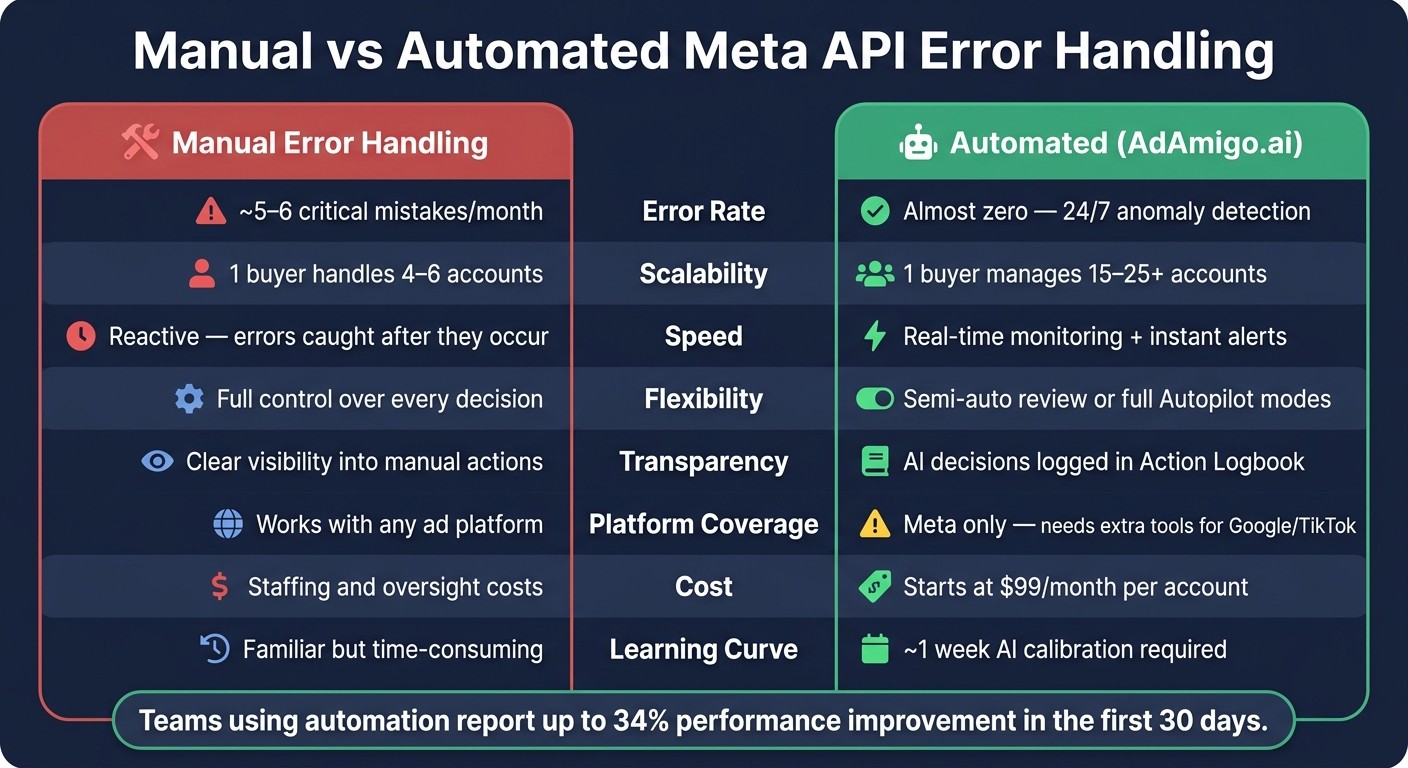
Manual vs Automated Meta API Error Handling: Key Metrics Compared
Choosing between manual and automated error handling depends on factors like your team size, the number of accounts you manage, and your tolerance for risk. Here's a quick breakdown of how the two approaches compare:
Aspect | Manual Error Handling | Automated (AdAmigo.ai) |
|---|---|---|
Error Rate | About 5–6 critical mistakes per month per account | Almost zero, thanks to 24/7 anomaly detection |
Scalability | One media buyer can handle 4–6 accounts | One media buyer can manage 15–25+ accounts |
Speed | Reactive, catching errors only after they occur | Real-time monitoring with instant alerts |
Flexibility | Full control over every decision | Options for semi-automatic reviews or full Autopilot modes |
Transparency | Clear visibility into every manual action | Logs all AI-driven decisions for review |
Platform Coverage | Works with any ad platform | Limited to Meta, needing extra tools for Google or TikTok |
Cost | Requires staffing and oversight costs | Starts at $99/month per account |
Learning Curve | Familiar but can be time-consuming | Takes about a week for AI calibration |
Manual error handling offers complete control but struggles to scale and tends to have a higher error rate. On the other hand, automated tools like AdAmigo.ai significantly reduce errors and allow you to manage more accounts efficiently. However, automation is currently limited to Meta platforms and requires initial setup, such as defining CPA and ROAS guardrails during the calibration phase. These factors can help you decide whether to develop in-house processes or lean on specialized platforms for managing errors in the Meta API environment.
Conclusion
Handling Meta API errors effectively means taking a multi-layered approach. This includes avoiding reliance on a single data source, starting API-created campaigns in a PAUSED state, and maintaining constant monitoring around the clock.
While manual error handling offers control, it struggles to keep up with scale, often leading to 5–6 critical errors per account each month - errors that come with real financial consequences. Automated platforms like AdAmigo.ai address this by reducing mistakes to nearly zero through proactive anomaly detection and AI-driven alerts. Users have even reported a 34% performance improvement within the first 30 days of using these tools. This comparison between manual and automated approaches underscores the importance of building resilient systems before scaling operations.
For developers creating Meta API integrations, a strong starting point is implementing reliable authentication management. Leveraging SDKs or middleware to manage OAuth, token refreshes, and scope adjustments can prevent unexpected API issues. Combine this with triple-source measurement for accurate and transparent reporting.
"Meta vs GA4: Resolving Reporting Differences often reveals why GA4 is the Source of Truth: Never trust Meta's self-reported conversions alone." - kayasinan, Developer, meta-ad-manager
While developers focus on robust integrations, businesses need to adopt adaptable error management strategies to protect their ad budgets. A practical approach for live ad spend is to begin with semi-auto mode, where AI-suggested corrections are reviewed before implementation. Once confidence in the system is established, transitioning to full Autopilot becomes a viable option. With entry plans starting at $99/month, AdAmigo provides an affordable safeguard against costly errors. Together, these technical and business strategies create a comprehensive framework for scaling Meta API integrations effectively.
FAQs
How can I tell if an error is safe to retry?
Errors can be retried if they’re temporary, like a server overload or downtime. For example, HTTP status codes like 429, 500, or 503 usually indicate issues that might resolve on their own. On the other hand, client-side errors such as 400 often aren’t retriable. It’s crucial to evaluate the error type carefully to decide the next steps.
What’s the best way to avoid Meta API rate limits?
To steer clear of Meta API rate limits, it’s essential to have structured error handling and monitoring in place. This means building systems that can quickly identify issues like setup errors, budget discrepancies, or any unusual activity before they escalate. Staying within Meta’s permissions, rate limits, and platform rules is non-negotiable. Tools like AdAmigo.ai can help by offering official API integrations that simplify compliance and ensure smoother operations.
When should I use System User tokens vs user tokens?
System User tokens are designed for automated processes or internal systems that need higher-level permissions. On the other hand, User tokens are intended for actions performed directly on behalf of individual users, leveraging their specific permissions. Each token type serves a distinct purpose, so it's important to select the appropriate one based on your particular use case.