
Meta Access Tokens & API Keys: Types, Expiration & Renewal
System user tokens never expire. Learn Meta access token & API key types, 60-day user token renewal, and automated strategies to keep ad campaigns running.
Meta API keys and tokens are essential for running Facebook and Instagram ad campaigns smoothly. They allow apps to access data, manage campaigns, and automate tasks. However, these tokens have expiration timelines that, if overlooked, can disrupt your operations. Here's what you need to know:
User Access Tokens: Short-lived (1–2 hours) and long-lived (about 60 days). These require regular refreshes.
Page Access Tokens: Depend on User Access Tokens. Can be set to never expire if linked to long-lived tokens.
App Access Tokens: Persistent until the app secret changes. Used for server-to-server tasks.
System User Tokens: Permanent and ideal for automation, as they don't expire.
Key risks: Tokens can expire early due to password changes, app updates, or inactivity. Regular monitoring and renewal are critical to avoid disruptions.
Solutions:
Manual renewal: Use Meta's tools for small-scale needs or follow a Meta Ads API key setup guide for manual configuration.
Automated scripts: Schedule token checks and renewals with cron jobs.
SaaS platforms: Services like AdAmigo.ai handle renewals, monitoring, and compliance automatically.
To ensure uninterrupted ad campaigns, choose a renewal method that suits your scale and resources. Automated solutions save time and reduce errors, especially for managing multiple accounts.
Facebook Ads API - Preventing Your Access Token From Expiring
Meta API Key and Access Token Types
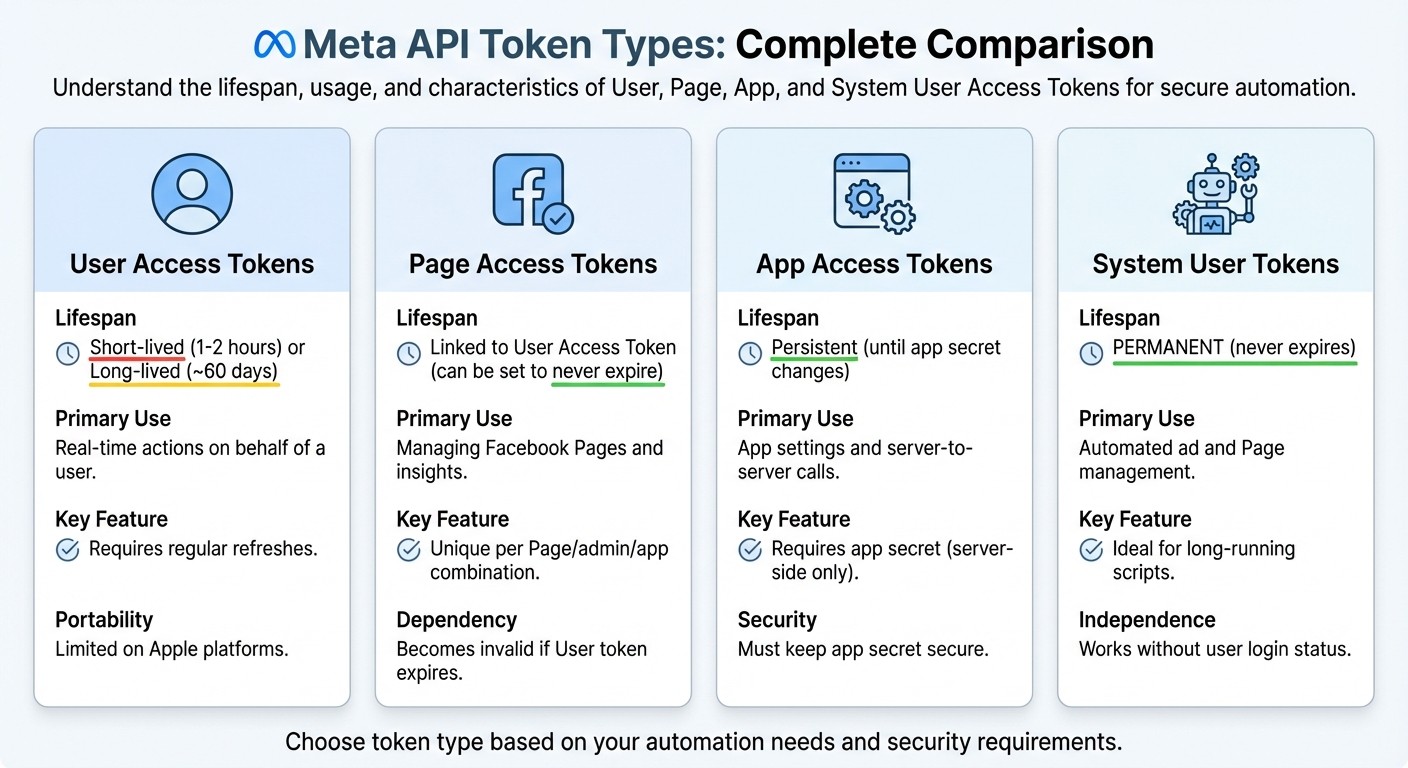
Meta API Token Types: Expiration Periods and Use Cases Comparison
Meta provides a range of access tokens, each tailored for specific tasks and levels of permission. Knowing what each token does is essential for understanding their expiration rules and ensuring smooth functionality.
User Access Tokens
User Access Tokens are tied to individual Facebook or Instagram accounts, allowing apps to perform actions on behalf of a specific user. These tokens are created when a user logs in and grants permissions. They're great for tasks like retrieving ad performance data for third-party analysis or posting content in real time.
User tokens come in two forms: short-lived (lasting 1–2 hours) and long-lived (lasting about 60 days). To avoid disruptions, these tokens need to be refreshed regularly. While they can be transferred between client and server environments, Apple platforms limit their portability to servers. Keeping these tokens up to date is key to maintaining uninterrupted operations.
Page Access Tokens
Page Access Tokens are specifically designed for managing Facebook Pages. They enable actions like reading insights, publishing posts, and moderating comments. Each token is unique to a specific combination of Page, admin, and app, meaning you’ll need separate tokens for managing multiple Pages.
The lifespan of a Page Access Token depends on the User Access Token that generated it. If the user token expires or is revoked, the Page token becomes invalid too. This interdependence means you need to monitor both types to keep your Page management running smoothly.
App Access Tokens and System User Tokens
App Access Tokens are tied to the app itself rather than a specific user. They’re used for app-wide tasks like modifying settings, managing test users, or retrieving app-level insights. These tokens require your app secret and should only be used for server-to-server calls to keep the app secret secure.
System User Tokens are ideal for automation. As Meta explains:
A System User access token is used if your app performs programmatic, automated actions on your business clients' Ad objects or Pages without having to rely on input from an app user.
These tokens are permanent, making them perfect for tasks like long-running scripts, scheduled jobs, or server-based tools that manage ad campaigns continuously. Created through Meta Business Manager, system users operate independently of individual login statuses or password changes.
Token Type | Lifespan | Primary Use Case |
|---|---|---|
User Access Token | Short-lived or long-lived (as noted) | Real-time actions on behalf of a user |
Page Access Token | Linked to User Access Token | Managing Facebook Pages and insights |
App Access Token | Persistent (until app secret changes) | App settings and server-to-server calls |
System User Token | Permanent |
How to Set Up a System User Access Token
Before you start, make sure you have admin access to your Meta Business Manager and a registered Meta app — you'll need both to create a system user and generate a token.
Here's the step-by-step process:
Open Business Settings in your Meta Business Manager.
Under Users, click System Users.
Click + Add and give your system user a name.
Assign a role — typically Admin or Employee, depending on the access level you need.
Under Assign Assets, select the ad accounts, Pages, or other assets this system user should manage.
Click Generate New Token, select your app from the dropdown, and choose the permissions (e.g.,
ads_management,ads_read) your integration needs.Copy the token immediately — Meta only shows it once.
This token never expires and isn't tied to an individual login, so it survives password changes and employee departures — exactly why it's the best choice for production automation.
Store the token somewhere secure right away: an environment variable, a secrets vault (like HashiCorp Vault or AWS Secrets Manager), or your platform's encrypted credential store. Never hard-code it in your scripts or commit it to version control.
When Meta API Keys Expire
Keeping track of when tokens expire - and what might cause them to be revoked early - is essential for smooth ad management. If you're not aware of your Meta API tokens' expiration timelines, you risk unexpected interruptions to campaigns, automation, and integrations. Each type of token has its own API key creation workflow and rules for expiration.
Standard Expiration Periods
Short-lived tokens: These expire quickly, usually within 1 to 2 hours of being generated.
Long-lived user access tokens: These last around 60 days. If you're using Facebook's iOS or Android SDKs, long-lived tokens can auto-refresh daily with user activity. However, if the app isn't opened for 90 days, these tokens expire, requiring users to log in again.
Page access tokens: When created from a long-lived user token, these can be set to never expire. This makes them especially useful for ongoing tasks, like scheduling posts or monitoring analytics. This reliability is a cornerstone for scaling Meta ads with real-time API updates across complex accounts.
System user tokens: These are unique because they never expire. As Meta explains, "One benefit of using a system user access token is that it does not expire, so it can be used in long-running scripts or services that need to access the Marketing API". This makes them perfect for server-based automation that runs without human input.
Even with these standard durations, tokens can sometimes expire earlier than expected. Several actions can trigger this, as outlined below.
What Triggers Expiration and Revocation
Tokens, regardless of their lifespan, can become invalid unexpectedly. Here's what you should watch out for:
Password changes: If a user updates their Facebook password, all associated user access tokens are revoked. Apps relying on those tokens will stop working until the user re-authenticates.
User de-authorization: When a user removes an app's permissions in their Facebook settings, all tokens tied to that app are immediately invalidated. Additionally, generating a new token for an Admin Center integration will invalidate the old one, so you can't keep backups.
App-level changes: Adjustments at the app level can revoke tokens. For instance, resetting your App Secret in the Meta Admin Center or App Dashboard will invalidate all active tokens tied to that app. Changes to app settings, especially security configurations or reclassifying an app to "Native/Desktop", can also affect token validity.
Inactivity: If an app with Standard access to the Marketing API goes unused for 180 days, its tokens may be revoked. Meta also reserves the right to shorten token lifetimes or expire them early as part of privacy or security measures. To prevent disruptions, follow Meta API integration best practices by building a system that checks token validity at app startup and prompts users to refresh permissions.
How to Manage Meta API Keys
Keeping your API keys in check is crucial for uninterrupted ad campaign performance. You can approach this through manual methods, automated scripts, or by using SaaS platforms. The right choice will depend on your resources and the scale of your operations.
Manual vs. Automated Renewal Methods
Manual renewal involves logging into Meta's API Explorer or app dashboard to generate and update tokens yourself. While this might work for small projects or testing, it becomes a headache as your needs grow. Timing mistakes and human errors in handling credentials are common with this method.
Automated scripts simplify the process by using cron jobs to manage token renewals. For example, you could set up a daily cron job to check your database for tokens expiring within seven days and automatically send a renewal request to Meta's Graph API. This approach scales better than manual methods and reduces errors, but it requires you to maintain the infrastructure. You'll need to ensure your servers are reliable, secure (e.g., using credential vaults), and ready to handle issues like Meta API rate limits or API updates.
SaaS platforms like AdAmigo.ai take automation a step further. These platforms handle renewals, compliance checks, and API rate limits for you. With just a quick account connection, AdAmigo manages everything in the background. For agencies, this means a single media buyer can oversee 4–8 times more clients because the platform handles the repetitive tasks, freeing up strategists to focus on growth.
Feature | Manual Renewal | Automated Scripts (Cron) | SaaS Platforms (AdAmigo.ai) |
|---|---|---|---|
Effort Level | High (Manual copy-paste) | Medium (Initial setup/coding) | Low (5-minute setup) |
Reliability | Low (Prone to human error) | High (If server is maintained) | Very High (Managed service) |
Scalability | Limited by bandwidth | Scalable with more code | Highly scalable (4–8× more clients) |
Security | Risk of exposure in docs | Secure if using Vaults | Industry-standard encryption |
Rate Limit Mgmt | None | Basic (Manual pacing) | Advanced (AI-driven pacing) |
Regardless of your method, regular monitoring is essential to avoid disruptions.
Monitoring Expiration Dates and Setting Up Alerts
Staying on top of token expiration is key to smooth operations. Set up a system to track token creation, type, and expiration dates. Logging each renewal and creating alerts for upcoming expirations or failures can save you from last-minute scrambles.
For cron-based setups, include logging in your scripts to record the results of each renewal attempt. Some developers prefer pre-built workflows, like those available on n8n's marketplace (priced at around £21 on Gumroad), to automate these checks without starting from scratch.
If you're using a managed platform like AdAmigo.ai, monitoring is typically built into the service. The platform continuously audits your Meta ad account and API connection, flagging potential issues before they escalate. Any problems or upcoming expirations are highlighted in your daily action feed, keeping you informed and ready to act.
Using AdAmigo.ai for API Key Management

AdAmigo.ai simplifies the entire process of managing Meta API keys while integrating it into a broader ad optimization system. Once your Meta ad account is connected, the platform automatically handles token renewals, monitors API health, and ensures compliance with Meta's rate limits and permissions - all without you lifting a finger.
Because AdAmigo works directly with Meta's official API, it adheres to your budget, pacing, geo, and placement rules. The AI Chat Agent adds another layer of convenience by answering questions like "Why did my API connection drop?" or "Are all my tokens valid?" in real-time. If a token is about to expire or gets revoked (due to a password change, for example), the platform flags the issue in your daily AI Actions feed and guides you through re-authentication.
For agencies juggling multiple client accounts, this eliminates the hassle of tracking numerous expiration dates or maintaining separate renewal scripts. AdAmigo consolidates everything - API management, creative testing, audience optimization, and budget adjustments - into one user-friendly interface. This allows one media buyer to manage workloads that would typically require an entire team.
How to Renew Meta API Keys
Renewing tokens before they expire is essential to keep your campaigns running smoothly. While the process depends on the type of token you're renewing, the general idea is to exchange your current token for a new one. Here's a breakdown of how to handle each token type.
Converting Short-Lived Tokens to Long-Lived Tokens
Short-lived User access tokens expire in just 1 to 2 hours, which makes them unsuitable for ongoing operations. To avoid interruptions, you can convert these to long-lived tokens that last about 60 days.
Manual Conversion: If you only need this occasionally, use the Meta Access Token Debugger tool. Simply paste your short-lived token, click "Debug", and then select "Extend Access Token" at the bottom of the table.
Programmatic Conversion: For a more automated approach, send a server-side GET request to Meta's Graph API. You'll need your App ID, App Secret, and the short-lived token. Make sure this request is server-side to keep your App Secret secure.
Here’s the format for the GET request:
Meta will respond with a JSON object containing a new access_token and its expires_in value (in seconds). Important: If your token has already expired, you’ll need the user to log in again, as expired tokens cannot be converted.
Creating Non-Expiring Page Tokens
Unlike user tokens, page tokens can be set up to never expire, which is perfect for managing Facebook Page content and ads. To create one, start by obtaining a long-lived User token for someone who has a role on the Page.
Once you have the User token, use the following request to retrieve a page-specific token:
The response will include an access_token for each page the user manages. These tokens don’t expire, but Data Access permissions must be renewed every 90 days.
Automating Renewals with Scripts and Cron Jobs
If you manage multiple accounts or want to avoid manual renewals, automation is the way to go. Scripts can handle everything from checking token expiration dates stored in a database to triggering the API exchange call when a token is close to expiring (usually within 7–14 days). Once a new token is issued, the script updates the stored token along with its expiration timestamp.
To automate this, schedule your scripts with cron jobs. For instance, you could set a daily check at 8:00 AM using the following cron expression:
When writing Bash scripts, tools like jq can help parse JSON responses from Meta’s Graph API to extract the new access_token and expires_in values.
For teams looking for a hands-off solution, AdAmigo.ai offers automated token renewals. After a quick 5-minute setup, the system manages renewals and flags any issues directly in your daily AI Actions feed.
Conclusion
Meta API key expiration policies are more than just a technical formality - they directly impact the smooth operation of your ad campaigns. Overlooking token expirations can lead to failed integrations, stalled optimizations, and costly downtime.
To avoid these pitfalls, managing tokens effectively is a must. Fortunately, there are multiple ways to stay ahead of expirations. Whether you opt for manual token conversions using server-side API calls, programmatic exchanges via the Graph API, or automated scripts scheduled with cron jobs, the key is to monitor expiration dates closely and act before trouble strikes.
For teams juggling multiple accounts or running continuous optimizations, automation is the most dependable solution. Platforms like AdAmigo.ai take care of token renewals automatically, while also offering 24/7 monitoring and alerts. By relying on System User tokens - widely regarded as the best choice for production environments - AdAmigo.ai ensures uninterrupted server-to-server access, independent of user logins. This means your ad campaigns can continue running smoothly, allowing bid adjustments, creative tests, and budget optimizations to proceed without interruption. This consistency is crucial for maintaining the steady data signals Meta’s algorithms rely on to deliver strong returns on ad spend.
Effective API key management goes beyond just renewals. Automating these processes not only saves your team from repetitive tasks but also supports proactive compliance with Meta's policies. By avoiding Meta ad rejections by scanning campaigns for potential violations, you can reduce the risk of account bans or ad rejections - issues that could jeopardize your tokens and disrupt your advertising efforts.
FAQs
Which Meta token type should I use for production automation?
For automating production tasks, it's best to use a system user access token. This type of token is tailored for server-to-server communication and is ideal for handling long-term automation processes. It provides a secure and reliable way for your application to interact with Meta's APIs efficiently.
How can I check if a token was revoked before it expires?
The Facebook Graph API's debug_token endpoint is a handy tool for verifying a token's status. If a token has been revoked, the API will flag it as either invalid or inactive. This means you can check its status at any time, even before it officially expires.
What’s the safest way to store and refresh Meta tokens on a server?
To keep Meta tokens safe, make sure to store them in encrypted storage or use environment variables to block any unauthorized access. For tokens with a longer lifespan (around 60 days), set up a system to refresh them before they expire. This involves exchanging the current token using your app secret. Continuously check the token's validity and automate the refresh process to maintain seamless API access while reducing potential security threats.