
Meta API Rate Limits vs. Scalability
How Meta's points-based API limits impact ad scaling and audience sync—use batching, async calls, quota headers, and tier upgrades to avoid 429 errors.
Meta's API rate limits can make scaling ad campaigns with bulk launching challenging. These restrictions dictate how many operations you can perform within a specific timeframe, such as creating campaigns or syncing audiences. Exceeding these limits results in HTTP 429 errors, temporarily halting automation or causing sync errors. For example:
Development accounts: 60 points max, with a 300-second block if exceeded.
Standard accounts: 9,000 points max, with a 60-second block.
Key constraints include a 100 requests per second cap for real-time updates and limits on budget adjustments and audience synchronization. These restrictions can slow down high-volume operations, like managing thousands of campaigns or updating millions of CRM records in real time.
To work around these limitations:
Batch API calls to reduce point usage.
Use asynchronous processes for large data pulls.
Upgrade to Advanced Access for higher limits.
Tools like AdAmigo.ai simplify this process by automating API management and optimizing requests, allowing advertisers to scale campaigns while staying within Meta's limits.
Meta API Rate Limits: How They Work and What They Restrict

How Meta's Rate Limiting System Works
Meta uses a points-based scoring system to track API usage. If your usage goes below the set limit, access is restored. This system works through three main layers:
Access tier: Determines your overall quota.
Business Use Case (BUC) formulas: These calculate hourly limits for specific tasks, such as managing ads (e.g., 100,000 points per hour plus 40 points per active ad for the Standard tier) or handling custom audiences.
Real-time mutation limit: Caps POST operations (like creating or editing campaigns, ad sets, and ads) and Meta Conversions API events at 100 requests per second (QPS).
Meta also monitors CPU and wall time for each request. If your account generates unusual traffic, your quota might be temporarily reduced below standard levels. To keep track of usage, you can check HTTP headers like X-Business-Use-Case and X-Ad-Account-Usage as part of your Meta Ads API setup. These headers provide utilization percentages and an estimated time for regaining access. While this system ensures platform stability, it can become a roadblock during high-volume tasks like syncing audiences.
Common Problems Advertisers Face
When you exceed your rate limit, throttling kicks in, leading to HTTP 429 errors. Common error codes include:
17: User request limit reached.
613: Too many calls from this ad account.
80000: Business Use Case limit reached.
The penalties vary depending on your access tier. Development accounts face blocks lasting 300 seconds, while Standard accounts encounter shorter 60-second interruptions. These short delays can quickly add up, especially when syncing audiences or connecting Meta Ads to third-party tools to launch campaigns across many accounts. To manage these complexities at scale, many teams use an AI copilot for Meta ads to automate ROI optimization.
Audience synchronization is particularly tricky. Custom audience quotas range from 5,000 points per hour for Development accounts to 700,000 points per hour for Standard accounts, with an additional 40 points charged per active audience. Even polling requests to check the status of asynchronous API sessions count against your overall limit, making it harder to scale audience operations efficiently.
Scalability Requirements for Audience Synchronization
Key Metrics for Scalability in Meta Ads
Scaling audience synchronization effectively requires batch processing, real-time updates, and deduplication. To ensure data accuracy, every event sent to Meta must include a unique event_id. This identifier helps Meta filter out duplicate entries between the Meta Pixel and Conversions API. For businesses handling large volumes of data, leveraging streaming pipelines like Apache Kafka alongside Redis can prevent bottlenecks during processing.
To comply with GDPR and CCPA regulations, all personally identifiable information (PII) must follow Meta conversion data compliance best practices, including being standardized and hashed using SHA-256. While this preprocessing step demands additional computing resources, it ensures data integrity when syncing millions of user records across multiple ad accounts.
However, these scalability efforts often face challenges due to Meta's API rate limits.
Scalability Demands vs. Rate Limit Constraints
Efficient data handling is essential, but scalability often collides with Meta's API rate limits. For example, Standard accounts are capped at 9,000 points, which translates to about 3,000 write operations before hitting the threshold. Additionally, custom audiences are limited to 700,000 points per hour.
Meta's real-time mutation limit allows only 100 requests per second per app and ad account combination. This restriction makes it difficult to launch hundreds of ads simultaneously or scale budgets and audiences effectively. Further complicating matters, budget adjustments are limited to four changes per hour per ad set, and spending limits can only be modified ten times per day.
These limitations highlight the importance of balancing real-time conversion tracking with Meta's constraints to manage campaigns at scale efficiently.
Marketing API Video 5: Building Efficient Integrations
Rate Limits vs. Scalability Needs: A Direct Comparison
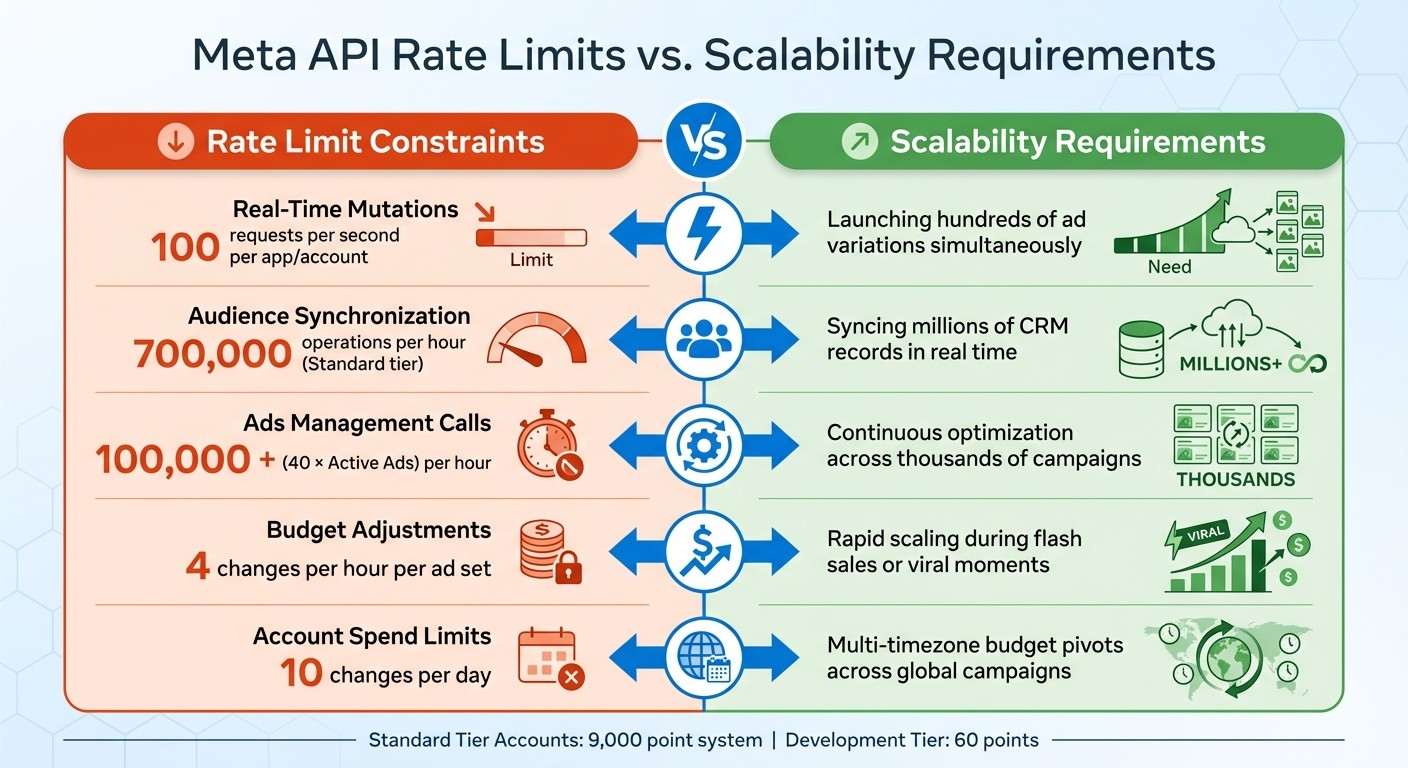
Meta API Rate Limits vs Scalability Requirements Comparison Chart
Side-by-Side Comparison of Key Metrics
Meta's API constraints often clash with the scalability demands of advertisers. To get a clearer picture, let’s look at these metrics side by side. Standard tier accounts operate with a 9,000-point system, while Development tier accounts are limited to just 60 points, both with the same decay rate.
Metric | Rate Limit Constraint | Scalability Requirement |
|---|---|---|
Real-Time Mutations | 100 requests per second per app/account | Launching hundreds of ad variations simultaneously |
Audience Synchronization | 700,000 operations per hour (Standard) | Syncing millions of CRM records in real time |
Ads Management Calls | 100,000 + (40 × Active Ads) per hour | Continuous optimization across thousands of campaigns |
Budget Adjustments | 4 changes per hour per ad set | Scaling Meta ads with real-time API updates is crucial during flash sales or viral moments |
Account Spend Limits | 10 changes per day | Multi-timezone budget pivots across global campaigns |
This table highlights how rate limits translate into operational hurdles for advertisers trying to scale.
How This Affects Campaign Management
These restrictions create very real challenges for running campaigns efficiently. Implementing Meta ads automation can help mitigate these bottlenecks by streamlining workflows. For instance, if you’re managing 5,000 active ads during a sudden traffic surge, the four-adjustments-per-hour limit per ad set can cause frustrating delays. Similarly, the 100 QPS mutation cap makes it impossible to launch 500 creative variations at once, even if they’re ready to go.
For agencies juggling multiple client accounts, the 700,000 operations-per-hour audience sync limit becomes a bottleneck when working with large CRM lists and CDP integrations. For long-term analysis, you can also move Meta Ads data to BigQuery to bypass API-based reporting limits. If a client has 2 million customer records, syncing them would take at least three hours—even if you follow the best practices to sync Meta audience data - assuming no other API calls are competing for the same quota. While the X-Business-Use-Case header provides real-time usage tracking, it doesn’t solve the underlying issue of these limits falling short of growth-driven advertisers' needs.
The 10-changes-per-day spending limit is another major constraint, especially for global campaigns. If you're managing budgets across several time zones and need to reallocate funds based on performance data using budget automation rules, you can quickly hit that daily cap. This forces advertisers to make tough choices: prioritize real-time optimization or stay within Meta’s strict boundaries using automated guardrails. Finding creative workarounds becomes essential to keep campaigns running smoothly and maintain momentum. Using AI prompts for Meta ads can also help generate the necessary insights to pivot strategies before limits are reached.
How to Scale Within Meta API Rate Limits
Batching and Optimizing API Calls
Meta's API rate limits operate on a score-based system, where read calls cost 1 point and write calls cost 3 points. To make the most of your quota, batching requests is key. For instance, instead of making 300 separate calls to adjust ad budgets, you can compare bulk uploads vs manual creation and consolidate those into a single batch request, significantly reducing your score usage. This approach helps you stay under the 9,000-point limit for Standard tier accounts.
When it comes to pulling large datasets - like a full year's worth of daily performance metrics - using asynchronous processing is crucial. Adding the async=true parameter allows you to queue up large jobs in the background, avoiding timeout errors and keeping your operations running smoothly. A great example of this in action is AdAmigo.ai's 2025 campaign, where they launched around 494,000 ads in just 30 days through efficient batching and parallel request handling. This saved users an impressive 37,087 hours of manual work.
Meta's official SDKs for Python, PHP, or JavaScript can also simplify the process by following best practices for Meta API integration. These tools handle things like pagination, error management, and query construction for you, letting you focus on strategy rather than technical details. To stay on top of your usage, monitor the X-Ad-Account-Usage and X-Business-Use-Case HTTP headers or use AI tools for Meta ad account analysis. These provide real-time feedback on your quota consumption, helping you avoid unexpected limits.
Advanced Access and Tier Upgrades
If you're operating on the Development tier, you’re working with a limit of 60 points per 300 seconds. Upgrading to Standard Access raises this significantly to 9,000 points with a 60-second recovery window. While the 100 queries-per-second (QPS) mutation cap remains unchanged, the higher quota allows for much greater operational flexibility.
To unlock these enhanced limits, you'll need to apply for Advanced Access through Meta's App Review dashboard. Completing business verification is a critical step in this process. Once approved, you’ll gain access to production-level quotas. As Meta explains, "Standard Access limits you to your own assets while Advanced Access opens up production use cases". This upgrade is particularly useful for scaling audience segmentation and synchronization and other high-demand tasks.
Timing and Request Distribution
Even after optimizing calls and upgrading your tier, effectively timing your requests is essential. Meta enforces a 100 QPS mutation limit, so staggering your API calls can prevent you from hitting this ceiling. For example, if you're launching 500 ad variations, spreading the calls over several seconds instead of sending them all at once helps avoid triggering Abuse Prevention Rate Limits, which could temporarily reduce your quotas.
For large-scale operations, asynchronous requests can be a lifesaver. By scheduling tasks during off-peak hours, you can reduce the impact on time-sensitive operations. Distributing traffic evenly and keeping a close eye on usage headers ensures you stay within Meta's limits while making the most of market opportunities. This balanced approach keeps your campaigns running smoothly without interruptions.
Tools for Scalable API-Driven Ad Management: AdAmigo.ai
How AdAmigo.ai Handles Rate Limits
AdAmigo.ai is built to navigate Meta's API restrictions while ensuring campaigns perform at their best. Instead of relying on standard user tokens, the platform uses System User tokens. These tokens don’t expire as long as they’re properly maintained, eliminating the hassle of frequent credential updates and allowing for uninterrupted automation.
The platform also tackles rate limits through smart batching and request distribution. Instead of flooding the API with individual requests, it consolidates actions into optimized batches, staying within Meta’s 100 queries-per-second limit. This approach prevents abuse flags while making the most of the available quota.
Features That Support Scalability
AdAmigo.ai offers several tools designed to simplify ad management and maximize scalability:
AI Ads Agent: This tool creates and deploys on-brand ad creatives with a single click. It analyzes your brand identity and competitor ads to produce fresh variations, all while managing API requests efficiently.
AI Actions: Provides a daily list of suggested tweaks to creatives, audiences, budgets, and bids. You can approve changes manually or let the system handle them autonomously.
Bulk Ad Launch: Allows you to launch hundreds of Meta ads directly from Google Drive in one go, managing API complexities behind the scenes.
AI Chat Agent: Acts as an interactive assistant for ad account management. It delivers instant performance reports, conducts audits, and enables bulk campaign creation and testing straight from spreadsheets.
These tools are designed to simplify workflows and enhance efficiency, letting advertisers focus on strategy while the system handles execution.
Benefits for Advertisers
AdAmigo.ai is one of the leading AI automation platforms for Meta ads, combining advanced API management with intelligent creative capabilities to help advertisers scale campaigns while maintaining ROAS benchmarks without hitting Meta’s rate limits.
For agencies, this means a single media buyer can manage 4–8× more clients using multi-account management tools, as the platform automates execution, freeing up senior team members to focus on strategic planning. In-house teams gain access to an AI media buyer that continuously improves its expertise, reducing the need for additional hires.
The platform adapts to your rules for budget pacing, geography, and placements, ensuring you remain in control while the AI does the heavy lifting. Unlike static systems, AdAmigo.ai evolves based on real-world results, refining creatives, targeting, bids, and budgets as a cohesive system. This enables faster testing and scaling of successful campaigns, all while adhering to Meta’s API limits.
Conclusion: Balancing Rate Limits and Scalability
Key Takeaways
Meta's API rate limits are designed to maintain system stability but can also pose challenges for scaling campaigns. For instance, the Standard tier limits your API score to 9,000 points, while mutation operations are capped at 100 requests per second per app and ad account combination. This creates a trade-off between speed and compliance - unless you carefully plan your API usage.
To move beyond the initial 60-point cap of the Development tier, you can upgrade to the Standard quota of 9,000 points through Meta's App Review dashboard. Additionally, using asynchronous API calls and batching requests intelligently and following bulk launch best practices can help you avoid HTTP 429 errors, ensuring smoother campaign execution and helping you manage learning phase volatility.
The right tools can make all the difference. Platforms like AdAmigo.ai simplify API management by batching requests and distributing calls strategically, helping you stay within rate limits. This approach allows agencies to handle 4–8× more clients per media buyer and enables in-house teams to scale without needing additional staff.
By adopting these strategies, you can streamline your campaign management while staying compliant with Meta's limitations.
Next Steps for Advertisers
To optimize your API usage and tackle the challenges of Meta's rate limits, take proactive steps. Monitor HTTP headers like X-Business-Use-Case and X-Ad-Account-Usage to identify and resolve bottlenecks. Keep an eye on key metrics such as call_count, total_cputime, and estimated_time_to_regain_access to track your API consumption in real time.
If you're managing multiple clients or scaling ad spend aggressively while avoiding common bulk testing mistakes, consider applying for Advanced Access. For high-volume tasks like Custom Audience updates, batching operations can help you stay efficient. For teams looking to automate processes while adhering to Meta's guidelines, tools like AdAmigo.ai offer a quick setup - connecting your ad account, setting KPIs, and delivering AI-driven optimizations daily. This allows you to focus on high-level strategy while the platform handles the complexities of API management.
FAQs
How do I estimate when I’ll hit Meta’s rate limits?
To gauge when you might approach Meta's rate limits, keep an eye on the real-time usage stats included in the API response headers. These headers provide a snapshot of your request volume compared to the allowed limits. If you encounter an HTTP 429 error, it’s a clear sign you’ve exceeded the limit and must pause until the limit resets. Monitoring these details closely can help you stay within the limits and manage your API usage efficiently.
What’s the best batching strategy for high-volume writes?
When working with Meta's APIs to handle a large number of write operations, it's crucial to manage rate limits effectively. This means spacing out your requests and implementing backoff strategies to prevent throttling or encountering errors like HTTP 429. Using automation tools, such as streaming pipelines, can help you scale your operations while staying within the API's restrictions. Additionally, monitoring your usage and adjusting the pacing of requests dynamically can maintain smooth performance without breaching the limits.
How can I scale audience sync without getting 429 errors?
To avoid those frustrating 429 errors when scaling audience synchronization, it's crucial to manage Meta API rate limits effectively. The key lies in understanding the difference between limits (the hard cap on requests) and throttling (temporary restrictions based on activity).
Here are some practical strategies to stay within those limits:
Automate with tools like AdAmigo.ai: Platforms like this can streamline updates and optimize how requests are sent, saving you time and reducing the risk of hitting limits.
Monitor API usage: Keep a close eye on your request patterns to identify any potential bottlenecks or spikes.
Space out requests: Instead of sending a flood of requests all at once, stagger them to avoid overwhelming the system.
Use backoff strategies: During high-traffic periods, implement exponential backoff techniques. This means gradually increasing the time between retries to avoid further strain on the API.
By combining these methods, you can ensure smoother, scalable audience synchronization while staying well within Meta's API limits.