
Checklist for AI-Driven Campaign Prioritization
Step-by-step checklist to set up conversion tracking, define KPIs, structure Meta campaigns for AI, and test, monitor, and scale performance.
Running Meta ads manually can be overwhelming. You're stuck monitoring performance, reallocating budgets, and pausing underperforming campaigns - all while risking missed opportunities. AI tools simplify this process by automating repetitive tasks, improving efficiency, and boosting results. Here's a quick overview of how you can use AI to manage your Meta campaigns:
Set Up Conversion Tracking: Ensure Meta's Pixel and Conversions API are configured correctly to improve attribution accuracy by 10–15%. Prioritize high-impact events like 'Purchase' and upload first-party data for better targeting.
Define Clear Goals and KPIs: Specify metrics like ROAS, CPA, or CTR based on your funnel stage to guide AI optimizations.
Structure Campaigns for AI: Use Advantage+ campaigns, segment audiences by funnel stage, and apply dynamic bidding strategies like cost caps or ROAS targets.
Test, Monitor, and Refine: Run A/B tests, monitor AI actions daily, and scale top-performing campaigns gradually to avoid destabilizing results.
AI tools like AdAmigo.ai and Meta Advantage+ can [automate tasks like budget adjustments, creative testing, and audience targeting](https://www.adamigo.ai/blog/meta-ads-automation-guide-from-basics-to-advanced), saving you hours of manual work. Start small by integrating one AI workflow and let the system handle optimizations, allowing you to focus on strategy.
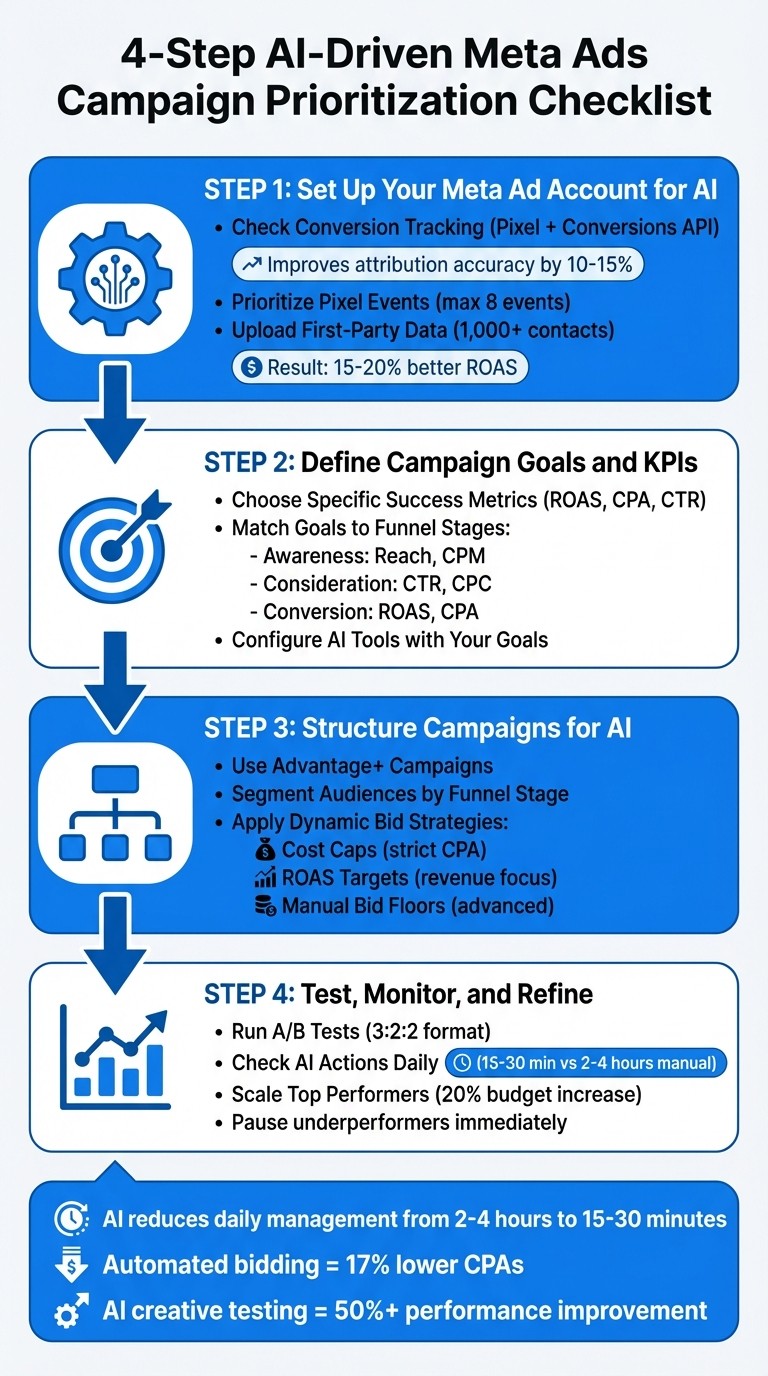
4-Step AI-Driven Meta Ads Campaign Prioritization Checklist
How we Automated a Meta Ad Agency with AI
Step 1: Set Up Your Meta Ad Account for AI
To get the most out of AI tools in your Meta ad campaigns, you need to ensure your account is set up with accurate and reliable data. Without proper tracking and event configuration, even the smartest AI won't be able to allocate your budget effectively.
Check Conversion Tracking Setup
Start by confirming that Meta's Conversions API and Pixel are properly configured. Use the Diagnostics tab in Events Manager to check for any errors or warnings. Test real actions, like purchases, to ensure server-side events match browser pixel fires. This setup can improve attribution accuracy by 10–15%.
To do this, go to Events Manager in Meta Business Suite, select your Pixel, and click the Diagnostics tab. Make sure your domain verification is at least 80% complete and that event deduplication is functioning correctly. This dual-tracking system helps bypass challenges like browser ad blockers and iOS privacy updates.
For US advertisers, ensure key events such as 'Purchase', 'Lead', and 'CompleteRegistration' are firing with accurate parameters, including value and currency in USD. Once tracking is verified, you’ll want to prioritize these events to fine-tune AI bidding.
Prioritize Your Pixel Events
In Events Manager, head to Settings > Prioritize Events to rank your events. Place 'Purchase' at the top and ensure it tracks USD value. Follow it with other important events like 'AddToCart', 'Lead', 'CompleteRegistration', and 'ViewContent'. Stick to a maximum of 8 events to help the AI focus on the most impactful data, which can improve conversion rates by 20–30%.
Avoid giving too much weight to low-volume events like 'Subscribe,' as they don’t provide enough data for AI optimization. Assign purchase values (e.g., an average order value of $50–100) to enable return-on-ad-spend (ROAS) optimization. Keep in mind, Meta’s algorithm needs at least 50 conversions in the past 30 days to learn effectively. Prioritize events that fire frequently to ensure the AI gets enough data. Once your events are set, you can use data enrichment to enhance AI performance.
Upload First-Party Data
Uploading first-party data is key to creating custom and lookalike audiences. Start by uploading a CSV file of hashed customer data (at least 1,000 contacts, with an emphasis on recent purchasers). Go to Audiences > Create Audience > Custom Audience > Customer File, and include data from recent buyers (last 90 days) along with lifetime value information in USD. Meta will automatically hash this data to comply with privacy regulations like the CCPA.
This data helps seed Lookalike Audiences, allowing the AI to identify and target profiles similar to your best customers. For example, a US-based e-commerce brand that uploaded 5,000 buyer emails saw their top campaigns scale 2x faster by focusing on similar high-converting profiles. To keep these audiences fresh, update your customer lists weekly to maintain a 25% match rate, which can lead to 15–20% better ROAS through more refined targeting.
Step 2: Define Campaign Goals and KPIs
For AI to work effectively, your campaign goals need to be crystal clear. Vague objectives like "increase sales" won't cut it. Instead, aim for something specific, such as "500 purchases at $40 CPA within 30 days." Once you’ve nailed down these targets, identify the metrics that align with each stage of your sales funnel.
Choose Specific Success Metrics
Your KPIs should directly reflect your business model and give the AI clear numbers to optimize. For instance:
E-commerce: Focus on ROAS (Return on Ad Spend) and CPA (Cost per Acquisition). For example, if your average order value (AOV) is $100, you might aim for a 3:1 ROAS.
Lead generation: Prioritize cost per lead and lead quality.
SaaS: Look at trial signups and qualified leads as your key metrics.
Tracking purchase value allows campaigns to optimize around revenue rather than just conversion volume. This is especially useful for targeting high-value customers. Make sure your attribution window matches your sales cycle. For most direct-response campaigns, a 7-day click attribution window works well, providing stable data for AI to learn from.
Match Campaign Goals to Funnel Stages
Aligning your campaign goals with your funnel stages ensures the AI stays focused, whether you’re building awareness, driving consideration, or pushing for conversions. Each stage requires you to choose Meta ad campaign objectives and metrics that align with your intent:
Awareness campaigns: Use objectives like "Reach" or "Brand Awareness" and track metrics such as impressions, reach, and CPM (cost per thousand impressions).
Consideration campaigns: Focus on "Traffic" or "Engagement" objectives, measuring click-through rates (CTR) and cost per click (CPC).
Conversion campaigns: Use "Conversions" or "Sales" objectives, monitoring CPA, ROAS, and other conversion-specific metrics.
Here’s how this might look:
Funnel Stage | Campaign Objective | Primary KPIs | Secondary KPIs |
|---|---|---|---|
Awareness (Top) | Awareness | Reach, Impressions, CPM | Ad Recall Lift |
Consideration (Mid) | Traffic / Engagement | CTR, CPC, Link Clicks | Landing Page Views |
Conversion (Bottom) | Sales / Leads | ROAS, CPA, CPL, CVR | AOV, LTV, Purchase Volume |
For example, in Q2 2024, a DTC skincare brand restructured its Meta campaigns using AdAmigo.ai, splitting them into three funnel-based categories with 3–5 ad sets each. By leveraging Advantage+ Shopping and detailed targeting, they saw a 38% boost in ROAS and a 22% reduction in cost per lead within just four weeks.
Configure AI Tools with Your Goals
After defining your KPIs, integrate your Meta ad account with your AI tool and input your target metrics. For instance, when setting up AdAmigo.ai, you can brief the AI with goals like "scale Meta ad campaigns by 30% while maintaining a 3× ROAS." From there, the AI generates a daily to-do list of impactful adjustments, covering creatives, audiences, budgets, and bids.
Be sure to include precise constraints, such as budget caps, geographic restrictions, placement preferences, and brand guidelines. This helps the AI quickly identify and pause underperforming campaigns. If your business lacks sufficient conversion data, start with engagement or traffic objectives to build the necessary conversion history for audience development. Additionally, document your event hierarchy in Events Manager to ensure the AI prioritizes the most critical conversions.
Step 3: Structure Campaigns for AI
After setting your goals and KPIs, the next step is organizing campaigns in a way that helps AI work efficiently. How you structure campaigns, define audiences, and set bids directly affects how quickly the AI learns and optimizes. A poorly designed setup can confuse the algorithm and waste your budget. On the other hand, a well-organized campaign layout allows AI to detect patterns and scale successful strategies. Using tools like Advantage+ campaigns can help streamline this process by enabling AI to handle creative and audience pairing.
Use Advantage+ Campaigns
Meta's Advantage+ campaigns are designed to simplify the decision-making process by automating creative selection, audience targeting, and Advantage+ placements vs manual placements. Instead of manually selecting demographics or placements, you provide broad parameters and let the AI test various combinations to find what works best. This approach is particularly effective for e-commerce, where AI quickly identifies the most effective creative-audience pairings. To get started, select "Advantage+ Shopping Campaign" in Ads Manager, upload multiple creative options, and let Meta allocate the budget to the top performers. However, if your account hasn’t achieved 50 conversions within 30 days, it’s better to start with standard conversion campaigns.
Segment Audiences by Funnel Stage
Dividing your audience based on their position in the sales funnel ensures the AI processes distinct signals effectively.
For top-of-funnel awareness campaigns, use broad targeting like country-level or interest-based audiences. This helps the algorithm uncover new demand.
In the middle of the funnel, focus on audiences who have engaged with your content or visited your site but haven’t converted yet.
At the bottom of the funnel, prioritize remarketing efforts for users who’ve added items to their cart or started the checkout process.
Exclude current customers from acquisition campaigns to ensure your budget is spent on finding new prospects. Additionally, remove underperforming audience segments regularly to keep the AI focused on high-value opportunities.
Apply Dynamic Bid Strategies
Dynamic bidding lets you manage spending while allowing the AI to adjust in real time. Here are three key strategies:
Cost Caps: Ideal for strict CPA (cost per acquisition) goals. Set a maximum CPA, and the AI will bid aggressively when costs are low and scale back when costs rise.
ROAS Targets: Best for revenue-focused campaigns. Specify your desired return on ad spend (e.g., 3× ROAS), and the AI will prioritize placements and audiences that meet or exceed that threshold.
Manual Bid Floors: Offers the most control but requires constant monitoring. This option is better suited for advanced advertisers who want to fine-tune campaigns.
If you’re new to AI-driven bidding, start with cost caps vs bid caps. Once you’ve collected stable conversion data and have a better understanding of your unit economics, transition to ROAS targets for more revenue-focused optimization. For a detailed walkthrough, follow this checklist for setting up AI bid strategies.
Bid Strategy | Best For | Key Benefit |
|---|---|---|
Cost Cap | Strict CPA targets | Prevents overspending per conversion |
ROAS Target | Revenue optimization | Focuses on profitable conversions |
Manual Bid Floor | Advanced control | Granular adjustments for experienced users |
For those using tools like AdAmigo.ai, having a well-structured campaign is even more critical. These AI tools analyze your setup and provide daily recommendations for budget adjustments, audience refinements, and creative updates. However, they can only perform effectively if your campaigns are built on clear, well-segmented foundations. A strong structure enables the AI to amplify results far beyond what manual efforts could achieve.
Step 4: Test, Monitor, and Refine AI Performance
Setting up an AI system is just the beginning. To achieve long-term success, you need to continually test, monitor, and refine its performance. This prevents the AI from focusing solely on short-term wins at the expense of your broader objectives.
Run Regular A/B Tests
A/B testing is essential to understand what works and what doesn’t. Focus on testing one variable at a time to pinpoint the factors driving results. A good starting point is the 3:2:2 testing format - three creatives, two texts, and two headlines. Run these tests for 7 to 30 days to collect stable, actionable data.
Once the test concludes, use tools like "Breakdown by Dynamic Creative Element" in Meta Ads Manager. This feature identifies which specific assets - such as headlines or images - are contributing most to conversions.
Frequency Level | Impact on Performance | Recommended Action |
|---|---|---|
Low (<2 per week) | Insufficient exposure; weak brand recall. | Increase budget or refine targeting if ROAS is strong. |
Optimal (2–5 per week) | Balanced exposure; ideal for engagement. | Maintain current spend and monitor performance. |
High (>5 per week) | Risk of ad fatigue; reduced CTR and higher CPA. | Pause ads, refresh creatives, or expand your audience. |
After completing your tests, shift to daily reviews to ensure the AI remains aligned with your goals.
Check AI Actions and Results Daily
The insights gained from A/B testing feed directly into daily evaluations. Regular monitoring ensures that AI-driven optimizations stay in sync with your business objectives. While Meta Ads Manager requires manual review - often taking 2–4 hours per account - tools like AdAmigo.ai simplify this process. They provide a daily, auto-prioritized to-do list that highlights high-impact adjustments across creatives, audiences, budgets, and bids. This allows you to act on recommendations within 15–30 minutes.
AdAmigo even includes an AI Chat Agent for added convenience. You can ask direct questions like "Why did CPA spike?" or "What should I adjust next?" and receive instant, actionable insights. This feature is especially valuable since 78% of agencies report challenges with AI integration as of 2024, often due to insufficient daily oversight.
Daily checks also help detect issues like model drift or inaccuracies. While tools like AdAmigo adapt based on actual campaign results, it’s still crucial to review recommendations to ensure they align with your brand’s guidelines and goals.
Feature | AdAmigo.ai | Meta Ads Manager |
|---|---|---|
Data Assessment | Continuous monitoring with prioritized recommendations | Manual review required |
Learning Capability | Adjusts based on real campaign outcomes | Rule-based optimization only |
Optimization | Autonomous, 24/7 adjustments | Manual management needed |
Budget Management | Automated allocation and pacing | Requires manual input |
Scale Top-Performing Campaigns
When you identify campaigns that are consistently performing well, scale them carefully to avoid destabilizing the algorithm. Increasing budgets too quickly can hurt your return on ad spend (ROAS). Instead, use trigger-based scaling to make gradual adjustments based on reliable performance benchmarks.
For underperforming campaigns, pause ad sets immediately. AI tools can automate these actions, allowing you to focus on higher-level strategy rather than micromanaging individual ads.
Condition (Trigger) | Action | Rationale |
|---|---|---|
ROAS > 3.0 for 3 consecutive days | Increase budget by 20% | Builds on consistent performance. |
ROAS > 4.0 AND CTR > 2% | Freeze campaign for 5 days | Prevents over-optimization. |
Cost per Purchase < $20 (3-day average) | Increase budget by 10% | Keeps efficiency steady. |
CPA > 2x target for 2 days | Pause ad set | Avoids wasting budget. |
While the World Economic Forum predicts that 85% of routine marketing tasks will be automated by 2025, automation doesn’t mean you can set it and forget it. Success lies in regular testing, daily monitoring, and strategic scaling - these are the habits that separate standout campaigns from the rest.
Comparing AI Tools for Campaign Prioritization
Once you've built your AI-driven Meta campaigns, the next step is figuring out which AI tool aligns best with your goals. For Meta ads, the two primary options are Meta Advantage+ and third-party AI tools like AdAmigo.ai. Each brings distinct features to the table, catering to different workflows and budgets. Here’s a breakdown to help you decide.
AdAmigo.ai vs. Meta Advantage+
Meta Advantage+ is a built-in tool within the Meta ecosystem. It focuses on automating creative adjustments and targeting, making campaign setup more straightforward. However, this simplicity means you might have less control over certain aspects. One standout feature is the 0-100 Opportunity Score, which highlights the optimization potential based on Meta's own best practices. This tool works best if you have strong conversion tracking and a variety of creative assets.
On the other hand, AdAmigo.ai operates as an autonomous learning agent, continuously updating its strategies based on actual campaign performance. It can auto-generate photorealistic ads, provide a daily list of prioritized tweaks, and even manage your account through an AI Chat Agent. For those managing multiple campaigns, AdAmigo.ai allows bulk launching of ads - dozens or even hundreds at once - while optimizing creatives, targeting, bids, and budgets as a cohesive system. For agencies, this means fewer hands-on tasks, enabling one media buyer to handle 4–8× more clients, while senior team members focus on strategy.
Feature | Meta Advantage+ | AdAmigo.ai |
|---|---|---|
Automation Level | Autonomous AI learning agent | |
Daily Actions | Manual adjustments or basic rules | Prioritized "AI Actions" list or autopilot |
Creative Generation | AI-generated photorealistic ads | |
Bulk Management | Spreadsheet-based uploads | One-click bulk launch |
Cross-Platform | Meta ecosystem only | Multi-platform management/reporting |
Pricing | Free (native to Meta) | Entry: $99/month (or $79/month annually) |
For the best results, consider combining both tools. Use Meta Advantage+ for quick, native optimizations, and AdAmigo.ai for advanced ad creation and deeper campaign insights. Together, they offer the speed of Meta's native features with the added flexibility and intelligence of an autonomous agent. This blend could be the key to finding the perfect balance for your campaigns.
Conclusion: Use AI to Simplify Campaign Management
This checklist highlights how AI reshapes every step of Meta ad management. While manual ad management can take 2–4 hours daily, AI reduces that to just 15–30 minutes. From setting clear KPIs to structuring campaigns with tools like Advantage+, each stage underscores how AI boosts efficiency.
AdAmigo.ai acts as an autonomous media buyer, simplifying campaign management for in-house teams. Instead of hiring additional staff, you get a 24/7 optimizer that improves over time.
Getting started is simple: connect your Meta account, set clear goals (like "Scale spend 30% at ≥3× ROAS"), and review AI recommendations. You can approve, tweak, or let the system make adjustments automatically. Advertisers using automated bid rules often see 17% lower CPAs, while AI-driven creative testing frameworks can improve performance by 50% or more. Following established creative testing benchmarks ensures your assets are optimized for these gains.
Switching from manual adjustments to a systematic, data-driven approach isn’t just about saving time - it’s about scaling smarter. AI analyzes thousands of signals in real time, pauses underperforming elements within 48 hours, and scales winning ads without disrupting the learning phase. Whether you use Meta Advantage+ alone or pair it with a tool like AdAmigo.ai, the result is the same: better campaign performance with less effort.
Start small - try one AI workflow and see the improvements build over time. The sooner you automate the execution, the sooner you can focus on strategies that drive real growth.
FAQs
How can AI tools make managing Meta ad campaigns easier and more effective?
AI tools make managing Meta ad campaigns much easier by taking over repetitive tasks like creating ad content, targeting the right audience, and fine-tuning budgets. Take AdAmigo.ai, for instance - it evaluates performance data in real-time, spots the best-performing ads, and applies updates automatically. This means fewer manual tweaks for you.
These tools also adjust campaigns on the fly, guided by metrics like ROAS (Return on Ad Spend) or CPA (Cost Per Acquisition). By constantly refining creatives, bids, and budgets, AI helps you scale your campaigns more efficiently. Plus, it frees up your time to focus on big-picture strategies and growth opportunities.
How do I set up my Meta ad account for AI-driven optimization?
To get your Meta ad account ready for AI-powered optimization, start by setting it up in Meta Business Manager. Make sure to enable tracking features like the Meta Pixel and Conversions API - these tools are essential for gathering the data needed to refine your campaigns. Be clear about your goals and key performance indicators (KPIs), such as Return on Ad Spend (ROAS) or Cost Per Acquisition (CPA), so your optimization efforts stay focused.
Once your account is set, consider using AI-driven tools like AdAmigo.ai. These platforms can handle tasks like creating ad creatives, refining audience targeting, and managing budgets automatically. To keep your campaigns on track, monitor key metrics like ROAS and conversion rates regularly. Use this data to make tweaks and improvements, ensuring your campaigns stay effective over time.
How can I choose the best AI tool to optimize my Meta ad campaigns?
The first step in selecting the right AI tool for your Meta ad campaigns is defining your goals. Are you aiming to scale your ad spend, boost your return on ad spend (ROAS), cut down on manual tasks, or refine your creative testing process? The tool you choose should align perfectly with these priorities while offering features like automated creative generation, precise audience targeting, budget management, and real-time performance tracking.
It’s also important to find a platform that can adjust to your specific needs, whether you prefer semi-autonomous or fully autonomous functionality. The ideal tool should work within your budget and campaign guidelines, optimize your creatives and targeting as a cohesive system, and provide insights you can act on. Whether you're part of an agency juggling multiple clients or an in-house team focused on efficiency, the right AI tool will integrate smoothly into your workflow, simplify campaign management, and help you hit your key performance indicators (KPIs).