
How Meta Pixel and CAPI Work Together
Combine Meta Pixel and Conversions API to recover lost conversions, ensure accurate deduplication, and boost ad attribution.
Using Meta Pixel and Conversions API (CAPI) together is the best way to improve your ad tracking and performance on Meta platforms. Here's why:
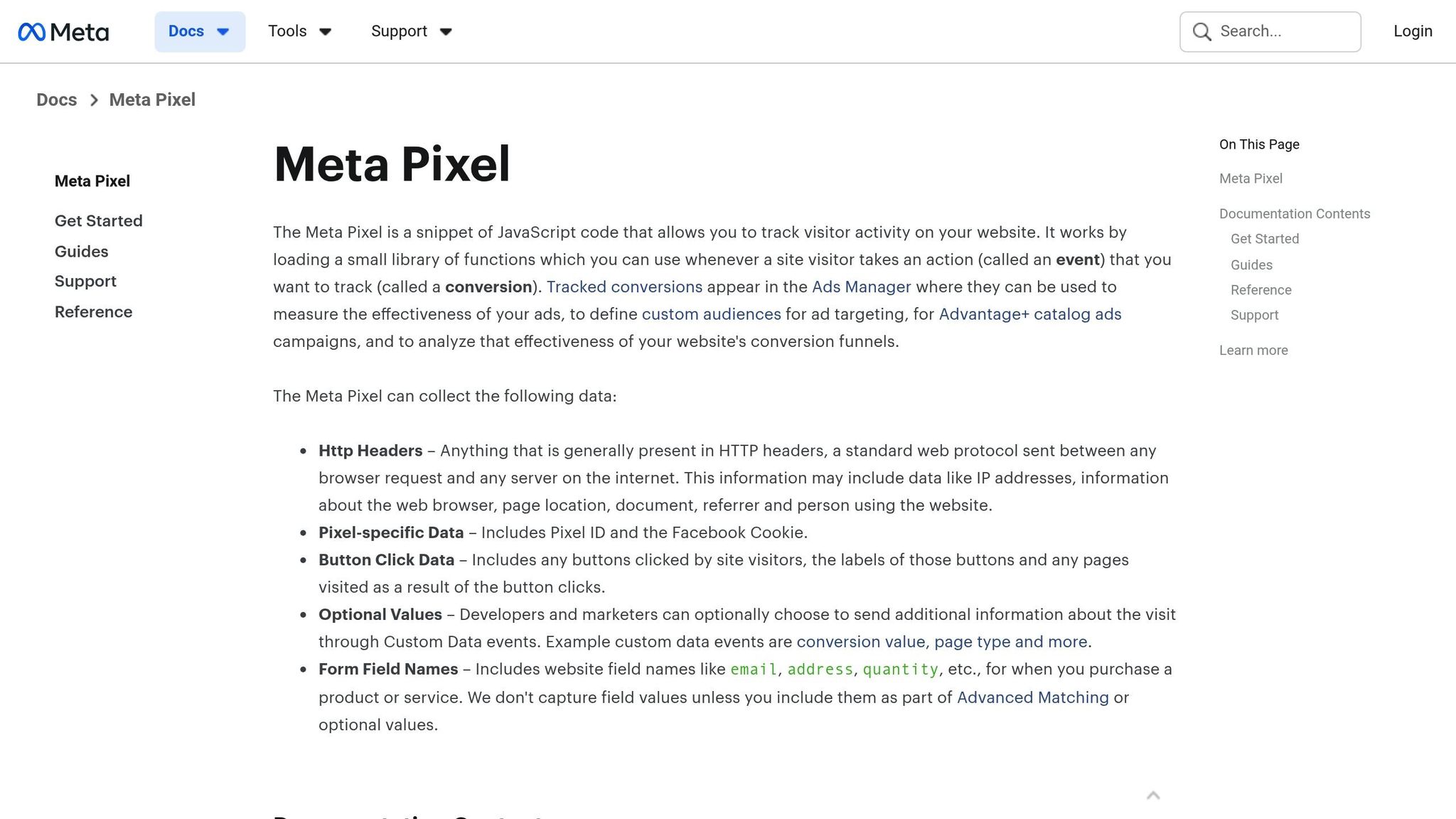
Meta Pixel: Tracks user actions on your website (like clicks, purchases, and page views) using browser data. However, privacy measures like iOS restrictions and ad blockers can limit its effectiveness.
Conversions API (CAPI): Sends data directly from your server to Meta, bypassing browser issues. This ensures you capture more conversion data, even in cases where Pixel falls short.
Why use both?
Meta Pixel captures browser-side data, while CAPI collects server-side information. Together, they provide a complete view of user behavior, enabling cross-device tracking to close attribution gaps, improve data accuracy, and help Meta's algorithms optimize your campaigns. Using both can recover up to 90% of lost conversion data and reduce ad costs.
Key benefits:
Fewer data gaps caused by privacy restrictions.
Accurate conversion tracking and deduplication of events.
Better targeting and audience building with enriched data.
For seamless integration, AI automation platforms like AdAmigo.ai can simplify setup and automate campaign optimization, saving time and effort while improving results.
How to Set Up Meta CAPI with PixelYourSite + Tips to Boost EMQ Score
How Meta Pixel and CAPI Work Together
Using Meta Pixel and CAPI together creates a well-rounded tracking system: Pixel handles browser-side actions, while CAPI manages server-side data. This combination helps address each other's weaknesses. Here's a closer look at how they handle event deduplication and data consistency.
Addressing Browser Tracking Challenges
Browser tracking has become less reliable due to privacy measures like Apple's Intelligent Tracking Prevention (ITP) in Safari and the App Tracking Transparency (ATT) framework in iOS 14+. Additionally, ad blockers like Brave and DuckDuckGo can block Pixel scripts, leading to data losses of up to 20–40%.
CAPI solves this issue by using server-to-server communication, which bypasses ad blockers and captures events even if a user closes the page early. This approach improves the accuracy of ROAS metrics and ensures better attribution reporting when client-side tracking fails. Charles Farina, Head of Innovation at Adswerve, explains:
"The future of measurement is not about finding a 1:1 replacement for the cookie, but rather building a new foundation that is durable and privacy-safe. Server-side tagging and APIs like the Conversions API are not just workarounds; they are central components of that new foundation. Businesses that master this will have a significant competitive advantage."
Managing Event Deduplication and Synchronization
When both Pixel and CAPI report the same event - like a purchase - Meta uses deduplication to prevent counting the event twice. This process matches event names and unique event_id values to ensure accurate conversion data.
To make this work, assign a unique event_id to each conversion. For example, if the Pixel sends a "Purchase" event with eventID: '12345', your server should also send the corresponding CAPI event with event_id: '12345'. Meta compares these events over a 48-hour window. If the event names and IDs match, one instance is kept, and the duplicate is discarded. A healthy deduplication rate ranges between 40–60%, which you can monitor in Facebook Events Manager.
Once deduplication is in place, it's vital to ensure that data from both sources is perfectly aligned.
Ensuring Consistency in Conversion Data
For deduplication to work, Pixel and CAPI must use identical, case-sensitive event names. For instance, a "Purchase" event from the Pixel won't match with a "purchase" event from CAPI.
Additionally, enrich each event with as much hashed customer data as possible - such as email, phone number, name, city, state, ZIP code, and Facebook identifiers like fbc (click ID) and fbp (browser ID). This extra information enhances your Event Match Quality score, which is critical for accurate conversion attribution. Aim for a score of 8 out of 10 or higher. With more data points, Meta's algorithms can better target high-intent users, optimize bids, and reduce acquisition costs, making your ad spend more effective. This data foundation is also essential for AI-powered retargeting to reach past visitors with high precision.
Setting Up Meta Pixel and CAPI Integration
Prerequisites: Meta Business Manager and Pixel Creation
To get started, register as a Facebook Developer to access the necessary tools. In Meta Business Manager, either create a new Pixel or locate an existing one, ensuring you have access to the Pixel ID for integration. It's important to have developer privileges within your Business Manager account; without these, the required options for setup won’t appear.
Generating CAPI Access Token
Once your Pixel is ready, the next step is to authenticate your API calls. Navigate to the Settings tab in Events Manager and locate the "Conversions API" section. Click on "Generate access token" and follow the prompts to complete the process. This token is crucial - it authenticates every server-side event sent to Meta by being included as a parameter.
After generating the token, go to the Overview section in Events Manager. Click "Manage Integrations" and then "Manage" next to "Conversions API." This step automatically creates a Conversions API app and system user, simplifying permissions and bypassing the need for App Review. When sending events via POST requests, include the token as a query parameter in your call structure:
https://graph.facebook.com/{API_VERSION}/{PIXEL_ID}/events?access_token={TOKEN}. After integration, verify that your events are being tracked accurately, ensuring Meta Pixel data powers your custom conversions effectively.
Testing and Troubleshooting the Integration
To ensure your setup is working, use the Test Events tab in Events Manager. Launch the ssGTM preview mode and leverage Facebook's Test Events tool to confirm that server-side and browser-side event tracking are functioning simultaneously.
Pay close attention to event name matching. Server-side and browser-side events must have identical names, as this is case-sensitive. Double-check that events are being received in near real-time, deduplicated correctly, and matched precisely by following Meta Pixel data sync best practices. Consistency is key - include the Event ID across all Facebook tags to maintain alignment. If updates don’t appear immediately, refresh your browser and try again. Continuously monitor the flow of event data from both CAPI and the browser Pixel in Events Manager to identify and address any issues early.
Scandiweb highlighted this setup process in October 2022, stressing the importance of developer privileges within Meta Business Manager for effective tracking.
Key Benefits of Meta Pixel and CAPI Integration
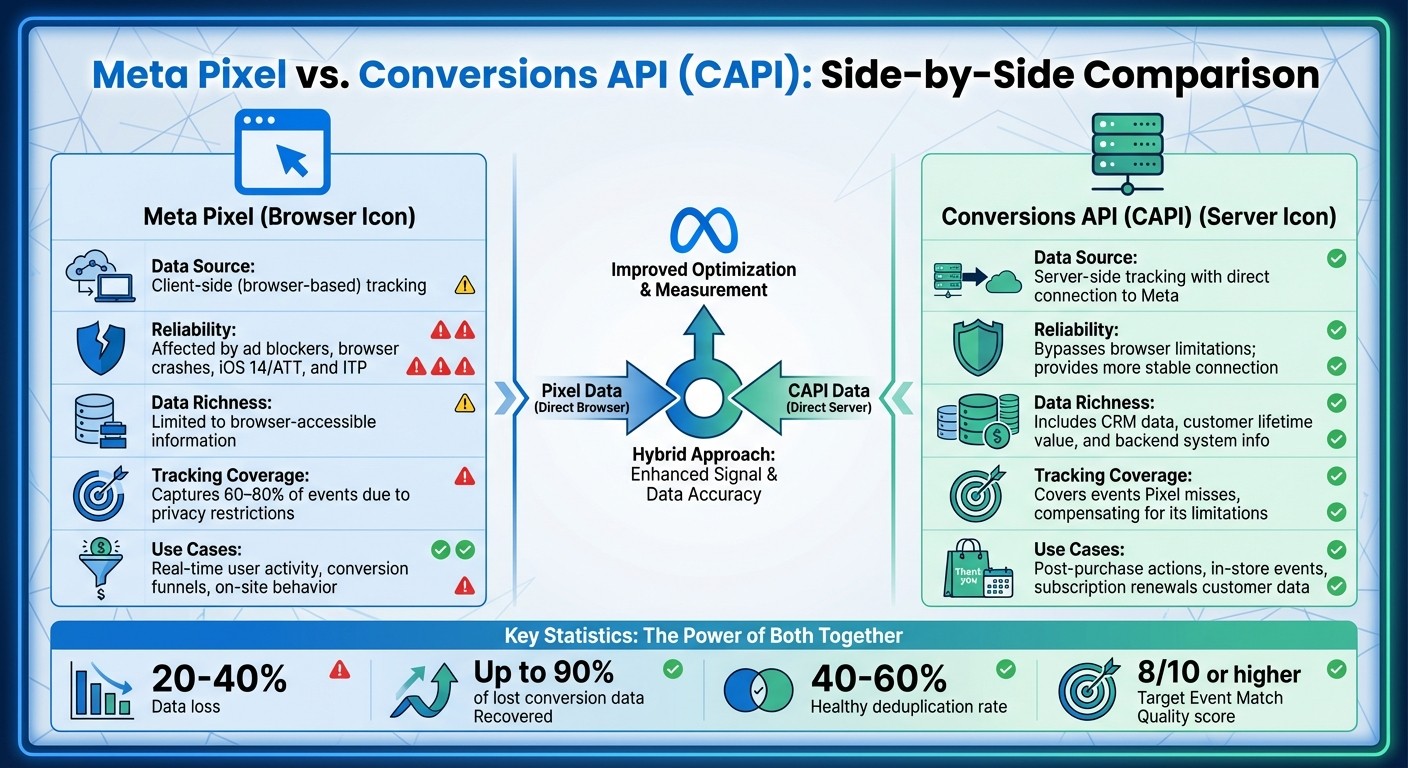
Meta Pixel vs Conversions API: Complete Comparison Chart
Better Data Accuracy and Attribution
When Meta Pixel and Conversions API (CAPI) work together, they create a more complete picture of your customer’s journey. While Meta Pixel alone can lose 20–40% of conversion data due to factors like iOS 14's App Tracking Transparency, Safari's Intelligent Tracking Prevention, and ad blockers, CAPI steps in to fill those gaps. It does so by directly sending key events - like purchases or sign-ups - straight from your server. Following a Conversions API setup guide ensures this connection is stable and secure. By using matching identifiers such as event_id and event_name, it avoids duplication by standardizing conversion data, ensuring your metrics are spot-on.
This dual tracking system doesn’t just fix data gaps - it also enriches the data you collect. CAPI allows you to send more detailed customer information, like hashed emails, phone numbers, names, locations, Facebook Click IDs (fbc), and Browser IDs (fbp), directly from your server. This richer data improves Meta's Event Match Quality, making it easier to connect ad clicks to real-world purchases.
In short, better data accuracy lays the groundwork for more effective ad performance and custom attribution models.
Improved Ad Optimization
With a unified and accurate data set, ad performance gets a serious boost. Marketers using a well-configured Conversions API setup have reported impressive results, including a 33% increase in incremental purchase events and an 82% increase in incremental subscription events. With more complete and reliable signals, Meta's algorithms can better target users who are most likely to convert.
Beyond improving performance metrics, this integration also enhances custom and lookalike audiences. By gaining a fuller understanding of user behavior, you can build audiences based on real actions rather than incomplete browser data.
Comparison Table: Pixel vs. CAPI Contributions
Aspect | Meta Pixel | Conversions API (CAPI) |
|---|---|---|
Data Source | Client-side (browser-based) tracking | Server-side tracking with a direct connection to Meta |
Reliability | Affected by ad blockers, browser crashes, iOS 14/ATT, and ITP | Bypasses browser limitations; provides a more stable connection |
Data Richness | Limited to browser-accessible information | Includes CRM data, customer lifetime value, and backend system info |
Tracking Coverage | Captures 60–80% of events due to privacy restrictions | Covers events Pixel misses, compensating for its limitations |
Use Cases | Real-time user activity, conversion funnels, on-site behavior | Post-purchase actions, in-store events, subscription renewals |
Event Match Quality | Lower due to limited user parameters | Higher with hashed emails, phone numbers, and enriched customer data |
Using AdAmigo.ai to Simplify Pixel-CAPI Integration
Automated Data Flow Management
Handling Pixel-CAPI integration across numerous campaigns can feel like juggling too many balls at once. Enter AdAmigo.ai - a tool designed to cut through the chaos. By linking directly to your Meta ad account, it enables real-time conversion tracking by syncing Pixel and CAPI data instantly, keeping everything running smoothly.
The platform’s AI dives deep into your campaign data, identifying the best attribution models and highlighting ad-driven conversions. By tapping into Meta's incremental attribution data, AdAmigo.ai gives you a clearer, more accurate view of how your ads are actually performing. This streamlined data flow lays the groundwork for smarter, more effective campaign adjustments.
AI-Driven Performance Monitoring
Once you set up cross-device attribution and your Pixel and CAPI are working together, the next step is making sense of all that data. That’s where AdAmigo.ai shines. Its AI Actions feature simplifies things by delivering a daily, prioritized to-do list of impactful tweaks to improve your campaigns. Instead of manually analyzing Meta ad account data to spot patterns, the AI does the heavy lifting - offering actionable suggestions for adjusting creatives, targeting, budgets, and bids.
Need quick answers? The AI Chat Agent is on hand to provide real-time insights into your campaign performance. Plus, you can bulk launch and analyze campaigns directly through the chat interface, saving time and effort.
Key Features for Meta Advertisers
AdAmigo.ai doesn’t just optimize tracking - it amplifies the entire Pixel-CAPI experience. For Meta advertisers, it offers tools that take campaign management to the next level. The AI Ads Agent studies your brand, identifies your top-performing ads, and even creates fresh, on-brand creatives you can launch with a single click. The Bulk Ad Launch feature allows you to deploy multiple Meta ads simultaneously, complete with the perfect combination of copy, visuals, and targeting.
AdAmigo.ai is more than just a tool - it’s a learning system that evolves with your campaign results. You can decide how much control to keep, approving changes manually or letting the system run on autopilot. For agencies, this means one media buyer can handle 4–8× more clients, leaving senior strategists free to focus on big-picture planning while AdAmigo takes care of the execution.
Conclusion
Using Meta Pixel alongside the Conversions API has become a must in today’s privacy-focused advertising environment. With browser tracking challenges like iOS 14 restrictions, Intelligent Tracking Prevention, and ad blockers, relying solely on Pixel can result in 20-40% data loss. The Conversions API bridges this gap by establishing a direct, server-to-server connection, bypassing browser-level limitations and ensuring your conversion data reaches Meta consistently. This includes capturing offline conversions that occur outside of your website.
The benefits of combining these tools are clear. For instance, in May 2021, HoneyBook managed to reduce acquisition costs by 50%, while Love Your Melon achieved a 17% increase in incremental revenue. These results highlight the power of using Pixel and CAPI together to drive better performance.
Additionally, proper deduplication ensures your data stays clean and accurate. By matching event_id parameters from both Pixel and CAPI, you can prevent double-counting while maintaining a complete view of your customer journey. This accurate data enables Meta’s algorithm to optimize targeting, map app events to refine audience segments, and reduce your cost per action and boost ROAS and optimize Meta Ads for ROI.
While managing elements like access tokens, server endpoints, Event Match Quality, and deduplication rates can feel overwhelming, tools like AdAmigo.ai simplify the process. By automating data flow management and offering AI-driven performance monitoring, these platforms allow you to focus on strategic decisions while the system handles the technical execution. For agencies, this efficiency means one media buyer can handle 4–8× more clients without compromising campaign quality.
FAQs
How do Meta Pixel and Conversions API work together to improve ad tracking?
Using both Meta Pixel (client-side) and Conversions API (CAPI) (server-side) creates a powerful dual-layer tracking system that boosts data accuracy. The Pixel captures events directly from the browser, but some of that data can get lost due to ad blockers, cookie limitations, or page-load delays. That’s where CAPI comes in - it sends the same events straight from your server, bridging any gaps caused by these issues.
By combining these tools, you get more dependable event tracking, minimize data loss, and gain a clearer understanding of user behavior. Meta advises syncing identical events from both systems and ensuring at least 75% of server-side events align with Pixel events. This alignment sharpens attribution accuracy, enhances campaign optimization, and provides a more complete picture of your performance.
What browser tracking issues does CAPI help solve?
The Conversions API (CAPI) tackles frequent problems tied to browser-based tracking, including cookie limitations, data gaps caused by browser updates, and privacy settings that restrict data collection. It also reduces challenges like crashes, connectivity issues, and incomplete signals, ensuring smoother and more precise tracking of ad performance.
When paired with Meta Pixel, CAPI offers a stronger, more dependable method for capturing user interactions, helping to enhance the success of your campaigns.
How does AdAmigo.ai make integrating Meta Pixel and Conversions API easier?
AdAmigo.ai takes the hassle out of setting up Meta Pixel and Conversions API (CAPI) by automating the entire process. With its AI Ads Agent, the platform can seamlessly add the Pixel code to your website and configure server-side events for CAPI. This ensures both systems work together effortlessly. Plus, it manages the eventID parameter to prevent duplicate tracking, keeping your ad performance data accurate and reliable.
What’s more, AdAmigo.ai doesn’t stop at setup. It continuously monitors and fine-tunes Pixel and CAPI settings through daily AI-driven updates. This means you won’t need to spend time troubleshooting or making manual adjustments. Instead, you can focus on your overall strategy while the platform ensures your tracking runs smoothly and efficiently.