
Meta vs GA4: Resolving Reporting Differences
Meta Ads and GA4 will never match exactly; reconcile differences by aligning UTMs, attribution windows, and using each platform's strengths to compare trends.
Why do Meta Ads and GA4 show different numbers? It’s because they track and measure data in completely different ways. Meta focuses on optimizing ad performance within its ecosystem (like Facebook and Instagram), while GA4 provides a broader view of user behavior across all marketing channels. This often results in Meta reporting 26% more conversions compared to GA4, which can underreport by 18–35% due to cookie rejection and ad blockers.
Key Differences Between Meta Ads and GA4:
Attribution Models: Meta gives full credit to ad interactions (including views), while GA4 distributes credit across all touchpoints.
Conversion Timing: Meta logs conversions on the ad interaction date, while GA4 records them on the actual purchase date.
Tracking Methods: Meta uses logged-in user IDs (cross-device tracking), while GA4 relies on first-party cookies and JavaScript.
View-Through Conversions: Meta includes them by default, GA4 doesn’t.
Why This Matters:
These discrepancies can lead to confusion when calculating ROI, allocating budgets, or optimizing campaigns. Relying solely on one platform could either overestimate or underestimate the success of your campaigns.
How to Align Data:
Standardize UTM Parameters: Ensure consistent naming for traffic sources.
Align Attribution Windows: Adjust to 7-day click-only for Meta and similar settings in GA4.
Use Both Platforms’ Strengths: Meta for ad-level insights; GA4 for cross-channel performance.
Automate Where Possible: Tools like AdAmigo.ai can streamline Meta ad management.
Quick Comparison:
Feature | Meta Ads | GA4 |
|---|---|---|
Attribution Window | 7-day click / 1-day view | Data-driven (30–90 days) |
Credit Assignment | 100% to Meta interactions | Distributed across all channels |
View-Through Tracking | Included by default | Excluded (click-based only) |
Conversion Timestamp | Date of interaction | Date of conversion |
Tracking Method | Logged-in user IDs | First-party cookies & JavaScript |
Takeaway: Meta and GA4 will never fully match. Instead, reconcile their data by focusing on trends and leveraging each platform’s unique insights for better decision-making.
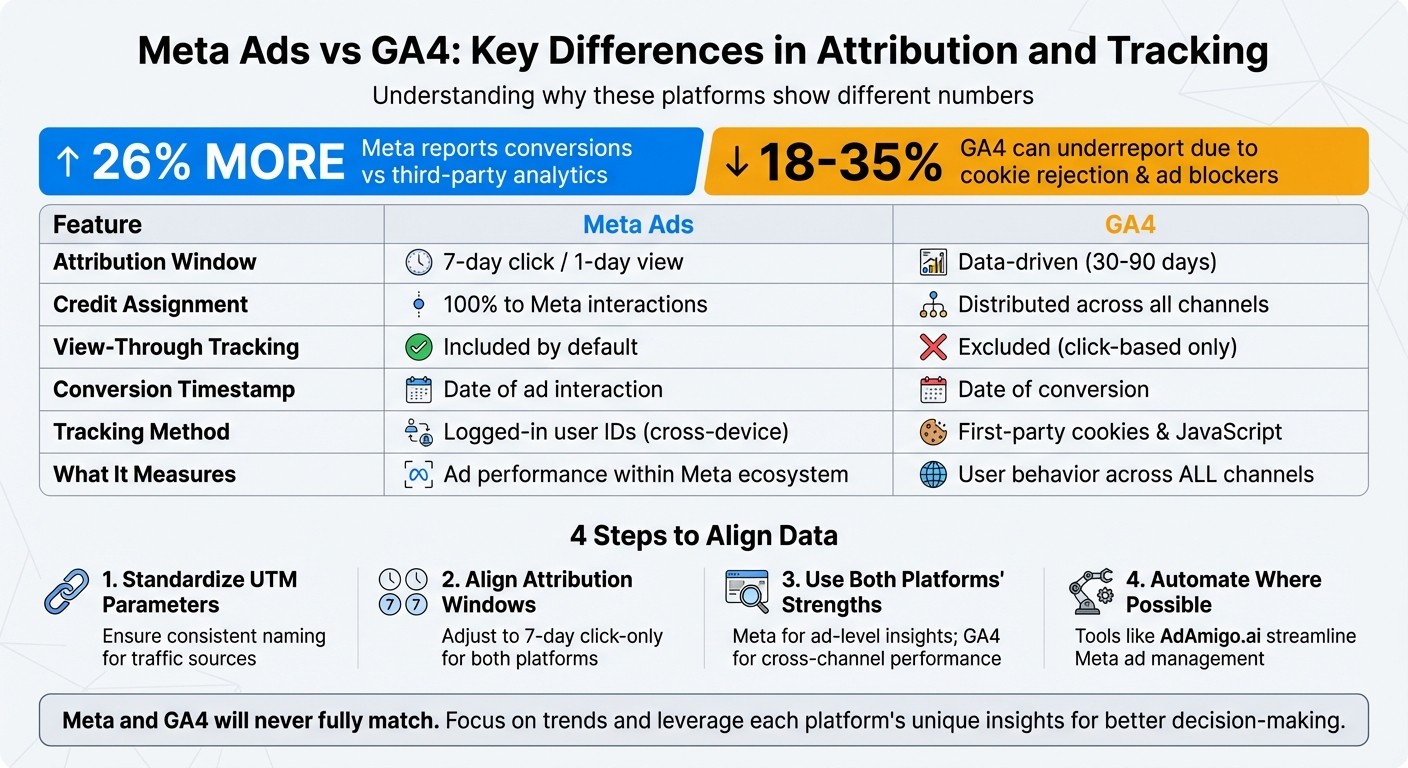
Meta Ads vs GA4: Key Differences in Attribution and Tracking
Why your Meta Ads & Google Analytics numbers don't match
How Meta Ads and GA4 Assign Credit to Conversions
The reason Meta and GA4 often show different conversion numbers lies in how each platform assigns credit and follows custom conversion reporting best practices. Their approaches to Meta Ads attribution vs. third-party tools are fundamentally different: Meta asks, "Did my ad directly influence this sale?" while GA4 focuses on, "How did different channels work together to make this sale happen?"
How Meta Assigns Credit
Meta uses an attribution model that gives credit to any interaction with your ad - whether it's a click or even just a view - within a specific time frame. The default attribution window is 7 days for clicks and 1 day for views. For instance, if someone clicks on your ad on Monday and makes a purchase on Friday, Meta attributes that conversion to the ad. Importantly, Meta records the conversion based on the date of the ad interaction, not the actual purchase date.
Meta also tracks logged-in users across devices, meaning it can link an ad viewed on a smartphone to a purchase made later on a desktop. This single-touch model is quite different from GA4’s multi-touch approach.
How GA4 Assigns Credit
GA4, on the other hand, takes a broader view of the customer journey. It tracks how users interact with multiple channels throughout the marketing funnel. Its default data-driven attribution model uses machine learning to distribute credit across all contributing channels - such as organic search, email, paid ads, and referrals. Unlike Meta, GA4 only tracks interactions that lead to a website session (usually a click) and does not include view-through conversions.
Another key difference is timing: GA4 reports conversions based on the date the conversion actually happens, not when the ad interaction occurred.
As Ali Izadi from Analytics Detectives puts it:
"Google Ads [and Meta] data tells you how your ads are performing directly, while GA4 data tells you how your ads contribute within the broader context of your marketing efforts."
Comparison Table: Meta vs GA4 Attribution
Feature | Meta Ads | GA4 |
|---|---|---|
Attribution Window | 7-day click / 1-day view | Data-driven (typically 30–90 days) |
Credit Assignment | 100% credit for ad interaction | Credit distributed across channels |
View-Through Tracking | Included by default | Excluded (click-based only) |
Conversion Timestamp | Date of ad click or view | Date conversion occurred |
Tracking Method | Logged-in user IDs (cross-device) | First-party cookies & Google Signals |
These differences explain why Meta often reports higher conversion numbers than GA4, which is why it's critical to properly sync Meta and GA4 conversions. On average, Meta shows 26% more conversions compared to third-party analytics tools. Meanwhile, GA4 can underreport paid campaign conversions by 18–35% due to factors like cookie rejection or ad blockers.
Why Clicks, Sessions, and Conversions Don't Match
When it comes to tracking campaign performance, differences in how platforms define and measure metrics like clicks, sessions, and conversions can cause serious reporting discrepancies. Meta and GA4 approach these metrics in fundamentally different ways, so even when tracking the same campaign, their numbers rarely align.
How Each Platform Defines Clicks and Sessions
Meta’s "Clicks (All)" metric counts every interaction with your ad - likes, shares, comments, and link clicks all count as clicks. For example, if someone taps your ad three times, Meta logs three clicks. On the other hand, GA4 tracks sessions, which only begin when its tracking code fires upon landing on your site. Those same three taps? GA4 records just one session, as long as they happen within its 30-minute session window.
Even when you compare Meta’s "Link Clicks" (clicks specifically intended to lead users to your site) to GA4 sessions, the numbers still won’t align. Why? If someone clicks your ad but closes the tab before the page fully loads, Meta counts the click, but GA4 doesn’t register a session. Additionally, ad blockers or disabled JavaScript can prevent GA4’s tracking code from firing, while Meta’s internal tracking remains unaffected.
Meta also uses a "people-based" tracking model, identifying users across devices via their login credentials by setting up cross-device attribution. GA4, by contrast, relies on JavaScript and first-party cookies, which are often blocked by browsers or privacy settings. This difference matters when you consider that over 65% of conversions start on one device and finish on another - Meta can track these transitions, but GA4 often misses them.
These fundamental differences in how metrics are defined naturally lead to even more variation in how conversions are tracked.
How Conversion Tracking Differs
Conversion timing is another key area where Meta and GA4 diverge. Meta attributes a conversion to the date of the ad click, regardless of when the actual purchase happens. For instance, if someone clicks your ad on Monday but doesn’t make a purchase until Friday, Meta logs the conversion on Monday. GA4, however, records it on Friday - the day the purchase occurs.
Meta also tracks view-through conversions by default. This means it counts users who saw your ad but didn’t click it, yet converted within a 1-day view window. GA4 doesn’t include view-through conversions; it only tracks conversions tied to direct clicks or sessions. As Freek Kampen from NewMetrics puts it:
"Discrepancies of around 20% are normal. So, you should also accept some in your data. You can assume that the truth is somewhere in the middle between the Meta Ads Manager and Google Analytics."
Comparison Table: Metric Definitions
Metric | Meta Ads | GA4 |
|---|---|---|
Clicks | Includes all interactions (likes, shares, comments, link clicks) | Not a primary metric; tracks "Sessions" instead |
Sessions | Not tracked | Begins on site landing with a 30-minute inactivity window |
Conversions | Reported on the day of the ad click | Reported on the actual conversion date |
View-Throughs | Included by default (1-day window) | Excluded; requires a direct click |
Tracking Method | Uses logged-in user IDs (cross-device) | Relies on first-party cookies and JavaScript |
Understanding these differences is essential for aligning data between Meta Ads and GA4.
How to Align Data Between Meta Ads and GA4
Bridging the data gap between Meta Ads and GA4 is essential to get a clearer understanding of your campaigns. While discrepancies between the two platforms are inevitable, you can minimize them by connecting the platforms, streamlining your tracking setup, and creating reports that provide a more unified view. As BrightBid explains:
"You won't 'sync' GA4 and Meta into one truth; you'll reconcile them. UTMs + GA conversions tell you post-click value, while Pixel/CAPI keeps Meta's delivery smart."
Here’s how you can integrate, adjust, and report data for better alignment.
Connecting Meta Data to GA4
Meta provides a built-in integration with GA4 through its Events Manager, making it easier to send GA4 event data to Meta’s pixel. To set this up, open Events Manager, navigate to Partner Integrations, and select Google Analytics. You'll need a Google account with at least Viewer access for your GA4 property. Once connected, map your GA4 properties to Meta datasets (pixels) and decide whether to share all traffic or only Meta-sourced traffic. Meta will then display a Connection Quality indicator - if it shows "Low", it could mean mapped events haven’t fired in 60 days or you’re using more than 50 unique utm_source values.
Keep in mind, GA4 doesn’t automatically pull in Meta’s cost data. You’ll need to manually upload CSV files or use a third-party connector to calculate your Return on Ad Spend (ROAS) within GA4. To avoid attribution issues, standardize UTM parameters for Meta Ads (e.g., utm_source=facebook or instagram, utm_medium=cpc) and add platforms like PayPal and Stripe to GA4’s Referral Exclusion List.
Once this is in place, the next step is to align the attribution windows between the platforms.
Setting Matching Attribution Windows
Meta’s default attribution window is 7-day click and 1-day view, whereas GA4 uses a 30-day lookback for acquisition events and up to 90 days for other conversions. To reduce the mismatch, adjust GA4’s conversion lookback windows to 30 or 7 days, depending on your needs. On Meta’s side, switch to "click-only" reporting and compare it with GA4’s last-click model. This eliminates view-through conversions from Meta’s data, which GA4 doesn’t track. Also, ensure both platforms are set to the same timezone to avoid discrepancies caused by conversions being logged on different days.
Building Custom Reports for Combined Insights
Custom reports are vital for understanding Meta’s role in the overall customer journey. Start with GA4’s Traffic Acquisition report and filter by session source/medium (e.g., facebook / cpc) to confirm that Meta traffic is being recorded accurately. Create additional reports to track metrics like engagement rate and average engagement time specifically for Meta traffic. For example, if Meta shows high click-through rates but GA4 reports low engagement, it could indicate a disconnect between your ad messaging and landing page.
In GA4’s Advertising section, use the Model Comparison tool to compare "Data-Driven" and "Last-Click" attribution models. This will help you understand how the two platforms differ in reporting conversions. Additionally, GA4’s Path Exploration feature can provide a visual representation of how Meta interactions fit into the broader user journey, alongside organic and search traffic.
Best Practices for Using Both Platforms Together
To get the most out of Meta Ads and GA4, use them for their specific strengths. Meta Ads excels at providing ad-level insights, such as which creatives, audiences, and placements are driving conversions within its platform. On the other hand, GA4 offers a broader, unbiased view of how Meta traffic performs alongside other channels like organic search, email, and direct traffic. Think of Meta as your go-to for delivery insights and GA4 as the tool for deeper post-click analysis.
Now let’s dive into how you can combine these strengths to optimize campaigns and improve tracking.
Using Each Platform for What It Does Best
Rather than trying to make both platforms match perfectly, focus on their unique metrics. Meta tracks logged-in users across devices and includes view-through conversions, which often leads to 26% higher conversion counts compared to standard analytics tools. Use these insights to experiment with creative formats, fine-tune audience segments, and tweak bids. Meanwhile, GA4’s cross-channel attribution helps you evaluate how Meta traffic stacks up against other sources and whether users are actually engaging with your site after clicking an ad, considering how first-click and last-click attribution impact your reporting.
A smart approach is to implement a weekly optimization routine. Use GA4 to pinpoint which Meta audiences deliver the lowest cost per acquisition (CPA) and the highest engagement. Then, reallocate your Meta budget toward those high-performing segments. This ensures you're focusing on meaningful results - like conversions and engagement - not just basic metrics like clicks.
Standardizing Tracking and Using Automation
Once you’ve defined each platform’s strengths, standardize your tracking to keep your data organized. Every Meta ad should follow a consistent UTM naming structure. For example:
utm_source=facebookorinstagramutm_medium=cpcA descriptive
utm_campaignvalue
Without consistent UTM parameters, GA4 may misclassify traffic into "unassigned" categories, making it harder to analyze performance. Additionally, ensure both platforms are set to the same timezone, and check that your landing pages don’t have redirects that strip UTM tags or the fbclid (Facebook Click ID) before GA4’s tag fires. This is essential for real-time conversion tracking and accurate attribution.
For automation, tools like AdAmigo.ai can be a game-changer. This AI agent is tailored specifically for Meta ads, automating tasks like creative generation, targeting adjustments, and budget optimization. AdAmigo.ai works around the clock, analyzing performance and making real-time adjustments to maximize results. Agencies can use it to manage 4–8× more clients per media buyer, while in-house teams can rely on it as a 24/7 assistant that gets smarter with every campaign.
Summary Table: Best Practices for Optimized Platform Use
Best Practice | Meta Ads Focus | GA4 Focus |
|---|---|---|
Attribution Alignment | Use 7-day click for delivery optimization | Use Data-Driven model for cross-channel credit |
Tracking Setup | Pixel + Conversions API (CAPI) | Event-based conversion tracking via GTM |
UTM Tagging | Use Meta's URL parameter builder | Monitor |
Optimization | Ad-level creative and audience testing | Landing page engagement and exit rates |
Automation | AdAmigo.ai for budget and bid adjustments | Custom reports for unified traffic quality |
Conclusion: Main Points for Fixing Reporting Differences
Meta Ads and GA4 will never produce identical numbers. As Freek Kampen from NewMetrics explains:
"Discrepancies of around 20% are normal... You can assume that the truth is somewhere in the middle between the Meta Ads Manager and Google Analytics".
The root of these differences lies in how each platform collects and processes data. Meta tracks logged-in users and includes view-through conversions, often requiring offline conversion tracking to capture the full customer journey, while GA4 relies on cookies and only captures click-through actions. On average, Meta reports 26% higher conversions compared to third-party analytics tools, whereas GA4 often underreports paid campaigns by 18–35% when cookies are blocked.
To narrow the gap, focus on syncing Meta Ads with Google Analytics. Always use consistent UTM parameters for Meta ads, implement Meta's Conversions API (CAPI) alongside the Pixel, and align attribution windows (e.g., set both platforms to track 7-day clicks). Additionally, ensure that landing pages preserve the fbclid or UTM tags during redirects, and allow 24–48 hours for GA4 data to fully process before drawing comparisons.
Rather than aiming for perfect alignment, leverage each platform for its strengths. Meta provides detailed insights into ad-level performance - such as which creatives, audiences, and placements drive results. To get even more granular, you can track custom conversions for specific user actions. GA4, on the other hand, offers a broader, cross-channel perspective, showing how Meta traffic interacts with organic search, email campaigns, and direct visits. As BrightBid emphasizes, the goal is to reconcile the data, not force it to match.
For teams managing multiple clients or handling constant campaign adjustments, automation tools like AdAmigo.ai can be game-changers. This AI-powered tool continuously analyzes Meta performance, generates new creatives, fine-tunes targeting, and optimizes budgets. With its help, agencies can manage 4–8× more clients per media buyer, while in-house teams benefit from a 24/7 assistant that improves with every campaign.
Both Meta Ads and GA4 have their limitations, so focus on trends rather than obsessing over exact numbers. By combining insights from both platforms, you can make smarter decisions about budgets, targeting, and creative strategies. Use these strategies to guide your campaigns toward more reliable and actionable data.
FAQs
Why do Meta Ads and Google Analytics 4 (GA4) show different conversion numbers?
Meta Ads and GA4 often show different conversion numbers because they rely on different approaches to gather, attribute, and report data. Meta tends to report higher conversions by using modeled conversions and a last-event attribution model, which gives credit to the final interaction within Meta's ecosystem. This method naturally boosts the number of conversions attributed to Meta campaigns.
GA4, however, takes a more comprehensive look at all website traffic, pulling data from various sources. The differences in reported numbers can stem from factors like varying attribution models, issues with tracking tags (such as being blocked or malfunctioning), and differences in reporting timeframes. While Meta zeroes in on its own touchpoints, GA4 aims to provide a neutral, all-encompassing view. These discrepancies highlight the distinct goals and methodologies of each platform rather than indicating any inaccuracies.
How can I resolve data differences between Meta Ads and GA4?
Data discrepancies between Meta Ads and Google Analytics 4 (GA4) happen frequently, mainly due to differences in how each platform tracks data, attributes conversions, and reports metrics over time. To narrow these gaps, start by ensuring your campaigns use consistent UTM parameters and proper tagging. This helps GA4 correctly identify and attribute traffic originating from Meta Ads.
Another way to address inconsistencies is by aligning attribution windows and conversion definitions across both platforms. Since Meta and GA4 often default to different settings, tweaking GA4’s configuration to match Meta’s attribution model can make a noticeable difference. Additionally, if a native Meta-GA4 integration is available, take advantage of it. This can simplify the data-sharing process and improve accuracy.
By sticking to solid measurement practices - like consistent tagging, syncing settings, and leveraging integrations - you can reduce mismatches in reporting and gain more reliable insights for decision-making.
How can I effectively use Meta Ads and Google Analytics 4 (GA4) together?
To make the most of Meta Ads and GA4, start by syncing your tracking and measurement settings. This means using consistent UTM parameters across your campaigns, defining conversions the same way in both platforms, and aligning attribution windows. These simple adjustments can significantly reduce discrepancies and give you a more unified view of performance.
Keep in mind that data mismatches can happen because of differences in tracking methods, attribution models, or reporting timeframes. To tackle this, regularly review and fine-tune your settings. Another valuable step is integrating GA4 events into Meta Ads. Whether you use native tools or third-party solutions, this can sharpen your conversion tracking - an essential move in today’s privacy-conscious world.
By staying focused on aligned KPIs and consistently optimizing your setup, you’ll unlock better insights and improve campaign performance across both platforms.