
Meta Ad Data Breach Response Plan
Step-by-step guide to contain Meta ad account breaches: secure access, freeze payments, audit users, enforce 2FA, and recover with AI monitoring.
When your Meta ad account is breached, quick action is critical to minimize damage. Follow these steps:
Secure Access: Assign multiple admins with "Full Control" and enforce Two-Factor Authentication (2FA) for all users.
Freeze Payments: Immediately contact your bank or remove compromised payment methods to stop further losses.
Audit Permissions: Regularly review and remove inactive or unknown users from your Business Manager.
Set Up Alerts: Enable Meta’s Business Manager Alerts and use AI tools like AdAmigo.ai to monitor for unusual activity.
Respond Swiftly:Report breaches to Meta, document evidence like unauthorized campaigns, and notify affected users if personal data is involved.
Strengthen Security: Complete Meta’s verification process, regularly review permissions, and use tools to prevent future breaches.
A solid response plan, combined with proactive monitoring, can safeguard your ad budget and user trust while ensuring compliance with legal requirements.
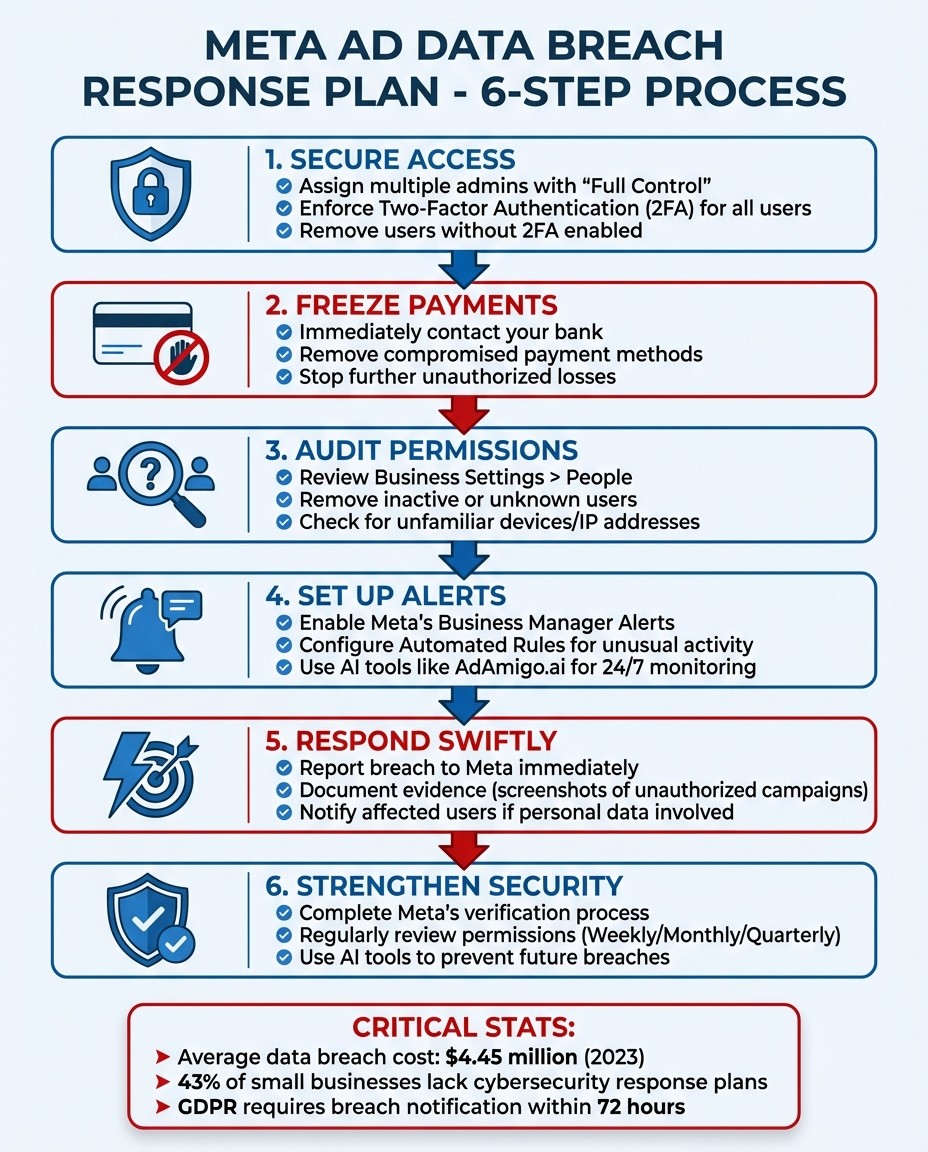
6-Step Meta Ad Account Breach Response Plan
Hacked Meta Business Manager - LOCK IT DOWN NOW!
Building Your Meta Ad Data Breach Response Plan
Having a well-thought-out response plan is key to managing potential data breaches. The foundation of this plan should include clearly defined roles within your team and reliable detection systems. Without these, you're left scrambling to fix problems instead of proactively addressing them.
Assign Roles and Responsibilities
Start by assigning at least three Full Control users in your Business Manager. Meta recommends this setup to ensure redundancy. If one admin account is compromised, the others can immediately step in to manage access, shut down unauthorized activity, or handle financial matters like credit lines. This structure ensures swift action during a breach.
A Trusted Backup Admin is also critical. This could be a coworker or agency partner who can take over if the primary admin's account is locked or hacked. Hackers often target top-level accounts first, so having a backup admin is a smart safety net.
To strengthen security, enforce Two-Factor Authentication (2FA) for all users. This can be managed via Business Settings > Security Center. Anyone not enabling 2FA should be removed, as they pose a security risk. Regularly audit your Business Settings > People to clean up old accounts, unknown users, or profiles tied to generic public email domains like @gmail.com.
Here’s a real-world example: In March 2025, Digital Ad Snack faced an ad account hack late on a Friday night. A team member spotted a new campaign with an unusually high daily budget that hadn’t been authorized. The breach was traced back to an employee’s personal Facebook account, which had been compromised. The team quickly froze the connected debit card and used a Full Control admin account to remove the compromised profile from Business Manager. The issue was resolved within hours.
If you notice signs your account is compromised, your first move should be to freeze the payment method - either by contacting the bank or removing the credit card from Meta. This prevents further unauthorized spending.
Once roles are clearly defined and secured, the next step is to configure detection systems for detecting Meta ad anomalies.
Set Up Detection Systems
Detection systems are your frontline defense, helping to identify threats before they spiral out of control. They also play a role in meeting compliance standards by enabling quick detection and response.
Activate Business Manager Alerts for real-time updates on ad rejections, account restrictions, or policy changes. Use Automated Rules to flag unusual activity, like sudden spending spikes or unexpected status changes. These rules can even pause campaigns automatically if something seems amiss. Keep an eye on the Account Quality Tab for signs of trouble, such as a spike in rejections or limited delivery tags, which could indicate compliance problems.
Check the "Where You're Logged In" section in your personal profile settings to spot unfamiliar devices or login locations. If your business has completed verification in the Security Center, enable the "Protect Important Actions" feature. This adds an extra approval step for sensitive changes. If you believe your personal profile has been hacked, head to facebook.com/hacked immediately to secure your account.
For even more robust monitoring, consider AI tools like AdAmigo.ai. These platforms can monitor for suspicious activity, broken links, or configuration errors around the clock. While Meta’s native tools handle the basics, AI-driven systems analyze patterns across your entire setup - covering creatives, targeting, bids, and budgets - to catch issues that might slip through manual checks.
How to Respond When a Breach Occurs
When a breach happens, time is of the essence. Acting quickly and following a structured approach can help limit the damage. Focus on containing the threat, understanding what went wrong, and fulfilling your legal obligations.
Contain the Breach and Assess the Damage
Start by locking down compromised access points. Freeze payment methods by contacting your bank or removing the card tied to Meta. Then, take these steps:
Audit your settings: Go to Business Settings > People to remove unknown or outdated users. Check "Where You're Logged In" for unfamiliar devices and log them out immediately.
Secure personal accounts: If personal accounts are affected, deactivate them right away. Direct affected users to secure their profiles at facebook.com/hacked.
Document everything: Take screenshots of unauthorized campaigns, altered budgets, or suspicious logins. These records will be essential when reporting the breach.
Report to Meta: Use the Meta Business Help Center to report the breach, providing your Business Manager ID and Ad Account Number.
Next, evaluate the impact of the breach by focusing on these areas:
Financial: Look for unauthorized spending, unexpected budget changes, or new payment methods.
Access: Check logs for unfamiliar devices or IP addresses and review API key permissions to ensure no unauthorized access tokens were generated.
Permissions: Identify any newly added admins or unknown users.
Compliance: Review the Account Quality Dashboard for policy violations and monitor pixel event activity in Events Manager and Audience Manager for irregularities.
Once you’ve contained the breach and assessed the damage, shift attention to meeting your legal obligations.
Meet Legal Requirements and Notify Affected Parties
If the breach involves user data, legal reporting and notification become your top priorities. Start by reporting the incident to Meta through the Meta Business Help Center, using your Business Manager ID and Ad Account Number.
Next, notify individuals whose personal data may have been compromised. Be upfront about what occurred, the type of data affected, and the measures you’re taking to address the situation. Ensure that individuals who had opted out of data collection are excluded from any compromised audiences.
Addressing legal requirements promptly can help shield your business from further liabilities and maintain trust with your users.
Recovery and Future Prevention
After containing the breach and addressing your legal responsibilities, the next step is to get your ad account back on track and put measures in place to avoid future attacks.
Restore Your Ad Account Operations
Start by ensuring only trusted users have access to your Business Manager. Go to Business Settings > People and remove any unauthorized accounts. If your personal profile was compromised, secure it through facebook.com/hacked.
Take back financial control by contacting your bank to block the compromised card and adding a new payment method to your account. Review all your campaigns to check for any that were paused or altered during the breach. Restart legitimate campaigns one at a time, keeping a close eye on spending to ensure everything is running as expected. You can also monitor your ad accounts with AI to detect anomalies in real-time.
It's also a good idea to create backup administrative access. Make sure at least three users have "Full Control" permissions in Business Manager, following Business Manager setup best practices. This setup allows access changes to be approved even if one account is compromised. Consider adding a trusted colleague or a partner marketing agency as a backup admin to reduce the risk of being completely locked out.
Once you've restored operations, it's time to focus on improving your password and account security to guard against future breaches.
Strengthen Your Ad Account Security
The first step is enabling Two-Factor Authentication (2FA) for all users. This can be done in Business Settings > Security Center, where you can enforce 2FA across your entire Business Portfolio - not just for admins. Be firm about removing users who refuse to comply with this requirement.
Complete Meta's business verification process in the Security Center to protect critical actions, such as adding new admins or updating payment methods. Regularly audit user access by reviewing the "People" section in Business Settings. Remove any former employees, inactive accounts, or users with public email domains (like @gmail.com) to minimize vulnerabilities.
Here’s a quick guide to help you stay on top of account security:
Audit Frequency | Focus Area | Key Actions |
|---|---|---|
Weekly | Active Users | Remove inactive or unknown users from Business Manager |
Monthly | Payment Methods | Review all cards on file and remove outdated payment methods |
Quarterly | Permissions | Audit "Full Control" users to ensure only trusted individuals have access |
Using AdAmigo.ai for Breach Prevention and Recovery

After restoring your operations and strengthening security measures, the next step is to bolster your defenses with proactive AI monitoring. This is where AdAmigo.ai steps in. It’s an AI-powered platform designed to continuously monitor your Meta ad account, catch problems early, and support rapid recovery in case of a breach.
AdAmigo.ai Protect: Spot Issues Before They Escalate
AdAmigo Protect serves as an automated safeguard, constantly watching for potential red flags in your account. It can detect unusual spending patterns, setup mistakes, broken links, and disabled ads - all of which could signal a security issue or technical glitch. Unlike Meta’s built-in alerts, which act only when fraud is highly likely, AdAmigo’s AI identifies irregularities earlier by analyzing your account’s overall behavior.
The platform also checks your creatives, ad copy, and targeting for policy violations before you launch campaigns. This pre-launch review helps you avoid Meta ad rejections that could leave your business exposed. As a trusted Meta Business Technology Partner, AdAmigo securely integrates with your ad account and provides tools for multi-account Meta ad management, minimizing the risk of human error.
Once detection is handled, the focus shifts to quick recovery.
Recover and Improve Campaigns with AI
If a breach occurs, AdAmigo’s Bulk Ad Launch feature allows you to relaunch hundreds of ads with a single click, ensuring you can quickly rebuild your campaigns. To get your performance back on track, the AI Actions tool provides a daily list of prioritized adjustments for your creatives, budgets, bids, and targeting - helping you recover without the need to start from scratch.
For deeper insights, the AI Chat Agent can diagnose the root cause of issues, compare your setup to successful competitor strategies, and guide you step-by-step through problems like expired tokens or altered permissions. Additionally, managing access becomes easier with the platform’s bulk permission management feature , which is a critical part of learning how to safely share ad account access, which lets you revoke compromised access across all accounts at once. This ensures your ad accounts are secured efficiently and effectively.
Conclusion
This guide walks you through the steps needed to protect your Meta ad accounts from breaches. A single breach can drain your budget and damage trust with your audience. That’s why having a well-documented response plan is crucial. Consider this: the global average cost of a data breach reached $4.45 million in 2023, yet 43% of small businesses still lack any kind of cybersecurity response plan.
When a breach happens, speed is everything. Quick actions like freezing payments or removing compromised users can save you thousands of dollars in unauthorized spending. A simple "First Hour" checklist can make the difference between keeping control and total chaos.
But a response plan isn’t a one-and-done effort. It needs regular updates and testing to stay effective. For example, you should run tabletop exercises annually, review access permissions every quarter, and update notification protocols and train your team on Meta policies to match evolving regulations. Compliance isn’t just about having a plan - it’s about acting faster than required. The GDPR’s 72-hour notification rule and varying state laws make this clear. Tools like AdAmigo.ai can help by providing constant monitoring and reinforcing these processes.
Services such as AdAmigo.ai offer round-the-clock monitoring to catch problems early - like unusual spending, disabled ads, or policy violations - before they spiral out of control. And if you need to recover disabled Meta ad accounts, features like automated bulk ad launching and prioritized AI Actions can help you rebuild campaigns quickly while reducing the chance of human error.
A solid response plan does more than protect your ad budget - it shields your reputation, maintains customer trust, and keeps your advertising efforts running smoothly while others may be struggling. Start building your plan today, test it regularly, and let AI handle the 24/7 vigilance no human team can match. By focusing on clear roles, strong detection systems, and rapid recovery, you’ll strengthen every strategy covered in this guide.
FAQs
What should I do in the first hour after a Meta ad account breach?
When a Meta ad account is breached, the first hour is critical. Take immediate steps to contain the situation. Begin by securing your account: update your passwords and thoroughly review recent activity to understand the extent of the breach. Inform your team right away and contact Meta support to report the incident and start the recovery process. Acting fast can help minimize damage and restore control over your account.
How can I tell if my Meta Business Manager was hacked vs. a normal issue?
If you notice unfamiliar campaigns, unexpected billing activity, or other unauthorized changes in your Meta Business Manager, it’s a strong sign that your account may have been compromised. These aren't typical issues - they point to a potential security breach.
Am I required to notify customers or regulators after a Meta ad data breach?
Yes, U.S. laws require businesses to notify customers or regulators if a data breach involving personally identifiable information (PII) occurs. This applies to breaches resulting from Meta ad data or any other source.
Every U.S. state and territory has specific laws mandating breach notifications. These laws aim to protect individuals by ensuring they are informed and can take necessary steps to safeguard their information.