
Agency playbook: how to run Meta ad spend without credit cards (monthly invoicing, direct debit, and client billing)
Use monthly invoicing, direct debit, or client-owned billing to run Meta ad spend without agency credit cards, plus roles, cash-flow tips, and contract safeguards.
Managing Meta ad spend without relying on credit cards can save agencies from unnecessary financial risks and administrative headaches. Instead of juggling hundreds of transactions each month, agencies can streamline billing using monthly invoicing, direct debit, or client billing. These methods consolidate charges, improve cash flow, and reduce the risk of payment issues.
Here’s how it works:
Client-Owned Billing: Clients handle payment directly to Meta, minimizing agency liability.
Agency-Owned Billing: Agencies pay Meta upfront and invoice clients later, offering more control but higher financial risk.
Hybrid Model: Combines client payment for ad spend with separate agency fees, balancing risk and flexibility.
Key steps for smooth billing:
Assign clear roles for managing payments and invoices.
Use Meta’s invoicing tools to track due dates and avoid ad pauses.
Prepare for weekends and holidays to prevent payment delays.
Implement strong contract clauses to protect against late payments.
The right billing model depends on your agency’s risk tolerance and client needs. With proper setup, you can simplify operations, safeguard finances, and focus on scaling your campaigns.
Meta Ads Client Setup Guide (Agency & Freelancers) – Avoid Bans, Billing Issues & Access Mistakes
3 Billing Models: How They Work and What to Expect
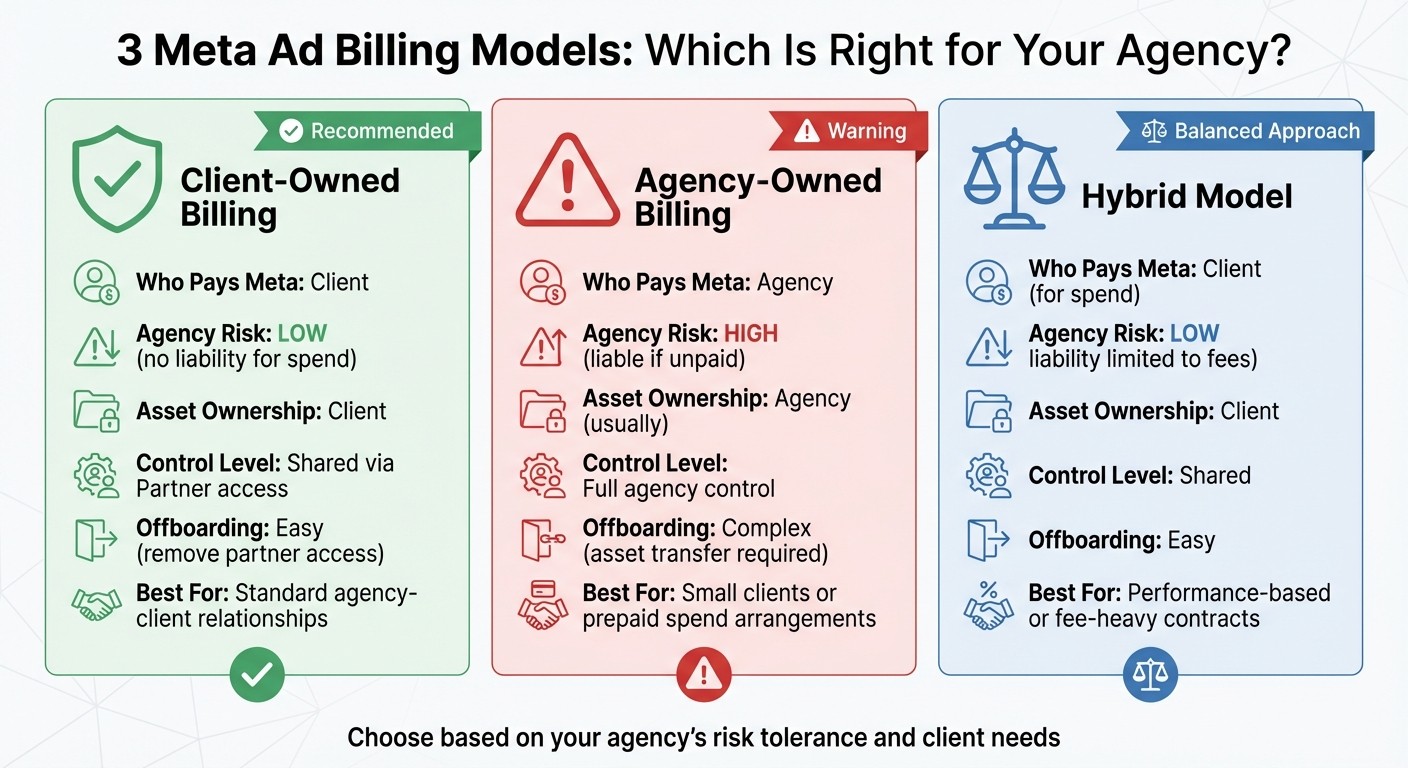
Comparison of 3 Meta Ad Billing Models for Agencies
Agencies typically adopt one of three billing approaches, each offering a different balance of financial risk and control. Here's a quick comparison:
Feature | Client-Owned Billing | Agency-Owned Billing | Hybrid Model |
|---|---|---|---|
Who Pays Meta | Client | Agency | Client (for spend) |
Agency Risk | Low (no liability for spend) | High (liable if unpaid) | Low (liability limited to fees) |
Asset Ownership | Client | Agency (usually) | Client |
Control Level | Shared via Partner access | Full agency control | Shared |
Offboarding | Easy (remove partner access) | Complex (asset transfer required) | Easy |
Best For | Standard agency-client relationships | Small clients or prepaid spend arrangements | Performance-based or fee-heavy contracts |
Let’s break down each model, its advantages, challenges, and how it works.
Client-Owned Billing (Recommended)
In this model, the client retains full ownership of the Business Portfolio and ad account structures, adding their own payment method - whether that’s a credit card, PayPal, or direct debit. Your agency is granted "Partner" access to manage campaigns, which requires a clear understanding of Meta ad permissions vs. admin roles, ensuring you can do your job without taking on financial liability or use an AI media buyer to automate optimization.
One of the biggest advantages? If the client’s payment fails or they stop paying Meta, their ads pause automatically, leaving your agency financially protected. Cedric Yarish from AdManage.ai highlights the importance of this setup:
"If a client ever feels like 'this agency owns our business,' they panic. Your setup needs to keep the client as the owner, always."
This structure is ideal for agencies looking to scale efficiently, as it shifts billing logistics to the client. However, onboarding can take longer since the client needs to set up their payment details. Additionally, you lose some control if their payment method fails, but the reduced risk makes this trade-off worthwhile.
Agency-Owned Billing (High Risk, Full Control)
Here, the agency takes on the responsibility of paying Meta directly, often using a line of credit or monthly invoicing. You then bill the client for their share of the ad spend. Agencies using this model often set up a dual-layer account structure, creating separate child accounts for each client.
This model gives you complete control over the ad account, making onboarding faster since the client doesn’t need to set up their own payment details. It’s particularly useful for smaller clients who may lack a Business Manager account or a credit line.
However, this control comes with significant financial risk. If a client delays payment or defaults entirely, your agency is left covering the costs. This exposure can quickly strain cash flow, making it essential to have ample liquid capital available to manage the risks.
Hybrid Model (Split Responsibility)
The hybrid model divides financial responsibility: the client pays Meta directly for ad spend, while the agency invoices separately for management or performance fees. Some agencies also offer "rented" accounts, where they provide the account infrastructure for a fee.
This approach balances the benefits of client payment responsibility with the flexibility to implement complex fee structures. It’s particularly useful for performance-based contracts or agreements involving a mix of flat retainers and conversion-based fees. Offboarding is straightforward, as you simply revoke your Partner access.
By keeping ad spend payments separate, this model minimizes financial risk while allowing agencies to scale operations. It also simplifies Meta’s billing process for the client, while giving you the ability to maintain control over your service fees.
Each of these models has its place, depending on your agency’s priorities, client needs, and risk tolerance. Understanding the nuances can help you choose the best fit for your business.
Step-by-Step Billing Operations Guide
Effectively managing billing operations on a daily basis is essential for keeping campaigns running smoothly.
Who Handles What: Roles and Responsibilities
Clear role assignments are key to avoiding confusion when invoices arrive or payments fail. Agency admins with "Manage Finance" permissions oversee credit lines, update payment methods, and handle high-level billing decisions. Your finance team or accountant should also have "Manage Finance" access to download invoices, reconcile spending, and monitor payment deadlines.
Media buyers, on the other hand, only need access to ad accounts to monitor daily spending and set campaign caps. They won’t need the ability to modify payment methods. Account managers can be assigned view-only or analyst permissions, allowing them to pull billing data for reports without risking accidental changes.
Meta sends invoices to specific email addresses set up in the "Billing & payments" section. To stay ahead of potential issues, you can set up automated alerts for instances like campaigns nearing their budget limits or experiencing sudden delivery drops. Scheduling quarterly reminders to review user access and API permissions also helps maintain a secure and efficient billing process. These steps integrate seamlessly into your agency's standard operating procedures, ensuring timely issue resolution and consistent cash flow. Implementing team workflows for ad policy compliance further protects your accounts from sudden disruptions.
Now, let’s look at how to track due dates and handle spend pauses to keep campaigns running without interruptions.
Tracking Due Dates and Handling Spend Pauses
The "Invoices" page in Meta Billing & Payments is your go-to tool for checking current and upcoming payment amounts. Agencies managing multiple clients can create a "Statement of Accounts" as a CSV file to track all unpaid invoices and their due dates.
For those using monthly invoicing in the US or SEPA regions, enabling autopay through direct debit ensures Meta deducts payments automatically on the due date. Keep in mind, billing information cannot be updated from two days before the end of the month until four days into the new month.
If a payment fails and Meta pauses ads, act quickly. For client-owned billing, contact the client to update their payment method. For agency-owned billing, use the "Pay now" button (available in the US and SEPA) to make a one-time payment if there’s a delay with your bank transfer.
"If you use the same payment method for multiple clients, and one of those accounts has a payment issue... Facebook may flag all accounts tied to that card." – LeadEnforce
To minimize risk, use separate payment methods for each client. Additionally, set automated rules to pause campaigns that exceed 150% of their daily budget, preventing overspending.
With due dates under control, it’s time to prepare for non-banking days, such as weekends and holidays.
Weekend and Holiday Backup Plans
Banks don’t process ACH payments on weekends or major holidays. If a payment date falls on a non-banking day, expect processing to take an extra day. Autopay systems typically deduct funds on the last banking day before a weekend or holiday to ensure on-time payments.
To avoid delays, schedule manual payments one business day before long weekends or holidays. Assign someone to verify billing details before the month-end lock period (which starts two days before month-end) to address any permission errors ahead of time. For threshold billing accounts, Meta processes charges automatically when the payment threshold is reached - even on weekends.
Set up real-time alerts for payment failures to take immediate action, even during weekends. Keep a cash buffer ready to cover ad spend due over weekends, as Sunday transactions may batch with Monday’s and not settle until the next business day. Lastly, enforce two-factor authentication in Business Settings to protect accounts from security issues that could disrupt ad delivery.
Managing Cash Flow and Financial Risk
In the world of agencies, managing cash flow is just as important as billing itself. When agencies cover ad spend upfront, the lag between paying platforms like Meta and getting reimbursed by clients can quickly drain working capital. Knowing how billing cycles work - and securing your agency with solid contract terms - can mean the difference between smooth operations and constant financial stress.
How Invoice Timing Affects Your Cash
Monthly invoicing provides a 30-day payment window from the invoice date. For example, if Meta invoices you on March 1st, payment isn’t due until March 31st. This gives agencies a full month to collect payments from clients before their own payment deadline. Compare this to credit card billing, where Meta charges your account every time a payment threshold is reached. A $200,000 monthly ad budget could lead to 200 separate $1,000 charges throughout the month, instantly impacting your available credit.
The 30-day window of monthly invoicing offers a clear advantage. It helps maintain working capital for essentials like payroll and software subscriptions. However, Meta’s billing system can still create challenges. For instance, Meta places authorizations on your account before deducting funds, reducing your available credit for other campaigns. While ACH and direct debit avoid the threshold issue, they often require immediate payment, negating the flexibility of monthly invoicing terms.
Another important detail: Meta locks billing updates from two days before the end of the month until four days into the new month. To avoid delays, make any payment method or billing changes at least three days before month-end.
Payment Method | When Charges Hit | Cash Flow Impact | Admin Work |
|---|---|---|---|
Credit Card | When threshold is reached | Immediate; reduces credit | High (frequent charges) |
ACH / Direct Debit | Monthly, due on receipt | Neutral; no extended terms | Low (single charge) |
Monthly Invoicing | Monthly with 30-day terms | Positive; extends cash flow | Low (one invoice) |
Grasping these differences highlights why agencies must address cash flow risks in their client agreements.
Contract Clauses You Need
Late payments are a common headache for agencies, costing an average of $39,000 annually, with 97% of agencies dealing with late-paying clients. To protect your agency, your contracts need to include safeguards for delayed payments. One effective measure is a pause policy - halt services after two late invoices to avoid covering multiple months of ad spend while chasing overdue payments.
Adding a 1.5% monthly late fee (18% annually) after 30 days past due can also encourage timely payments. For project-based work, consider milestone-based payment triggers to ensure the next phase doesn’t start until the current invoice is settled. Since 25% of B2B businesses delay payments by 20–30 days past the due date, these clauses are critical.
"We structure our payment terms like building blocks - each phase must be paid before beginning the next. This approach reduced our payment issues by 80%." – Harmanjit Singh, Origin Web Studios
Upfront payment methods are another must. Require a credit card on file or ACH authorization for recurring retainers. For new clients or large campaigns, ask for a 20–50% deposit before any ad spend begins. This protects your agency if the client relationship falters early on.
Lastly, clarify who owns the billing account. If using the client’s Meta credit line (the preferred approach), your contract should state that the client is responsible for all ad spend. Specify that campaigns will pause if their payment to Meta fails. If you’re fronting the spend on your own credit line, include terms addressing who bears the costs of paused campaigns and any fees to restart them.
With cash flow management and contract protections in place, the next step is to explore how agencies can structure business portfolios to handle multiple clients effectively.
Setting Up Business Portfolios for Multiple Clients
When managing multiple clients, how you organize Meta Business Manager portfolios plays a big role in ensuring billing is clear, assets are secure, and operations run smoothly. The best practice? Each client should own their own Business Manager, while your agency requests Partner access using your Agency Business ID. This approach keeps client assets separate, avoids cross-contamination from policy violations, and ensures that billing stays under the client’s control.
"Your client always owns their Ad Account, Page, and data. You are simply granted permission to work on their behalf, much like giving a key to your house cleaner but not the deed to your house." – Graphed
For agencies juggling multiple clients, Meta's 2-Tier structure is a lifesaver. With this setup, a Parent Business Manager oversees multiple Child Business Managers, allowing for consolidated invoicing and shared credit lines while maintaining individual account spend limits. Inside each Business Manager, use Projects to align ad accounts and Pages with specific clients. This ensures media buyers only operate within the correct client context, reinforcing both billing transparency and operational security.
Portfolio Structure and User Permissions
The golden rule? One ad account per client. This keeps data clean, protects assets if you need to recover disabled Meta ad accounts, and simplifies billing. Since Meta limits profiles to creating only two Business Portfolios, your agency should stick to a single central Agency Business Manager and request partner access to client-owned portfolios.
When it comes to permissions, adopt a least-privilege model. Media buyers typically need "Advertiser" or "Manage Campaigns" access to handle campaigns, while finance staff require "Finance" or "Manage" access for billing and payments. Full Admin access should only go to senior operations staff when absolutely necessary. To streamline billing, add your finance team’s email to the "Additional invoicing emails" field in each client’s Business Manager so they receive statements directly. For large-scale management, consider using System Users with access tokens to perform actions without relying on personal Facebook logins.
Role Type | Recommended Permissions | Primary Responsibilities |
|---|---|---|
Media Buyer | Advertiser / Manage Campaigns | Create/edit campaigns, manage creative |
Finance Staff | Finance Editor / Manage | Handle invoices, payment methods, credit lines |
Senior Ops | Admin / Full Control | User management, partner requests, settings |
Reporting Analyst | Analyst / View Performance | Generate performance reports |
Regular maintenance is key. Conduct quarterly audits to remove inactive users and confirm permissions. Use clear naming conventions like "[Client Name] - [Region] - [Environment]" to minimize errors, such as editing the wrong client’s campaigns. Agencies that implement structured onboarding processes see up to 63% better retention rates, proving that a little effort upfront can pay off in the long run.
Copy-Paste Templates for Billing Setup
Simplify client onboarding and internal workflows with these ready-to-use templates. Back in June 2025, Sandor Farkas, the Co-founder of Connexify, shared a standardized Meta Business setup guide that included a practical client email template. His method focuses on three key principles: clarity, security, and ownership - all of which are reflected in the templates provided here.
Client Email: Billing Change Notice
This email is designed for use when transitioning a client to Meta monthly invoicing or setting up partner access for the first time. It’s concise, reassuring, and action-focused.
Subject: Action Required: Grant Partner Access to Your Meta Business Manager
Hi [Client Name],
To manage your Meta ads effectively and ensure your campaigns run without interruptions, we need Partner Access to your Meta Business Manager. This setup keeps you in full control of your assets and billing while allowing us to manage campaigns on your behalf.
Here’s what you need to do:
1. Add our agency as a Partner
Navigate to Business Settings > Users > Partners > Add and enter our Business Manager ID: [Your Agency BMID].
2. Grant access to these assets:
Ad Account: [Ad Account ID]
Facebook Page: [Page URL]
Pixel/Data Source: [Pixel ID]
Instagram Account: [Handle]
Catalog (if applicable): [Catalog ID]
3. Set permissions to "Manage Ads"
This provides us with the minimum access required to create and manage campaigns - nothing more.
4. Enable Two-Factor Authentication (2FA)
This step is essential for securing your account and avoiding policy issues.
Important: You retain full ownership of all assets and payment methods. We only receive partner access to perform our work. If you’re moving to monthly invoicing, Meta will issue invoices with a 30-day payment window from the date they are generated.
Need assistance? Check Meta’s Add a Partner guide or reply to this email.
Thanks,
[Your Name]
Internal Onboarding Checklist
This checklist helps your team stay organized during the billing setup process for new clients. Follow it each time to avoid access problems, payment failures, or invoice-related confusion.
Onboarding Phase | Key Action Items |
|---|---|
Preparation | • Confirm the Agency Business Manager is active |
Data Collection | • Gather Client Business Manager ID, Ad Account IDs, Pixel IDs, and Purchase Order (PO) Numbers |
Access Setup | • Request Partner Access |
Billing Config | • Set the Credit Line as the default payment method |
Verification | • Confirm "Manage Finance" permissions are active |
Key reminders: Monthly invoicing typically begins on the 1st of the month after setup. Billing details are locked from two days before the end of the month until four days after. Make sure to add the client’s finance team email to the "Additional invoicing emails" section in their Business Manager so they receive statements directly. For clients with multiple ad accounts, use Invoice Groups to consolidate everything into a single monthly invoice.
"Always request the minimum necessary permissions when establishing partner access - clients appreciate the security-conscious approach." – AdStellar
Once the setup is complete, test billing alerts and credit line charges to catch any configuration errors before they disrupt live campaigns.
These templates provide a structured approach to billing setup, ensuring smooth client onboarding and consistent management practices.
Summary: Running Meta Ads Without Credit Cards
Managing Meta ads without relying on credit cards revolves around three key factors: the billing model, the operational structure, and the financial safeguards.
Billing Models
Client-Owned Billing: This approach minimizes risk by requiring clients to maintain their own Business Manager accounts and payment methods. Agencies gain access to assets via Partner permissions, ensuring financial responsibility stays with the client.
Agency-Owned Billing: Here, the agency assumes full control over billing. While this offers flexibility, it also increases financial risk - issues with one account could lead Meta to flag all accounts linked to the agency's payment method.
Hybrid Model: This combines elements of both approaches. Agencies share a line of credit with child Business Managers and implement spend limits to control budgets and reduce risk.
Operational Strategies
To ensure smooth operations, assign clear roles for invoice monitoring and set up real-time alerts to catch unexpected spend spikes. Always maintain backup payment methods to avoid campaign interruptions, especially during weekends or holidays. Monthly invoicing with 30-day terms can help improve cash flow compared to frequent credit card charges.
Financial Safeguards
Since the credit line owner is legally responsible for all ad spend, contracts must clearly outline liability and reimbursement terms. Following a Meta ad account setup checklist simplifies client transitions, and Partner Access should always be requested through Business Manager setup best practices rather than personal profiles. For clients with multiple ad accounts, using Invoice Groups consolidates billing into a single monthly statement. Additionally, setting account spending limits and campaign caps helps prevent budget overruns, particularly when sharing a credit line.
FAQs
Can we still use cards anywhere?
Yes, you can still use credit cards to manage Meta ad spend. However, for agencies, this can get tricky since Business Manager accounts generally allow only one card per account. If you need to use multiple cards, you might have to create additional Business Manager accounts or assign specific cards to individual campaigns. While this approach works, it demands meticulous organization to prevent mix-ups and keep everything running smoothly.
What if the client refuses bank payments?
If a client declines bank payments, start by reviewing their billing setup. Explore other payment methods supported by Meta, such as credit cards or invoicing, to find a suitable solution. Make sure contracts clearly outline responsibilities, including clauses for late payments and billing ownership, to avoid misunderstandings down the line.
Keep an open line of communication with the client to address any concerns or issues quickly. If the refusal continues, you might need to adapt the billing model to ensure campaigns stay on track without interruptions.
Who is liable if invoices are unpaid?
When it comes to unpaid invoices, the responsibility usually lies with the party designated to handle payments - most often the client or the account owner. This depends on how the billing arrangements are set up, specifically whether the client or the agency is listed as the invoice owner. To avoid confusion, contracts should clearly define who is liable for unpaid or overdue invoices and specify any potential consequences, such as ad pauses or account restrictions. Ultimately, the invoice owner is the one tasked with ensuring payments are made on time.
How to handle multiple brands under one business portfolio?
To handle multiple brands within a business portfolio effectively, organize your Business Manager with a well-defined hierarchy. Treat each brand as a distinct asset and assign permissions thoughtfully: for example, give finance teams access to billing and allow media buyers to manage campaigns. Stick to consistent naming conventions and standardized permission setups. This approach minimizes risks like account shutdowns, ensures smoother scalability, and keeps your operations aligned with Meta's policies.