
Meta Ads Credit Cards Removed: 2026 Billing Change Guide
High-spend Meta ad accounts must switch from credit cards to monthly invoicing by March 31, 2026. Covers credit lines, the billing lockout, and recovery steps.
Starting April 1, 2026, Meta will no longer accept credit or debit cards for certain ad accounts — primarily those with high ad spend. Affected advertisers must switch to one of two payment methods — monthly invoicing or direct debit — by March 31, 2026, or their ads will pause.
But here's what most guides miss: the real deadline isn't March 31. It's March 29. Between March 30 and April 4, Meta locks billing settings to a read-only state — meaning if you haven't completed your transition by the 29th, you're locked out and can't prevent the April 1 pause. More on this below.
Key Points:
Who is affected? High-spending accounts (specific thresholds not disclosed). Smaller accounts may still use credit cards.
Why the change? To reduce credit card processing fees (1.5%–3.5% per transaction) and improve billing reliability.
Payment options:
Monthly invoicing: Consolidates ad spend into one bill with Net 30 terms and a credit line.
Direct debit: Automatically withdraws funds from a linked bank account each month (US and SEPA regions only).
Critical dates:
Notifications began February 26, 2026.
Transition must be completed by March 29, 2026 (before the lockout begins).
Billing settings become read-only March 30–April 4.
Ads pause April 1, 2026, if no valid payment method is set.
What's at stake: Losing 2%–3% credit card rewards — ranging from $9,000 to $180,000 per year depending on your spend.
What to do now:
Check your billing settings in Meta Business Suite or Ads Manager for notifications.
Set up monthly invoicing or direct debit based on your needs.
Add a backup payment method to prevent disruptions.
Complete everything before March 29 — don't wait for the 31st.
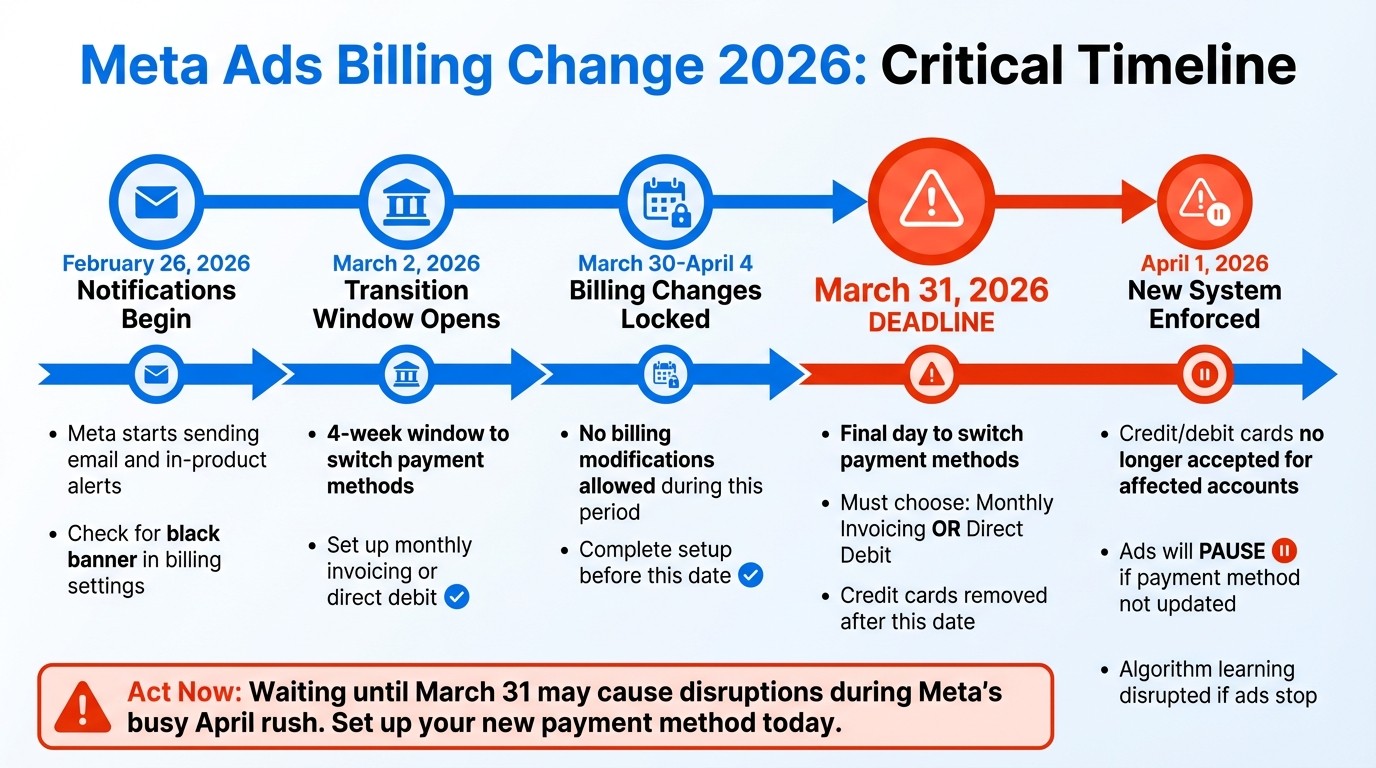
⚠️ The Real Deadline: Billing Settings Lockout (March 30–April 4)
Most advertisers are focused on March 31 — but the date that matters most is March 29, 2026.
Between March 30 and April 4, 2026, Meta places billing settings into a read-only lockout period. For five full days, you cannot add, remove, or modify any payment method — including credit cards, monthly invoicing applications, or direct debit bank accounts.
What you CANNOT do during the lockout
Add or remove a payment method
Apply for monthly invoicing or a credit line
Link a new bank account for direct debit
Change your backup payment method
Update billing addresses or legal entity information
What you CAN do during the lockout
View your current billing settings and payment methods
Download past invoices
Check your credit line balance and available credit
Monitor ad delivery status
Why Meta imposes the lockout
The lockout isn't arbitrary — it's Meta's way of stabilizing the billing infrastructure during a mass migration. With tens of thousands of accounts transitioning simultaneously, Meta needs a clean cutover window where the billing system can reconcile pending charges, finalize credit line assignments, and process the April 1 enforcement without mid-transition changes creating conflicts.
"The advertisers who migrate early and cleanly will barely notice the transition. The ones who wait until March 31 will be scrambling." — Chris Pollard, Founder, AdsUploader
Bottom line: If you haven't set up monthly invoicing or direct debit by end of day March 29, you will watch your ads pause on April 1 with no ability to fix it until April 5. For e-commerce brands spending $50K+/month, that's roughly $1,600–$7,000+ in lost revenue per day of downtime.
If you've already missed the lockout window, skip ahead to our recovery steps.
What's Changing: Credit Cards Removed, New Payment Methods Required
Credit and Debit Cards No Longer Accepted for Some Accounts
Meta is phasing out credit and debit card payments for high-spending accounts, though smaller accounts may still use them. This change primarily affects business portfolios and accounts exceeding Meta's internal spending threshold — and mirrors Google's earlier transition of high-spending advertisers to bank-based payments.
If your account is impacted, you'll notice a banner in your billing settings. Since Meta hasn't disclosed a universal spending threshold, you'll need to check your account for the notice to confirm.
"All ad accounts connected to business portfolio will need to use monthly invoicing to pay for ads beginning April 1, 2026." — Meta Platform Notice
The primary driver? Credit card interchange fees, which run 1.5% to 3.5% per transaction on ad platforms. With Meta generating $196.2 billion in advertising revenue in 2025, even a modest percentage in processing fees represents billions in avoidable cost. By moving advertisers to bank-based payments, Meta eliminates those fees — and gains more predictable cash flow.
Two New Payment Methods: Monthly Invoicing and Direct Debit
Monthly invoicing consolidates your ad spend into a single bill each month, with Net 30 payment terms. Your account is assigned a maximum spend limit (a credit line) based on its history. If you hit that limit, your ads pause until you make a payment or Meta increases your line. Payments can be made manually or set to autopay.
Direct debit automatically withdraws funds from your linked bank account on the due date. Currently, this option is available only in the US and SEPA regions. Unlike threshold billing — where your card is charged whenever you reach a spending limit — direct debit processes a single payment each month, offering more predictable cash flow.
Both methods eliminate the 2% to 3% cash-back rewards many advertisers previously earned by using business credit cards for ad spend. We'll quantify exactly what that costs you later in this guide.
Timeline: When the Change Happens and Key Deadlines
When Notifications Started Appearing
Meta started reaching out to impacted advertising accounts on February 26, 2026, using both email and in-product alerts. If you haven't seen a notification, your account is probably unaffected — at least for now.
The transition officially began on March 2, 2026, kicking off a four-week window to make the necessary changes. To check if your account is included, look for a black notification banner or specific alerts in the "Billing and Payments" section. These early notifications are designed to prepare users for the important deadlines ahead.
Key Deadlines for Switching Payment Methods
The deadline to complete your transition is March 29, 2026. Starting March 30, billing settings become read-only, and on April 1, 2026, Meta enforces the new billing requirements.
"Starting April 1, 2026, Meta is requiring ad accounts to switch to either: Monthly invoicing or Direct debit from a bank account. That means no more credit cards on file." — Jason Andrew, Founder, SBO Financial
What Happens If You Missed the Deadline
If your ads paused on April 1, here's what to do — in order:
Step 1: Check when billing settings unlock. If it's still before April 5, your settings are in read-only lockout. No changes are possible. Note the date and wait — then act immediately when the lockout lifts.
Step 2: Set up your payment method. Once billing settings are editable again, go to Ads Manager > Billing & Payments and add monthly invoicing or direct debit. If applying for monthly invoicing, expect a review period before your credit line is approved.
Step 3: Reactivate paused campaigns. After adding a valid payment method, Meta will attempt to resume your ads. Be aware: campaigns paused for several days will re-enter the algorithm's learning phase, which can mean less efficient delivery and higher CPAs for the first few days post-restart.
Step 4: Monitor performance closely for 72 hours. A paused-and-resumed account often shows erratic delivery patterns. Use budget automation rules to catch spend anomalies early.
Step 5: Set up a backup payment method. Once your primary method is active, add a backup — direct debit if you're on invoicing, or vice versa — to prevent another outage. If your account was disabled entirely, you may need to go through Meta's account recovery process before resuming ads.
"Miss paying an invoice because you don't have an accounts payable process? Your ads stop working." — Jason Andrew, Founder, SBO Financial
Who Is Affected by This Change
How to Know If Your Account Is Affected
If your account is affected, you'll see a notification banner in Meta Business Suite or an alert in Ads Manager. If you don't see any notification, it's safe to assume your account isn't impacted.
You can also confirm by checking your billing and payments settings in Ads Manager. Affected accounts will have a notification banner there, too. For accounts on monthly invoicing, a banner will indicate activation starting on the 1st of the following month.
Key Note: Only users with "Full control" or "Manage finance" permissions can view these billing notifications.
Accounts That Can Still Use Credit Cards
This change targets high-spend accounts, but Meta hasn't disclosed a specific spending threshold. Smaller accounts spending below this undefined limit can continue using credit cards without any changes.
Google made a similar shift for high-spending advertisers about a year ago. For Meta, advertisers spending over $2,500 daily can manually apply for higher thresholds using a Meta application form. However, the most reliable way to know if your account can still use credit cards is by checking for the absence of a notification.
How to Check and Update Your Billing Settings
Finding Billing Settings in Meta Business Suite
To access your billing settings, open Meta Business Suite and navigate to All Tools > Billing & Payments. This section serves as the main hub for managing payment methods, account status, and notifications.
From there, click on the Accounts tab to review your payment method and balance. If your account is affected by billing and policy changes, you'll see a notification banner in the Payment Settings tab with details about the necessary steps.
Note: Only users with "Full control" over the business portfolio or those with "Manage finance" permissions can view and make changes to these settings.
Setting Up Monthly Invoicing or Direct Debit
After accessing your billing settings, here's how to set up a new payment method:
For monthly invoicing, go to the Credit Lines section and click Apply. Once Meta approves your application, monthly invoicing will begin on the 1st of the following month. Make sure to update your business documentation under the Legal Entities page to ensure tax compliance.
To set up direct debit, go to the Payment Methods page, click Add Payment Method, and select the bank account option. Be sure to clear any outstanding balances first, as Meta won't allow new bank accounts to be added if there are unpaid charges. Direct debit is available for users in the US and SEPA regions, and bank verification typically takes 3–4 days to complete. If you're already using monthly invoicing, you can also enable Autopay to automatically debit your bank account when invoices are due.
Understanding Meta Credit Lines: How They Work
If you're switching to monthly invoicing, you'll be assigned a credit line — a maximum spend limit that caps how much you can charge before Meta requires payment. Understanding how credit lines work is essential, because hitting yours mid-month will pause your ads just as surely as a declined credit card would.
How Meta Sets Your Starting Credit Line
Meta determines your initial credit line based on your account's historical ad spend. The higher and more consistent your past spend, the higher your starting limit. There's no public formula, but advertisers report initial lines roughly in line with their average monthly spend over the prior 3–6 months.
Checking Your Available Credit
You can view your credit line balance at any time in Meta Business Suite > Billing & Payments > Credit Lines. The dashboard shows:
Your total credit line amount
Current balance (how much you've spent this billing cycle)
Available credit (what's left before you hit the cap)
Next payment due date
What Happens When You Hit the Cap
If your ad spend reaches your credit line limit mid-cycle, your ads pause immediately — the same as a declined card. To resume delivery, you must either:
Make an early payment to bring your balance below the limit, or
Request a credit line increase from Meta (and wait for approval)
This makes it critical to set spend guardrails that keep your daily budgets aligned with your credit line ceiling. An AI-powered monitoring tool can alert you before you approach the cap — rather than discovering it when campaigns go silent.
How to Request a Credit Line Increase
To request a higher credit line:
Go to Billing & Payments > Credit Lines in Meta Business Suite.
Select your credit line and click "Request Increase."
Enter your requested amount and a business justification (e.g., upcoming seasonal spend increase).
Meta reviews your payment history and spend trajectory — decisions typically take 2–5 business days.
Important: Meta's credit line documentation explicitly states that a credit line "is not a form of credit or financing." It's a spend ceiling, not a loan — you're not borrowing money, and Meta isn't extending you credit in the traditional sense. You're simply being given a limit on how much you can spend before settling up.
Credit Line Tips for High Spenders
Request an increase before you need it. Don't wait until you're at 90% utilization — Meta's review can take up to a week.
Seasonal spend planning. If Q4 is your peak, request a higher line in October so you're not capped during Black Friday.
Monitor with automation. Use budget automation rules to track spend against your credit line in real time and receive alerts before hitting the limit.
Invoice Management: What You Need to Know
Switching to monthly invoicing means your accounting workflow changes. Here's what's on a Meta invoice, how to access it, and how to keep reconciliation manageable — especially if you're an agency.
How to View and Download Invoices
Open Meta Business Suite > Billing & Payments.
Click the Invoices tab to see all billing documents.
Use the date range filter to narrow by month or billing period.
Click any invoice to view details, or select Download PDF for your records.
Each Meta invoice includes:
Invoice number — unique identifier for that billing period
Billing period — the date range the invoice covers
Total amount due — consolidated ad spend plus any applicable taxes
Tax breakdown — separated by jurisdiction where Meta is required to collect
Payment reference number — used when making manual payments
Due date — typically 30 days from the invoice date (Net 30)
PO Numbers and Campaign Tags for Reconciliation
If your finance team requires purchase order (PO) numbers on invoices for reconciliation, you can add them:
Go to Billing & Payments > Payment Settings.
Under Business Info, enter your PO number in the designated field.
This PO number will appear on every subsequent invoice.
Campaign tags let you label ad campaigns for internal tracking — useful for tying specific campaigns to client budgets or internal cost centers. Set these in Ads Manager at the campaign level, and use consistent naming conventions to simplify month-end reconciliation.
Invoice Groups for Agencies
Agencies managing multiple client accounts can use invoice groups to organize billing:
Group ad accounts by client, campaign type, or internal department
View and download invoices per group instead of per account
Simplify reconciliation by matching invoice groups to client billing cycles
To create an invoice group, go to Billing & Payments > Invoices > Invoice Groups and click Create Group. Select the ad accounts to include and assign a group name your finance team will recognize.
Month-End Locking Period
In addition to the March 30–April 4 transition lockout, Meta applies a recurring month-end locking period to billing settings. This typically starts two days before the end of each month and lasts until four days into the new month. During this window:
Billing addresses, PO numbers, and legal entity details cannot be edited
New payment methods cannot be added
Credit line increase requests may be delayed
Plan any billing changes around this monthly window — especially invoice recipient updates and PO number changes.
Monthly Invoicing vs Direct Debit: Which One to Choose
How Monthly Invoicing and Direct Debit Differ
When deciding between monthly invoicing and direct debit, it's important to understand how these two methods operate. They follow distinct billing cycles, each with its own advantages and challenges.
With monthly invoicing, all your ad spend is consolidated into one bill, which comes with a Net 30 payment term. This means you have 30 days from the invoice date to settle the payment. Essentially, this setup gives you about 45 days of cash flow flexibility, since spending accumulates throughout the month before the invoice is issued.
Direct debit, however, takes a more immediate approach. Charges are processed daily, based on your spending and budget. For smaller campaigns, Meta typically groups smaller amounts into a single daily charge. There's no fixed payment threshold, so payments are triggered as expenses occur.
The key difference lies in cash flow management. Monthly invoicing allows you to delay payments by 30 to 45 days, offering breathing room for liquidity. For example, if you're spending $100,000 monthly on Meta ads, you can hold onto that cash longer with monthly invoicing. In contrast, direct debit withdraws funds almost immediately, which can put pressure on daily liquidity.
"Monthly invoicing means you'll need someone actively managing payments. Miss paying an invoice because you don't have an accounts payable process? Your ads stop working." — Jason Andrew, Founder, SBO Financial
Comparison Table: Monthly Invoicing vs Direct Debit
Feature | Monthly Invoicing | Direct Debit |
|---|---|---|
Payment Timing | Payment due 30 days after invoice | Daily or grouped charges (near real-time) |
Cash Flow Impact | Delayed payment improves cash flow (~45 days float) | Immediate payment affects daily liquidity |
Ideal For | High-spending businesses and agencies ($50K+/mo) | Smaller businesses with steady, predictable budgets |
Setup Requirements | Business verification and credit line approval | Bank account verification only (3–4 days) |
Primary Benefit | Consolidated billing and predictable cycles | Automatic, hands-off payments |
Risk | Ads pause if invoice is missed or credit line cap is hit | Ads pause if bank funds are insufficient |
Availability | Global (application required) | US and SEPA regions only |
Monthly invoicing is well-suited for agencies managing multiple clients, businesses with high ad spend (typically over $50,000 per month), and those with a structured accounts payable process. While it offers flexibility, it does require careful management of due dates. In the US or SEPA regions, you can simplify this by setting up Autopay, which automatically debits your account on the invoice due date.
On the other hand, direct debit is a better fit for smaller advertisers with predictable budgets who want a more hands-off payment method. Just make sure your bank account always has enough funds to prevent your ads from pausing unexpectedly.
Agency Credit Line Sharing: How It Works
For agencies managing multiple client ad accounts, the billing transition introduces a new layer of complexity: credit line sharing. Instead of each client's ads charging to a credit card, agencies must now navigate Meta's credit line sharing framework — and the rules are country-specific.
Three Sharing Modes: Partial, Fixed, and Full
When an agency requests access to a client's credit line, the client (the credit line owner) can grant one of three levels:
Sharing Mode | What It Means | Best For |
|---|---|---|
Partial | Agency can spend up to a client-set sub-limit | Most agency-client relationships; client retains spend control |
Fixed | Agency gets a specific, hard-capped amount | Project-based or campaign-specific work with defined budgets |
Full | Agency can spend up to the client's entire credit line | Fully managed services where the agency runs all paid media |
Who's Liable? Bill-To vs. Liable-To
This is the distinction that catches agencies off guard:
Bill-to: The entity Meta sends the invoice to. This can be the agency or the client.
Liable-to: The entity legally responsible for paying. The liable party is always the credit line owner — meaning the client, not the agency, is ultimately on the hook for ad spend.
Even if an agency overspends against a shared credit line, the client bears the legal obligation to Meta. This makes it essential to define liability terms clearly in your agency-client agreements before setting up credit line sharing. Without that clarity, a spending overrun can become a relationship-ending dispute.
Country-Matching Requirement
Credit line sharing has a critical geographic constraint: for businesses in the US, Brazil, France, India, and Mexico, both the agency and the client must be based in the same country to share a credit line. A US-based agency cannot share a credit line with a French client's ad account — they'd need separate payment arrangements.
Additionally, ad accounts must use a supported currency to be attached to a monthly invoicing credit line. Check Meta's current supported currencies list before structuring multi-country client engagements.
Managing Multi-Client Transitions
If you're an agency with 10, 20, or 50+ clients affected by this change, the administrative burden is real. Each client needs:
Their own credit line application or transition to direct debit
Credit line sharing permissions configured
Backup payment methods set
Invoice recipients updated
PO numbers and campaign tags aligned
An AI media buyer platform can monitor billing status across all client accounts simultaneously — flagging spend anomalies, credit line utilization warnings, and payment failures before they cause account-wide pauses.
How This Change Affects Your Business
What You Lose: Quantified Credit Card Rewards
The most immediate financial impact is the loss of credit card rewards. Here's what that looks like at different monthly spend levels:
Monthly Meta Ad Spend | Annual Spend | Rewards Lost (2% cashback) | Rewards Lost (3% cashback) |
|---|---|---|---|
$50,000 | $600,000 | $12,000/year | $18,000/year |
$100,000 | $1,200,000 | $24,000/year | $36,000/year |
$250,000 | $3,000,000 | $60,000/year | $90,000/year |
$500,000 | $6,000,000 | $120,000/year | $180,000/year |
For a brand spending $100,000/month, that's $18,000–$36,000 in annual rewards that simply disappear. Some advanced advertisers previously maximized this by using multiple cards and reward stacking, achieving effective cashback rates as high as 4%–4.5% — making the loss even steeper at the top end.
The Cash Flow Offset: Net 30 Float
There is a partial counterbalance. Monthly invoicing's Net 30 terms give you roughly 45 days of float between when ad spend begins and when payment is due. For a business spending $100,000/month, that's $100,000–$150,000 in cash you're holding for an extra 30–45 days versus daily direct debit charges.
If your business can earn 4%–5% on short-term cash holdings (money market, high-yield savings), that float generates $4,000–$7,500/year — offsetting roughly 15%–30% of the rewards loss at the $100K/month tier. It's not a replacement, but it softens the impact.
Cash Flow Benefits of Monthly Invoicing
Beyond the float, monthly invoicing consolidates all charges into a single bill, offering smoother cash flow management compared to the multiple threshold charges credit cards trigger. Previously, a $50,000 monthly ad spend could generate up to 20 separate credit card charges. This new system simplifies reconciliation and minimizes the risk of ads pausing mid-campaign due to hitting spending limits.
That said, for brands with high Q4 spending on advance inventory, losing the flexibility of a credit card buffer could tighten cash flow — plan your seasonal budget allocations accordingly.
Operational Changes for Brands
For brands, this change necessitates setting up formal accounts payable processes. Unlike credit cards, which handle payments automatically, monthly invoicing requires active oversight — missing a payment deadline will pause your ads. Key steps:
Assign a billing admin with "Manage finance" permissions
Set up invoice recipients so finance teams receive bills directly
Add PO numbers for internal reconciliation
Enable Autopay if you're in the US or SEPA region to reduce manual payment risk
Use budget automation rules to monitor account status and detect spend anomalies 24/7
10-Minute Checklist: What to Do Right Now
Before March 29, take these steps to keep your campaigns running without interruption.
Check Permissions and Notifications
First, make sure at least two people in your organization have "Full control" and "Manage finance" permissions in Business Settings. This is critical to avoid account lockouts. Those with full control can oversee all connected ad accounts and assign finance roles, while finance managers handle tasks like paying invoices, setting up autopay, and updating billing addresses.
Next, review Payment Settings in Ads Manager or Meta Business Suite. Look for banners alerting you to update your payment method. If there's no banner, your account might not require immediate action.
Remember: billing details — PO numbers, addresses, legal entity info — cannot be modified during the month-end locking period (last two days of the month through the fourth day of the next month). Plan updates around this window.
Set Up and Verify Your Payment Method
Head to Payment Settings in Ads Manager and click "Add payment method." Choose between monthly invoicing or direct debit based on your needs. If applying for monthly invoicing, note that credit line approval may take several days. For direct debit, link your bank account right away — verification typically takes 3–4 business days.
Double-check your business details and billing address on the "Legal entities" page. If using monthly invoicing, update invoice recipients in the "Billing & payments" section so the right people get invoices and payment confirmations. For US or SEPA accounts, enabling Autopay reduces the risk of missed payments.
Add a Backup Payment Method
Adding a backup payment method ensures your ads stay live even if your primary method fails. Options include direct debit, a secondary bank account, or — for accounts not yet affected — a credit or debit card, depending on your location and currency.
If your backup method has a transaction limit, adjust your payment threshold in billing settings to align with that limit. Also, avoid linking one payment method to too many ad accounts — Meta enforces limits for security reasons.
Set Up Spend Monitoring
Once your payment method is in place, set up continuous monitoring. A billing failure at 2 a.m. shouldn't go unnoticed until morning. Use automated spend guardrails and alerts to catch issues before they cascade.
Conclusion
Meta's billing update demands action before March 29, 2026 — not March 31. The five-day lockout period (March 30–April 4) means waiting until the last minute isn't an option; it's a guaranteed pause.
Starting April 1, affected accounts can no longer use credit cards. If you've received a notification in Business Suite, you need to transition to monthly invoicing or direct debit — and you need to complete it before the lockout freezes your settings.
The financial impact is real: losing 2%–3% credit card rewards translates to $12,000–$180,000 per year depending on your spend level. Monthly invoicing's Net 30 float offsets a portion of that, but it doesn't replace it. What monthly invoicing does offer is consolidated, predictable billing — provided you have the accounts payable process to manage it.
"The advertisers who migrate early and cleanly will barely notice the transition. The ones who wait until March 31 will be scrambling." — Chris Pollard, Founder, AdsUploader
To avoid disruptions, take these steps now: review your billing settings, switch to monthly invoicing or direct debit if required, assign a billing admin, verify backup payment methods, understand your credit line mechanics, and track invoice due dates. Acting early isn't just about avoiding a pause — it's about making the transition boring, which is exactly what you want a billing change to be.
FAQs
Is this change global or only in certain countries?
Meta is rolling out billing updates in phases, and these changes may not apply worldwide. Depending on the country, some accounts are shifting to monthly invoicing while others may face different adjustments. If your account is affected, you'll receive a notification — no notification means no action needed for now.
Can I switch back to a credit card after moving to invoicing or direct debit?
Yes, it's possible to switch back to a credit card after using invoicing or direct debit, provided your account still supports it and the option is available in your billing settings. However, for accounts flagged in this transition, credit cards may be permanently removed as an option. Check your Billing & Payments settings to see what's available.
What if monthly invoicing isn't available or I'm not approved?
If monthly invoicing isn't available or your application is denied, direct debit is your fallback. Without either method in place, your ads will pause due to billing issues. Review your billing settings in Business Suite and ensure at least one valid payment method is active before the deadline.
How do I check my credit line balance and available credit?
Go to Meta Business Suite > Billing & Payments > Credit Lines. You'll see your total credit line, current balance, available credit, and next payment due date. Monitor this regularly — hitting your cap mid-cycle will pause your ads.
What's the difference between the March 30–April 4 lockout and the monthly locking period?
The March 30–April 4 lockout is a one-time transition freeze — a five-day window where billing settings become read-only so Meta can process the mass migration to the new payment system. The monthly locking period is a recurring window (last two days of each month through the fourth day of the next month) during which billing details like PO numbers and addresses can't be edited. Both block payment method changes, but the transition lockout is longer and tied specifically to the April 2026 deadline.