
How Marketplace Ad Placements Affect ROAS
Facebook Marketplace placements can lower CPC and boost conversions—use Advantage+ automation, Meta Pixel, square creatives, and fast replies to raise ROAS.
Running ads on Facebook Marketplace can significantly improve your Return on Ad Spend (ROAS). Here’s why: Marketplace users are typically in a shopping mindset, leading to higher conversion rates and lower costs compared to other placements like the News Feed. For example, Ubisoft saw a 67% increase in purchases by adding Marketplace to their ad strategy.
Key Takeaways:
Higher Purchase Intent: 80% of Marketplace users visit to shop, not browse.
Lower Costs: Average cost-per-click (CPC) is $0.68, with cost-per-thousand impressions (CPM) around $8.
Better Conversion Rates: Marketplace ads often outperform News Feed ads due to the shopping-focused audience, a trend reflected in Meta placement benchmarks.
Automation Benefits: Using Advantage+ vs manual placements can reduce CPC by 15% and increase conversions by 20%.
To make the most of Marketplace ads, focus on:
Creative Design: Use square images (1,080 x 1,080 px) and price-first headlines to blend into the shopping environment.
Quick Responses: Respond to inquiries within 5 minutes to maximize conversions.
Performance Tracking: Monitor ROAS, CPC, and conversion rates in Ads Manager to ensure Marketplace ads are delivering results.
Marketplace ads work best when paired with automation tools and AI-driven strategies, such as AI-powered retargeting, helping you optimize campaigns and scale effectively. This is particularly important when learning how to scale budgets without compromising efficiency. By aligning your ads with the platform's shopping intent, you can achieve stronger ROAS and better overall performance.
What is ROAS and How Marketplace Placements Work
ROAS, or Return on Ad Spend, is a simple but powerful metric. It’s calculated by dividing the revenue generated by the amount spent on ads. For example, a ROAS of 4 means you’re earning $4 for every ROAS of 4 means you’re earning $4 for every $1 you invest. Generally, a range of 3.0–5.0+ is considered strong you invest. Generally, ROAS benchmarks of 3.0–5.0+ are considered strong, while anything below 2.0 suggests there might be issues with your campaign.
Facebook Marketplace operates as a dedicated shopping hub, where users browse with a clear intent to purchase. Unlike casual scrolling on the News Feed, Marketplace is all about product discovery. Ads here are labeled as "Sponsored" but blend seamlessly with organic listings, ensuring they fit naturally into a space where users are already in buying mode.
This setup can be a game changer for your budget. Meta’s ad delivery system often finds low-CPM opportunities in Marketplace, sometimes costing less than $4. Plus, because users are actively shopping, clicks from Marketplace often convert better than those from the News Feed.
These differences in behavior and cost structure are what make Marketplace placements stand out, as explained below.
Why Marketplace Placements Perform Differently
Marketplace ads perform differently because they cater to users who are further along in the buying process. While News Feed users might be casually browsing, Marketplace shoppers are actively searching for specific products. This high purchase intent, combined with lower competition, contributes to the platform’s unique results.
Using Advantage+ vs. manual placements can amplify these benefits, reducing CPC by 15% and increasing conversions by 20%. Meta’s interest-based targeting and AI-driven systems also work to your advantage, especially if you’re a local business. You can further refine this by creating custom audiences to retarget previous visitors. Meta's AI-driven geo-targeting automatically focuses on users near your location, making Marketplace ideal for promoting physical products or services that require quick delivery or in-person visits.
Creative design is another factor. To succeed, your ads need to mimic the format of product listings. High-quality square images (1,080 x 1,080 px) and price-first headlines are key. When your ad feels like a natural part of the browsing experience, users are more likely to engage with it.
Common Problems with Marketplace Placements
Despite its potential, not every advertiser sees success with Marketplace ads. One red flag is when your Marketplace CPC is more than 30% higher than your Feed CPC after the learning phase. This often indicates that your creative isn’t resonating with the audience. For example, using lifestyle imagery or brand-awareness messaging instead of product-focused, price-forward content can hurt performance.
Another challenge is ad fatigue. Marketplace audiences tend to see the same ads repeatedly, which can quickly reduce engagement. To keep performance steady, switch out your hero images every 10–14 days. Neglecting this refresh cycle can lead to declining click-through rates and a drop in ROAS.
Timing is also critical. Marketplace buyers are often ready to act immediately. If you don’t respond to inquiries within five minutes, you’re 100 times less likely to connect with a lead compared to responding within that window. Delayed responses waste the high-intent traffic that Marketplace delivers, turning potential conversions into missed opportunities.
How Marketplace Ad Placements Affect ROAS
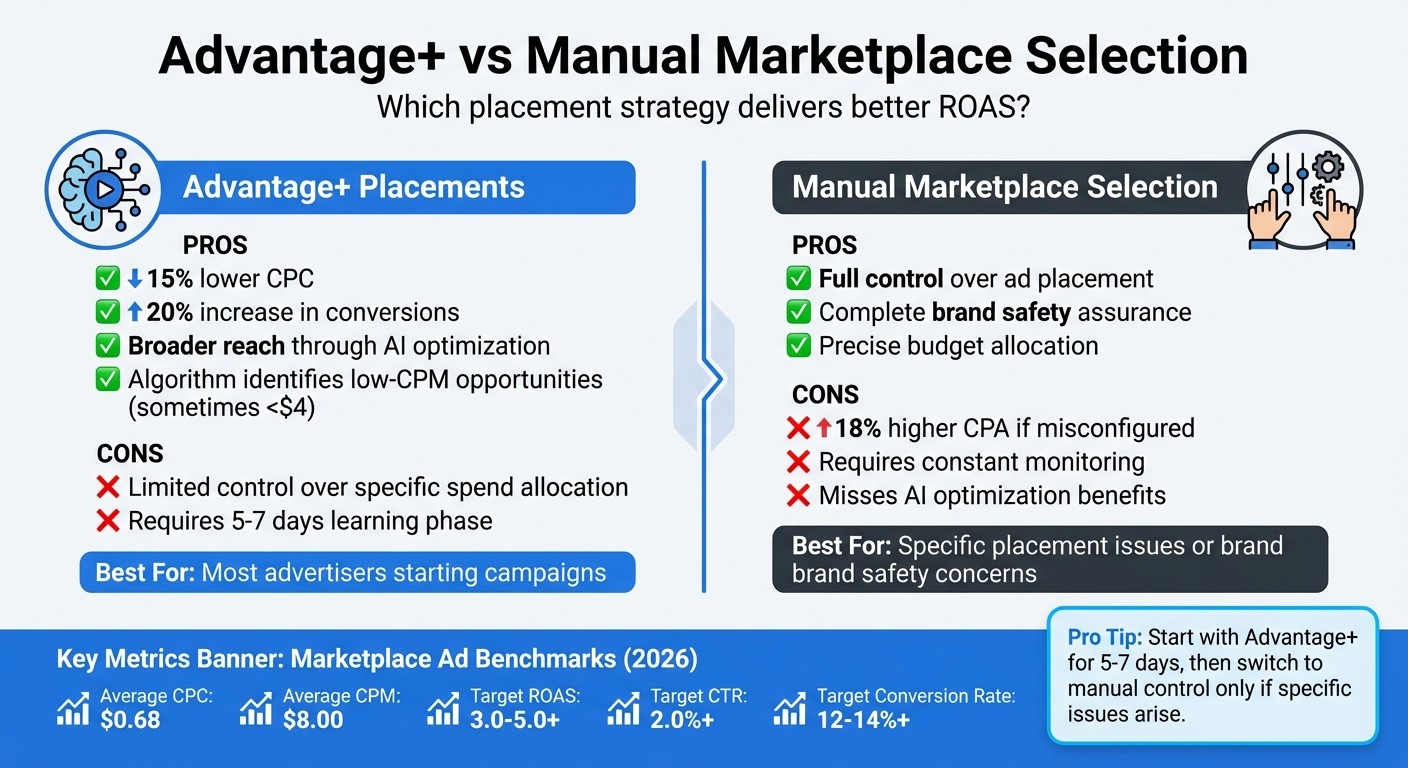
Advantage+ vs Manual Marketplace Ad Placements: Performance Comparison
Marketplace ad placements stand out because users on these platforms are already in a shopping mindset, actively browsing for products. On average, the cost-per-click (CPC) hovers around $0.68, while the cost-per-thousand impressions (CPM) is approximately $8.00 - often cheaper than premium placements like the Instagram Feed. This cost efficiency stems from Meta's delivery algorithm, which identifies what advertisers call "bargain inventory." These are low-CPM opportunities, sometimes dropping below $4, as the algorithm optimizes across Feed, Reels, and Marketplace. Plus, since Marketplace ads appear alongside organic listings, they feel less disruptive, leading to stronger engagement when the creative aligns with the platform's style. This dynamic highlights how placement strategies and AI-driven optimization can influence both costs and conversions.
Advantage+ Automatic Placements vs. Manual Marketplace Selection
Deciding between manual vs AI-powered Facebook ad management for Marketplace placements hinges on your campaign goals and how much control you want. Advantage+ placements leverage Meta's algorithm to dynamically allocate your budget, often reducing CPC by 15% and increasing conversions by 20% compared to manually managed placements. The algorithm takes about 5–7 days to learn and determine where your ads perform best.
On the other hand, manual Marketplace selection gives advertisers complete control over where their ads appear and ensures brand safety. However, incorrect setup can lead to an 18% increase in cost-per-acquisition (CPA). Here's a quick comparison:
Strategy | Pros | Cons |
|---|---|---|
Advantage+ Placements | Automatically optimizes for lower CPC and broader reach | Limited control over specific spend allocation |
Manual Marketplace Ads | Full control over placement and brand safety | Higher CPA risk if not configured properly |
For most advertisers, starting with Advantage+ is a smart move. It allows the AI to identify the most efficient delivery options. Manual control can then be introduced later if specific placement issues arise. Regardless of the approach, keeping an eye on performance metrics is essential.
Key Metrics to Track for Marketplace Ads
To assess how Marketplace ads stack up against other placements, use Ads Manager to monitor placement-specific performance. The key metrics to focus on include ROAS (Return on Ad Spend), CTR (Click-Through Rate), and conversion rate. After the algorithm's initial learning phase, if your Marketplace CPC exceeds your Feed CPC by more than 30%, it may indicate that your creative isn't resonating with the shopping-focused audience.
For campaigns targeting sales in 2026, strong Marketplace results generally show a ROAS in the range of 3.0–5.0+, a CTR above 2.0%, and conversion rates between 12–14%+. A ROAS below 2.0 suggests that immediate adjustments are needed. By tracking these metrics weekly - especially during the critical first month - you can quickly identify and address performance issues before they drain your budget. These insights will directly shape the optimization strategies discussed in the next sections.
Setting Up Marketplace Ads for Better ROAS
Before diving into Marketplace campaigns, it’s crucial to establish a solid setup to track performance accurately and avoid wasting your budget. Three key steps will help: understanding why use Meta Pixel to monitor conversions, creating custom ROAS columns for quick placement insights, and choosing the right objectives and targeting to align with Marketplace’s shopping-focused audience. These steps are the foundation for using proven optimization tips to refine your campaigns.
Installing and Configuring Meta Pixel
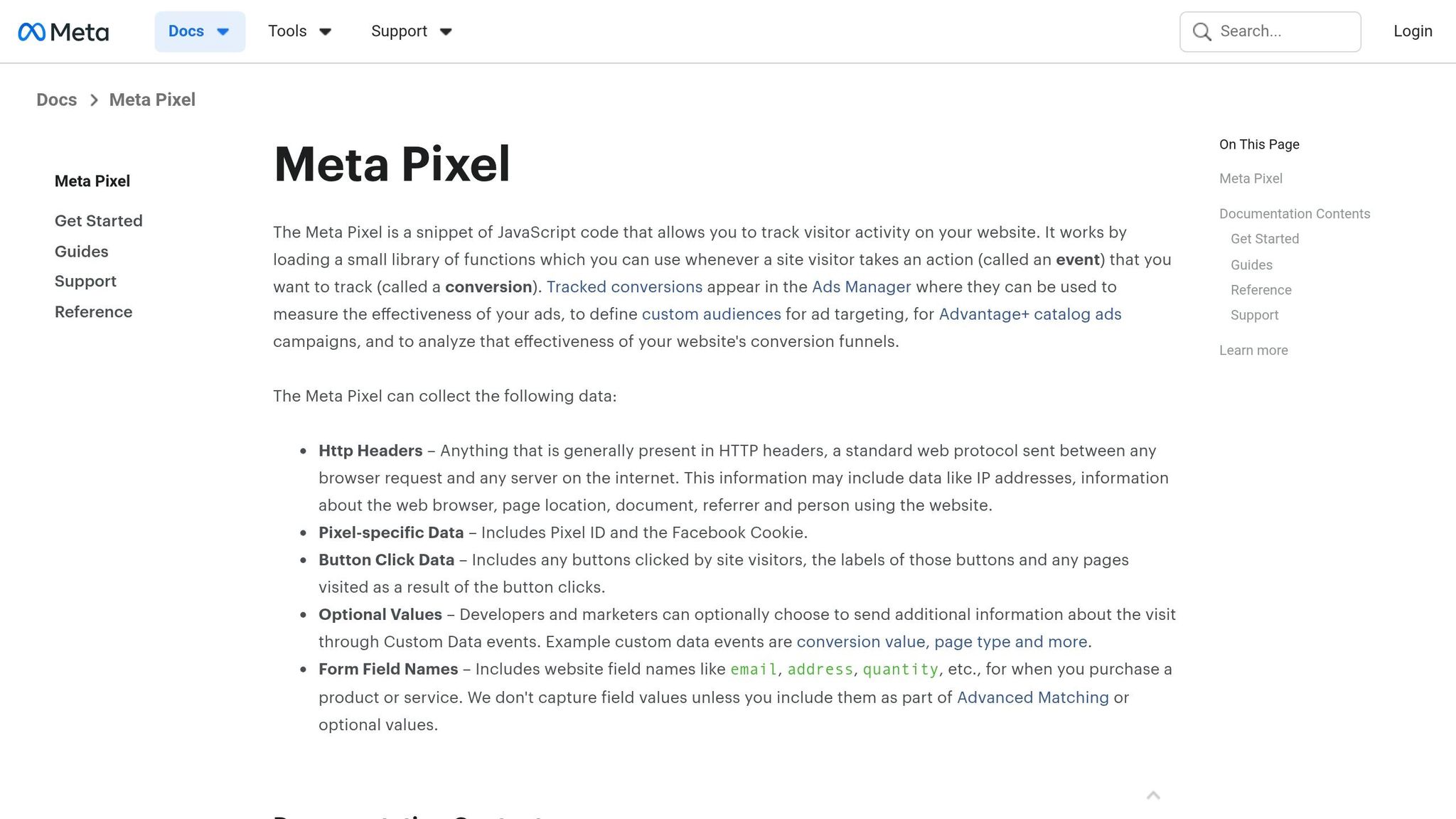
The Meta Pixel is a small JavaScript snippet that tracks visitor actions on your site, helping calculate ROAS effectively. Start by adding the Base Code to every page of your site and Event Snippets to key conversion pages, such as the Purchase Confirmation page.
To track purchases, configure the Purchase event with parameters like value (transaction amount) and currency. For example:
fbq('track', 'Purchase', {currency: "USD", value: 30.00});.
Simplify tag management with Google Tag Manager (GTM), which reduces coding errors and centralizes updates. Store your Pixel ID as a "Constant Variable" in GTM to ensure consistency and make future changes easier. To confirm the Pixel is working correctly, use tools like the Meta Pixel Helper Chrome extension and the Test Events feature in Events Manager. Additionally, disable "Automatic Data Detection" in your Pixel settings to avoid collecting irrelevant data.
Creating Custom ROAS Columns in Ads Manager
Once your Pixel is verified, set up custom ROAS columns in Meta Ads Manager. This allows you to compare Marketplace performance with other placements like Feed, Stories, and Reels by analyzing Meta ad metrics. After the algorithm's 5–7 day learning phase, evaluate whether your Marketplace ROAS hits the benchmark of 3.0–5.0+ for successful campaigns.
If you’re running an e-commerce store on Shopify, take advantage of its one-click installation tools to automatically track standard events like Purchase and Add to Cart. Breaking down performance by placement will show whether Marketplace is driving results or underperforming compared to other surfaces.
Campaign Objectives and Targeting Best Practices
Choose the Sales or Traffic objective to align with Marketplace’s strong purchase intent. Use Advantage+ automatic placements to let Meta’s algorithm allocate your budget across different surfaces. This can boost conversions by 20% and lower your cost-per-click (CPC) by 15% compared to manual placement selection.
For targeting, try Advantage+ Audiences to let AI find new shoppers who behave like your top customers. If you cater to a local market, consider radius targeting around specific locations. When crafting your ad creatives, lead with price-first headlines. Marketplace shoppers are price-conscious, so showing the cost upfront can grab their attention. After the learning phase, review placement breakdowns in Ads Manager to ensure Marketplace ads are delivering the ROAS you’re aiming for.
How to Improve ROAS for Marketplace Placements
Once your tracking and campaign structure are ready, the next step is to fine-tune your creatives, audiences, and bids to push your return on ad spend (ROAS) beyond industry ROAS benchmarks. Marketplace shoppers scroll quickly, expecting ads to feel like organic listings. Your ads need to blend in seamlessly while still grabbing attention. With AI automation and strategic adjustments, you can boost performance without adding extra workload. Let’s dive into optimizing your creatives and audience targeting for maximum impact.
Optimizing Creatives and Audiences
Marketplace users often decide within 1–3 seconds whether to engage with an ad or scroll past it. To catch their attention, use 3–5 high-quality square images (at least 1,080 × 1,080 pixels) that resemble native Marketplace listings rather than overly polished stock photos.
Price transparency is key. Include the price prominently in the image and headline - this builds trust, especially since 80% of Marketplace users are actively shopping. Focus on benefits rather than technical details. For example, "Power your home without the grid" is far more engaging than "5kWh battery". Lifestyle photos and user-generated content (UGC) also tend to outperform studio images because they feel more relatable and genuine.
When running A/B tests, change only one variable at a time - such as swapping out the hero image while keeping the audience and copy consistent. Let the test run for 7–10 days to allow the algorithm to exit the learning phase. For higher-consideration products, adding a "Click-to-Message" button (via Messenger or WhatsApp) can help you qualify leads quickly. Marketplace buyers expect fast responses - replying within five minutes makes you 100 times more likely to connect with them.
To improve accuracy in bidding and reduce your cost per acquisition, pair the Meta Pixel with the Conversions API (CAPI). This combination sends server-side signals to the algorithm, helping it make smarter decisions. For even greater efficiency, let AI tools handle these optimizations.
Using AI Tools for Optimization
AI tools like AdAmigo.ai can streamline creative updates, audience testing, and bid adjustments. The platform’s AI Ads Agent analyzes your brand identity and top-performing ads, then generates fully designed creatives that can be added to your ad account in just one click. Its AI Actions feature offers a daily to-do list of high-impact tweaks, such as pausing underperforming ads or scaling top performers, so you’re never left guessing what to adjust.
You can choose "Autopilot" mode for routine optimizations or an approval-based mode for more control over strategic decisions. AdAmigo’s Bulk Ad Launch feature allows you to test dozens of ad variations at once, which is especially useful in Marketplace’s fast-paced environment. Unlike static rules engines, this tool continuously adapts based on real-world results, respecting your budget, pacing, and placement rules. For agencies, this means a single media buyer can manage 4–8× more clients, freeing up senior strategists to focus on broader growth opportunities.
Adjusting Minimum ROAS Bids
Fine-tuning your bids is another way to ensure profitability. Meta’s transition from "Maximize Conversion Value" to "Maximize ROAS" prioritizes return per dollar spent, rather than just conversion volume. To take advantage of this, set automated minimum ROAS bid caps (e.g., 3.0×–4.0×) in your campaign settings. This tells Meta to show your ads only when it predicts a profitable outcome, protecting your budget from low-quality clicks.
Start cautiously - if your current ROAS is 2.5×, set a 3.0× minimum and monitor the results for a week. If your ad spend drops too much, lower the cap slightly. If your ROAS improves without losing volume, increase the cap gradually. This method works particularly well on Marketplace, where ad costs average around $0.68 per click and $8 per 1,000 views (CPM) as of 2026. By combining minimum ROAS bids with AI-driven creative and audience strategies, you can scale your campaigns while keeping profitability on track.
Conclusion
This guide has explored how Marketplace placements can drive better return on ad spend (ROAS). Facebook Marketplace attracts shoppers with strong buying intent - 80% of visitors use the platform specifically to make purchases. This leads to lower costs and higher conversion rates. For example, in 2026, Ubisoft experienced a 67% increase in purchases, while Apartment Guide achieved a 45% reduction in incremental conversion costs by leveraging Marketplace placements. These results highlight the importance of a strategy to optimize Meta ad placements for maximizing ROAS.
"Facebook Marketplace enables us to connect with buyers who are already on the platform and showing purchase intent. When combined with a robust audience strategy, striking creatives and News Feed ads, this new placement delivers incremental impact on reach and improved sales." - Frederic Harnois, Media Performance, Ubisoft
To get started, use Advantage+ placements during the first 5–7 days of your campaign. This allows Meta's AI to identify cost-effective inventory. Afterward, analyze performance data to determine if Marketplace is outperforming other placements. Pair your campaigns with CAPI to recover signals lost due to browser restrictions, and ensure your creatives align with the Marketplace's shopping environment by using square images and clear pricing.
For advertisers looking to scale, automation tools like AdAmigo.ai simplify daily tasks like bid adjustments, creative updates, and audience testing. The platform’s AI Actions feature prioritizes impactful optimizations, while the Bulk Ad Launch tool lets you test multiple variations at once. Agencies report that automation allows a single media buyer to manage 4–8× more clients, enabling senior strategists to focus on growth. Apply these strategies to refine your campaigns and achieve stronger results.
FAQs
Should I use Advantage+ placements or manually select Marketplace?
Advantage+ placements are usually the go-to choice for achieving better performance and maximizing efficiency. Meta’s AI takes care of budget optimization across various placements, including Marketplace, which can often lead to higher ROAS. On the other hand, manually selecting Marketplace gives you more control but comes with the need for extra testing and ongoing management. Unless you have a clear reason to specifically target or exclude Marketplace, Advantage+ placements are likely the smarter choice for most campaigns.
How can I tell if Marketplace is hurting my ROAS?
To figure out if Marketplace ads are dragging down your ROAS, take a close look at performance metrics broken down by placement. If you notice that ROAS for Marketplace ads consistently trails behind placements like Facebook News Feed or Instagram Stories, it could be a red flag. Keep an eye on these trends over time. If Marketplace continues to underperform, you might want to cut back or even exclude it entirely, shifting that budget toward placements delivering stronger results.
What creative changes improve Marketplace ad performance?
To improve the performance of Marketplace ads, focus on a few key strategies:
Use attention-grabbing visuals that stand out and resonate with your audience.
Craft clear, concise messaging that communicates your value quickly and effectively.
Regularly test and refresh your ad content to keep it engaging and aligned with audience preferences.
By updating your ads frequently, you can maintain relevance and capture attention more consistently.