
How to Adapt Meta Ads for Education Policies
How to run compliant education ads on Meta: verification, targeting limits, creative best practices, and data-driven optimization.
Running education ads on Meta is challenging due to strict rules and sensitive topics. Non-compliance can lead to ad rejections, account strikes, or even legal issues. This guide explains how to:
Follow Meta's rules for targeting and creative content and visuals.
Ensure compliance with U.S. laws and Meta's policies.
Use strategies like interest-based and broad targeting and data-driven adjustments to improve performance.
Navigate verification processes, including identity and business checks.
Avoid common pitfalls like exaggerated claims or improper audience targeting.
Key takeaway: Success with education ads on Meta requires understanding their policies, using compliant targeting methods, and creating straightforward, effective ad content. Tools like AdAmigo.ai can help automate these processes, saving time and reducing errors. For deeper insights, you can also use AI tools for account analysis to monitor performance trends.
Meta's Education Advertising Policies Explained

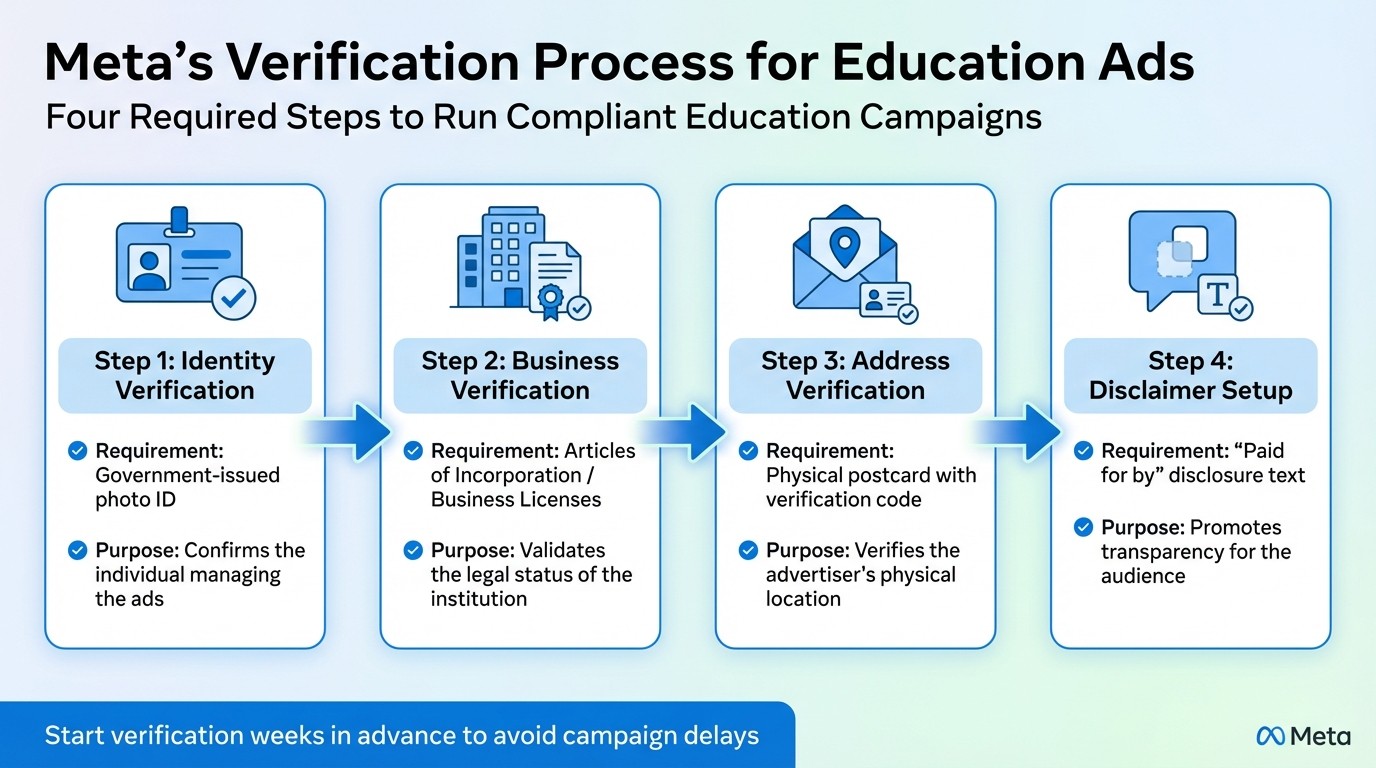
Meta Education Ads Verification Process Steps
Grasping Meta's specific rules is crucial for creating compliant and effective education ad campaigns. Unlike e-commerce ads, education-related content faces stricter scrutiny. Ads touching on topics like education policy, student debt, or school access undergo a more rigorous review process, requiring identity verification and a "Paid for by" disclaimer. Aurora Sandino, a Meta ads expert, explains:
If your content could be seen as political - for instance, immigration, education, climate change, or healthcare - it likely requires review and authorization.
Below, you'll find details on compliance rules, audience targeting strategies, including using a target audience finder, and the verification process for educational ads.
Compliance Requirements for Education Ads
Compliance is key to running successful campaigns. Frequent ad rejections can lead to account restrictions or even bans. Additionally, making frequent budget adjustments after launching campaigns can raise red flags. To avoid delays, start the identity verification process weeks in advance, ensuring you have 2FA set up for your Business Manager, especially for ads tied to policy-related topics.
Age Targeting and Audience Restrictions
Meta's 2026 Andromeda algorithm emphasizes ad creative over interest-based targeting. For non-regulated education campaigns, broad targeting paired with dynamic creative optimization tends to deliver the best results. With an average conversion rate of 13.58% for education ads on Meta, this approach has proven effective. To help advertisers maintain performance, Meta offers Creative Fatigue and Creative Similarity scores in the dashboard, which flag when ad assets become stale or overly repetitive.
Verification for Educational Content
Educational institutions or EdTech companies running ads may need to complete Meta's business verification process. This multi-step process ensures your legal and physical presence is verified:
Verification Step | Requirement | Purpose |
|---|---|---|
Identity | Government-issued photo ID | Confirms the individual managing the ads |
Business | Articles of Incorporation / Licenses | Validates the legal status of the institution |
Address | Physical postcard with code | Verifies the advertiser's physical location |
Disclaimer | "Paid for by" text | Promotes transparency for the audience |
Once verified, your ads will move through the approval process more quickly, reducing the likelihood of rejections due to credibility concerns.
How to Optimize Education Ad Campaigns
Balancing creative quality, precise targeting, and data-driven adjustments is key to running successful education ad campaigns. Ads in this sector face stricter scrutiny on Meta, requiring careful attention to compliance, audience sensitivities, and value-driven messaging. With a solid strategy, the next step is to focus on crafting compliant and effective ad creatives.
Creating Compliant Ad Creatives
Meta’s review process prioritizes your ad’s creative elements, so it’s essential to use clear, straightforward visuals and messaging that showcase your program’s benefits. Avoid exaggerated claims to keep your ads both compliant and cost-efficient. Instead, focus on benefits like career outcomes, flexible scheduling, or financial aid options.
Visuals should feel genuine and relatable. Use images that feature actual students, faculty, or campus environments rather than generic stock photos. For example, showing graduates or professors creates a sense of trust and connection, especially when targeting parents or adult learners. This approach reduces negative feedback, such as "Hide ad" or "Report ad", which can hurt your ad’s performance.
Your call-to-action (CTA) should match where your audience is in their decision-making process. For awareness campaigns aimed at prospective students, use CTAs like "Learn More" or "Download Guide." For retargeting campaigns, where users are already familiar with your program, consider CTAs like "Schedule a Tour" or "Start Your Application." Also, ensure your landing pages align with the promises in your ads. For example, if an ad promotes a free course catalog, sending users to a generic homepage can lead to high bounce rates, which Meta interprets as poor ad quality.
Targeting Strategies for Education Campaigns
When campaigns aren’t bound by strict regulations, combining broad targeting with strong creatives often yields the best results. Rather than over-restricting demographics, let Meta’s system optimize by using high-quality conversion data.
For campaigns involving regulated topics, such as student debt or education access, stricter targeting rules apply. Focus on geographic and placement-specific strategies. Use Ads Manager’s Breakdown feature to analyze which placements (like Instagram Stories or Facebook Feed) and locations offer the best cost-efficiency. For instance, a community college might see better returns by geo-targeting within a 25-mile radius rather than running statewide ads. For online programs, testing different regions and reallocating budgets to areas with lower costs per result can be highly effective.
Once targeting is refined, precise data tracking helps further enhance performance. This ensures your campaigns remain efficient and compliant with Meta’s policies.
Using Data to Improve Ad Performance
Key metrics like Click-Through Rate (CTR), Cost Per Result, and CPM offer valuable insights into how well your ads are performing in Meta’s auction system. A drop in CTR could indicate creative fatigue, while rising CPM might signal increased competition or issues with ad quality. Keep an eye on Creative Fatigue scores and update stale assets as needed to maintain engagement.
For ad sets to stabilize and perform optimally, they need around 50 optimization events within seven days. If you’re running multiple ad sets with small budgets, consolidating them can help you reach this threshold faster.
Event Match Quality (EMQ), available in Events Manager, measures how well your customer data - like emails, phone numbers, or IP addresses - matches user accounts for better attribution. Low EMQ scores can weaken conversion tracking and hinder campaign optimization. To improve this, ensure your pixel or Conversions API captures as much data as possible. This is particularly important for education campaigns, where long decision cycles mean users may research on one device but convert later on another. Strong data tracking not only supports optimization but also ensures compliance with Meta’s policies through accurate reporting and attribution.
Managing Education Ads with AdAmigo.ai
Running education campaigns on Meta can be a challenging process, but AdAmigo.ai simplifies it by automating creative generation, targeting, and compliance. Designed to ease the workload, AdAmigo.ai takes a hands-off approach to ensure your campaigns remain compliant and scalable. Here's a closer look at how it turns complex tasks into smooth, AI-powered solutions.
Automating Ad Creation and Targeting
AdAmigo.ai's AI Ads Agent takes the guesswork out of creating compliant ad content. With just one prompt, it generates ad creatives and copy tailored to your brand, automatically formatting them for different placements - think 9:16 for Stories, 4:5 for Feed, and 1:1 for square placements. The platform also scans for prohibited language and restricted keywords, flagging terms like "guaranteed" that could lead to ad rejections.
When it comes to audience targeting, AdAmigo.ai makes it just as seamless. Instead of comparing AI vs manual audience creation in Ads Manager, you can use simple text or voice commands to instruct the AI Chat Agent. It can create lookalike audiences or tweak age and geographic restrictions - essential for campaigns aimed at minors, where Meta imposes strict limits on interest and demographic targeting. As Jakob K. shared in a G2 review:
The fact that you can launch campaigns through text or voice commands feels like magic! It handles everything from creating lookalike audiences to adjusting budgets with just a few prompts.
Daily Optimization with AI Actions
To keep campaigns running at peak performance, AdAmigo.ai offers the AI Actions feature. This tool provides a daily to-do list of prioritized optimizations, including adjustments to creatives, audiences, budgets, and bids. You can either approve changes individually or switch on Autopilot mode for hands-free execution.
This feature is especially helpful for achieving Meta's 50-conversion-per-week benchmark, as it automatically consolidates underperforming ad sets. Plus, with 24/7 AI monitoring, the platform catches setup issues, spending anomalies, and broken links before they can impact your budget.
Scaling Campaigns Efficiently
Once you’ve identified successful campaigns, AdAmigo.ai’s Bulk Ad Launch and testing tool makes scaling effortless. You can deploy dozens - or even hundreds - of ads at once by pulling creative assets directly from Google Drive. This feature is particularly valuable for multi-program education campaigns, as it minimizes compliance risks associated with manual errors.
The platform ensures all your budget, pacing, geographic, and placement rules are followed, allowing you to test and scale winning strategies faster than manual methods ever could. This level of efficiency not only boosts campaign performance but also frees up agencies to take on more clients without sacrificing quality or control.
Key Takeaways for Education Ad Compliance
Creating compliant education ads on Meta revolves around four key principles: clarity, fairness, documentation, and monitoring. First, ensure your campaigns are classified correctly so Meta applies the appropriate rules. Then, confirm that your targeting adheres to age restrictions and follows guidelines for financing or credentialed programs [4, 16]. Additionally, it's essential to verify local legal and educational regulations for every state you target. Meta requires advertisers to align with platform policies, local laws, Community Standards, and industry self-regulatory codes [3, 4]. These steps establish a strong foundation for compliance.
Before launching a campaign, use this quick checklist: Have you set proper age limits for all ad sets, especially when targeting high school students or audiences under 18? Have you ensured compliance with Meta's Ad Standards, Community Standards, and local education or consumer protection laws for each state [2, 3, 4]? For ad creatives and copy, make sure visuals reflect the real educational experience rather than using misleading stock imagery. Also, avoid targeting or portraying individuals in ways that highlight sensitive personal attributes without their consent [3, 5].
Ongoing monitoring is just as important. Plan quarterly reviews of policies and legal updates to keep up with Meta's evolving standards and any new U.S. regulations affecting education marketing. Regularly train your internal teams using Meta's resources to ensure compliance knowledge is shared, not siloed with a single media buyer [3, 4, 5, 15]. Keep in mind that targeting users under 18 comes with stricter controls and fewer options, which can impact ad reach and performance. Prepare for these limitations in your strategy. Automating these processes can help reinforce your compliance efforts.
For seamless compliance, tools like AdAmigo.ai can make a big difference. This platform scans for prohibited language, flags restricted keywords, and automatically adjusts targeting parameters, catching issues before they cost you money. Its 24/7 AI monitoring ensures your campaigns stay within Meta's rules, allowing your team to focus on strategy instead of tedious manual checks.
FAQs
Do my education ads need a “Paid for by” disclaimer?
Yes, education ads on Meta platforms must include a “Paid for by” disclaimer to comply with transparency requirements. This is particularly important for ads related to political or issue-based content. Meta enforces this policy in line with federal regulations to ensure adherence to compliance standards.
What targeting limits apply when advertising to under-18 audiences?
When running ads aimed at audiences under 18 on Meta, your targeting options are limited to just age and city-level location. Gender, interests, and behavioral data cannot be used for these campaigns.
How can I improve results without triggering policy violations?
To get better results without running into policy issues, make sure your ads align with Meta's advertising standards. Steer clear of banned content, such as misleading claims, shocking visuals, or inappropriate imagery. Regularly review your ads for compliance, and consider using tools like AdAmigo.ai to keep everything in check. If your ads fall under special categories, follow the specific rules that apply. Also, stay informed about policy updates - especially if you're in a sensitive industry - and tweak your strategies as needed to stay compliant while improving performance.