
Real-Time Data Sync Guide
How to capture, transport, and store real-time events to improve Meta ad tracking, attribution, and campaign performance.
Real-time data sync ensures that information is transferred instantly, enabling faster decisions and better campaign performance. For Meta advertising, this means sending data directly to Meta's servers as it happens, improving tracking accuracy and ad targeting. Key tools include Meta Pixel for browser tracking, Conversions API (CAPI) for server-side data, and Offline Conversions API for in-store or phone transactions. Combining these methods can boost conversion tracking accuracy from 40-60% to 80-95%.
Key Takeaways:
Real-time sync outperforms batch processing by enabling immediate data flow.
Using both Meta Pixel and CAPI reduces data loss and improves ad performance.
Essential fields for Meta events include
event_name,event_time,action_source, andevent_id.Tools like Apache Kafka and RabbitMQ streamline high-volume data transport.
Proper data storage (e.g., Redis or BigQuery) and accurate user identifiers are crucial for better attribution.
Real-time data sync isn't just technical - it directly impacts metrics like ROAS and CPA. By integrating tools like Meta's APIs and using top AI tools for Meta ads, businesses can optimize campaigns efficiently and improve results.
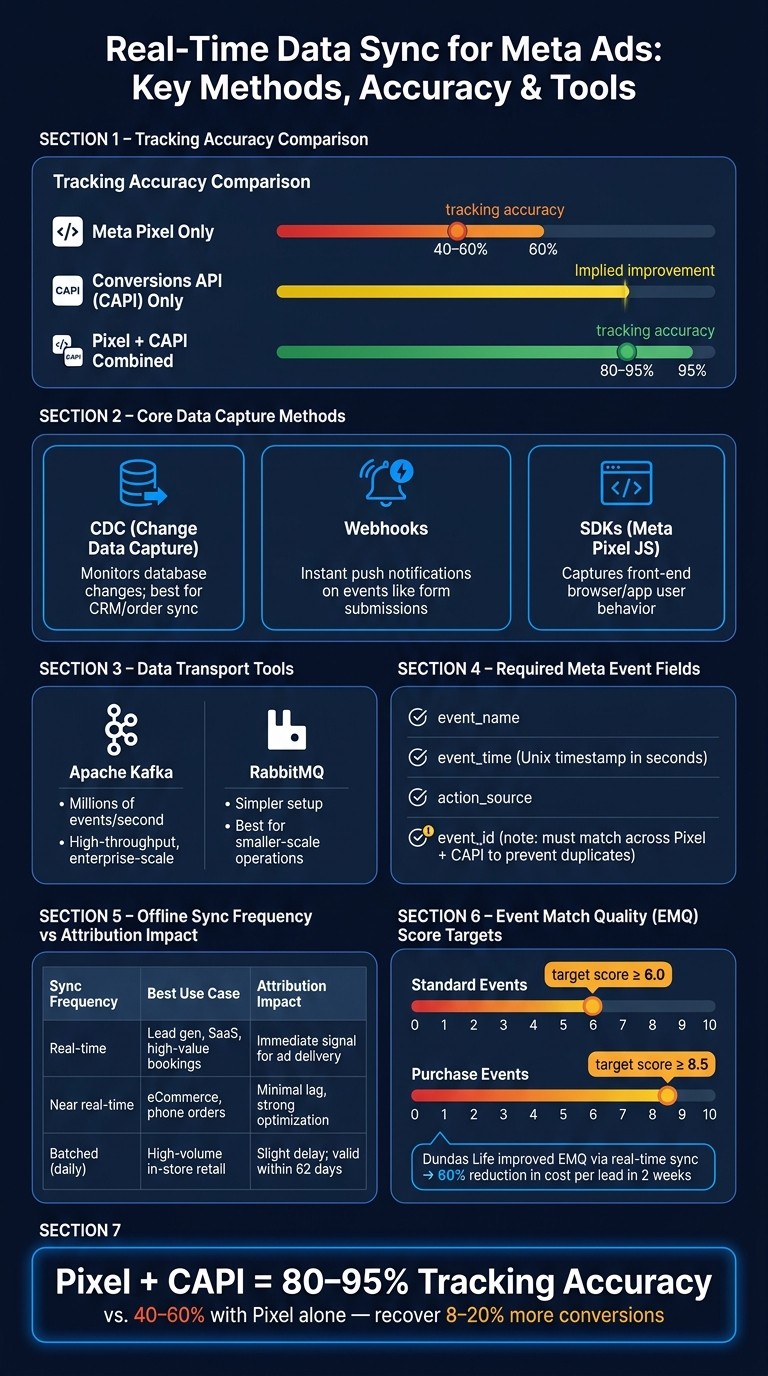
Meta Pixel vs CAPI vs Combined: Tracking Accuracy & Real-Time Sync Methods
Core Components of Real-Time Data Synchronization
Real-time synchronization depends on three key elements: capturing, transporting, and storing data effectively. Each plays a critical role in ensuring smooth Meta integration.
Data Capture Methods
The most common ways to capture data include Change Data Capture (CDC), webhooks, and SDKs. Each method is suited to specific scenarios.
CDC: This method monitors changes in your database - such as new entries, updates, or deletions - and streams them downstream as they occur. It's particularly useful for syncing CRM or order data with Meta's Conversions API without needing to alter your application code.
Webhooks: Unlike CDC, webhooks push event notifications to a target URL instantly when something happens, like a form submission or a completed transaction.
SDKs: Tools like Meta's Pixel JavaScript library capture user behavior directly from apps or browsers.
For most Meta integrations, a combination of these methods works best. SDKs handle front-end user interactions, webhooks manage server-side triggers, and CDC ensures your database stays aligned with Meta's systems. For organizations managing complex data stacks, CDP integration can further streamline this unification process. Once captured, the next step is efficient data transport.
Data Transport and Streaming Technologies
Meta's Conversions API (CAPI) serves as the main HTTP transport layer for sending server-side events to Meta. However, in environments with high data volumes, sending individual events over HTTP can become inefficient. This is where message queues and streaming frameworks come into play.
Apache Kafka and RabbitMQ: These tools act as intermediaries between your data sources and Meta's API. Instead of sending events directly as they occur, your application publishes them to a queue. A separate process then reads from the queue and sends batches to Meta's API. This setup ensures reliability, prevents data loss during traffic spikes, and allows for retries if requests fail. Kafka is ideal for handling millions of events per second in high-throughput setups, while RabbitMQ is a simpler option for smaller-scale operations.
Data Storage and Modeling for Meta Integration
Once data is transported, proper storage and schema modeling are essential to ensure Meta accurately matches conversion events.
Your data's structure and storage method directly impact how well Meta can match events. Two effective storage patterns include:
In-memory databases like Redis: These provide fast, low-latency access to live session data.
Cloud data warehouses like BigQuery or Snowflake: These are better suited for long-term analysis and building audiences.
Every Meta event must include these four fields:
event_nameevent_time(Unix timestamp in seconds)action_sourceevent_id
The event_id is particularly crucial. It must remain consistent across both Pixel and CAPI payloads to avoid duplicate conversions.
For identity matching, Meta relies on shared identifiers to track user actions across platforms like Facebook, Instagram, and Messenger. The table below outlines the key identifiers and their formatting requirements:
Identifier Type | Hashing Required | Formatting Rules |
|---|---|---|
Email ( | Yes (SHA-256) | Lowercase, trimmed, no spaces |
Phone Number ( | Yes (SHA-256) | E.164 format (e.g., +12025551234) |
External ID | No | CRM or loyalty program IDs |
Mobile Ad ID | No | IDFA (iOS) or AAID (Android) |
A helpful metric to monitor is your Event Match Quality (EMQ) score in Meta Events Manager. Strive for a score of 6.0 or higher for standard events and 8.5 or above for purchase events. For example, in 2024, Canadian insurance company Dundas Life improved their EMQ score through real-time data synchronization, reducing their cost per lead by 60% in just two weeks.
How to Set Up Real-Time Sync Across Meta Platforms
Setting up real-time synchronization across Meta platforms requires precise event tracking, reliable identity signals, and swift data delivery to Meta. Using these methods ensures your data sync supports campaign optimization through Meta's analytics tools.
Web and Server-Side Integration
For a strong web setup, combine the Meta Pixel (client-side) with the Conversions API (server-side). The Pixel captures browser-level interactions instantly, while the Conversions API compensates for limitations like ad blockers, ITP, and iOS privacy changes. According to Meta, this hybrid approach can recover 8–20% more conversions compared to relying solely on the Pixel.
To avoid double-counting events, implement event deduplication. Generate a unique event_id and reuse it across both browser and server calls. Meta uses the combination of event_name and event_id to identify and remove duplicates within a 48-hour period.
For better resilience against browser restrictions, route events through your domain (e.g., yourdomain.com/events) before forwarding them to Meta. This first-party data collection method reduces dependence on third-party cookies. If you're looking for a quicker way to set up server-side integration, partner tools like Shopify, WooCommerce, Google Tag Manager Server-Side, or Segment offer guided Conversions API connections without requiring extensive custom development. These strategies help Meta optimize ad delivery and attribution using real-time web signals.
Once your web integration is solid, you can apply similar strategies to mobile platforms for a seamless approach.
Mobile App Data Synchronization
To sync mobile app data, integrate the Meta SDK and ensure your app events (like AppInstall, Purchase, Subscribe) align with your web event taxonomy. This alignment is crucial because Meta uses shared identifiers across platforms to create a unified view of the customer journey.
On iOS, configure App Tracking Transparency (ATT) prompts and enable SKAdNetwork for aggregated attribution. For Android, verify that deep link support is correctly set up to connect ad clicks to first app launches and subsequent in-app actions.
For background events, such as subscription renewals, use the Conversions API for Apps (server-to-server). Send these events from your backend with the same event_name, event_id, and user identifiers that your SDK uses. This ensures attribution remains accurate even when the app isn't actively open. Backend-confirmed events sent to Meta help maintain reliable campaign signals.
Offline data integration follows similar principles, ensuring consistency across all channels.
Offline Conversions and CRM Integration
To sync offline data like in-store purchases, phone orders, or CRM-closed deals, start by creating an Offline Event Set in Events Manager and linking it to your ad accounts. Build a pipeline that formats and delivers this data to Meta promptly.
A practical way to achieve this is by using CDC (Change Data Capture) or webhooks from your CRM or POS system. These tools detect new transactions, format the data to Meta's required schema, and send it to the Offline Conversions API. Each record must include key fields such as event_name, event_time, value, currency, and at least one hashed identifier (e.g., em for email or ph for phone, hashed using SHA-256). Events should be uploaded within 62 days of their occurrence, though faster uploads improve attribution and help Meta's delivery algorithm respond more effectively.
Sync Frequency | Best Use Case | Attribution Impact |
|---|---|---|
Real-time | Lead generation, SaaS, high-value bookings | Immediate signal for ad delivery |
Near real-time | eCommerce, phone orders | Minimal lag, strong optimization |
Batched (daily) | High-volume in-store retail | Slight delay; still valid within 62 days |
Using a consistent external transaction ID helps prevent duplicate events during retries. Once your pipeline is live, monitor match rates and upload errors in Events Manager. Regularly compare your CRM revenue totals with Meta-attributed offline conversions to identify any coverage gaps. Keeping offline data updated in near real time ensures every channel contributes to improved campaign performance.
Best Practices for Reliable and Scalable Data Sync
Improving Signal Quality and Event Strategy
The success of your data sync plays a direct role in how effectively Meta can optimize your campaigns. While sending events with only basic parameters meets technical requirements, adding extra fields like value, currency, content_ids, and content_type provides Meta’s algorithm with richer signals. For purchase events in particular, including details such as order value and product IDs helps Meta identify your most valuable customers and locate similar audiences.
Consistency is key when naming events across web, app, and server integrations. For example, stick to a single name like Purchase instead of using variations such as purchase or order_complete. Additionally, always include a consistent event_id for each event. This ensures reliable deduplication and makes it easier to troubleshoot attribution issues.
A strong event strategy should also incorporate robust data protection measures, balancing performance with compliance.
Data Privacy and Compliance
Before sharing user data with Meta, ensure it’s hashed using SHA-256. This applies to all personally identifiable information (PII), such as email addresses, phone numbers, and names. Meta does not accept raw PII, so failing to hash this data can lead to compliance risks and technical errors. Don't forget to normalize the data before hashing - for example, convert emails to lowercase and format phone numbers to E.164 standards (e.g., +12125551234).
Meta also offers two settings to align with privacy regulations, depending on your audience and location. Limited Data Use (LDU) limits how Meta processes data in regions with privacy laws, such as California under the CCPA. Meanwhile, Aggregated Event Measurement (AEM) is necessary for iOS web traffic and allows you to optimize for up to eight events per domain. Make sure to prioritize your most valuable events when configuring AEM, as these will receive optimization signals from iOS users.
Consent management is a critical step in this process. If a user hasn’t granted consent, their data should never reach your pipeline. To ensure this, integrate your Consent Management Platform (CMP) with your tag management system. This allows event firing to depend on real-time consent status, not just the state at page load.
With enriched and compliant event data, continuous monitoring becomes essential to maintain strong campaign performance.
Monitoring and Troubleshooting Sync Issues
After launching your pipeline, focus on two key health indicators: event volume and match rate. If the match rate in Events Manager falls below 40%, Meta may struggle to link your events to user profiles, which weakens targeting and attribution. Common culprits include missing or incorrectly formatted user identifiers, inconsistent hashing, or events missing user_data fields.
For latency-related challenges, understanding the difference between batch and stream processing is crucial:
Feature | Batch Processing | Stream Processing |
|---|---|---|
Latency | Higher; results delayed until batch completion | Lower; enables immediate real-time action |
Best Use Case | Historical analysis, end-of-day reports | Live campaign adjustments, real-time optimization |
Complexity | Easier to implement and maintain | More complex due to continuous flow |
If your pipeline experiences an outage, circuit breakers can prevent a flood of failed API calls from overwhelming Meta’s endpoints when the service resumes. Pair this with a dead-letter queue to temporarily store failed events. This allows you to replay them later without permanently losing data. For critical pipelines, active-active redundancy ensures continuous operation, while active-passive failover offers a balance between reliability and cost, recovering in 30 seconds to 2 minutes.
Set up automated alerts to monitor your ad accounts and catch sudden drops in event volume. A drop of 20% or more from your baseline within a 15-minute window should trigger an investigation. Quickly identifying issues like a broken Pixel or a failed CAPI endpoint can mean the difference between a minor data gap and a major loss in attribution. These monitoring practices apply across both web and mobile integrations, ensuring a resilient and reliable data sync process across all channels.
Using Real-Time Sync for Campaign Optimization with AI Tools
Once your data pipeline is set up, you can take things to the next level by using real-time sync to drive automated campaign optimization.
By combining a solid data pipeline with real-time sync, you can enable smarter campaign adjustments across Meta platforms.
How AdAmigo.ai Uses Real-Time Data

AdAmigo.ai is a fully autonomous AI media buyer designed specifically for Meta ads. It connects directly to your Meta ad account through Meta's official API and tracks live metrics like ROAS, cost per purchase, and engagement rates to optimize campaigns 24/7.
At the heart of AdAmigo is its AI Autopilot feature, which continuously audits your account to identify impactful opportunities. It handles tasks like scaling successful ad sets, pausing underperformers, prioritizing ad sets, reallocating budgets, and testing new creatives. You can let it work automatically or require your approval before any changes are implemented.
Another standout feature is the AI Chat Agent, which allows you to interact with your ad account conversationally. Instead of navigating through Ads Manager, you can simply ask questions like "What caused yesterday's ROAS drop?" or give commands like "Increase budgets for top-performing campaigns." The AI will analyze the data and execute changes on the spot.
Aligning Internal Metrics with Meta Performance
When your CAPI integration provides business-level data - such as lifetime value (LTV) or profit margins - alongside conversion events, AI tools can focus on driving profitability instead of just increasing volume. For instance, if your integration sends value parameters based on actual margins instead of revenue, AdAmigo's Autopilot can prioritize campaigns that attract profitable customers rather than just high-volume ones. This alignment ensures that your internal metrics and Meta's performance data are working in sync, bridging the gap between ad results and real business outcomes.
This alignment lays the groundwork for automation that delivers meaningful results.
Benefits of Automation and Continuous Optimization
AdAmigo users have reported seeing up to a 30% performance boost in the first month, with some accounts achieving an 83% increase in ROAS once the AI starts refining creatives, audiences, and budgets as a cohesive system rather than handling them as separate tasks.
For agencies, this means a single media buyer using AdAmigo can manage 3–5× more client accounts by delegating repetitive tasks to the AI. For in-house eCommerce teams, it eliminates the need to build a large paid media team just to stay competitive on Meta.
A seamless real-time data sync isn't just a technical milestone - it’s the engine that powers AI tools like AdAmigo to deliver continuous improvements without relying on manual adjustments.
Conclusion
Real-time data synchronization is the backbone of effective Meta advertising. Without precise and timely signals flowing seamlessly between your systems and Meta's platform, even the most creative ad strategies can fall short.
Key Points Recap
The difference between relying solely on the Pixel and integrating both the Pixel and Conversions API (CAPI) is massive. Tracking accuracy leaps from around 40–60% to a much more reliable 80–95%. This improvement directly impacts Meta's ability to target effectively. Brands that have adopted CAPI consistently report noticeable increases in purchase conversions and revenue. Plus, the integration has proven its worth in reducing Facebook ad costs, demonstrating its value for long-term acquisition strategies.
To achieve these results, certain practices are non-negotiable. Consistent use of event_id, uploading data within one hour, and leveraging System User tokens for server-to-server connections are essential steps. Tokens ensure continuity, even when team members change. Additionally, maintaining an EMQ score of 8.0 or higher for purchase events is key to accurate attribution. Real-time sync isn’t a one-and-done effort - it requires regular attention. Weekly audits of event data, staying up-to-date with Meta’s API changes (within the 90-day update window), and prioritizing data enrichment are all critical.
This strong data foundation allows AI tools like AdAmigo.ai to step in and fine-tune your campaigns automatically. By treating data quality as a priority rather than an afterthought, you set the stage for Meta campaigns that consistently outperform the competition.
FAQs
How do I choose between Pixel, CAPI, and Offline Conversions?
Meta doesn’t make you pick one or the other - you can (and should) use both. Meta’s Conversions API (CAPI) brings together all conversion tracking, including offline and CRM events. To get the most accurate results, pair the browser-based Pixel with server-side CAPI.
Here’s how they work together: the Pixel tracks real-time actions directly on the client side, while CAPI handles reliable tracking from server to server. To prevent double-counting, ensure you use the same event names and share a unique event_id for deduplication.
What’s the simplest way to deduplicate events with event_id?
To handle duplicate events effectively, assign a unique event_id (such as an order number or UUID) at the moment the action occurs. Include this event_id in both the browser-side Pixel request and the server-side Conversions API (CAPI) request. Additionally, make sure the event_name is identical across both sources. If Meta receives matching pairs of event_id and event_name within a 48-hour window, it will automatically discard duplicates. To confirm everything is set up correctly, use the Deduplication tab or the Test Events tool available in Events Manager.
Which user identifiers most improve match rate and EMQ?
To improve your Event Match Quality (EMQ) score and match rate, prioritize sending hashed email addresses and click IDs (fbc). For even better results, consider adding phone numbers, CRM external IDs, and browser IDs (fbp). If your scores are still low, include hashed first and last names as well.
When handling sensitive data, make sure to normalize it first - convert everything to lowercase and remove any extra spaces - before hashing with SHA-256. Tools like AdAmigo.ai can help you track data flow and maintain compliance throughout the process.