
CDP Integration for Meta Ads Optimization
Unify first-party data with a CDP and Meta's Conversions API to improve targeting, attribution, and ROAS.
Meta Ads in 2026 demand smarter data solutions due to privacy updates and the end of third-party cookies. A Customer Data Platform (CDP) is the answer, helping unify and clean first-party data while integrating directly with Meta's Conversions API. This ensures better campaign performance by bypassing browser limitations and improving audience targeting.
Key Takeaways:
CDP as a central hub: Collects data from platforms like Shopify, HubSpot, and email tools into unified customer profiles.
Direct integration with Meta: Sends server-side data to Meta Ads for accurate tracking and optimization.
Proven results: CDP use can cut acquisition costs by 50%, increase lead conversions by 36%, and drive 20% more conversions.
Better targeting: Enables precise audience segmentation, real-time data syncing, and improved attribution.
Privacy compliance: Ensures data security with hashing and compliance with GDPR/CCPA.
Why It Matters:
Meta Ads struggle without quality data due to iOS privacy changes and ad blockers. CDPs bridge this gap, giving businesses - big or small - the tools to compete effectively by leveraging clean, actionable data for improved campaign outcomes.
This article dives into selecting the right CDP, preparing data, syncing tools, and building targeted campaigns. Whether you're a small business or agency, CDPs are reshaping how Meta Ads deliver results.
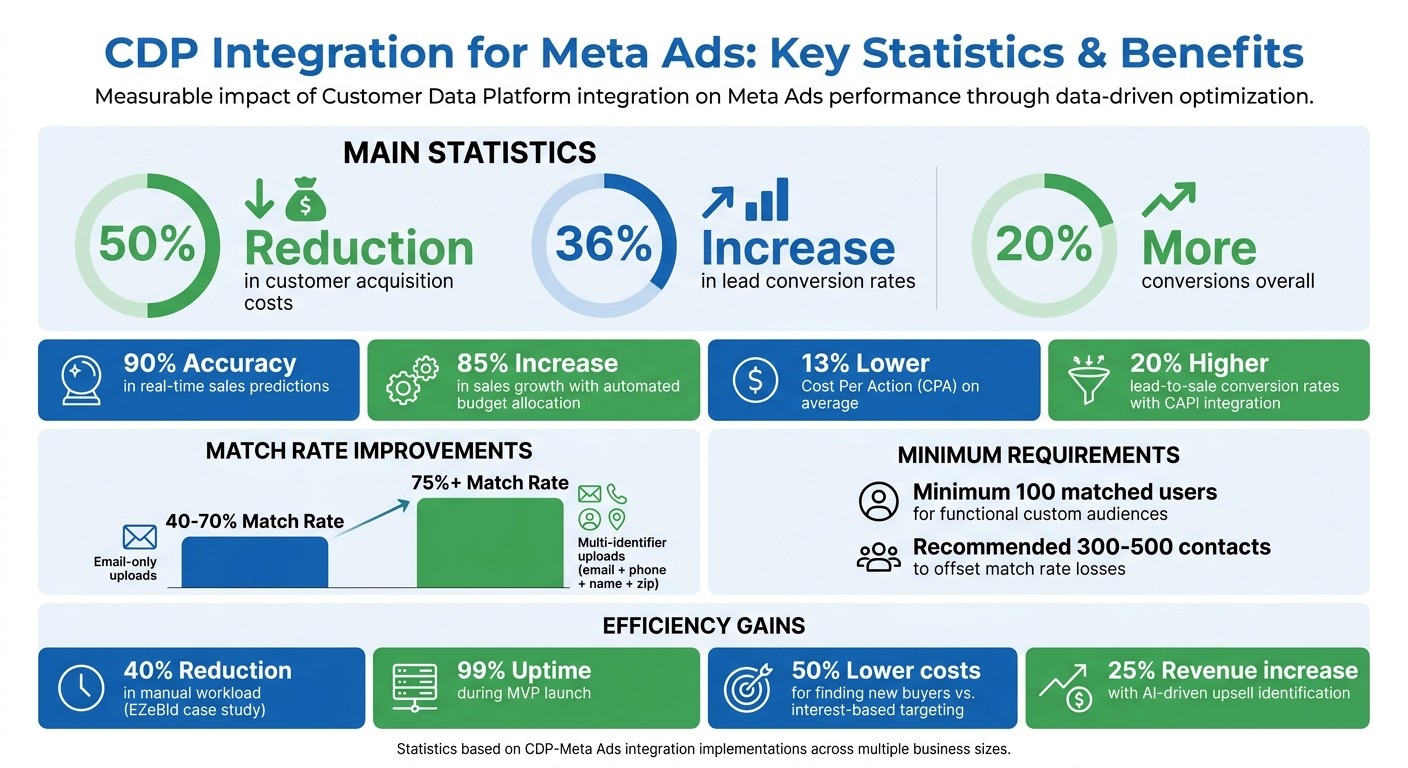
CDP Integration Impact on Meta Ads Performance: Key Statistics and Benefits
How to Connect Your CRM to Meta Ads (Step-by-Step)
Prerequisites for CDP-Meta Integration
To connect your CDP to Meta Ads effectively, you'll need a supportive platform, clean data, and a clear understanding of Meta's integration tools. Skipping these essentials can lead to delays. These steps are the foundation for a smooth integration process, which will be covered in detail later.
Choosing a CDP with Meta API Support
The first step is selecting a CDP that supports native server-to-server Meta API integration. By 2026, Meta's Conversions API (CAPI) will be essential for tracking, especially with ongoing iOS updates and browser privacy restrictions.
When evaluating CDPs, prioritize these features:
Native Meta API support
Renewable system user tokens: These tokens allow continuous server-to-server integrations without the need for manual renewals. Avoid short-term tokens, as they can disrupt operations.
Your choice should also align with your team's technical capabilities. For example:
Large companies with data engineering teams often build custom solutions using tools like AWS, Snowflake, or Python.
Mid-sized marketing teams frequently opt for platforms like Segment, Tealium, or Adobe Experience Platform to accelerate implementation.
Small brands without technical resources often rely on managed services, where external agencies handle the setup.
Data Preparation and Privacy Compliance
Meta's algorithms thrive on clean, unified customer data. Your CDP should handle identity resolution by consolidating fragmented records from systems like your CRM, Shopify, and email platform into single customer profiles. This is typically achieved using shared identifiers such as email addresses or phone numbers.
Before sending data to Meta, follow these best practices:
Hash identifiers like email addresses and phone numbers using SHA256.
Standardize currency values according to ISO 4217 (e.g., USD).
Modern privacy laws, such as GDPR and CCPA, require secure, server-side data handling. Your CDP plays a central role by cleaning and hashing data before it reaches Meta, ensuring compliance. Additionally, Meta requires a minimum of 100 matched users for custom audiences to be functional. However, uploading 300–500 contacts is recommended to offset match rate losses, as email-based uploads typically achieve match rates between 40% and 70%.
Understanding Meta Ads Integration Capabilities
Once your data is clean and compliant, you can tap into Meta's audience-building tools. Meta offers three main options for leveraging CDP data: Custom Audiences, Lookalike Audiences, and Advantage+ AI integration. Knowing how these tools work will help you optimize your campaigns.
Custom Audiences: These can come from customer lists (uploaded identifiers), website custom audiences (tracked via pixel or CAPI), or engagement audiences (based on on-platform interactions like video views or lead form submissions). Your CDP is key to building customer lists from your own data.
Lookalike Audiences: These use your best customers as a seed to find similar users. High-quality first-party data, such as your top 20% of lifetime value customers, creates strong seeds for lookalike modeling.
Advantage+ AI integration: You can use custom audiences as "audience suggestions" to guide Meta's AI, enhancing prospecting without requiring manual targeting.
Retention windows are another important factor. For high-intent retargeting, set retention windows of 1–7 days. For broader campaigns, you can extend these up to 180 days. Meta's algorithms now prioritize first-party data sources like customer lists and CAPI signals, making a well-integrated CDP a strategic edge.
Step-by-Step Guide to CDP-Meta Ads Integration
With your CDP and Meta account set up, it's time to connect the two and start creating campaigns. The process involves three key steps: setting up automated data flows, building targeted audiences, and structuring campaigns around those audiences. Each step builds on the previous one, so follow them in order.
Setting Up Data Pipeline and Sync Mechanisms
The first step is to establish a reliable data pipeline between your CDP and Meta. This means configuring automated exports of customer data - properly hashed and formatted - into Meta's Custom Audiences.
CDPs typically offer two sync options: real-time and batch. Real-time sync updates audiences within seconds or minutes, making it ideal for campaigns like cart abandonment or instant retargeting. Batch sync, on the other hand, runs on a set schedule (daily or weekly) and is better suited for tasks like monthly reporting or analyzing lifetime value (LTV). Real-time sync ensures you don’t show ads to users who’ve just converted, while batch sync is more cost-efficient for large datasets.
To get started, follow a Meta Ads API key setup guide to generate a non-expiring System User Token in Meta Business Manager (navigate to Business Settings > System Users) and store it securely in your CDP settings.
Next, align your CDP fields with Meta’s data requirements. Key event data like event_name, event_time, and event_id can be sent unhashed. However, user identifiers such as em (email), ph (phone), and fn (first name) must be hashed using SHA-256 before being sent. Other technical data like client_ip_address, fbc, and fbp, along with commerce-related fields like value, currency, and order_id, can remain unhashed.
Be on the lookout for common sync issues. A 400 error usually means you haven’t accepted Meta’s Custom Audience Terms - this can be resolved in Ads Manager. A 401 error indicates your token has expired; switching to a System User Token should fix this. If your audience size remains at "1,000" despite uploading more data, it’s likely due to Meta’s privacy threshold for small lists - allow the list to grow naturally.
Once your pipeline is in place, you can move on to segmenting your customer data into targeted audiences for precise campaign execution.
Creating and Managing CDP-Driven Meta Audiences
With your data pipeline running, the next step is to segment your CDP data into focused audience groups. Uploading one massive list isn’t ideal - strategic segmentation leads to better performance and control.
Here are some core audience segments to consider:
Top revenue-generating customers: Use the top 20% by revenue as seeds for Lookalike Audiences.
Recent purchasers: Focus on those who’ve made purchases within the last 30 days for upsell opportunities.
Lapsed customers: Target those inactive for 90+ days with win-back offers.
Leads not yet converted: Create nurturing campaigns for these potential customers.
Match rates are crucial for success. CRM uploads with only email addresses typically see match rates of 40–70%. Including additional identifiers like phone numbers, names, and zip codes can boost match rates to over 75%.
Refresh your Lookalike Audience seeds regularly - at least once a month - to keep targeting relevant. For website and engagement audiences, use rolling retention windows (e.g., 30 days) so they update automatically without manual input.
Retention windows should align with your campaign goals. Also, use exclusion lists to avoid wasting ad spend by keeping existing customers out of acquisition campaigns.
Implementing Campaign Structures with CDP Data
With your audiences defined, the final step is to structure your campaigns by funnel stage. This ensures you’re delivering the right message at the right time.
Top of Funnel (TOFU): Focus on awareness and acquiring new customers. Use 1–3% Lookalike Audiences seeded from your top revenue-generating segment. This approach can reduce acquisition costs by up to 50%.
Middle of Funnel (MOFU): Target users in the consideration phase, such as website visitors from the past 14–60 days or those with high engagement (e.g., 50%+ video views). These audiences are familiar with your brand and may need more social proof or information to convert.
Bottom of Funnel (BOFU): Aim for immediate conversions by targeting cart abandoners (1–7 day window) and unconverted CRM leads. High-intent audiences like these respond well to urgency messaging and limited-time offers. Using server-side tracking through your CDP can increase conversions by up to 20% compared to browser-only tracking.
Retention Campaigns: Use a 180-day window to target existing customers with upsell, cross-sell, or win-back offers. These segments can also serve as exclusion lists for acquisition campaigns, ensuring you don’t overlap audiences.
Identity resolution is vital here. Your CDP consolidates fragmented data - such as emails, phone numbers, and external IDs - into unified customer profiles. When CRM data is integrated with web behavior, lead conversion rates can increase by 36%.
Optimizing Campaigns Using Predictive Analytics
With your integrated CDP–Meta setup in place, predictive analytics can take your campaigns to the next level. Instead of manually adjusting budgets or refreshing audience segments, your CDP operates as a central intelligence system, continuously refining campaign performance using real-time data.
Dynamic Budget Allocation and Audience Refreshes
Modern CDPs can predict sales outcomes with up to 90% real-time accuracy. These insights - like customer lifetime value, churn likelihood, and purchase intent - enable automated budget adjustments that have been shown to drive an 85% increase in sales growth.
By syncing real-time audience segments, such as cart abandoners or high-intent prospects, through the Conversions API, you can bypass browser restrictions and instantly update your audience lists. This ensures your campaigns remain relevant and responsive to customer behavior.
Measuring Campaign Impact and Success
To evaluate the effectiveness of CDP-driven optimizations, focus on metrics that align with your campaign objectives. For example:
Awareness campaigns: Monitor reach, impressions, and video completion rates.
Consideration campaigns: Track click-through rates, lead generation metrics, and time spent on site.
Conversion campaigns: Focus on Return on Ad Spend (ROAS), Cost Per Action (CPA), and overall sales revenue.
A structured testing approach, like the 3-2-2 A/B testing method (3 creatives, 2 audiences, 2 offers), can help identify top-performing combinations before scaling. This method eliminates guesswork and provides clear insights into what works best.
Cross-platform attribution is another key factor. By consolidating data from email, web, CRM, and Meta into a single view, your CDP reveals the full customer journey, allowing you to measure campaign impact more accurately. Integrating Meta's Conversions API with your CDP has been shown to reduce CPA by 13% on average and increase lead-to-sale conversion rates by 20%.
Armed with these metrics, you can confidently scale your winning campaigns using real-time insights.
Scaling Campaigns with Real-Time Data Insights
Once you've identified your best-performing ad sets, scaling becomes a calculated process. Real-time insights from your CDP enable two primary scaling strategies:
Vertical scaling: Gradually increase budgets for successful ads by 10–20%.
Horizontal scaling: Expand your reach by diversifying audience targeting and testing new creatives.
Your CDP and Meta Events Manager provide the data needed to guide these decisions. For instance, if a particular audience segment demonstrates a lower CPA, you can allocate more budget to that segment incrementally. If performance begins to plateau, shift to horizontal scaling by introducing fresh creatives or exploring additional audience groups.
Take EZeBld, a construction SaaS provider, as an example. By adopting an AI-driven platform developed by DATAFOREST, they replaced manual workflows, cut their manual workload by 40%, and achieved 99% uptime during their MVP launch. This kind of automation frees up your team to focus on strategy while the CDP handles execution.
Finally, use your CDP to suppress converted users from acquisition campaigns automatically. This prevents wasted ad spend and ensures your budget is directed toward acquiring new customers. Companies using these insights have reported finding new buyers at 50% lower costs.
Recommended Tools for CDP-Enhanced Optimization
How AdAmigo.ai Simplifies Meta Ads Management
AdAmigo.ai takes the power of CDP-driven insights and makes managing Meta Ads a breeze. Its autonomous AI keeps tabs on your ad account, using real-time data from your CDP pipeline to handle all campaign elements automatically. This eliminates the delays that come with manual adjustments.
With its AI Autopilot, AdAmigo.ai pinpoints high-impact opportunities based on live CDP data. It can launch new tests, shift budgets to better-performing audiences, pause underperforming campaigns, and scale top performers. You can let it work automatically or approve changes yourself. This means your CDP data isn't just sitting in dashboards - it’s driving real action.
On top of that, the AI Chat Agent makes campaign management as easy as having a conversation. You can ask questions like, "Why did yesterday's ROAS drop?" or give commands like, "Start AI-powered retargeting for cart abandoners." The AI analyzes the data and takes action instantly. For creative needs, the AI-powered creative scaling (Ad Factory) reviews your top-performing ads and creates new variations that align with your brand, saving you the hassle of maintaining a constant creative flow.
Key Features of AdAmigo.ai for CDP Integration
AdAmigo.ai works seamlessly with your CDP-to-Meta pipeline, turning insights into actionable campaigns in no time.
Bulk Ad Launcher: This feature simplifies the process of launching ads for CDP-driven audience segments. Just upload your creatives to Google Drive and provide a brief. AdAmigo handles the rest - writing copy, structuring campaigns, creating ad sets, and publishing them directly to your Meta account. It’s perfect for testing multiple audience segments, like high-intent prospects, recent buyers, or at-risk customers, without spending hours in Ads Manager.
AdAmigo Protect: Scaling campaigns can introduce risks, but AdAmigo Protect has you covered. It monitors your account for issues like authentication errors, rate limits, or permission problems, catching about 90% of potential integration issues. This proactive monitoring ensures your campaigns stay on track, even during rapid adjustments.
Why AdAmigo.ai Works for Small Businesses and Agencies
For agencies, AdAmigo.ai allows one media buyer to manage three to five times more client accounts by automating repetitive tasks. This frees up senior strategists to focus on bigger-picture goals, like growth strategies and creative planning. For eCommerce brands and in-house teams, AdAmigo acts as a 24/7 AI media buyer, running advanced Meta ad strategies without the need for a large team.
Conclusion
Key Benefits of CDP Integration for Meta Ads
Bringing a CDP into your Meta Ads strategy can transform how you target, optimize, and scale campaigns. By switching from browser-based pixels to server-side tracking through Meta's Conversions API, you sidestep hurdles like ad blockers and iOS privacy updates, ensuring more precise attribution.
With first-party data - like emails, phone numbers, and purchase histories - you can build highly effective seed audiences. Businesses using predictive analytics to forecast sales with up to 90% accuracy can automatically reallocate budgets to their most lucrative segments. This approach often uncovers new customers at half the cost of broad, interest-based targeting.
Real-time exclusions of recent buyers also stretch your ad budget further by avoiding redundant spending on users who have already converted. When CRM data is combined with web behavior through a CDP, lead conversion rates can rise by 36%. Meanwhile, AI-driven models can increase revenue by 25% by identifying upsell opportunities based on live customer behavior.
Next Steps for Businesses and Marketers
These advantages point to actionable steps for marketers. Start by integrating the Conversions API alongside your Meta Pixel. Standardize your customer data - ensure emails are lowercase, add country codes to phone numbers, and hash the data for better match rates.
Segment your CRM lists into detailed groups, such as high-value customers, recent buyers (within 30 days), and leads who haven’t converted yet. This segmentation makes it easier to tailor bids and messaging to specific points in the customer journey. Refresh these seed audiences monthly to keep your lookalike audiences aligned with current buyer profiles.
To streamline these processes, tools like AdAmigo.ai can help. They automate tasks like launching campaigns, adjusting budgets, and optimizing performance based on your CDP data, eliminating the need for manual intervention. Whether you’re an agency juggling multiple clients or an eCommerce brand with limited resources, automation ensures your CDP insights are put to work 24/7.
FAQs
Do I need a CDP if I already use the Meta Pixel?
The Meta Pixel is a powerful tool for tracking website interactions, such as page views and conversions, which are crucial for fine-tuning campaign performance. On the other hand, a Customer Data Platform (CDP) goes a step further by pulling in data from various sources - like CRM systems and eCommerce platforms - to create a complete, unified view of your customers. This comprehensive approach allows for advanced audience segmentation, deeper cross-channel insights, and highly tailored marketing efforts.
For businesses looking to improve targeting and seamlessly integrate data across multiple platforms, a CDP works hand-in-hand with the Meta Pixel. This synergy is especially important in today’s privacy-conscious environment, where smarter, more strategic data use is key.
What data should I send to Meta via Conversions API for best results?
For the best outcomes, share high-quality, standardized event data that accurately represents user interactions. Make sure to include essential parameters such as:
event_name: The name of the event.event_time: Use the ISO 8601 format for timestamps.action_source: Indicate where the action originated.
Additionally, include hashed user identifiers like email addresses or phone numbers to improve matching accuracy. To prevent duplicate tracking, ensure consistent use of event_id across both the Facebook Pixel and CAPI.
By combining CAPI with the Facebook Pixel, you can achieve more reliable tracking, even in situations where browser restrictions or ad blockers might otherwise limit data collection.
How long does CDP-to-Meta integration usually take to set up?
Connecting a customer data platform (CDP) to Meta is surprisingly quick - it usually takes around 13 minutes. This setup allows you to link platforms like HubSpot, Shopify, and Meta Ads, streamlining your data flow. The process, as explained in the DataForest.ai blog, ensures your platforms work together seamlessly for better ad targeting and customer insights.