
Meta Ads API: Best Practices for Updates
Manage Meta Ads API updates with versioning, testing in paused accounts, phased rollouts, feature flags, and post-update monitoring.
The Meta Ads API is key for managing ad tools and integrations on Meta's platform, but keeping up with its regular updates can be challenging. Missing updates can break workflows, disrupt campaigns, and waste ad spend or overspend your budget. Here's what you need to know:
API Updates Frequency: Meta releases new API versions every 3-4 months, with older versions phased out after about two years. Explicitly specifying the version in your requests (e.g.,
/v25.0/) avoids errors.Breaking vs. Non-Breaking Changes: Updates may add new features or remove/modify existing ones, requiring code adjustments.
Monitoring Tools: Use Meta's API Changelog, App Dashboard, and proactive alerts to track updates.
Preparation: Test updates in a controlled environment before live deployment. Use feature flags to manage transitions and minimize risks.
Post-Update Monitoring: Validate data accuracy with triple-source checks (Meta Ads API, GA4, and baseline metrics). Set alerts for anomalies like spending spikes or disapproved ads.
Understanding Meta Ads API Versioning
How Meta Handles API Versions and Deprecations
Meta rolls out a new Marketing API version every three to four months. To ensure your API calls work, always include the specific version in your requests (e.g., /v25.0/), as unversioned calls will result in errors.
When a new version is introduced, the previous version stays active for at least 90 days before being deprecated. Typically, each version is supported for about two years in total. Starting in May 2024, Meta began automatically upgrading API calls to the next available version if there are no breaking changes for the endpoint. However, it's still wise to explicitly define the version you’re using (e.g., v25.0) to avoid unexpected issues. This approach helps reduce disruptions and makes it easier to plan for future updates.
For more significant updates, Meta uses "Migrations" - a process that provides developers with at least 90 days to adapt before changes become mandatory.
Types of Changes in API Updates
Not all updates affect your setup the same way. Non-breaking updates, such as adding new fields or endpoints, integrate smoothly. On the other hand, breaking changes - like removing fields, renaming metrics, modifying permissions, or adjusting rate limits - can disrupt your workflows if not addressed promptly. Following Meta API configuration best practices ensures your setup remains resilient against these changes.
A notable example of a disruptive change is the "Andromeda" update from late 2025. This platform-level overhaul redefined how creative-driven targeting works:
"Andromeda (late 2025) doubled down: creative ≈ targeting in practice." – AI-CMO Review
Changes like this don’t just impact your code - they can ripple through your campaign strategies and account structures.
How to Monitor for Version Changes
Staying on top of version updates is crucial. You can track them through Meta's Marketing API Changelog and view pending migrations in the App Dashboard under Settings > Migrations. Alternatively, you can query the /app node for updates. To stay ahead, set up proactive alerts in Developer Settings (Meta Developer Contact Settings) and bookmark the Out-of-Cycle Change Index for interim updates.
These tools and practices are essential for building a reliable plan for scaling Meta Ads with real-time API updates, which will be covered in the next section.
Building an API Update Plan
Turning API change alerts into a structured update plan can save you from last-minute chaos and ensure smooth transitions between versions. A well-organized plan connects your monitoring system to actionable, phased updates, keeping your operations steady.
Setting a Version Support Policy
Start by defining a clear policy for which API versions you’ll support. For instance, you might decide to maintain the current version and the one immediately prior. This approach provides a buffer when platforms like Meta release new updates, sparing you from the burden of maintaining outdated code indefinitely.
Internally, set deadlines for phasing out older versions. This gives your team enough time to adjust integrations before hitting a hard cutoff. To reduce risks, pilot the update on a small group of accounts first, following bulk launch best practices to ensure stability. This proof-of-concept phase helps you detect and address any unexpected issues before rolling it out across your entire portfolio.
Assessing the Impact of API Changes
Once you’ve set your support policy, the next step is to evaluate how updates will affect your systems. A good way to do this is by mapping your API usage to specific functional modules. Here’s an example framework:
Integration Category | What It Covers |
|---|---|
Core | Read/write permissions, campaign creation, budget changes |
Asset Management | Bulk creative uploads, ad library management |
Data & Attribution | CRM integrations, Conversions API (CAPI), conversion analysis |
Reporting | Automated performance data pulled for stakeholders |
Go through each category and identify which endpoints your third-party tools use, such as "Create Ad", "Get Insights", or "List Ad Accounts". This process highlights where code changes are necessary and where existing implementations can stay as they are.
Don’t forget to account for algorithmic updates, not just technical ones. For example, changes in creative-driven targeting could impact your account structure and campaign strategies. Your assessment should determine whether your current setup aligns with Meta’s evolving algorithms and whether adjustments are needed.
Using Configuration and Feature Flags
After pinpointing the affected areas, leverage configuration and feature flags to manage the transition. Instead of embedding version-sensitive behavior directly into your code, store it in a centralized configuration file. For example, a file like ad-config.json could house performance thresholds such as target_cpa, target_roas, and max_frequency. When the API changes how metrics are calculated or reported, you only need to update the configuration file, not the core code.
For updates that carry higher risks, consider adding a human-approval flag. This ensures that new API actions are reviewed before they go live. You can also configure campaigns or ad sets created during testing to launch in a PAUSED state. This precaution allows you to verify that the API is functioning correctly before anything goes live.
"These AI actions go beyond simply suggesting actions; they provide valuable insights and justifications. This not only improves my results but also deepens my understanding of campaign optimization." – Verified User, G2 Review
Finally, set up custom alerts tied to your configuration thresholds. For instance, a spend_pace_alert_pct flag can notify you if spending accelerates unusually after an update. Catching anomalies early helps maintain performance stability and ensures your campaigns stay on track during each update cycle.
How to Implement and Test API Version Updates
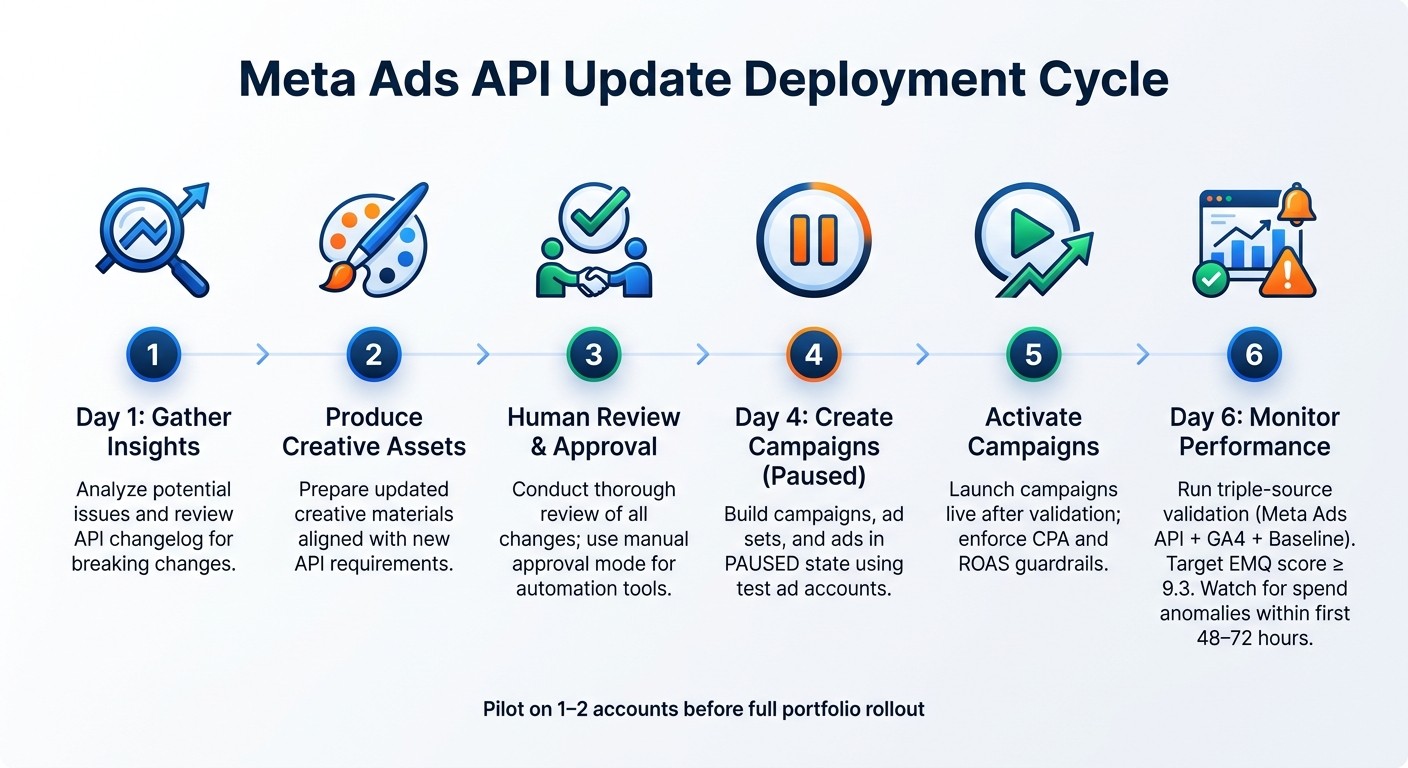
Meta Ads API Update Cycle: 6-Step Deployment Process
Once you've completed your impact assessment and set up feature flags, it's time to move forward with implementing your update plan step by step.
Setting Up a Test Environment
Before making any changes to live accounts, start by using Meta's test ad accounts to validate the new API version. Always create campaigns, ad sets, and ads in a PAUSED state by default. This approach ensures that targeting, creative elements, and settings are thoroughly checked before anything is activated.
For tools that rely on automation, like AI-driven media buyers, switch to manual approval mode. This "review-and-approve" setup allows you to confirm that the updated API is interpreting and executing logic as expected before enabling automation.
Once you've confirmed everything works as intended in the test environment, you can move on to a gradual rollout to minimize risks.
Rolling Out Updates in Phases
A phased rollout is the most reliable way to transition from testing to live production. Begin by piloting the update on just 1–2 accounts. This initial stage helps identify edge cases that may not have been caught in the test environment, such as unexpected changes in spend pacing or campaign structure.
Using a 6-day deployment cycle can help streamline the process:
Day 1: Gather insights and analyze potential issues.
Day 2: Produce creative assets.
Day 3: Conduct a thorough human review and approval.
Day 4: Create campaigns in a paused state.
Day 5: Activate campaigns.
Day 6: Closely monitor performance to catch and address any issues before scaling further.
Testing and Validation Practices
Once updates are live, it's essential to verify that everything is functioning as intended. Use a triple-source validation approach: compare data from the Meta Ads API, GA4, and a baseline metric to ensure reporting accuracy. If discrepancies arise, they could indicate an issue with attribution or event tracking due to endpoint changes.
To validate tracking, leverage scripts like capi-test, capi-send, and emq-check. These tools help confirm that server-side events are firing correctly under the updated API version. Aim for an Event Match Quality (EMQ) score of 9.3 or higher to maintain reliable conversion data. Combine this with 24/7 anomaly detection to quickly identify spend irregularities, broken links, or disapproved ads.
Monitoring and Optimizing After an Update
Tracking Errors and API Performance
Once your update is live, it's time to keep a close eye on your metrics. Start by continuing triple-source validation - compare data from the Meta Ads API, GA4, and an "Assumed Real" baseline. This approach helps you quickly spot any attribution issues that may arise in the early days of the update. Pay special attention to rate limit headers and API response times, as you might encounter latency spikes or throttling errors within the first 48–72 hours after a version change.
It's also a good idea to systematically store logs. These logs can help you trace any issues back to specific endpoints or request patterns. To make this process even smoother, set up alerts that trigger whenever key benchmarks are breached. For example, use an updated configuration file that defines metrics like target CPA, minimum CTR, maximum frequency, and a ROAS floor. This way, you'll be notified as soon as performance metrics stray outside acceptable ranges.
Automated tools can make this monitoring process far more efficient, ensuring you can quickly detect and resolve any issues.
Using Automation Tools to Support Post-Update Performance
"90% of ad management is pattern recognition. Spend trending up or down. CTR declining (creative fatigue). CPA spiking (audience exhaustion). Winners emerging. Losers bleeding." - Matt Berman, Founder, Emerald Digital
Automation can be a game-changer after an API update. During this phase, new ad sets enter their learning period, delivery logic adjusts, and unexpected edge cases might pop up. Relying solely on manual monitoring during this time can lead to delays and errors.
Consider tools like AdAmigo.ai, which are specifically designed for this purpose. For instance, AdAmigo's AdAmigo Protect feature offers round-the-clock monitoring for Meta ad accounts. It automatically flags issues like budget anomalies, disapproved ads, broken links, and unusual delivery behaviors. A real-world example? An EU-based agency managing 15 accounts used AdAmigo's Autopilot feature with Slack integration and caught four separate "waste incidents" - situations where client websites went offline while ads continued running. This proactive approach saved them from significant budget losses and even allowed the agency to scale from 15 to 45 accounts without increasing headcount.
If you're using automated optimization tools, it’s critical to set strict CPA and ROAS guardrails during the post-update calibration period. This prevents automated systems from making overly aggressive budget adjustments while the API is still stabilizing.
Documenting and Communicating API Changes Internally
Monitoring is only part of the equation - clear internal communication is just as important. Your API update isn’t truly complete until everyone involved understands what changed and why. Without this clarity, teams might make decisions based on outdated or incorrect assumptions.
Maintain a detailed changelog that includes the API version, affected endpoints or parameters, changes in delivery or reporting behavior, and the date the update went live. This documentation complements your update plan and testing protocols, ensuring no detail is overlooked.
Additionally, share a plain-language summary of the changes with all stakeholders - not just the engineers. This makes it easier to interpret dips or shifts in performance metrics. For instance, a drop in metrics might simply reflect a reporting change introduced by the new API version rather than a genuine performance issue. Clear communication ensures everyone is on the same page and avoids unnecessary confusion.
Conclusion
To keep your Meta Ads API integration running smoothly, sticking to a disciplined approach is key. Teams that excel in managing updates typically focus on three core practices: setting a clear version support policy, testing changes in a controlled environment before pushing them live, and closely monitoring performance after updates are implemented. This includes monitoring API key usage to catch rate limit issues or token errors early. Actions like pausing new campaigns by default, cross-checking data, and enforcing strict CPA or ROAS guardrails help avoid expensive errors. At the same time, refreshing creative assets regularly ensures you're taking full advantage of the API's evolving features.
As discussed earlier, combining technical accuracy with creative flexibility is essential for sustained ad success. For example, after the Andromeda update in late 2025, a skincare brand that prioritized both saw its ROAS jump from 2.4 to 4.3 within just a month, while also saving 12 hours of manual work each week.
FAQs
When should I upgrade to a new Meta Ads API version?
Meta rolls out API updates quarterly, with each version supported for a minimum of two years. To avoid disruptions, it's important to upgrade before your current API version hits its end-of-support date. Staying current not only ensures compatibility but also gives you access to new features, bug fixes, and improved performance.
Be proactive: plan migrations as soon as deprecations are announced, always specify API versions in your calls, and thoroughly test your operations after updates. This approach keeps your systems running smoothly and minimizes potential issues.
How can I prevent an API update from accidentally spending money?
To keep your spending in check during an API update, it’s smart to set up safeguards like approval workflows for budget adjustments and campaign tweaks. Using tools that combine rule-based automation with manual approval processes ensures that no major changes slip through unnoticed. By blending automation with human oversight, you can reduce risks and maintain control over your ad spend.
What’s the fastest way to detect reporting or tracking issues after an update?
To spot reporting or tracking issues right after an update, rely on real-time analytics and structured insights. Keep an eye out for anomalies, such as unusually high spending paired with a low CTR. Use tools designed to audit tracking setups, test server-side events, and enhance Event Match Quality. Automating these checks regularly can help maintain accurate tracking and optimize performance.