
Checklist for AI-Driven Creative Testing
Step-by-step checklist to set up, run, and optimize AI-driven ad creative tests for faster, data-backed campaign results.
AI-driven creative testing automates ad creation, testing, and optimization, saving time and improving results. Here's what you need to know:
What It Does: AI evaluates performance data in real-time, identifies top-performing ads, and scales them automatically. It handles tasks like multivariate testing and decision-making based on solid data.
Key Benefits: Saves up to 520 hours annually for marketers, ensures decisions are based on 95% confidence levels, and manages multiple accounts with minimal oversight.
When to Use: Ideal for speeding up slow production workflows, testing ideas before committing to expensive production, and managing large-scale campaigns.
Preparation Steps:
Define objectives and KPIs (e.g., ROAS > 3×, CTR > 1.5%).
Select an AI tool like AdAmigo.ai for automated analysis and creative generation.
Organize creative assets and set up a structured testing framework.
Execution Tips:
Launch campaigns with equal budgets for fair testing.
Monitor metrics like CTR, CPA, and Hook Rate to identify winners.
Use predictive modeling to estimate performance before launching.
Optimization:
Pause underperforming ads within 48–72 hours.
Scale winning creatives by increasing budgets gradually.
Refresh ads every 2–4 weeks to avoid creative fatigue.
This approach transforms ad testing into a faster, more efficient process while allowing teams to focus on strategy.
Preparation Steps for AI-Driven Creative Testing
Define Objectives and KPIs
Start by setting clear goals and measurable KPIs. For instance, in conversion campaigns, you might aim for a ROAS greater than 3× or a conversion rate above 4%. For awareness campaigns, a CTR over 1.5% or a ThruPlay rate above 25% could be your benchmark.
It’s crucial to establish kill thresholds and winner signals early on. For example, pause any ad that exceeds 2× your target CPA, and scale creatives that achieve a ROAS over 3×. As the RedClaw Performance Team aptly puts it:
"Creative is your most important optimization lever. The algorithm handles targeting, placements, and bidding automatically. What it cannot do is create better ads".
Considering that creative quality drives 47% of ad performance variability, getting your KPIs aligned from the beginning is non-negotiable. Run your tests for 7–14 days to exit the learning phase, ensuring you gather at least 1,000 impressions and 10–30 conversions per variant. For video ads, monitor the "hook rate" - the percentage of viewers who watch beyond the first 3 seconds - to gauge how well your opening grabs attention.
Choose the Right AI Tool
Once your KPIs are defined, the next step is selecting an AI tool that can accurately analyze and optimize creative elements. Look for a tool capable of isolating specific variables during multivariate testing. For instance, if you’re comparing a video hook to a headline, the tool should pinpoint which change influenced performance.
A standout example is AdAmigo.ai, an AI-driven platform that learns your brand identity, identifies top-performing ads, and generates new creatives that can be launched directly into your Meta ad account. It continuously analyzes performance and can autonomously produce fully designed ad creatives. You can either approve changes manually or let the system operate on autopilot, optimizing creatives, budgets, targeting, and bids as one seamless process.
Costs for basic AI tools typically range from $50 to $200 per month. However, AdAmigo.ai’s Full Access plan, priced at $349 per month per ad account, offers added benefits like unlimited ad spend, team member access, and a dedicated account manager. For agencies, this tool allows one media buyer to manage 3–5× more accounts, freeing up strategists to focus on broader planning while the AI handles repetitive tasks.
Prepare Creative Assets
After selecting your AI tool, organize your creative assets for testing. Start by exporting 90 days of Meta Ads data to identify your top-performing 10–20% creatives as a baseline. Ensure all assets are properly named (e.g., Product_Format_Size_Version), sorted by aspect ratio (1:1, 4:5, 9:16), and meet Meta's file size requirements (images under 30MB, videos under 4GB). Store everything in a cloud-based platform like Google Drive, which integrates seamlessly with tools like AdAmigo.ai for automated syncing and variation generation.
To fuel multivariate testing, create a copy matrix with 3–5 variations each for headlines, primary text, and CTAs. Stick to the 70/20/10 budget rule: allocate 70% of your budget to proven winners, 20% to structured AI testing, and 10% to experimental, high-risk concepts. When testing, change only one element at a time - such as the video hook or the headline - so the AI can accurately track which modification drives performance shifts.
Checklist for Setting Up AI Creative Testing
Input Brand Identity and KPIs
Start by uploading your brand guidelines to ensure your AI-generated ads stay true to your brand's look and feel. Include essential elements like logos, color palettes, fonts, tone of voice, and any specific messaging preferences. If you're using a platform like AdAmigo.ai, it can analyze your brand identity and top-performing ads to create content that aligns with your style seamlessly.
Next, define your performance metrics based on your campaign goals. For example, research shows that strong engagement benchmarks include:
A CTR above 1% for display ads or 3% for social ads
A Hook Rate (first 3 seconds of a video) over 50%
A Video Through Rate exceeding 25%.
As AdBid.me puts it:
"Every ad is a hypothesis. Testing is how you prove or disprove that hypothesis. The winner is the company that runs the most experiments and learns the fastest."
Once you've nailed down your brand identity and KPIs, you're ready to generate creative variations built on proven dynamic creative testing strategies.
Generate Creative Variations
Dive into your last 90 days of performance data to benchmark Meta Ads performance and spot trends among your best-performing ads. For instance, do your top ads start with a question? Or do they feature product close-ups? This analysis helps ensure the AI builds on strategies that have already worked for your brand.
With tools like AdAmigo.ai, you can automatically generate photorealistic ads and multiple copy variations. Unlike Meta's standard Dynamic Creative Optimization (DCO) best practices, AdAmigo functions as an autonomous learning system, refining its output based on real-world performance data. Focus your testing on key elements like the hook (the first 3 seconds) and the core message, while also experimenting with visuals, call-to-action styles, and copy length.
In today’s privacy-first environment, where algorithms prioritize creative quality over behavioral targeting, well-crafted ads can deliver 3–5× better results compared to average campaigns.
Ensure Compliance with Platform Guidelines
After finalizing your creative concepts, double-check that all assets meet Meta's technical requirements. Here’s a quick rundown of key guidelines:
Images: File size under 30MB
Videos: File size under 4GB
Aspect Ratios: 1:1, 4:5, or 9:16
Headlines: Up to 40 characters
Primary Text: Around 125 characters for mobile
Descriptions: Roughly 30 characters
To maximize performance, test multi-format creative approaches - play with different opening frames, messaging angles, and visual styles. If you're using AdAmigo.ai’s Bulk Ad Launcher, it can simplify this process by automatically structuring campaigns, applying targeting, and publishing ads directly to your Meta account. This not only ensures your assets meet compliance standards but also saves you a ton of time during setup while helping you avoid common mistakes in bulk ad testing.
I Tested 1,000+ AI Ad Creatives on Meta, these are the money makers
Checklist for Running and Monitoring AI-Driven Tests
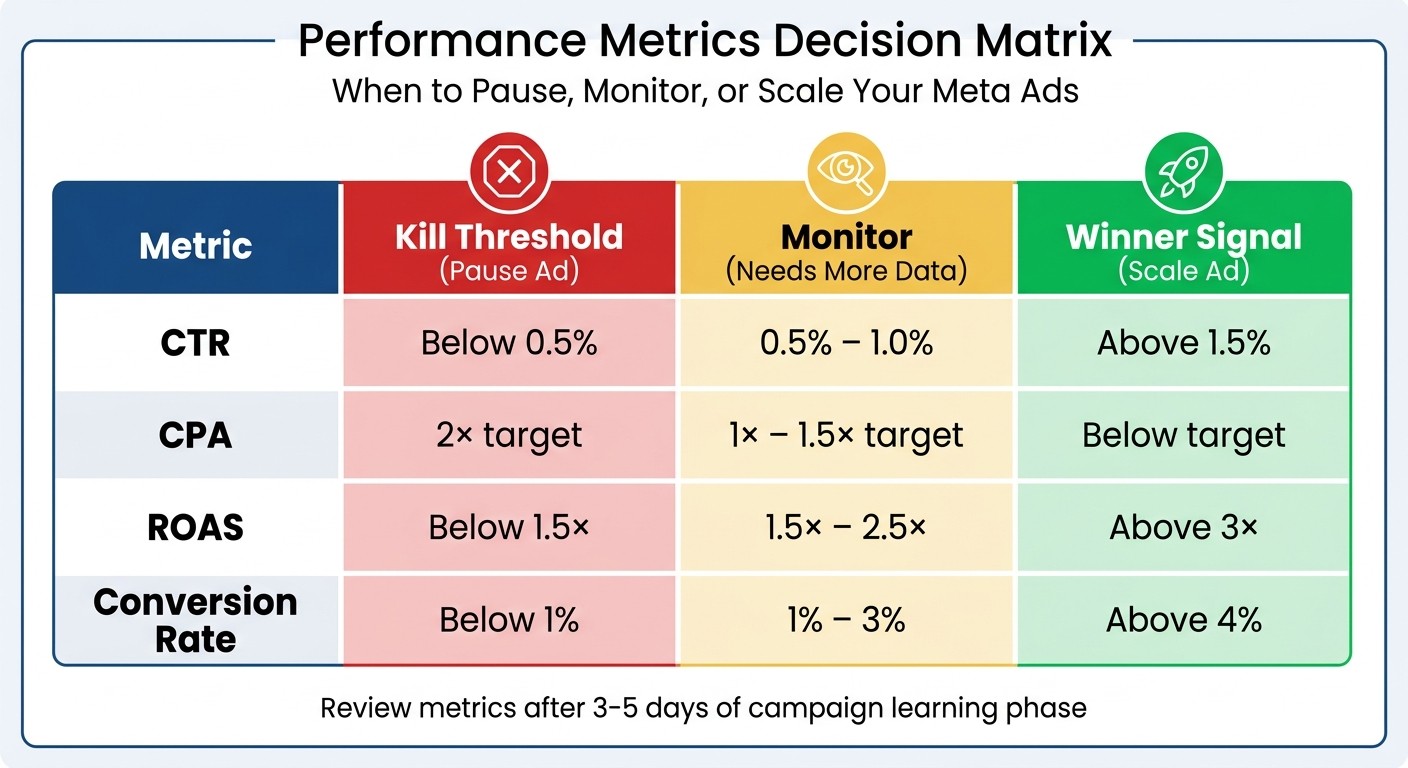
AI-Driven Creative Testing Performance Metrics: Kill, Monitor, and Scale Thresholds
Launch Campaigns Using Bulk Tools
Kick off your campaigns efficiently by using bulk tools like AdAmigo.ai's Bulk Ad Launcher. These tools streamline the process by uploading assets from Google Drive, generating ad copy, structuring campaigns, and publishing ads - all in one go.
When setting up your initial tests, opt for Ad Set Budget Optimization (ABO) to ensure every creative gets an equal share of the budget. For instance, assign $5.00 per creative so the algorithm can fairly evaluate performance. During the first 3–5 days, avoid making edits. This period is critical for the algorithm to complete its learning phase, which typically requires around 50 events per week. To avoid wasting money on underperforming ads, set automated spend rules to pause any ad set that exceeds 2–3× your target CPA without delivering conversions.
Monitor Key Metrics in Real Time
Once your campaigns are live, shift your attention to real-time performance tracking. Instead of focusing on aggregated results, dive into individual asset performance. Use Meta Ads Manager's "Breakdown by Dynamic Creative Asset" to analyze elements like headlines, images, and CTAs. Early metrics such as Hook Rate (percentage of viewers watching past the first 3 seconds) and ThruPlay Rate can help predict which videos will perform well before spending your full budget.
AI-powered tools like AdAmigo.ai can provide daily insights into your account structure, offering AI-driven recommendations on reallocating budgets, pausing underperforming ads, and refreshing creative assets. Pay close attention to frequency metrics - if someone sees your ad more than 3–4 times per week, engagement usually drops, and costs can climb due to creative fatigue. Use the table below to guide your decisions:
Metric | Kill Threshold (Pause Ad) | Monitor (Needs More Data) | Winner Signal (Scale Ad) |
|---|---|---|---|
CTR | Below 0.5% | 0.5% – 1.0% | Above 1.5% |
CPA | 2× target | 1× – 1.5× target | Below target |
ROAS | Below 1.5× | 1.5× – 2.5× | Above 3× |
Conversion Rate | Below 1% | 1% – 3% | Above 4% |
When you spot a winning ad (CPA 20%+ below target), scale it up gradually. Increase the budget by 20–30% every 2–3 days to avoid disrupting the algorithm's learning phase.
Enable Predictive Modeling
To refine your campaigns even further, integrate predictive analytics before launching. Predictive models can estimate ad performance and help you compare creative options without spending a dime. By training these models on real campaign data, you can identify potential winners and weed out underperformers, ensuring your budget goes to the most promising assets from the start.
"Meta's advertising ecosystem has evolved beyond simple A/B tests into a sophisticated machine learning environment that demands disciplined, systematic testing frameworks." - Extuitive
Instead of relying solely on post-launch metrics, use predictive AI to align creative variations with the audience segments most likely to respond. For the best results, provide the algorithm with distinctly different concepts - varying hooks, angles, and formats - rather than small tweaks. This strategy strengthens predictive models and can speed up campaign iterations by as much as 40%, helping you combat creative fatigue and maintain steady performance as your campaigns grow.
Checklist for Optimization and Iteration
Pause Underperformers and Scale Winners
Once your test setup and monitoring are in place, it’s time to act on creative performance quickly. Pause ads that aren’t delivering results within 48–72 hours or after spending $50–$100 without meeting your target metrics.
When you spot a winning creative, scale it gradually to avoid disrupting Meta's algorithm. A good rule of thumb is to increase budgets by 20–30% every 2–3 days, sticking to the 70-20-10 allocation framework.
For those who want to automate this process, tools like AdAmigo.ai's AI Autopilot can handle it for you. This system monitors ad performance around the clock, pausing underperforming ads and reallocating budgets to top-performing ones without manual intervention. This is a key part of AI-driven resource prioritization for modern campaigns.
Regenerate Creatives Based on Insights
Keep your creatives fresh by updating them every 2–4 weeks to stay ahead of performance drops. Monitor Meta ad frequency benchmarks: if cold audiences see your ad 3–4 times or retargeting audiences hit 5–7 impressions, it’s time to introduce new variations.
Use insights from your top-performing ads to guide your updates. For example, if a static image is performing well, experiment by turning it into a video or carousel format to extend its impact. AdAmigo.ai’s Ad Factory can help streamline this by analyzing your best-performing ads and competitor trends, then generating new variations that align with your brand. This approach can speed up campaign iteration by up to 40% compared to manual processes.
Schedule Regular Reviews and Refinements
Make daily check-ins part of your routine to address immediate needs - like reviewing AI-recommended changes, approving budget adjustments, and spotting any anomalies. Then, hold weekly reviews to refine broader strategies.
"AI is not here to replace the human touch; instead, it's a catalyst that ignites a renaissance in the realm of creative processes." - Kyle Durston, Ladder.io
Document everything - successful ideas, failed experiments, and the reasoning behind each decision. This creates a knowledge base that helps avoid repeating mistakes and builds on past successes. With AI managing the execution, you can focus on higher-level tasks like discovering new audience segments, testing untapped creative ideas, and setting ambitious growth goals by testing the top variables in Meta ads while the system keeps optimizing in the background.
Conclusion
AI-powered creative testing is reshaping how teams handle Meta ads, transforming what used to be a manual Meta ads process into a smooth, ongoing system. By following a checklist approach, you can ensure every important step is covered, maintain consistency, and create a system that gets better with each campaign cycle.
The time savings are impressive. Where manual optimization often takes 2–4 hours daily per account, tools like AdAmigo.ai cut that down to just 15–30 minutes of oversight. Plus, these tools work 24/7, unlike traditional methods limited to business hours. This shift means one media buyer can now oversee 10+ accounts at once, compared to the previous limit of 1–3. The result? Faster testing, quicker scaling of successful ads, and the ability to pause underperformers before they waste your budget.
Think of this checklist as a living document. Experiment with your team, tweak the steps to suit your needs, and keep track of what works and what doesn’t. Over time, AdAmigo.ai's AI Ads Agent adapts to your results, creating new creatives that match your brand while its AI Actions feature focuses on impactful daily adjustments. These tools let you shift your attention from tedious execution to high-level strategy.
To get started, connect your Meta ad account, define your KPIs, and run your first test using this checklist. Track your baseline metrics and evaluate improvements after 2–4 weeks. With AI and a structured approach working together, creative testing evolves from a frustrating challenge into a powerful advantage.
FAQs
What’s the minimum budget and data needed for a valid AI creative test?
To conduct a proper AI creative test, set aside a small portion of your campaign budget and gather sufficient data to identify any noticeable differences in performance. Keep a close eye on the results during the first 24–48 hours to ensure your ads are running correctly and evaluate key performance indicators.
How do I avoid “false winners” when the algorithm is still learning?
To avoid “false winners” during the algorithm's learning stage, stick to a structured testing framework. This approach helps isolate variables and ensures you're accurately attributing performance. It's also a good idea to rotate your ads every 21–28 days to prevent audience fatigue. Keep a close eye on key metrics like ROAS (Return on Ad Spend) and CTR (Click-Through Rate) to gauge effectiveness. Using AI tools for automation can streamline the process, making it easier to spot true top performers and avoid scaling based on short-term spikes.
What should I automate vs keep manual when using AdAmigo.ai?
Automate routine tasks such as generating creative content, launching campaigns, and making real-time adjustments to bids, budgets, and targeting. AdAmigo.ai is designed to manage these processes seamlessly and consistently.
At the same time, retain manual control over critical areas like strategic decisions, niche audience targeting, and highly tailored campaigns. This approach ensures you maintain precision where it matters most, while allowing the AI to handle repetitive tasks, blending efficiency with strategic focus.