
Is Meta Ads MCP Safe for Facebook Ads Automation? 10 Guardrails Before Letting AI Touch Your Ad Account
Details the risks of using Meta Ads MCP for Facebook ad automation and 10 essential guardrails like approvals, budget caps, and audit logs.
Meta Ads MCP, launched on April 29, 2026, allows AI media buyers like ChatGPT and Claude to directly manage Facebook ad accounts using natural language commands. While this simplifies ad management, it comes with serious risks. MCP lacks built-in safeguards like budget caps, approval workflows, or fraud detection prevention. Without these, AI could make costly mistakes, such as resetting learning phases, overspending, or triggering account bans.
Here’s what you need to know:
MCP is an access tool, not a safety system. It executes commands but doesn’t judge their impact.
AI mistakes can be expensive. Examples include inflated CPAs, premature ad pauses, and fraud detection triggers.
Guardrails are essential. These include human approvals, budget caps, automation rules, and detailed audit logs.
To use Meta Ads MCP safely, advertisers must implement strict controls or opt for third-party tools like AdAmigo.ai, which provides built-in safeguards, approval processes, and monitoring to reduce risks.
Bottom line: MCP is powerful but risky without proper oversight. Pair it with safety measures to avoid costly errors.
What Meta Ads MCP Can and Cannot Do
What Meta Ads MCP Actually Does
Think of Meta Ads MCP as a universal translator for ad management. It takes plain-language commands - typed into AI tools like Claude or ChatGPT - and converts them into structured requests that interact with the Meta Marketing API through a standardized protocol.
Meta’s official MCP server supports 58 function definitions and 31 tools spread across five key areas. These allow an AI to handle tasks like analyzing campaign performance, gathering audience data, creating and managing campaigns, tweaking budgets and targeting, maintaining product catalogs, and even running diagnostics on ad signals.
Capability Surface | What the AI Can Do |
|---|---|
Campaign Management | Create, edit, pause, or activate campaigns, ad sets, and ads; adjust budgets and targeting |
Insights & Benchmarks | Access performance trends, detect anomalies, review auction rankings, and compare industry benchmarks |
Catalog & Products | Build catalogs, add product data, and troubleshoot feed or item visibility issues |
Account & Pages | Retrieve details for ad accounts, user pages, and business pages |
Data Quality | Run diagnostics on datasets, assess signal health, and flag measurement gaps |
But here’s the catch: MCP doesn’t decide when to use these tools, how much to adjust, or whether a particular action makes strategic sense.
Why MCP Is Not a Safety System on Its Own
As ALM Corp explains:
"It is an access layer that connects conversational AI to real Meta advertising workflows... the connector is infrastructure, not judgment."
In other words, MCP is like a direct line to Meta’s advertising tools, but it doesn’t come with built-in safeguards. It lacks features like budget caps, approval workflows, KPI monitoring, or even awareness of Meta's Learning Phase. This means an AI could make a seemingly small tweak - like adjusting targeting - that unintentionally resets a campaign’s learning process, driving up your CPA.
Another key limitation is that MCP is stateless by default. Unless you manually provide context, it won’t remember changes made in previous sessions.
Here’s a real-world example: In May 2026, a media buyer at the DTC brand Brandwerk asked MCP to "refresh the creative rotation" for five active ad sets. One of those ad sets had just exited the learning phase. MCP executed the request as instructed, but the result was disastrous: the CPA skyrocketed from €37 to €89 in just three days, leading to an estimated overspend of €14,200 before the team manually reversed the changes. The protocol didn’t fail - it followed the command exactly. The issue was the lack of any guardrail to flag the vague instruction or its potential impact.
This underscores MCP’s biggest limitation: it provides access, not oversight. While it enables powerful actions, those actions require strict controls to avoid costly mistakes.
The Risks of Letting AI Make Live Ad Changes Without Oversight
Common Mistakes AI Makes in Ad Automation
When it comes to live ad accounts, relying on AI without proper safeguards can lead to serious issues. Brandwerk's experience highlights some of the typical problems that arise.
One of the biggest challenges is premature decision-making. AI tools often act too quickly, pausing ads or reallocating budgets before gathering enough data. For example, ad sets with fewer than 30 conversions in the past seven days are particularly at risk. Making changes at this stage can throw off performance, as the algorithm hasn’t had enough time to adapt. The AI’s reliance on raw numbers means it often misses the bigger picture.
Another frequent issue is unintended learning phase resets. Even small tweaks can reset the learning phase, leading to inflated CPAs - sometimes 2–3 times higher - over a period of up to 10 days. Chris Pollard, Founder of Ads Uploader, explains it well:
"Every time you touch a budget or flip a status, you reset part of the learning phase."
Then there’s the problem of fraud detection triggers. AI systems often make rapid, high-volume changes, like adjusting budgets for 40 ad sets or launching 100 campaigns in minutes. This kind of activity can set off Meta’s suspicious Meta ad activity detection systems, which may interpret it as bot-like behavior. In one case from early 2026, an advertiser (u/SurfaceLabs) had their Meta ad account permanently banned after an AI tool’s rapid API calls triggered these safeguards.
These examples show how general-purpose AI tools, without media-buying expertise, can amplify risks instead of reducing them. This is especially true when making common mistakes in bulk Meta ad testing that ignore account health.
Why General AI Tools Like Claude Code Are Not Built for Media Buying
The shortcomings of general AI tools become even more apparent in the context of media buying. These tools are primarily designed to streamline technical workflows, not to manage live ad campaigns where real money is on the line. While something like Claude Code can reduce friction in software development, it lacks the precision required for managing advertising budgets and strategies.
The main issue is that these tools lack business context. Sure, a general AI might recognize a ROAS number, but it doesn’t understand whether that figure aligns with your profit margins, inventory levels, or operational capacity. It also doesn’t account for your account history, creative testing plans, or the reasoning behind your campaign structure. Murat Bock, Founder of AdLibrary, sums it up:
"A meta ads AI agent without scope constraints is just a script with no error handling."
This gap in understanding becomes even riskier in multi-account environments. Without proper account routing, an AI might apply changes to the wrong account simply because it loosely matched a client name. There’s no built-in safeguard to prevent this - it requires careful engineering to avoid such mistakes.
Ultimately, while these tools may be technically capable of making changes, they lack the strategic insight to determine whether those changes are appropriate. Automation without judgment doesn’t reduce risk; it increases it.
Meta is banning ad accounts for using AI. Here’s the safe way
10 Guardrails to Put in Place Before Automating Meta Ads
To avoid potential pitfalls, it's crucial to set up safeguards when automating Meta Ads. While the Meta Ads MCP offers powerful tools, these guardrails help ensure AI actions align with your advertising strategy. Understanding the risks is just the first step - the real work lies in creating controls to prevent those risks from becoming costly mistakes. Below are the essential measures every advertiser should implement before granting AI write access to a live Meta ad account.
Start with Read-Only Access
Begin cautiously by granting the AI read-only access to your account. This lets you evaluate how well it interprets performance data, campaign structures, and historical trends. For example, is it accurately identifying underperforming ads, tracking ROAS trends, and recognizing campaigns still in the learning phase?
As Blend AI explains:
"The safest read-write systems make the planned action visible before execution, keep changes scoped, and avoid treating every prompt as permission to touch live spend."
Once the AI demonstrates reliable analysis, you can consider granting limited write access.
Require Human Approval for Key Changes
Not all AI-driven actions carry the same level of risk. For routine tasks, like pausing ads with high frequency and low CTR, AI-powered ad management can be used with proper safeguards. However, major changes - such as significant budget reallocations or restructuring campaigns - should always require human approval.
High-confidence tasks (e.g., pausing ads when frequency exceeds 3.5 or adjusting bids after consistent ROAS performance) are suitable for automation with guardrails. Low-confidence tasks (e.g., audience expansion or major budget shifts) should always go through human review. Here's a quick breakdown:
Task Category | Automate with Guardrails | Require Human Approval |
|---|---|---|
Budget/Bids | Adjustments within ±10% | Major reallocations or scaling |
Creative | Pausing low-performance ads | Selecting new creative concepts |
Targeting | Pausing "Learning Limited" ad sets | Audience expansion or exclusions |
Safety | Anomaly alerts (e.g., spend spikes >2× baseline) | Structural campaign changes |
Next, protect your ad spend by implementing strict budget controls.
Set Budget Caps and Change Limits
To avoid costly errors, set a fixed daily spend cap at the campaign level that the AI cannot exceed, regardless of performance signals. Additionally, restrict budget changes to no more than 10% per session, and require human approval for increases above 25%.
Budget adjustments below 20% typically avoid resetting Meta's learning phase, while larger changes almost always trigger a reset. This can lead to performance setbacks, as one case showed a nine-day recovery period after excessive budget shifts. Tarek Kekhia, Co-Founder of AdAdvisor, highlights the importance of maintaining natural action patterns:
"If an action pattern would look strange coming from a person manually using Ads Manager, it will look strange to Meta's systems too."
To further mitigate risks, configure new ad sets to launch in PAUSED status by default. This ensures a human can review all settings before any spend occurs.
Define KPI Rules and Performance Thresholds
Without clear goals, AI actions can become random guesses. Define specific metrics for the AI to optimize, such as target CPL, CPA, ROAS, or minimum conversion volume. Establish strict rules, like prohibiting changes to ad sets with fewer than 30 conversions over seven days, to avoid wasted spend or resetting the learning phase.
Additionally, set minimum spend and time thresholds before allowing the AI to act. Short-term ROAS signals (e.g., 48 hours) can be misleading, so ensure the AI bases decisions on more stable data.
Log Every Change and Build in Rollback Options
Proactive controls are important, but so are monitoring and recovery mechanisms. Every AI-driven action should generate a detailed log explaining what was changed, why, and what data triggered the decision. This audit trail is essential for accountability and helps the AI understand context, especially since many systems don't retain memory between sessions.
A rolling audit log covering the past 48 hours, reviewed at the start of each session, can address this challenge. Equally important are rollback capabilities. If an unintended change occurs, you need the ability to reverse it quickly rather than manually reconstructing settings. Keeping a record of what the AI requested versus what the platform accepted allows for quick recovery, saving time and minimizing disruption.
How AdAmigo.ai Handles Meta Ads Automation More Safely
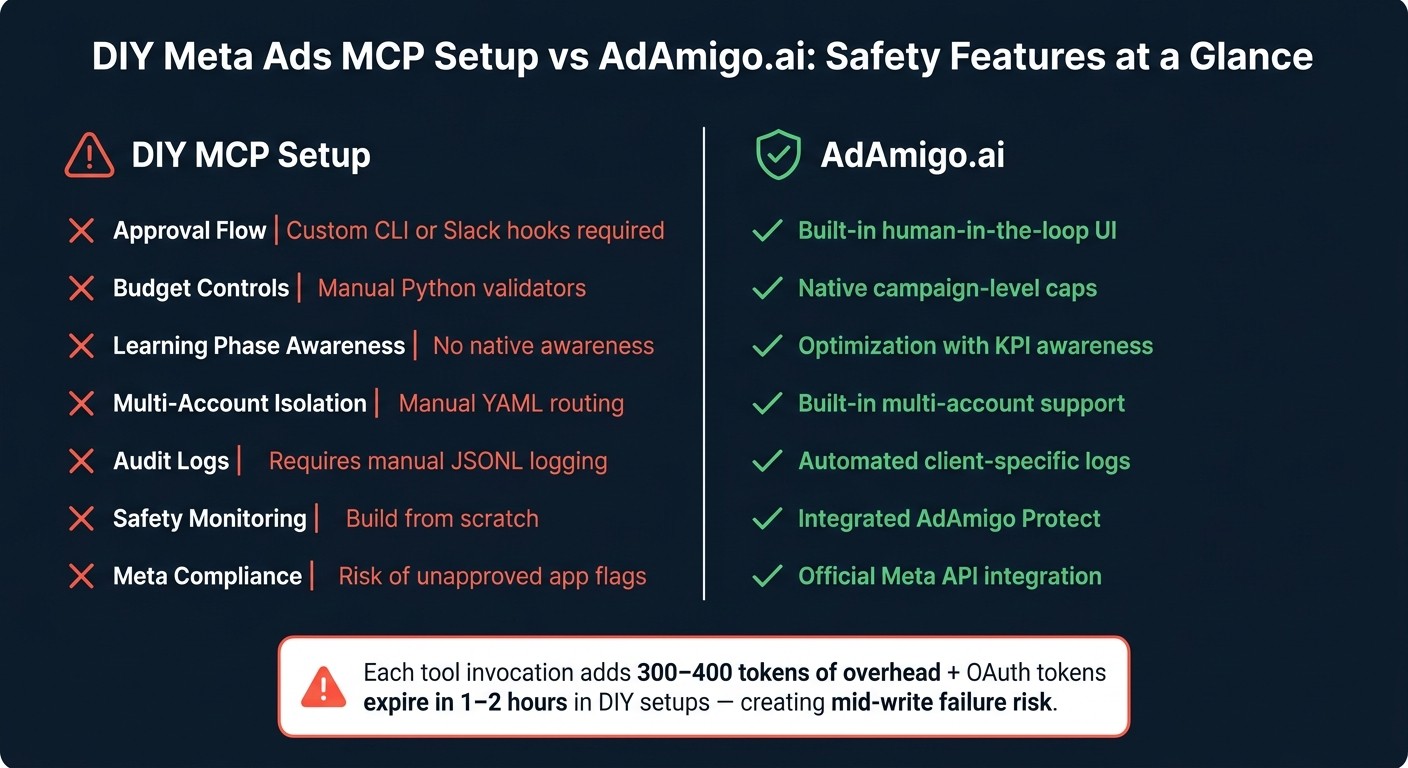
DIY Meta Ads MCP vs AdAmigo.ai: Safety Features Compared
AdAmigo.ai is designed with safety at its core, adhering to the 10 guardrails that define secure Meta ads automation. These principles aren't just an afterthought - they're the foundation of the entire platform.
Features Tailored for Advertisers and Agencies
AdAmigo.ai is an AI-powered media buying tool built specifically for live Meta ad accounts. Its AI Autopilot continuously monitors key areas like creatives, audiences, budgets, and campaign structures, identifying impactful optimizations. These recommendations align with your specific KPIs, such as ROAS, CPL, or CPA. You can choose to automate execution or review and approve changes manually.
The platform offers dual operating modes to match how teams work. In Manual Review mode, every AI suggestion is queued for explicit approval before implementation. Autopilot mode, on the other hand, executes changes automatically but stays within the boundaries you set during onboarding - like budget caps, KPI targets, campaign goals, and scaling rules. The best part? No coding is required.
To safeguard your campaigns, AdAmigo Protect serves as a built-in safety net. It monitors for unusual patterns, such as sudden spending spikes, delivery issues, or performance drops, catching problems early before they escalate into costly errors. Unlike complex custom builds, this monitoring is native to the platform, making it both seamless and reliable.
This integrated approach eliminates the need for the cumbersome workflows often required in DIY MCP setups.
Why AdAmigo.ai Simplifies Setup Compared to DIY MCP Workflows
Setting up a DIY MCP solution often involves manual YAML routing, custom validators, and extensive logging. Murat Bock, Founder & Fullstack Developer, aptly explains:
"The agency that wins with meta ads MCP isn't the one with the most automation - it's the one that built the containment layer first."
AdAmigo.ai delivers that containment layer - complete with approval flows, audit logs, budget safeguards, and multi-account isolation - right out of the box. DIY setups, by contrast, are prone to errors. For example, a single vague prompt can trigger a "significant edit" flag in Meta, resetting the learning phase and inflating CPAs for a week or more.
Here's a side-by-side comparison of DIY MCP setups versus AdAmigo.ai's streamlined solution:
Feature | DIY MCP Setup | AdAmigo.ai |
|---|---|---|
Approval Flow | Custom CLI or Slack hooks required | Built-in human-in-the-loop UI |
Budget Controls | Manual Python validators | Native campaign-level caps |
Learning Phase Awareness | No native awareness | Optimization with KPI awareness |
Multi-Account Isolation | Manual YAML routing | Built-in multi-account support |
Audit Logs | Requires manual JSONL logging | Automated client-specific logs |
Safety Monitoring | Build from scratch | Integrated AdAmigo Protect |
Meta Compliance | Risk of unapproved app flags |
For agencies juggling multiple client accounts, the manual effort in DIY setups can quickly become overwhelming. Each tool invocation in a session adds about 300–400 tokens of overhead, and OAuth tokens typically expire within 1–2 hours. This creates the risk of "mid-write" failures, where some ad sets are paused while others remain active, disrupting campaign performance.
AdAmigo.ai eliminates these headaches by managing token renewals, session continuity, and account isolation at the platform level. This ensures your campaigns run smoothly and efficiently, without the risks and inefficiencies of DIY solutions.
Conclusion: Meta Ads MCP Needs an Operating Layer to Work Safely
To ensure Meta ads automation operates effectively, a secure and well-structured operational layer is essential.
MCP has brought a new level of AI-driven advertising since its open beta launch on April 29, 2026. It has standardized AI connectivity to Meta campaigns, but it serves as a tool for execution rather than a comprehensive management system. While MCP can move data and execute commands, it doesn't evaluate the strategic implications of actions like budget adjustments, ad set readiness, or bulk changes that could inadvertently trigger Meta's fraud detection systems.
Rapid API calls - such as launching campaigns, adjusting bids, or pausing ad sets - can raise red flags within Meta's systems, even when each action is technically valid. An operating layer addresses this by pacing changes to resemble human activity and incorporating approval steps before implementation. Without this safeguard, advertisers face risks like overspending, disrupted learning phases, prematurely paused ads, and data-driven decisions made on incomplete information - all of which undermine campaign success.
For both technical teams and advertisers, the solution is clear: MCP's potential is only fully realized when paired with a system that enforces the necessary safeguards. Whether you choose to build this layer internally or opt for a purpose-built solution like AdAmigo.ai - which includes approval workflows, budget controls, audit logs, and monitoring from the start - the operational layer isn't optional. MCP provides AI access, but the operating layer ensures those AI-driven actions align with your strategic goals.
FAQs
Is Meta Ads MCP safe?
Meta Ads MCP can be a secure tool when configured with the right precautions. To ensure safety, it's essential to use approved servers, implement scoped permissions, and maintain human oversight. Adding safeguards like audit trails and rate limiting further reduces risks. On the flip side, relying on unapproved servers or unmanaged automation could lead to issues like account bans. When proper guardrails are in place, MCP offers a reliable way to automate Meta ads effectively.
Can AI safely manage Facebook ads?
AI can handle Facebook ads effectively, but only when the right precautions are in place. While tools like MCP enable AI to perform campaign tasks, responsible oversight is critical. Key safeguards include:
Read-only workflows to limit unauthorized changes.
Human approvals for any updates or adjustments.
Budget caps to prevent overspending.
KPI-based rules to keep campaigns aligned with goals.
Audit trails for transparency and accountability.
These measures ensure AI stays within set boundaries, avoiding unintended actions and minimizing risks associated with unchecked automation.
What are the risks of Meta Ads MCP?
The potential dangers of Meta Ads MCP stem from a lack of control over automation rather than the technology itself. MCP integrates AI tools with active ad accounts, allowing adjustments that, if unchecked, could result in issues like overspending, breaking platform rules, or underperforming campaigns. Some common risks include excessive budget hikes, stopping ads too early, making untested changes to targeting, and launching ads that don't comply with guidelines. To avoid these pitfalls, it's crucial to have safeguards in place, such as clear permissions, approval processes, and detailed audit trails, ensuring everything runs smoothly and securely.
Can Claude Code safely automate Meta ads?
Claude Code offers a way to automate Meta ads, but its safety largely depends on how it's configured and managed. While it’s built to streamline coding workflows, it’s not specifically designed for media buying. That means it doesn’t come with essential safeguards like budget caps, approval processes, or KPI tracking. For automation to run safely, users need to set up their own guardrails, establish approval systems, and actively monitor performance. Without these measures in place, there’s a chance of expensive mistakes or unintended outcomes.
What guardrails do I need before automating Meta ads?
To ensure the safe automation of Meta ads, begin by using read-only mode. This allows you to confirm the AI's accuracy without making any actual changes. When you're ready to move forward, require human approval for significant updates - like adjusting budgets or targeting - unless you've chosen to enable full autopilot.
It's also smart to implement budget caps to prevent overspending. Avoid sudden budget increases and make sure decisions are backed by enough reliable data. Set KPI-based rules to guide automation, keep an eye on creative fatigue, and always maintain an audit trail. This way, you'll have rollback options to fix errors quickly and ensure accountability throughout the process.
Is AdAmigo.ai safer than a DIY MCP setup?
AdAmigo.ai is designed with safety in mind, incorporating features like approval processes, audit trails, and monitoring tools. These safeguards make it a more secure option compared to a DIY Managed Campaign Process (MCP) setup. While MCP allows AI to manage campaigns through Meta's API, it doesn't include built-in protections. With a DIY approach, advertisers have to develop their own safety measures, which can leave room for error. AdAmigo.ai minimizes these risks by embedding AI execution within a structured, safety-oriented framework.
Should agencies use Meta Ads MCP for client accounts?
Agencies can absolutely use Meta Ads MCP for managing client accounts, but safety and compliance need to be top priorities. To keep things secure, key measures include OAuth scoping, account selection controls, permission management, and audit trails. These steps help avoid cross-account mishaps.
For secure automation, agencies should consider safeguards like read-only modes, human approval for changes, budget caps, and constant monitoring. Alternatively, platforms such as AdAmigo.ai offer built-in guardrails and workflows specifically designed to meet agency needs.
What is the safest way to automate Facebook ads with AI?
The best way to automate Facebook ads using AI is to pair advanced tools with strong safeguards. Instead of depending entirely on Meta's MCP or similar AI tools, you can implement measures like permission settings, approval workflows, budget limits, KPI-based rules, and audit trails. For example, platforms like AdAmigo.ai integrate these types of controls, allowing AI to optimize ad performance while reducing risks like policy breaches or account suspensions. Ultimately, combining human oversight with well-structured safeguards ensures a safer and more effective automation process.