
Best Practices for Meta API Key Compliance
Secure Meta API keys with server-side OAuth, encrypted storage, token rotation, least-privilege permissions, and continuous monitoring to stay compliant.
Securing your Meta API keys is critical for protecting your ad accounts and ensuring smooth campaign operations. Mismanagement - like hardcoding keys, neglecting token rotation, or over-assigning permissions - can lead to data breaches, budget losses, or even account suspensions. Meta's policies hold you accountable for API usage, so compliance is non-negotiable.
Key takeaways:
API Key Basics: Meta uses static credentials (App ID, App Secret) and dynamic access tokens. Tokens are temporary, permission-scoped, and must be securely stored.
OAuth 2.0 Authentication: Use server-side flows to keep sensitive credentials safe, and always verify tokens to prevent misuse.
Secure Management Tips: Encrypt tokens, rotate them regularly, and avoid exposing keys in public repositories or client-side code.
Compliance Risks: Violating Meta's platform policies or mishandling user data can result in ad disapprovals, restricted accounts, or permanent bans.
Monitoring & Auditing: Log API usage, monitor for anomalies and misconfigurations, and use tools like Meta's Access Token Debugger to stay compliant.
To simplify compliance and security, tools like AdAmigo.ai automate token management, policy checks, and campaign monitoring, helping you maintain control while scaling your advertising efforts. This is especially effective when scaling with real-time API updates to maintain performance.
Facebook API Tutorial: Graph API, Access Token and Developer Documentation Explained
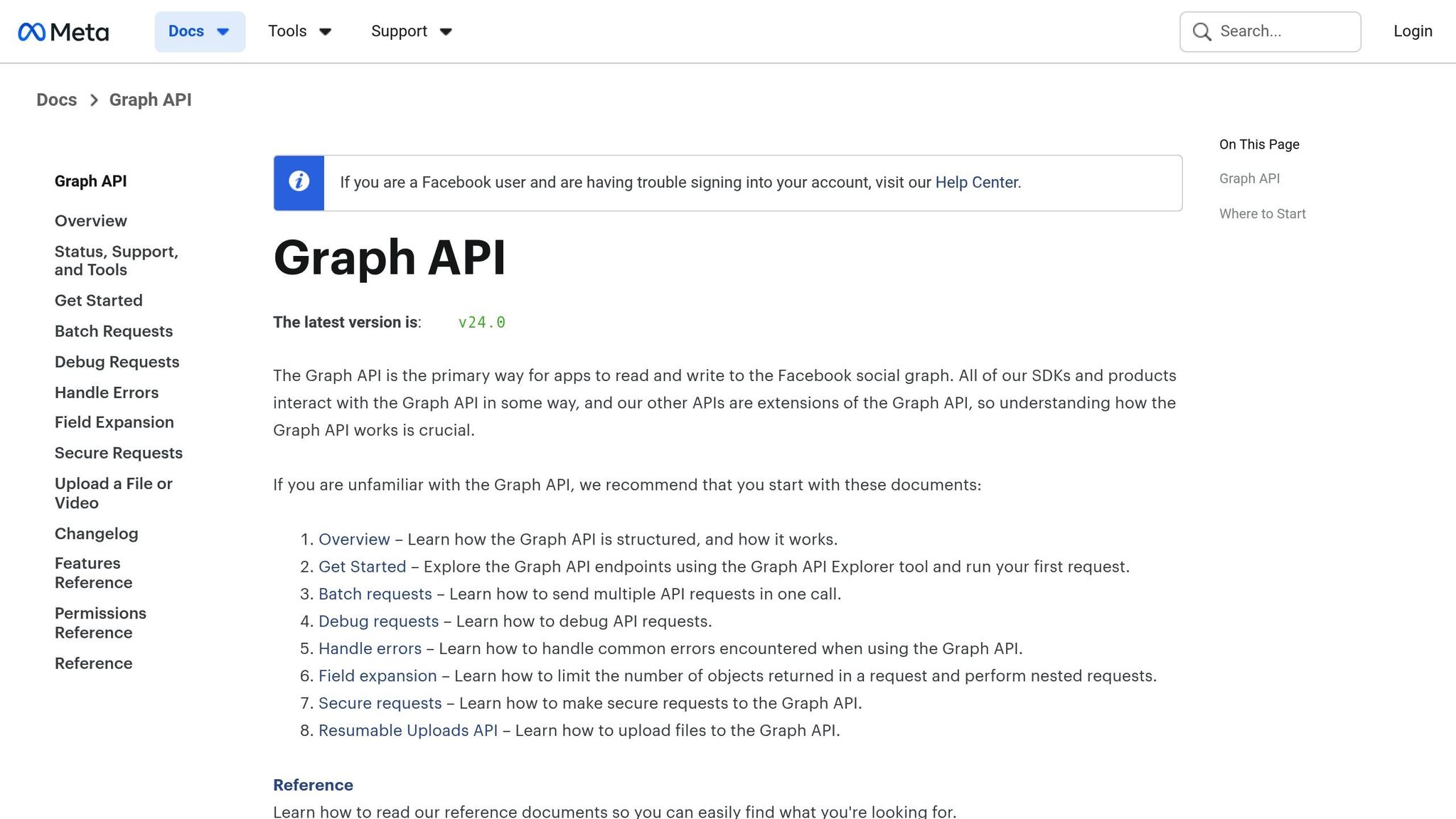
How Meta API Authentication Works

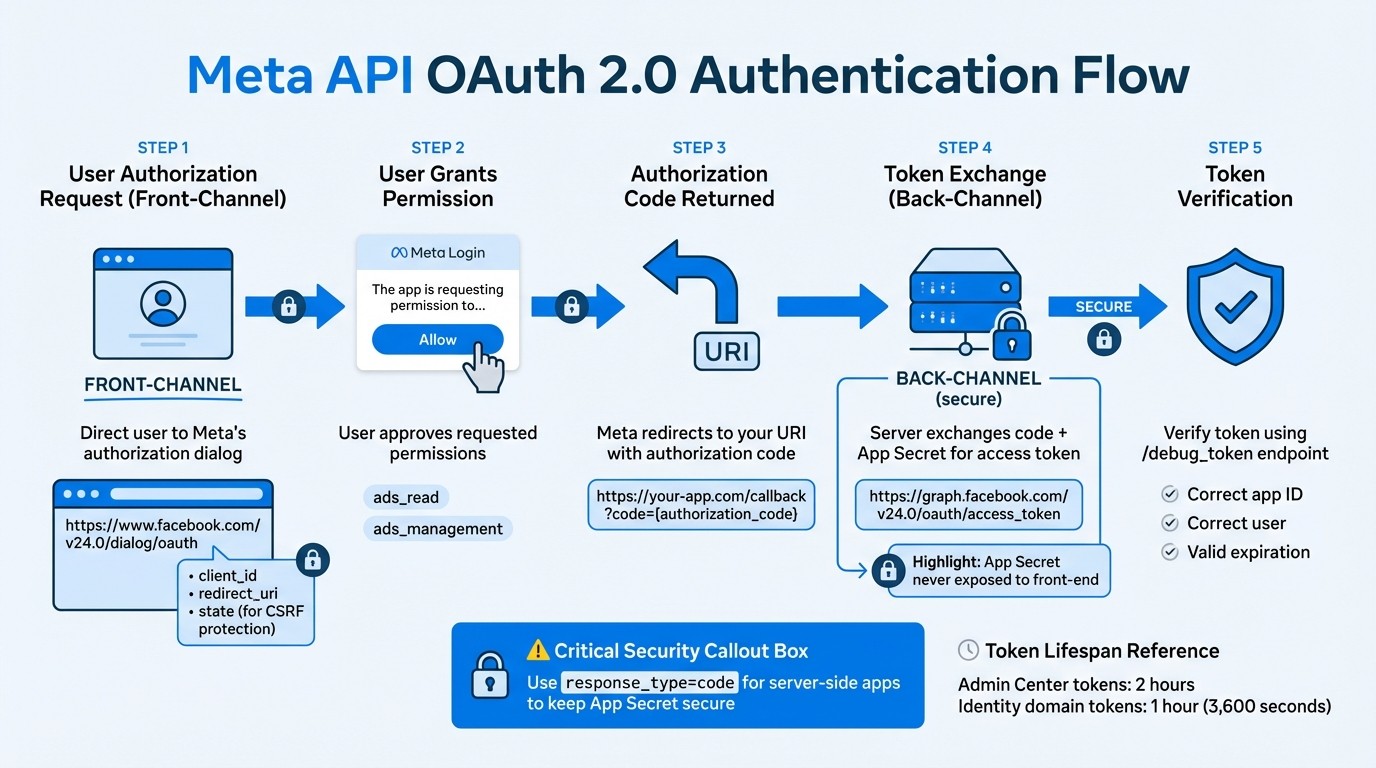
Meta API OAuth 2.0 Authentication Flow: 5-Step Security Process
Meta's authentication system relies on two main credentials: your App ID and App Secret, which confirm your app's identity, and access tokens, which are required for every API call and grant specific permissions.
"Access Tokens are required when making API calls by an integration, and they represent both the integration and the permissions granted to it." - Meta Admin Center
Each type of credential has a distinct purpose and calls for specific security precautions. For example, your App Secret should never be exposed in client-side code, mobile apps, or anywhere it could be accessed or decompiled. On the other hand, access tokens are temporary and scoped, meaning they expire after a set time and are limited to predefined permissions. For instance, Admin Center custom integration tokens are valid for 2 hours, while identity domain tokens typically expire after 1 hour (3,600 seconds). The sections below explain these components in greater detail and how to use them securely.
API Keys vs. Access Tokens
In Meta's framework, what some might call "API keys" are actually the App ID and App Secret - static credentials used for initial authentication.
Access tokens, on the other hand, are dynamic and do the heavy lifting. These tokens are temporary, tied to specific permissions, and must be included with every API request. When requesting an access token, you specify the permissions (or "scopes") you need. For example, the ads_read scope is for viewing campaign reports, while ads_management is for modifying campaigns. Following the principle of least privilege, you should only request the permissions necessary for your task. If you only need to view performance data, avoid asking for write access.
Tokens also differ in lifespan and purpose. Short-lived tokens, which require frequent renewal, help limit the impact of a potential compromise. Long-lived tokens are more convenient but demand stricter security measures, including careful storage and regular rotation.
Once your app's identity is verified using static credentials, OAuth 2.0 takes over for user authentication, as outlined below.
OAuth Flows for User Authentication
Meta employs OAuth 2.0 to enable secure communication between your application and its platform. This process involves two channels: a front-channel where users grant consent through their browser, and a back-channel where your server securely exchanges credentials with Meta's servers.
To start, direct users to Meta's authorization dialog at https://www.facebook.com/v24.0/dialog/oauth. Include your client_id, redirect_uri, and a randomly generated state parameter for CSRF protection.
Once users approve the request, Meta redirects them to your specified URI with an authorization code. Your server then makes a back-channel request to https://graph.facebook.com/v24.0/oauth/access_token, exchanging the code and your App Secret for a final access token. This two-step process ensures your App Secret remains secure and never appears on the front-end. This is a critical security measure when you connect Meta ads to third-party tools for data analysis or automation.
The response_type parameter determines the flow type: use code for server-side applications where the App Secret can be securely stored, or token for client-side or desktop apps. Always verify tokens using the /debug_token endpoint to ensure they were generated for your app and the correct user. This step helps catch token substitution attacks before they can cause harm. For those looking to simplify these technical complexities, using an AI Media Buyer for Facebook ads can automate secure integration and optimization.
Secure API Key Management Practices
Once you've mastered Meta's authentication, the next step is ensuring your credentials are protected from the moment they're created. Proper key management is essential to keep your account and tokens secure throughout their lifecycle. Without it, you risk exposing your ad accounts to unauthorized access, wasted budgets, or even policy violations or security gaps. Here, we'll focus on three key areas: generation, storage, and rotation - essential steps for securing your API credentials.
Token Generation and Encryption
Only generate tokens when absolutely necessary, and make sure they’re transmitted over HTTPS to prevent interception during transfer. Once a token is created, store it using industry-standard encryption methods. Avoid relying on simple obfuscation or custom encryption techniques, as they offer minimal security.
Regular Token Rotation
Even encrypted tokens aren't immune to risks, which is why regular rotation is so important. Short-lived tokens, like the 2-hour Admin Center tokens, naturally limit exposure by requiring frequent renewal. Incorporating routine token rotations also lays the groundwork for stronger compliance and monitoring practices within your Meta API integration.
Meeting Meta Platform Policy Requirements
Securing your tokens is just the start - your API usage also needs to align with Meta's platform policies. Every API call, ad launch, and piece of data you handle is subject to Meta's compliance framework. Breaking these rules can lead to account restrictions, ad disapprovals, or even permanent bans.
Ad Policy Adherence
Whenever you make changes through the API - whether it's tweaking ad creative, targeting, or optimization goals - an ad review is triggered. API-driven campaigns are held to the same advertising policies as manually created ads. To avoid meta ad rejections and unnecessary spending, it's a good idea to create ads in a "PAUSED" state first. This allows you to review them thoroughly before they go live and start consuming your budget.
If an ad violates policies, Meta provides specific error codes through the API. Make these error codes visible to end-users so they can quickly identify and resolve issues. Before launching campaigns in production, use Sandbox mode to test your Marketing API calls. This ensures you can troubleshoot without running real ads or affecting live accounts. Additionally, apps intended for production must pass Meta's formal App Review process, which assesses the permissions and features you're requesting.
While ad review compliance is critical, protecting user data is equally important.
Data Privacy Requirements
Beyond ad compliance, safeguarding user data is a cornerstone of API integration. Meta expects developers to uphold strict data security standards. According to their policy: "If you use Platform as a developer, you are responsible for securing Platform Data in a way that meets or exceeds industry standards given the data's sensitivity". This includes securely storing User IDs and session keys together for programmatic access, and ensuring all data handling aligns with the Facebook Platform Terms.
To enhance security:
Keep credentials out of client-side code and restrict API key usage to trusted servers using the Server IP allow list.
Follow the principle of least privilege, granting only the permissions you truly need (e.g.,
ads_readfor reporting-only access) to minimize data exposure risks.Always transmit access tokens and user data over secure HTTPS connections.
Never commit credentials to public code repositories.
Using AdAmigo.ai for Compliance and Optimization
Keeping up with best practices for token management and compliance is critical, but automation takes it to the next level by enhancing security and efficiency.
Managing API keys manually during large-scale Meta ad campaigns can get messy fast. That’s where AdAmigo.ai steps in, using its AI-powered workflow to handle API key management seamlessly, ensuring compliance happens behind the scenes.
Automated Compliance Checks
AdAmigo.ai simplifies compliance with secure OAuth authentication and thorough token hygiene for your Meta ad account. Its platform runs round-the-clock automated campaign audits, catching potential policy violations before your campaigns go live. With the AI Actions system, policy risks are flagged in your daily feed, making it easy to approve, edit, or even auto-publish compliant updates without delay.
Secure API Key Storage and Management
AdAmigo.ai takes security seriously by encrypting access tokens and automating token rotation. This eliminates the hassle of dealing with expired credentials and reduces risks like accidentally exposing API keys. Plus, with server-side authentication management, one media buyer can efficiently handle 4–8× more client accounts compared to manual methods.
Auditing and Monitoring API Usage
After securing token management, the next step is to keep a close eye on API usage. Regular auditing of Meta API activities ensures compliance with their Platform Terms and Developer Policies. Meta reserves the right to audit developer activities at any time. By setting up robust logging and monitoring systems, you can tackle issues early and protect your ad accounts from unauthorized access.
Setting Up API Usage Logs
Once you've nailed down secure key management, the next move is to monitor API key usage in detail. Start by recording essential metadata for every API call. This includes identifiers like user IDs and ad account IDs, as well as timestamps, HTTP methods, and status codes. These details allow for a thorough analysis of API activity. Use structured formats such as JSON schema or protobuf to ensure consistency and machine-readability.
For production environments, prioritize system user tokens since they don’t expire like regular user tokens. When working with Meta Admin Center integrations, enable the "Read security audit logs" permission to access system-level activity data. Keep in mind that custom integration tokens expire exactly two hours after issuance. Centralize your logs by sending them to a remote aggregator, and synchronize system clocks to a single reference time source for accurate event correlation.
"Have a system in place for logging access to user data, tracing where user data was sent and stored." – Meta Developer Data Security Best Practices
To protect your logs, implement tamper-proof measures like write-once storage or cryptographic signing. Make sure logs are backed up according to well-defined retention schedules.
Monitoring for Unauthorized Access
Keep an eye out for anomalies, such as sudden spikes in 401 Unauthorized or 403 Forbidden responses. These could signal breaches or misconfigured permissions. Use adaptive alerts that rely on rolling baselines, such as a two-week window, to catch unusual activity.
Stick to the principle of least privilege for API permissions to limit risks if credentials are compromised. For mobile or client-side apps, route API calls through a proxy server. This keeps your Meta API key secure and simplifies centralized key management.
Rotate API keys regularly - every 30, 60, or 90 days - depending on the sensitivity of the data they provide access to. Automate scans of public repositories like GitHub to detect exposed credentials, which can trigger security alerts. Also, log events related to credential generation and revocation.
"Monitor transfers of user data and key points where user data can leave the system (e.g., third parties, public endpoints)." – Meta Developer Data Security Best Practices
To manually verify token details such as scopes, expiration timestamps, and associated App IDs, use Meta's Access Token Debugger. For broader monitoring across your infrastructure, tools like AWS CloudWatch or Node Exporter can track resource usage, while AWS WAF or Cloudflare API Shield can identify suspicious activity tied to OWASP risk categories.
These monitoring strategies work hand-in-hand with earlier security measures, creating a more secure and resilient system.
Conclusion
Protecting your Meta API keys is essential to safeguarding your ad accounts from unauthorized access and potential suspension. As a developer, you are responsible for both the financial and operational security of your applications and their usage of the Meta Ads API. Start by applying least privilege access - only grant permissions that are absolutely necessary, like ads_read or ads_management, to minimize exposure risks. Additionally, enforce practices like strict token rotation, encryption, and maintaining detailed audit logs. Regularly audit Meta ad accounts for unusual activity, such as an increase in 401 Unauthorized responses, to identify and address issues early.
Beyond securing keys, staying compliant with Meta's policies for software companies and other industries is just as important. Proper key management not only aligns with these policies but also ensures your campaigns run smoothly without interruptions, following Meta ads QA best practices for every launch. Adhering to these best practices creates a strong foundation for consistent and reliable ad performance.
If you’re managing multiple clients or scaling your advertising operations, AdAmigo.ai can simplify your workflow. This tool automates secure API key management and compliance checks, while optimizing multi-campaign performance, freeing up your team to focus on strategy rather than manual tasks. Implementing Meta ad policy training can further empower your team to maintain these standards. With AdAmigo.ai, you can ensure both compliance and continuous campaign performance with ease.
FAQs
What’s the difference between a Meta App Secret and an access token?
A Meta App Secret is a private key that ensures secure authentication for app interactions with Meta's platform. Meanwhile, an access token acts as a credential, enabling API requests and granting permission to access specific data or perform actions on behalf of a user or app. Both play separate but crucial roles in maintaining security and enabling app functionality.
How often should I rotate Meta access tokens and why?
Meta access tokens need regular rotation - ideally every 60 days or less - to maintain security and reduce the risk of unauthorized access. Letting tokens expire can interrupt API integrations, so staying ahead of this helps keep everything running smoothly while protecting your data.
What’s the fastest way to detect leaked keys or unauthorized API usage?
To spot leaked keys or unauthorized API usage fast, head to the Meta Developer dashboard to confirm your API key's validity. You can also use the Meta Access Token Debugger to review permissions and track activity. If you notice problems like expired tokens or denied permissions, address them immediately to ensure your security and stay compliant.