
How to Use First-Party Data with Meta Conversions API
Use server-side first-party data with Meta's Conversions API to restore lost signals, improve attribution, and boost ROAS.
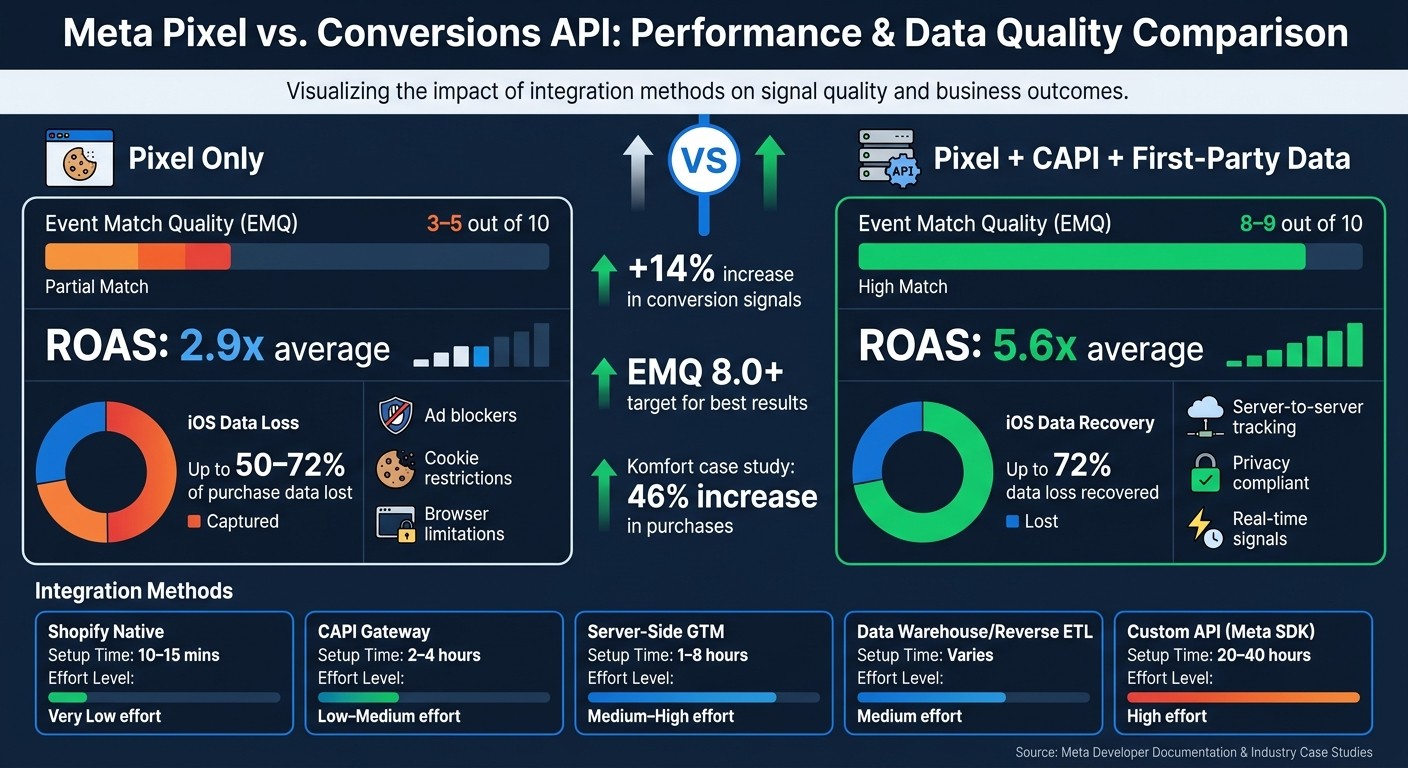
Want better ad performance and accurate tracking on Meta? First-party data combined with Meta's Conversions API (CAPI) is the solution. Unlike the Meta Pixel vs. Conversions API differences, CAPI uses server-to-server tracking, bypassing browser limitations like ad blockers and cookie restrictions. This ensures more reliable data for ad optimization and attribution.
Key Benefits of Using First-Party Data with CAPI:
Reduces data loss (up to 72% on iOS devices).
Improves Event Match Quality (EMQ) from 3–5 to 6–9.
Boosts Return on Ad Spend (ROAS) to an average of 5.6x compared to 2.9x with Pixel-only setups.
Provides greater control over what data is shared and when.
How to Get Started:
Plan Your Strategy:
Identify key conversion events (e.g., Purchase, AddToCart).
Choose which first-party data (e.g., email, phone, purchase history) to include.
Ensure data is hashed (SHA-256) for privacy compliance.
Choose an Integration Method:
Options range from Shopify's native setup (quickest) to advanced custom API builds.
Server-Side GTM works well for teams managing multiple platforms.
Set Up and Test:
Use both Pixel and CAPI for redundancy.
Deduplicate events using unique
event_idvalues.Test in Meta’s Events Manager to ensure accurate tracking.
Monitor and Optimize:
Aim for an EMQ score of 8.0+ for better campaign results.
Use tools like AdAmigo.ai for automated performance monitoring and scaling.
Privacy and Security Tips:
Collect user consent for server-side tracking.
Send only essential data to comply with regulations like CCPA.
Secure API tokens with a secrets manager.
Bottom Line: Combining first-party data with Meta CAPI ensures better ad performance, accurate attribution, and compliance with privacy laws. Start with a clear data strategy, use the right integration method, and prioritize privacy and security.
Meta Pixel vs. Conversions API: Performance & Data Quality Comparison
How to Set Up Facebook CAPI with First Party Data and Server Side Tagging
Planning a First-Party Data Strategy for Meta CAPI
Before diving into implementation, it’s crucial to map out your data flows, key metrics, and data sources. This preparation not only helps with tracking accuracy but also ensures compliance with privacy standards. A well-thought-out plan improves the effectiveness of Meta CAPI, making it more reliable for both tracking and privacy needs.
Identify Key Conversion Events
Focus on the actions that directly impact revenue or your sales pipeline. Rank these events using Meta's Aggregated Event Measurement (AEM) in Events Manager. For most ecommerce businesses, the order of importance typically starts with Purchase, followed by AddToCart, InitiateCheckout, and ViewContent. For lead-generation businesses, deeper CRM signals like MQL (Marketing Qualified Lead), SQL (Sales Qualified Lead), or Converted status are more useful than generic Lead events. These deeper signals help Meta's algorithm differentiate between high-quality and low-quality traffic.
Timing is just as important as choosing the right events. Send events as close to real-time as possible - ideally within an hour of the action. Delays longer than 24 hours can hurt attribution accuracy and weaken Meta's ability to optimize campaigns.
Once you’ve prioritized your events, identify the data points that best support them.
Choose Which First-Party Data to Include
The more customer identifiers you include, the better your Event Match Quality (EMQ). Key parameters include hashed email address, phone number, first and last name, ZIP code, city, state, and date of birth. Don’t forget to include order_value (in USD), currency, and a unique order_id to avoid duplication.
If you’re collecting form submissions, capture the fbclid parameter from the landing page URL and save it in your CRM. This click ID links offline conversions - like a closed deal or phone-based purchase - back to the original Meta ad. Without it, those conversions won’t be attributed to your campaigns.
To stay compliant, hash all personally identifiable information (PII) using standardized SHA-256 data formats before sending it. Meta's Business SDK can handle this automatically, reducing the risk of compliance errors.
Select an Integration Method
Your choice of integration method depends on your tech stack and team capabilities. Here’s a quick breakdown:
Method | Setup Time | Technical Effort | Best For |
|---|---|---|---|
Shopify Native | 10–15 mins | Very low | Standard Shopify stores |
CAPI Gateway | 2–4 hours | Low–medium | Advertisers focused on Meta who want server tracking without custom code |
Server-Side GTM | 1–8 hours | Medium–high | Teams managing multiple ad platforms like Google, TikTok, and Meta |
Data Warehouse / Reverse ETL | Varies | Medium (data team) | Brands using platforms like Databricks, Snowflake, or BigQuery for CRM and offline data |
Custom API (Meta SDK) | 20–40 hours | High | Businesses with complex offline events or headless stacks |
For Shopify users, the native integration is often the easiest and most effective option. It’s free, and as of early 2026, Meta’s one-click setup simplifies token generation and event mapping. If your team runs ads across multiple platforms, server-side GTM might be worth the extra effort since it centralizes tracking. On the other hand, custom API builds only make sense if you have a developer and a unique tech stack that off-the-shelf solutions can’t handle.
"Marketing activation should be governed like any other production data pipeline. With this integration, there's no need for custom API maintenance, brittle reverse ETL workflows, or black-box middleware." - Databricks
A great example comes from Komfort, a Polish home furnishings retailer. In 2025, they implemented CAPI alongside custom conversions to track off-site events. The result? A 46% increase in purchases. The takeaway here isn’t just about using CAPI - it’s about having a clear data strategy before diving into integration.
With a well-defined plan, you’re ready to move on to setting up the Meta Conversions API in the next steps. A thoughtful strategy ensures a smoother implementation process.
Step-by-Step Guide to Setting Up Meta Conversions API
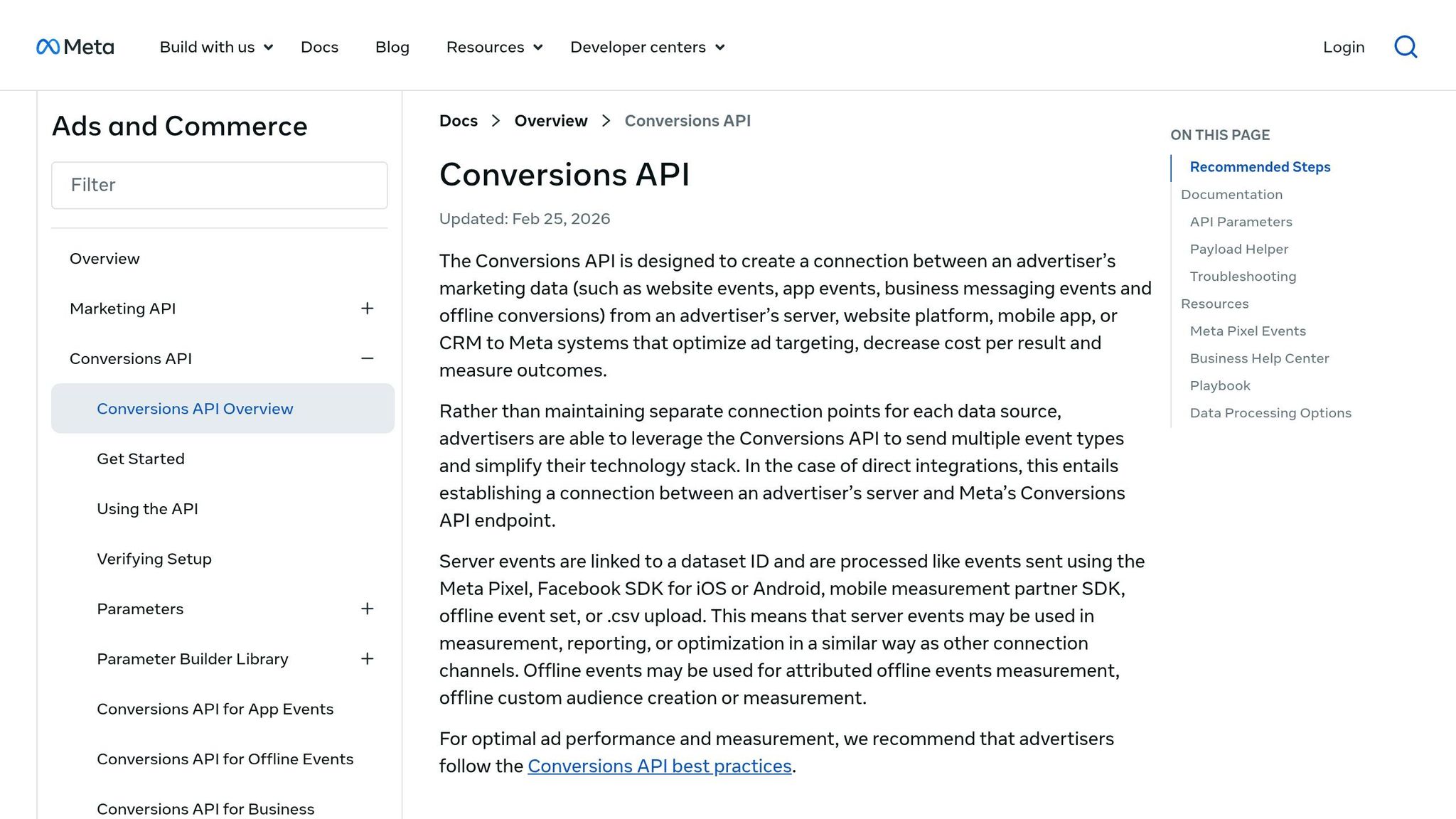
With your data strategy ready, it’s time to dive into the setup process. This involves three main steps: preparing your Meta assets, setting up server-side tracking, and verifying everything works as expected.
Prepare Your Meta Assets
Before you start coding, make sure you have all the necessary access and credentials. You’ll need four key assets to ensure seamless integration between your browser Pixel and server-side CAPI calls:
Asset | Purpose | Where to Find It |
|---|---|---|
Business Manager | Manages all your Meta assets in one place | business.facebook.com |
Meta Pixel ID | Directs where your data is sent | Events Manager > Settings |
Access Token | Authenticates server-to-server requests | Events Manager > Settings > Conversions API |
Domain Verification | Verifies ownership of your website | Business Settings > Brand Safety > Domains |
If you’re using Business Manager to generate tokens instead of Events Manager, you’ll also need to create a System User. This is a non-human account that holds the access token and handles API calls on your behalf. You can set this up under Business Settings > Users > System Users.
Once you’ve gathered these assets, you’re ready to configure your server-side tracking to ensure smooth event transmission.
Implement Server-Side Tracking
For optimal results, use a redundant setup where conversion events are sent through both the browser Pixel and CAPI simultaneously. This approach captures a broader range of signals. Browser events can be blocked by ad blockers or iOS privacy settings, while server events fill in those gaps, providing a fuller data picture. Relying solely on Pixel tracking could result in losing up to 50% of iOS purchase data.
To prevent duplicate entries, assign a unique event_id to each event sent through both the browser and server. Meta’s system will deduplicate these events within 48 hours.
Each server event must include the following components:
event_name: The type of event (e.g., "Purchase" or "Lead")event_time: A Unix timestamp in secondsuser_data: Key user identifiers (e.g., email, phone, first name, last name) hashed using SHA-256. These identifiers must be normalized (lowercase and trimmed) before hashing.
In addition to user data, include technical signals like client_ip_address, client_user_agent, fbc, and fbp. These don’t require hashing and should be passed as-is.
"With 3rd-party cookie restrictions limiting targeting, a solution was needed to minimize data loss and improve accuracy... Implementing the server-based 'Conversion API' enhanced data quality, significantly boosting ROAS." - Marketing Manager, Gentle Monster
Timing is critical. Send events as close to real-time as possible, as delays longer than two hours can negatively impact Meta’s ability to optimize ad delivery.
Test and Verify Your Integration
Once server-side tracking is in place, it’s time to test and ensure everything is functioning correctly. Go to Events Manager > Test Events in Meta. This tool lets you send test payloads and monitor how Meta processes them in real time.
Trigger a real conversion (like a purchase or form submission) while keeping an eye on the Test Events tab. You should see a single deduplicated row showing both "Browser" and "Server" sources for the same event. If two separate rows appear, it means your event_id values aren’t matching between browser and server calls. Fix this issue before going live.
After confirming deduplication, double-check your Aggregated Event Measurement (AEM) priority settings in Events Manager. Ensure your highest-value events are ranked correctly, as this is especially crucial for iOS attribution.
Optimizing and Monitoring Performance with First-Party Data
Now that your CAPI integration is live, it’s time to use first-party data to fine-tune performance and improve attribution accuracy.
Monitor Event Match Quality
Event Match Quality (EMQ) is Meta’s scoring system (0 to 10) that measures how effectively your server events align with user profiles. By integrating hashed identifiers like email, phone number, and name, along with technical data such as fbp and fbc, you can boost your EMQ score from a Pixel-only range of 3–5 to 8–9. Adding predictive lifetime value (pLTV) scores can further elevate your EMQ to 9–10, which has been linked to an average ROAS of 5.6x, compared to 2.9x for setups relying solely on Pixel data. You can find your EMQ score in Events Manager under the "Overview" tab, and aim for a baseline of 8.0 or higher.
"CAPI is the floor, not the ceiling. The ceiling is your Event Match Quality (EMQ) score - and every percentage point you leave on the table is revenue the algorithm never bids for." - Murat Bock, Founder, AdLibrary
Maintaining a high EMQ not only improves campaign outcomes but also reduces reporting errors by ensuring accurate data.
Ensure Data Accuracy and Prevent Duplication
If you’re running Meta Pixel alongside CAPI, there’s a risk of double-counting conversions. To avoid this, make sure the event_id from both browser and server events matches for each user action. Advertisers who implemented enhanced conversion infrastructure saw a 14% increase in conversion signals.
Use AI Optimization Tools
Meta’s algorithms, such as the Andromeda optimization engine and the Adaptive Ranking Model, depend on accurate and detailed signal data to make real-time bidding and delivery decisions. By combining monitoring, deduplication, and AI-powered optimization, you can transform first-party data into tangible campaign improvements.
Platforms like AdAmigo.ai integrate directly with your Meta account through the official API, offering continuous monitoring, testing, and optimization. Its AI Autopilot feature analyzes campaign performance across creatives, audiences, budgets, and structures. It automatically scales successful elements and pauses underperforming ones, ensuring your first-party data contributes to measurable results.
"The performance differential is not from having better data. It is from having your data reach the auction at all." - Abhi Agnihotri, Founder & CEO, AdZeta
For teams managing Advantage+ Shopping Campaigns, maintaining clean, high-volume purchase signals through CAPI is essential. Pairing a strong CAPI setup with ongoing AI-driven optimization ensures your first-party data delivers meaningful performance improvements.
Ensuring Privacy Compliance and Data Security
When implementing your CAPI integration, maintaining privacy and securing data should be top priorities. Even if your CAPI setup runs perfectly, inadequate data practices can lead to legal troubles or damage your reputation. With U.S. privacy laws like CCPA becoming stricter, integrating privacy measures effectively is just as important as the technical configuration.
Consent and Transparency
The consent logic you use for CAPI should mirror what you apply to your Meta Pixel, following Meta consent mode best practices. If a user opts out of tracking on your site, that preference must also extend to your server-side events. Treating browser and server channels differently can lead to inconsistencies and potential regulatory issues.
Meta offers "Data Processing Options" within the Conversions API, allowing you to manage user data according to regional regulations like CCPA. For instance, if a California resident opts out of the sale of personal information, you must pass data_processing_options: ["LDU"] (Limited Data Use) in your API payload. This isn't just a configuration choice - it’s a regulatory requirement to restrict Meta's data usage.
"The Conversions API supports advertisers' efforts to provide consumers with appropriate data transparency and control while also helping them to continue providing personal experiences." - Meta Developer Documentation
Your privacy policy and consent banner must clearly state that server-side data is being collected and shared with advertising partners. Generic phrases like "we may share data with third parties" no longer meet the transparency standards of laws like CCPA.
Data Minimization
Only send the data you need to meet your measurement goals. For example, if a conversion event doesn't require a user's first and last name to improve match rates, don’t include it. Meta’s guidelines emphasize sending the minimum data necessary to achieve your objectives. Additionally, ensure all data is normalized before hashing to maintain consistency and accuracy.
Security Best Practices
Your API access token is the key to your entire CAPI integration, so protecting it is essential. Store it securely in a secrets manager, and never hard-code it into client-side scripts or public repositories.
For added security, generate tokens using a System User in Meta Business Manager instead of a personal account. System Users are linked to your business, ensuring tokens remain functional even if an employee leaves. Restrict API access to only the servers and personnel who need it, and regularly review permissions to prevent unauthorized access.
Here are some key security measures to strengthen your integration:
Security Measure | Implementation Method | Purpose |
|---|---|---|
Authentication | Access Tokens | Ensures only authorized servers can send data |
Access Control | System Users | Links API access to the business, not individuals |
Token Storage | Secrets manager | Protects tokens from being exposed |
Data Normalization | Pre-hashing scripts | Ensures clean, consistent data before transmission |
Conclusion: Key Takeaways
Combining first-party data with Meta's Conversions API can significantly improve ad performance. By running both Pixel and CAPI with matching event identifiers, you ensure Meta receives complete, high-quality signals. This becomes increasingly important as privacy restrictions tighten.
The quality of your data is just as critical as the quantity. For example, Pixel-only setups often result in Event Match Quality (EMQ) scores of 3–5. However, adding hashed identifiers through CAPI can raise that score to 8–9. Higher EMQ scores, when paired with predictive lifetime value data, have been linked to an average 5.6x ROAS, compared to just 2.9x for Pixel-only setups. Additionally, sending events in real time remains essential for accurate attribution and optimizing ad delivery.
Beyond performance, privacy compliance needs to be a foundational part of your setup - not an afterthought. Make sure your consent logic is consistent across browser and server channels, and only share the data you truly need. When implemented correctly, a first-party data pipeline becomes a dependable asset you can control and monitor, unlike third-party solutions that often operate as opaque black boxes. This approach protects both your performance metrics and your data's integrity.
Finally, automation can streamline the ongoing management of your campaigns. For those who find manual oversight too complex, tools like AdAmigo.ai offer a solution. AdAmigo acts as an autonomous AI media buyer for Meta ads, continuously auditing your account, optimizing budgets and audiences, and leveraging performance data to maximize the value of your CAPI signals - without the need for constant hands-on management.
FAQs
What first-party data fields improve Meta CAPI matching the most?
When it comes to improving accuracy with Meta's Conversions API (CAPI), certain first-party data fields stand out. The most impactful are hashed personal identifiers like:
Email addresses (
em)Phone numbers (
ph)
These identifiers are hashed using SHA256 to ensure privacy while maintaining effectiveness.
Adding first and last names (fn, ln) and an external user ID (external_id) further enhances matching precision. Beyond these, fbc (click ID) and fbp (browser ID) play a crucial role. These fields, sent unhashed, help connect server events to browser sessions, ensuring a smoother and more accurate match.
How do I avoid double-counting when using both Pixel and CAPI?
To avoid double-counting when using both Pixel and Conversions API (CAPI), make sure that identical events share the same event_name and a unique event_id across both sources. Meta has an automatic process to deduplicate events with matching event_id and event_name within a 48-hour window. Adding parameters such as order_id or fbp to both requests can also improve the accuracy of deduplication. Keep an eye on Event Match Quality (EMQ) regularly to ensure your data remains accurate.
How can I stay CCPA-compliant while sending server-side conversion data?
To ensure compliance with the CCPA when using Meta's Conversions API, it's important to hash all personally identifiable information (PII) like emails and phone numbers using SHA256 before sending it. Share only the essential hashed data, such as email, phone number, IP address, and user agent. Avoid transmitting any raw or unencrypted PII. Additionally, maintain transparency by adhering to CCPA guidelines, respecting user rights, and offering clear opt-out options when necessary.