
Meta Conversions API vs Third-Party Tools
Compare Meta Conversions API and third‑party conversion tools by setup, cost, real‑time sync, and automation needs.
Looking to improve your Meta Ads performance despite privacy restrictions like iOS 14.5? You’ve got two main options for tracking conversions: Meta’s Conversions API (CAPI) and third-party tools. Both aim to recover lost data signals, but they differ in setup, cost, and functionality.
Here’s the breakdown:
Meta Conversions API: Sends real-time conversion data directly from your server to Meta, bypassing ad blockers and privacy restrictions. It’s free but requires technical expertise for setup (and careful debugging of conversion tracking) and only works within Meta’s ecosystem.
Third-Party Tools: Work across multiple platforms (e.g., Meta and Google Ads) with features like automated monitoring and easier setup. However, they come with subscription fees and may introduce slight data delays.
Quick Comparison:
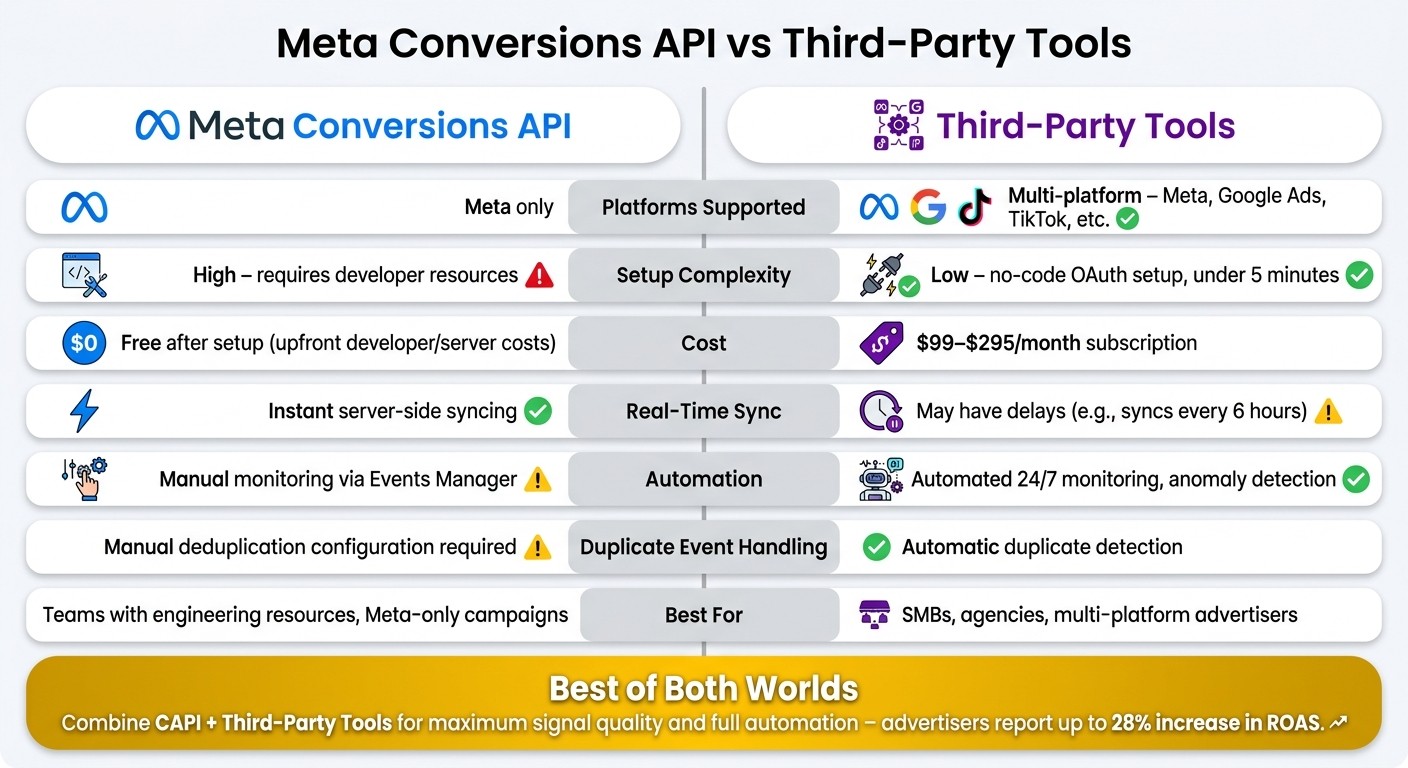
Feature | Meta Conversions API | Third-Party Tools |
|---|---|---|
Platforms Supported | Meta only | Multi-platform (Meta, Google, etc.) |
Setup Complexity | High (requires developers) | Low (no-code options) |
Cost | Free (after setup) | $99–$295/month |
Real-Time Sync | Instant | May have slight delays |
Automation | Manual | Automated monitoring |
Which is right for you?
Choose Meta CAPI if you have developer resources and focus solely on Meta Ads.
Opt for third-party tools if you want multi-platform tracking and automation with minimal setup.
For the best results, consider combining both to leverage CAPI’s direct data flow with third-party automation.
Keep reading to explore the pros, cons, and best use cases for each solution.
Meta Conversions API vs Third-Party Tools: Side-by-Side Comparison
Meta Conversions API: Features, Benefits, and Limitations
Key Features of Meta Conversions API
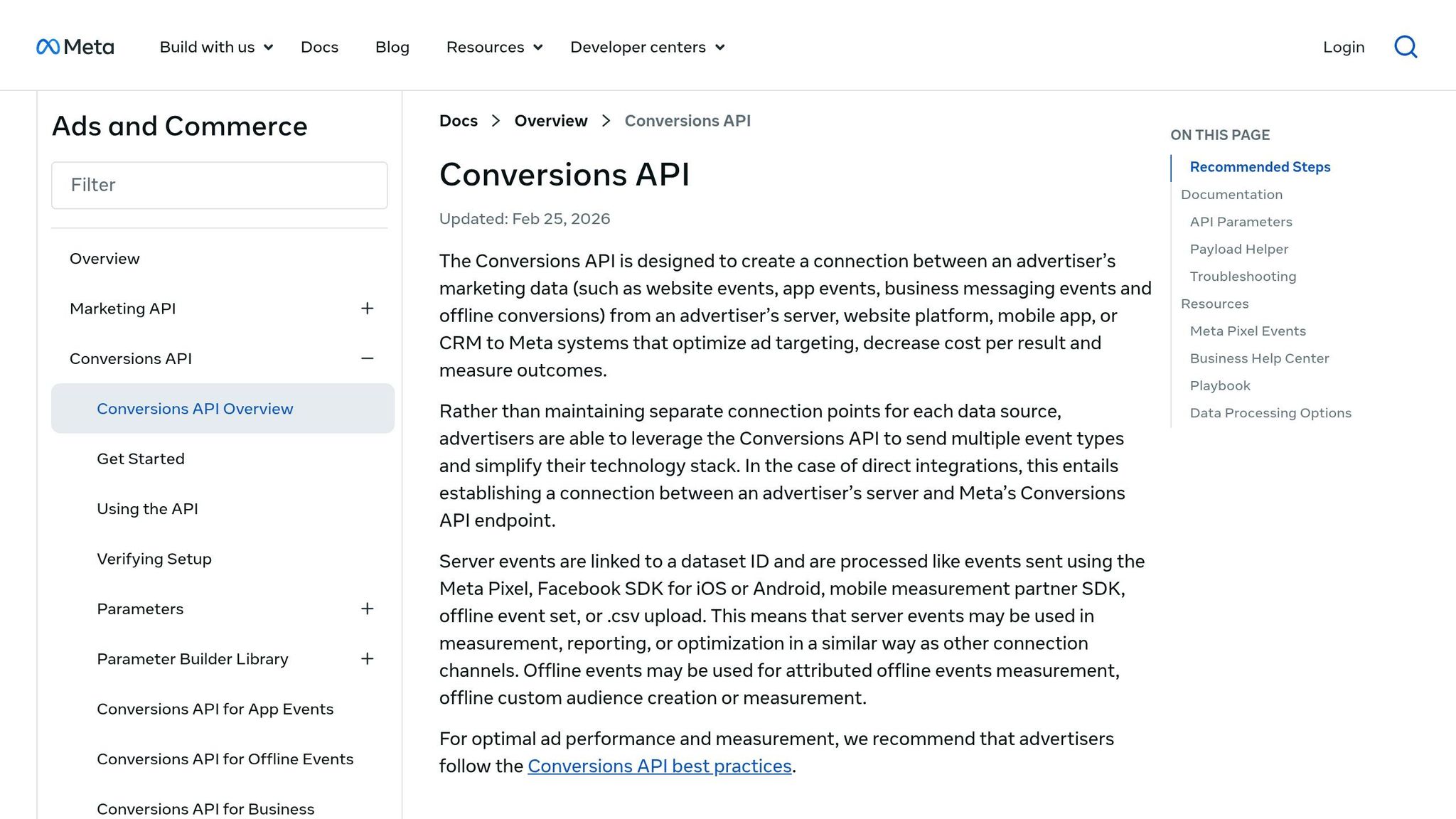
Meta's Conversions API (CAPI) enables event data to flow directly from your server to Meta, avoiding browser-based obstacles. This means that ad blockers, cookie restrictions, and Apple's ATT (App Tracking Transparency) framework can't block your data from reaching Meta's systems.
CAPI complements the Meta Pixel rather than replacing it. By working together, these tools create a backup system - if a browser-based event is blocked, the server-side event ensures the data still gets through. To prevent counting the same event twice, Meta uses event deduplication, which identifies and consolidates overlapping data from both sources.
Another standout feature is Advanced Matching. By securely sharing hashed customer data - like emails or phone numbers - you help Meta match users across devices, even when they're not logged in. This boosts attribution accuracy and helps Meta's algorithms better target the right audience.
Feature | Meta Pixel (Browser) | Conversions API (Server) |
|---|---|---|
Data Source | User's web browser | Advertiser's server |
Reliability | Impacted by ad blockers/iOS ATT | Unaffected by blockers and ATT |
Privacy Control | Limited by cookie policies | Greater control over data sharing |
Setup Complexity | Easy (JavaScript snippet) | More complex (API/server-side) |
These features highlight why CAPI is a powerful addition to Meta's tracking toolkit.
Advantages of Using Meta Conversions API
As a Meta-native tool, CAPI integrates seamlessly with Meta's ad systems, including its Andromeda AI, which powers bidding, creative delivery, and audience targeting. Because the API communicates directly with Meta, there’s no reliance on third-party middleware that could disrupt data flow. Meta also handles updates internally, reducing the need for outside vendors. For advertisers looking for a reliable and efficient way to deliver precise data to Meta's algorithm, CAPI is a strong solution.
But while the API offers clear advantages, it does come with notable challenges, which are covered below.
Limitations of Meta Conversions API
The biggest challenge with CAPI is its complex setup process. Building the API from scratch requires significant developer resources to configure server-side events, authenticate the API, and manage deduplication. For businesses with limited technical expertise, this can be a significant obstacle.
Another limitation is that CAPI is exclusive to Meta. If your advertising strategy spans platforms like Google or TikTok, you’ll need entirely different solutions to track conversions on those platforms, as CAPI is built solely for Meta's ecosystem.
Third-Party Tools: Features, Benefits, and Limitations
What Are Third-Party Conversion Sync Tools?
Third-party conversion sync tools serve as a connection point between your data sources and advertising platforms. They gather, standardize, and transmit conversion event data from places like your website, CRM, or backend systems to ad platforms. Unlike Meta's Conversions API - which is specifically designed for use within Meta's ecosystem - these tools typically function across multiple platforms, such as Meta and Google Ads.
Advantages of Third-Party Tools
One standout benefit is their ability to work across multiple platforms. Tools that support both Meta and Google Ads allow you to send the same conversion event to both platforms using a single setup. They also simplify data management by offering centralized dashboards where you can access consolidated conversion data. Moreover, tools that are official Meta Business Partners often provide more reliable API performance and fewer interruptions compared to unofficial options. Some, like AdAmigo.ai, go a step further by combining multi-channel functionality with advanced automation and real-time monitoring features. While this streamlined system offers convenience, it does come with certain compromises.
Limitations of Third-Party Tools
These tools aren't without challenges. Subscription fees and reliance on external vendors can add complexity, while fixed sync schedules may introduce delays that hinder real-time optimization. This delay is a critical factor when scaling Meta ads with real-time updates to maintain performance. For campaigns where every conversion matters, even slight delays can slow Meta's ability to adjust bids and optimize delivery efficiently. In the next section, we'll directly compare these tools with Meta's Conversions API to better understand the trade-offs in performance and integration.
Meta Conversions API vs. Third-Party Tools: A Direct Comparison
Data Accuracy and Signal Quality
Meta's Conversions API delivers server-side event data directly to Meta, bypassing browser-based limitations like iOS privacy restrictions. This ensures cleaner data transmission, but the accuracy depends heavily on maintaining proper event matching and data quality after setup. On the other hand, third-party tools such as AdAmigo.ai and AdFire take it a step further by actively monitoring Event Match Quality (EMQ) scores and automatically flagging duplicate events. These tools provide a layer of continuous oversight that Meta's native API lacks.
Factor | Meta Conversions API | Third-Party Tools |
|---|---|---|
Core strength | Server-side data transmission | EMQ scoring, anomaly detection |
iOS/browser restrictions | Bypasses them natively | Relies on CAPI underneath |
Ongoing signal monitoring | Manual (via Events Manager) | Automated, often 24/7 |
Duplicate event handling | Requires manual configuration | Automatic detection |
Next, let’s dive into the differences in setup complexity between Meta's native API and third-party solutions.
Implementation Complexity
Setting up Meta's Conversions API can be a time-intensive process. It requires configuring event deduplication, prioritizing up to eight conversion events in the Events Manager, and, unless you're using platforms like Shopify or WooCommerce with native integrations, custom server-side development.
Third-party tools simplify this process significantly. Most use OAuth 2.0, enabling a quick, no-code setup that often takes less than five minutes. Maintenance is also less burdensome, as these tools handle tasks like anomaly detection and health checks automatically. In contrast, using Meta's native tools requires manual monitoring via the Meta Pixel Helper or Test Events tab.
Real-Time Sync Capabilities
Real-time event syncing is another key distinction. Meta's Conversions API excels here, immediately sending events as they are triggered server-side. This makes it particularly valuable for campaigns where fast algorithmic responses are critical.
Third-party tools vary in their real-time capabilities. Many operate on fixed schedules, such as syncing every six hours, which can introduce delays. However, some tools like AdAmigo.ai offer 24/7 monitoring to catch anomalies quickly. While this is useful, it doesn’t match the instant event-level syncing provided by Meta's native solution. If your campaigns rely on immediate data updates, the Conversions API has a clear advantage.
Cost and Scalability
Cost is a significant factor when choosing between these options. Meta's Conversions API involves upfront developer and server hosting expenses but has no ongoing subscription fees. In contrast, third-party tools come with a monthly subscription, which can eliminate the need for dedicated technical resources.
For example, AdAmigo.ai charges $99/month for accounts spending up to $2,500 per month, scaling to $295/month for higher budgets with unlimited AI actions. AdFire offers a free plan that supports unified monitoring for Meta and Google Ads, making it an attractive choice for smaller budgets.
Solution | Upfront Cost | Ongoing Cost | Best Fit |
|---|---|---|---|
Meta Conversions API | Developer/server setup | None | Teams with engineering resources |
AdAmigo.ai | Minimal (OAuth setup) | $99–$295/month | SMBs to performance agencies |
AdFire | None | Free plan available | Smaller budgets, multi-platform |
Meta Pixel vs Conversions API - which do you need?
Choosing the Right Solution for Your Business
Here’s a breakdown to help you decide which solution aligns best with your business needs.
When to Use Meta Conversions API
Meta's Conversions API is a solid choice if you have an in-house developer and want a direct, subscription-free data pipeline to Meta. It’s especially suited for advertisers running campaigns exclusively in the Meta ecosystem without the need for cross-platform event syncing. If your setup is straightforward - one platform, one data source, and a developer available to manage it - this option delivers what you need without ongoing tool costs. However, if you’re looking for seamless integration across multiple platforms, third-party tools might be a better fit.
When to Use Third-Party Tools
Third-party tools shine when you need multi-platform reporting, automated monitoring, or a quick, code-free setup. For advertisers juggling campaigns across platforms, a tool like AdFire simplifies reporting with its free plan and unified dashboard for Meta and Google Ads. If deeper Meta-specific automation is your goal, platforms like AdAmigo.ai take it further by offering features like budget adjustments, creative testing, and AI-driven campaign management.
Using Both Together for Better Results
In some cases, combining these solutions can offer the best of both worlds. High-quality, real-time data is key to ad success, and Meta's Conversions API ensures a direct, dependable server-to-Meta data flow that bypasses ad blockers and iOS restrictions. Meanwhile, a third-party tool can use that clean data to automate decisions, flag issues early, and optimize performance. For this hybrid approach, enabling Advanced Matching and configuring deduplication is essential to avoid double-counting. Tools like AdAmigo.ai can then use this data to audit your Meta account, test strategies, adjust budgets, and refine creatives - either automatically or with your approval.
Your Situation | Best Fit |
|---|---|
Developer on staff, Meta-only campaigns | Meta Conversions API (native) |
No-code setup needed, Meta-focused automation | AdAmigo.ai ($99–$295/month) |
Multi-platform (Meta + Google), smaller budget | AdFire (free plan available) |
Maximum signal quality + full automation | CAPI + third-party tool (hybrid) |
Conclusion: Key Takeaways
Here's a quick recap to help you decide on the best conversion tracking solution for your needs:
Meta Conversions API is a free option that provides a straightforward, reliable data signal. However, it lacks built-in automation, requiring additional tools to manage campaigns efficiently.
Third-party tools take CAPI's data signals a step further by automating tasks like budget adjustments, creative testing, anomaly detection, and campaign optimization around the clock. Advertisers using these tools have reported up to a 28% increase in ROAS within the first month, showing how automation can make a big difference.
By combining both solutions, you can enjoy the best of both worlds: CAPI ensures high-quality data and strong signal integrity, while third-party tools handle the heavy lifting of campaign execution. This hybrid approach addresses the gaps each solution has on its own.
Your Priority | Recommended Solution |
|---|---|
Clean, direct data signal to Meta | Meta Conversions API (free) |
Automated campaign management | AdAmigo.ai ($99–$295/month) |
Multi-platform reporting on a budget | AdFire (free plan available) |
Maximum performance | CAPI + third-party tool (hybrid) |
Ultimately, your decision should align with your team's technical expertise, budget, and how much of the campaign management process you want to automate. Use this guide to find the solution that fits your needs best.
FAQs
Do I need both Meta Pixel and CAPI?
Using both the Meta Pixel and the Conversions API (CAPI) together is a smart move. This combination helps ensure accurate tracking, even when cookies are blocked or users opt out due to privacy preferences. It can boost attribution accuracy by 10–15%, reduce conversion costs, and improve your return on ad spend. Plus, by using both methods, you enable proper event deduplication, ensuring that data from the server side and browser side are matched correctly.
How do I avoid double-counting with CAPI?
To avoid double-counting conversions when integrating Meta's Conversions API (CAPI) with the browser pixel, it's crucial to set up proper event deduplication. The key is using a unique identifier, such as an event ID, which allows Meta to merge duplicate reports from both your server and browser.
After setting this up, head to the Diagnostics tab in Events Manager to verify everything is running smoothly. You can also use the Test Events tool to ensure server-side and browser events align correctly.
What’s the easiest way to track Meta and Google together?
The simplest way to monitor Meta and Google Ads together is by using a unified dashboard, such as AdFire. This platform pulls data from both systems through OAuth, allowing you to view metrics like spend and ROAS side-by-side without dealing with manual switching or CSV exports.
For more advanced Meta ad management, tools like AdAmigo.ai connect directly to Meta's official API. These tools offer autonomous ad management, but it's worth noting they don't handle Google Ads directly.