
Meta Pixel Server-Side Tracking: Best Practices 2026
Guide to hybrid Meta Pixel + CAPI setup, event deduplication, EMQ, and privacy-compliant server-side tracking.
Meta Pixel server-side tracking is now essential for accurate ad performance on Meta. By combining client-side tracking with the Conversions API (CAPI), you can bypass browser restrictions, recover lost data, and improve campaign results.
Here’s what you need to know:
Why it matters: Ad blockers and privacy updates (like iOS 14.5) limit client-side tracking. CAPI sends data directly from your server to Meta, ensuring data reliability.
Hybrid approach: Use Meta Pixel for real-time tracking and CAPI for filling data gaps. Together, they provide a full view of user behavior.
Key benefits: Improved Event Match Quality (EMQ) scores (aim for 9.3+), better ad targeting, and accurate AI optimization with Meta's Andromeda model.
Setup essentials: Verify your domain, prioritize key events (like
Purchase), and use tools like server-side Google Tag Manager (sGTM) or direct API integration.Privacy compliance: Collect user consent and hash personal data (e.g., email, phone) before sending it to Meta.
Avoid double-counting: Use unique
event_idvalues for deduplication between Pixel and CAPI.
Quick Tip: For small businesses, partner integrations (like Shopify) simplify setup. Agencies or larger brands may benefit from sGTM for flexibility.
With data quality driving Meta’s AI success, server-side tracking isn't just an option - it's a must for staying competitive in 2026.
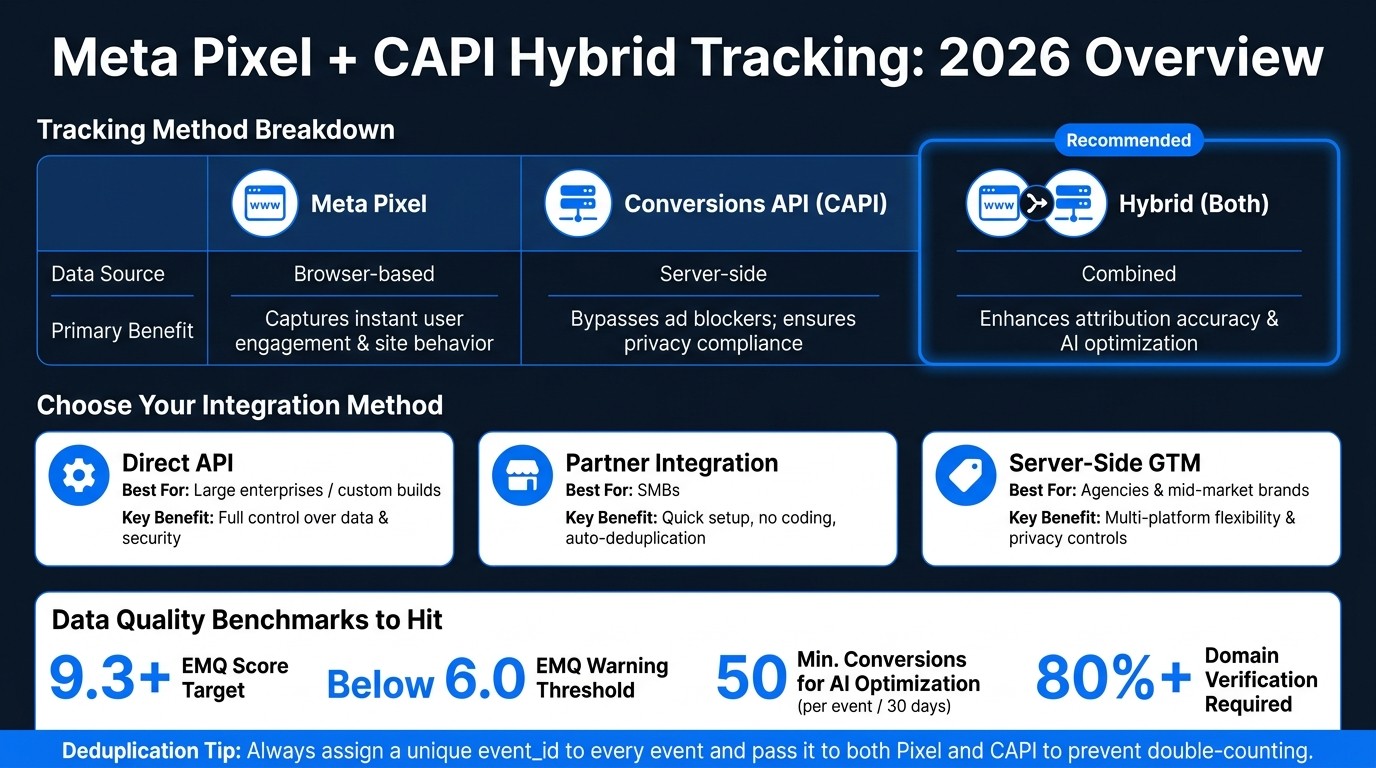
Meta Pixel vs CAPI vs Hybrid Tracking: 2026 Comparison
Planning and Building a Compliant Server-Side Tracking Setup
Technical Requirements Before You Start
Before diving into the technical setup, ensure you have the right tools and permissions ready. Start with Meta Events Manager access - you’ll need it to create your Pixel, generate CAPI access tokens, and monitor the Diagnostics tab, which serves as your main health check for the entire system.
Domain verification is a must. Meta requires at least 80% domain verification in Meta Business Suite to confirm data ownership and enable Aggregated Event Measurement (AEM). Without this, event prioritization won’t function properly. Once verified, you can prioritize key events like Purchase, Lead, and AddToCart to optimize AI-driven targeting within the Events Manager.
You’ll also need a server-side environment to process events. Options include Google Tag Manager’s server-side container (sGTM), a Direct API integration, or a native partner platform. The best choice depends on your technical expertise and current tech stack. Evaluate each option to find the one that aligns with your team’s capabilities and control requirements.
Choosing the Right Integration Method
Selecting the right integration method is all about balancing your resources and control needs. Here's a breakdown of the primary options:
Integration Method | Best For | Key Benefit |
|---|---|---|
Direct API (Graph API) | Large enterprises / custom builds | Full control over data and security; no third-party tools |
Partner Integration | SMBs using Shopify, WooCommerce | Quick setup; no coding required; automatic deduplication |
Server-Side GTM | Agencies and mid-market brands | Flexibility to manage multiple platforms; better privacy controls |
For most agencies and mid-sized businesses, server-side GTM provides a great balance. It allows you to manage multiple tags within a single server container and offers a centralized way to enforce privacy rules. If you’re on Shopify or WooCommerce, the partner integration is the fastest way to get up and running, with built-in deduplication included. However, if you have a dedicated development team and need complete control, a Direct API integration is worth considering.
Privacy and Consent Management in 2026
Once you’ve chosen your integration method, the next step is ensuring privacy compliance. Maintaining user privacy is critical, as it directly affects the quality and reliability of your data. Before transmitting any user data to Meta, you must collect explicit consent and hash all personal identifiers (e.g., email addresses, phone numbers). Meta’s CAPI requires SHA-256 hashed values, so raw personal data should never leave your server.
Your consent management platform (CMP) should control CAPI event firing in the same way it manages your browser Pixel. If a user opts out, neither client-side Pixel events nor server-side events should trigger during their session. Consistency across both channels is essential for compliance. Use the Events Manager Diagnostics tab to verify that server-side events align with browser Pixel activity and to identify any gaps in your consent logic.
How to Implement Hybrid Pixel + CAPI Tracking
Event Deduplication and Synchronization
When both your browser Pixel and server-side CAPI send the same event to Meta, you risk double-counting conversions. The solution? Assign a unique event_id to every event and ensure that both the browser and server send the same ID. Meta uses this event_id to identify and discard duplicate events. To keep everything in sync, generate the event_id server-side first, then pass it to the Pixel.
To ensure everything is working smoothly, use the Test Events tab in Events Manager. This tool lets you confirm that both signals are firing correctly. Additionally, the Diagnostics tab is helpful for spotting synchronization issues or mismatches. Regularly checking these tabs helps maintain accurate reporting and ensures Meta’s AI receives high-quality data for optimization.
Tool | Purpose |
|---|---|
| Links browser and server events, allowing Meta to filter out duplicates |
Test Events Tab | Verifies real-time signal firing accuracy |
Diagnostics Tab | Highlights errors and synchronization gaps |
Once your events are synchronized, the next step is to configure a clear event hierarchy for Meta’s AI to optimize effectively.
Configuring Events for Meta AI Optimization
Meta’s algorithm works best when it has a clear hierarchy of events to follow. To set this up, go to Settings > Prioritize Events in Events Manager. Here, rank your events by their importance to your business. For example, place Purchase (with USD value tracking) at the top, followed by AddToCart, Lead, and CompleteRegistration. You can prioritize up to eight events in total.
For Meta’s AI to exit the learning phase and optimize effectively, it needs at least 50 conversions per event within a 30-day window. If your Purchase volume is too low to meet this threshold, consider optimizing for a higher-volume event like AddToCart. This approach ensures the algorithm has enough data to work with.
Once your event hierarchy is set, focus on structuring your event payloads for precise data capture.
Structuring Payloads and Parameters
Every server-side event should include these three key components: user_data, custom_data, and action_source.
user_data: Add hashed personal identifiers like email, phone number,fbp(Facebook browser cookie), andfbc(click ID). Use SHA-256 hashing for all personal data before it leaves your server.custom_data: For purchase events, include thevalue(in USD) andcurrency("USD"). For product-related events, addcontent_idsandcontent_type.action_source: Set this to"website"for on-site events. This helps Meta attribute the conversion accurately.
To improve your Event Match Quality (EMQ) score, include external_id (your internal customer ID) alongside fbp and fbc. A higher EMQ score directly impacts campaign performance. Scores below 6.0 indicate poor data quality, which can hurt the effectiveness of Meta’s AI optimization.
How to Set Up Facebook Pixel & Meta Conversion API | Facebook CAPI Setup Server-Side 2026 Part 02
Improving Data Quality and Campaign Performance
To get the most out of your hybrid Pixel + CAPI setup, it's essential to focus on improving the quality of your data and sharpening your campaign analytics.
How to Improve Event Match Quality (EMQ)
Event Match Quality (EMQ) measures how effective your tracking setup is. Meta rates it on a scale from 0 to 10, and you should aim for a score of 9.3 or higher. If your EMQ falls below 6.0, it means you're not providing enough data for Meta's AI to optimize effectively, which can hurt your campaign results.
The fastest way to boost EMQ is by sending more identifying parameters with each event. Include details like first name, last name, city, state, and zip code whenever possible. Each extra detail helps Meta improve its matching accuracy. To stay on top of things, set up alerts in Events Manager to notify you if your EMQ dips below 6.0.
For Lookalike Audiences, the quality of your seed data is crucial. Instead of using a broad customer list, focus on a smaller, well-defined group - like 1,000 to 5,000 repeat buyers with a high average order value. A smaller but higher-quality seed almost always outperforms a larger, mixed dataset.
These steps not only improve EMQ but also strengthen attribution, which we'll dive into next.
Attribution and Reporting in a Privacy-First Era
Once you've secured high-quality data, the next step is accurate attribution and reporting.
Meta's Aggregated Event Measurement (AEM) framework helps manage conversion reporting for users who have opted out of tracking on iOS. AEM allows up to eight prioritized events per domain, so it's essential to organize your event hierarchy carefully in Events Manager. Server-side data sent via CAPI works alongside browser-based tracking to fill in gaps, giving Meta a more complete view of your conversions.
Keep in mind that attribution windows are now shorter by default. If your sales cycle is longer - say 14 or 30 days - you should adjust your attribution settings in Ads Manager. This ensures your reported ROAS reflects the full value of your conversions, even over an extended customer journey.
Troubleshooting Data Accuracy Issues
To maintain data accuracy, start by addressing discrepancies between your Pixel and CAPI event counts. These mismatches often stem from missing deduplication logic or events firing at the wrong points in the user journey. Use the Diagnostics tab to check for issues like missing event_id values or incorrect hashing.
Another common problem is signal contamination. This happens when your Pixel triggers on every page view without filtering, overwhelming Meta's algorithm with low-intent data. To avoid this, audit your event triggers and ensure only meaningful actions - like purchases or sign-ups - are sent as standard events. Clean, focused data will always outperform large volumes of noisy signals.
Using Automation and AI Tools to Get More from Server-Side Tracking
Connecting AI Tools with Server-Side Tracking
Clean, accurate data is the backbone of effective AI performance. When AI tools work with clean, deduplicated server-side CAPI signals, they can create precise predictive models for conversion probabilities. This allows them to adjust audience targeting in real time as new data flows in. However, industry experts caution that using AI without dependable tracking can lead to wasted budgets on low-quality conversions. Ensuring your data quality is solid before activating AI automation is a must. A strong data foundation is what enables automated campaign improvements to truly deliver results.
Campaign Optimization with AdAmigo.ai

Once your tracking setup is reliable, tools like AdAmigo.ai can take your data to the next level. By leveraging both Pixel and CAPI data, AdAmigo.ai optimizes targeting through Meta's official API. Its AI Autopilot keeps tabs on your campaigns, analyzing performance across creatives, audiences, budgets, and structures. It scales up high-performing ads, pauses the ones that underdeliver, and provides daily action plans aligned with your KPIs. You can let it run autonomously or manually approve changes - it’s flexible.
The platform also features an AI Chat Agent and Ad Factory, which work together to provide actionable insights from simple queries and generate optimized ad variations based on your top-performing creatives. This keeps campaigns dynamic and engaging, especially as traditional identity signals become less reliable. AdAmigo has reported impressive results, with some accounts seeing up to an 83% increase in ROAS and a 30% performance boost within just a month of using the full platform.
Keeping Your Setup Scalable and Stable Over Time
As automation becomes a bigger part of your campaign strategy, stability is crucial. Automation, while powerful, isn’t foolproof. Misconfigured events or unexpected spending spikes can quickly eat into your budget, especially when systems operate around the clock without human oversight. AdAmigo Protect helps tackle this by continuously monitoring account health and performance trends, flagging unusual activity, delivery problems, or setup errors early on.
To further safeguard your campaigns, it’s wise to set clear limits within any AI tool. For instance, you might require human approval for budget changes above 20% or for adjustments to campaign objectives. This helps prevent risky decisions from being made automatically. Striking a balance between automated processes and human oversight ensures your campaigns stay scalable and resilient, all while being anchored in trustworthy data.
Key Takeaways for 2026
The move to server-side tracking is becoming a must for any serious Meta ads strategy. Relying solely on browser data leaves you exposed to vulnerabilities, but combining Meta Pixel with Conversions API (CAPI) creates a powerful hybrid. This approach blends instant behavioral signals from the browser with privacy-compliant, server-side conversion data for a more complete picture.
Hitting 50 conversion events per event type within a 30-day window is a critical milestone. This number is what Meta's AI models need to optimize effectively. Without it, even a well-structured campaign will struggle. Reliable data at this scale opens the door to smarter targeting strategies.
Once data quality is in place, targeting increasingly depends on creative performance. As demographic-based targeting fades and algorithm-driven delivery takes over, engagement signals from CAPI become the fuel for Meta's AI. Clean, server-side signals not only improve audience targeting but also make tracking quality a key factor in creative success - not just a technical concern.
Automation works best when supported by dependable data. Platforms like AdAmigo.ai can transform strong CAPI data into actionable insights. As Matt Berman, Founder of Emerald Digital, explains:
"90% of ad management is pattern recognition... You don't need to stare at Ads Manager to spot these patterns. An AI agent can do it and tell you what matters."
Here’s a quick breakdown of how each tracking method contributes to your strategy:
Tracking Method | Data Source | Primary Benefit in 2026 |
|---|---|---|
Meta Pixel | Browser-based | Captures instant user engagement and site behavior |
Conversions API | Server-side | Bypasses ad blockers; ensures compliance with privacy rules |
Hybrid (Both) | Combined | Enhances attribution accuracy and AI optimization |
To succeed in 2026, focus on building a hybrid tracking setup, ensuring high-quality data, and integrating automation with clear boundaries. This step-by-step approach is key to staying ahead.
FAQs
Do I still need the Meta Pixel if I set up CAPI?
Yes, you still need the Meta Pixel even if you're using the Conversions API (CAPI). Why? Using both creates a dual-tracking system, which boosts data reliability - especially when browser-based events get blocked. This combination improves attribution accuracy and enhances event match quality. Tools like AdAmigo.ai can assist in fine-tuning your tracking and performance, making the most of both the Pixel and CAPI for more precise, AI-powered ad optimization.
How can I prevent double-counting with Pixel and CAPI?
To prevent double-counting when using Meta Pixel and Conversions API (CAPI), it's crucial to set up event deduplication properly. Meta relies on unique event IDs to combine duplicate events from both the browser and server into a single conversion.
You can monitor this by visiting Meta Events Manager. Under the Diagnostics tab, look for any deduplication alerts. Additionally, the Test Events tab allows you to confirm that browser and server events are aligning in real time. Performing regular audits will ensure your data remains accurate and reliable.
What user data should I send to improve EMQ without breaking privacy rules?
To boost your Event Match Quality (EMQ) while maintaining privacy, you should enable Advanced Matching in your Meta Pixel setup. This feature securely shares hashed customer details - such as email, phone number, name, and city - with Meta.
Because the data is hashed before being transmitted, it aligns with privacy regulations like GDPR and CCPA. Just ensure your website’s privacy policy clearly informs visitors that their data may be used for retargeting and advanced matching purposes.