
Best Tools for Meta Ads Reporting Dashboards
Compare top Meta Ads reporting dashboards—pricing, automation, integrations, and AI-driven optimization to find the right tool.
Meta Ads reporting dashboards simplify how marketers analyze and optimize Facebook and Instagram ad campaigns. These tools connect directly to Meta's API, turning raw performance metrics like CPM, CPC, and ROAS into visual insights. They save time, reduce manual reporting efforts, and provide actionable recommendations using AI. You can even use AI prompts for reporting to automate these insights. Key features include automation, customizable dashboards, custom conversion reporting, and integrations with platforms like Google Ads and Shopify for multi-channel analysis. Here's a quick summary of top tools:
Meta Ads Manager: Free, basic reporting for solo advertisers.
Looker Studio: Free with connectors, great for custom dashboards but requires technical skills.
Supermetrics: Data pipeline for advanced users; starts at $39/month.
AdAmigo.ai: AI-driven reporting and campaign optimization; starts at $99/month.
Whatagraph: Polished, presentation-ready reports; starts at $199/month.
Databox: Mobile-first monitoring with a free tier.
AgencyAnalytics: White-label client portals; starts at $79/month.
Quick Comparison:
Tool | Price | Best For | Key Feature |
|---|---|---|---|
Meta Ads Manager | Free | Solo advertisers | Basic reporting |
Looker Studio | Free + $39+ | Data-savvy teams | Full customization |
Supermetrics | $39+ | Analysts | Multi-platform integration |
AdAmigo.ai | $99+ | Agencies, in-house teams | AI-driven optimization |
Whatagraph | $199+ | Agencies | Polished, branded reports |
Databox | Free-$47+ | Mobile-first tracking | Real-time alerts |
AgencyAnalytics | $79+ | Client-facing agencies | White-label dashboards |
These tools help marketers move from manual reporting to smarter, automated insights, driving better decisions and campaign outcomes.
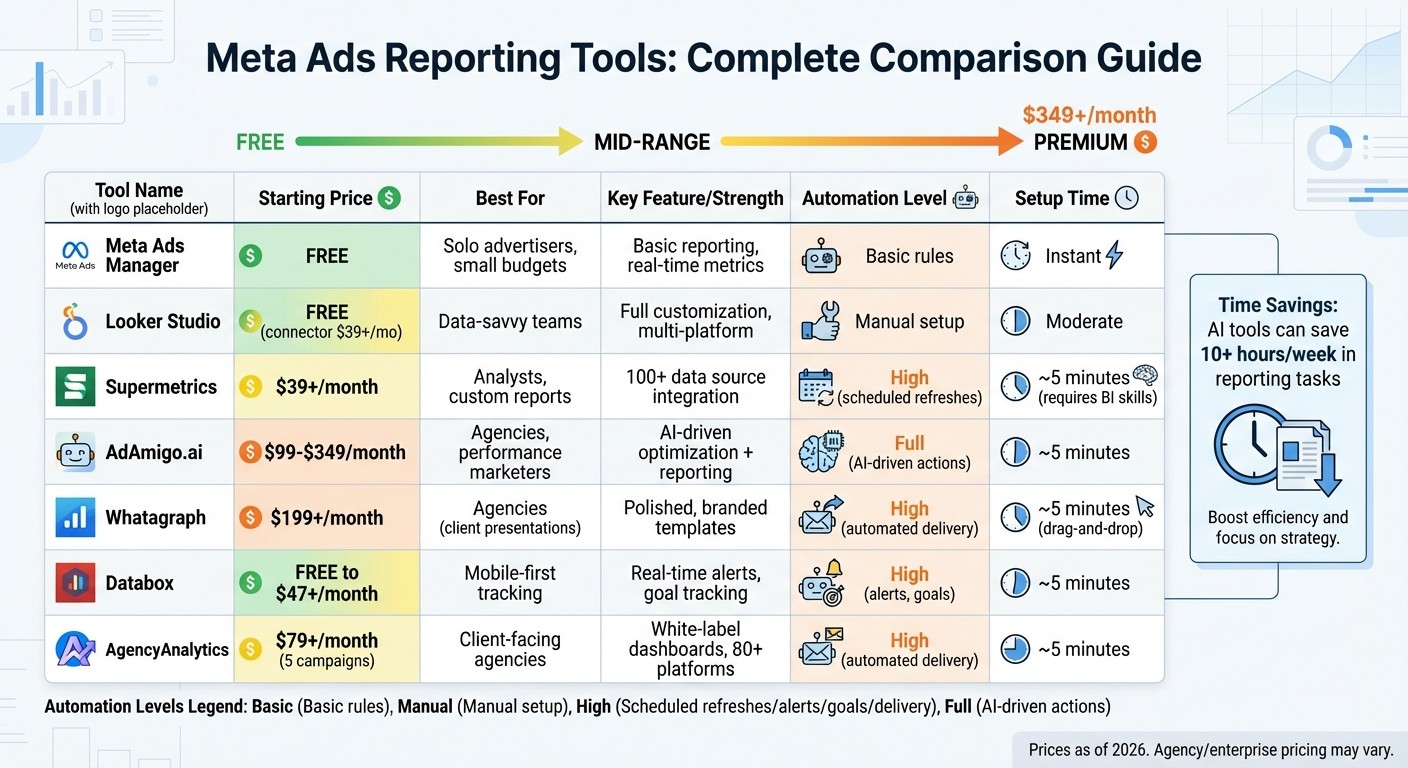
Meta Ads Reporting Tools Comparison: Features, Pricing and Best Use Cases
Connect Meta Ads to Looker Studio (Free Connector + Dashboard template)
What to Look for in Meta Ads Reporting Tools
When it comes to choosing the right Meta Ads reporting tools, the best options stand out by simplifying workflows and offering insights that drive decisions. While features vary across platforms, the ideal tools save time, reveal critical data patterns, and align seamlessly with your business objectives. Here’s what makes a reporting tool worth your investment.
Automation and Scheduled Reporting
Manually compiling reports is time-consuming and inefficient. That’s why automation is a must. Look for tools that integrate directly through APIs and can schedule reports to be sent automatically via email or Slack. This ensures stakeholders stay updated without the need for constant manual input.
Some advanced platforms take automation a step further by enabling rules that act on performance metrics. For example, you can set up automated rules to pause ads that underperform or scale up campaigns using budget automation rules when specific ROAS or CPA thresholds are hit. These features not only save time but also help optimize campaigns in real time.
On top of automation, the ability to create tailored visualizations ensures you’re focusing on the metrics that matter most to your goals.
Customizable Dashboards
Generic, prebuilt dashboards often focus on surface-level metrics that don’t move the needle. Customizable dashboards, on the other hand, allow you to track what’s truly important - whether that’s custom conversions, blended ROAS, or the health of your entire funnel. Breaking down data by factors like age, gender, placement, or device lets you uncover optimization opportunities that might otherwise go unnoticed.
For agencies, white-labeling capabilities can be a game-changer. Features like adding your logo, brand colors, and even a custom domain to client reports not only enhance professionalism but also reinforce your expertise. Additionally, dashboards that visualize each stage of the marketing funnel ensure your spending aligns with specific goals. Tools that merge data from multiple sources, such as Meta Ads and Google Analytics, create a unified view of multi-channel performance.
Modern dashboards are also evolving, with AI-powered insights taking center stage.
AI and Predictive Insights
The biggest trend in 2026 is dashboards that go beyond simply reporting past performance - they now explain why certain results occurred and what steps to take next. AI diagnostic tools monitor key signals like creative fatigue, CPM fluctuations, or audience saturation and flag potential issues early. Instead of sifting through spreadsheets, you get prioritized, actionable recommendations delivered daily.
AI also dives deep into creative performance, identifying which headlines, images, or hooks drive the best results. This allows you to replicate successful elements in future campaigns. Some platforms even generate plain-language executive summaries, turning complex data into easy-to-understand narratives. This feature alone can save 20–30 minutes per report, and for performance marketers, the overall time savings can exceed 10 hours per week.
As AdStellar puts it:
"The real shift happening in 2026 is toward dashboards that don't just report what happened - they tell you what to do next."
Best Tools for Meta Ads Reporting Dashboards
Here’s a breakdown of some top tools for Meta Ads reporting, each offering unique features to address different needs like data visualization, automation, and campaign management.
Meta Ads Manager
Meta Ads Manager is Meta's own tool, offering real-time metrics and a range of customization options. You can also use an ad performance benchmark tool to see how your metrics stack up against industry standards. You can tweak columns, analyze data by demographics (like age or gender), and even set automation rules for scaling or pausing ads based on performance thresholds.
That said, it’s limited to Meta data only - there’s no integration with platforms like Google Ads or external analytics tools. Plus, its interface isn’t ideal for client presentations, as it lacks advanced visual design or white-labeling options.
Best for: Solo advertisers or small businesses managing a single Meta account who need a cost-free, straightforward tool for campaign management.
Looker Studio
Looker Studio (formerly Google Data Studio) is a free visualization platform that gives you complete creative control. You can build custom dashboards with interactive filters, combine data from multiple sources, and share reports without restrictions.
However, integrating Meta data requires a third-party connector like Supermetrics, which starts at $39/month. There’s also a learning curve - designing a professional dashboard from scratch can take time if you’re not familiar with data modeling.
Feature | Looker Studio | Third-Party Connector Cost |
|---|---|---|
Platform Cost | Free | $39–$239/month (Supermetrics) |
Customization | Full design flexibility | Varies by connector |
Best For | Budget-conscious teams with skills | Data analysts or in-house teams |
Best for: Teams that need multi-platform reporting and have the technical expertise to design their own dashboards, or agencies willing to invest time upfront to save on monthly expenses.
Supermetrics
Supermetrics serves as a data pipeline, transferring Meta data to tools like Google Sheets, Excel, or platforms like Tableau. It supports over 100 data sources and allows scheduled data refreshes, making it ideal for teams already working in spreadsheets or custom BI setups.
That said, you’ll need to create your own reports. Without technical expertise or a dedicated analyst, this can be time-consuming. Pricing starts at $39/month for a single destination, with agency plans beginning at $239/month.
Best for: Technical teams or data analysts who prefer building custom reports and need flexibility to integrate multiple platforms.
AdAmigo.ai

AdAmigo.ai takes a different approach by combining reporting with autonomous optimization. It doesn’t just provide insights - it acts as an AI-powered media buyer that automates campaign improvements. Key features include:
AI Chat Agent: Answer questions like “Why did ROAS drop yesterday?” or “Launch a new retargeting campaign,” while also executing recommendations.
AI Autopilot: continuously audits and improves your account, either with your approval or fully autonomously.
Creative Generation: Analyzes top-performing ads and competitor trends to create new ad creatives.
Bulk Ad Launcher: Upload dozens of creatives to Google Drive, and the AI handles everything from copywriting to campaign setup.
For agencies, this tool can help one buyer manage 3–5× more clients by automating repetitive tasks. Pricing starts at $99/month for basic optimization or $349/month for full automation, with custom pricing available for agencies handling multiple accounts.
Best for: Agencies, performance marketers, and in-house teams looking for a mix of reporting, automation, and creative generation.
Other Tools: Whatagraph, Databox, and AgencyAnalytics
These specialized platforms cater to more niche needs:
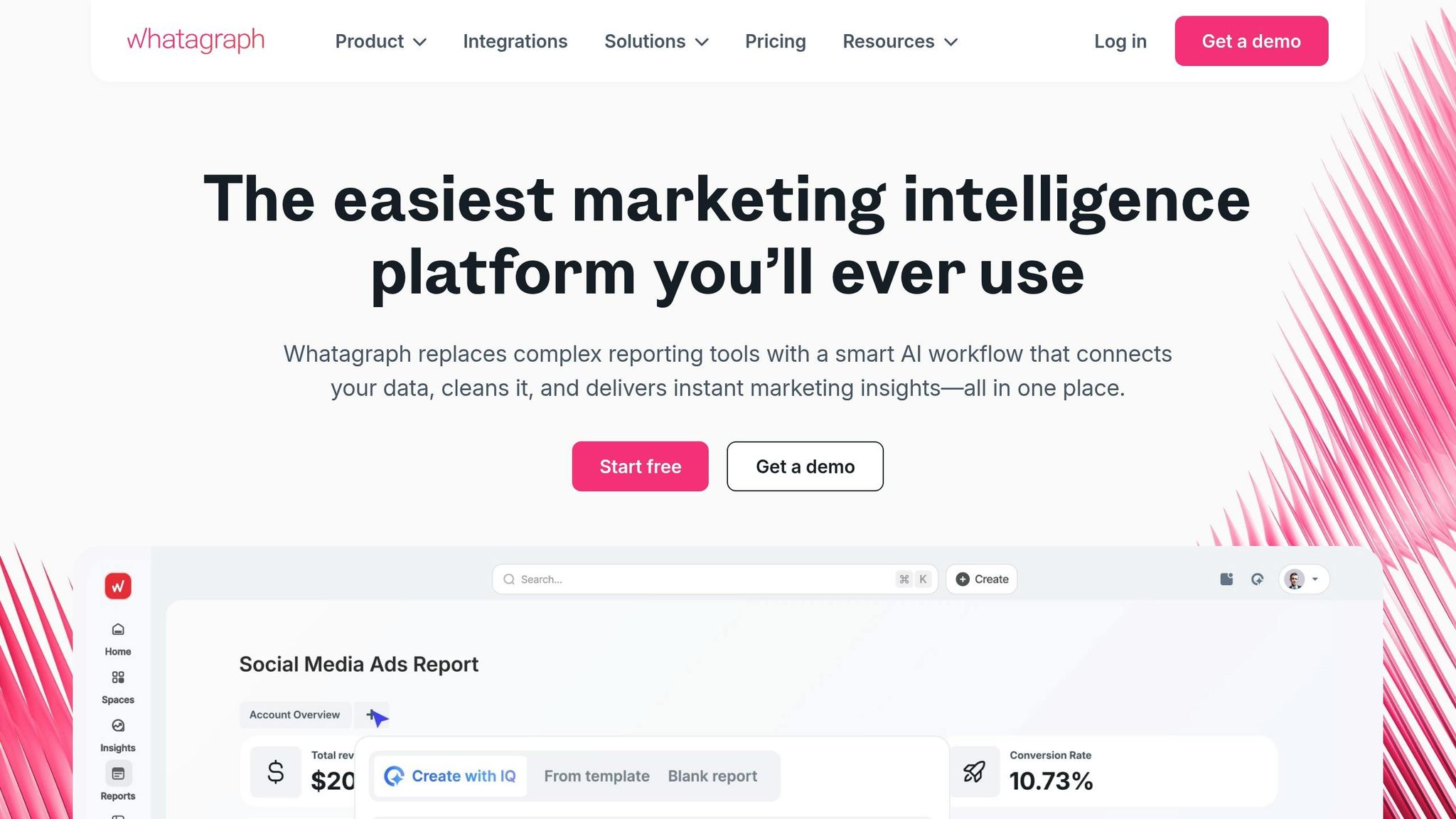
Whatagraph ($199/month): Known for its polished, drag-and-drop templates and automated narratives that summarize trends. Perfect for agencies focused on presentation-ready reports, though its templates may limit deeper analysis.
Databox (free tier available, paid plans from $47/month): Great for mobile-first monitoring, with real-time alerts and goal tracking. Ideal for teams needing quick KPI updates, though the free tier only supports three data sources.
AgencyAnalytics ($79/month for five campaigns): Built for client-facing agencies, offering white-label features like branded login pages and portals. It supports over 80 platforms but has a slight data delay, making it less ideal for real-time optimization.
"By consolidating all of our tools into dashboards, we have saved so much time and money - it's truly been invaluable." - Jason Hylan, Clix
Tool | Starting Price | Key Strength | Best For |
|---|---|---|---|
Whatagraph | $199/month | Polished, branded templates | Agencies focused on client presentations |
Databox | Free (paid plans from $47/month) | Mobile monitoring and alerts | Teams tracking KPIs on the go |
AgencyAnalytics | $79/month | White-label client portals | Agencies managing multiple accounts |
The next section will compare these tools in terms of features, pricing, and use cases.
Tool Comparison: Features, Pricing, and Use Cases
Selecting the right tool boils down to understanding your team's workflow, budget, and reporting priorities. Here's a breakdown of some top options:
Meta Ads Manager is a free tool that's great for solo marketers. However, its limited automation and single-source data can make it less effective for polished, multi-platform reporting.
Looker Studio offers extensive design flexibility without upfront costs, but integrating Meta Ads data requires a third-party connector or moving data to BigQuery via Supermetrics (starting at $39/month). While Looker Studio can create visually impressive dashboards, setting it up often demands technical know-how or a checklist for custom metrics.
For agencies focused on client reporting, tools like Whatagraph ($199/month) and AgencyAnalytics ($79/month for five campaigns) are strong contenders. Both offer white-labeled portals and automated reporting that can save significant time. John Reserva from Dilate Digital shared his experience:
"AgencyAnalytics is scalable, it's reliable, and it's easy to use... knowing that [it] can scale to the number of campaigns or clients we have without problems is exactly what we need."
Databox stands out with its free tier for up to three data sources and mobile-first KPI tracking, making it perfect for teams needing quick, on-the-go performance updates.
Meanwhile, AdAmigo.ai takes things a step further by combining reporting with autonomous optimization. For $99/month, it offers AI-driven recommendations, while the $349/month plan delivers full automation. This includes launching campaigns, adjusting budgets, creating ad content, and scaling successful ads. This level of automation is a key component of Meta Ads ROI optimization for high-growth businesses. This AI-driven multi-campaign optimization streamlines complex workflows for growing brands. It's particularly useful for agencies managing multiple clients or in-house teams seeking 24/7 optimization support.
Here's a comparison of the tools and their reporting capabilities:
Tool | Starting Price | Setup Duration | Automation Level | Best For |
|---|---|---|---|---|
Meta Ads Manager | Free | Instant | Basic rules | Solo marketers, small budgets |
Looker Studio | Free (connector $39/mo) | Moderate | Manual setup | Data-savvy teams |
Supermetrics | $39/mo | Minimal (requires BI skills) | High (scheduled refreshes) | Analysts building custom reports |
AgencyAnalytics | $79/mo | Approximately 5 minutes | High (automated delivery) | Client-facing agencies |
Whatagraph | $199/mo | Approximately 5 minutes (drag-and-drop) | High (automated delivery) | Visual presentations |
Databox | Free–$47/mo | Approximately 5 minutes | High (alerts, goals) | Mobile-first monitoring |
AdAmigo.ai | $99–$349/mo | Approximately 5 minutes | Full (AI-driven actions) | Performance-driven teams, agencies |
This comparison highlights the trade-offs between hands-on customization and automated, AI-driven solutions. For example, Supermetrics simplifies data integration for analysts by connecting over 100 sources into tools like spreadsheets or BI platforms for $39/month per destination. On the other hand, AI tools like AdAmigo.ai go beyond reporting to actively optimize campaigns, offering a hands-off approach to performance management.
Conclusion
When choosing a Meta Ads reporting tool, it's important to consider your workflow, budget, and whether you prioritize visibility or full optimization. Manual reporting can be a huge drain on resources, while automation not only saves time but also reduces costs significantly.
Customization plays a critical role because generic dashboards often focus on surface-level metrics rather than the KPIs that truly influence your business decisions. Tools powered by AI take it a step further by not only analyzing performance shifts but also providing actionable recommendations for improvement. Tyler Corcoran, Marketing Analytics Manager at Booyah Advertising, captures this perfectly:
"With Improvado, we now trust the data. If anything is wrong, it's how someone on the team is viewing it, not the data itself. It's 99.9% accurate."
These insights are essential for selecting a tool that goes beyond simple data reporting to actively enhancing performance.
If you're managing multiple clients or scaling ad spend rapidly, look for AI automation platforms that blend reporting with optimization. For example, AdAmigo.ai doesn't just report results - it automates campaign management by launching ads, adjusting budgets, testing creatives, following creative testing benchmarks, and scaling successful strategies around the clock. It’s like having a virtual media buyer that works tirelessly, allowing you to focus on strategy while it handles the heavy lifting. This kind of tool represents the evolution from passive data tracking to proactive campaign management.
The move from understanding "what happened" to knowing "what to do next" is shaping the future of advertising in 2026. To stay ahead, choose a dashboard that combines real-time data, customization, and AI-powered actions. This way, you can shift your energy from manual tasks to high-level growth strategies, ensuring your business stays competitive and creative.
FAQs
Which Meta Ads reporting tool is best for my team size and budget?
When choosing the right tool, it all comes down to your team’s priorities and budget. If you're part of a larger team juggling multiple campaigns, tools like SegmentStream or Sentrum are excellent options. They provide advanced attribution capabilities and insights across various channels.
For smaller teams or those working with limited budgets, Meta Ads Manager, Motion, or Coupler.io deliver affordable and dependable dashboards that get the job done without breaking the bank.
If automation powered by AI is what you're after, AdStellar AI and Sentrum stand out. These tools are great for quickly spotting performance opportunities and streamlining your workflow.
Do I need a connector to show Meta Ads data in Looker Studio?
Yes, you’ll need a connector to view Meta Ads data in Looker Studio since Google doesn’t offer a built-in Facebook Ads connector. To bridge this gap, third-party tools like Windsor.ai, Coupler.io, Adzviser, and SENTRUM provide integration solutions that make this process smooth and efficient.
What’s the difference between reporting dashboards and AI optimization tools like AdAmigo.ai?
Reporting dashboards are all about bringing performance data to life. They help marketers keep tabs on metrics, spot trends, and make smarter decisions. Essentially, they show you what’s going on across your campaigns in a clear, visual way.
AI optimization tools, like AdAmigo.ai, take things a step further. They don’t just show data - they act on it. These tools can automate tasks like generating creatives, refining targeting, and tweaking budgets. Often, this happens in real time, making campaigns more efficient and scalable with very little manual effort.