
Meta Ads Data to BigQuery: How It Works
Move Meta Ads into BigQuery to store years of data, enable SQL analysis, and automate reporting with native or no-code connectors.
Want to analyze your Meta Ads beyond six months? Meta Ads Manager limits historical data access to six months, making long-term analysis difficult. By syncing your Meta Ads data with BigQuery, you can store and analyze years of performance metrics, integrate Meta Ads with analytics tools to combine data from multiple platforms, and automate reporting.
Key takeaways:
Meta Ads Manager allows only six months of historical data exports.
BigQuery enables long-term data storage, SQL analysis, and integration with tools like GA4 and CRMs.
Use either Google’s free BigQuery Data Transfer Service or no-code tools like Renta or Windsor.ai for easy setup.
Why use BigQuery for Meta Ads:
Overcome Meta’s data retention limits with governance tools.
Consolidate data from multiple sources for better insights.
Automate updates and reduce manual errors.
How to sync Meta Ads with BigQuery:
Use Google’s Data Transfer Service (free but technical setup required).
Opt for no-code tools like Renta, which simplify the process and offer faster refresh rates.
Once your data is in BigQuery, you can optimize your analysis with table partitioning, clustering, and integration with reporting tools like Looker Studio. For advanced automation, tools like AdAmigo.ai can manage campaigns and optimize performance directly using your BigQuery data.
Facebook Ads to BigQuery with Windsor.ai (Full Setup)
This integration is a key part of using AI tools for Facebook ad campaign analysis to drive better results.
How to Connect Meta Ads to BigQuery
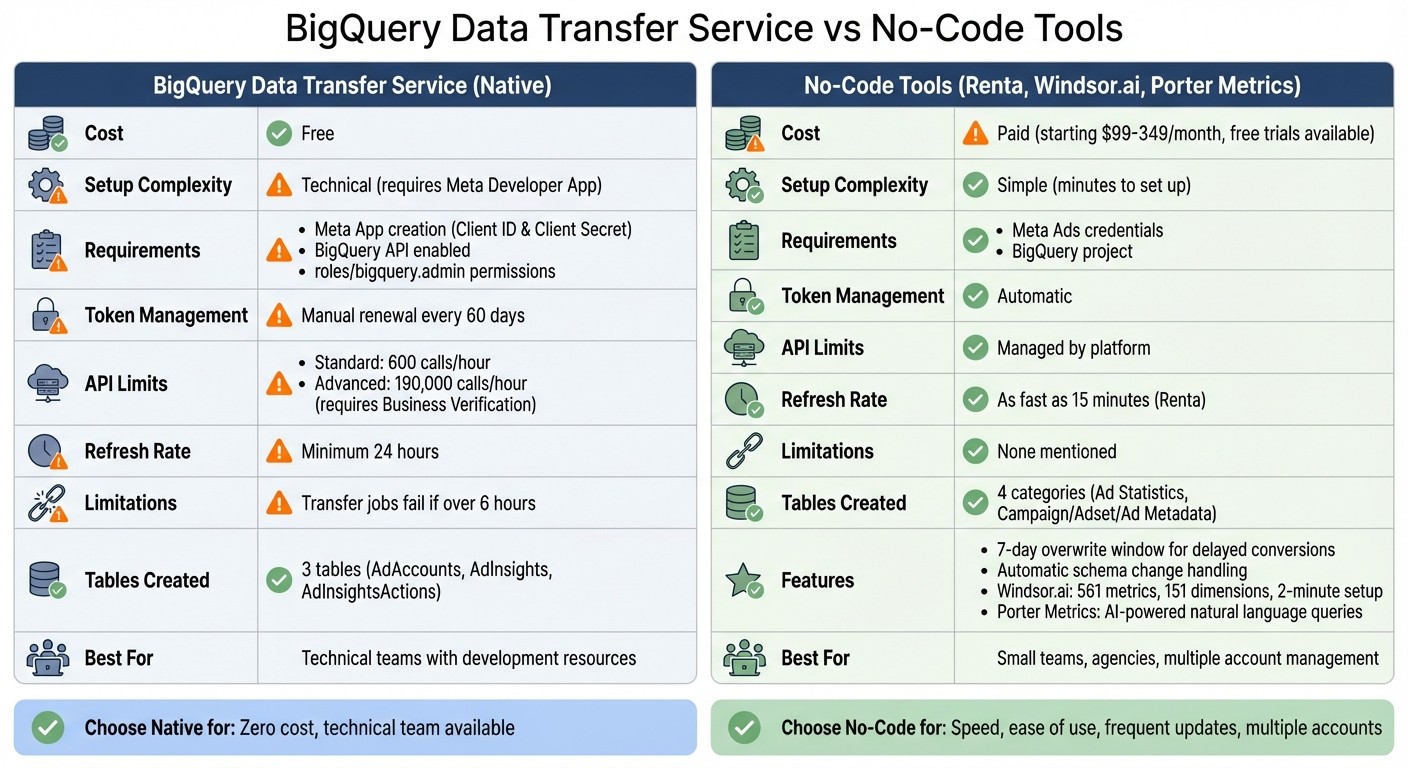
BigQuery Data Transfer Service vs No-Code Tools for Meta Ads Integration
You have two main options for syncing Meta Ads data to BigQuery: Google's BigQuery Data Transfer Service (DTS) or a no-code integration tool. The native option is free but requires a detailed setup, while no-code tools simplify the process, getting you started in just minutes with minimal technical effort. Here's how to use both methods.
What You Need Before Starting
For the native BigQuery connector, you'll need to follow the Meta Ads API key creation workflow to create a Meta App on the Meta for Developers portal to obtain your Client ID and Client Secret. Make sure your Google Cloud Platform project has the BigQuery API enabled and that you have the roles/bigquery.admin permissions. Keep in mind that standard Meta API tokens expire every 60 days, requiring manual renewal. With standard access, you're limited to 600 API calls per hour, but advanced access (requiring Business Verification and App Review) increases the limit to 190,000 calls per hour.
For no-code tools, all you need are your Meta Ads credentials and a BigQuery project. These platforms handle token management automatically and typically allow a 7-day overwrite window to capture delayed conversions, helping you compare Meta's attribution with third-party tools for better accuracy.
Setting Up BigQuery Data Transfer Service
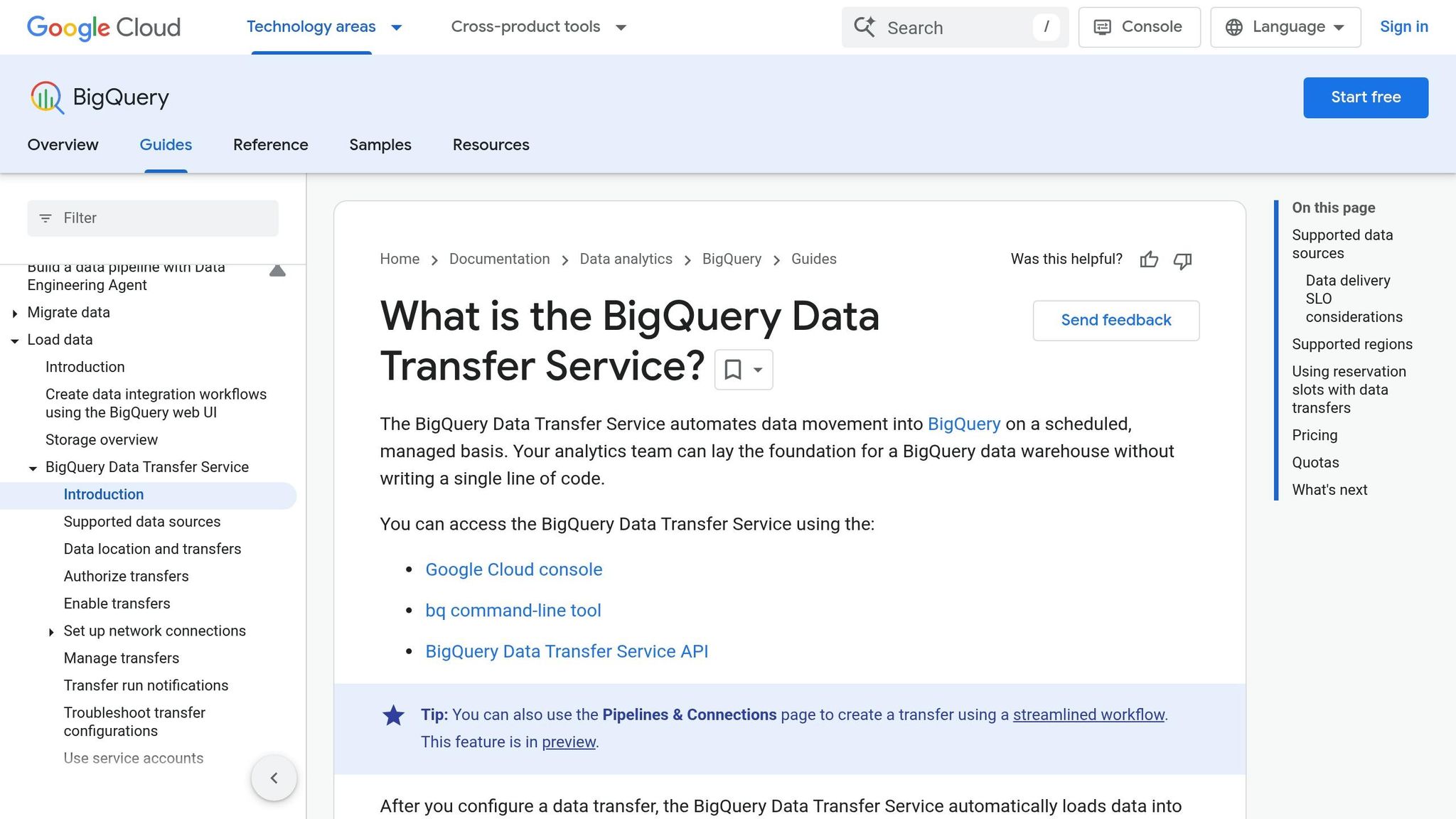
To use Google's native connector:
Open the Data Transfers section in the Cloud Console and click Create Transfer.
Choose Facebook Ads as the source.
Enter your Client ID and Client Secret, then click Authorize to generate a refresh token.
Add the provided redirect URI to your Facebook App's Valid OAuth Redirect URIs.
Specify the Facebook Ads objects and breakdowns you want to transfer.
Select your target BigQuery dataset, name the transfer, and set the frequency (minimum interval: 24 hours).
Click Save.
Once set up, the connector creates three tables in your dataset: AdAccounts, AdInsights, and AdInsightsActions. However, note that transfer jobs lasting over six hours will fail.
Using No-Code Integration Tools
For a faster, more user-friendly option, consider no-code integration tools like Renta, Windsor.ai, or Porter Metrics. These tools eliminate the need for a Meta Developer App and manage tokens for you. Here’s a quick overview:
Renta: Updates data every 15 minutes and uses pre-built templates to create connected pipelines.
Windsor.ai: Streams analytics-ready data to BigQuery in about two minutes and provides access to 561 metrics and 151 dimensions.
Porter Metrics: Leverages AI to let you build queries using natural language instead of SQL, delivering ready-to-use marketing data.
"Renta lets you manage data exports from thousands of Meta Ads accounts with an update interval of every 15 minutes." – Serhii Dovhanich
These platforms automatically handle schema changes and provide incremental updates to capture attribution data. Windsor.ai offers a 30-day free trial with no credit card required, while Porter Metrics also provides a free trial. If you're managing multiple accounts or need refresh rates faster than the native connector's 24-hour minimum, these no-code solutions are worth exploring.
How Meta Ads Data is Organized in BigQuery
When Meta Ads data is imported into BigQuery, it’s split into multiple interconnected tables. If you’re using BigQuery’s native Data Transfer Service, you’ll find three predefined tables: AdAccounts, AdInsights, and AdInsightsActions. Alternatively, no-code ETL tools typically organize the data into four key categories: Ad Statistics, Campaign Metadata, Adset Metadata, and Ad Metadata. This structure ensures streamlined queries and smooth integration with third-party tools and analytics workflows.
Main Tables and Metrics
The Ad Statistics table is where you’ll find core performance metrics. This table captures daily data for metrics like impressions, clicks, spend, reach, frequency, and conversions (e.g., leads or purchases). Each row corresponds to a specific date and links to an ad_id, which connects it to the relevant creative. Updates occur daily, with a common 7-day overwrite window to account for delayed conversions within the attribution period.
The metadata tables provide crucial details about campaigns, ad sets, and creatives:
Campaign Metadata includes high-level details such as campaign names, objectives (e.g., Traffic or Awareness), buying types (Auction or Reserved), and current statuses.
Adset Metadata focuses on configuration details like budget settings (daily or lifetime), optimization goals, and scheduling rules.
Ad Metadata highlights creative-specific information, including moderation statuses and preview links.
"When building a data warehouse for Facebook Ads reporting, it is architecturally correct to split data into four entity types: statistics, creative metadata ads, ad set metadata adsets, and campaign metadata campaigns." – Serhii Dovhanich, Renta
This structured setup is key for creating fast, multi-source queries that support in-depth analysis and efficient data management over time.
How Tables Connect to Each Other
The tables are connected through unique identifiers: campaign_id, adset_id, and ad_id. The Ad Statistics table only stores these unique IDs, which keeps it efficient. To generate reports, you join the Ad Statistics table with the Campaign, Adset, and Ad Metadata tables using their respective identifiers. This creates a unified dataset for analysis.
One of the benefits of this structure is that it automatically reflects updates. For instance, renaming a campaign will update its name across all historical data in your reports without altering past records.
A typical query workflow might begin with the Ad Statistics table. From there, you’d use a LEFT JOIN to connect it to the Campaign Metadata table via campaign_id, followed by another join to the Adset Metadata table via adset_id. This process results in a flat "Data Mart" that’s ready for use in your BI tool.
Preparing Your Data for Analysis
After syncing and organizing your Meta Ads data in BigQuery, the next step is getting it ready for smooth analysis and reporting.
Building a Combined Data Table
Your Meta Ads data in BigQuery is likely spread across several tables. To streamline reporting, you'll need to merge these into a single, unified table. Start with the Ad Statistics table, which holds key metrics like spend, clicks, and conversions. Use LEFT JOIN to connect this table with the Campaign, Adset, and Ad Metadata tables. These connections rely on unique identifiers such as campaign_id, adset_id, and ad_id. The result is a "flat" table - commonly referred to as a Data Mart - that combines performance metrics with descriptive details like campaign names and budget settings.
This setup ensures that historical data remains accurate while keeping metadata tables updated with the latest attributes. To reduce clutter, exclude any ads or ad sets with zero impressions or spend.
Making Your Queries Run Faster
BigQuery's pricing is tied to the volume of data scanned, so optimizing your table structure can save both time and money. Partition your table by date (using the date column) and cluster by fields that are frequently filtered, such as account_id or campaign_id. This reduces the amount of data scanned and speeds up your queries. You can also set up scheduled pre-aggregated snapshot tables, which are especially useful for Meta Ads reporting dashboards.
Connecting to Reporting Tools
BigQuery works seamlessly with visualization platforms like Looker Studio (formerly Google Data Studio). This integration allows you to build dashboards directly, without needing to export data. To make your dashboards more user-friendly, rename technical fields (e.g., change amount_spent to "Spend") and create a BigQuery view to handle duplicate records by selecting the most recent entry for each unique ID.
These steps not only optimize your data for analysis but also set the stage for leveraging tools for multi-account Meta ad management to simplify operations further.
Using AdAmigo.ai to Automate Meta Ads Management

Once your data is fine-tuned in BigQuery, tools like AdAmigo.ai can take campaign performance to the next level by automating key processes.
How AdAmigo.ai Works with BigQuery Data
BigQuery serves as the repository for your historical Meta Ads data, while AdAmigo.ai taps into these insights to fine-tune campaigns automatically. Every 15 minutes, it audits your ad account and identifies priority tasks - like scaling budgets or adjusting AI vs manual audience targeting - without the need for manual intervention.
What AdAmigo.ai Can Do
AdAmigo.ai simplifies campaign management by automating repetitive tasks and offering actionable insights. Here’s what it brings to the table:
AI Actions Agent: Provides a daily list of impactful adjustments across creatives, audiences, budgets, and bids. This includes AI-powered creative scaling to maintain performance as spend increases.
AI Ads Agent: Analyzes high-performing ads and competitor content to create and deploy new variations automatically.
AI Chat Agent: Enables plain-language performance queries and bulk campaign launches straight from Google Drive.
Protect Feature: Keeps an eye out for issues like overspending, broken links, and disabled ads to ensure smooth operations.
You can choose between Review Mode for manual approval of updates or Autopilot Mode for hands-free management.
"Our budgets are controlled, our spend is being smartly allocated and our ROAS is up massively. Agencies charging 7 times the cost of AdAmigo have been put to shame quite frankly!"
Rochelle D., G2 Review
Best For Small Businesses and Agencies
AdAmigo.ai is a game-changer for small teams and agencies. With its automation, a single media buyer can handle up to 3–5 times more accounts, freeing up strategists to focus on higher-level planning. For brands, it’s a cost-effective alternative to hiring additional staff, providing continuous optimization at a fraction of the cost. As an official Meta Business Technology Partner, AdAmigo.ai integrates seamlessly with your ad accounts. Pricing starts at $349 per month for full automation, or $99 per month for optimization suggestions.
Conclusion
Syncing Meta Ads data to BigQuery transforms how you analyze campaign performance. By centralizing your data and structuring it to track custom conversions, you can move past the constraints of attribution issues.
Once your data is organized, improving query performance becomes essential. Methods like table partitioning and creating data marts not only speed up queries but also reduce BigQuery costs, making your BI dashboards more efficient at delivering actionable insights.
Thanks to modern no-code ETL tools, real-time conversion tracking and data syncing is now possible. This ensures your optimization efforts are always informed by the most up-to-date performance data.
Platforms like AdAmigo.ai take it a step further by leveraging BigQuery insights to automatically adjust budgets, creatives, and targeting. This allows a single media buyer to handle 3–5× more accounts while brands benefit from continuous, cost-effective campaign management.
FAQs
Which Meta Ads fields and breakdowns should I sync to BigQuery?
When syncing Meta Ads data to BigQuery, make sure to include essential metrics like spend, impressions, clicks, conversions, and ROAS. Pair these with dimensions such as campaign name, ad set, ad name, creative, placement, and targeting. To dive deeper into performance, add breakdowns by campaign, ad set, creative, placement, and time (e.g., daily or hourly). These fields provide the detailed insights you need for tailored reporting and analysis.
How do I handle delayed conversions and attribution updates in BigQuery?
The BigQuery Data Transfer Service for Facebook Ads automatically pulls data from up to 30 days prior to each transfer run. This 30-day refresh window is fixed and cannot be changed. If you need access to older data, you can perform a data backfill, as long as it aligns with the retention policy set by your data source.
How can I keep BigQuery query costs low when analyzing Meta Ads data?
If you're looking to keep BigQuery costs in check while handling Meta Ads data, the key is to focus on storage optimization and query efficiency. Here are some practical steps to achieve that:
Use Table Partitioning and Clustering: These techniques help reduce the amount of data scanned during queries. By organizing your data effectively, you can limit unnecessary processing and save on costs.
Schedule Query Audits: Regularly review your queries to identify and eliminate redundant scans. This ensures you're not wasting resources on outdated or irrelevant queries.
Efficient Slot Allocation: Manage your BigQuery slots wisely to balance performance and cost. Mismanaged slots can lead to higher expenses without improving query speed.
Leverage BI Engine: Tools like BI Engine can cache frequently accessed data, reducing query times and costs significantly for repeated operations.
Monitor Query Patterns: Keep an eye on how your data is being queried. By retrieving only the data you need, you can avoid unnecessary cost spikes caused by scanning excessive data.
Taking these steps can help you streamline your BigQuery usage while keeping expenses under control.